1
Chapter 3
Installation
This chapter provides guidelines to what is needed to set up and install an JDAM network. A quick hookup
scheme is provided that lets you configure modules before they are installed in a network.
To help you to connect JDAM modules with sensor inputs, several wiring examples are provided. Finally,
you will find at the end of this chapter a programming example using the JDAM command set.
Be sure to carefully plan the layout and configuration of your network before you start. Guidelines
regarding layout are given in Appendix E: RS-485 Network.
NOTICE: Except for changing JDAM to other compatible modules, which have on-board switches for
their baud rate setting, JDAM modules should not be opened. There is no need to open the JDAM modules:
all configuration is done remotely and there are no user serviceable parts are inside. Opening the cover will
therefore void the warranty.
3.1 Set up an JDAM network
The following list gives an overview of what is needed to setup, install and configure an JDAM
environment.
A host computer that can output ASCII characters with an RS-232C or RS-485 port.
Power supply for the JDAM modules (+10 to +30 VDC )
JDAM Series Utility software
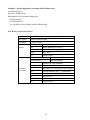
3.2 JDAM modules
The JDAM module which you are going to install
3.3 Host computer
Any computer or terminal that can output in ASCII format over either RS-232 or RS-485 can be connected
as the host computer. When only RS-232 is available, an JDAM-9520 module (RS-232/RS-485 converter)
is required to transform the host signals to the correct RS-485 protocol. The converter also provides
opto-isolation and transformer-based isolation to protect your equipment.
For the ease of use in industrial environments the JDAM modules are designed to accept industry standard
+24 VDC unregulated power. Operation is guaranteed when using any power supply between +10 and +30
VDC. Power ripples must be limited to 5 V peak to peak while the voltage in all cases must be maintained
between +10 and +30 VDC . All power supply specifications are referenced at module connector. When
modules are powered remotely, the effects of line voltage drops must be considered.
28