1
Section4 Installing the PC & Wiring of power supply
4-1 Installing PC uints
80mm or more
Unite
Unite
MICREXSX
110mm or more
Other
device
Remote I/O
10mm or more
2)
2)
3) Heat generating
device
Incorrect
1)
110mm
or more
50mm or more
Duct
50mm or more
MICREX-
1)
50mm or more
50mm or more
1)
Remote I/O
Unite
Remote I/O
1) 110mm or more
10mm or more
SX
4)
Highvoltage
device
5)
50mm or more
Duct
Incorrect
Incorrect
Mounting angle
0°
Incorrect
90°
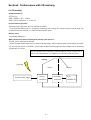
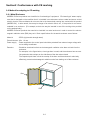
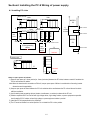
Keep an open space as follows:
1) Keep an open space of 110mm (vertical) or 10mm (horizontal) between the PC unites, between remote I/O modules the
PC unit and remote I/O module.
Note:When the base board is mounted on a DIN rail, keep an open space of 80mm in consideration of mounting bracket
dimensions and the workability.
2) Keep an open space of 50mm between the PC unit and other device and between the PC unit and the wall to obtain
sufficient ventilation.
3) Avoid installing heat generating devices (heaters, transformers, or resistors) underneath the PC unit.
4) Shield or separate the PC unit as far from high voltage device, high-voltage cables, or power equipment as possible.
Avoid installing PC I/O cables unit and high-voltage or power equipment cables in parallel.
5) Install the PC unit perpendicular to the panel floor.
6) The PC must be installed in a vertical position. Do not install the PC in other position.
4-1