1
Troubleshooting
1. Is the USB cable supplied with the Satsports GPS connected correctly?
Please check that the USB lead is plugged into the USB socket on the Satsports GPS unit
and is fully plugged in as far as possible. Check the computer USB connection is secure.
2. Have you linked your Satsports to your computer correctly after attaching the USB?
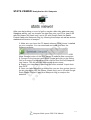
Once you have attached the USB to both your computer and GPS unit, make sure you
press the button named USB Mass Storage on the GPS screen to complete connection.
3. What operating system are you using on your computer?
The PC software Stats Viewer will only work on the
following Windows 32bit operating systems:
-
- Windows 2000
- Windows XP
- Windows Vista
- Windows 7
- Windows Vista
Apple Mac that run Parallels 3 and higher with any of the Windows operating
systems listed above
Soon to support Apple Mac (without Parallels)
To determine which operating system you have on your computer:
a) Right click on the ʻMy Computerʼ icon on your desktop and select ʻPropertiesʼ from the
drop down menu.
b) When the ʻSystem Propertiesʼ dialogue box opens the ʻGeneralʼ tab is selected by
default. Under the heading ʻSystemʼ the operating system is displayed.
c) If you do not have a ʻMy Computerʼ icon on your desktop (common in Windows XP) click
on ʻStartʼ and two columns will appear. In the right hand column you will see the option of
ʻMy Computerʼ. Right click on this option as instructed in (a) above.
4. Have you installed the Stats Viewer replay and analytic software to your computer?
If you have not installed the software you will not be able to perform a download of maps
and you will not be able to upload your recorded data and analysis. Once the software is
installed there will be a new icon on your desktop: ʻSatsports. Please check to see if you
have the latest version of this software by clicking System and then performing updates to
both PC software and the GPS software.
5. Have you connected the computer to the Internet?
This is vital in order to open Stats Viewer and get the latest updated maps or to youʼre your
replay in 3D with Google Earth.
Satsports Multi-sports GPS S320 Manual
5