1
USING RAPID
3.4.9
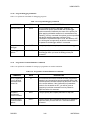
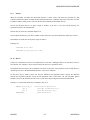
Block Commands
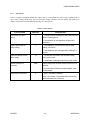
A block is any defined, contiguous stream of text, from a single character to many lines — even the entire file. To
define a block, put a begin-block marker at the first character and an end-block marker after the last character.
Once you define a block in this way, you can move it, copy it, delete it, or write it to a file (see file commands
paragraph 3.4.6).
The editor highlights defined blocks, but you may change this via the hide-block command. Block commands
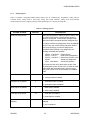
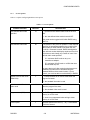
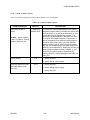
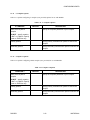
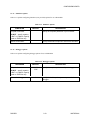
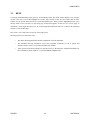
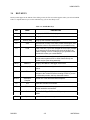
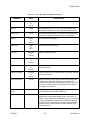
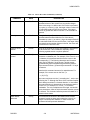
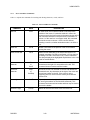
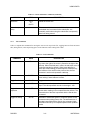
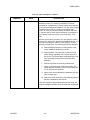
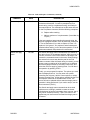
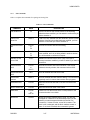
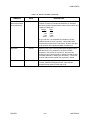
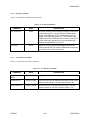
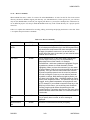
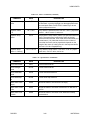
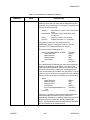
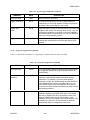
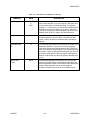
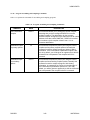
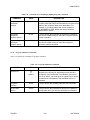
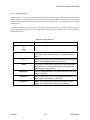
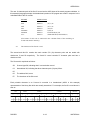
work only with non-hidden, fully defined blocks. Table 3-11 explains block commands.
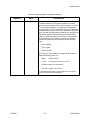
Table 3-11. Block Commands
COMMAND
KEYS
DESCRIPTION
Begin block
Ctrl-KB
Marks the beginning of a block. The marker itself is not
visible on the screen, and the block becomes visible only
when the end block marker is set. You may also use the
begin block marker as an extra text marker and jump directly
to it with the Top of block command.
End block
Ctrl-KK
or
F8
Marks the end of a block. Like the begin block marker, the
end block marker is invisible, and the block itself will not be
displayed unless both markers are set. You may also use the
end block marker as an extra text marker and jump directly
to it with the Bottom of block command.
Top of block
Ctrl-QB
Moves the cursor to the position of the block begin marker.
The command works even if the block is hidden or the block
end marker is not set.
Bottom of block
Ctrl-QK
Moves the cursor to the position of the block end marker.
The command works even if the block is hidden or the block
begin marker is not set.
Copy block
Ctrl-KC
Copy the currently marked and displayed block to the
position of the cursor. The block markers are placed around
the new copy of the block.
Move block
Ctrl-KV
or
Alt-F8
Move the currently marked and displayed block to the
position of the cursor. The block markers remain around the
block at its new position.
Delete block
Ctrl-KY
Delete the currently marked and displayed block. Although
the Undo command can usually restore portions of an
accidentally deleted block, there is no command to restore a
deleted block in its entirety, so you should use this command
with care.
RAPID/D
3-19
MOTOROLA