1
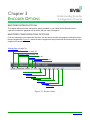
Chapter 3. Encoder Options
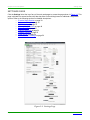
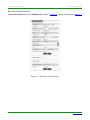
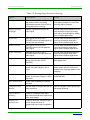
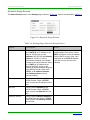
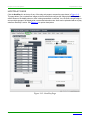
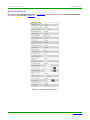
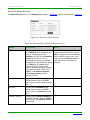
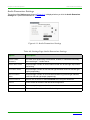
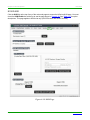
Advanced Settings
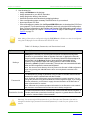
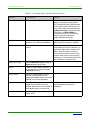
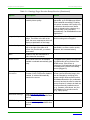
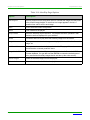
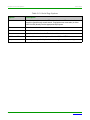
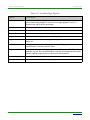
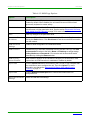
Table 3-2. Settings Page: Advanced Settings
Option
Description
Notes
Settings Lock
Enable to lock the Encoder IP settings
and stream number, preventing
automated processes (from N-Able or
N-Command) from occurring.
This does not prevent a control system
from making changes or a user from
manually making changes.
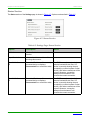
Input Level Gain
Left/Right
Select a PRE-ENCODE cut in the
audio signal.
This can help prevent distortion of the
audio when the source is providing
audio that is too loud/clipping. Setting
does not affect digital audio.
Audio Gain
Slide right to provide a POSTENCODE boost in the audio signal (to
both left and right channel).
This can help compensate when the
source is providing a weak audio
signal. Does not affect digital audio.
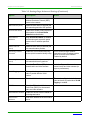
Audio Gain Left
Slide right to provide a POSTENCODE boost in the left channel’s
audio signal.
This can help compensate when the
source is providing a weak audio
signal. Does not affect digital audio.
Audio Gain Right
Slide right to provide a POSTENCODE boost in the right channel’s
audio signal.
This can help compensate when the
source is providing a weak audio
signal. Does not affect digital audio.
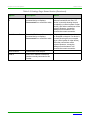
Brightness
Use sliders to raise or lower RGB
values of the Encoder (POSTENCODE).
Only affects analog video. Does not
affect digital video.
Horz Offset
Enter the number of pixels to shift the
screen to the left. Range is -4 to 4
pixels.
The higher the number, the more to the
left the screen will shift. Enter even
numbers only to prevent red/blue color
swapping.
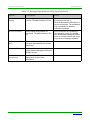
Vert Offset
Enter the number of pixels to shift the
screen up and down. Range is -100 to
100 pixels.
The higher the number, the higher the
screen will shift.
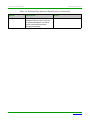
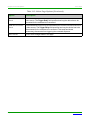
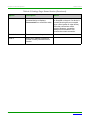
Gen1 Output Mode
Enable when outputting to V-Series
decoders.
Component Sync
Window
Use this slider to configure the sync on
green sensitivity.
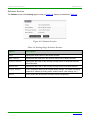
Input audio for
HostPlay
Enable to activate the input audio
when the Live/Local menu is set to one
of the local images.
HostPlay for
Unsupported
Enable to cause the Encoder to use a
custom image whenever an
unsupported video mode is supplied to
it.
Page 44
N2000 Series User Manual
Used for computer video input to help
with screen flickering.
www.svsiav.com