1
13
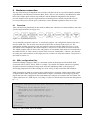
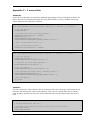
only exists of declaration of variables. These variables are not used for the initializing the target, so it
doesn’t matter if they are declared before or after initializing the target.
One may have briefly noticed the startup functions: “Open” and “Initialize”. These functions are also
defined in the XML element “Startup” as children of this element. “Open” takes one argument,
“function”, and places this code where it opens the device. This function is already available in the
ADSP21992.c source code as “ADSP21992_Initialize”, so only the function name is given as
argument:
<Open function="ADSP21992_Initialize();" />
Listing 4-4: Open function
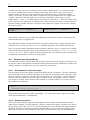
The initialization part of the XML files only consists of declaration of some variables. This is not
discussed here. The relevant parts of these declarations are discussed in section 4.2.1.4.
4.2.1.3 Shutdown procedures
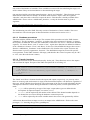
This deals with the shutdown of the target. The contents of this procedure are in the XML element
“Shutdown”. The first argument, “sequence” is similar to the same argument of “Startup”: it denotes
the sequence of shutdown. This time, the combination of the letters “R” and “C” denotes the shutdown
sequence. “R” means “Reset”, and “C” means “Close”. Again, these functions are defined in children
of the “Shutdown” element: “Close” and “Reset”. In the case of the ADSP21992 target, there exists a
function “ADSP21992_Termintate” in the ADSP21992.c file. Similar to the “Open” function, this
function name is given as argument to “function”. The ADSP21992 target has no need for specific
reset operations, to this XML element is left empty (and therefore the value of sequence may be “RC”
or “CR”, since the order doesn’t matter).
4.2.1.4 Transfer functions
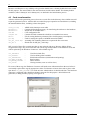
The transfer functions are the functions that really “do the job”. These functions write to the outputs
and read from the inputs. This part of the XML description file is in Listing 4-5.
<Transfer>
<Read scale="" function="ADSP21992_%type%%channel%(&dummyin, 1, &%var%, 1,
xx_major);" />
<Write scale="" function="ADSP21992_%type%%channel%(&%var%, 1, &dummyout, 1,
xx_major);" />
</Transfer>
Listing 4-5: Part from ADSP21992.xml
The “Read” and “Write” elements describe the inputs and outputs, respectively. As you may notice,
there are some tags (the text between %-signs) in the function descriptions. All functions, regardless of
their type, will be called by these functions. The replacement of the tags by useful information decides
which precise function is called. During the hardware connection process, several replacements are
made:
• %type% will be replaced by the type of the input / output (these types are defined in the
descriptions for input and output, see section 4.2.1.1)
• %channel% will be replaced by the number of the channel. This channel number depends on
the channel the user selects during the hardware connection process.
• %var% will be replaced by the actual variable name in the source code generated by 20Sim.
All functions that read from an input or write to an output in the ADSP21992.c file have the same
prototype (“???” denoting the type like “getADInput”)
ADSP21992_??? (double *inarr, int inputs, double *outarr, int outputs, int major)
Listing 4-6: Function prototype in ADSP21992.c
Control Engineering