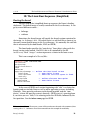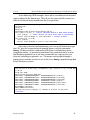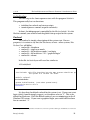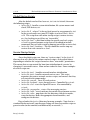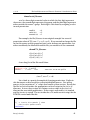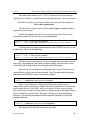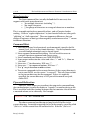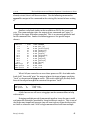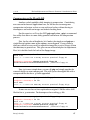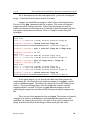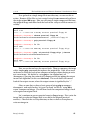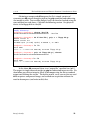
1
A Practitioner's Guide to Linux as a Computer Forensic Platform Barry J. Grundy [email protected] VER 3.78 December 2008 v. 3.78 The Law Enforcement and Forensic Examiner's Introduction to Linux LEGALITIES..........................................................................................................................................4 ACKNOWLEDGMENTS..............................................................................................................................4 FOREWORD..........................................................................................................................................5 A WORD ABOUT THE “GNU” IN GNU/LINUX...........................................................................................6 WHY LEARN LINUX?..............................................................................................................................6 CONVENTIONS USED IN THIS DOCUMENT.....................................................................................................7 I. INSTALLATION..........................................................................................................................8 DISTRIBUTIONS.....................................................................................................................................8 SLACKWARE AND USING THIS GUIDE................................................................................................11 INSTALLATION METHODS......................................................................................................................12 SLACKWARE INSTALLATION NOTES ..........................................................................................................12 DESKTOP ENVIRONMENT.......................................................................................................................16 THE LINUX KERNEL: VERSIONS AND ISSUES..............................................................................................16 CONFIGURING SLACKWARE 12: 2.6 KERNEL CONSIDERATIONS.......................................................................19 UDEV..........................................................................................................................................19 HARDWARE ABSTRACTION LAYER......................................................................................................20 DBUS........................................................................................................................................20 2.6 KERNEL AND DESKTOPS............................................................................................................21 “ROLLING YOUR OWN” THE CUSTOM KERNEL.........................................................................................21 II. LINUX DISKS, PARTITIONS AND THE FILE SYSTEM...........................................................23 DISKS...............................................................................................................................................23 PARTITIONS.......................................................................................................................................23 USING MODULES – LINUX DRIVERS.........................................................................................................25 DEVICE RECOGNITION..........................................................................................................................27 THE FILE SYSTEM...............................................................................................................................28 III. THE LINUX BOOT SEQUENCE (SIMPLIFIED).....................................................................30 BOOTING THE KERNEL..........................................................................................................................30 INITIALIZATION...................................................................................................................................32 RUNLEVEL.........................................................................................................................................32 GLOBAL STARTUP SCRIPTS....................................................................................................................33 SERVICE STARTUP SCRIPTS....................................................................................................................33 BASH...............................................................................................................................................34 IV. LINUX COMMANDS..............................................................................................................36 LINUX AT THE TERMINAL.......................................................................................................................36 ADDITIONAL USEFUL COMMANDS............................................................................................................39 FILE PERMISSIONS...............................................................................................................................41 METACHARACTERS...............................................................................................................................44 COMMAND HINTS...............................................................................................................................44 PIPES AND REDIRECTION.......................................................................................................................44 THE SUPER USER...............................................................................................................................46 V. EDITING WITH VI...................................................................................................................47 THE JOY OF VI...................................................................................................................................47 VI COMMAND SUMMARY .......................................................................................................................48 VI. MOUNTING FILE SYSTEMS..................................................................................................49 THE MOUNT COMMAND......................................................................................................................49 THE FILE SYSTEM TABLE (/ETC/FSTAB).....................................................................................................51 Barry J. Grundy 2 v. 3.78 The Law Enforcement and Forensic Examiner's Introduction to Linux VII. LINUX AND FORENSICS......................................................................................................53 INCLUDED FORENSIC TOOLS..................................................................................................................53 ANALYSIS ORGANIZATION.......................................................................................................................54 DETERMINING THE STRUCTURE OF THE DISK..............................................................................................55 CREATING A FORENSIC IMAGE OF THE SUSPECT DISK.....................................................................................56 MOUNTING A RESTORED IMAGE...............................................................................................................57 MOUNTING THE IMAGE USING THE LOOPBACK DEVICE...................................................................................58 FILE HASH........................................................................................................................................58 THE ANALYSIS....................................................................................................................................61 MAKING A LIST OF ALL FILES ...............................................................................................................62 MAKING A LIST OF FILE TYPES...............................................................................................................63 VIEWING FILES...................................................................................................................................65 SEARCHING UNALLOCATED AND SLACK SPACE FOR TEXT..............................................................................66 VIII. COMMON FORENSIC ISSUES............................................................................................70 HANDLING LARGE DISKS......................................................................................................................70 PREPARING A DISK FOR THE SUSPECT IMAGE.............................................................................................72 OBTAINING DISK INFORMATION.............................................................................................................74 IX. ADVANCED (BEGINNER) FORENSICS..................................................................................76 THE COMMAND LINE ON STEROIDS.........................................................................................................76 FUN WITH DD..................................................................................................................................84 SPLITTING FILES AND IMAGES.................................................................................................................84 COMPRESSION ON THE FLY WITH DD......................................................................................................87 DATA CARVING WITH DD....................................................................................................................91 CARVING PARTITIONS WITH DD.............................................................................................................94 DETERMINING THE SUBJECT DISK FILE SYSTEM STRUCTURE.........................................................................98 DD OVER THE WIRE.........................................................................................................................101 X. ADVANCED FORENSIC TOOLS............................................................................................104 ALTERNATIVE IMAGING TOOLS..............................................................................................................106 DC3DD.....................................................................................................................................106 DDRESCUE.................................................................................................................................113 BAD SECTORS DDRESCUE............................................................................................................119 BAD SECTORS – DC3DD................................................................................................................122 BAD SECTOR ACQUISITION CONCLUSIONS......................................................................................124 LIBEWF WORKING WITH EXPERT WITNESS FILES................................................................................125 SLEUTHKIT......................................................................................................................................134 SLEUTHKIT INSTALLATION AND SYSTEM PREP...........................................................................................136 SLEUTHKIT EXERCISES........................................................................................................................138 SLEUTHKIT EXERCISE #1 – DELETED FILE IDENTIFICATION AND RECOVERY.....................................................139 SLEUTHKIT EXERCISE #2 – PHYSICAL STRING SEARCH & ALLOCATION STATUS................................................150 SLEUTHKIT EXERCISE #3 – UNALLOCATED EXTRACTION & EXAMINATION.......................................................157 SLEUTHKIT EXERCISE #4 – NTFS EXAMINATION: FILE ANALYSIS................................................................163 SLEUTHKIT EXERCISE #5 – NTFS EXAMINATION: ADS............................................................................168 SLEUTHKIT EXERCISE #6 – NTFS EXAMINATION: SORTING FILES................................................................171 SLEUTHKIT EXERCISE #7 – SIGNATURE SEARCH IN UNALLOCATED SPACE.......................................................174 SMART FOR LINUX.........................................................................................................................179 SMART FILTERING..........................................................................................................................185 SMART FILTERING – VIEWING GRAPHICS FILES.....................................................................................187 SMART SEARCHING.........................................................................................................................189 XI. BOOTABLE LINUX DISTRIBUTIONS..................................................................................194 Barry J. Grundy 3 v. 3.78 The Law Enforcement and Forensic Examiner's Introduction to Linux TOMSRTBT BOOT FROM A FLOPPY ........................................................................................................194 KNOPPIX FULL LINUX WITHOUT THE INSTALL.........................................................................................194 SMART LINUX IT’S BOOTABLE!........................................................................................................194 HELIX – KNOPPIX BASED INCIDENT RESPONSE.........................................................................................195 XII. CONCLUSION.....................................................................................................................196 XIII. LINUX SUPPORT..............................................................................................................197 PLACES TO GO FOR SUPPORT:................................................................................................................197 Legalities All trademarks are the property of their respective owners. © 19982008 Barry J. Grundy ([email protected]): This document may be redistributed, in its entirety, including the whole of this copyright notice, without additional consent if the redistributor receives no remuneration and if the redistributor uses these materials to assist and/or train members of Law Enforcement or Security / Incident Response professionals. Otherwise, these materials may not be redistributed without the express written consent of the author, Barry J. Grundy. Acknowledgments As this guide grows in length and depth, so do the contributions I receive from others in the field that take time out of their own busy days to assist me in making sure that this document is at least accurate if not totally complete. I very much appreciate the proof reading and suggestions made by all. Every time I get comments back on a draft version of this guide, I learn something new. I would like to thank Cory Altheide, Brian Carrier, Christopher Cooper, Nick Furneaux, John Garris, RobertJan Mora, and Jesse Kornblum for providing critical review, valuable input, and in some cases, a much needed sanity check of the contents of this document. Special thanks to Robby Workman for providing very constructive guidance on Slackware details throughout the entire guide. All of the expertise and contributions are greatly appreciated. Also, I would like to specifically thank all of the Linux Kernel, various distribution, and software development teams for their hard work in providing us with an operating system and utilities that are robust and controllable. Too often we forget the amount of dedication and work that goes into what many end users expect to just “work”. Barry J. Grundy 4 v. 3.78 The Law Enforcement and Forensic Examiner's Introduction to Linux Foreword This purpose of this document is to provide an introduction to the GNU/Linux (Linux) operating system as a forensic platform for computer crime investigators and forensic examiners. This is the third major iteration of this paper. There is a balance to be met between maintaining the original introductory purpose of the work, and the constant requests from others coupled with my own desire to add more detailed content. Since the first release, this work has almost quadrupled in length. The content is meant to be “beginner” level, but as the computer forensic community evolves and the subject matter widens and becomes more mainstream, the definition of “beginner” level material starts to blur. As a result, I've made an effort to keep the material as basic as possible without omitting those subjects that I see as fundamental to the proper understanding of Linux and its potential as a computer forensic platform. A number of people have pointed out to me that with inclusion of some of the more complex exercises, this document should be given the more fitting “practitioner's guide” moniker rather than “beginner's guide”. We follow the philosophy that a handson approach is the best way to learn. GNU/Linux operating system utilities and specialized forensic tools available to investigators for forensic analysis are presented with practical exercises. This is by no means meant to be the definitive “howto” on forensic methods using Linux. Rather, it is a (somewhat extended) starting point for those who are interested in pursuing the selfeducation needed to become proficient in the use of Linux as an investigative tool. Not all of the commands offered here will work in all situations, but by describing the basic commands available to an investigator I hope to “start the ball rolling”. I will present the commands, the reader needs to followup on the more advanced options and uses. Knowing how these commands work is every bit as important as knowing what to type at the prompt. If you are even an intermediate Linux user, then much of what is contained in these pages will be review. Still, I hope you find some of it useful. Over the years I have repeatedly heard from colleagues that have tried Linux by installing it, and then proceeded to sit back and wonder “what next?” I have also entertained a number of requests and suggestions for a more expansive exploration of applications available to Linux for forensic analysis at the application level. You have a copy of this introduction. Now download the exercises and drive on. Barry J. Grundy 5 v. 3.78 The Law Enforcement and Forensic Examiner's Introduction to Linux As always, I am open to suggestions and critique. My contact information is on the front page. If you have ideas, questions, or comments, please don’t hesitate to email me. Any feedback is welcome. This document is occasionally (infrequently, actually) updated. Check for newer versions (numbered on the front page) at the official site: http://www.LinuxLEO.com A word about the “GNU” in GNU/Linux When we talk about the “Linux” operating system, we are actually talking about the GNU/Linux operating system (OS). Linux itself is not an OS. It is just a kernel. The OS is actually a combination of the Linux kernel and the GNU utilities that allow us (more specifically our hardware) to interact with the kernel. Which is why the proper name for the OS is “GNU/Linux”. We (incorrectly) call it “Linux” for convenience. Why Learn Linux? One of the questions I hear most often is: “why should I use Linux when I already have [insert Windows GUI forensic tool here]?” There are many reasons why Linux is quickly gaining ground as a forensic platform. I’m hoping this document will illustrate some of those attributes. • • • Control – not just over your forensic software, but the whole OS and attached hardware. Flexibility – boot from a CD (to a complete OS), file system support, platform support, etc. Power – A Linux distribution is (or can be) a forensic tool. Another point to be made is that simply knowing how Linux works is becoming more and more important. While many of the Windows based forensic packages in use today are fully capable of examining Linux systems, the same cannot be said for the examiners. As Linux becomes more and more popular, both in the commercial world and with desktop users, the chance that an examiner will encounter a Linux system in a case becomes more likely (especially in network investigations). Even if you elect to utilize a Windows forensic tool to conduct your analysis, you must at least be familiar with the OS you are examining. If you do not know what is normal, then how do you know what does not belong? This is true on so many levels, from the actual contents of various directories to strange entries in configuration files, all the way down to how files are stored. Barry J. Grundy 6 v. 3.78 The Law Enforcement and Forensic Examiner's Introduction to Linux While this document is more about Linux as a forensic tool rather than analysis of Linux, you can still learn a lot about how the OS works by actually using it. Conventions used in this document When illustrating a command and it's output, you will see something like the following: root@rock:~# command output... This is essentially a command line (terminal) session where... root@rock:~# ...is the command prompt, followed by the command (typed by the user) and then the command's output. The command will be shown in bold text to further differentiate it from command output. In Linux, the command prompt can take different forms, depending on the environment settings (the default differs among distributions). In the example above, the format is user@hostname directory # meaning that we are the user “root” working on the computer named “rock” currently in the directory root (the root user's home directory – in this case, the “home directory” is symbolized by the shorthand representation of the tilde “~”). Note that for a “root” login the command prompt's trailing character is # . If we log in as a regular user, the default prompt character changes to a $ , as in the following example: bgrundy@rock:~$ This is an important difference. The “root” user is the system “superuser”. We will cover the differences between user logins later in this document. Barry J. Grundy 7 v. 3.78 The Law Enforcement and Forensic Examiner's Introduction to Linux I. Installation First and foremost, know your hardware. If your Linux machine is to be a dual boot system with Windows, then use the Windows Device Manager to record all your installed hardware and the settings used by Windows. If you are setting up a standalone Linux system, then gather as much documentation about your system as you can. This has become much less important with the evolution of the Linux install routines. Hardware compatibility and detection have been greatly improved over the past couple of years. Some of the recent versions of distributions, like Ubuntu Linux, have extraordinary hardware detection. • Hard drive – knowing the size and geometry is helpful when planning your partitioning. • SCSI adapters and devices (note the adapter chipset). SCSI is very well supported under Linux. • Sound card (note the chipset). • Video Card (important to know your chipset and memory, etc.). • Monitor timings. • Horizontal and vertical refresh rates. • Network card (chipset). • Network Parameters: • IP (if not DHCP) • Netmask • Broadcast address • DNS servers • Default gateway • USB controller support is standard in current distributions. • IEEE1394 (Firewire) controller support is also standard in current distributions. In the vast majority of cases, most of this information will not be needed. But it's always handy to know your hardware if you must trouble shoot. Most distributions have a plethora of documentation, including online help and documents in down loadable form. Do a Web search and you are likely to find a number of answers to any question you might have about hardware compatibility issues in Linux. Distributions Linux comes in a number of different “flavors”. These are most often referred to as “distributions” (“distro”). Default kernel configuration, tools that are included (system management and configuration, etc.) and the package Barry J. Grundy 8 v. 3.78 The Law Enforcement and Forensic Examiner's Introduction to Linux format (the upgrade path) most commonly differentiate the various Linux distros. It is common to hear users complain that device X works under Suse Linux, but not on Red Hat, etc. Or that device Y did not work under RedHat version 9, but a change to CentOS “fixed it”. Most often, the difference is in the version of the Linux kernel being used and therefore the updated drivers, or the patches applied by the distribution vendor, not the version of the distribution (or the distribution itself). Here's an overview of just a few of the Linux distros that are available. Selecting one is a matter of preference. Many of these distros now provide a “live CD” that allows a user to boot a CD into a fully functional operating environment. Try them out and see what pleases you. Red Hat / Fedora One of the most popular Linux distributions. Red Hat works with companies like Dell, IBM and Intel to assist businesses in the adoption of Linux for enterprise use. Use of RPM and Kickstart began the first “real” user upgrade paths for Linux. Red Hat has elected to move into an enterprise oriented business model. It is still a viable option for the desktop through the “Fedora Project” (http://fedoraproject.org/) . Fedora is an excellent choice for beginners because of the huge install base and the proliferation of online support. The install routine is well polished and hardware support is well documented. Another Red Hat based distribution is CentOS. Debian Not really for beginners. The installation routine is not as polished as some other distributions. Debian has always been a hacker favorite. It is also one of the most “noncommercial” Linux distributions, and true to the spirit of GNU/GPL. (http://www.debian.org/). SuSE Now owned by Novell, SuSE is originally German in origin. It is by far the largest software inclusive distribution. (http://www.novell.com/linux/). There is an “open” support network and download directory at http://www.opensuse.org. A Live CD is also available. Mandriva Linux Formerly known as “Mandrake”. Mandriva is a favorite of many beginners and desktop users. It is heavy on GUI configuration tools, allowing for easy migration to a Linux desktop environment. (http://wwwnew.mandriva.com/). Barry J. Grundy 9 v. 3.78 The Law Enforcement and Forensic Examiner's Introduction to Linux Gentoo Linux Sourcecentric distribution that is optimized during install – one of my personal favorites. Once through the complex installation routine, upgrading the system and adding software is made extremely easy through Gentoo’s “Portage” system. Not for beginners, though. You are left to configure the system entirely on your own. If you have endless patience and a lot of time, it can be a fantastic learning experience. (http://www.gentoo.org/). Ubuntu Linux A relative newcomer, Ubuntu Linux is based on Debian and although I've not used it myself, it has a reputation for fantastic hardware detection and ease of use and installation. (http://www.ubuntulinux.org). I've heard that this is a great choice for beginners. Slackware The original commercial distribution. Slackware has been around for years. Installation is now almost as easy as all the others. Good standard Linux. Not overencumbered by GUI config tools. Slackware aims to produce the most “UNIXlike” Linux distro available. One of my personal favorites, and in my humble opinion, currently one of the best choices for a forensic platform. (http://www.slackware.com/). This guide is tailored for use with a Slackware Linux installation. Lot's of information on more distributions than you care to read about is available at http://www.distrowatch.com. My suggestion for the absolute beginner looking to experience an overall “desktop” OS would be either the newest version of Fedora Core or Ubuntu. If you really want to “dive in” and bury yourself, go for Gentoo, Slackware or Debian. If you choose one of these latter distributions, be prepared to read…a lot. If you are unsure where to start, will be using this guide as your primary reference, and are interested mainly in forensic applications of Linux, then I would suggest Slackware. More on why a little later. One thing to keep in mind: As I mentioned earlier, if you are going to use Linux in a forensic capacity, then try not to rely on GUI tools too much. Almost all settings and configurations in Linux are maintained in text files (usually in either your home directory, or in /etc). By learning to edit the files yourself, you avoid problems when either the X window system is not available, or when the specific GUI tool you rely on is not on a system you might come across. In addition, knowledge of the text configuration files will give you insight into what is “normal”, and what might have been changed when you examine a subject system. Learning to interpret Linux configuration files is all part of the "forensic experience". Barry J. Grundy 10 v. 3.78 The Law Enforcement and Forensic Examiner's Introduction to Linux SLACKWARE and Using this Guide Because of differences between distributions, the Linux flavor of your choice can cause different results in commands' output and different behavior overall. Additionally, some sections of this document describing configuration files or startup scripts, for example, might appear vastly different depending on the distro you select. If you are selecting a Linux distribution for the sole purpose of learning through following along with this document, then I would suggest Slackware. Slackware is stable and does not attempt to enrich the user's experience with cutting edge file system hacks or automatic configurations that might hamper forensic work. Detailed sections of this guide on the inner workings of Linux will be written toward a basic Slackware installation (currently in version 12.1). Previous versions of this document attempted to be far more distro independent. The examples and discussions of configuration files were focused on the more popular distribution formats. In the intervening years, there has been a veritable explosion of different flavors of Linux. This guide has been linked on a number of websites, and has been used in a variety of training forums. As a result of these changes, I have found myself receiving numerous emails asking questions like “The output I get does not match what's in your guide. I'm using 'Fuzzy Kitten Linux 2.0' with kernel version 2.6.16fk145.2...What could be wrong?” My reply has become standard to such queries: “I'm not familiar with that version of Linux, and I'm not sure what changes have been made to that kernel”. Providing answers to questions on the exercises that follow requires that I know a little about the environment being used. To that end, I've decided to point people towards a standard, stable version of Linux that includes few surprises. By default, Slackware's current installation routine leaves initial disk partitioning up to the user. There are no default schemes that result in surprising “volume groups” or other complex disk management techniques. The resulting file system table (also known as “fstab”) is standard and does not require editing to provide for a forensically sound environment, unlike some other popular distributions. The most recent version of Slackware (12.x) now uses the 2.6 series kernel by default. In many circumstances, your hardware will require you that use a 2.6 kernel (certain SATA controllers, etc.). In recognition of this, the current version of this document now assumes that the user has installed a 2.6 kernel version of Linux. This brings the LinuxLEO Practitioner's Guide in line with the majority of forensic practitioners currently using Linux, including Barry J. Grundy 11 v. 3.78 The Law Enforcement and Forensic Examiner's Introduction to Linux myself. Previous versions of this document suggested a 2.4 (kernel version) install. Slackware Linux is stable, consistent, and simple. As always, Linux is Linux. Any distribution can be changed to function like any other (in theory). However, my philosophy has always been to start with an optimal system, rather than attempt to “roll back” a system heavily modified and optimized for the desktop rather than a forensic workstation. If you are comfortable with another distribution, then by all means, continue to use and learn it. Just be aware that there may be customizations and modifications made to the standard kernel and file system setups that might not be ideal for forensic use. These can always be remedied, but I prefer to start as close to optimal as possible. Installation Methods • Download the needed ISO (CD image) files, burn them to a CD and boot the media. This is the most common method of installing Linux. Most distros can be downloaded for free via http, ftp, or torrent. Slackware is available at http://www.slackware.com. Have a look at http://linuxlookup.com/linux_iso or http://distrowatch.com/ for information on downloading and installing other Linux flavors. • Use a bootable Linux distribution (covered later). For example, the SMART or Helix Linux bootable CDs can easily be used as experimental platforms. See http://www.asrdata2.com or http://www.efense.com/helix for more information. During a standard installation, much of the work is done for you, and relatively safe defaults are provided. As mentioned earlier, hardware detection has gone through some great improvements in recent years. I strongly believe that many (if not most) Linux distros are far easier and faster to install than other “mainstream” operating systems. Typical Linux installation is well documented online (check the “howtos” at the Linux Documentation Project: http://www.tldp.org/). There are numerous books available on the subject, and most of these are supplied with a Linux distribution ready for install. Familiarize yourself with Linux disk and partition naming conventions (covered in Chapter II of this document) and you should be ready to start. Slackware Installation Notes As previously mentioned, it is suggested that you start with Slackware if this is your first foray into Linux and forensics AND you primary interest is Barry J. Grundy 12 v. 3.78 The Law Enforcement and Forensic Examiner's Introduction to Linux forensics. If you do decide to give Slackware a shot, here are some simple guidelines. The documentation provided on Slackware's site is complete and easy to follow. Read there first... Decide on standalone Linux or dual boot. • Install Windows first in a dual boot system. If you have Vista, be careful there are issues you should be aware of. Research dual booting with Vista before proceeding. • Determine how you want the Linux system to be partitioned. • Do NOT create any extra partitions with Windows fdisk. Just leave the space unallocated. Slackware will require you to utilize Linux fdisk or another partitioning tool at the start of the install process. READ through the installation documentation before you start the process. Don't be in a hurry. If you want to learn Linux, you have to be willing to read. For Slackware, have a look through the installation chapters of the “Slackbook” located at http://www.slackbook.org . For a basic (but detailed) understanding of how Linux works and how to use it, the Slackbook should be your first stop. 1) Boot the Linux media. Slackware requires only the first two installation disks (or the single DVD). • • • • • • • • Read each screen carefully. Accepting most defaults works. Your hardware will be detected and configured under most (if not all) circumstances. On line support is extensive if you have problems. Keep in mind that if a piece of hardware causes problems during an install, or is not detected during installation, this does not mean that it will not work. Install the operating system and spend some time troubleshooting. When learning Linux, Google is very often your best friend (try http://www.google.com/linux). The Slackware install CD for the current version (12.1) will boot by default using a kernel called “hugesmp.s”. It includes support for most hardware by default and supports multiple CPUs. If it does not work, then try the single CPU i486 kernel “huge.s”. Hit the “F2” key at the initial “boot:” prompt for more info. Once the system is booted, you are presented with the “slackware login:” prompt. READ THE ENTIRE SCREEN as instructed. Login as root, and continue with your install routine. The main install routine for Slackware is started with the command setup. You will need to ensure that you have your disk properly partitioned before you enter the setup program. Take the time to read each screen completely as it comes up. Barry J. Grundy 13 v. 3.78 The Law Enforcement and Forensic Examiner's Introduction to Linux 2) Partition and format for Linux • At a minimum you will need two partitions. This step is normally part of the installation process, or is covered in the distribution's documentation. • Root ( / ) as type “Linux Native”. • Swap as type “Linux Swap” (use 2x your system memory as a starting point for swap size). You will hear a lot about using multiple partitions for different directories. Don’t let that confuse you. There are arguments both for and against using multiple partitions for a Linux file system. If you are just starting out, use one large root (/) partition, and one swap partition as described above. • You will partition your Slackware Linux system using fdisk or cfdisk. The Slackbook has a detailed section on using fdisk to accomplish this. (http://www.slackbook.org/html/book.html#INSTALLATIONPARTITIONING). In fact, I would read the entire installation section of the Slackbook. It will make the process much easier for you. • When asked to format the root partition, I would suggest selecting the ext3 file system (Now default in Slackware 12.1). 3) Package installation (system) • When asked which packages to select for installation, it is usually safe for a beginner to select “everything” or “full”. This allows you to try all the packages, along with multiple X Window desktop environments. This can take as much as 5 to 6GB on some of the newer distributions (5GB on Slackware), however it includes all the software you are likely to need for a long time (including many “office” type applications, Internet, e mail, etc.). This is not really optimal for a forensic workstation, but for a learning box it will give you the most exposure to available software for experimentation. 4) Installation Configuration • Sound • Usually automatic. If not, search the Web. The answer is out there. If it does not work “out of the box” (as it should with most hardware in Slackware), then try the following. • There are many current distributions using the “Advanced Linux Sound Architecture” (ALSA), including Slackware. Configuring sound on Linux using ALSA can be quite easy. Once booted into your new system, try running the command alsaconf to allow the system to attempt automatic configuration. If that appears to work (no obvious error messages), run alsamixer to adjust speaker volume. These programs are run from a command prompt. The alsaconf program is run as the root user, while alsamixer can be run as a regular user. • Barry J. Grundy 14 v. 3.78 The Law Enforcement and Forensic Examiner's Introduction to Linux • • • • Xorg (X Window system) • Know your hardware (video card, etc.). • If you choose to configure X during the installation routine, do not click “yes” if the installation routine asks if you want X to start automatically every time you system boots. This can make problem solving difficult and results in less control over the system. You can always start the GUI with startx from the command line. • By default, Xorg will use a standard VESA driver to run your X Window system. You can attempt to get a more optimum configuration after the installation by running X configure, which will write a new configuration file with settings tailored more for your hardware. This will create a file called xorg.conf.new which can then be copied to /etc/X11/xorg.conf. • I would suggest you use XFCE as you desktop manager. Feel free to use others, but XFCE will provide a clean, uncluttered interface. • You select XFCE as your desktop during the Slackware installation by choosing “xinitrc.xfce” during the X setup portion. You can try other window managers by running the command xwmconfig and selecting a different one. Boot Method (the Boot loader…selects the OS to boot) • LILO or GRUB. • LILO is the default for Slackware. Some people find GRUB more flexible and secure. GRUB can be installed later, if you like. • Usually select the option to install LILO to the master boot record (MBR). The presence of other boot loaders (as provided by other operating systems) determines where to install LILO or GRUB. • The boot loader contains the code that points to the kernel to be booted. Check http:// www.tldp.org for “multiOS” and “multiboot” HowTo documents. Create a user name for yourself – avoid using root exclusively. For more information, check the file CHANGES_AND_HINTS.TXT on the install CD, or at: http://slackware.osuosl.org/slackware 12.1/CHANGES_AND_HINTS.TXT This file is loaded with useful hints and changes of interest from one release to another. Linux is a multiuser system. It is designed for use on networks (remember, it is based on Unix). The “root” user is the system administrator, and is created by default during installation. Exclusive use of the “root” login is DANGEROUS. Linux assumes that “root” knows what he or she is doing and allows “root” to do anything he or she wants, including destroy the system. Create a new user. Don’t log in as “root” unless you must. Having said this, much of the work done for forensic analysis must be done as “root” to allow access to raw devices and system commands. Barry J. Grundy 15 v. 3.78 The Law Enforcement and Forensic Examiner's Introduction to Linux Desktop Environment When talking about forensic suitability, your choice of desktop system can make a difference. First of all, the term “desktop environment” and “window manager” are NOT interchangeable. Let's briefly clarify the components of a common Linux GUI. • • • X Window – This is the basic GUI environment used in Linux. Commonly referred to as “X”, it is the application that provides the GUI framework, and is NOT part of the OS. X is a client / server program with complete network transparency. Window Manager – This is a program that controls the appearance of windows in the X Window system, along with certain GUI behaviors (window focus, etc.). Examples are Kwin, Metacity, XFWM, Enlightenment, etc. Desktop Environment – A combination of Window Manager and a consistent interface that provides the overall desktop experience. Examples are XFCE, GNOME, KDE, etc. ➢ The default Window Manager for KDE is Kwin. ➢ The default Window Manager for GNOME is Metacity ➢ The default Window Manager for XFCE is XFWM. These defaults can be changed to allow for preferences in speed and resource management over the desire for “eyecandy”, etc. You can also elect to run a Window Manager without a desktop environment. For example, the Enlightenment Window Manager is known for it's eyecandy and can be run standalone, with or without KDE or GNOME, etc. Slackware no longer comes with GNOME as an option, though it can be installed like any other application. During the base Slackware installation, you will be given a choice of KDE, XFCE, and some others. I would like to suggest XFCE. It provides a cleaner interface for a beginner to learn on. It is leaner and therefore less resource intensive. You still have access to many KDE utilities, if you elected to install KDE during package selection. You can install more than one desktop and switch between them, if you like. The easiest way to switch is with the xwmconfig command. The Linux Kernel: Versions and Issues The Linux kernel is the “brain” of the system. It is the base component of the Operating System that allows the hardware to interact with and manage other software and system resources. Barry J. Grundy 16 v. 3.78 The Law Enforcement and Forensic Examiner's Introduction to Linux In December of 2003, the Linux 2.6 kernel was released. This was another milestone in the Linux saga, and all of the newer “mainstream” distribution versions are based on the 2.6 kernel. Many of the changes in 2.6 over the previous 2.4 are geared toward enterprise use and scalability. The newer kernel release also has a number of infrastructure changes that have a significant impact on Linux as a forensic platform. For example, there is enhanced support for USB and a myriad of other external devices. Read up on udev for more information one one such change 1. We will very briefly discuss udev later in this section. As with all forensic tools, we need to have a clear view of how any kernel version will interact with our forensic platforms and subject hardware. Almost all current distributions of Linux already come with a 2.6 kernel installed by default. Slackware 12 has also moved to the 2.6 kernel series (2.6.24.5 in 12.1). Previous versions of this document suggested using an “older” (but updated) version of the kernel (2.4 series) to account for infrastructure changes in newer kernel versions that could adversely affect Linux employed as a forensic platform. This version of the Linux Forensic Practitioner's Guide has departed from that philosophy and we now use a distribution with a 2. 6 kernel by default. Still, it is both interesting and important to understand the implications of kernel choice on a forensic platform. So while we have moved on to the 2.6 kernel, we will still cover the differences and caveats to using a modern kernel. Prior to the 2.6 series kernel, the developers maintained 2 separate kernel “branches”. One was for the “stable” kernel, and the other was for “testing”. Once released, the stable kernel was updated with bug fixes and was considered a solid production kernel. The other kernel branch was the testing branch and was used to incorporate innovations and updates to the kernel infrastructure. The stable kernel had an even numbered secondary point release, and the testing branch had an odd numbered secondary point release. Stable branch Testing Branch 2.0 2.1 2.2 2.3 2.4 2.5 2.6 ?? 1 http://www.kernel.org/pub/linux/utils/kernel/hotplug/udev.html Barry J. Grundy 17 v. 3.78 The Law Enforcement and Forensic Examiner's Introduction to Linux The development of the 2.5 test kernel series resulted in the “stable” 2.6 series. Many of the improvements, once deemed stable, were “back ported” to the 2.4 kernel. As a result, the 2.4 series is still considered modern and supports much of the newer hardware currently in use. So, what were the initial reservations about adhoc adoption of the 2.6 kernel in forensics, even though it's considered stable? You will notice from the chart above that there is no current 2.7 testing branch. The current kernel development scheme does not utilize a testing branch. This means that “new innovations” and changes to kernel infrastructure get wrapped directly into 2.6 kernel updates. As a result, critical upgrades within the 2.6 kernel series have a potential to break existing applications. There were many in the Linux community (even outside of computer forensics) that saw the 2.6 kernel as a fine system for desktop computers, but did not consider using it in a production environment. Again, this does NOT mean that it was not suitable for forensics, just that it required more testing and careful configuration with the addition of more cutting edge features. Of equal importance in selecting a Linux kernel for forensic use was the interface that the kernel provides between the hardware and the end user. The 2.6 kernel includes a number enhancements that are designed specifically to improve the overall Linux experience on the desktop. These enhancements, if not properly configured and controlled, can result in a loss of user control over devices, one of the primary reasons for using Linux for forensics in the first place. Such obstacles can be overcome through proper configuration, but rigorous testing, as with all forensic applications, is required. Knowing what services to disable, and what affect this will have on the entire system is imperative. While a complete discussion of these requirements is largely beyond the scope of this guide, we will cover basic configuration in later sections. So we have finally arrived at a point where the 2.6 kernel is mainstream and we will be using it in our forensic environment. The key to safe use (this goes for ANY operating system) is knowledge of your environment and proper testing. Please keep that in mind. You MUST understand how your hardware and software interact with any given operating system before using it in a “production” forensic analysis. One of the greatest strengths Linux provides is the concept of “total control”. This requires thorough testing and understanding. Don't lose sight of this in pursuit of an “easy” desktop experience. Barry J. Grundy 18 v. 3.78 The Law Enforcement and Forensic Examiner's Introduction to Linux Configuring Slackware 12: 2.6 kernel considerations So, we've discussed the differences between the 2.4 and the 2.6 kernel. There are infrastructure changes and “enhancements” to the 2.6 kernel that can be more of a challenge to configure for a Linux beginner looking for a stable and sound forensic platform. In this section, we will focus on the minimum configuration requirements for creating a sound forensic environment under current Linux distributions using the 2.6 kernel. We will briefly discuss device node management (udev), hardware abstraction (HAL) and message bus (dbus) daemons, and the desktop environment. In simplified terms, it is these components that create the most obvious problems for forensic suitability in the most current Linux distributions. The good news is that, being Linux, the user has very granular control over these services. The control that we love having with Linux is still there, we just need to grab some of it back from the kernel (or the desktop, as the case may be). udev Starting with kernel version 2.6.13, Linux device management was handed over to a new system called udev. Traditionally, the device nodes (files representing the devices, located in the /dev directory) used in previous kernel versions were static, that is they existed at all times, whether in use or not2. For example, on a system with static device nodes we may have a primary SATA hard drive that is detected by the kernel as /dev/sda. Since we have no IDE drives, no drive is detected as /dev/hda. But when we look in the /dev directory we see static nodes for all the possible disk and partition names for /dev/hda. The device nodes exist whether or not the device is detected. In the new system, udev creates device nodes “on the fly”. The nodes are created as the kernel detects the device and the /dev directory is populated in real time. In addition to being more efficient, udev also runs in user space. One of the benefits of udev is that it provides for “persistent naming”. In other words, you can write a set of rules (For a nice explanation of udev rules, see: http://reactivated.net/writing_udev_rules.html) that will allow udev to recognize a device based on individual characteristics (serial number, manufacturer, model, etc.). The rule can be written to create a userdefined link in the /dev directory, so that for example, my thumb drive can always be accessed through an arbitrary device node name of my choice, like /dev/my thumb, if I so choose. This means that I don't have to search through USB device nodes to find the correct device name if I have more than one external storage device connected. 2 We will not cover Devfs, a device management system that used dynamic nodes prior to udev. Barry J. Grundy 19 v. 3.78 The Law Enforcement and Forensic Examiner's Introduction to Linux Udev is required for current 2.6 kernels. On Slackware, it runs as a daemon from the startup script /etc/rc.d/rc.udev. We will discuss these startup scripts in more detail later in this document. We will not do any specific configuration for udev on our forensic computers at this time. We discuss it here simply because it is a major change in device handling in the 2.6 kernel. Udev does NOT involve itself in auto mounting or otherwise interacting with applications. It simply provides a hardware to kernel interface. Hardware Abstraction Layer HAL refers to the Hardware Abstraction Layer. The HAL daemon maintains information about devices connected to the system. In effect, HAL acts as a “middle man” for device detection, in that it organizes device information in a uniform format accessible to applications that want to either access or react to a change is the status of a device (plugged in or unplugged, etc.). The information that HAL makes available is object specific and provides far more detail than normal kernel detection allows. As a result, applications that receive information about a device from HAL can react in context. HAL and udev are not connected, and operate independently of one another. Where HAL describes a device in detail, for use by applications, udev simply manages device nodes. In Slackware 12, HAL is run as a daemon from /etc/rc.d/rc.hald. See the section titled “Service Startup Scripts” in Chapter III for more information on rc scripts and how to stop the service from auto starting. dbus The system message bus, or dbus, provides a mechanism for applications to exchange information. For our purposes here, we will simply state that dbus is the communication channel used by HAL to send its information to applications. In Slackware 12, dbus is run as a daemon from /etc/rc.d/rc.messagebus. With some very fine configuration, it's possible to have HAL and dbus running and still maintain a sound forensic environment. For our purposes, we will turn HAL and dbus off. We do this because exhaustive configuration is outside the scope of this document. We will make these adjustment in the section “File Permissions” on page 41. It has been noted that turning dbus off is not strictly required (at this point). I suggest doing so for the sake of safety. I urge you to test your own configurations. Barry J. Grundy 20 v. 3.78 The Law Enforcement and Forensic Examiner's Introduction to Linux 2.6 Kernel and Desktops One of the considerations when discussing Desktop Environments is its integration with the HAL and dbus services to allow for desktop auto mounting of removable media. KDE and GNOME are heavily integrated with HAL/dbus and users need to be aware of how to control this undesired behavior in a forensic environment. Equally important is how to deal with instability caused when expected messages from the OS are not received by a polling application. XFCE is a lighter weight (read: lighter on resources) desktop. And although XFCE is also capable of integration with HAL and dbus, it allows for easier control of removable media on the desktop (search for thunarvolman). While KDE and GNOME also allow for control of automounting through configuration dialogs, they are far more tightly integrated and arguably more complex. “Rolling your own” The Custom Kernel "Every forensic examiner should compile his own kernel, just like every Jedi builds his own lightsaber." ”The” Cory Altheide At some point during your Linux education, you will want to learn how to recompile your kernel. Why? Well...the above quote puts it quite nicely. The kernel that comes with your distro of choice is often heavily patched, and is configured to work with the widest variety of hardware possible. This gives the stock distribution a better chance of working on a multitude of systems right out of the box. Note that the Slackware kernel's are nicely generic and quite suitable “out of the box” for forensic use. Also, be warned that user customized kernels make for difficult troubleshooting and you will often be asked to reproduce problems with a stock kernel before you can get specific support. This is simply a matter of defining a common denominator when addressing problems. The actual steps for compiling a custom kernel are outside the scope of this document, and have been covered elsewhere3. The concepts, however are important for an overall understanding of how Linux works. A quick Internet search for “linux custom kernel compile” or the like will provide a good start. Throw in the word “forensic” for some more specific pointers. 3 Barry J. Grundy 21 v. 3.78 The Law Enforcement and Forensic Examiner's Introduction to Linux As mentioned previously, the kernel provides the most basic interface between hardware and the system software and resource management. This includes drivers and other components that are actually small separate pieces of code that can either be compiled as “modules” or compiled directly in the kernel “image”. There are two basic approaches to compiling a kernel. Static kernels are built so that all of the drivers and desired features are compiled into the single kernel image. Modular kernels are built such that drivers and other features can be compiled as separate “object” files that can be loaded and unloaded “on the fly” into a running system. More on handling kernel modules can be found in Section II of this document, under “Using Modules”. In short, you might find yourself in need of a kernel recompile as a result of the fact that you require specific drivers or support that is not currently included in your distribution's default kernel configuration. Or, after becoming comfortable with Linux, you decide you want to try your hand at actually configuring your custom kernel simply because you want to make it more efficient or because you want to expand the support for hardware, file systems, or partition table types that you might come across during an investigation. In any event, Forensics with Linux is all about control. Customizing your kernel configuration, while an advanced skill, is the most basic form of control you have in Linux (short of rewriting the source code itself). At some point, this is something you will want to educate yourself further on. Barry J. Grundy 22 v. 3.78 The Law Enforcement and Forensic Examiner's Introduction to Linux II. Linux Disks, Partitions and the File System Disks Linux treats its devices as files. The special directory where these "files" are maintained is "/dev". • • • • • • DEVICE: Floppy (a:) Hard disk (master, IDE0) Hard disk (slave, IDE0) Hard disk (master, IDE1) 1st SCSI hard disk (SATA, USB) 2nd SCSI hard disk FILE NAME: /dev/fd0 /dev/hda /dev/hdb /dev/hdc, etc. /dev/sda /dev/sdb, etc. Partitions DEVICE: 1st Hard disk (master, IDE0) • 1st Primary partition • 2nd Primary partition • 1st Logical drive (on ext’d part) • 2nd Logical drive nd 2 Hard disk (slave, IDE0) • 1st Primary partition CDROM (ATAPI) or 3rd disk (mstr, IDE1) 1st SCSI disk (or SATA, USB, etc.) • 1st Primary partition FILE NAME: /dev/hda /dev/hda1 /dev/hda2, etc. /dev/hda5 /dev/hda6, etc. /dev/hdb /dev/hdb1, etc. /dev/hdc /dev/sda /dev/sda1, etc. The pattern described above is fairly easy to follow. If you are using a standard IDE disk (or standard ATAPI CDROM drive), it will be referred to as hdx where the "x" is replaced with an "a" if the disk is connected to the primary IDE controller as master and a "b" if the disk is connected to the primary IDE controller as a slave device. In the same way, the IDE disks (or CDROM) connected to the secondary IDE controller as master and slave will be referred to as hdc and hdd respectively. SCSI and Serial ATA (SATA) disks will be referred to as sdx. In the case of SCSI disks, they are assigned letters in the order in which they are detected. This includes USB and Firewire. For example, a primary SATA disk will be assigned sda. If you attach a USB disk or a thumb drive it will normally be detected as sdb, and so on.4 4 You may run across older distributions that support devfs which uses a different naming scheme. Don’t let this confuse you. The pattern described above is still supported through “links” for compatibility. See http://www.atnf.csiro.au/people/rgooch/linux/docs/devfs.html for more information. Barry J. Grundy 23 v. 3.78 The Law Enforcement and Forensic Examiner's Introduction to Linux The fdisk program can be used to create or list partitions on a supported device. This is an example of the output of fdisk on a dual boot system using the “list” option (l [dash “el”]): root@rock:~# fdisk -l /dev/hda Disk /dev/hda: 60.0 GB, 60011642880 bytes 255 heads, 63 sectors/track, 7296 cylinders Units = cylinders of 16065 * 512 = 8225280 bytes Device Boot /dev/hda1 * /dev/hda2 /dev/hda3 /dev/hda5 /dev/hda6 /dev/hda7 Start 1 655 2479 2479 4304 4367 End 654 2478 7296 4303 4366 7296 Blocks 5253223+ 14651280 38700585 14659281 506016 23535193+ Id 7 7 5 83 82 c System HPFS/NTFS HPFS/NTFS Extended Linux Linux swap W95 FAT32 (LBA) fdisk –l /dev/hdx gives you a list of all the partitions available on a particular drive, in this case and IDE drive). Each partition is identified by its Linux name. The "boot flag" is indicated, and the beginning and ending cylinders for each partition is given. The number of blocks per partition is displayed. Finally, the partition "Id" and file system type are displayed. To see a list of valid types, run fdisk and at the prompt type "l" (the letter “el”). Do not confuse Linux fdisk with DOS fdisk. They are very different. The Linux version of fdisk provides for much greater control over partitioning. Remember that the partition type identified in the last column, under “System” has nothing to do with the file system found on that partition. Do not rely on the partition type to determine the file system. On most normal systems, a type “c” (W95 FAT32) partition type will contain a FAT32 partition, but not always. Also, consider partitions of type 83 (Linux). Type 83 partitions can normally hold EXT2, EXT3, ReiserFS, or any number of other file system types. We will discuss file system identification later in this document. BEFORE FILE SYSTEMS ON DEVICES CAN BE USED, THEY MUST BE MOUNTED! Any file systems on partitions you define during installation will be mounted automatically every time you boot. We will cover the mounting of file systems in the section that deals with Linux commands, after you have some navigation experience. Keep in mind, that even what not mounted, devices can still be written to. Simply not mounting a file system does not protect it from being inadvertently changed through your actions. Barry J. Grundy 24 v. 3.78 The Law Enforcement and Forensic Examiner's Introduction to Linux Mounting file systems on some types of external devices, which we will come to later in this document, may require us to delve a little deeper into modules Using modules – Linux Drivers It’s difficult to decide when to introduce modules to a new user. The concept can be a little confusing, but “out of the box” Linux distributions rely heavily on modules for device and file system support. For this reason, we will make an effort to get familiar with the concept early on. As discussed in the previous section, modules are really just “drivers” that can be loaded and unloaded from the kernel dynamically. They are object files (*.ko for the 2.6 kernel) that contain the required driver code for the supported device or option. Modules can be used to provide support for everything from USB controllers and network interfaces to file systems. The various modules available on your system are located in the /lib/modules/<KERNELVERSION>/ directory. Note that the current kernel version running on your system can be found using the command uname r. There are, in general, three ways that driver code is loaded in Linux: ● ● ● Driver code is compiled directly into the kernel. The code is part of the kernel image that is loaded when the computer boots. Supported devices are recognized and configured as the OS loads. Modules are loaded at boot time through the actions of udev, which handles “hotplug” events. After the kernel is loaded, udev “events” are triggered and the proper modules are automatically loaded. We will cover this in more detail in the chapter covering system startup. Recall that udev handles the device node management. Modules are manually loaded by the user, as needed. In cases where the driver code is not automatically loaded, modules can be installed and removed from the system “on the fly” using the following commands (as root): modprobe an intelligent module loader rmmod to remove the module lsmod to get a list of currently installed modules For example, to get USB support for a USB thumb drive on some systems, you may need to load a couple of modules. With the USB device plugged in, we can install the needed modules (ehci_hcd for many USB 2.0 controllers, and usbstorage for the storage interface) with: Barry J. Grundy 25 v. 3.78 The Law Enforcement and Forensic Examiner's Introduction to Linux modprobe ehci_hcd (depending on your USB controller) modprobe usbstorage Note that while the module is named with a “.ko” extension, we do not include that in the insertion command. We only need to install these drivers if the kernel does not have the support compiled in, or if the module is not loaded automatically. Note that on a stock Slackware 12.1 system, the support for USB is compiled into the kernel and loading modules is not needed. So how would you know if you needed to load modules? To check and see if the modules are already loaded, you can use the lsmod command to look for the driver name. Use grep to show only lines with specific text. We will cover grep in far more detail later on. root@rock:~# lsmod | grep ehci_hcd root@rock:~# In this case, the command returns nothing. This might indicate that the driver is not loaded or it might indicated that the driver is not a module, but is compiled directly into the kernel. I can check this using the dmesg command and grep as well. The dmesg command replays the system startup messages root@rock:~# dmesg | grep ehci_hcd ehci_hcd 0000:00:1d.7: EHCI Host Controller ehci_hcd 0000:00:1d.7: new USB bus registered, assigned bus number 1 ehci_hcd 0000:00:1d.7: debug port 1 ehci_hcd 0000:00:1d.7: irq 20, io mem 0x80004000 ehci_hcd 0000:00:1d.7: USB 2.0 started, EHCI 1.00, driver 10 Dec 2004 The output of the above commands shows us that support for the USB 2.0 host controller is already loaded (as shown in the dmesg output), but not as a module (as shown in the lsmod output). While this subject can be a bit daunting at first, just keep in mind that an attached device may or may not work on a given system until the proper module is installed. Knowing how to check for existing support, and how to insert a module if needed is important. Barry J. Grundy 26 v. 3.78 The Law Enforcement and Forensic Examiner's Introduction to Linux Device Recognition Another common question arises when a user plugs a device in a Linux box and receives no feedback on how (or even if) the device was recognized. One easy method for determining how and if an inserted device is registered is to use the previously introduced dmesg command. For example, if I plug a USB thumb drive into a Linux computer, and the computer is running a HAL enabled desktop, I may well see an icon appear on the desktop for the disk. I might even see a folder open on the desktop allowing me to access the files automatically. Obviously, on a system we are using as a forensic platform, we may want to minimize this sort of behavior (more on that later...). So when there is no visible feedback, where do we look to see what device node was assigned to our disk (/dev/sda, /dev/sdb, etc.)? How do we know if it was even detected? Again, this question is particularly pertinent to the forensic examiner, since we will likely configure our system to be a little less “helpful”. Plugging in the thumb drive and running the dmesg command provides me with the following output: root@rock:~# dmesg <previous output> scsi 2:0:0:0: Direct-Access SanDisk U3 Titanium ANSI: 2 sd 2:0:0:0: [sda] 1994385 512-byte hardware sectors (1021 sd 2:0:0:0: [sda] Write Protect is off sd 2:0:0:0: [sda] Mode Sense: 03 00 00 00 sd 2:0:0:0: [sda] Assuming drive cache: write through sd 2:0:0:0: [sda] 1994385 512-byte hardware sectors (1021 sd 2:0:0:0: [sda] Write Protect is off sda: sda1 sd 2:0:0:0: [sda] Attached SCSI removable disk scsi 2:0:0:1: CD-ROM SanDisk U3 Titanium ANSI: 2 sr0: scsi3-mmc drive: 8x/40x writer xa/form2 cdda tray sr 2:0:0:1: Attached scsi CD-ROM sr0 usb-storage: device scan complete 2.16 PQ: 0 MB) MB) 2.16 PQ: 0 The important information is in bold. Note that this particular thumb drive (a SanDisk U3) provides two parts, the storage volume with a single partition (/dev/sda1), and an emulated CDROM device which was detected as /dev/sr0. SCSI CDROM devices are recognized as srx or scdx. Barry J. Grundy 27 v. 3.78 The Law Enforcement and Forensic Examiner's Introduction to Linux The File System Like the Windows file system, the Linux file system is hierarchical. the "top" directory is referred to as "the root" directory and is represented by "/". Note that the following is not a complete list, but provides an introduction to some important directories. / (“root” not to be confused with “/root”) |_ bin | |_ <files> ls, chmod, sort, date, cp, dd |_boot | |_<files> vmlinuz, system.map |_ dev | |_<devices> hd*, tty*, sd*, fd*, cdrom |_ etc | |_X11 | |_ <files> XF86Config, X | |_<files> lilo.conf, fstab, inittab, modules.conf |_ home | |_barry (your user’s name is in here) | |_<files> .bashrc, .bash_profile, personal files | |_other users |_mnt | |_cdrom | |_floppy | |_other temporary mount points |_media | |_cdrom0 | |_dvd0 | |_other standard media mount points |_root | |_<root user's home directory> |_sbin | |_<files> shutdown, cfdisk, fdisk, insmod |_usr | |_local | |_lib | |_man |_var | |_log On most Linux distributions, the directory structure is organized in the same manner. Certain configuration files and programs are distribution dependent, but the basic layout is similar to this. Barry J. Grundy 28 v. 3.78 The Law Enforcement and Forensic Examiner's Introduction to Linux Note that the directory “slash” (/) is opposite what most people are used to in Windows (\). Directory contents can include: • • • • • • • • • • • /bin Common commands. /boot Files needed at boot time, including the kernel images pointed to by LILO (the LInux LOader) or GRUB. /dev Files that represent devices on the system. These are actually interface files to allow the kernel to interact with the hardware and the file system. /etc Administrative configuration files and scripts. /home Directories for each user on the system. Each user directory can be extended by the respective user and will contain their personal files as well as user specific configuration files (for X preferences, etc.). /mnt Provides temporary mount points for external, remote and removable file systems. /media Provides a standard place for users and applications to mount removable media. Part of the new File System Hierarchy Standard. /root The root user's home directory. /sbin Administrative commands and process control daemons. /usr Contains local software, libraries, games, etc. /var Logs and other variable file will be found here. Another important concept when browsing the file system is that of relative versus explicit paths. While confusing at first, practice will make the idea second nature. Just remember that when you provide a pathname to a command or file, including a “/” in front means an explicit path, and will define the location starting from the top level directory (root). Beginning a pathname without a “/” indicates that your path starts in the current directory and is referred to as a relative path. More on this later. One very useful resource for this subject is the File System Hierarchy Standard (FHS), the purpose of which is to provide a reference for developers and system administrators on file and directory placement. Read more about it at http://www.pathname.com/fhs/ Barry J. Grundy 29 v. 3.78 The Law Enforcement and Forensic Examiner's Introduction to Linux III. The Linux Boot Sequence (Simplified) Booting the kernel The first step in the (simplified) boot up sequence for Linux is loading the kernel. The kernel image is usually contained in the /boot directory. It can go by several different names… • • bzImage vmlinuz Sometimes the kernel image will specify the kernel version contained in the image, i.e. bzImage2.6.24. Very often there is a soft link (like a shortcut) to the most current kernel image in the /boot directory. It is normally this soft link that is referenced by the boot loader, LILO (or GRUB). The boot loader specifies the “root device” (boot drive), along with the kernel version to be booted. For LILO, this is all controlled by the file /etc/lilo.conf. Each “image=” section represents a choice in the boot screen. This is an example of a lilo.conf file5: root@rock:~# cat /etc/lilo.conf boot=/dev/hda map=/boot/map install=/boot/boot.b prompt timeout=50 image=/boot/bzImage < - Defines the Linux kernel to boot label=linux < - Menu choice in LILO root=/dev/hda3 < - Where the root file system is found read-only other=/dev/hda1 < - Defines alternate boot option label=WinXP < - Menu choice in LILO table=/dev/hda In the case of GRUB, each section beginning with “title” is a choice for booting and can include Linux as well as other operating systems, including Windows. Note again the reference to the kernel location, and the “root device” (where the root file system is located). GRUB starts it’s counting from 0, so where you see “hd0,0” it is referring to the first IDE disk, followed by the first partition. See the info or man page for GRUB. The actual /etc/lilo.conf file on your system will be much more cluttered with comments (lines starting with a “#”. Comments have been removed from this example for readability. 5 Barry J. Grundy 30 v. 3.78 The Law Enforcement and Forensic Examiner's Introduction to Linux In the following GRUB example, there will be two different Linux kernel choices offered in the boot menu. They all use the same root file system, but differ in the kernel image loaded from the /boot partition. root@rock:~# cat /boot/grub/grub.conf boot=/dev/hda default=0 timeout=10 splashimage=(hd0,0)/boot/grub/splash.xpm.gz title Linux (2.6.24) <- “title” sections define a boot menu choice root (hd0,0) <- “root” device (1st hard drive and 1st partition) kernel /boot/bzImage ro root=/dev/hda1 <- kernel to boot title Linux-old (2.4.33) root (hd0,0) kernel /boot/bzImage-2.4.33 ro root=/dev/hda1 Once the system has finished booting, you can see the kernel messages that “fly” past the screen during the booting process with the command dmesg. We discussed this command a little when we talked about device recognition earlier. As previously mentioned, this command can be used to find hardware problems, or to see how a removable (or suspect) drive was detected, including its geometry, etc. The output can be piped through a paging viewer to make it easier to see (in this case, dmesg is piped through less on my Slackware system.): root@rock:~# dmesg | less Linux version 2.6.24.5-smp (root@midas) (gcc version 4.2.3) #2 SMP Wed Apr 30 13 :41:38 CDT 2008 BIOS-provided physical RAM map: BIOS-e820: 0000000000000000 - 000000000009fc00 (usable) BIOS-e820: 000000000009fc00 - 00000000000a0000 (reserved) BIOS-e820: 00000000000f0000 - 0000000000100000 (reserved) BIOS-e820: 0000000000100000 - 000000001fff0000 (usable) BIOS-e820: 000000001fff0000 - 0000000020000000 (ACPI data) BIOS-e820: 00000000fffc0000 - 0000000100000000 (reserved) 0MB HIGHMEM available. 511MB LOWMEM available. Entering add_active_range(0, 0, 131056) 0 entries of 256 used <continues> Barry J. Grundy 31 v. 3.78 The Law Enforcement and Forensic Examiner's Introduction to Linux Initialization The next step in the boot sequence starts with the program /sbin/init. This program really has two functions: • • initialize the runlevel and startup scripts terminal process control (respawn terminals) In short, the init program is controlled by the file /etc/inittab. It is this file that controls your runlevel and the global startup scripts for the system. Runlevel The runlevel is simply a description of the system state. For our purposes, it is easiest to say that (for Slackware, at least – other systems, like Fedora Core will differ): • runlevel 0 = shutdown • runlevel 1 = single user mode • runlevel 3 = full multiuser mode / text login • runlevel 4 = full multiuser / X11 / graphical login6 • runlevel 6 = reboot In the file /etc/inittab you will see a line similar to: id:3:initdefault: root@rock:~#less /etc/inittab # # /etc/inittab: This file describes how the INIT process should set up # the system in a certain run-level. # # Default runlevel. id:3:initdefault: # System initialization, (runs when system boots). si:S:sysinit:/etc/rc.d/rc.S <continues> It is here that the default runlevel for the system is set. If you want a text login (which I would strongly suggest), set the above value to “3”. This is the default for Slackware. With this default runlevel, you use startx to get to the X Window GUI system. If you want a graphical login, you would edit the above line to contain a “4”. 6 This is largely distribution dependent. In Fedora Core, run level 5 provides a GUI login. In Slackware, it's run level 4. Barry J. Grundy 32 v. 3.78 The Law Enforcement and Forensic Examiner's Introduction to Linux Global Startup Scripts After the default run level has been set, init (via /etc/inittab) then runs the following scripts: • /etc/rc.d/rc.S handles system initialization, file system mount and check, PNP devices, etc. • • • /etc/rc.d/rc.X where X is the run level passed as an argument by init. In the case of mulituser (non GUI) logins (run level 2 or 3), this is rc.M. This script then calls other startup scripts (various services, etc.) by checking to see if they are “executable”. /etc/rc.d/rc.local called from within the specific run level scripts, rc.local is a general purpose script that can be edited to include commands that you want started at bootup (sort of like autoexec.bat). /etc/rc.d/rc.local_shutdown This file should be used to stop any services that were started in rc.local. Service Startup Scripts Once the global scripts run, there are “service scripts” in the /etc/rc.d/ directory that are called by the various runlevel scripts, as described above, depending on whether the scripts themselves have “executable” permissions. This means that we can control the boot time initialization of a service by changing it's executable status. More on how to do this later. Some examples of service scripts are: • • • • • • • • /etc/rc.d/rc.inet1 handles network interface initialization /etc/rc.d/rc.inet2 – handles network services start. This script organizes the various network services scripts, and ensures that they are started in the proper order. /etc/rc.d/rc. pcmcia starts PC card services. /etc/rc.d/rc.sendmail – starts the mail server. Controlled by rc.inet2. /etc/rc.d/rc.sshd – starts the OpenSSH server. Also controlled by rc.inet2. /etc/rc.d/rc. messagebus starts dbus messaging services. /etc/rc.d/rc. hald starts hardware abstraction layer daemon services. /etc/rc.d/rc. udev populates the /dev directory with device nodes, scans for devices, loads the appropriate kernel modules, and configures the devices. Have a look at the /etc/rc.d directory for more examples. Note that in a standard Slackware install, you directory listing will show executable scripts as green in color (in the terminal) and followed by an asterisk (*). Barry J. Grundy 33 v. 3.78 The Law Enforcement and Forensic Examiner's Introduction to Linux Again, this is Slackware specific. Other distributions differ (some differ greatly!), but the concept remains consistent. Once you become familiar with the process, it will make sense. The ability to manipulate startup scripts is an important step in your Linux learning process. Bash bash (Bourne Again Shell) is the default command shell for most Linux distros. It is the program that sets the environment for your command line experience in Linux. The functional equivalent in DOS would be command.com. There are a number of shells available, but we will cover bash here. There are actually quite a few files that can be used to customize a user’s Linux experience. Here are some that will get you started. • • • /etc/profile This is the global bash initialization file for interactive login shells. Edits made to this file will be applied to all bash shell users. This file sets the standard system path, the format of the command prompt and other environment variables. • Note that changes made to this file may be lost during upgrades. Another method is to create an executable file in the directory /etc/profile.d. Executable files placed in that directory are run at the end of /etc/profile. /home/$USER/.bash_profile7 This script is located in each user’s home directory ($USER) and can be edited by the user, allowing him or her to customize their own environment. It is in this file that you can add aliases to change the way commands respond. Note that the dot in front of the filename makes it a “hidden” file. /home/$USER/.bash_history – This is an exceedingly useful file for a number of reasons. It stores a set number of commands that have already been typed at the command line (default is 500). These are accessible through either “reverse shells” or simply by using the “up” arrow on the keyboard to scroll through the history of alreadyused commands. Instead of retyping a command over and over again, you can access it from the history. • From the perspective of a forensic examiner, if you are examining a Linux system, you can access each user's (don't forget root) .bash_history file to see what commands were run from the command line. Remember that the leading “.” in the file name signifies that it is a hidden file. In bash we define the contents of a variable with a dollar sign. $USER is a variable that represents the name of the current user. To see the contents of shell individual variables, use “echo $VARNAME”. 7 Barry J. Grundy 34 v. 3.78 The Law Enforcement and Forensic Examiner's Introduction to Linux Keep in mind that the default values for ./bash_history (number of entries, history file name, etc.) can be controlled by the user(s). Read man bash for more detailed info. The bash startup sequence is actually more complicated than this, but this should give you a starting point. In addition to the above files, check out /home/$USER/.bashrc. The man page for bash is an interesting (and long) read, and will describe some of the customization options. In addition, reading the man page will give a good introduction to the programming power provided by bash scripting. When you read the man page, you will want to concentrate on the INVOCATION section for how the shell is used and basic programming syntax. Barry J. Grundy 35 v. 3.78 The Law Enforcement and Forensic Examiner's Introduction to Linux IV. Linux Commands Linux at the terminal Directory listing = ls ls –F ls –a ls –l ls –lh root@rock:~# total 3984 drwxr-xr-x drwxr-xr-x drwx-----drwxr-xr-x -rw-r--r--rwxrwx---rwxr-xr-x <continues> list files. classifies files and directories. show all files (including hidden). detailed file list (long view). detailed list (long, with “human readable” file sizes). ls -l 3 2 2 3 1 1 1 root root root root root root root root root root root root root root 4096 4096 4096 4096 175 2740 107012 Feb Jun Jan Aug Sep Dec Nov 15 2004 Backup_config 16 16:10 Desktop 27 2004 Documents 10 14:26 VMware 26 2003 investigator.bjg 15 2003 k.key 29 2003 scanModem We will discuss the meaning of each column in the ls l output later in this document. Change directory = cd <dir> change directory to <dir>. cd (by itself) shortcut back to your home directory. cd .. up one directory (note the space between “cd” and “..”. cd back to the last directory you were in. cd /dirname change to the specified directory. Note that the addition of the “/” in front of the directory implies an explicit (absolute) path, not a relative one. With practice, this will make more sense. cd dirname change to the specified directory. The lack of a “/” in front of the directory name implies a relative path meaning dirname is a subfolder of our current directory. Copy cp cp sourcefile destinationfile copy a file. Clear the Terminal clear clears the terminal screen of all text and returns a prompt. Barry J. Grundy 36 v. 3.78 The Law Enforcement and Forensic Examiner's Introduction to Linux Move a file or directory mv mv sourcefile destinationfile Delete a file or directory rm rm filename rm r rmdir rm f Display command help man man command move or rename a file. deletes a file. recursively deletes all files in directories and subdirectories. remove directories. do not prompt for file removal displays a "manual" page for the specified command. Use "q" to quit. VERY USEFUL. If you want to find information about a command called find, including its usage, options, output, etc., then you would use the “man page” for the command find : root@rock:~# man find FIND(1L) NAME FIND(1L) find - search for files in a directory hierarchy SYNOPSIS find [path...] [expression] DESCRIPTION This manual page documents the GNU version of find. find searches the directory tree rooted at each given file name by evaluating the given expression from left to right, according to the rules of precedence (see section OPERATORS), until the outcome is known (the left hand side is false for and operations, true for or), at which point find moves on to the next file name. <continues> Create a directory mkdir mkdir directoryname Barry J. Grundy creates a directory. Again, remember the difference between a relative and explicit path here. 37 v. 3.78 The Law Enforcement and Forensic Examiner's Introduction to Linux Display the contents of a file cat or more or less cat filename The simplest form of file display, cat streams the contents of a file to the standard output (usually the terminal). cat actually stands for “concatenate”. This command can also be used to add files together (useful later on…). For example: cat file1 file2 > file3 Takes the contents of file1 and file2 and streams the output which is redirected to a single file, file3. This effectively adds the two files into one single file (the original files remain unchanged). more filename displays the contents of a file one page at a time. Unlike its DOS counterpart, Linux more takes filenames as direct arguments. less filename less is a better more. Supports scrolling in both directions, and a number of other powerful features. less is actually the GNU version of more, and on many systems you will find that more is actually a link to less. Use “q” to exit a less session. Note that you can string together several options. For example: ls aF bgrundy@rock:~/workdir $ ls -aF ./ .lntrc arlist dir1/ doc1@ ../ .tschr cpscript* dir2/ mystuff/ rmscript* topsc@ workfiles/ ..will give you a list of all files (a), including hidden files, and file/directory classification (F, which shows "/" for directories, "*" for executables, and "@" for links). Barry J. Grundy 38 v. 3.78 The Law Enforcement and Forensic Examiner's Introduction to Linux Additional useful commands grep search for patterns. grep pattern filename grep will look for occurrences of pattern within the file filename. grep is an extremely powerful tool. It has hundreds of uses given the large number of options it supports. Check the man page for more details. We will use grep in our forensic exercises later on. find allows you to search for a file (wild cards – actually “expressions” permitted). To look for your fstab file, you might try: root@rock:~# find / -name fstab -print /etc/fstab This means "find, starting in the root directory ( / ), by name, fstab and print the results to the screen". find also allows you to search by file type or even file times (actually inode times). The power of the find command should not be underestimated. More on this tool later. pwd prints the present working directory to the screen. The following example shows that we are currently in the directory /root. root@rock:~# pwd /root file categorizes files based on what they contain, regardless of the name (or extension, if one exists). Compares the file header to the "magic" file in an attempt to ID the file type. For example: root@rock:~# file snapshot01.gif snapshot01.gif: GIF image data, version 87a, 800 x 600 ps list of current processes. Gives the process ID number (PID), and the terminal on which the process is running. ps ax shows all processes (a), and all processes without an associated terminal (x). Note the lack of a dash in front of the options. See the man page for info on this departure from our previous convention. Barry J. Grundy 39 v. 3.78 The Law Enforcement and Forensic Examiner's Introduction to Linux root@rock:~# ps ax PID TTY STAT 1 ? S 2 ? SN 3 ? S< 4 ? S< ... 1966 ? Ss 1973 ? Ss 2009 ? Ss 2109 ? Ss <continues> TIME 0:00 0:00 0:00 0:00 COMMAND init [3] [ksoftirqd/0] [events/0] [khelper] 0:00 0:00 0:00 0:00 /usr/sbin/syslogd -m 0 /usr/sbin/klogd -c 3 -2 /usr/sbin/acpid -c /etc/acpi/events /usr/sbin/cupsd strings prints out the readable characters from a file. Will print out strings that are at least four characters long (by default)from a file. Useful for looking at data files without the originating program, and searching executables for useful strings, etc. More on this forensically useful command later. chmod changes the permissions on a file. (See the section in this document on permissions). chown changes the owner of a file in much the same way as chmod changes the permissions. shutdown this command MUST be used to shutdown the machine and cleanly exit the system. This is not DOS. Turning off the machine at the prompt is not allowed and can damage your file system (in some cases)8. You can run several different options here (check the man page for many more): shutdown r now runlevel 6). will reboot the system now (change to shutdown h now will halt the system. Ready for power down (change to runlevel 0). This has become much less of an issue with the newer journaled file systems used by Linux. 8 Barry J. Grundy 40 v. 3.78 The Law Enforcement and Forensic Examiner's Introduction to Linux File Permissions Files in Linux have certain specified file permissions. These permissions can be viewed by running the ls l command on a directory or on a particular file. For example: root@rock:~# ls -l myfile -rwxr-xr-x 1 root root 1643 Jan 19 23:23 myfile If you look close at the first 10 characters, you have a dash () followed by 9 more characters. The first character describes the type of file. A dash () indicates a regular file. A "d" would indicate a directory, and "b" a special block device, etc. First character of ls l output: - = regular file d = directory b = block device (SCSI or IDE disk) c = character device (serial port) l = link (points to another file or directory) The next 9 characters indicate the file permissions. These are given in groups of three: Owner rwx Group rwx Others rwx The characters indicate r = read w = write x = execute So for the above myfile we have rwx rx rx This gives the file owner read, write and execute permissions (rwx), but restricts other members of the owner’s group and users outside that group to only read and execute the file (rx). Write access is denied as symbolized by the “”. Now back to the chmod command. There are a number of ways to use this command, including explicitly assigning r, w, or x to the file. We will cover the octal method here because the syntax is easiest to remember (and I find it most flexible). In this method, the syntax is as follows Barry J. Grundy 41 v. 3.78 The Law Enforcement and Forensic Examiner's Introduction to Linux chmod octal filename octal is a three digit numerical value in which the first digit represents the owner, the second digit represents the group, and the third digit represents others outside the owner's group. Each digit is calculated by assigning a value to each permission: read (r) = 4 write (w) = 2 execute (x) = 1 For example, the file filename in our original example has an octal permission value of 755 (rwx =7, rx =5, rx=5). If you wanted to change the file so that the owner and the group had read, write and execute permissions, but others would only be allowed to read the file, you would issue the command: chmod 774 filename 4(r)+2(w)+1(x)=7 4(r)+2(w)+1(x)=7 4(r)+0()+0() =4 A new long list of the file would show: root@rock:~# chmod 774 myfile root@rock:~# ls -l myfile -rwxrwxr-1 root root 1643 Jan 19 23:23 myfile (rwx=7, rwx=7, r=4) Let us look at a practical example of changing permissions. Earlier in this document we discussed the system initialization process. Part of that process is the execution of “rc” scripts that handle system services. Recall that the file /etc/inittab invokes the appropriate run level scripts in the /etc/rc.d/ directory. In turn, these scripts test various service scripts in the /etc/rc.d/ directory for executable permissions. If the script is executable, it is invoked and the service is started. The test inside the rc.M (mulituser init script) for the PCMCIA service looks like this: root@rock:~# cat /etc/rc.d/rc.M ... if [ -x /etc/rc.d/rc.pcmcia ]; then . /etc/rc.d/rc.pcmcia start <continues> Barry J. Grundy 42 v. 3.78 The Law Enforcement and Forensic Examiner's Introduction to Linux The code shown above is an “if / then” statement where the brackets signify the test and the x checks for executable permissions. So it would read: “if the file /etc/rc.d/rc.pcmcia is executable, then execute the command /etc/rc.d/rc.pcmcia start”. Note that the rc scripts can have either start, stop or restart passed as arguments in most cases. A look at the permissions of /etc/rc.d/rc.pcmcia shows that it is not executable, and so will not start at system initialization: root@rock:~# ls -l /etc/rc.d/rc.pcmcia -rw-r--r-- 1 root root 5090 2006-08-16 16:48 /etc/rc.d/rc.pcmcia To change the executable permissions to allow PCMCIA services to start at boot time, I execute the following: root@rock:~# chmod 755 /etc/rc.d/rc.pcmcia root@rock:~# ls -l /etc/rc.d/rc.pcmcia -rwxr-xr-x 1 root root 5090 2006-08-16 16:48 /etc/rc.d/rc.pcmcia* The directory listing shows that I have changed the executable status of the script. Depending on your color terminal settings, you may also see the color of the file change and an asterisk appended to the name. You can use this technique to go through your /etc/rc.d/ directory to turn off those services that you do not need. Since I'm not running a laptop, and don't need PCMCIA services or wireless support: root@rock:~# chmod 644 /etc/rc.d/rc.pcmcia root@rock:~# chmod 644 /etc/rc.d/rc.wireless Since we are running a 2. 6 kernel on Slackware, and we want a forensically sound system in as simple a manner as possible here, you should do the same to the rc.hald (HAL) and rc.messagebus (dbus) service scripts. This will prevent system messages from accessing and automounting storage devices when they are detected. This does NOT prevent them from being detected...Just from being mounted and/or opened (normally by virtue of desktop software). root@rock:~# chmod 644 /etc/rc.d/rc.hald root@rock:~# chmod 644 /etc/rc.d/rc.messagebus The changes will take effect next time you boot. Barry J. Grundy 43 v. 3.78 The Law Enforcement and Forensic Examiner's Introduction to Linux Metacharacters The Linux command line (actually the bash shell in our case) also supports wild cards (metacharacters) • * for multiple characters (including "."). • ? for single characters. • [ ] for groups of characters or a range of characters or numbers. This is a complicated and very powerful subject, and will require further reading… Refer to “regular expressions” in your favorite Linux text, along with “globbing” or “shell expansion”. There are important differences that can confuse a beginner, so don’t get discouraged by confusion over what “*” means in different situations. Command Hints 1. Linux has a history list of previously used commands (stored in the file named .bash_history in your home directory). Use the keyboard arrows to scroll through commands you've already typed. 2. Linux supports command line editing. You can used the cursor to navigate a previous command and correct errors. 3. Linux commands and filenames are CASE SENSITIVE. 4. Learn output redirection for stdout and stderr (“>” and “2>”). More on this later. 5. Linux uses “/” for directories, DOS uses “\”. 6. Linux uses ““ for command options, DOS uses “/”. 7. Use “q” to quit from less or man sessions. 8. To execute commands in the current directory (if the current directory is not in your PATH), use the syntax "./command". This tells Linux to look in the present directory for the command. Unless it is explicitly specified, the current directory is NOT part of the normal user path, unlike DOS. Pipes and Redirection Like DOS, Linux allows you to redirect the output of a command from the standard output (usually the display or "console") to another device or file. This is useful for tasks like creating an output file that contains a list of files on a mounted volume, or in a directory. For example: root@rock:~# ls -al > filelist.txt The above command would output a long list of all the files in the current directory. Instead of outputting the list to the console, a new file called "filelist.txt" will be created that will contain the list. If the file "filelist.txt" Barry J. Grundy 44 v. 3.78 The Law Enforcement and Forensic Examiner's Introduction to Linux already existed, then it will be overwritten. Use the following command to append the output of the command to the existing file, instead of overwriting it: root@rock:~# ls -al >> filelist.txt Another useful tool similar to that available on DOS is the command pipe. The command pipe takes the output of one command and "pipes" it straight to the input of another command. This is an extremely powerful tool for the command line. Look at the following process list (partial output shown): root@rock:~# ps ax PID TTY STAT 1 ? S 2 ? SN 3 ? S< 4 ? S< 5 ? S< 26 ? S< 36 ? S< 45 ? S 46 ? S 48 ? S< 2490 tty1 S 3287 pts/0 Ss 3325 pts/0 R+ TIME 0:00 0:00 0:00 0:00 0:00 0:00 0:00 0:00 0:00 0:00 0:00 0:00 0:00 COMMAND init [3] [ksoftirqd/0] [events/0] [khelper] [kacpid] [kblockd/0] [vesafb] [pdflush] [pdflush] [aio/0] bash -bash ps ax What if all you wanted to see were those processes ID's that indicated a bash shell? You could "pipe" the output of ps to the input of grep, specifying "bash" as the pattern for grep to search. The result would give you only those lines of the output from ps that contained the pattern "bash". root@rock:~# ps ax | grep bash 2490 tty1 S 0:00 bash 3287 pts/0 Ss 0:00 -bash A little later on we will cover using pipes on the command line to help with analysis. Stringing multiple powerful commands together is one the most useful and powerful techniques provided by Linux for forensic analysis. This is one of the single most important concepts you will want to learn if you decide to take on Linux as a forensic tool. With a single command line built from multiple Barry J. Grundy 45 v. 3.78 The Law Enforcement and Forensic Examiner's Introduction to Linux commands and pipes, you can use several utilities and programs to boil down an analysis very quickly. The Super User If Linux gives you an error message "Permission denied", then in all likelihood you need to be "root" to execute the command or edit the file, etc. You don't have to log out and then log back in as "root" to do this. Just use the su command to give yourself root powers (assuming you know root’s password). Enter the password when prompted. You now have root privileges (the system prompt will reflect this). When you are finished using your su login, return to your original login by typing exit. Here is a sample su session: bgrundy@rock:~$ whoami bgrundy bgrundy@rock:~$ su Password:<enter root password> root@rock:~# whoami root root@rock:~# exit logout bgrundy@rock:~$ Note that the "" after su allows Linux to apply root's environment (including root’s path) to your su login. So you don't have to enter the full path of a command. Actually, su is a “switch user” command, and can allow you to become any user (if you know the password), not just root. A word of caution: Be VERY judicious in your use of the root login. It can be destructive. For simple tasks that require root permission, use su and use it sparingly. Barry J. Grundy 46 v. 3.78 The Law Enforcement and Forensic Examiner's Introduction to Linux V. Editing with Vi There are a number of terminal mode (nonGUI) editors available in Linux, including emacs and vi. You could always use one of the available GUI text editors in Xwindow, but what if you are unable to start X? The benefit of learning vi or emacs is your ability to use them from an xterm, a character terminal, or a telnet (use ssh instead!) session, etc. We will discuss vi here. (I don't do emacs :)). vi in particular is useful, because you will find it on all versions of Unix. Learn vi and you should be able to edit a file on any Unix system. The Joy of Vi You can start vi either by simply typing vi at the command prompt, or you can specify the file you want to edit with vi filename. If the file does not already exist, it will be created for you. vi consists of two operating modes, command mode and edit mode. When you first enter vi you will be in command mode. Command mode allows you to search for text, move around the file, and issue commands for saving, saveas, and exiting the editor. Edit mode is where you actually input and change text. In order to switch to edit mode, type either a (for append), i (for insert), or one of the other insert options listed on the next page. When you do this you will see "Insert" appear at the bottom of your screen (in most versions). You can now input text. When you want to exit the edit mode and return to command mode, hit the escape key. You can use the arrow keys to move around the file in command mode. The vi editor was designed, however, to be exceedingly efficient, if not intuitive. The traditional way of moving around the file is to use the qwerty keys right under your finger tips. More on this below. In addition, there are a number of other navigation keys that make moving around in vi easier. If you lose track of which mode you are in, hit the escape key twice. You should hear your computer beep and you will know that you are in command mode. In current Linux distributions, vi is usually a link to some newer implementation of vi, such as vim (vi improved), or in the case of Slackware, elvis. If your distribution includes vim, it should come with a nice online tutorial. It is worth your time. Try typing vimtutor at a command prompt. Barry J. Grundy 47 v. 3.78 The Law Enforcement and Forensic Examiner's Introduction to Linux Work through the entire thing. This is the single best way to start learning vi. The navigation keys mentioned above will become clear if you use vimtutor. Vi command summary Entering Edit Mode from Command Mode: a = append text (after the cursor) i = insert text (directly under the cursor) o (the letter “oh”) = open a new line under the current line O (capital “oh”) = open a new line above the current line Command (Normal) Mode: 0 (zero) = $ = x = X = dd = :w = :wq = :q! = :w filename = Move cursor to beginning of current line. Move cursor to the end of current line. delete the character under the cursor delete the character before the cursor delete the entire line the cursor is on save and continue editing save and quit (can use ZZ as well) quit and discard changes save a copy to filename (“save as”) The best way to save yourself from a messed up edit is to hit <ESC> followed by :q! That command will quit without saving changes. Another useful feature in command mode is the string search. To search for a particular string in a file, make sure you are in command mode and type /string Where string is your search target. After issuing the command, you can move on to the next hit by typing "n". vi is an extremely powerful editor. There are a huge number of commands and capabilities that are outside the scope of this guide. See man vi for more details. Keep in mind there are chapters in books devoted to this editor. There are even a couple of books devoted to vi alone. Barry J. Grundy 48 v. 3.78 The Law Enforcement and Forensic Examiner's Introduction to Linux VI. Mounting File Systems There is a long list of file system types that can be accessed through Linux. You do this by using the mount command. Linux has a couple of special directories used to mount file systems to the existing Linux directory tree. One directory is called /mnt. It is here that you can dynamically attach new file systems from external (or internal) storage devices that were not mounted at boot time. Typically, the /mnt directory is used for temporary mounting. Another available directory is /media, which provides a standard place for users and applications to mount removable media. Actually you can mount file systems anywhere (not just on /mnt or /media), but it's better for organization. Since we will be dealing with mostly temporary mounting of various file systems, we will use the /mnt directory for most of our work. Here is a brief overview. Any time you specify a mount point you must first make sure that that directory exists. For example to mount a floppy under /mnt/floppy you must be sure that /mnt/floppy exists. After all, suppose we want to have a CDROM and a floppy mounted at the same time? They can't both be mounted under /mnt (you would be trying to access two file systems through one directory!). So we create directories for each device’s file system under the parent directory /mnt. You decide what you want to call the directories, but make them easy to remember. Keep in mind that until you learn to manipulate the file /etc/fstab (covered later), only root can mount and unmount file systems. Newer distributions usually create mount points for floppy and cdrom for you, but you might want to add others for yourself (mount points for subject disks or images, etc. like /mnt/data or /mnt/analysis): root@rock:~# mkdir /mnt/analysis The Mount Command The "mount" command uses the following syntax: mount t <filesystem> o <options> <device> <mountpoint> Example: Reading a DOS / Windows floppy • Barry J. Grundy Insert the floppy and type: 49 v. 3.78 The Law Enforcement and Forensic Examiner's Introduction to Linux root@rock:~# mount -t vfat /dev/fd0 /mnt/floppy Now change to the newly mounted file system (this assumes that the directory /mnt/floppy already exists. If not, create it): root@rock:~# cd /mnt/floppy You should now be able to navigate the floppy as usual. When you are finished, EXIT OUT of the /mnt/floppy directory, and unmount the file system with: root@rock:~# umount /mnt/floppy • • Note the proper command is umount, not unmount. This cleanly unmounts the file system. DO NOT remove the disk OR SWAP the disk until it is unmounted. If you get an error message that says the file system cannot be unmounted because it is busy, then you most likely have a file open from that directory, or are using that directory from another terminal. Check all your xterms and virtual terminals and make sure you are no longer in the mounted directory. Example: Reading a CDROM • Insert the CDROM and type: root@rock:~# mount -t iso9660 /dev/cdrom /mnt/cdrom • Now change to the newly mounted file system: root@rock:~# cd /mnt/cdrom • • You should now be able to navigate the CD as usual. When you are finished, EXIT OUT of the /mnt/cdrom directory, and unmount the file system with: root@rock:~# umount /mnt/cdrom Barry J. Grundy 50 v. 3.78 The Law Enforcement and Forensic Examiner's Introduction to Linux If you want to see a list of file systems that are currently mounted, just use the mount command without any arguments or parameters. It will list the mount point and file system type of each device on system, along with the mount options used (if any). root@rock:~# mount /dev/hda5 on / type ext3 (rw,noatime) none on /proc type proc (rw) /dev/hda7 on /mnt/data type vfat (rw) /dev/fd0 on /mnt/floppy type vfat (ro,noexec,noatime) The ability to mount and unmount file systems is an important skill in Linux. There are a large number of options that can be used with mount (some we will cover later), and a number of ways the mounting can be done easily and automatically. Refer to the mount info or man pages for more information. The file system table (/etc/fstab) It might seem like "mount t iso9660 /dev/cdrom /mnt/cdrom" is a lot to type every time you want to mount a CD. One way around this is to edit the file /etc/fstab (“file system table”). This file allows you to provide defaults for your mountable file systems, thereby shortening the commands required to mount them. My /etc/fstab looks like this: root@rock:~# cat /etc/fstab /dev/sda3 / /dev/sda2 none /dev/sda1 /boot /dev/cdrom /mnt/cdrom /dev/sda4 /mnt/data none /proc /dev/fd0 /mnt/floppy ext3 swap ext3 iso9660 vfat proc vfat noauto,noatime sw defaults noauto,users,ro rw,users defaults noauto,rw,users 1 0 1 0 0 0 0 1 0 2 0 0 0 0 The columns are: <device> <mount point> <fstype> <default options> With this /etc/fstab, I can mount a floppy or CD by simply typing: root@rock:~# mount /mnt/floppy or root@rock:~# mount /mnt/cdrom Barry J. Grundy 51 v. 3.78 The Law Enforcement and Forensic Examiner's Introduction to Linux The above mount commands look incomplete. When not enough information is given, the mount command will look to /etc/fstab to fill in the blanks. If it finds the required info, it will go ahead with the mount. Note the "user" entry in the options column for some devices. This allows nonroot users to mount the devices. Very useful. To find out more about available options for /etc/fstab, enter info fstab at the command prompt. Also keep in mind that default Linux installations will often create /mnt/floppy and /mnt/cdrom for you already. After installing a new Linux system, have a look at /etc/fstab to see what is available for you. If what you need isn’t there, add it. Barry J. Grundy 52 v. 3.78 The Law Enforcement and Forensic Examiner's Introduction to Linux VII. Linux and Forensics Included Forensic Tools Linux comes with a number of simple utilities that make imaging and basic analysis of suspect disks and drives comparatively easy. These tools include: • dd command used to copy from an input file or device to an output file or device. Simple bitstream imaging. • sfdisk and fdisk used to determine the disk structure. • grep search files (or multiple files) for instances of an expression or pattern. • The loop device allows you to associate regular files with device nodes. This will then allow you to mount a bitstream image without having to rewrite the image to a disk. • md5sum and sha1sum create and store an MD5 or SHA hash of a file or list of files (including devices). • file reads a file’s header information in an attempt to ascertain its type, regardless of name or extension. • xxd command line hexdump tool. For viewing a file in hex mode. Following is a very simple series of steps to allow you to perform an easy practice analysis using the simple Linux tools mentioned above. All of the commands can be further explored with “man command”. For simplicity we are going to use a floppy with a FAT file system. Again, this is just an introduction to the basic commands. These steps can be far more powerful with some command line tweaking. Barry J. Grundy 53 v. 3.78 The Law Enforcement and Forensic Examiner's Introduction to Linux Analysis organization Having already said that this is just an introduction, most of the work you will do here can be applied to actual casework. The tools are standard Linux tools, and although the example shown here is very simple, it can be extended with some practice and a little (ok, a lot) of reading. The practice floppy (in raw image format from a simple dd) for the following exercise is available at: http://www.LinuxLEO.com/Files/practical.floppy.dd Of course, as has been pointed out to me on numerous occasions in the last few years, floppy disks are largely a thing of the past. They are nice in that they have a standard size, make for a small and very manageable image for introductory practice, and provide a consistent physical interface (when they are present). Future versions of this document will likely do away with the floppy image altogether, in favor of more modern media (even for the basic exercise). But for the mean time, just bear with me and follow along. You don't need a floppy drive to download and analyze the image...if you don't have one, you'll just have to do without writing the image to a physical disk. At this point, understanding the concepts is good enough. Once you download the floppy image, put a blank floppy disk in your drive and create the practice floppy with the following command (covered in detail later): root@rock:~# dd if=practical.floppy.dd of=/dev/fd0 The output of various commands and the amount of searching we will do here is limited by the scope of this example and the amount of data on a floppy. When you actually do an analysis on larger media, you will want to have it organized. Note that when you issue a command that results in an output file, that file will end up in your current directory, unless you specify a path for it. One way of organizing your data would be to create a directory in your “home” directory for evidence and then a subdirectory for different cases. Since we will be executing these commands as root, the home directory is /root: root@rock:~# mkdir ~/evid Barry J. Grundy 54 v. 3.78 The Law Enforcement and Forensic Examiner's Introduction to Linux The tilde (~) in front of the directory name is shorthand for “home directory”, so when I type ~/evid, it is interpreted as $HOME/evid. If I am logged in as root, the directory will be created as /root/evid. Note that if you are already in your home directory, then you don't need to type ~/. Simply using mkdir evid will work just fine. We are being explicit for instructional purposes. Directing all of our analysis output to this directory will keep our output files separated from everything else and maintain case organization. You may wish to have a separate drive mounted as /mnt/evid. For the purposes of this exercise, we will be logged in as root. I have mentioned already that this is generally a bad idea, and that you can make a mess of your system if you are not careful. Many of the commands we are utilizing here require root access (permissions on devices that you might want to access should not be changed to allow otherwise, and doing so would be far more complex than you think). So the output files that we create and the images we make will be found under /root/evid/. An additional step you might want to take is to create a special mount point for all subject file system analysis . This is another way of separating common system use with evidence processing. root@rock:~# mkdir /mnt/analysis Determining the structure of the disk There are two simple tools available for determining the structure of a disk attached to your system. The first, fdisk, we discussed earlier using the l option. Replace the “x” with the letter of the drive that corresponds to the subject drive. For example, if our subject disk is attached on the secondary IDE channel as the master disk, it will be seen as /dev/hdc. A Serial ATA (SATA) disk will be /dev/sda (or sdb, etc.) We can get the partition information on that disk with: root@rock:~# fdisk -l /dev/hdc Disk /dev/hdc: 60.0 GB, 60011642880 bytes 255 heads, 63 sectors/track, 7296 cylinders Units = cylinders of 16065 * 512 = 8225280 bytes Device Boot /dev/hdc1 * /dev/hdc2 /dev/hdc3 /dev/hdc5 /dev/hdc6 Barry J. Grundy Start 1 655 2479 2479 4304 End 654 2478 7296 4303 4366 Blocks 5253223+ 14651280 38700585 14659281 506016 Id 7 7 5 83 82 System HPFS/NTFS HPFS/NTFS Extended Linux Linux swap 55 v. 3.78 The Law Enforcement and Forensic Examiner's Introduction to Linux We can redirect the output of this command to a file for later use by issuing the command as: root@rock:~# fdisk -l /dev/hdc > ~/evid/fdisk.disk1 A couple of things to note here: The name of the output file (fdisk.disk1) is completely arbitrary. There are no rules for extensions. Name the file anything you want. I would suggest you stick to a convention and make it descriptive. Also note that since we identified an explicit path for the file name, therefore fdisk.disk1 will be created in /root/evid. Had we not given the path, the file would be created in the current directory (/root). Also note that you can expect to see strange output if you use fdisk on a floppy disk. The fdisk command works by examining the partition table in the first sector (0) of a device. If there is no partition table there, such as on devices that house a single volume, it will still attempt to interpret the data and output garbage. Be aware of that if you attempt fdisk on the practice floppy (and some USB thumb drives). Try it on your hard drive instead to see sample output. Don’t use fdisk on the practice floppy. The output will just confuse you. Creating a forensic image of the suspect disk Make an image of the practice disk using basic dd. This is your standard forensic image of a suspect disk. Change to and execute the command from within the /root/evid/ directory: root@rock:~# cd evid root@rock:~/evid # dd if=/dev/fd0 of=image.disk1 bs=512 This takes your floppy device (/dev/fd0) as the input file (if) and writes the output file (of) called image.disk1 in the current directory (/root/evid/). The bs option specifies the block size. This is really not needed for most block devices (hard drives, etc.) as the Linux kernel handles the actual block size. It’s added here for illustration, as it can be a useful option in many situations (discussed later). For the sake of safety and practice, change the readwrite permissions of your image to readonly (for what it's worth, I don't normally do this). root@rock:~/evid # chmod 444 image.disk1 Barry J. Grundy 56 v. 3.78 The Law Enforcement and Forensic Examiner's Introduction to Linux The 444 gives all users readonly access. If you are real picky, you could use 400. Note that the owner of the file is the user that created it. Now that you have created an image file, you can restore the image to another disk if you are interested in a “clone” of the original disk. Put another (blank) floppy in and type: root@rock:~/evid # dd if=image.disk1 of=/dev/fd0 bs=512 This is the same as the first dd command, only in reverse. Now you are taking your image (the input file “if”) and writing it to another disk (the output file “of”) to be used as a backup or as a working copy for the actual analysis. Note that using dd creates an exact duplicate of the physical device file. This includes all the file slack and unallocated space. We are not simply copying the logical file structure. Unlike many forensic imaging tools, dd does not fill the image with any proprietary data or information. It is a simple bit stream copy from start to end. This (in my eversohumble opinion) has a number of advantages, as we will see later. Mounting a restored image Mount the restored (cloned) working copy and view the contents. Remember, we are assuming this is a DOS formatted disk from a Win 98/95 machine. root@rock:~/evid # mount -t vfat -o ro,noexec /dev/fd0 /mnt/analysis This will mount your working copy (the new floppy you created from the forensic image) on “/mnt/analysis”. The “–o ro,noexec” specifies the options ro (readonly) and noexec (prevents the execution of binaries from the mount point) in order to protect the disk from you, and your system (and mount point) from the contents of the disk. There are other useful mount options as well, such as noatime. See man mount for more details. Now cd to the mount point (/mnt/analysis) and browse the contents. Having mounted the physical clone of our original, we are simply looking at the logical file system. Be sure to unmount the disk when you finish. root@rock:~/evid # umount /mnt/analysis Barry J. Grundy 57 v. 3.78 The Law Enforcement and Forensic Examiner's Introduction to Linux Mounting the image using the loopback device Another way to view the contents of the image without having to restore it to another disk is to mount using the loop interface. Basically, this allows you to “mount” a file system within an image file (instead of a disk) to a mount point and browse the contents. Your Linux kernel must have loop either compiled as a module or compiled into the kernel for this to work. By default, Slackware 12 has the loop driver compiled into the kernel. We use the same mount command and the same options, but this time we include the option “loop” to indicate that we want to use the loop device to mount the file system within the image file, and we specify a disk (partition) image rather than a disk device. Change to the directory where you created the image and type: root@rock:~/evid # mount -t vfat -o ro,noexec,loop image.disk1 /mnt/analysis Now you can change to /mnt/analysis and browse the image as if it were a mounted disk! Use the mount command by itself to double check the mounted options. When you are finished browsing, unmount the image file. root@rock:~/evid # umount /mnt/analysis File Hash One important step in any analysis is verifying the integrity of your data both before after the analysis is complete. You can get a hash (CRC, MD5, or SHA) of each file in a number of different ways. In this example, we will use the SHA hash. SHA is a hash signature generator that supplies a 160bit “fingerprint” of a file or disk. It is not feasible for someone to computationally recreate a file based on the SHA hash. This means that matching SHA signatures mean identical files. We can get an SHA sum of a disk by changing to our evidence directory (i.e. /root/evid) and running the following command (note that the following commands can be replaced with md5sum if you prefer to use the MD5 hash algorithm): root@rock:~/evid # sha1sum /dev/fd0 Barry J. Grundy 58 v. 3.78 The Law Enforcement and Forensic Examiner's Introduction to Linux or root@rock:~/evid # sha1sum /dev/fd0 > sha.disk1 The redirection in the second command allows us to store the signature in a file and use it for verification later on. To get a hash of a raw disk (/dev/hda, /dev/fd0, etc.) the disk does NOT have to be mounted. We are hashing the device (the disk) not the file system. As we discussed earlier, Linux treats all objects, including physical disks, as files. So whether you are hashing a file or a hard drive, the command is the same. We can get a hash of each file on the disk using the find command and an option that allows us to execute a command on each file found. We can get a very useful list of SHA hashes for every file on a disk by loop mounting the image again, and then changing to the /mnt/analysis directory: root@rock:~# mount -t vfat -o ro,noexec,loop image.disk1 /mnt/analysis root@rock:~# cd /mnt/analysis root@rock:/mnt/analysis # Once we are in the /mnt/analysis directory (as reflected by our prompt), we can now run a command that will find all the regular files on the file system at that mount point and run a hash on all those files: root@rock:/mnt/analysis # find . -type f -exec sha1sum {} \; > ~/evid/sha.filelist This command says “find, starting in the current directory (signified by the “.”), any regular file (type f) and execute (exec) the command sha1sum on all files found ({}). Redirect the output to sha.filelist in the ~/evid directory (where we are storing all of our evidence files). Remember, the tilde (~) in front of the directory name is shorthand for “home”, so ~/evid is equivalent to /root/evid. The “\;” is an escape sequence that ends the –exec command. The result is a list of files from our analysis mount point and their SHA hashes. Again, you can substitute the md5sum command if you prefer. Have a look at the hashes by using the cat command to stream the file to standard output (in this case, our terminal screen): Barry J. Grundy 59 v. 3.78 The Law Enforcement and Forensic Examiner's Introduction to Linux root@rock:/mnt/analysis # cat /root/evid/sha.filelist 86082e288fea4a0f5c5ed3c7c40b3e7947afec11 ./Docs/Benchmarks.xls 81e62f9f73633e85b91e7064655b0ed190228108 ./Docs/Computer_Build.xml 0950fb83dd03714d0c15622fa4c5efe719869e48 ./Docs/Law.doc 7a1d5170911a87a74ffff8569f85861bc2d2462d ./Docs/whyhack 63ddc7bca46f08caa51e1d64a12885e1b4c33cc9 ./Pics/C800x600.jpg 8844614b5c2f90fd9df6f8c8766109573ae1b923 ./Pics/bike2.jpg 4cf18c44023c05fad0de98ed6b669dc4645f130b ./Pics/bike3.jpg <continues> You can also use Linux to do your verification for you. To verify that nothing has been changed on the original floppy, you can use the c option with sha1sum. If the disk was not altered, the command will return “ok”. Make sure the floppy is in the drive and type: root@rock:/mnt/analysis # sha1sum -c /root/evid/sha.disk1 If the SHA hashes match from the floppy and the original SHA output file, then the command will return “OK” for /dev/fd0. Remember that sha.disk1 contains the hash for the physical disk. The same can be done with the list of file SHAs. Make sure the floppy file system is still mounted on /mnt/analysis, change to that directory and issue the command: root@rock:/mnt/analysis # sha1sum -c /root/evid/sha.filelist ./Docs/Benchmarks.xls: OK ./Docs/Computer_Build.xml: OK ./Docs/Law.doc: OK ./Docs/whyhack: OK ./Pics/C800x600.jpg: OK ./Pics/bike2.jpg: OK ./Pics/bike3.jpg: OK ./Pics/matrixs3.jpg: OK ./Pics/mulewheelie.gif: OK ./Pics/Stoppie.gif: OK ./arp.exe: OK ./ftp.exe: OK ./loveletter.virus: OK ./ouchy.dat: OK ./snoof.gz: OK Again, the SHA hashes in the file will be compared with SHA sums taken from the floppy (at the mount point). If anything has changed, the program will give a “failed” message. Unchanged files will be marked “OK”. This is the fastest way to verify the hashes. Note that the filenames start with “./”. This indicates a relative path. Meaning that we must be in the same relative directory when we check the hashes, since that's where the command will look for the files. Barry J. Grundy 60 v. 3.78 The Law Enforcement and Forensic Examiner's Introduction to Linux The Analysis You can now view the contents of the readonly mounted or restored disk or loopmounted image. If you are running the X window system, then you can use your favorite file browser to look through the disk. In most (if not all) cases, you will find the command line more useful and powerful in order to allow file redirection and permanent record of your analysis. We will use the command line here. We are also assuming that you are issuing the following commands from the proper mount point (/mnt/analysis/). If you want to save a copy of each command’s output, be sure to direct the output file to your evidence directory (/root/evid/) using an explicit path. Navigate through the directories and see what you can find. Use the ls command to view the contents of the disk. Again, you should be in the directory /mnt/analysis, our working directory. The command in the following form might be useful: root@rock:/mnt/analysis # ls -al total 118 drwxr--r-4 root root 7168 Dec drwxr-xr-x 13 root root 4096 Dec drwxr--r-3 root root 512 Sep drwxr--r-2 root root 512 Sep -rwxr--r-1 root root 19536 Aug -rwxr--r-1 root root 37520 Aug -r-xr--r-1 root root 16161 Sep -rwxr--r-1 root root 21271 Mar -rwxr--r-1 root root 12384 Aug 31 1969 . 21 14:20 .. 23 2000 Docs 23 2000 Pics 24 1996 arp.exe 24 1996 ftp.exe 21 2000 loveletter.virus 19 2000 ouchy.dat 2 2000 snoof.gz This will show all the hidden files (a), give the list in long format to identify permission, date, etc. (l). You can also use the –R option to list recursively through directories. You might want to pipe that through less. root@rock: analysis # ls -alR | less .: total 118 drwxr--r-4 root root 7168 Dec 31 drwxr-xr-x 13 root root 4096 Dec 21 drwxr--r-3 root root 512 Sep 23 drwxr--r-2 root root 512 Sep 23 ... ./Docs: total 64 drwxr--r-- 3 root root 512 Sep 23 drwxr--r-- 4 root root 7168 Dec 31 -rwxr--r-- 1 root root 17920 Sep 21 <continues> Barry J. Grundy 1969 14:20 2000 2000 . .. Docs Pics 2000 . 1969 .. 2000 Benchmarks.xls 61 v. 3.78 The Law Enforcement and Forensic Examiner's Introduction to Linux Note that we are looking at files on a FAT32 partition using Linux tools. Things like permissions can be a little misleading because of translations that may take place, depending on the file system, and omitted information. This is where some of our more advanced forensic tools come in later. Use the space bar to scroll through the recursive list of files. Remember that the letter “q” will quit a paging session. Making a List of All Files Get creative. Take the above command and redirect the output to your evidence directory. With that you will have a list of all the files and their owners and permissions on the subject file system. This is a very important command. Check the man page for various uses and options. For example, you could use the –i option to include the inode (file “serial number”) in the list, the –u option can be used so that the output will include and sort by access time (when used with the –t option). root@rock:/mnt/analysis # ls -laiRtu > ~/evid/access_file.list You could also get a list of the files, one per line, using the find command and redirecting the output to another list file: root@rock:/mnt/analysis # find . -type f > ~/evid/file.list.2 There is also the tree command, which prints a recursive listing that is more visual...It indents the entries by directory depth and colorizes the filenames (if the terminal is correctly set). Barry J. Grundy 62 v. 3.78 The Law Enforcement and Forensic Examiner's Introduction to Linux root@rock:/mnt/analysis # tree |-- Docs | |-- Benchmarks.xls | |-- Computer_Build.xml | |-- Law.doc | |-- Private | `-- whyhack |-- Pics | |-- C800x600.jpg | |-- Stoppie.gif | |-- bike2.jpg | |-- bike3.jpg | |-- matrixs3.jpg | `-- mulewheelie.gif |-- arp.exe |-- ftp.exe |-- loveletter.virus |-- ouchy.dat `-- snoof.gz 3 directories, 15 files Have a look at the above commands, and compare their output. Which do you like better? Remember the syntax assumes you are issuing the command from the /mnt/analysis directory (use pwd if you don’t know where you are). Now use the grep command on either of lists created by the first two commands above for whatever strings or extensions you want to look for. root@rock:/mnt/analysis # grep -i jpg ~/evid/file.list.2 This command looks for the pattern “jpg” in the list of files, using the filename extension to alert us to a JPEG file. The i makes the grep command case insensitive. Once you get a better handle on grep, you can make your searches far more targeted. For example, specifying strings at the beginning or end of a line (like file extensions) using “^” or “$”. The grep man page has a whole section on these “regular expression” terms. Making a List of File Types What if you are looking for JPEG’s but the name of the file has been changed, or the extension is wrong? You can also run the command file on each file and see what it might contain. file filename Barry J. Grundy 63 v. 3.78 The Law Enforcement and Forensic Examiner's Introduction to Linux The file command compares each file’s header (the first few bytes of a raw file) with the contents of the “magic” file (can be found in /usr/share/magic, or /etc/file/magic, depending on the distribution). It then outputs a description of the file. If there are a large number of files without extensions, or where the extensions have changed, you might want to run the file command on all the files on a disk (or in a directory, etc.). Remember our use of the find command’s exec option with sha1sum? Let’s do the same thing with file: root@rock:/mnt/analysis # find . -type f -exec file {} \; > ~/evid/filetype.list View the resulting list with the cat command (or less), and if you are looking for images in particular, then use grep to specify that: root@rock:/mnt/analysis # cat ~/evid/filetype.list ./Docs/Benchmarks.xls: Microsoft Installer ./Docs/Computer_Build.xml: gzip compressed data, from Unix ./Docs/Law.doc: Microsoft Installer ./Docs/whyhack: ASCII English text, with very long lines ./Pics/C800x600.jpg: JPEG image data, JFIF standard 1.02 ./Pics/bike2.jpg: PC bitmap data, Windows 3.x format, 300 x 204 x 24 ./Pics/bike3.jpg: PC bitmap data, Windows 3.x format, 317 x 197 x 24 ./Pics/matrixs3.jpg: JPEG image data, JFIF standard 1.01 ./Pics/mulewheelie.gif: PC bitmap data, Windows 3.x format, 425x328x24 ./Pics/Stoppie.gif: GIF image data, version 87a, 1024 x 693 ./arp.exe: MS-DOS exe PE for MS Windows (console) Intel 80386 32-bit ./ftp.exe: MS-DOS exe PE for MS Windows (console) Intel 80386 32-bit ./loveletter.virus: ASCII English text ./ouchy.dat: JPEG image data, JFIF standard 1.02 ./snoof.gz: gzip compressed data, from Unix The following command would look for the string “image” using the grep command on the file /root/evid/filetype.list root@rock:/mnt/analysis # grep image ~/evid/filetype.list ./Pics/C800x600.jpg: JPEG image data, JFIF standard 1.02 ./Pics/matrixs3.jpg: JPEG image data, JFIF standard 1.01 ./Pics/Stoppie.gif: GIF image data, version 87a, 1024 x 693 ./ouchy.dat: JPEG image data, JFIF standard 1.02 Note that the file ouchy.dat does not have the proper extension, but it is still identified as a JPEG image. Also note that some of the images above do not show up in our grep list because their descriptions do not contain the word “image”. There are two Windows Bitmap images that have .jpg extensions that do not end up in the grep list. We can fix this by either creating our own Barry J. Grundy 64 v. 3.78 The Law Enforcement and Forensic Examiner's Introduction to Linux “images” magic file or by “tagging” the original file. We “tag” the original magic file by editing it to contain our own identifiers that we can then use grep to locate. Viewing Files For text files and data files, you might want to use cat, more or less to view the contents. cat filename more filename less filename Be aware that if the output is not standard text, then you might corrupt the terminal output (type reset or stty sane at the prompt and it should clear up). It is best to run these commands in a terminal window in X so that you can simply close out a corrupted terminal and start another. Using the file command will give you a good idea of which files will be viewable and what program might best be used to view the contents of a file. For example, Microsoft Office documents can be opened under Linux using programs like OpenOffice. Perhaps a better alternative for viewing unknown files would be to use the strings command. This command can be used to parse regular ASCII text out of any file. It’s good for formatted documents, data files (Excel, etc.) and even binaries (e.g. unidentified executables), which might have interesting text strings hidden in them. It might be best to pipe the output through less. strings filename | less Have a look at the contents of the practice disk on /mnt/analysis. There is a file called arp.exe. What does this file do? We can’t execute it, and from using the file command we know that it’s an DOS/Windows executable. Run the following command (again, assuming you are in the /mnt/analysis directory) and scroll through the output. Do you find anything of interest (hint: like a usage message)? Barry J. Grundy 65 v. 3.78 The Law Enforcement and Forensic Examiner's Introduction to Linux root@rock:/mnt/analysis # strings arp.exe | less l|} <-t8</t4 t]Ph t2Ph ' Ph!' @SVW wR9U wM9U wH9U SVWj ...<continues> inetmib1.dll Displays and modifies the IP-to-Physical address translation tables used by address resolution protocol (ARP). ARP -s inet_addr eth_addr [if_addr] ARP -d inet_addr [if_addr] ARP -a [inet_addr] [-N if_addr] -a Displays current ARP entries by interrogating the current protocol data. If inet_addr is specified, the IP and Physical addresses for only the specified computer are displayed. If more than one network interface uses ARP, entries for each ARP table are displayed. -g Same as -a. <continues> If you are currently running the X window system, you can use any of the graphics tools that come standard with whichever Linux distribution you are using. gqview is one graphics tool for the GNOME desktop that will display graphic files in a directory. Experiment a little. Other tools, such as gthumb for Gnome and Konqueror from the KDE desktop have a feature that will create a very nice html image gallery for you from all images in a directory. Once you are finished exploring, be sure to unmount the floppy (or loop mounted disk image). Again, make sure you are not anywhere in the mount point when you try to unmount, or you will get the “busy” error. The commands will take you back to your home directory (using the tilde ~ ) and then unmount the loop mounted file system. root@rock:/mnt/analysis # cd ~ root@rock:~# umount /mnt/analysis Searching Unallocated and Slack Space for Text Now let’s go back to the original image. The restored disk (or loop mounted disk image) allowed you to check all the files and directories (logical view). What about unallocated and slack space (physical view)? We will now Barry J. Grundy 66 v. 3.78 The Law Enforcement and Forensic Examiner's Introduction to Linux analyze the image itself, since it was a bit for bit copy and includes data in the unallocated areas of the disk. Let’s assume that we have seized this disk from a former employee of a large corporation. The wouldbe cracker sent a letter to the corporation threatening to unleash a virus in their network. The suspect denies sending the letter. This is a simple matter of finding the text from a deleted file (unallocated space). First, change back to the directory in which you created the image, whether it was the root’s home directory, or a special one you created. root@rock:~# cd /root/evid root@rock:~/evid # Now we will use the grep command to search the image for any instance of an expression or pattern. We will use a number of options to make the output of grep more useful. The syntax of grep is normally: grep –options <pattern> <filetosearch> The first thing we will do is create a list of keywords to search for. It’s rare we ever want to search evidence for a single keyword, after all. For our example, lets use “ransom”, “$50,000” (the ransom amount), and “unleash a virus”. These are some keywords and a phrase that we have decided to use from the original letter received by the corporation. Make the list of keywords (using vi) and save it as /root/evid/searchlist.txt. Ensure that each string you want to search for is on a different line. $50,000 ransom unleash a virus Make sure there are NO BLANK LINES IN THE LIST OR AT THE END OF THE LIST!! Now we run the grep command on our image: root@rock:~/evid # grep -abif searchlist.txt image.disk1 > hits.txt We are asking grep to use the list we created in “searchlist.txt” for the patterns we are looking for. This is specified with the “f file” option. We are telling grep to search image.disk1 for these patterns, and redirect the output to a file called hits.txt, so we can record the output. The –a option tells grep to process the file as if it were text, even if it’s binary. The option i tells grep to Barry J. Grundy 67 v. 3.78 The Law Enforcement and Forensic Examiner's Introduction to Linux ignore upper and lower case. And the b option tells grep to give us the byte offset of each hit so we can find the line in xxd. Earlier we mentioned the grep man page and the section it has on regular expressions. Please take the time to read through it and experiment. Once you run the command above, you should have a new file in your current directory called hits.txt. View this file with less or more or any text viewer. Keep in mind that strings might be best for the job. Again, if you use more or less, you run the risk of corrupting your terminal if there are non ASCII characters. We will simply use cat to stream the entire contents of the file to the standard output. The file hits.txt should give you a list of lines that contain the words in your searchlist.txt file. In front of each line is a number that represents the byte offset for that “hit” in the image file. For illustration purposes, the search terms are underlined, and the byte offsets are bold in the output below: root@rock:~/evid # cat hits.txt 75441:you and your entire business ransom. 75500:I have had enough of your mindless corporate piracy and will no longer stand for it. You will receive another letter next week. It will have a single bank account number and bank name. I want you to deposit $50,000 in the account the day you receive the letter. 75767:Don't try anything, and don't contact the cops. If you do, I will unleash a virus that will bring down your whole network and destroy your consumer's confidence. In keeping with our command line philosophy, we will use xxd to display the data found at each byte offset. xxd is a command line hex dump tool, useful for examining files. Do this for each offset in the list of hits. This should yield some interesting results if you scroll above and below the offsets. root@rock:~/evid # 00126b1: 796f 7520 00126c1: 6972 6520 00126d1: 736f 6d2e 00126e1: 7420 6120 00126f1: 6520 6861 0012701: 796f 7572 0012711: 7270 6f72 0012721: 6e64 2077 0012731: 7220 7374 <continues> xxd -s 75441 image.disk1 616e 6420 796f 7572 2065 6275 7369 6e65 7373 2072 0a0a 5468 6973 2069 7320 6a6f 6b65 2e0a 0a49 2068 6420 656e 6f75 6768 206f 206d 696e 646c 6573 7320 6174 6520 7069 7261 6379 696c 6c20 6e6f 206c 6f6e 616e 6420 666f 7220 6974 | less 6e74 you and your ent 616e ire business ran 6e6f som...This is no 6176 t a joke...I hav 6620 e had enough of 636f your mindless co 2061 rporate piracy a 6765 nd will no longe 2e20 r stand for it. Please note that the use of grep in this manner is fairly limited. There are character sets that the common versions of grep do not support. So doing a physical search for a string on an image file is really only useful for what it does Barry J. Grundy 68 v. 3.78 The Law Enforcement and Forensic Examiner's Introduction to Linux show you. In other words, negative results for a grep search of an image can be misleading. The strings or keywords may exist in the image in a form not recognizable to grep or strings. There are tools that address this, and we will discuss some of them later. Barry J. Grundy 69 v. 3.78 The Law Enforcement and Forensic Examiner's Introduction to Linux VIII. Common Forensic Issues Handling Large Disks The example used in this text utilizes a file system on a floppy disk. What happens when you are dealing with larger hard disks? When you create an image of a disk drive with the dd command there are a number of components to the image. These components can include a boot sector, partition table, and the various partitions (if defined). When you attempt to mount a larger image with the loop device, you find that the mount command is unable to find the file system on the disk. This is because mount does not know how to “recognize” the partition table. Remember, the mount command handles file systems, not disks (or disk images). The easy way around this (although it is not very efficient for large disks) would be to create separate images for each disk partition that you want to analyze. For a simple hard drive with a single large partition, you could create two images. Assuming your suspect disk is attached as the master device on the secondary IDE channel: root@rock:~# dd if=/dev/hdc of=image.disk.dd ...gets the entire disk. root@rock:~# dd if=/dev/hdc1 of=image.part1.dd ...gets the first partition. The first command gets you a full image of the entire disk (hdc) for backup purposes, including the boot record and partition table. The second command gets you the partition (hdc1). The resulting image from the second command can be mounted via the loop device. Note that although both of the above images will contain the same file system with the same data, the hashes will obviously not match. Making separate images for each partition, however, is very inefficient. One method for handling larger disks when using the loop device is to send the mount command a message to skip trying to mount the first 63 sectors of the image. These sectors are used to contain information (like the MBR) that is not part of a normal data partition. We know that each sector is Barry J. Grundy 70 v. 3.78 The Law Enforcement and Forensic Examiner's Introduction to Linux 512 bytes, and that there are 63 of them. This gives us an offset of 32256 bytes from the start of our image to the first partition we want to mount. This is then passed to the mount command as an option, which essentially triggers the use of an available loop device to mount the specified file system: root@rock:~# mount -t fstype -o loop,offset=32256 image.disk.dd /mnt/analysis This effectively “jumps over” the first 63 sectors of the image and goes straight to the “boot sector” of the first partition, allowing the mount command to work properly. We will see other examples of this, and how to find the actual offset later in this document. It may not always be 63 sectors. Now that we know about the issues surrounding the creation of large images from whole disks, what do we do if we run into an error? Suppose you are creating a disk image with dd and the command exits halfway through the process with a read error? We can instruct dd to attempt to read past the errors using the conv=noerror option. In basic terms, this is telling the dd command to ignore the errors that it finds, and attempt to read past them. When we specify the noerror option it is a good idea to include the sync option along with it. This will “pad” the dd output wherever errors are found and ensure that the output will be “synchronized” with the original disk. This may allow file system access and file recovery where errors are not fatal. Assuming that our subject drive is /dev/hdc, the command will look something like: root@rock:~# dd if=/dev/hdc of=image.disk.dd conv=noerror,sync I would like to caution forensic examiners against using the conv=noerror, sync option, however. While dd is capable of reading past errors in many cases, it is not designed to actually recover any data from those areas. There are a number of tools out there that are designed specifically for this purpose. My current philosophy is that if you need to use conv=noerror,sync, then you are using the wrong tool. That is not to say it will not work as advertised (with some caveats), only that there are better options, or at least important considerations. We will discuss better options for error prone disks later in this document. In addition to the structure of the images and the issues of image sizes, we also have to be concerned with memory usage and our tools. You might find that grep, when used as illustrated in our floppy analysis example, might not work as expected with larger images and could exit with an error similar to: grep: memory exhausted Barry J. Grundy 71 v. 3.78 The Law Enforcement and Forensic Examiner's Introduction to Linux The most apparent cause for this is that grep does its searches line by line. When you are “grepping” a large disk image, you might find that you have a huge number of bytes to read through before grep comes across a newline character. What if grep had to read 200MB of data before coming across a newline? It would “exhaust” itself (the input buffer fills up). What if we could forcefeed grep some newlines? In our example analysis we are “grepping” for text. We are not concerned with nontext characters at all. If we could take the input stream to grep and change the non text characters to newlines, grep would have no problem. Note that changing the input stream to grep does not change the image itself. Also, remember that we are still looking for a byte offset. Luckily, the character sizes remain the same, and so the offset does not change as we feed newlines into the stream (simply replacing one “character” with another). Let’s say we want to take all of the control characters streaming into grep from the disk image and change them to newlines. We can use the translate command, tr, to accomplish this. Check out man tr for more information about this powerful command: root@rock:~/evid # tr '[:cntrl:]' '\n' < image.disk | grep -abif list.txt > hits.txt This command would read: “Translate all the characters contained in the set of control characters ([:cntrl:]) to newlines (\n). Take the input to tr from image.disk and pipe the output to grep, sending the results to hits.txt. This effectively changes the stream before it gets to grep. This is only one of many possible problems you could come across. My point here is that when issues such as these arise, you need to be familiar enough with the tools Linux provides to be able to understand why such errors might have been produced, and how you can get around them. Remember, the shell tools and the GNU software that accompany a Linux distribution are extremely powerful, and are capable of tackling nearly any task. Where the standard shell fails, you might look at perl or python as options. These subjects are outside of the scope of the current presentation, but are introduced as fodder for further experimentation. Preparing a Disk for the Suspect Image One common practice in forensic disk analysis is to “wipe” a disk prior to restoring a forensic image to it. This ensures that any data found on the restored disk is from the image and not from “residual” data. That is, data left behind from a previous case or image. Barry J. Grundy 72 v. 3.78 The Law Enforcement and Forensic Examiner's Introduction to Linux We can use a special device as a source of zeros. This can be used to create empty files and wipe portions of disks. You can write zeros to an entire disk (or at least to those areas accessible to the kernel and user space) using the following command (assuming /dev/hdc is the disk you want to wipe): root@rock:~# dd if=/dev/zero of=/dev/hdc bs=4096 This starts at the beginning of the drive and writes zeros (the input file) to every sector on /dev/hdc (the output file) in 4096 byte chunks (bs = “block size”). Specifying larger block sizes can speed the writing process. Experiment with different block sizes and see what effect it has on the writing speed (i.e. 32k, 64k, etc.). I’ve wiped 60GB disks in under an hour on a fast IDE controller with the proper drive parameters (see the next section for more info). So how do we verify that our command to write zeros to a whole disk was a success? You could check random sectors with a hex editor, but that’s not realistic for a large drive. One of the best methods would be to use the xxd command (command line hexdump) with the “autoskip” option (works if a drive is wiped with 0x00). The output of this command on a zero’d drive would give just three lines. The first line, starting at offset zero with a row of zeros in the data area, followed by an asterisk (*) to indicate identical lines, and finally the last line, with the final offset followed by the remaining zeros in the data area. Here’s and example of the command on a zero’d drive (floppy) and its output. root@rock:~# xxd -a /dev/fd0 0000000: 0000 0000 0000 0000 0000 0000 0000 0000 * 0167ff0: 0000 0000 0000 0000 0000 0000 0000 0000 Barry J. Grundy ................ ................ 73 v. 3.78 The Law Enforcement and Forensic Examiner's Introduction to Linux Obtaining Disk Information Specific drive parameters can be displayed and set using the hdparm command (for IDE and SATA disks in recent versions). Check hdparm’s man page for available options. For instance, setting DMA on a drive can dramatically speed things up. Note that while hdparm may be able to display settings on SATA disks, be aware that setting parameters is a different story. Drives must be capable of a given setting in order to work. root@rock:~# hdparm /dev/hda /dev/hda: multcount IO_support unmaskirq using_dma keepsettings readonly readahead geometry = 16 (on) = 1 (32-bit) = 0 (off) = 0 (off) <-- DMA is turned off = 0 (off) = 0 (off) = 256 (on) = 65535/16/63, sectors = 60011642880, start = 0 root@rock:~# hdparm -d1 /dev/hda /dev/hda: setting using_dma to 1 (on) using_dma = 1 (on) <-- We have turned DMA on with the -d1 option In the above session, the first command displays the current parameters of the drive /dev/hda and shows that DMA is off. The second command actually turns DMA on for that particular disk. Pay attention to the “multicount” and “IO_support” settings as well. Most modern distributions take care of this for you. Just be aware of the capability. Note that this is an IDE disk. To obtain a more complete listing of a drive's information, you can use the I switch with hdparm. Here is a sample of hdparm output on a SATA disk. Note that you are given the disk model, serial number and geometry information, to include user addressable sectors (output is edited for brevity): Barry J. Grundy 74 v. 3.78 The Law Enforcement and Forensic Examiner's Introduction to Linux root@rock:~# hdparm -I /dev/sda /dev/sda: ATA device, with non-removable media Model Number: ST3250823AS Serial Number: 3ND1M14Q Firmware Revision: 3.03 Standards: Used: ATA/ATAPI-6 T13 1410D revision 2 Supported: 7 6 5 4 & some of 7 Configuration: Logical max current cylinders 16383 16383 heads 16 16 sectors/track 63 63 -CHS current addressable sectors: 16514064 LBA user addressable sectors: 268435455 LBA48 user addressable sectors: 488397168 Capabilities: ... Commands/features: Enabled Supported: * SMART feature set * Power Management feature set * Write cache ... * Host-initiated interface power management * Phy event counters * Software settings preservation Checksum: correct Barry J. Grundy 75 v. 3.78 The Law Enforcement and Forensic Examiner's Introduction to Linux IX. Advanced (Beginner) Forensics The following sections are more advanced and detailed. New tools are introduced to help round out some of your knowledge and provide a more solid footing on the capabilities of the Linux command line. The topics are still at the beginner level, but you should be at least somewhat comfortable with the command line before tackling the exercises. Although I’ve included the commands and much of the output for those who are reading this without the benefit of a Linux box nearby, it is important that you follow along on your own system as we go through the practical exercises. Typing at the keyboard and experimentation is the only way to learn. The Command Line on Steroids Let’s dig a little deeper into the command line. Often there are arguments made about the usefulness of the command line interface (CLI) versus a GUI tool for analysis. I would argue that in the case of large sets of regimented data, the CLI can sometimes be faster and more flexible than many GUI tools available today. As an example, we will look at a set of log files from a single Unix system. We are not going to analyze them for any sort of smoking gun. The point here is to illustrate the ability of commands through the CLI to organize and parse through data by using pipes to string a series of commands together, obtaining the desired output. Follow along with the example, and keep in mind that to get anywhere near proficient with this will require a great deal of reading and practice. The payoff is enormous. Create a directory called “logs” and download the file logs.v3.tar.gz into that directory: http://www.LinuxLEO.com/Files/logs.v3.tar.gz A .tar.gz file is commonly referred to as a “tar archive”. Much like a zip file in the Windows world. The tar part of the extension indicates that the file was created using the tar command (see man tar for more info). The gz extension indicates that the file was compressed (commonly with gzip). When you first download a tar archive, you should always have a look at the contents of the archive before decompressing, extracting and haphazardly writing the contents to your drive. View the contents of the archive with the following command: Barry J. Grundy 76 v. 3.78 The Law Enforcement and Forensic Examiner's Introduction to Linux root@rock:~/logs # tar tzvf logs.v3.tar.gz -rw-r--r-- root/root 8282 2003-10-29 12:45 -rw------- root/root 8302 2003-10-29 16:17 -rw------- root/root 8293 2003-10-29 16:19 -rw------- root/root 4694 2003-10-29 16:23 -rw------- root/root 1215 2003-10-29 16:23 messages messages.1 messages.2 messages.3 messages.4 The above tar command will list (t) and decompress (z) with verbose output (v) the file (f) logs.v3.tar.gz. We will use the tar command extensively throughout this document. The archive contains 5 log files from a Unix system. The messages logs contain entries from a variety of sources, including the kernel and other applications. The numbered files result from log rotation. As the logs are filled, they are rotated and eventually deleted. On most Unix systems, the logs are found in /var/log/ or /var/adm. untar the file: root@rock:~/logs # tar xzvf logs.v3.tar.gz messages messages.1 messages.2 messages.3 messages.4 This tar command differs little from our first command. Now, instead of listing the contents with the t option, we are extracting it with the x option. All the other options remain the same. Remember this for later use. Let’s have a look at one log entry. We pipe the output of cat to the command head n 1 so that we only get the 1st line: root@rock:~/logs # cat messages | head -n 1 Nov 17 04:02:14 hostname123 syslogd 1.4.1: restart. Each line in the log files begin with a date and time stamp. Next comes the hostname followed by the name of the application that generated the log message. Finally, the actual message is printed. Let’s assume these logs are from a victim system, and we want to analyze them and parse out the useful information. We are not going to worry about what we are actually seeing here, our object is to understand how to boil the information down to something useful. Barry J. Grundy 77 v. 3.78 The Law Enforcement and Forensic Examiner's Introduction to Linux First of all, rather than parsing each file individually, let’s try and analyze all the logs at one time. They are all in the same format, and essentially they comprise one large log. We can use the cat command to add all the files together and send them to standard output. If we work on that data stream, then we are essentially making one large log out of all five logs. Can you see a potential problem with this? root@rock:~/logs # cat messages* | less Nov 17 04:02:14 hostname123 syslogd 1.4.1: restart. Nov 17 04:05:46 hostname123 su(pam_unix)[19307]: session opened for user news by (uid=0) Nov 17 04:05:47 hostname123 su(pam_unix)[19307]: session closed for user news Nov 17 10:57:11 hostname123 sshd[32765]: Did not receive identification string from 2xx.71.188.192 Nov 17 10:57:11 hostname123 sshd[32766]: Did not receive identification string from 2xx.71.188.192 Nov 17 10:57:11 hostname123 sshd[32767]: Did not receive identification string from 2xx.71.188.192 Nov 17 19:26:43 hostname123 sshd[2019]: Did not receive identification string from 200.xx.72.129 Nov 18 04:06:04 hostname123 su(pam_unix)[5019]: session opened for user news by (uid=0) Nov 18 04:06:05 hostname123 su(pam_unix)[5019]: session closed for user news Nov 18 18:55:06 hostname123 sshd[11204]: Did not receive identification string from 6x.x2.248.243 Nov 19 04:05:42 hostname123 su(pam_unix)[15422]: session opened for user news by (uid=0) <continues> If you look at the output (scroll using less), you will see that the dates ascend and then jump to an earlier date and then start to ascend again. This is because the later log entries are added to the bottom of each file, so as the files are added together, the dates appear to be out of order. What we really want to do is stream each file backwards so that they get added together with the most recent date in each file at the top instead of at the bottom. In this way, when the files are added together they are in order. In order to accomplish this, we use tac (yes, that’s cat backwards). Barry J. Grundy 78 v. 3.78 The Law Enforcement and Forensic Examiner's Introduction to Linux root@rock:~/logs # tac messages* | less Nov 23 18:27:00 hostname123 rc.sysinit: Mounting proc filesystem: succeeded Nov 23 18:27:58 hostname123 kernel: hda: hda1 hda2 hda3 hda4 < hda5 hda6 hda7 > Nov 23 18:27:58 hostname123 kernel: Partition check: Nov 23 18:27:58 hostname123 kernel: ide-floppy driver 0.99.newide Nov 23 18:27:58 hostname123 kernel: hda: 12594960 sectors (6449 MB) w/80KiB Cache, CHS=784/ 255/63, UDMA(33) Nov 23 18:27:58 hostname123 kernel: blk: queue c035e6a4, I/O limit 4095Mb (mask 0xffffffff) Nov 23 18:27:58 hostname123 kernel: ide1 at 0x170-0x177,0x376 on irq 15 Nov 23 18:27:58 hostname123 kernel: ide0 at 0x1f0-0x1f7,0x3f6 on irq 14 Nov 23 18:27:58 hostname123 kernel: hdc: TOSHIBA CD-ROM XM-6202B, ATAPI CD/ DVD-ROM drive Nov 23 18:27:58 hostname123 kernel: hda: QUANTUM FIREBALL SE6.4A, ATA DISK drive Nov 23 18:27:58 hostname123 kernel: ide1: BM-DMA at 0x14c8-0x14cf, BIOS settings: hdc:D MA, hdd:pio Nov 23 18:27:58 hostname123 kernel: ide0: BM-DMA at 0x14c0-0x14c7, BIOS settings: hda:D MA, hdb:pio Nov 23 18:27:58 hostname123 kernel: PIIX4: not 100%% native mode: will probe irqs later <continues> Beautiful. The dates are now in order. We can now work on the stream of log entries as if they were one large (in order) file. We will introduce a new command, awk, to help us view specific fields from the log entries, in this case, the dates. awk is an extremely powerful command. The version most often found on Linux systems is gawk (GNU awk). While we are going to use it as a standalone command, awk is actually a programming language on its own, and can be used to write scripts for organizing data. Our concentration will be centered on awk’s “print” function. See man awk for more details. Sets of repetitive data can often be divided into columns or “fields”, depending on the structure of the file. In this case, the fields in the log files are separated by simple white space (awk’s default field separator). The date is comprised of the first two fields (month and day). root@rock:~/logs # tac messages* | awk '{print $1" "$2}' | less Nov 23 Nov 23 Nov 23 Nov 23 Nov 23 <continues> Barry J. Grundy 79 v. 3.78 The Law Enforcement and Forensic Examiner's Introduction to Linux This command will stream all the log files (each one from bottom to top) and send the output to awk which will print the first field, $1 (month), followed by a space (“ “), followed by the second field, $2 (day). This shows the month and day for every entry. Suppose I just want to see one of each date when an entry was made. I don’t need to see repeating dates. I ask to see one of each unique line of output with uniq: root@rock:~/logs # tac messages* | awk '{print $1" "$2}' | uniq | less Feb 23 Nov 22 Nov 21 Nov 20 Nov 19 <continues> This removes repeated dates, and shows me just those dates with log activity. If a particular date is of interest, I can grep the logs for that particular date: root@rock:~/logs # tac messages* | grep "Nov 4" Nov 4 17:41:27 hostname123 sshd[27630]: Received disconnect from 1xx.183.221.214: 11: Disconnect requested by Windows SSH Client. Nov 4 17:13:07 hostname123 sshd(pam_unix)[27630]: session opened for user root by (uid=0) Nov 4 17:13:07 hostname123 sshd[27630]: Accepted password for root from 1xx.183.221.214 port 1762 ssh2 Nov 4 17:08:23 hostname123 sshd(pam_unix)[27479]: session closed for user root Nov 4 17:07:11 hostname123 squid[27608]: Squid Parent: child process 27610 started <continues> (note there are 2 spaces between “Nov” and “4”, one space will not work) Of course, we have to keep in mind that this would give us any lines where the string “Nov 4” resided, not just in the date field. To be more explicit, we could say that we only want lines that start with “Nov 4”, using the “^” (in our case, this gives essentially the same output): root@rock:~/logs # tac messages* | grep ^"Nov 4" Nov 4 17:41:27 hostname123 sshd[27630]: Received disconnect from 1xx.183.221.214: 11: Disconnect requested by Windows SSH Client. Nov 4 17:13:07 hostname123 sshd(pam_unix)[27630]: session opened for user root by (uid=0) <continues> Barry J. Grundy 80 v. 3.78 The Law Enforcement and Forensic Examiner's Introduction to Linux Also, if we don’t know that there are two spaces between “Nov” and “4”, we can tell grep to look for any number of spaces between the two: root@rock:~/logs # tac messages* | grep ^"Nov[ ]*4" Nov 4 17:41:27 hostname123 sshd[27630]: Received disconnect from 1xx.183.221.214: 11: Disconnect requested by Windows SSH Client. Nov 4 17:13:07 hostname123 sshd(pam_unix)[27630]: session opened for user root by (uid=0) Nov 4 17:13:07 hostname123 sshd[27630]: Accepted password for root from 1xx.183.221.214 port 1762 ssh2 Nov 4 17:08:23 hostname123 sshd(pam_unix)[27479]: session closed for user root Nov 4 17:07:11 hostname123 squid[27608]: Squid Parent: child process 27610 started <continues> The above grep expression translates to “Lines starting (^) with the string “Nov” followed by zero or more (*) of the preceding characters ([/space/]) followed by a 4”. Obviously, this is a complex issue. Knowing how to use regular expression will give you huge flexibility in sorting through and organizing large sets of data. As mentioned earlier, read the grep man page for a good primer on regular expressions. As we look through the log files, we may come across entries that appear suspect. Perhaps we need to gather all the entries that we see containing the string “Did not receive identification string from <IP>” for further analysis. root@rock:~/logs # tac messages* | grep "identification string" | less Nov 22 23:48:47 hostname123 sshd[19380]: Did not receive identification string from 19x.xx9.220.35 Nov 22 23:48:47 hostname123 sshd[19379]: Did not receive identification string from 19x.xx9.220.35 Nov 20 14:13:11 hostname123 sshd[29854]: Did not receive identification string from 200.xx.114.131 Nov 18 18:55:06 hostname123 sshd[11204]: Did not receive identification string from 6x.x2.248.243 <continues> Now we just want the date (fields 1 and 2), the time (field 3) and the re mote IP address that generated the log entry. The IP address is the last field. Rather than count each word in the entry to get to the field number of the IP, we can simply use the variable “$NF”, which means “number of fields”. Since the IP is the last field, its field number is equal to the number of fields: Barry J. Grundy 81 v. 3.78 The Law Enforcement and Forensic Examiner's Introduction to Linux root@rock:~/logs # tac messages* | grep "identification string" | awk '{print $1" "$2" "$3" "$NF}' | less Nov 22 23:48:47 19x.xx9.220.35 Nov 22 23:48:47 19x.xx9.220.35 Nov 20 14:13:11 200.xx.114.131 Nov 18 18:55:06 6x.x2.248.243 Nov 17 19:26:43 200.xx.72.129 <continues> Note that when the command is too long for one line, it will automatically wrap to the next line. We can add some tabs (“\t”) in place of spaces in our output to make it more readable: root@rock:~/logs # tac messages* | grep "identification string" | awk '{print $1" "$2"\t"$3"\t"$NF}' | less Nov 22 23:48:47 19x.xx9.220.35 Nov 22 23:48:47 19x.xx9.220.35 Nov 20 14:13:11 200.xx.114.131 Nov 18 18:55:06 6x.x2.248.243 Nov 17 19:26:43 200.xx.72.129 <continues> This can all be redirected to an analysis log or text file for easy addition to a report (note that “> report.txt” creates the report file, “>> report.txt” appends to it). The following commands are typed on one line each: root@rock:~/logs # echo "Localhost123: Log entries from /var/log/messages" > report.txt root@rock:~/logs # echo "\"Did not receive identification string\":" >> report.txt root@rock:~/logs # tac messages* | grep "identification string" | awk '{print $1" "$2"\t"$3”\t"$NF}' >> report.txt We can also get a sorted (sort) list of the unique (u) IP addresses involved in the same way: root@rock:~/logs # echo "Unique IP addresses:" >> report.txt root@rock:~/logs # tac messages* | grep "identification string" | awk '{print $NF}' | sort -u >> report.txt The second command above prints only the last field ($NF) of our grep output (which is the IP address). The resulting list of IP addresses can also be fed to a script that does nslookup or whois database queries. You can view the resulting report (report.txt) using the less command. Barry J. Grundy 82 v. 3.78 The Law Enforcement and Forensic Examiner's Introduction to Linux As with all the exercises in this document, we have just sampled the abilities of the Linux command line. It all seems somewhat convoluted to the beginner. After some practice and experience with different sets of data, you will find that you can glance at a file and say “I want that information”, and be able to write a quick piped command to get what you want in a readable format in a matter of seconds. As with all language skills, the Linux command line “language” is perishable. Keep a good reference handy and remember that you might have to look up syntax a few times before it becomes second nature. Barry J. Grundy 83 v. 3.78 The Law Enforcement and Forensic Examiner's Introduction to Linux Fun with DD We’ve already done some simple imaging and wiping using dd, let’s explore some other uses for this flexible tool. dd is sort of like a little forensic Swiss army knife (talk about overused clichés!). It has lots of applications, limited only by your imagination. Splitting Files and Images One function we might find useful would be the ability to split images up into usable chunks, either for archiving or for use in another program. We will first discuss using split on its own, then in conjunction with dd for “on the fly” splitting. For example, you might have a 10GB image that you want to split into 640MB parts so they can be written to CDR media. Or, if you use forensic software in Windows and need files no larger than 2GB (for a FAT32 partition), you might want to split the image into 2GB pieces. For this we use the split command. split normally works on lines of input (i.e. from a text file). But if we use the –b option, we force split to treat the file as binary input and lines are ignored. We can specify the size of the files we want along with the prefix we want for the output files. In newer versions of split we can also use the d option to give us numerical numbering (*.01, *.02, *.03, etc.) for the output files as opposed to alphabetical (*.aa, *.ab, *.ac, etc.). The command looks like: split d b XXm <file to be split> <prefix of output files> where XX is the size of the resulting files. For example, if we have a 6GB image called image.disk1.dd, we can split it into 2GB files using the following command: root@rock:~# split -d -b 2000m image.disk1.dd image.split. This would result in 3 files (2GB in size) each named with the prefix “image.split.” as specified in the command, followed by “01”, “02”, “03”, and so on (assuming a newer version of split that supports the d option is used): Barry J. Grundy 84 v. 3.78 The Law Enforcement and Forensic Examiner's Introduction to Linux root@rock:~# ls image.split.* image.split.01 image.split.02 image.split.03 The process can be reversed. If we want to reassemble the image from the split parts (from CDR, etc.), we can use the cat command and redirect the output to a new file. Remember cat simply streams the specified files to standard output. If you redirect this output, the files are assembled into one. root@rock:~# cat image.split.01 image.split.02 image.split.03 > image.new Or root@rock:~# cat image.split.0* > image.new Another way of accomplishing this would be to split the image as we create it (i.e. from a dd command). This is essentially the “on the fly” splitting we mentioned earlier. We do this by piping the output of the dd command straight to split. Assuming our subject drive is /dev/hdc, we would use the command: root@rock:~# dd if=/dev/hdc | split -d -b 2000m – image.split. In this case, instead of giving the name of the file to be split in the split command, we give a simple ““ (after the “2000m”). The single dash is a descriptor that means “standard input”. In other words, the command is taking its input from the data pipe provided by the standard output of dd instead of from a file. Once we have the image, the same technique using cat will allow us to reassemble it for hashing or analysis. For practice, let’s take the practical exercise floppy disk we used earlier and try this method on that disk, splitting it into 360k pieces. If you don't have a floppy disk, just use a USB thumb drive and replace /dev/fd0 in the following command with /dev/sdx (where x is your thumb drive). Obtain a hash first, so that we can compare the split files and the original and make sure that the splitting changes nothing: root@rock:~# sha1sum /dev/fd0 f5ee9cf56f23e5f5773e2a4854360404a62015cf /dev/fd0 root@rock:~# dd if=practical.floppy.dd | split -d -b 360k - floppy.split. 2880+0 records in 2880+0 records out Barry J. Grundy 85 v. 3.78 The Law Enforcement and Forensic Examiner's Introduction to Linux – remember, the “records” are 512 byte blocks ( times 2880 = 1.44Mb) root@rock:~# ls -lh total 2.9M -rw-r--r-- 1 root root -rw-r--r-- 1 root root -rw-r--r-- 1 root root -rw-r--r-- 1 root root 360K 360K 360K 360K Jan Jan Jan Jan 31 31 31 31 12:56 12:56 12:56 12:56 floppy.split.01 floppy.split.02 floppy.split.03 floppy.split.04 root@rock:~# cat floppy.split.0* | sha1sum f5ee9cf56f23e5f5773e2a4854360404a62015cf - (The out put of the second command above shows a ““ in place of the filename. This represents the fact that the hash was calculated from “standard input” to sha1sum [from the pipe], not a file or device) root@rock:~# cat floppy.split.0* > new.floppy.image root@rock:~# ls -lh total 4.3M -rw-r--r-- 1 root root -rw-r--r-- 1 root root -rw-r--r-- 1 root root -rw-r--r-- 1 root root -rw-r--r-- 1 root root 360K 360K 360K 360K 1.5M Jan Jan Jan Jan Jan 31 31 31 31 31 12:56 12:56 12:56 12:56 13:01 root@rock:~# sha1sum new.floppy.image f5ee9cf56f23e5f5773e2a4854360404a62015cf floppy.split.01 floppy.split.02 floppy.split.03 floppy.split.04 new.floppy.image new.floppy.image Above, we reassemble the floppy image using cat, and then see the new image in a directory listing. We then hash the reassembled image using sha1sum. Looking at the output of the above commands, we see that all the sha1sum’s match (don't confuse sha1sum output with md5sum output). We find the same hash for the disk, for the split images “cated” together, and for the newly reassembled image. Barry J. Grundy 86 v. 3.78 The Law Enforcement and Forensic Examiner's Introduction to Linux Compression on the Fly with DD Another useful capability while imaging is compression. Considering our concern for forensic application here, we will be sure to manage our compression technique so that we can verify our hashes without having to decompress and write our images out before checking them. For this exercise, we'll use the GNU gzip application. gzip is a command line utility that allows us some fairly granular control over the compression process. First, for the sake of familiarity, let's look at the simple use of gzip on a single file and explore some of the options at our disposal. I have created a directory called testcomp and I've copied the image file practical.floppy.dd into that directory to practice on. This gives me an uncluttered place to experiment. First, let's double check the hash of the floppy image: root@rock:~/testcomp# ls -lh total 1.5M -rw-r--r-- 1 root root 1.5M May 22 09:11 practical.floppy.dd root@rock:~/testcomp# sha1sum practical.floppy.dd f5ee9cf56f23e5f5773e2a4854360404a62015cf practical.floppy.dd Now, in its most simple form, we can call gzip and simply provide the name of the file we want compressed. This will replace the original file with a compressed file that has a .gz suffix appended. root@rock:~/testcomp # gzip practical.floppy.dd root@rock:~/testcomp # ls -lh total 636K -rw-r--r-- 1 root root 632K May 22 09:11 practical.floppy.dd.gz So now we see that we have replaced our original 1.5M file with a 632K file that has a .gz extension. To decompress the resulting .gz file: root@rock:~/testcomp # gzip -d practical.floppy.dd.gz root@rock:~/testcomp # ls -lh total 1.5M -rw-r--r-- 1 root root 1.5M May 22 09:11 practical.floppy.dd root@rock:~/testcomp# sha1sum practical.floppy.dd f5ee9cf56f23e5f5773e2a4854360404a62015cf practical.floppy.dd Barry J. Grundy 87 v. 3.78 The Law Enforcement and Forensic Examiner's Introduction to Linux We've decompressed the file and replaced the .gz file with the original image. A check of the hash shows that all is in order. Suppose we would like to compress a file but leave the original intact. We can use the gzip command with the c option. This writes to standard output instead of a replacement file. When using this option we need to redirect the output to a filename of our choosing so that the compressed file is not simply streamed to our terminal. Here is a sample session using this technique: root@rock:~/testcomp # ls -lh total 1.5M -rw-r--r-- 1 root root 1.5M May 22 09:11 practical.floppy.dd root@rock:~/testcomp # sha1sum practical.floppy.dd f5ee9cf56f23e5f5773e2a4854360404a62015cf practical.floppy.dd root@rock:~/testcomp # gzip -c practical.floppy.dd > floppy.dd.gz root@rock:~/testcomp # ls -lh total 2.1M -rw-r--r-- 1 root root 632K May 22 09:38 floppy.dd.gz -rw-r--r-- 1 root root 1.5M May 22 09:11 practical.floppy.dd root@rock:~/testcomp # root@rock:~/testcomp # total 3.5M -rw-r--r-- 1 root root -rw-r--r-- 1 root root -rw-r--r-- 1 root root gzip -cd floppy.dd.gz > floppy.dd ls -lh 1.5M May 22 09:40 floppy.dd 632K May 22 09:38 floppy.dd.gz 1.5M May 22 09:39 practical.floppy.dd root@rock:~/testcomp # sha1sum practical.floppy.dd f5ee9cf56f23e5f5773e2a4854360404a62015cf practical.floppy.dd In the above output, we see that the first directory listing shows the single image file. We check the hash and then compress using gzip c which writes to standard output. We redirect that output to a new file (name of our choice). The second listing shows that the original file remains, and the compressed file is created. We then use gzip cd to decompress the file, redirecting the output to a new file and this time preserving the compressed file. These are very basic options for the use of gzip. The reason we learn the c option is to allow us to decompress a file and pipe the output to a hash algorithm. In a more practical sense, this allows us to create a compressed image and check the hash of that image without writing the file twice. Barry J. Grundy 88 v. 3.78 The Law Enforcement and Forensic Examiner's Introduction to Linux If we go back to a single image file in our directory, we can see this in action. Remove all the files we just created (using the rm command) and leave the single original dd image. Now we will create a single compressed file from that original image and then check the hash of the compressed file to ensure it's validity: root@rock:~/testcomp # ls -lh total 1.5M -rw-r--r-- 1 root root 1.5M May 22 09:11 practical.floppy.dd root@rock:~/testcomp # sha1sum practical.floppy.dd f5ee9cf56f23e5f5773e2a4854360404a62015cf practical.floppy.dd root@rock:~/testcomp # gzip practical.floppy.dd root@rock:~/testcomp # ls -lh total 636K -rw-r--r-- 1 root root 632K May 22 09:52 practical floppy.dd.gz root@rock:~/testcomp # gzip -cd practical.floppy.dd.gz | sha1sum f5ee9cf56f23e5f5773e2a4854360404a62015cf root@rock:~/testcomp # ls -lh total 636K -rw-r--r-- 1 root root 632K May 22 09:52 practical floppy.dd.gz First we see that we have the correct hash. Then we compress the image with a simple gzip command that replaces the original file. Now, all we want to do next is check the hash of our compressed image without having to write out a new image. We do this by using gzip c (to standard out) d (decompress), passing the name of our compressed file but piping the output to our hash algorithm (in this case sha1sum). The result shows the correct hash of the output stream, where the output stream is signified by the “”. Okay, so now that we have a basic grasp of using gzip to compress, decompress, and verify hashes, let's put it to work “on the fly” using dd to create a compressed image. We will then check the compressed image's hash value against an original hash. Let's continue to use our practical exercise floppy image. First, write the image back to a physical floppy disk (as we did in the original practical exercise). Clear out the testcomp directory so that we have a clean place to write our image to. Barry J. Grundy 89 v. 3.78 The Law Enforcement and Forensic Examiner's Introduction to Linux Obtaining a compressed dd image on the fly is simply a matter of streaming our dd output through a pipe to the gzip command and redirecting that output to a file. Our resulting image's hash can then be checked using the same method we used above. Consider the following session. Our physical device is the floppy disk in /dev/fd0. root@rock:~/testcomp # ls -lh <empty directory> root@rock:~/testcomp # sha1sum /dev/fd0 f5ee9cf56f23e5f5773e2a4854360404a62015cf /dev/fd0 root@rock:~/testcomp # dd if=/dev/fd0 | gzip -c > floppy.dd.gz 2880+0 records in 2880+0 records out 1474560 bytes (1.5 MB) copied, 0.393626 s, 3.7 MB/s root@rock:~/testcomp # ls -lh total 636K -rw-r--r-- 1 root root 632K May 22 09:58 floppy.dd.gz root@rock:~/testcomp # gzip -cd floppy.dd.gz | sha1sum f5ee9cf56f23e5f5773e2a4854360404a62015cf root@rock:~/testcomp # ls -lh total 636K -rw-r--r-- 1 root root 632K May 22 09:58 floppy.dd.gz In the above dd command there is no “output file” specified (no “of=”). The output is simply directed straight to gzip for redirection into a new file. We then follow up with our integrity check by decompressing the file to standard output and hashing the stream. The hashes match, so we can see that we used dd to acquire a compressed image, and verified our acquisition without the need to decompress (and write to disk) first. Barry J. Grundy 90 v. 3.78 The Law Enforcement and Forensic Examiner's Introduction to Linux Data Carving with DD In this next example, we will use dd to carve a JPEG image from a chunk of raw data. By itself, this is not a real useful exercise. There are lots of tools out there that will “carve” files from forensic images, including a simple cut and paste from a hex editor. However, the purpose of this exercise is to help you become more familiar with dd. In addition, you will get a chance to use a number of other tools in preparation for the “carving”. This will help familiarize you further with the Linux toolbox. First you will need to download the raw data chunk from: http://www.LinuxLEO.com/Files/image_carve.raw Have a brief look at the file image_carve.raw with your wonderful command line hexdump tool, xxd: root@rock:~# xxd image_carve.raw | less 0000000: 776a 176b 5fd3 9eae 247f 33b3 efbe 0000010: d3a9 daa0 8eef c199 102f 7eaa 0c68 0000020: fca4 7e13 dc6b 17a9 e973 35a0 cfc3 0000030: f9c0 a6b9 1476 b268 de0f 94fa a2f4 0000040: 452d 7691 eb4f 2fa7 b31f 328b c07a <continues> 8d6a a908 9360 4705 ce3d wj.k_...$.3....j ........./~..h.. ..~..k...s5....` .....v.h......G. E-v..O/...2..z.= It’s really just a file full of random characters. Somewhere inside there is a standard JPEG image. Let’s go through the steps we need to take to “recover” the picture file using dd and other Linux tools. We are going to stick with command line tools available in most default installations. First we need a plan. How would we go about recovering the file? What are the things we need to know to get the image (picture) out, and only the image? Imagine dd as a pair of scissors. We need to know where to put the scissors to start cutting, and we need to know where to stop cutting. Finding the start of the JPEG and the end of the JPEG can tell us this. Once we know where we will start and stop, we can calculate the size of the JPEG. We can then tell dd where to start cutting, and how much to cut. The output file will be our JPEG image. Easy, right? So here’s our plan, and the tools we’ll use: 1) Find the start of the JPEG (xxd and grep) 2) Find the end of the JPEG (xxd and grep) 3) Calculate the size of the JPEG (in bytes using bc) 4) Cut from the start to the end and output to a file (using dd) Barry J. Grundy 91 v. 3.78 The Law Enforcement and Forensic Examiner's Introduction to Linux This exercise starts with the assumption that we are familiar with standard file headers. Since we will be searching for a standard JPEG image within the data chunk, we will start with the stipulation that the JPEG header begins with hex ffd8 with a sixbyte offset to the string “JFIF”. The end of the standard JPEG is marked by hex ffd9. Let’s go ahead with step 1: Using xxd, we pipe the output of our image_carve.raw file to grep and look for the start of the JPEG9: root@rock:~# xxd image_carve.raw | grep ffd8 00052a0: b4f1 559c ffd8 ffe0 0010 4a46 4946 0001 ..U.......JFIF.. As the output shows, using grep we’ve found the pattern “ffd8” near the string “JFIF”. The start of a standard JPEG file header has been found. The offset (in hex) for the beginning of this line of xxd output is 00052a0. Now we can calculate the byte offset in decimal. For this we will use the bc command. bc is a command line “calculator”, useful for conversions and calculations. It can be used either interactively or take piped input. In this case we will echo the hex offset to bc, first telling it that the value is in base 16. bc will return the decimal value. root@rock:~# echo "ibase=16;00052A0" | bc 21152 It’s important that you use uppercase letters in the hex value. Note that this is NOT the start of the JPEG, just the start of the line in xxd’s output. The “ffd8” string is actually located another 4 bytes farther into that line of output. So we add 4 to the start of the line. Our offset is now 21156. We have found and calculated the start of the JPEG image in our data chunk. Now it’s time to find the end of the file. Since we already know where the JPEG starts, we will start our search for the end of the file from that point. Again using xxd and grep we search for the string: root@rock:~# xxd -s 21156 image_carve.raw | grep ffd9 0006c74: ffd9 d175 650b ce68 4543 0bf5 6705 a73c ...ue..hEC..g..< The perceptive among you will notice that this is a “perfect world” situation. There are a number of variables that can make this operation more difficult. The grep command can be adjusted for many situations using a complex regular expression (outside the scope of this document). 9 Barry J. Grundy 92 v. 3.78 The Law Enforcement and Forensic Examiner's Introduction to Linux The –s 21156 specifies where to start searching (since we know this is the front of the JPEG, there’s no reason to search before it and we eliminate false hits from that region). The output shows the first “ffd9” at hex offset 0006c74. Let’s convert that to decimal: root@rock:~# echo "ibase=16;0006C74" | bc 27764 Because that is the offset for the start of the line, we need to add 2 to the value to include the ffd9 (giving us 27766). Now that we know the start and the end of the file, we can calculate the size: root@rock:~# echo "27766 - 21156" | bc 6610 We now know the file is 6610 bytes in size, and it starts at byte offset 21156. The carving is the easy part! We will use dd with three options: skip= how far into the data chuck we begin “cutting”. bs= (block size) the number of bytes we include as a “block”. count = the number of blocks we will be “cutting”. The input file for the dd command is image_carve.raw. Obviously, the value of skip will be the offset to the start of the JPEG. The easiest way to handle the block size is to specify it as bs=1 (meaning one byte) and then setting count to the size of the file. The name of the output file is arbitrary. root@rock:~# dd if=image_carve.raw of=carv.jpg skip=21156 bs=1 count=6610 6610+0 records in 6610+0 records out You should now have a file in your current directory called carv.jpg. If you are in X, simply use the xv command to view the file (or any other image viewer) and see what you’ve got. root@rock:~# xv carv.jpg xv from a command line (while in an X session) will display the graphic image in it's own window. Barry J. Grundy 93 v. 3.78 The Law Enforcement and Forensic Examiner's Introduction to Linux Carving Partitions with DD Now we can try another useful exercise in carving with dd. Often, you will obtain or be given a dd image of a full disk. At times you might find it desirable to have each separate partition within the disk available to search or mount. Remember, you cannot simply mount an entire disk image, only the partitions. There are commercial solutions to mounting partitions within an entire image, like SMART for Linux forensic software. Recent advances in forensic tools like The Sleuthkit have make the ability to carve partitions from an image less important that it once was. For the beginning Linux forensics student, I would still consider this an important skill, however. Plus, it's just good practice for a number of Linux commands. We introduce this technique here not to teach it for practical use, but to provide another practical exercise using a number of important command line tools. The method we will use in this exercise entails identifying the partitions within a dd image with fdisk or sfdisk. We will then use dd to carve the partitions out of the image. First, let’s grab the practice disk image that we will be working on. This is a dd image of a 330MB disk from a Linux system that was compromised. http://www.LinuxLEO.com/Files/able2.tar.gz The tar archive contains the disk image, the MD5 digest values, and the imaging log file with information collected during the imaging process. Create a directory called “able2” in your /root directory. This will be the working directory for the following exercise. Again, the vast majority of steps taken in preparation for, and execution of a forensic analysis require root access to commands and devices. Once you have downloaded the file into that able2 directory, change to that directory and check the md5sum10 (it should match the output below): root@rock:~/able2 # md5sum able2.tar.gz 7863920262cad3b30333192fd50965b8 able2.tar.gz The file name is derived from the original hostname of the machine that was compromised. Very often we name our cases and evidence with the 10 Yes, we are using md5sum here but we used sha1sum earlier...Consistency is overrated! ;) Barry J. Grundy 94 v. 3.78 The Law Enforcement and Forensic Examiner's Introduction to Linux original hostname of the machine we are investigating (whether a victim or a hostile). If the MD5 matches, then we can continue…We now need to check the contents of the tar archive, then extract and decompress the archive. root@rock:~/able2 # tar tzvf able2.tar.gz -rwxrwxr-x root/root 345830400 2003-08-10 -rwxrwxr-x root/root 3700 2003-08-11 -rwxrwxr-x root/root 43 2003-08-10 -rwxrwxr-x root/root 43 2003-08-10 root@rock:~/able2 # tar xzvf able2.tar.gz able2.dd able2.log md5.dd md5.hdd 21:16:36 07:56:04 21:16:36 21:04:40 able2.dd able2.log md5.dd md5.hdd <-Disk image <-collection log <-image hash <-original disk hash The second command above executes the tar command with the options x to extract the files, z to decompress the files, v for verbose output, and f to specify the file. Have a look at the files that result: root@rock:~/able2 # ls -lh total 465M -rwxrwxr-x 1 root root 330M -rwxrwxr-x 1 root root 3.7K -rwxr-x--- 1 root root 135M -rwxrwxr-x 1 root root 43 -rwxrwxr-x 1 root root 43 Aug Aug Jan Aug Aug 10 2003 able2.dd 11 2003 able2.log 31 13:18 able2.tar.gz 10 2003 md5.dd 10 2003 md5.hdd The output of ls –lh (the –lh is for “long list with human readable sizes”) shows the 330MB dd image, the log file and two files that record the original MD5 hashes, one for the image (md5.dd) and one for the original disk (md5.hdd). At this point you can check the hash of the able2.dd and compare it to the value stored in md5.dd (gathered when the system was originally imaged) to be sure the image is intact. root@rock:~/able2 # cat md5.dd 02b2d6fc742895fa4af9fa566240b880 able2.dd root@rock:~/able2 # md5sum able2.dd 02b2d6fc742895fa4af9fa566240b880 able2.dd Barry J. Grundy 95 v. 3.78 The Law Enforcement and Forensic Examiner's Introduction to Linux Okay, now we have our image, and we have verified that it is an accurate copy. We now want to know a little bit about the contents of the image and what it represents. During the evidence acquisition process, it is essential that information about the disk be recorded. Standard operating procedures should include collection of disk and system information, and not just the dd image itself. The file able2.log was created from the output of various commands used during the evidence collection process. The log includes information about the investigator that gathered the evidence, information about the system, and the output of commands including hdparm, fdisk, sfdisk and hashing functions. We create the log file by appending (“>>”) the output of the commands, in sequence, to the log: command >> logfile.txt Look at the log file, able2.log, using less and scroll down to the section that shows the structure of the disk (the output of fdisk –l /dev/hdd and sfdisk –l –uS /dev/hdd): root@rock:~/able2 # less able2.log <scrolled output> ################################################################# fdisk output for SUBJECT disk: Disk /dev/hdd: 345 MB, 345830400 bytes 15 heads, 57 sectors/track, 790 cylinders Units = cylinders of 855 * 512 = 437760 bytes Device Boot /dev/hdd1 /dev/hdd2 /dev/hdd3 /dev/hdd4 Start 1 13 133 210 End 12 132 209 790 Blocks 5101+ 51300 32917+ 248377+ Id 83 83 82 83 System Linux Linux Linux swap Linux ################################################################# sfdisk output for SUBJECT disk: Disk /dev/hdd: 790 cylinders, 15 heads, 57 sectors/track Units = sectors of 512 bytes, counting from 0 Device Boot /dev/hdd1 /dev/hdd2 /dev/hdd3 /dev/hdd4 Start 57 10260 112860 178695 End 10259 112859 178694 675449 #sectors 10203 102600 65835 496755 Id 83 83 82 83 System Linux Linux Linux swap Linux ################################################################# Barry J. Grundy 96 v. 3.78 The Law Enforcement and Forensic Examiner's Introduction to Linux The output shown above is directly from the victim hard drive (the machine able2), recorded prior to obtaining the dd image. It shows that there are 4 partitions on the drive. The data partitions are hdd1, hdd2 and hdd4. The hdd3 partition is actually a swap partition (for virtual memory). Remember that the designation hdd indicates that the victim hard drive was attached to our forensic workstation as the slave drive on the secondary IDE controller during the imaging process, NOT how it was attached in the original machine. The command sfdisk –l –uS /dev/hdd gave us the second listing above and shows the partition sizes in units of “sectors” (uS). The output also gives us the start of the partition. For our partition carving exercise (as with the raw data carving), all we need is the starting offset, and the size. Let’s go ahead and dd out each partition. If you have the output of sfdisk –l –uS /dev/hdx, the job is easy. root@rock:~/able2 # dd 10203+0 records in 10203+0 records out root@rock:~/able2 # dd 102600+0 records in 102600+0 records out root@rock:~/able2 # dd 65835+0 records in 65835+0 records out root@rock:~/able2 # dd 496755+0 records in 496755+0 records out if=able2.dd of=able2.part1.dd bs=512 skip=57 count=10203 if=able2.dd of=able2.part2.dd bs=512 skip=10260 count=102600 if=able2.dd of=able2.part3.dd bs=512 skip=112860 count=65835 if=able2.dd of=able2.part4.dd bs=512 skip=178695 count=496755 Examine these commands closely. The input file (if=able2.dd) is the full disk image. The output files (of=able2.part#.dd) will contain each of the partitions. The block size that we are using is the sector size (bs=512), which matches the output of the sfdisk command. Each dd section needs to start where each partition begins (skip=X), and cut as far as the partition goes (count=Y). We also obtained partition number three, the swap partition. This can also be searched with grep and strings (or carving utilities) for evidence. This will leave you with four able2.part*.dd files in your current directory that can now be loop mounted. What if you have a dd image of the full disk, but no log file or access to the original disk, and therefore no info from sfdisk or fdisk? We can run the sfdisk or fdisk commands directly on the image if we like. Remember that the original disk that the image was obtained from was seen as a simple file (/dev/hdx) and the image we obtain using dd is also simply a file. So why would Barry J. Grundy 97 v. 3.78 The Law Enforcement and Forensic Examiner's Introduction to Linux tools like fdisk treat them any differently. The hashes match, so they are essentially the same file: root@rock:~/able2 # sfdisk -l -uS able2.dd Disk able2.dd: cannot get geometry ...<error messages> Units = sectors of 512 bytes, counting from 0 Device Boot able2.dd1 able2.dd2 able2.dd3 able2.dd4 Start 57 10260 112860 178695 End 10259 112859 178694 675449 #sectors 10203 102600 65835 496755 Id 83 83 82 83 System Linux Linux Linux swap / Solaris Linux Aside from the error messages at the beginning of the output (removed for readability), notice that the actual disk geometry (in sectors) matches that taken from the original disk. The partitions are now noted as able2.dd*, indicating, “able2.dd image, partitions 1 through 4”. In a pinch, we could use this to gather information from the image file we were given, to determine the partitioning scheme of the disk that was imaged. Unfortunately, you cannot mount the partitions associated with able2.dd*. The block devices don’t actually exist (able2.dd*). Determining the Subject Disk File System Structure Going back to our able2 case dd images, we now have the original image along with the partition images that we carved out. able2.dd able2.part1.dd able2.part2.dd able2.part3.dd able2.part4.dd (original image) (1st Partition) (2nd Partition) (3rd Partition) (4th Partition) The next trick is to mount the partitions in such a way that we reconstruct the original file system. This generally pertains to subject disks that were imaged from Unix hosts. One of the benefits of Linux/Unix systems is the ability to separate the file system across partitions. This can be done for any number of reasons, allowing for flexibility where there are concerns about disk space or security, etc. For example, a System Administrator may decide to keep the directory /var/log on its own separate partition. This might be done in an attempt to prevent rampant log files from filling the root (“/” not “/root”) partition and Barry J. Grundy 98 v. 3.78 The Law Enforcement and Forensic Examiner's Introduction to Linux bringing the system down. It is common to see /boot in its own partition as well. This allows the kernel image to be placed near “the front” (in terms of cylinders) of a hard drive, an issue in older versions of the Linux boot loader LILO. There are also a variety of security implications addressed by this setup. So when you have a disk with multiple partitions, how do you find out the structure of the file system? Earlier in this paper we discussed the /etc/fstab file. This file maintains the mounting information for each file system, including the physical partition; mount point, file system type, and options. Once we find this file, reconstructing the system is easy. With experience, you will start to get a feel for how partitions are setup, and where to look for the fstab. To make things simple here, just mount each partition (loopback, read only) and have a look around. One thing we might like to know is what sort of file system is on each partition before we try and mount them. We can use the file command to do this11. Remember from our earlier exercise that the file command determines the type of file by looking for “header” information. root@rock:~/able2 # file able2.part* able2.part1.dd: Linux rev 1.0 ext2 filesystem data able2.part2.dd: Linux rev 1.0 ext2 filesystem data able2.part3.dd: Linux/i386 swap file (new style) 1 able2.part4.dd: Linux rev 1.0 ext2 filesystem data (mounted or unclean) (mounted or unclean) (4K pages) size 8228 pages (mounted or unclean) Previously, we were able to determine that the partitions were “Linux” partitions from the output of fdisk and sfdisk. Now file informs us that the file system type is ext212. We can use this information to mount the partitions. root@rock:~/able2 # mount -t ext2 -o ro,loop able2.part1.dd /mnt/analysis/ Do this for each partition (either unmounting between partitions, or mounting to a different mount point) and you will eventually find the /etc directory containing the fstab file in able2.part2.dd with the following important entries: root@rock:~/able2 # cat /mnt/analysis/etc/fstab /dev/hda2 / ext2 defaults /dev/hda1 /boot ext2 defaults /dev/hda4 /usr ext2 defaults /dev/hda3 swap swap defaults 1 1 1 0 1 2 2 0 Keep in mind that the file command relies on the contents of the magic file to determine a file type. If this command does not work for you in the following example, then it is most likely because the magic file on your system does not include headers for file system types. 12 You can also use the auto file system type under the mount command, but I prefer to be explicit. Check man mount for more information. 11 Barry J. Grundy 99 v. 3.78 The Law Enforcement and Forensic Examiner's Introduction to Linux So now we see that the logical file system was constructed from three separate partitions (note that /dev/hda here refers to the disk when it is mounted in the original system): “/” (root) mounted from /dev/hda2 (data on hda2) |_ bin/ (data on hda2) |_boot/ mounted from /dev/hda1 (data on hda1) |_dev/ (data on hda2) |_etc/ (data on hda2) |_home/ (data on hda2) |_lib/ (data on hda2) |_opt/ (data on hda2) |_proc/ (data on hda2) |_usr/ mounted from/dev/hda4 (data on hda4) |_root/ (data on hda2) |_sbin/ (data on hda2) |_tmp/ (data on hda2) |_var/ (data on hda2) Now we can create the original file system at our analysis mount point. The mount point /mnt/analysis already exists. When you mount the root partition of able2.dd on /mnt/analysis, you will note that the directories /mnt/analysis/boot and /mnt/analysis/usr are empty. That is because we have to mount those partitions to access the contents of those directories. root@rock:~/able2 # mount -t ext2 -o ro,loop able2.part2.dd /mnt/analysis/ root@rock:~/able2 # mount -t ext2 -o ro,loop able2.part1.dd /mnt/analysis/boot root@rock:~/able2 # mount -t ext2 -o ro,loop able2.part4.dd /mnt/analysis/usr We now have the recreated original file system under /mnt/analysis: “/” (root) |_ bin/ |_boot/ |_dev/ |_etc/ |_home/ |_lib/ |_opt/ |_proc/ |_usr/ |_root/ |_sbin/ |_tmp... Barry J. Grundy mounted on /mnt/analysis mounted on /mnt/analysis/boot mounted on /mnt/analysis/usr 100 v. 3.78 The Law Enforcement and Forensic Examiner's Introduction to Linux At this point we can run all of our searches and commands just as we did for the previous floppy disk exercise on a complete file system “rooted” at /mnt/analysis. As always, you should know what you are doing when you mount a complete file system on your forensic workstation. Be aware of options to the mount command that you might want to use (check man mount for options like “nodev” and “nosuid”, “noatime” etc.). Take note of where links point to from the subject file system. Note that we have mounted the partitions “read only” (ro). Remember to unmount each partition when you are finished exploring. DD Over the Wire There may occasions where you want or need to acquire an image of a computer using a boot disk and network connectivity. Most often, this approach is used with a Linux boot disk on the subject machine (the machine you are going to image). Another computer, the imaging collection platform, is connected either via a network hub or switch; or through a crossover cable. There are a variety of configurations possible. These sorts of acquisitions can even take place across the country or anywhere around the world. The reasons and applications of this approach are outside of the scope of this paper, so we will concentrate on the mechanics and the very basic commands required. First, lets clarify some terminology for the purpose of our discussion here. In this instance, the computer we want to image will be referred to as the “subject” computer. The computer to which we are writing the image will be referred to as the “collection” box. In order to accomplish imaging across the network, we will need to setup our collection box to “listen” for data from our subject box. We do this using netcat, the nc command. The basic setup looks like this: Barry J. Grundy 101 v. 3.78 The Law Enforcement and Forensic Examiner's Introduction to Linux The first step is to open a “listening” port on the collection computer. We will do this on our forensic system with nc: root@rock: ~ # nc -l -p 2525 | dd of=/mnt/evid/net_image.dd This command opens a listening session (l) on TCP port 2525 (p 2525) and pipes any traffic that comes across that port to the dd command (with only the “output file” flag), which writes the file /mnt/evid/net_image.dd. Next, on the subject computer (note that the command prompt identifies this a computer with the hostname “bootdisk”), we issue the dd command. Instead of giving the command an output file parameter using of=, we pipe the dd command output to netcat (nc) and send it to our listening port (2525) on the collection computer at IP address 192.166.55.20. root@bootdisk ~ # dd if=/dev/sda | nc 192.168.55.20 2525 This command pipes the output of dd straight to nc, directing the image over the network to TCP port 2525 on the host 192.168.5.20 (our collection box's IP address). If you want to use dd options like conv=noerror,sync or bs=x, then you do that on the dd side of the pipe: root@bootdisk ~ # dd if=/dev/sda bs=4096 | nc 192.168.55.20 2525 Barry J. Grundy 102 v. 3.78 The Law Enforcement and Forensic Examiner's Introduction to Linux Once the imaging is complete, we will see that the commands at both ends appear to “hang”. After we receive our completion messages from dd on the subject box (records in / records out), we can kill the nc listening on our collection box with a simple ctrl c. This should return our prompts on both sides of the connections. You should then check both the hash of the physical disk that was imaged on the subject computer and the resulting image on the collection box to see if they match. Barry J. Grundy 103 v. 3.78 The Law Enforcement and Forensic Examiner's Introduction to Linux X. Advanced Forensic Tools So now you have some experience with using the Linux command line and the powerful tools that are provided with a Linux installation. However, as forensic examiners, we soon come to find out that time is a valuable commodity. While learning to use the command line tools native to a Linux install is useful for a myriad of tasks in the “real world”, it can also be tedious. After all, there are Windows based tools out there that allow you to do much of what we have discussed here in a simple point and click GUI. Well, the same can be said for Linux. The popularity of Linux is growing at a fantastic rate. Not only do we see it in an enterprise environment and in big media, but we are also starting to see its widening use in the field of computer forensics. In recent years we’ve seen the list of available forensic tools for Linux grow with the rest of the industry. In this section we will cover a number of forensic tools available to make your analysis easier and more efficient. We will cover both free tools and commercial tools. We will start with some alternative imaging tools, specially designed to work with forensic acquisitions in mind. AUTHOR’S NOTE: Inclusion of tools and packages in this section in no way constitutes an endorsement of those tools. Please test them yourself to ensure that they meet your needs. The tools here were chosen because it was suggested by a large number of readers of the original Introduction document that I provide information on forensic packages for Linux. Since this is a Linux document, I am covering available Linux tools. This does not mean that the common tools available for other platforms cannot be used to accomplish many of the same results. On a personal note, I do maintain that analysis of a Unix system is best accomplished with a Unix (like) tool set. One more note: Please keep in mind, as you work through these exercises, this document is NOT meant to be an education in file system analysis. As you work through the exercises you will come across terms like inode, MFT entry, allocation status, partition tables and direct and indirect blocks, etc. These exercises are about using the tools, and are not meant to instruct you on basic forensic knowledge, Linux file systems or any other file systems. This is all about the tools. If you need to learn file system structure as it relates to computer forensics, please read Brian Carrier's book: File System Forensic Analysis Barry J. Grundy 104 v. 3.78 The Law Enforcement and Forensic Examiner's Introduction to Linux (Published by AddisonWesley, 2005). This is not the last time I will suggest this. To get a quick overview of some file systems, you can do a quick Internet search. There is a ton of information readily available if you need a primer. Here are some simple links to get you started13. If you have questions on any of these file systems, or how they work, I would suggest some light reading before diving into these exercises. NTFS: http://www.ntfs.com http://en.wikipedia.org/wiki/NTFS EXT2/3: http://e2fsprogs.sourceforge.net/ext2intro.html http://en.wikipedia.org/wiki/Ext3 FAT: http://en.wikipedia.org/wiki/File_allocation_table Also, once you install the Sleuthkit (covered in an upcoming section) you should have a look in the ./sleuthkit3.xx/docs/ directory (or wherever the source is installed) for the Sleuthkit Implementation Notes (or SKINs). These files contain some excellent detailed information on file system structure. 13 The author does not vouch for any of these sources. They are provided for your information only. Barry J. Grundy 105 v. 3.78 The Law Enforcement and Forensic Examiner's Introduction to Linux Alternative Imaging Tools Standard Linux dd is a fine imaging tool. It is robust, well tested, and has a proven track record. We've already demonstrated some of it's capabilities beyond what many consider “normal” forensic imaging functions. As good as dd is as an imaging tool, it has one simple, perceived flaw: It was never actually designed to be used for forensic acquisitions. It is very capable, but some practitioners prefer full featured imaging tools that do not require external programs to accomplish logging, hashing, and imaging error documentation. Additionally, dd is not the best solution for obtaining evidence from damaged or failing media. There are a number of forensic specific tools out there for Linux users that wish to acquire evidence. Some of these tools include: ● ● ● ● ● ● dc3dd enhanced dd program for forensic use (based on dd code). dcfldd – enhanced dd program for forensic use (fork of dd code). aimage – forensic imaging tool provided primarily to create images in the Advanced Forensic Format (AFF). Future versions of this guide will likely cover aimage and afflib in more detail. ewfacquire – Provided as part of the libewf project, this tool is used to acquire Expert Witness Format (EWF) images. We will cover it in some detail later. AIR – Automated Image and Restore, a GUI front end to both dd and dcfldd. GNU ddrescue – An imaging tool specifically designed to recover data from media exhibiting errors (not to be confused with dd_rescue). This is not an exhaustive list. These, however, are the most commonly used (as far as I know). We will cover the first in the list (dc3dd) and the last in the list (ddrescue) in this document. Later on, in the section on Advanced Tools we will cover ewfacqure, installed as part of the libewf package. dc3dd The first tool we will cover is dc3dd. This is a newer imaging tool based on original (patched) code from dd. It is very similar to the popular dcfldd but provides a slightly different feature set. My choice of whether to cover either dcfldd or dc3dd is largely arbitrary. One of the reasons I decided to cover dc3dd here is it's relationship to recent dd code updates, including direct I/O capabilities. dc3dd is maintained by the DoD (Department of Defense) Cyber Barry J. Grundy 106 v. 3.78 The Law Enforcement and Forensic Examiner's Introduction to Linux Crime Center (other wise known as Dc3)14 Regardless of which (dc3dd or dcfldd ) you prefer, familiarity with one of these tools will translate very nicely to the other with some reading and experimentation, as they are very similar. While there are significant differences, many of the features we discuss in this section are common to both dc3dd and dcfldd. The source package and more information for dc3dd can be found at http://dc3dd.sourceforge.net. That page also provides a good summary of the capabilities of dc3dd and it's overall intent. Installation of dc3dd follows the same routine of most source packages available in Linux. These packages are commonly called “tarballs” and end with the tar.gz or tar.bz2 extensions, depending on the method of compression. In general, once the “tarball” has been extracted, the common commands to compile and install the package are simply (from the extracted directory): ./configure make make install So, once we have the package downloaded, we can extract the tarball in the same way we extracted any of the other tar.gz files we worked with: root@rock:~# tar xzvf dc3dd-6.9.91.tar.gz dc3dd-6.9.91/ dc3dd-6.9.91/.prev-version dc3dd-6.9.91/.version dc3dd-6.9.91/.vg-suppressions dc3dd-6.9.91/.x-po-check dc3dd-6.9.91/.x-sc_file_system dc3dd-6.9.91/.x-sc_GPL_version dc3dd-6.9.91/.x-sc_obsolete_symbols dc3dd-6.9.91/.x-sc_prohibit_atoi_atof <continues> After the package has been extracted, we change into the resulting directory and then run a “configure script” to allow the program to ascertain our system configuration and prepare compiler options for our environment. We do this by issuing the command ./configure: DCFLdd is also named for a DoD entity – the Defense Computer Forensics Lab. 14 Barry J. Grundy 107 v. 3.78 The Law Enforcement and Forensic Examiner's Introduction to Linux root@rock:~# cd dc3dd-6.9.91/ root@rock:~/dc3dd-6.9.91# ./configure checking build system type... i686-pc-linux-gnu checking host system type... i686-pc-linux-gnu configure: autobuild project... dc3dd configure: autobuild revision... 6.9.91 configure: autobuild hostname... rockriver configure: autobuild timestamp... 20080807-202619 checking for a BSD-compatible install... /usr/bin/ginstall -c checking whether build environment is sane... <continues> Assuming no errors, we type make and watch the compiler go to work. root@rock:~/dc3dd-6.9.91# make Making all in lib make[1]: Entering directory `/root/Tools/dc3dd-6.9.91/lib' { echo '/* DO NOT EDIT! GENERATED AUTOMATICALLY! */'; \ cat ./alloca.in.h; \ } > alloca.h-t mv -f alloca.h-t alloca.h rm -f configmake.h-t configmake.h { echo '/* DO NOT EDIT! GENERATED AUTOMATICALLY! */'; \ <continues> Finally, in order to call the various tools without using the full path to the compiled binaries, we must run the command that properly installs both the tools to the proper path, and any required libraries to the proper directories. This is accomplished with make install. root@rock:~/dc3dd-6.9.91# make install Making install in lib make[1]: Entering directory `/root/Tools/dc3dd-6.9.91/lib' make install-am make[2]: Entering directory `/root/Tools/dc3dd-6.9.91/lib' make[3]: Entering directory `/root/Tools/dc3dd-6.9.91/lib' test yes != no || /bin/sh /root/Tools/dc3dd-6.9.91/build-aux/install-sh -d /usr/local/lib if test -f /usr/local/lib/charset.alias; then \ <continues> Our tool is now installed and ready to use. One point to ponder if you are looking for the man page for dc3dd: The install routine does not copy the man page to the correct default location on our Slackware system (other OS versions may very). However, the dc3dd man page is essentially the same as the information provided by the help option. Barry J. Grundy 108 v. 3.78 The Law Enforcement and Forensic Examiner's Introduction to Linux So, you can either run dc3dd with the help option, or you can copy the man page file to the correct location15: root@rock:~/dc3dd-6.9.91# cp man/dc3dd.1 /usr/local/man/man1/ root@rock:~/dc3dd-6.9.91# man dc3dd DD(1) NAME User Commands DD(1 ) dd - convert and copy a file SYNOPSIS dc3dd [OPERAND]... dc3dd OPTION <continues> OR simply: root@rock:~/dc3dd-6.9.91# dc3dd --help Usage: dc3dd [OPERAND]... or: dc3dd OPTION Copy a file, converting and formatting according to the operands. bs=BYTES cbs=BYTES <continues> force ibs=BYTES and obs=BYTES convert BYTES bytes at a time Since we are already talking about the help page, let's have a look at the basic usage of dc3dd. As you read through the usage section of the man page, you'll notice a number of additions to regular dd for the forensic examiner. Let's concentrate on these notables: ● split=BYTES ● splitformat=FMT ● progress=on ● hash=ALGORITHM ● hashwindow=BYTES ● log=FILE ● verifylog=FILE split the output into pieces of size BYTES create extensions for split pieces using FMT... displays a progress meter computes ALGORITHM hashes of the input data number of bytes for piecewise hashing appends hashes and errors to the same file write the results of the verify to the given file Essentially, dc3dd (and similarly dcfldd) has incorporated the hashing, splitting and logging of our acquisition into a single command. All of this can be done with regular dd and external tools, but there is no doubt many practitioners prefer an integrated approach. The standard options available to the regular dd command still work with the forensic editions (bs, skip, etc.). Or adjust $MANPATH, etc 15 Barry J. Grundy 109 v. 3.78 The Law Enforcement and Forensic Examiner's Introduction to Linux More than just incorporating the other steps into a single command, dc3dd extends the functionality. For example, using a regular split command with dd as we did in a previous exercise, we can either allow the default alphabetic naming convention of split, or pass the d option to provide us with decimal extensions on our files. In contrast, dc3dd allows us to not only define the size of each split as an option to the imaging command without need for a piped command, but it also allows more granular control over the format of the extensions each split will have as part of its filename. So, to split a 6 GB disk into 2 GB images, I would simply pass: split=2G The extension following the output file name can be formatted with the splitformat option. This option allows us to specify alphabetical or numerical extensions from 1 to 4 characters in length. Numerical extensions can either begin from 1 or from 0. The number of characters passed with the option defines the length of the extension. The following table provides some examples: Option Resulting extensions splitformat=aa *.aa (two alphabetic chars) *.ab *.ac splitformat=aaaa *.aaaa (four alphabetic chars) *.aaab *.aaac splitformat=000 *.000 (three numeric chars – starts with 000) *.001 *.002 splitformat=111 *.001 (three numeric chars– starts with 001) *.002 *.003 In addition, when using regular GNU dd, our hashing functions are performed external to the imaging, by either the md5sum or sha1sum commands, depending on the analyst preference. dc3dd allows the user to run BOTH hashes concurrently on an acquisition and log the hashes. We select our hash algorithm with the option hash=, specifying any of md5, sha1, sha256, sha512, or a comma separated list of algorithms. In this way you can select multiple hash methods for a single image file. These will be written to a log file we indicate (or to standard output if no log is specified). Barry J. Grundy 110 v. 3.78 The Law Enforcement and Forensic Examiner's Introduction to Linux dc3dd also provides a hashwindow function. The hashwindow= option initiates “piecewise” hashing of the output, so you get a calculated hash over each specified number of bytes, which is then logged. This allows for a more granular view of the data integrity, should errors be encountered. The smaller the hashwindow, the better granular view you have of the data. So, to specify a hashwindow of 16MB using both SHA1 and MD5, you would use the options: hash=md5,sha1 hashwindow=16M Both the hashwindow values and the hash of the total image will be recorded either to standard out (the terminal) or to a log file if one is specified. You can specify separate logs for error messages and hash values, or have both of them written to a single file. The options for logging are: hashlog=file errlog=file log=file hashes are written to this log file. error messages are written to this file. both hashes and error messages are consolidated in a single log file. Below is an example of a very basic dc3dd command used to image a small 256MB thumb drive. Aside from the options covered above, we will also use the progress=on option. This option gives us a running count of the amount of data copied, as well as a running time and average data copied per second. root@rock:~# dc3dd if=/dev/sda of=image.dc3dd progress=on hash=md5 hashwindow=32M split=64M splitformat=000 log=image.log.txt <running> 5039104 bytes (4.8 M) copied, 2.07115 s, 2.3 M/s <finished> 506880+0 records in 506880+0 records out 259522560 bytes (248 M) copied, 109.425 s, 2.3 M/s root@rock:~# total 312M -rw-r--r-- 1 -rw-r--r-- 1 -rw-r--r-- 1 -rw-r--r-- 1 -rw-r--r-- 1 ls -lh root root root root root Barry J. Grundy root root root root root 64M 64M 64M 56M 596 2008-07-13 2008-07-13 2008-07-13 2008-07-13 2008-07-13 07:48 07:48 07:49 07:49 07:49 image.dc3dd.000 image.dc3dd.001 image.dc3dd.002 image.dc3dd.003 image.log.txt 111 v. 3.78 The Law Enforcement and Forensic Examiner's Introduction to Linux The options used above are: if=/dev/sda of=image.dc3dd input file is /dev/sda image is written to image.dc3dd (arbitrary extension). progress=on shows imaging progress as described above hashwindow=32M calculates a hash of the data every 32 megabytes hash=md5 describes the hash algorithm(s) to be used for each hashwindow and for the total image. split=64M the image is split into 64 megabyte chunks. splitformat=000 the extensions on each image split will be three numerical characters, starting from 0. log=image.log.txt both the calculated hash values and any error messages will be logged to the file image.log.txt The resulting output (shown by our ls command above) gives us 4 split image files, with numerical extensions starting with 000. We also have a log file of our hashes and any error messages, which we can view with less or cat: root@rock:~# cat image.log.txt md5 0- 33554432: 3ef3e1146490631d10399be537b548ae md5 33554432- 67108864: 84fb1bb69b5b8a9dfd2c0f61b9ebb72d md5 67108864- 100663296: 9b025ba1d8e7a96eb666d5252bfd53cb md5 100663296- 134217728: cac15f6afd76e0f9fd6c6cea93444f01 md5 134217728- 167772160: 26b9b1a732e0cf07591578392371e353 md5 167772160- 201326592: dde2fa565d6ea1a26a73466e0909f7ee md5 201326592- 234881024: 58f06dd588d8ffb3beb46ada6309436b md5 234881024- 259522560: a3e41cf8b32332ff504775ba44f49f3a md5 TOTAL: c90ee2dfd36eae3aafd5fac9b8d2eb70 506880+0 records in 506880+0 records out 259522560 bytes (248 M) copied, 109.425 s, 2.3 M/s As previously discussed, the log file contains our hashes and our error messages. Each line in the log starts with the hash algorithm and the hashwindow data range, followed by the calculated hash. The last hash line (or lines, if multiple algorithms are specified), gives the hash over the total image, which can be compared to a device hash, for example, to authenticate an acquisition. The log file ends with the standard dd output which shows the number of “records” read and written. Even though it is not really an “error” message, this information is normally written to stderr (standard error output), hence it's inclusion in an error log. The records are equivalent to the block size option. Since we did not specify an explicit block size, the default for this block device is used, which is 512 bytes. Barry J. Grundy 112 v. 3.78 The Law Enforcement and Forensic Examiner's Introduction to Linux One final note on dc3dd: Like regular dd, you can pass the option conv=noerror,sync to the command. This would allow our acquisition to read past any nonfatal disk errors and sync the output so that the resulting image might still be usable. While many practitioners suggest this option as a default for running dd related commands, I strongly urge against it. Some of the reasons for this will become more apparent in the following section on ddrescue. The bottom line is that if you need to use conv=noerror,sync then you are using the wrong tool. Which brings us to ddrescue. ddrescue The real reason I decided to add a section to this document on alternative imaging tools was so that I could introduce ddrescue. Recent testing has shown that standard dd based tools are simply inadequate for acquiring disks that have a propensity for errors. This is NOT to say tools like dd, dc3dd or dcfldd are useless, far from it. They are just not optimal for error recovery. This section is not meant to provide an eduction on disk errors, media failure, or types of failure. Nor is it meant to imply that any tool is better or worse than any other. I will simply describe the basic functionality and leave it to the reader to pursue the details. First, let's start with the some of the issues that arise with the use of common dd based tools. For the most part, these tools take a “linear” approach to imaging, meaning that they start at the beginning of the input file and read block by block until the end of the file is reached. When an error is encountered, the tool will either fail with an “input/output” error, or if a parameter such as conv=noerror is passed it will ignore the errors and attempt to read through them, continuing to read block by block until it comes across readable data again. Obviously, simple failure (“giving up” when errors are encountered) is not good, as it means that any data in readable areas beyond the errors will be missed. The problem with ignoring the errors and attempting to read through them (“conv=noerror”) is that we are further stressing a disk that is already possibly on the verge of complete failure. The fact of the matter is that you may only get one chance at reading a disk that is exhibiting “bad sectors”. If there is an actual physical defect, the simple act of reading the bad areas may make matters worse, leading to disk failure before other viable areas of the disk are collected. Barry J. Grundy 113 v. 3.78 The Law Enforcement and Forensic Examiner's Introduction to Linux So, when we pass conv=noerror to an imaging command, we are actually asking our imaging tools to “grind through” the bad areas. Why not initially skip over the bad sections altogether, since in many cases recovery may be unlikely, and concentrate on recovering data from areas of the disk that are good? Once the “good” data is acquired, we can go back and attempt to collect data from the error areas. In a nutshell, that is the philosophy behind ddrescue. Used properly, ddrescue will read the “healthy” portions of a disk first, and then fall back to recovery mode – trying to read data from “bad sectors”. It does this through the use of some very robust logging, which allows it to resume any imaging job at any point, given a log file to work from. Before we go any farther with a description, let's download and install ddrescue and have a look at it's options. You can obtain ddrescue from: http://www.gnu.org/software/ddrescue/ddrescue.html Once the file is downloaded, we go through the same set of build and install commands we used for our previous “tarball” software archive. In this case, the file we obtain from the above site is a tar.bz2 archive rather than a tar.gz archive. This simply means that the compression is bzip2 rather than gzip. As a result, we use the j option with tar rather than the z option: root@rock:~# tar xjvf ddrescue-1.8.tar.bz2 ddrescue-1.8/AUTHORS ddrescue-1.8/COPYING ddrescue-1.8/ChangeLog ddrescue-1.8/INSTALL ddrescue-1.8/Makefile.in ddrescue-1.8/NEWS <continues> root@rock:~# cd ddrescue-1.8 root@rock:~/ddrescue-1.8# ./configure creating config.status creating Makefile VPATH = . ... CXXFLAGS = -Wall -W -O2 LDFLAGS = OK. Now you can run make. <continues> Barry J. Grundy 114 v. 3.78 The Law Enforcement and Forensic Examiner's Introduction to Linux root@rock:~/ddrescue-1.8# make g++ -Wall -W -O2 -c -o arg_parser.o arg_parser.cc g++ -Wall -W -O2 -c -o block.o block.cc g++ -Wall -W -O2 -c -o ddrescue.o ddrescue.cc g++ -Wall -W -O2 -c -o fillbook.o fillbook.cc g++ -Wall -W -O2 -c -o logbook.o logbook.cc g++ -Wall -W -O2 -c -o rescuebook.o rescuebook.cc g++ -Wall -W -O2 -DPROGVERSION=\"1.8\" -c -o main.o main.cc g++ -o ddrescue arg_parser.o block.o ddrescue.o fillbook.o logbook.o rescuebook.o main.o root@rock:~/ddrescue-1.8# make install if test ! -d /usr/local/share/info ; then install -d /usr/local/share/info ; fi install -p -m 644 ./doc/ddrescue.info /usr/local/share/info/ddrescue.info install-info /usr/local/share/info/ddrescue.info /usr/local/share/info/ dir if test ! -d /usr/local/bin ; then install -d /usr/local/bin ; fi install -p -m 755 ./ddrescue /usr/local/bin/ddrescue The documentation for ddrescue is excellent. The detailed manual is in an info page. The command info ddrescue will give you a great start understanding how this program works, including examples and the ideas behind the algorithm used. I'll run through the process here, providing a “forensic” perspective. The first consideration when using any recovery software, is that the disk must be accessible by the Linux kernel. If the drive does not show up in the /dev structure, then there's no way to get tools like ddrescue to work. Next, we have to have a plan to recover as much data as we can from a bad drive. The prevailing philosophy of ddrescue is that we should attempt to get all the good data first. This differs from normal dd based tools, which simply attempt to get all the data at one time in a linear fashion. ddrescue uses the concept of “splitting the errors”. In other words, when an area of bad sectors is encountered, the errors are split until the “good” areas are properly imaged and the unreadable areas marked as bad. Finally, ddrescue attempts to retry the bad areas by rereading them until we either get data or fail after a certain number of specified attempts. There are a number of ingenious options to ddrescue that allow the user to try and obtain the most important part of the disk first, then move on until as much of the disk is obtained as possible. Areas that are imaged successfully need not be read more than once. As mentioned previously, this is made possible by some very robust logging. The log is written periodically during the imaging process, so that even in the event of a system crash the session can be Barry J. Grundy 115 v. 3.78 The Law Enforcement and Forensic Examiner's Introduction to Linux restarted, keeping duplicate imaging efforts, and therefore disk access, to a minimum. Given that we are addressing forensic acquisition here, we will concentrate all our efforts on obtaining the entire disk, even if it means multiple runs. The following examples will be used to illustrate how the most important options to ddrescue work for the forensic examiner. We will concentrate on detailing the imaging log used by ddrescue so that the user can see what is going on with the tool, and how it operates. Let's look at a simple example of using ddrescue on media without errors, using a 1GB thumb drive. The simplest way to run ddrescue is by providing the input file, output file and a name for our log file. Note that there is no “if=” or “of=”. In order to get a good look at how the log file works, we'll interrupt our imaging process halfway through, check the log, and then resume the imaging. root@rock:~# ddrescue /dev/sda image.sda.ddr ddrlog.txt Press Ctrl-C to interrupt Initial status (read from logfile) rescued: 0 B, errsize: 0 B, errors: 0 Current status rescued: 341312 kB, errsize: 0 B, current rate: ipos: 341312 kB, errors: 0, average rate: opos: 341312 kB Copying data... Interrupted by user 1835 kB/s 3038 kB/s Here we used /dev/sda as our input file, wrote the image to image.sda.ddr, and wrote the log to ddrlog.txt. Note the output shows the progress of the imaging by default, giving us a running count of the amount of data copied or “rescued”, along with a count of the number of errors encountered (in this case zero), and the imaging speed. I interrupted this process with the “ctrlc” key combo after around 325MB (of 1GB) were copied. Now lets have a look at our log: root@rock:~# cat ddrlog.txt # Rescue Logfile. Created by GNU ddrescue version 1.8 # current_pos current_status 0x14580200 ? # pos size status 0x00000000 0x14580200 + 0x14580200 0x28852000 ? Barry J. Grundy 116 v. 3.78 The Law Enforcement and Forensic Examiner's Introduction to Linux The log shows us the current status of your acquisition16. Lines starting with a “#” are comments. There are two sections of note. The first non comment line shows the current status of the imaging while the second section (two lines, in this case) shows the status of various blocks of data. The values are in hexadecimal, and are used by ddrescue to keep track of those areas of the target device that have marked errors as well those areas that have already been successfully read and written. The status symbols (taken from the info page) are as follows: Character ? * / + Meaning nontried bad area nontrimmed bad area nonsplit bad hardware block(s) finished In this case we are concerned only with the '?' and the '+' (we'll get to the others later). Essentially, when the copying process is interrupted, the log is used to tell ddrescue where the copying left off, and what has already been copied (or otherwise marked). The first section (status) alone may be sufficient in this case, since ddrescue need only pickup where it left off, but in the case of a disk with errors, the block section is required so ddrescue can keep track of what areas still need to be retried as good data is sought among the bad. Translated, our log would tell us the following: # current_pos current_status 0x14580200 ? The current imaging process is copying (“?”) data at byte offset 34131200 (0x14580200) # pos size status 0x00000000 0x14580200 + 0x14580200 0x28852000 ? The data block from offset 0 of size 34131200 bytes (0x14580200) has been successfully copied (“+”). The data block from offset 341312000 (0x14580200) and 679813120 bytes in size (0x28852000) is currently being copied (“?”). Note also that the size of our partially copied file matches the size of the block of data marked “finished” in our log file: The ddrescue info page has a very detailed explanation of the log file structure. 16 Barry J. Grundy 117 v. 3.78 The Law Enforcement and Forensic Examiner's Introduction to Linux root@rock:~# ls -l image.sda.ddr -rw-r--r-- 1 root root 341312000 2008-08-22 19:28 image.sda.ddr We can continue and complete the copy operation now by simply re invoking the same command. By specifying the same input and output files, and by providing the log file, we tell ddrescue to continue where it left off: root@rock:~# cat ddrlog.txt # Rescue Logfile. Created by GNU ddrescue version 1.8 # current_pos current_status 0x14580200 ? # pos size status 0x00000000 0x14580200 + 0x14580200 0x28852000 ? The progress indicator starts at the input position (ipos) specified in the log, and continues from there. When finished, the log shows the fully completed image in the second section (marked again with a '+'). root@rock:~# ddrescue /dev/sda image.sda.ddr ddrlog.txt Press Ctrl-C to interrupt Initial status (read from logfile) rescued: 341312 kB, errsize: Current status rescued: 1021 MB, errsize: ipos: 1021 MB, errors: opos: 1021 MB Finished 0 B, errors: 0 B, 0, current rate: average rate: 0 1703 kB/s 1966 kB/s root@rock:~# cat ddrlog.txt # Rescue Logfile. Created by GNU ddrescue version 1.8 # current_pos current_status 0x3CDD0400 + # pos size status 0x00000000 0x3CDD2200 + root@rock:~# echo "ibase=16;3CDD2200" | bc 1021125120 root@rock:~# ls -l image.sda.ddr -rw-r--r-- 1 root root 1021125120 2008-08-22 21:09 image.sda.ddr The above session shows the completed ddrescue command along with the contents of the log, which shows the status line informing of a completed Barry J. Grundy 118 v. 3.78 The Law Enforcement and Forensic Examiner's Introduction to Linux image, and the block list now with a single entry from offset 0 for a size of 1021125120 bytes (0x3cdd0400). The completed block size matches the size of our image. Note the bc command to convert the hex value to decimal. So that provides us an easy overview of ddrescue on a simple acquisition with one interruption, but no errors. Bad Sectors ddrescue We've introduced two new imaging tools, dc3dd and ddrescue. We've shown an example of each in a simple acquisition, and now we are going to have a look at using them to acquire media with errors. In this case we will use a small 1.2 GB IDE disk with 15 bad sectors. This is not an artificially created disk, but a disk with actual errors. We'll start with ddrescue and then compare with the results of dc3dd. As previously discussed, one of the main reasons we would try to use ddrescue over regular dd or dc3dd, is that we can have it obtain the good data before trying to read all the bad sectors. This gives us a better chance of acquiring all of the readable portions of the disk. Recall that with ddrescue, we can make numerous passes, using the log file to determine what still needs to be read and added to our acquisition. The plan: – – Use ddrescue to obtain only the portions of the disk that are “good”. Use the ddrescue log to go back at retry the “bad” areas, making 3 attempts at reading each bad sector. This is done without rereading the whole disk. So, using ddrescue, we'll do our first acquisition run, passing an option that tells it to avoid “splitting” the bad areas, and just reading the good. This means that instead of breaking the bad areas of the disk into smaller parts , down to the hardware sector size, ddrescue will simply skip them and mark them with an asterisk (“*”) in the log file. We've attached our disk to an EIDE controller, and found that it is detected as /dev/hdf. Now we run ddrescue: Barry J. Grundy 119 v. 3.78 The Law Enforcement and Forensic Examiner's Introduction to Linux root@rock:~# ddrescue -n /dev/hdf image.hdf.ddr ddrloghdf.txt Press Ctrl-C to interrupt Initial status (read from logfile) rescued: 0 B, errsize: Current status rescued: 18350 kB, errsize: ipos: 18350 kB, errors: opos: 18350 kB copying data... 0 B, errors: 0 B, 0, current rate: average rate: 0 6291 kB/s 6116 kB/s The n option tells ddrescue to not “trim” or retry the error areas. Once the imaging is complete we get: root@rock:~# ddrescue -n /dev/hdf image.hdf.ddr ddrloghdf.txt Press Ctrl-C to interrupt Initial status (read from logfile) rescued: 1281 MB, errsize: 61440 B, ipos: 850771 kB, errors: 15, opos: 850771 kB Finished current rate: average rate: 33280 kB/s 1930 kB/s Note the amount of data “rescued” is the size of our disk “1281 MB”. The number of errors is listed as “15” and the size of the error areas is “61440 Bytes”. One interesting note about the total “error size” is that it calculates to 4096 bytes per error (61440/15). If there were 15 bad sectors we would expect an error size of 7680 bytes (512*15). The difference is a result of “kernel caching”, where the actual blocks read and written are multiples of the cache size. Obviously this is not desirable in a forensic acquisition (we want all the data we can get). We alleviate this issue by using “direct access”, where we bypass kernel caching. More on this later. Looking at our resulting log, ddrloghdf.txt (shortened for readability): root@rock:~# cat ddrloghdf.txt # Rescue Logfile. Created by GNU ddrescue version 1.8 # current_pos current_status 0x32B5C000 + # pos size status 0x00000000 0x32B77000 + 0x32B77000 0x00000E00 / 0x32B77E00 0x00000200 0x32B78000 0x00049000 + 0x32BC1000 0x00000E00 / 0x32BC1E00 0x00000200 <snip> 0x38684000 0x00000E00 / 0x38684E00 0x00000200 0x38685000 0x14013000 + Barry J. Grundy 120 v. 3.78 The Law Enforcement and Forensic Examiner's Introduction to Linux The first noncomment line of the log indicates that we have a complete image from byte offset 0 through 850771968 (0x32B5C000). We then have our areas where errors were detected. The errors in the log of our asofyet incomplete image are in groups of three addresses, each marked with a different symbol. Using the second set in the above log, we see 0x32B78000 0x32BC1000 0x32BC1E00 0x00049000 0x00000E00 0x00000200 + / - (finished copying, good data) (data in a “bad area” not yet split) (block is marked “bad”) At this point, I would make one suggestion, from a forensic perspective: It might be a good idea to save a copy of each log, as it's changed, between successive runs. The logging done by ddrescue is designed for recovery, not documenting a forensic acquisition. By saving the log to a different filename between runs, you will have created a more complete picture of the forensic image as it goes through the error splitting and rereading process. Back to our acquisition now we need to go back and try and re read the areas that are marked as “nonsplit”. We issue essentially the same command, using the same input and output file, and the same log file. This time we remove the n option: root@rock:~# ddrescue -d -r3 /dev/hdf image.hdf.ddr ddrloghdf.txt Press Ctrl-C to interrupt Initial status (read from logfile) rescued: 1281 MB, errsize: 61440 B, Current status rescued: 1281 MB, errsize: 39936 B, ipos: 855198 kB, errors: 19, opos: 855198 kB splitting error areas... rescued: ipos: opos: Finished 1281 MB, 946356 kB, 946356 kB errsize: errors: 7680 B, 15, errors: 15 current rate: average rate: 2560 B/s 4300 B/s current rate: average rate: 0 B/s 663 B/s The r3 option is passed because we want ddrescue to try and reread the bad areas 3 times before actually marking them bad. We also pass the d option to specify direct access, and avoid the caching issue. The final results show that we have the same 15 error areas, but they have been split down to a total error size of 7680 bytes (15 x 512). Note that in this case, the errors were unrecoverable, even with 3 tries. The log now shows our completed image, without split areas, but with each bad sector identified: Barry J. Grundy 121 v. 3.78 The Law Enforcement and Forensic Examiner's Introduction to Linux root@rock:~# cat ddrloghdf.txt # Rescue Logfile. Created by GNU ddrescue version 1.8 # current_pos current_status 0x38684000 + # pos size status 0x00000000 0x32B77800 + 0x32B77800 0x00000200 <snip> 0x38684000 0x00000200 0x38684200 0x14013E00 + There are only “finished” areas and “bad” areas left in our log. And the bad areas are each a single 512 byte sector (size is 0x00000200). We should also note that our resulting image is already “synchronized”. The bad areas of the image have been filled with null bytes. One interesting feature of ddrescue is the ability to “fill” the image bad areas with a character of your choice. This can be useful in an exam to differentiate between zero'd sectors copied from the original image, versus bad sectors synchronized during the acquisition. See info ddrescue for more details. Bad Sectors – dc3dd Now we'll have a look at the same imaging job with dc3dd, and have a look at the result. Let's start with our most common acquisition parameters: root@rock:~# dc3dd if=/dev/hdf of=image.hdf.dc3dd progress=on hash=md5 hashwindow=32M log=dc3ddloghdf.txt conv=noerror,sync 850884608 bytes (811 M) copied, 757.63 s, 1.1 M/s dc3dd: reading `/dev/hdf': Input/output error 1661884+0 records in 1661884+0 records out 850884608 bytes (811 M) copied, 758.599 s, 1.1 M/s 851187200 bytes (812 M) copied, 758.908 s, 1.1 M/s dc3dd: reading `/dev/hdf': Input/output error 1662474+1 records in 1662475+0 records out 851187200 bytes (812 M) copied, 759.806 s, 1.1 M/s 851489280 bytes (812 M) copied, 760.118 s, 1.1 M/s <snip> 2503752+120 records in 2503872+0 records out 1281982464 bytes (1.2 G) copied, 1208.11 s, 1 M/s With dc3dd, we use the same command we did in our previous example. Like regular dd, the conv=noerror,sync option tells dc3dd to ignore any errors, attempt to read past them, and write zeros to the image in order to keep it “synchronized” with the original. The sync is important because it keeps data Barry J. Grundy 122 v. 3.78 The Law Enforcement and Forensic Examiner's Introduction to Linux structures properly aligned and allows, for example, a file system within the image to be properly mounted (assuming the damaged areas are not critical). Note that our output shows 120 records (blocks) read as errors, ignored and sync'd. Given that each record is 512 bytes (the default block size), the amount of data lost is 61440 bytes. The same “error size” as our original ddrescue run. Luckily, recent versions of programs based on dd (including dc3dd) have a flag that allows for direct access. Again, this direct flag is passed to avoid kernel caching (in this case, 4096 byte pages). Re running our dc3dd command with the iflag=direct, we get the following: root@rock:~# dc3dd if=/dev/hdf of=image.hdf.dc3dd progress=on hash=md5 hashwindow=32M log=dc3ddloghdf.txt conv=noerror,sync iflag=direct 850884608 bytes (811 M) copied, 757.63 s, 1.1 M/s dc3dd: reading `/dev/hdf': Input/output error 1661884+0 records in 1661884+0 records out 850884608 bytes (811 M) copied, 758.599 s, 1.1 M/s 851187200 bytes (812 M) copied, 758.908 s, 1.1 M/s dc3dd: reading `/dev/hdf': Input/output error 1662474+1 records in 1662475+0 records out 851187200 bytes (812 M) copied, 759.806 s, 1.1 M/s <snip> 946356224 bytes (903 M) copied, 857.745 s, 1.1 M/s 2503857+15 records in 2503872+0 records out 1281982464 bytes (1.2 G) copied, 1160.53 s, 1.1 M/s We've ended up with essentially the same result as our ddrescue acquisition. We now have 15 errors of 512 bytes. The iflag option is new to the dd code, upon which dc3dd is based. Note that this is one reason I elected to cover dc3dd rather than dcfldd17. As a result of the fact that dcfldd is a “fork” of dd code, it does not include a provision for a “direct” flag. One final option you might consider passing when dealing with errors and dc3dd is the errors=group option. This will suppress multiple lines of error output for consecutive errors, giving a much smaller log file in those cases where large numbers of consecutive sectors are marked as bad. For the curious among you, the hashes for the ddrescue acquisition and the dc3dd acquisition do match. So, what's the difference? Note that you can still do direct I/O with dcfldd by accessing the target device through /dev/raw. 17 Barry J. Grundy 123 v. 3.78 The Law Enforcement and Forensic Examiner's Introduction to Linux Bad Sector Acquisition Conclusions We acquired an IDE disk with what appears to be 15 bad sectors using two different tools. In this case, we arrived at the same result. So, asking the question again, what's the difference between the tools, and why select one over the other? dc3dd is primarily a forensic imaging tool. It is designed specifically for acquiring images for examination. It's strength is in allowing a forensic analyst to control the output of the acquisition. It provides for very granular control over authentication, splitting, and forensic logging. It does handle errors, as we saw in the preceding section, but it is not specifically designed with a recovery algorithm in mind – it just reads from start to finish. ddrescue is primarily a recovery tool. It is designed specifically for rescuing data from failing or damaged media. It's strength is in it's ability to acquire the maximum amount of data from damaged media without simply “grinding” through an already damaged disk. The logging, while not particularly “friendly”, is geared toward directing successive runs at the data, not forensic documentation. If you are looking to attempt to acquire the data found within “bad sectors”, you have a much better shot at it with ddrescue. While the results obtained in these examples do little to highlight the differences in the tools, other than the interface, keep in mind that every piece of media that exhibits errors is different. The degree of the error is never apparent. As such, your mileage with each tool will vary greatly. One possible approach to this problem, if you prefer using acquisition tools designed for forensics (like dc3dd or dcfldd) , would be to continue using your tool of choice, but without the conv=noerror option. Instead, let the acquisition fail if an error is found. You can then move to a tool like ddrescue to safely acquire whatever data is recoverable, with a chance at getting more than would otherwise be possible. Just keep in mind that if a disk is going bad, you may only have one shot at acquiring it. Barry J. Grundy 124 v. 3.78 The Law Enforcement and Forensic Examiner's Introduction to Linux LIBEWF Working with Expert Witness Files One of the more ubiquitous forensic image formats found in the computer forensic world is the Expert Witness or “EWF” format. A number of popular GUI tools provide images by default in this format, and there are many tools that can read, convert or work with these images. We will explore a set of tools here, belonging to the libewf project, that provide the ability to create, view, convert and work with expert witness evidence containers. We cover libewf before the other advanced forensic tools because it needs to be installed first in order to supply the required libraries to our other forensic tools for supporting these image formats . The libewf tools and detailed project information can be found at: https://www.uitwisselplatform.nl/projects/libewf/ Download the most current version and extract the contents of the “tarball”. Note we are using version 20080501 in this document: root@rock:~# tar xzvf libewf-20080501.tar.gz libewf-20080501/ libewf-20080501/Makefile.in libewf-20080501/COPYING libewf-20080501/depcomp libewf-20080501/ltmain.sh libewf-20080501/compile libewf-20080501/ChangeLog libewf-20080501/INSTALL <continues> Installation of libewf follows the same routine we used to previously install dc3dd. As always, read the “INSTALL” file in the extracted directory to ensure the package uses this common method. Recall the commands we use are: ./configure make make install The first command configures the build environment, the second command calls the compiler and builds the tools, and the third command installs the tools (and libraries) to the proper locations. Barry J. Grundy 125 v. 3.78 The Law Enforcement and Forensic Examiner's Introduction to Linux root@rock:~# cd libewf-20080501 root@rock:~/libewf-20080501# ./configure checking for a BSD-compatible install... /usr/bin/ginstall -c checking whether build environment is sane... yes checking for gawk... gawk checking whether make sets $(MAKE)... yes checking build system type... i686-pc-linux-gnu <continues> Again, assuming no errors, we type make and watch as the compiler does its thing: root@rock:~/libewf-20080501# make Making all in libewf make[1]: Entering directory `/root/Tools/libewf-20080501/libewf' make all-am make[2]: Entering directory `/root/Tools/libewf-20080501/libewf' if /bin/sh ../libtool --tag=CC --mode=compile gcc -DHAVE_CONFIG_H -I. -I. -I. -I../include -g -O2 -Wall -MT ewf_compress.lo -MD -MP -MF ".deps/ewf_compress.Tpo" -c -o ewf_compress.lo ewf_compress.c; \ <continue> Our newly compiled tools are placed in the “ewftools” directory. We will cover the following tools briefly here: ● ● ● ● ● ewfinfo ewfverify ewfexport ewfacquire ewfacquirestream Now we use make install to put the commands in the proper path: root@rock:~/libewf-20080501# make install Making all in libewf make[1]: Entering directory `/root/libewf-20080501/libewf' make Making install in common make[1]: Entering directory `/root/libewf-20080501/common' make[2]: Entering directory `/root/libewf-20080501/common' make[2]: Nothing to be done for `install-exec-am'. make[2]: Nothing to be done for `install-data-am'. make[2]: Leaving directory `/root/libewf-20080501/common' make[1]: Leaving directory `/root/libewf-20080501/common' Making install in libewf <continue> Barry J. Grundy 126 v. 3.78 The Law Enforcement and Forensic Examiner's Introduction to Linux Once the installation is complete we can move straight to using the tools. Proper paths have already been set, and the libraries required by other programs to use the support of libewf are available. On some systems, you may run into an initial problem where calling a tool results in a “library not found” error. If that is the case on your particular system, simply run the command ldconfig and try again. To start, let's talk about those situations where you've been provided a set of image files (or file) that were obtained using a popular Windows forensic tool. There will be times where you would like read the metadata included with the images, verify the contents of the images, or export or convert the images to a bitstream (commonly referred to as “dd”) format. This is where the libewf tools come in handy. They operate at the Linux command line, don't require any other special software, license, or dongle and are very fast. We will use a copy of an NTFS practical exercise image we will use in our upcoming Sleuthkit exercises. This particular copy is in EWF format. The file can be obtained from: http://www.LinuxLEO.com/Files/ntfs_pract.E01 The first thing we can do is run the ewfinfo command on the image file. This will return the metadata from the image file that includes acquisition and media information. We learn the version of the software that the image was created with, along with the collection platform, date of acquisition, name of the examiner that created the image with the description and notes. Have a look at the output of ewfinfo on our E01 file: Barry J. Grundy 127 v. 3.78 The Law Enforcement and Forensic Examiner's Introduction to Linux root@rock:~# ewfinfo ntfs_pract.E01 ewfinfo 20080501 (libewf 20080501, zlib 1.2.3, libcrypto 0.9.8, libuuid) Acquiry information Case number: Description: Examiner name: Evidence number: Notes: Acquiry date: System date: Operating system used: Software version used: Password: NTFS_Practical NTFS_pract Joe Agent NTFS_pract This is a practice Image (e01 format) 26/06/2007 10:58:13 26/06/2007 10:58:13 Windows XP 5.04 N/A Media information Media type: Media is physical: Amount of sectors: Bytes per sector: Media size: Error granularity: Compression type: GUID: MD5 hash in file: fixed disk yes 1024000 512 524288000 64 good (fast) compression 7b4bd359-960b-e845-93b4-2ae39474fed4 d3c4659e4195c6df1da3afdbdc0dce8f Notice that the last line in the output provides us with an MD5 hash of the data in the file. Don't confuse this with the hash of the file itself. A file in EWF format stores the original data from the media that was imaged along with a series of CRC checks and metadata. The hash of the E01 file will NOT match the hash of the original media imaged. The hash of the original media and therefore the data collected is recorded in the EWF file for later verification. If we are given an E01 file, or a set of EWF files (E01, E02, etc.), and we want to simply verify that the data within the file is consistent with the data collected at the time of imaging, we can use the ewfverify command. This command rehashes the data contained within file (disregarding the meta data) and compares the hash obtained with the “MD5 hash in file”. You can see from our output below that the the ntfs_pract.E01 file verifies without error. The hash obtained during the verification matches that stored within the file: Barry J. Grundy 128 v. 3.78 The Law Enforcement and Forensic Examiner's Introduction to Linux root@rock:~# ewfverify ntfs_pract.E01 ewfverify 20080501 (libewf 20080501, zlib 1.2.3, libcrypto 0.9.8, libuuid) Verify started at: Tue Aug 21 10:07:07 2007 This could take a while. Status: at 3%. verified 18 MB (19202048 bytes) of total 500 MB (524288000 bytes). completion in 32 second(s) with 15 MB/s (15887515 bytes/second). ... (edited for brevity) Verify completed at: Tue Aug 21 10:07:10 2007 Read: 500 MB (524288000 bytes) in 3 second(s) with 166 MB/s (174762666 bytes/second). MD5 hash stored in file: MD5 hash calculated over data: d3c4659e4195c6df1da3afdbdc0dce8f d3c4659e4195c6df1da3afdbdc0dce8f ewfverify: SUCCESS Another useful tool in the libewf arsenal is ewfexport. This tool allows you to take an EWF file and convert it to a bitstream image file, essentially removing the metadata and leaving us with the data. It is interesting to note that ewfexport actually writes to standard output by default, making it suitable for piping to other commands. We can use the t option to write to a file. Using the ewfexport's ability to write to standard out, we see that we can actually convert the E01 file to bitstream and pipe the data directly to md5sum to obtain the same hash as we did with ewfverify: root@rock:~# ewfexport ntfs_pract.E01 | md5sum ewfexport 20080501 (libewf 20080501, zlib 1.2.3, libcrypto 0.9.8, libuuid) Information for export required, please provide the necessary input Start export at offset (0 >= value >= 524288000) [0]: Amount of bytes to export (0 >= value >= 524288000) [524288000]: Export started at: Tue Aug 21 10:11:26 2007 ... (edited for brevity) Status: at 71%. exported 357 MB (374439936 bytes) of total 500 MB (524288000 bytes). completion in 1 second(s) with 125 MB/s (131072000 bytes/second). Export completed at: Tue Aug 21 10:11:29 2007 Written: 500 MB (524288000 bytes) in 3 second(s) with 166 MB/s (174762666 bytes/second). d3c4659e4195c6df1da3afdbdc0dce8f Barry J. Grundy - 129 v. 3.78 The Law Enforcement and Forensic Examiner's Introduction to Linux The ewfexport command first asks us for some information on what we want to export form the EWF file (default is start to end). The data is exported and piped through the md5sum command. The last line of output shows the expected MD5 hash for the data and the input file is shown as “”, signifying that the md5sum command was reading the standard output coming through the pipe. If we want to export the EWF file to an bitstream image, we use the t (for “target”) option. In the command below, we create the file ntfs_image.dd using ewfexport and check the MD5 hash: root@rock:~# ewfexport -t ntfs_image.dd ntfs_pract.E01 ewfexport 20080501 (libewf 20080501, zlib 1.2.3, libcrypto 0.9.8, libuuid) Information for export required, please provide the necessary input Start export at offset (0 >= value >= 524288000) [0]: Amount of bytes to export (0 >= value >= 524288000) [524288000]: Export started at: Tue Aug 21 10:13:51 2007 This could take a while. Status: at 7%. exported 39 MB (40927232 bytes) of total 500 MB (524288000 bytes). completion in 13 second(s) with 35 MB/s (37449142 bytes/second). ... (edited for brevity) Status: at 88%. exported 444 MB (466386944 bytes) of total 500 MB (524288000 bytes). completion in 0 second(s) with 125 MB/s (131072000 bytes/second). Export completed at: Tue Aug 21 10:13:55 2007 Written: 500 MB (524288000 bytes) in 4 second(s) with 125 MB/s (131072000 bytes/second). root@rock:~# md5sum ntfs_image.dd d3c4659e4195c6df1da3afdbdc0dce8f ntfs_image.dd Here we have written n new file called ntfs_image.dd, a bitstream image file exported from ntfs_pract.E01. The hash obtained afterward matches the expected hash from our original EWF file. Finally, we will have a quick look at the ewfacquire and ewfacquirestream. These two commands are used to create EWF files that can be used in other programs. The easiest way to describe how ewfacquire works is to watch it run. There are a number of options available with the command. To get a short list, just run the command by itself with no options. To obtain an image, simply issue the command with the name of the file or Barry J. Grundy 130 v. 3.78 The Law Enforcement and Forensic Examiner's Introduction to Linux physical device you wish to image. The program will prompt you for required information, to be stored with the data in the EWF format: root@rock:~# ewfacquire /dev/sdb ewfacquire 20080501 (libewf 20080501, zlib 1.2.3, libcrypto 0.9.8, libuuid) Acquiry parameters required, please provide the necessary input Image path and filename without extension: /root/ntfs_ewf Case number: 111-222 Description: Removable media (generic thumbdrive) Evidence number: 1 Examiner name: Barry Grundy Notes: Seized from subject Media type (fixed, removable) [fixed]: removable Volume type (logical, physical) [physical]: physical Use compression (none, fast, best) [none]: fast Use EWF file format (ewf, smart, ftk, encase1, encase2, encase3, encase4, encase5, encase6, linen5, linen6, ewfx) [encase5]: encase5 Start to acquire at offset (0 >= value >= 524288000) [0]: Amount of bytes to acquire (0 >= value >= 524288000) [524288000]: Evidence segment file size in kbytes (2^10) (1440 >= value >= 2097152) [665600]: The amount of sectors to read at once (64, 128, 256, 512, 1024, 2048, 4096, 8192, 16384, 32768) [64]: The amount of sectors to be used as error granularity (1 >= value >= 64) [64]: The amount of retries when a read error occurs (0 >= value >= 255) [2]: Wipe sectors on read error (mimic EnCase like behavior) (yes, no) [yes]: The following acquiry parameters were provided: Image path and filename: /root/ntfs_ewf.E01 Case number: 111-222 Description: Removable media (generic thumbdrive) Evidence number: 1 Examiner name: Barry Grundy Notes: Seized from subject Media type: removable Volume type: physical Compression used: fast EWF file format: EnCase 5 Acquiry start offet: 0 Amount of bytes to acquire: 524288000 Evidence segment file size: 665600 kbytes Block size: 64 sectors Error granularity: 64 sectors Retries on read error: 2 Wipe sectors on read error: yes Continue acquiry with these values (yes, no) [yes]: yes Acquiry started at: Tue Aug 21 10:21:55 2007 ... (edited for brevity) Acquiry completed at: Tue Aug 21 10:22:31 2007 MD5 hash calculated over data: Barry J. Grundy d3c4659e4195c6df1da3afdbdc0dce8f 131 v. 3.78 The Law Enforcement and Forensic Examiner's Introduction to Linux In the above command session, user input is shown in bold. In places where there is no input provided, the defaults are used. Notice that ewfacquire gives you several options for image formats that can be specified. The file(s) specified by the user is given an E** extension and placed in the path directed by the user. Finally, an MD5 hash is provided at the end of the output for verification. Last, but not least, ewfacquirestream acts much like ewfacquire, but allows for data to be gathered via standard input. The most obvious use for this is taking data passed by a program like netcat. Recall our “DD over the Wire” exercise. In that exercise, the data was sent across the network from our SUBJECT computer (booted with a Linux bootdisk) using dd and netcat (nc) and to our listening netcat process on our collection box IP address and port: Subject computer: root@bootdisk~ # dd if=/dev/sda | nc 192.168.55.20 2525 ...Once the data reached the destination collection computer, the listening netcat process piped the output to the dd command output string, and the file was written exactly as it came across, as a bitstream image. Remember that the command on the collection computer must be run first, so that it is “listening” for the data before the command is run on the subject computer. Collection computer: root@rock:~ # nc -l -p 2525 | dd of=/mnt/evid/net_image.dd By using ewfacquirestream, we can create EWF files instead of a bitstream image. We simply pipe the output stream from netcat to ewfacquirestream. If we do not wish to have the program use default values, then we issue the command with options that define how we want the image made (sectors, hash algorithms, error handling, etc.) and what information we want stored. The command on the subject machine remains the same. The command on the collection box would look something like this (utilizing many of the command defaults): Barry J. Grundy 132 v. 3.78 The Law Enforcement and Forensic Examiner's Introduction to Linux Collection computer using ewfacquirestream: root@rock:~ # nc -l -p 2525 | ewfacquirestream -C 111-222 -D 'removable thumb drive' -e 'Barry Grundy' -E '1' -f encase5 -m removable -M physical -N 'Seized from subject' -t /mnt/evid/net_image This command takes the output from netcat (nc) and pipes it to ewfacquirestream. ● the case number is specified with C ● the evidence description is given with D ● the examiner given with e ● evidence number with E ● encase5 format is specified with f encase5 ● the media type is given with m ● the volume type is given with M ● notes are provided with N ● the target path and file name is specified with t /path/file. No extension is given, and ewfacquirestream automatically appends an E01 extension to the resulting file. To get a complete list of options, look at the man pages, or run the command with the h option. Barry J. Grundy 133 v. 3.78 The Law Enforcement and Forensic Examiner's Introduction to Linux Sleuthkit The first of the recovery tools we will cover here is actually not a GUI tool at all, but rather a collection of command line tools.18 The Sleuthkit is written by Brian Carrier and maintained at http://www.sleuthkit.org. It is partially based on The Coroner’s Toolkit (TCT) originally written by Dan Farmer and Wietse Venema. The Sleuthkit adds additional file system support (FAT and NTFS). Additionally, the Sleuthkit allows you to analyze various file system types regardless of the platform you are currently working on. The current version, as of this writing is 3.0x . Go to the “downloads” section of the Sleuthkit website (http://www.sleuthkit.org) and grab the latest copy. For the sake of simplicity, let’s download the file to our /root (root user’s home) directory. Note that with the release of version 3.x, there are a number of very significant changes to the Sleuthkit over previous versions. Most note worthy, as of the 2.x series, is the inclusion of direct support for full disk images (rather than just partitions) and split disk images. Also, there have been a number of significant changes in new 3.x version, including renamed tools and changes to the programs that affect the way deleted files are dealt with. Let's start with a discussion of the tools first. Most of this information is readily available in the Sleuthkit documentation or on the Sleuthkit website. The Sleuthkit’s tools are organized by what the author calls a “layer” approach. • • • • • Media management layer – mmls, mmcat, mmstat File system layer – fsstat File name layer (“Human Interface”) – fls, ffind Meta data (inode) layer – icat, ils, ifind, istat Content (data) layer – blkcalc, blkcat, blkls, blkstat We also have tools that address physical disks and tools that address the “journals” of some file systems. • • Journal tools – jcat, jls disk tools – disk_stat, disk_reset 18 Note that I have removed the Autopsy section from this version of the guide. I find that I do not use Autopsy much at all. And trying to discuss a tool that you don't use often can be bothersome...especially in a classroom full of inquisitive students that are often smarter than the instructor. Barry J. Grundy 134 v. 3.78 The Law Enforcement and Forensic Examiner's Introduction to Linux Notice that the commands that correspond to the analysis of a given layer begin with a common letter. For example, the file system command starts with “fs”, and the inode (metadata) layer commands start with “i” and so on. If the “layer” approach referenced above seems a little confusing to you, you should take the time to read the Sleuthkit's README.txt file. The author does a fine job of defining and describing these layers and how they fit together for a forensic analysis. Understanding that the Sleuthkit tools operate at different layers is extremely important. It should be noted here that the output of each tool is specifically tailored to the file system being analyzed. For example, the fsstat command is used to print file system details. The structure of the output and the descriptive fields change depending on the target file system. This will become apparent throughout the exercises. In addition to the tools already mentioned, there are some miscellaneous tools included with the Sleuthkit that don't fall into the above categories: ● ● ● ● ● ● ● sorter – categorizes allocated and unallocated files based on type (images, executables, etc). Extremely flexible and configurable. img_cat – allows for the separation of metadata and original data from image files (media duplication, not pictures). img_stat – provides information about a forensic image. The information it provides is dependent on the image format (aff, ewf, etc.). hfind – hash lookup tool. Creates and searches an indexed database. sigfind searches a given file (forensic image, disk, etc.) for a hex signature at any specified offset (sector boundary). mactime – creates a time line of file activity. VERY useful for intrusion investigations where temporal relationships are critical. srch_strings – like standard BSD strings command, but with the ability to parse different encodings. Barry J. Grundy 135 v. 3.78 The Law Enforcement and Forensic Examiner's Introduction to Linux Sleuthkit Installation and System Prep Installation is easy. You can simply untar the file then change in to the resulting directory: root@rock:~# tar xzvf sleuthkit-3.0.0.tar.gz sleuthkit-3.0.0/ sleuthkit-3.0.0/aclocal.m4 sleuthkit-3.0.0/CHANGES.txt sleuthkit-3.0.0/config/ <continues> root@rock:~# cd sleuthkit-3.0.0 root@rock:~/sleuthkit-3.0.0 # Take a moment to read the included documentation (README.txt is a good place to start). We will continue with a short description in this document, but most of what you need to know is right there. Compiling the tools has changed significantly as of version 2.50 of the Sleuthkit. Previously, the programs were compiled with a simple make command, and libraries that provided a number of features were simply included with the package. Now, the program is compiled and built “manually” so support for external libraries (and their versions) is up to the user. For example, the libewf package (covered earlier), which provides support for Expert Witness format images must be properly installed before installing the Sleuthkit if you want support for EnCase format images. This is why we covered libewf and installed it first. As with the libewf package, the new versions of the Sleuthkit are compiled and installed using the same basic set of commands as other “tarball” source distributions. Inside the directory we extracted above, we use the commands: ./configure make make install The first step is to “configure” the package for compilation. This is where support is added for our previously installed libewf package. Note the output of the command at the end of the configure process in the following output: Barry J. Grundy 136 v. 3.78 The Law Enforcement and Forensic Examiner's Introduction to Linux root@rock:~/sleuthkit-3.0.0 # ./configure checking for a BSD-compatible install... /usr/bin/ginstall -c checking whether build environment is sane... yes checking for gawk... gawk checking whether make sets $(MAKE)... yes ... checking for libewf_open in -lewf... yes configure: creating ./config.status config.status: creating Makefile <continues> During the configure process you'll note the line (in bold above) that the Sleuthkit detected the libewf install and will include support, so that the tools can be used on EWF (.E01) files. Next, we run the make command to compile the tools. root@rock:~/sleuthkit-3.0.0 # make Making all in tsk3 make[1]: Entering directory `/root/sleuthkit-3.0.0/tsk3' make all-recursive make[2]: Entering directory `/root/sleuthkit-3.0.0/tsk3' Making all in base make[3]: Entering directory `/root/sleuthkit-3.0.0/tsk3/base' source='md5c.c' object='md5c.lo' libtool=yes \ depfile='.deps/md5c.Plo' tmpdepfile='.deps/md5c.TPlo' \ depmode=gcc3 /bin/sh ../../config/depcomp \ <compiler output> If you run into any problems, read the INSTALL.txt document. When the compiling is finished, you will find the Sleuthkit tools located in various sleuthkit3.x/tools/* directories. The man pages for each command are located in the sleuthkit3.x/man directory. At this point we are ready to complete the install: root@rock:~/sleuthkit-3.0.0 # make install Making install in tsk3 make[1]: Entering directory `/root/sleuthkit-3.0.0/tsk3' Making install in base make[2]: Entering directory `/root/sleuthkit-3.0.0/tsk3/base' make[3]: Entering directory `/root/sleuthkit-3.0.0/tsk3/base' make[3]: Nothing to be done for `install-exec-am'. make[3]: Nothing to be done for `install-data-am'. make[3]: Leaving directory `/root/sleuthkit-3.0.0/tsk3/base' make[2]: Leaving directory `/root/sleuthkit-3.0.0/tsk3/base' Making install in img <continues> Barry J. Grundy 137 v. 3.78 The Law Enforcement and Forensic Examiner's Introduction to Linux This places the Sleuthkit commands in /usr/local/bin/ and the man (manual pages for each command) in /usr/local/man. Various header file and libraries used by the system are also copied to the proper locations. Sleuthkit Exercises Since the very first versions of this document, one of the most commonly requested additions has always been a more complete introduction to the Sleuthkit tools. I have been asked many, many times to add more exercises that include more of the tools and some of the more common file systems encountered by the average investigator. So, to that end, I've added a couple of new comprehensive exercises and a more thorough explanation of the available tools. We are going to start with a quick sample analysis using just a few of the Sleuthkit command line tools. Like all of the other exercises in this document, I’d suggest you follow along if you can. Using these commands on your own is the only way to really learn the techniques. Read the included man pages and play with the options to obtain other output. The image files used in the following examples are available for download. Get your hands on the keyboard and follow along. Barry J. Grundy 138 v. 3.78 The Law Enforcement and Forensic Examiner's Introduction to Linux Sleuthkit Exercise #1 – Deleted File Identification and Recovery Let's start our tour of Sleuthkit with one of the tools introduced in version 2 of the Sleuthkit, img_stat. This command is used to display the forensic image attributes including the type of image, and the format. If we run the command against our able2.dd image, we see the following output. Note that we are running the command from within the /root/able2 directory, so there's no need to provide the full path to the target image. root@rock:~# cd able2 root@rock:~/able2 # img_stat able2.dd IMAGE FILE INFORMATION -------------------------------------------Image Type: raw Size in bytes: 345830400 root@rock:~/able2 # Since this is just a dd image, we see that the “Image Type” is listed as “raw”, and we are given the size of the image in bytes. Very quickly, let's split our able2.dd file and see what the output from img_stat looks like when run on split files. We are going to split the original image file /root/able2/able2.dd into 100MB chunks (note that we use the d option to get our splits numbered), then run img_stat on the splits: root@rock:~/able2# split -d -b 100m able2.dd able2.split. root@rock:~/able2 # ls -lh able2.split.0* -rw-r--r-- 1 root root 100M Mar 21 15:11 able2.split.00 -rw-r--r-- 1 root root 100M Mar 21 15:11 able2.split.01 -rw-r--r-- 1 root root 100M Mar 21 15:11 able2.split.02 -rw-r--r-- 1 root root 30M Mar 21 15:12 able2.split.03 root@rock:~/able2 # img_stat able2.split.0* IMAGE FILE INFORMATION -------------------------------------------Image Type: split Size in bytes: 345830400 -------------------------------------------Split Information: able2.split.00 (0 to 104857599) able2.split.01 (104857600 to 209715199) able2.split.02 (209715200 to 314572799) able2.split.03 (314572800 to 345830399) Barry J. Grundy 139 v. 3.78 The Law Enforcement and Forensic Examiner's Introduction to Linux So, in the first command above, we split the able2.dd file. We then do an ls lh to see the resulting splits and their sizes. Finally, the Sleuthkit's img_stat command is executed, and we see that it recognizes the split files and gives us the byte offsets of each split. Now let’s have a look at a couple of the file system and file name layer tools, fsstat and fls. We will run them against our able2 images. Keep in mind that in older versions of Sleuthkit, we needed to carve the partitions out of the image to use with the tools. As of version 2.00, Sleuthkit tools have been able to look directly at the whole disk image. An offset must still be passed to the tool in order to for it to see the target file system. We have already used sfdisk to determine partition offsets within a dd image. Sleuthkit also comes with a tool, mmls, that does much the same thing, providing access to the partition table within an image, and giving the partition offsets in sector units. As with many of the Sleuthkit tools, there is a certain amount of “intelligence” built into the command. If you do not pass the proper image type ( with the i option) or the proper partition type ( for example, specifying that this is a dos partition table with the t option), Sleuthkit will attempt to guess the proper parameters. For the sake of correctness, we will use the options i and t to pass the image type (either split or raw) and the type partition table. root@rock:~/able2 # mmls -i split -t dos able2.split.0* DOS Partition Table Sector: 0 Units are in 512-byte sectors 00: 01: 02: 03: 04: 05: Slot --------00:00 00:01 00:02 00:03 Start 0000000000 0000000001 0000000057 0000010260 0000112860 0000178695 End 0000000000 0000000056 0000010259 0000112859 0000178694 0000675449 Length 0000000001 0000000056 0000010203 0000102600 0000065835 0000496755 Description Primary Table (#0) Unallocated Linux (0x83) Linux (0x83) Linux Swap / Solaris Linux (0x83) For the sake of this analysis, the information we are looking for is located on the root partition (file system) of our image. Remember from our previous analysis of the able2 dd image that the root (“/”) file system is located on the second partition (able2.part2.dd in the previous exercise). Looking at our mmls output, we can see that that partition starts at sector 10260 (actually numbered “03” in the mmls output, or slot 00:01). So, we run the Sleuthkit fsstat command with o 10260 to gather file system information at that offset. Barry J. Grundy 140 v. 3.78 The Law Enforcement and Forensic Examiner's Introduction to Linux root@rock:~/able2 # fsstat -o 10260 able2.dd FILE SYSTEM INFORMATION -------------------------------------------File System Type: Ext2 Volume Name: Volume ID: 906e777080e09488d0116064da18c0c4 Last Written at: Sun Aug 10 14:50:03 2003 Last Checked at: Tue Feb 11 00:20:09 1997 Last Mounted at: Thu Feb 13 02:33:02 1997 Unmounted Improperly Last mounted on: Source OS: Linux Dynamic Structure InCompat Features: Filetype, Read Only Compat Features: Sparse Super, METADATA INFORMATION -------------------------------------------Inode Range: 1 - 12881 Root Directory: 2 Free Inodes: 5807 CONTENT INFORMATION -------------------------------------------Block Range: 0 - 51299 Block Size: 1024 Reserved Blocks Before Block Groups: 1 <continues> The fsstat command provides type specific information about the file system located in a device or forensic image. As previously noted, we ran the fsstat command above with the option o 10260. This specifies that we want information from the file system residing on the partition that starts at sector offset 10260. We can get more information using the fls command. fls lists the file names and directories contained in a file system, or in a directory, if the meta data identifier for a particular directory is passed. The output can be adjusted with a number of options, to include gathering information about deleted files. If you type “fls” on its own, you will see the available options (view the man page for a more complete explanation). If you run the fls command with no options (other than the o option to specify the file system), then by default it will run on the “root” directory (inode 2 on and EXT file system, MFT entry 5 on NTFS, etc.). Barry J. Grundy 141 v. 3.78 The Law Enforcement and Forensic Examiner's Introduction to Linux In other words, on an EXT file system, running: root@rock:~/able2 # fls -o 10260 able2.dd And: root@rock:~/able2 # fls -o 10260 able2.dd 2 ...will result in the same output. In the second command, the “2” passed at the end of the command means “root directory”, which is run by default in the first command. So, in the following command, we run fls and only pass o 10260. This results in a listing of the contents of the root directory: root@rock:~/able2 # fls -o 10260 able2.dd d/d 11: lost+found d/d 3681: boot d/d 7361: usr d/d 3682: proc d/d 7362: var d/d 5521: tmp d/d 7363: dev d/d 9201: etc d/d 1843: bin d/d 1844: home d/d 7368: lib d/d 7369: mnt d/d 7370: opt d/d 1848: root d/d 1849: sbin r/r 1042: .bash_history d/d 11105: .001 d/d 12881: $OrphanFiles There are several points we want to take note of before we continue. Let's take a few lines of output and describe what the tool is telling us. Have a look at the last three lines from the above fls command. ... r/r 1042: d/d 11105: d/d 12881: .bash_history .001 $OrphanFiles Each line of output starts with two characters separated by a slash. This field indicates the file type as described by the file's directory entry, and the file's metadata (in this case, the inode). For example, the first file listed in the snippet above, .bash_history, is identified as a regular file in both the file's Barry J. Grundy 142 v. 3.78 The Law Enforcement and Forensic Examiner's Introduction to Linux directory and inode entry. This is noted by the r/r designation. Conversely, the following two entries (.001 and $OrphanFiles) are identified as directories. The next field is the metadata entry number (inode, MFT entry, etc.) followed by the filename. In the case of the file .bash_history the inode is listed as 1042. Note that the last line of the output, $OrphanFiles is a virtual folder, created by the Sleuthkit and assigned a virtual inode (a new feature for Sleuthkit 3.00). This folder contains virtual file entries that represent unallocated meta data entries where there are no corresponding file names. These are commonly referred to as “orphan files”, which can be accessed by specifying the meta data address, but not through any file name path. We will cover this in more detail in a later section. We can continue to run fls on directory entries to dig deeper into the file system structure (or use r for a recursive listing). By passing the meta data entry number of a directory, we can view it's contents. Read man fls for a look at some useful features. For example, have a look at the .001 directory in the listing above. This is an unusual directory and would cause some suspicion. It is hidden (starts with a “.”), and no such directory is common in the root of the file system. So, to see the contents of the .001 directory, we would pass its inode to fls: root@rock:~/able2 # fls -o 10260 able2.dd 11105 r/r 2138: lolit_pics.tar.gz r/r 11107: lolitaz1 r/r 11108: lolitaz10 r/r 11109: lolitaz11 r/r 11110: lolitaz12 r/r 11111: lolitaz13 r/r 11112: lolitaz2 r/r 11113: lolitaz3 r/r 11114: lolitaz4 r/r 11115: lolitaz5 r/r 11116: lolitaz6 r/r 11117: lolitaz7 r/r 11118: lolitaz8 r/r 11119: lolitaz9 The contents of the directory are listed. We will cover commands to help view and analyze the individual files later on. fls can also be useful for uncovering deleted files. By default, fls will show both allocated and unallocated files. We can change this behavior by passing other options. For example, if we wanted to see only deleted entires Barry J. Grundy 143 v. 3.78 The Law Enforcement and Forensic Examiner's Introduction to Linux that are listed as files (rather than directories), and we want the listing to be recursive, we could use the following command: root@rock:~/able2 # fls -o 10260 -Frd able2.dd r/r * 11120(realloc): var/lib/slocate/slocate.db.tmp r/r * 10063: var/log/xferlog.5 r/r * 10063: var/lock/makewhatis.lock r/r * 6613: var/run/shutdown.pid r/r * 1046: var/tmp/rpm-tmp.64655 r/r * 6609(realloc): var/catman/cat1/rdate.1.gz r/r * 6613: var/catman/cat1/rdate.1.gz r/r * 6616: tmp/logrot2V6Q1J r/r * 2139: dev/ttYZ0/lrkn.tgz d/r * 10071(realloc): dev/ttYZ0/lrk3 r/r * 6572(realloc): etc/X11/fs/configl/r * 1041(realloc): etc/rc.d/rc0.d/K83ypbind l/r * 1042(realloc): etc/rc.d/rc1.d/K83ypbind l/r * 6583(realloc): etc/rc.d/rc2.d/K83ypbind l/r * 6584(realloc): etc/rc.d/rc4.d/K83ypbind l/r * 1044: etc/rc.d/rc5.d/K83ypbind l/r * 6585(realloc): etc/rc.d/rc6.d/K83ypbind r/r * 1044: etc/rc.d/rc.firewall~ r/r * 6544(realloc): etc/pam.d/passwdr/r * 10055(realloc): etc/mtab.tmp r/r * 10047(realloc): etc/mtab~ r/- * 0: etc/.inetd.conf.swx r/r * 2138(realloc): root/lolit_pics.tar.gz r/r * 2139: root/lrkn.tgz r/r * 1055: $OrphanFiles/OrphanFile-1055 r/r * 1056: $OrphanFiles/OrphanFile-1056 r/r * 1057: $OrphanFiles/OrphanFile-1057 r/r * 2141: $OrphanFiles/OrphanFile-2141 r/r * 2142: $OrphanFiles/OrphanFile-2142 r/r * 2143: $OrphanFiles/OrphanFile-2143 <continues> In the above command, we run the fls command against the partition in able2.dd starting at sector offset 10260 (o 10260), showing only file entries (F), descending into directories (r), and displaying deleted entries (d). Notice that all of the files listed have an asterisk (*) before the inode. This indicates the file is deleted, which we expect in the above output since we specified the d option to fls. We are then presented with the metadata entry number (inode, MFT entry, etc.) followed by the filename. Have a look at the line of output for inode number 2138 (root/lolit_pics.tar.gz). The inode is followed by “(realloc)”. Keep in mind that fls describes the file name layer. The “realloc” means that the file name listed is marked as unallocated, even though the meta data entry (2138) is marked as Barry J. Grundy 144 v. 3.78 The Law Enforcement and Forensic Examiner's Introduction to Linux allocated. In other words...the inode from our deleted file may have been “reallocated” to a new file. According to Brian Carrier: “The difference comes about because there is a file name layer and a metadata layer. Every file has an entry in both layers and each entry has its own allocation status. If a file is marked as "deleted" then this means that both the file name and metadata entries are marked as unallocated. If a file is marked as "realloc" then this means that its file name is unallocated and its metadata is allocated. The latter occurs if: The file was renamed and a new file name entry was created for the file, but the metadata stayed the same. NTFS resorted the names and the old copies of the name will be "unallocated" even though the file still exists. The file was deleted, but the metadata has been reallocated to a new file. In the first two cases, the metadata correctly corresponds to the deleted file name. In the last case, the metadata may not correspond to the name because it may instead correspond to a new file.” In the case of inode 2138, it looks as though the “realloc” was caused by the file being moved to the directory .001 (see the fls listing of .001 on the previous page). This causes it to be deleted from it's current directory entry (root/lolit_pics.tar.gz) and a new file name created (.001/lolit_pics.tar.gz). The inode and the data blocks that it points to remain unchanged and in “allocated status”, but it has been “reallocated” to the new name. Let's continue our analysis exercise using a couple of meta data (inode) layer tools included with the Sleuthkit. In a Linux EXT type file system, an inode has a unique number and is assigned to a file. The number corresponds to the inode table, allocated when a partition is formatted. The inode contains all the meta data available for a file, including the modified/accessed/changed (mac) times and a list of all the data blocks allocated to that file. If you look at the output of our last fls command, you will see a deleted file called lrkn.tgz located in the /root directory (the last file in the output of our fls command, before the list of orphan files recall that the asterisk indicates it is deleted): Barry J. Grundy 145 v. 3.78 The Law Enforcement and Forensic Examiner's Introduction to Linux ... r/r * 2139: ... root/lrkn.tgz The inode displayed by fls for this file is 2139. This same inode also points to another deleted file in /dev earlier in the output (same file, different location). We can find all the file names associated with a particular meta data entry by using the ffind command: root@rock:~/able2 # ffind -o 10260 able2.dd 2139 * /dev/ttYZ0/lrkn.tgz * /root/lrkn.tgz Here we see that there are two file names associated with inode 2139, and both are deleted, as noted again by the asterisk. Continuing on, we are going to use istat. Remember that fsstat took a file system as an argument and reported statistics about that file system. istat does the same thing; only it works on a specified inode or meta data entry. We use istat to gather information about inode 2139: root@rock:~/able2 # istat -o 10260 able2.dd 2139 inode: 2139 Not Allocated Group: 1 Generation Id: 3534950564 uid / gid: 0 / 0 mode: rrw-r--r-size: 3639016 num of links: 0 Inode Times: Accessed: File Modified: Inode Modified: Deleted: Sun Sun Sun Sun Aug Aug Aug Aug 10 10 10 10 00:18:38 00:08:32 00:29:58 00:29:58 2003 2003 2003 2003 Direct Blocks: 22811 22812 22813 22814 22815 22816 22817 22818 22819 22820 22821 22822 22824 22825 22826 22827 <snip>... 32233 32234 This reads the inode statistics (istat), on the file system located in the able2.dd image in the partition at sector offset 10260 (o 10260), from inode 2139 found in our fls command. There is a large amount of output here, showing all the inode information and the file system blocks (“Direct Blocks”) Barry J. Grundy 146 v. 3.78 The Law Enforcement and Forensic Examiner's Introduction to Linux that contain all of the file’s data. We can either pipe the output of istat to a file for logging, or we can send it to less for viewing. Keep in mind that the Sleuthkit supports a number of different file systems. istat (along with many of the Sleuthkit commands) will work on more than just an EXT file system. The descriptive output will change to match the file system istat is being used on. We will see more of this a little later. You can see the supported file systems by running istat with “f list”. root@rock:~/able2 # istat -f list Supported file system types: ntfs (NTFS) fat (FAT (Auto Detection)) ext (ExtX (Auto Detection)) iso9660 (ISO9660 CD) ufs (UFS (Auto Detection)) raw (Raw Data) swap (Swap Space) fat12 (FAT12) fat16 (FAT16) fat32 (FAT32) ext2 (Ext2) ext3 (Ext3) ufs1 (UFS1) ufs2 (UFS2) We now have the name of a deleted file of interest (from fls) and the inode information, including where the data is stored (from istat). Now we are going to use the icat command from the Sleuthkit to grab the actual data contained in the data blocks referenced from the inode. icat also takes the “inode” as an argument and reads the content of the data blocks that are assigned to that inode, sending it to standard output. Remember, this is a deleted file that we are recovering here. We are going to send the contents of the data blocks assigned to inode 2139 to a file for closer examination. root@rock:~/able2 # icat -o 10260 able2.dd 2139 > /root/lrkn.tgz.2139 This runs the icat command on the file system in our able2.dd image at sector offset 10260 (o 10260) and streams the contents of the data blocks associated with inode 2139 to the file /root/lrkn.tgz.2139. The filename is arbitrary; I simply took the name of the file from fls and appended the inode number to indicate that it was recovered. Normally this output should be directed to some results or specified evidence directory. Barry J. Grundy 147 v. 3.78 The Law Enforcement and Forensic Examiner's Introduction to Linux Now that we have what we hope is a recovered file, what do we do with it? Look at the resulting file with the file command: root@rock:~/able2 # file /root/lrkn.tgz.2139 /root/lrkn.tgz.2139: gzip compressed data, was "lrkn.tar", from Unix Have a look at the contents of the recovered archive (pipe the output through less…it’s long). Remember that the “t” option to the tar command lists the contents of the archive. Don’t just haphazardly extract an archive without knowing what it will write, or especially where19 root@rock:~/able2 # tar tzvf /root/lrkn.tgz.2139 | less drwxr-xr-x lp/lp 0 1998-10-01 18:48:18 lrk3/ -rwxr-xr-x lp/lp 742 1998-06-27 11:30:45 lrk3/1 -rw-r--r-- lp/lp 716 1996-11-02 16:38:43 lrk3/MCONFIG -rw-r--r-- lp/lp 6833 1998-10-03 05:02:15 lrk3/Makefile -rw-r--r-- lp/lp 6364 1996-12-27 22:01:43 lrk3/README -rwxr-xr-x lp/lp 90 1998-06-27 12:53:45 lrk3/RUN drwxr-xr-x lp/lp 0 1998-10-01 18:08:50 lrk3/bin/ <continues> We have not yet extracted the archive, we've just listed its contents. Notice that there is a README file included in the archive. If we are curious about the contents of the archive, perhaps reading the README file would be a good idea, yes? Rather that extract the entire contents of the archive, we will go for just the README using the following tar command: root@rock:~/able2 # tar xzvfO /root/lrkn.tgz.2139 lrk3/README > /root/README.2139 lrk3/README The difference with this tar command is that we specify that we want the output sent to stdout (“O” [capital letter “oh”]) so we can redirect it. We also specify the name of the file that we want extracted from the archive (lrk3/README). This is all redirected to a new file called /root/README.2139. If you read that file (use less), you will find that we have uncovered a “rootkit”, full of programs used to hide a hacker’s activity. Briefly, let's look at a different type of file recovered by icat. The concept is the same, but instead of extracting a file, you can stream it's contents to Let’s face it, it would be BAD to have an archive that contains a bunch of Trojans and other nasties (evil kernel source or libraries, etc.) overwrite those on your system. Be extremely careful with archives. 19 Barry J. Grundy 148 v. 3.78 The Law Enforcement and Forensic Examiner's Introduction to Linux stdout for viewing. Recall our previous directory listing of the .001 directory at inode 11105: root@rock:~/able2 # fls -o 10260 able2.dd 11105 r/r 2138: lolit_pics.tar.gz r/r 11107: lolitaz1 r/r 11108: lolitaz10 <continues> We can determine the contents of the (allocated) file with inode 11108, for example, by using icat to stream the inode's data blocks through a pipe to the file command. We use the “” to indicate that file is getting its input from the pipe: root@rock:~/able2 # icat -o 10260 able2.dd 11108 | file /dev/stdin: JPEG image data, JFIF standard 1.02 The output shows that we are dealing with a jpeg image. So we decide to use the display command to show us the contents: root@rock:~/able2 # icat -o 10260 able2.dd 11108 | display This results in an image opening in a window, assuming you are running in a graphical environment and have ImageMagick installed, which provides the display utility. Barry J. Grundy 149 v. 3.78 The Law Enforcement and Forensic Examiner's Introduction to Linux Sleuthkit Exercise #2 – Physical String Search & Allocation Status This is another section added in response to a number of questions I've received both in classes and via email. In our original floppy disk image analysis, one of the exercises we completed was a physical search of the image for a set of strings. Once the strings were located, we viewed them with the xxd utility. That's just half the story. In the vast majority of real examinations you are going to want to find out (if possible) what file that string belonged to and whether or not that file is allocated or unallocated. That is the purpose of this exercise. This is a far more advanced exercise, but the question is asked enough that I thought it was worth covering here. I realize this is a beginner level document, but these are important concepts. Even if you rely on GUI tools for your day to day forensic analysis, you should understand exactly how your tools calculate and display their findings. In some ways the Sleuthkit forces you to understand these concepts (or you don't get very far). This time we are going to do a search for a single string in our Linux disk image able2.dd. Based on some information received elsewhere, we decide to search our image for the keyword “Cybernetik”. Change to the directory containing our able2.dd image and use grep to search for the string: root@rock:~/able2 # grep -abi Cybernetik able2.dd 10561603: * updated by Cybernetik for linux rootkit 55306929:Cybernetik proudly presents... 55312943:Email: [email protected] 55312975:Finger: [email protected] Recall that our grep command is taking the file able2.dd treating it a s a text file (a) and searching for the string “Cybernetik”. The search is case insensitive (i) and will output the byte offset of any matches (b). Our output shows that the first match comes at byte offset 10561603. Like we did in our first string search exercise, we are going to quickly view the match using our hex viewer xxd and providing the offset given by grep. We will also use the head command to indicate that we only want to see a specific number of lines, in this case just 5 (n 5). We just want to get a quick look at the context of the match before proceeding. Barry J. Grundy 150 v. 3.78 The Law Enforcement and Forensic Examiner's Introduction to Linux root@rock:~/able2 # xxd 0a12843: 202a 0975 7064 0a12853: 6265 726e 6574 0a12863: 7578 2072 6f6f 0a12873: 2369 6e63 6c75 0a12883: 7065 732e 683e -s 10561603 able2.dd | head -n 5 6174 6564 2062 7920 4379 *.updated by Cy 696b 2066 6f72 206c 696e bernetik for lin 746b 6974 0a20 2a2f 0a0a ux rootkit. */.. 6465 203c 7379 732f 7479 #include <sys/ty 0a23 696e 636c 7564 6520 pes.h>.#include We also have to keep in mind that what we have found is the offset to the match in the entire disk, not in a specific file system. In order to use the Sleuthkit tools, we need to have a file system to target. Let's figure out which partition (and file system) the match is in. Use bc to calculate which sector of the image and therefore the original disk the keyword is in. Each sector is 512 bytes, so dividing the byte offset by 512 tells us which sector: root@rock:~/able2 # echo "10561603/512" | bc 20628 The Sleuthkit's mmls command gives us the offset to each partition in the image (you could also use sfdisk): root@rock:~/able2 # mmls able2.dd DOS Partition Table Offset Sector: 0 Units are in 512-byte sectors Slot Start 00: ----0000000000 01: ----0000000001 02: 00:00 0000000057 03: 00:01 0000010260 04: 00:02 0000112860 Solaris x86 (0x82) 05: 00:03 0000178695 Barry J. Grundy End 0000000000 0000000056 0000010259 0000112859 0000178694 Length 0000000001 0000000056 0000010203 0000102600 0000065835 Description Primary Table (#0) Unallocated Linux (0x83) Linux (0x83) Linux Swap / 0000675449 0000496755 Linux (0x83) 151 v. 3.78 The Law Enforcement and Forensic Examiner's Introduction to Linux From the output of mmls above, we see that our calculated sector, 20628, falls in the second partition (between 10260 and 112859). The offset to our file system for the Sleuthkit commands will be 10260. The problem is that the offset that we have is the keyword's offset in the disk image, not in the file system (which is what the volume data block is associated with). So we have to calculate the offset to the file AND the offset to the partition that contains the file. The difference between the two is the volume offset of the keyword hit, instead of the physical disk (or image) offset. Now we know the offset to the keyword within the actual volume, rather than the entire image. Let's find out what inode (metadata unit) points to the volume data block at that offset. To find which inode this belongs to, we first have to calculate the volume data block address. Look at the Sleuthkit's fsstat output to see the number of bytes per block. We need to run fsstat on the file system at sector offset 10260: Barry J. Grundy 152 v. 3.78 The Law Enforcement and Forensic Examiner's Introduction to Linux root@rock:~/able2 # fsstat -o 10260 -f ext able2.dd FILE SYSTEM INFORMATION -------------------------------------------File System Type: Ext2 Volume Name: Volume ID: 906e777080e09488d0116064da18c0c4 Last Written at: Sun Aug 10 14:50:03 2003 Last Checked at: Tue Feb 11 00:20:09 1997 Last Mounted at: Thu Feb 13 02:33:02 1997 Unmounted Improperly Last mounted on: Source OS: Linux Dynamic Structure InCompat Features: Filetype, Read Only Compat Features: Sparse Super, METADATA INFORMATION -------------------------------------------Inode Range: 1 - 12881 Root Directory: 2 Free Inodes: 5807 CONTENT INFORMATION -------------------------------------------Block Range: 0 - 51299 Block Size: 1024 Reserved Blocks Before Block Groups: 1 Free Blocks: 9512 <continues> The fsstat output shows us (highlighted in bold) that the data blocks within the volume are 1024 bytes each. If we divide the volume offset by 1024, we identify the data block that holds the keyword hit. Barry J. Grundy 153 v. 3.78 The Law Enforcement and Forensic Examiner's Introduction to Linux Here are our calculations, summarized: ● ● ● ● offset to the string in the disk image (from our grep output): 10561603 offset to the partition that contains the file: 10260 sectors * 512 bytes per sector offset to the string in the partition is the difference between the two above numbers. the data block is the offset in the file system divided by the block size, (data unit size) 1024, from our fsstat output. In short, our calculation, taking into account all the illustrations above, is simply: root@rock:~/able2 # echo "(10561603-(10260*512))/1024" | bc 5184 Note that we use parentheses to group our calculations. We find the byte offset to the file system first (10260*512), subtract that from the offset to the string (10561603) and then divide the whole thing by the data unit size (1024) obtained from fsstat. This (5184) is our data unit (not the inode!) that contains the string we found with grep. Very quickly, we can ascertain its allocation status with the Sleuthkit command blkstat: root@rock:~/able2 # blkstat -o 10260 -f ext able2.dd 5184 Fragment: 5184 Not Allocated Group: 0 So blkstat tells us that our key word search for the string “Cybernetik” resulted in a match in an unallocated block. Now we use ifind to tell us which inode (metadata structure) points to data block 5184 in the second partition of our image: Barry J. Grundy 154 v. 3.78 The Law Enforcement and Forensic Examiner's Introduction to Linux root@rock:~/able2 # 10090 ifind -o 10260 -f ext -d 5184 able2.dd Excellent! The inode that holds the keyword match is 10090. Now we use istat to give us the statistics of that inode: root@rock:~/able2 # istat -o 10260 -f ext able2.dd 10090 inode: 10090 Not Allocated Group: 5 Generation Id: 3534950782 uid / gid: 4 / 7 mode: -rw-r--r-size: 3591 num of links: 0 Inode Times: Accessed: File Modified: Inode Modified: Deleted: Sun Wed Sun Sun Aug Dec Aug Aug 10 25 10 10 00:18:36 16:27:43 00:29:58 00:29:58 2003 1996 2003 2003 Direct Blocks: 5184 5185 5186 5187 From the istat output we see that inode 10090 is unallocated (same as blkstat told us about the data unit) . Note also that the first direct block indicated by our istat output is 5184, just as we calculated. We can get the data from the direct blocks of the original file by using icat r. Pipe the output through less so that we can read it easier. Note that our keyword is right there at the top: root@rock:~/able2 # icat -r -o 10260 -f ext able2.dd 10090 | less /* * fixer.c * by Idefix * inspired on sum.c and SaintStat 2.0 * updated by Cybernetik for linux rootkit */ #include #include #include #include <sys/types.h> <sys/stat.h> <sys/time.h> <stdio.h> main (argc,argv) int argc; char **argv; <continues> Barry J. Grundy 155 v. 3.78 The Law Enforcement and Forensic Examiner's Introduction to Linux At this point, we have recovered the data we were looking for. We can run our icat command as above again, this time directing the output to a file (as we did with the rootkit file from our previous recovery exercise). One additional note: With the release of Sleuthkit v3.x, we now have a virtual directory that contains entries for orphan files. As we previously noted, in our discussion of the fls command, these files are the result of an inode containing file data having no file name (directory entry) associated with it. Sleuthkit organizes these in the virtual $OrphanFiles directory. This is a useful feature because it allows us to identify and access orphan files from the output of the fls command. In this exercise, we determined through our calculations that we were looking for the contents of inode 10090. The Sleuthkit command ffind can tell us the file name associated with an inode. Here, we are provided with the $OrphanFiles entry: root@rock:~/able2 # ffind -o 10260 able2.dd 10090 * /$OrphanFiles/OrphanFile-10090 Keep in mind that various file systems act very differently. Even between an Ext2 and Ext3 file system there are differences in how files are deleted. Sleuthkit will simply report what it finds to the investigator. It is up to YOU to properly interpret what you are shown. Barry J. Grundy 156 v. 3.78 The Law Enforcement and Forensic Examiner's Introduction to Linux Sleuthkit Exercise #3 – Unallocated Extraction & Examination As the size of media being examined continues to grow, it is becoming apparent to many investigators that data reduction techniques are more important than ever. These techniques take on several forms, including hash analysis (removing known “good” files from a data set, for example) and separating allocated space in an image from unallocated space, allowing them to be searched separately with specialized tools. We will be doing the latter in this exercise. The Sleuthkit comes with a set of tools for handling information at the “block” layer of the analysis model. The block layer consists of the actual file system blocks that hold the information we are seeking. They are not specific to unallocated data only, but are especially useful for working on unallocated blocks that have been extracted from an image. The tools that manipulate this layer, as you would expect, start with blk and include: blkls blkcalc blkstat blkcat We will be focusing on blkls, blkcalc and blkstat for the next couple of exercises. The tool that starts us off here is blkls. This command “lists all the data blocks”. If you were to use the “e” option, the output would be the same as the output of dd for that volume, since e tells blkls to copy “every block”. However, by default, blkls will only copy out the unallocated blocks of an image. This allows us to separate allocated and unallocated blocks in our file system. We can use logical tools (find, ls, etc.) on the “live” files in a mounted file system, and concentrate data recovery efforts on only those blocks that may contain deleted or otherwise unallocated data. Conversely, when we do a physical search of the output of blkls, we can be sure that artifacts found are from unallocated content. To illustrate what we are talking about here, we'll run the same exercise we did in Sleuthkit Exercise #2, this time extracting the unallocated data from our volume of interest and comparing the output from the whole volume analysis vs. unallocated analysis. So, we'll be working on the able2.dd image from earlier. We expect to get the same results we did in Exercise #2, but this Barry J. Grundy 157 v. 3.78 The Law Enforcement and Forensic Examiner's Introduction to Linux time by analyzing only the unallocated space, and then associating the recovered data with its original location in the full disk image. First we'll need to change into the directory containing our able2.dd image. Then we check the partition table and decide which volume we'll be examining. Recall that this is where we get our o (offset) value from for our Sleuthkit commands. To do this, we run the mmls command : root@rock:~/Able2# mmls able2.dd DOS Partition Table Offset Sector: 0 Units are in 512-byte sectors 00: 01: 02: 03: 04: 05: Slot --------00:00 00:01 00:02 00:03 Start 0000000000 0000000001 0000000057 0000010260 0000112860 0000178695 End 0000000000 0000000056 0000010259 0000112859 0000178694 0000675449 Length 0000000001 0000000056 0000010203 0000102600 0000065835 0000496755 Description Primary Table (#0) Unallocated Linux (0x83) Linux (0x83) Linux Swap...(0x82) Linux (0x83) As with Exercise #2, we've decided to search the unallocated space in the second Linux partition (at offset 10260, in bold above). We run the blkls command using the offset option (o) which indicates what partition's file system we are analyzing. We then redirect the output to a new file that will contain only the unallocated blocks of that particular volume. root@rock:~/Able2# blkls -o 10260 able2.dd > able2.blkls root@rock:~/Able2# ls -lh total 9.4M -rw-r--r-- 1 root root 9.3M 2008-06-09 09:40 able2.blkls -rwxrwxr-x 1 root root 330M 2003-08-10 21:16 able2.dd ... In the above command, we are using blkls on the second partition (o 10260) within the able2.dd image, and redirecting the output to a file called able2.blkls. The file able2.blkls will contain only the unallocated blocks from the target file system. Now, as we did in our previous analysis of this file system (Exercise #2) we will use grep, this time on the extracted unallocated space, our able2.blkls file, to search for our text string of interest. Read back through Exercise #2 if you need a refresher on these commands. Barry J. Grundy 158 v. 3.78 The Law Enforcement and Forensic Examiner's Introduction to Linux root@rock:~/Able2# grep -abi cybernetik able2.blkls 1631299: * updated by Cybernetik for linux rootkit 9317041:Cybernetik proudly presents... 9323055:Email: [email protected] 9323087:Finger: [email protected] The grep command above now tells us that we have found the string “cybernetik” at four different offsets in the extracted unallocated space. We will concentrate on the first hit here. Of course these are different from the offsets we found in Exercise #2 because we are no longer searching the entire original dd image. So the next obvious question is “so what?”. We found potential evidence in our extracted unallocated space. But how does it relate to the original image? As forensic examiners, merely finding potential evidence is not good enough. We also need to know where it came from (physical location in the original image), what file it belongs or (possibly) belonged to, meta data associated with the file, and context. Finding potential evidence in a big block of aggregate unallocated space is of little use to us if we cannot at least make some effort at attribution in the original file system. That's where the other block layer tools come in. We can use blkcalc to calculate the location (by data block or fragment) in our original image. Once we've done that, we simply use the meta data layer tools to identify and potentially recover the original file, as we did in our previous effort. First we need to gather a bit of data about the original file system. We run the fsstat command to determine the size of the data blocks we are working with. root@rock:~/Able2# fsstat -o 10260 able2.dd FILE SYSTEM INFORMATION -------------------------------------------File System Type: Ext2 Volume Name: Volume ID: 906e777080e09488d0116064da18c0c4 ... CONTENT INFORMATION -------------------------------------------Block Range: 0 - 51299 Block Size: 1024 ... In the fsstat command above, we see that the block size (in bold) is 1024. We take the offset from our grep output on the able2.blkls image and divide that by 1024. This tells us how many unallocated data blocks into the Barry J. Grundy 159 v. 3.78 The Law Enforcement and Forensic Examiner's Introduction to Linux unallocated image we found our string of interest. We use the echo command to pass the math expression to the command line calculator, bc: root@rock:~/Able2# echo "1631299/1024" | bc 1593 We now know, from the above output, that the string “cybernetik” is in data block 1593 of our extracted unallocated file, able2.blkls. This is where our handy blkcalc command comes in. We use blkcalc with the u option to specify that we want to calculate the block address from an extracted unallocated image (from blkls output). We run the command on the original dd image because we are calculating the orginal data block in that image. root@rock:~/Able2# blkcalc -o 10260 -u 1593 able2.dd 5184 The command above is running blkcalc on the file system at offset 10260 (o 10260) in the original able2.dd, passing the data block we calculated from the blkls image able2.blkls (u 1593). The result is a familiar block 5184 (see Exercise #2 again). The illustration below gives a visual representation of a simple example: Allocated Unallocated Blocks in original file system: 0 1 2 ... ... 48 49 50 ... blkls image: 0 1 2 3 4 5 6 7 8 ... blkcalc o $fs_offset u 3 original.dd = 49 In the illustrated example above, the data in block #3 of the blkls image would map to block #49 in the original file system. We would find this with the Barry J. Grundy 160 v. 3.78 The Law Enforcement and Forensic Examiner's Introduction to Linux blkcalc command as shown (this is just an illustration, and does not apply to the current exercise): root@rock:~/example# blkcalc -o $fs_offset -u 3 original.dd 49 So, in simple terms, we have extracted the unallocated space, found a string of interest in a data block in the unallocated image, and then found the corresponding data block in the original image. If we look at the blkstat (data block statistics) output for block 5184 in the original image, we see that it is, in fact unallocated, which makes sense, since we found it within our extracted unallocated space (we're back to the same results as in Exercise #2). Note that we are now running the commands on the original dd image. We'll continue on for the sake of completeness. root@rock:~/Able2# blkstat -o 10260 able2.dd 5184 Fragment: 5184 Not Allocated Group: 0 Using the command blkcat we can look at the raw contents of the data block (using xxd and less as a viewer). If we want to, we can even use blkcat to extract the block, redirecting the contents to another file: root@rock:~/Able2# 0000000: 2f2a 0a20 0000010: 0962 7920 0000020: 6e73 7069 0000030: 2061 6e64 0000040: 2e30 0a20 0000050: 2043 7962 0000060: 6c69 6e75 0000070: 2f0a 0a23 0000080: 2f74 7970 <continues> blkcat -o 2a09 6669 4964 6566 7265 6420 2053 6169 2a09 7570 6572 6e65 7820 726f 696e 636c 6573 2e68 10260 able2.dd 7865 722e 630a 6978 200a 202a 6f6e 2073 756d 6e74 5374 6174 6461 7465 6420 7469 6b20 666f 6f74 6b69 740a 7564 6520 3c73 3e0a 2369 6e63 5184 | xxd | less 202a /*. *.fixer.c. * 0969 .by Idefix . *.i 2e63 nspired on sum.c 2032 and SaintStat 2 6279 .0. *.updated by 7220 Cybernetik for 202a linux rootkit. * 7973 /..#include <sys 6c75 /types.h>.#inclu ent: root@rock:~/Able2# blkcat -o 10260 able2.dd 5184 > 5184.blkcat root@rock:~/Able2# ls -lh total 474M -rw-r--r-- 1 root root 1.0K 2008-11-27 04:19 5184.blkcat -rw-r--r-- 1 root root 9.3M 2008-11-27 03:58 able2.blkls -rwxrwxr-x 1 root root 330M 2003-08-10 21:16 able2.dd* Note the size of the file resulting from the blkcat output (5184.blkcat) is 1.0k (1024 bytes – the file system block size), just as expected. Barry J. Grundy 161 v. 3.78 The Law Enforcement and Forensic Examiner's Introduction to Linux If we want to recover the actual file and meta data associated with the identified data block, we use ifind to determine which meta data structure (in this case inode since we are working on an EXT file system) holds the data in block 5184. Then istat shows us the meta data for the inode: root@rock:~/Able2# ifind -o 10260 -d 5184 able2.dd 10090 root@rock:~/Able2# istat -o 10260 able2.dd 10090 inode: 10090 Not Allocated Group: 5 Generation Id: 3534950782 uid / gid: 4 / 7 mode: -rw-r--r-size: 3591 num of links: 0 Inode Times: Accessed: Sun Aug 10 00:18:36 2003 File Modified: Wed Dec 25 16:27:43 1996 Inode Modified: Sun Aug 10 00:29:58 2003 Deleted: Sun Aug 10 00:29:58 2003 Direct Blocks: 5184 5185 5186 5187 Again, as we saw previously, the istat command, which shows us the meta data for inode 10090, indicates that the file with this inode is Not Allocated, and its first direct block is 5184. Just as we expected. We then use icat to recover the file. In this case, we just pipe the first few lines out to see our string of interest, “cybernetik”. root@rock:~/Able2# icat -o 10260 able2.dd 10090 | head -n 10 /* * fixer.c * by Idefix * inspired on sum.c and SaintStat 2.0 * updated by Cybernetik for linux rootkit */ #include <sys/types.h> #include <sys/stat.h> #include <sys/time.h> <continues> Barry J. Grundy 162 v. 3.78 The Law Enforcement and Forensic Examiner's Introduction to Linux Sleuthkit Exercise #4 – NTFS Examination: File Analysis At this point we've done a couple of intermediate exercises using an ext2 file system from a Linux disk image. Another common suggestion I receive in class feedback and from other users of this guide is to provide a more advanced exercise using a file system more commonly encountered by examiners in the field. So, in the following exercises we will do some simple analyses on an NTFS file system. Some might ask, “why?” There are many tools out there capable of analyzing an NTFS file system in its native environment. In my mind there are two very good reasons for learning to apply the Sleuthkit on Windows file systems. First, the Sleuthkit is comprised of a number of separate tools with very discrete sets of capabilities. The specialized nature of these tools means that you have to understand their interaction with the file system being analyzed. This makes them especially suited to help learning the ins and outs of file system behavior. The fact that the Sleuthkit does less of the work for you makes it a great learning tool. Second, an open source tool that operates in an environment other than Windows makes for an excellent crossverification utility. The following exercise follows a set of very basic steps useful in most any analysis. Make sure that you follow along at the command line. Experimentation is the best way to learn. If you have not already done so, I would strongly suggest (again) that you invest in a copy of Brian Carrier's book: File System Forensic Analysis (Published by AddisonWesley, 2005). This book is the definitive guide to file system behavior for forensic analysts. As a reminder (again), the purpose of these exercises in NOT to teach you file systems (or forensic methods, for that matter), but rather to illustrate the detailed information Sleuthkit can provide on common file systems encountered by field examiners. The file we will use for this exercise can be obtained from: http://www.LinuxLEO.com/Files/ntfs_pract.dd.gz Let's create a directory in our /root (the root user's home) directory called /root/ntfs_pract/ and place the file in there. First, we will decompress the gzipped file using the gzip command we learned earlier and check its SHA1 hash: Barry J. Grundy 163 v. 3.78 The Law Enforcement and Forensic Examiner's Introduction to Linux root@rock:~/ntfs_pract # ls ntfs_pract.dd.gz root@rock:~/ntfs_pract # gzip -d ntfs_pract.dd.gz root@rock:~/ntfs_pract # ls ntfs_pract.dd root@rock:~/ntfs_pract # sha1sum ntfs_pract.dd 0cbce7666c8db70377cb5fc2abf9268821b6dafe ntfs_pract.dd Now we will run through a series of basic Sleuthkit commands as we would in any analysis. The structure of the forensic image is viewed using mmls: root@rock:~/ntfs_pract # mmls ntfs_pract.dd DOS Partition Table Offset Sector: 0 Units are in 512-byte sectors 00: 01: 02: 03: Slot --------00:00 ----- Start 0000000000 0000000001 0000000059 0001023060 End 0000000000 0000000058 0001023059 0001023999 Length 0000000001 0000000058 0001023001 0000000940 Description Primary Table (#0) Unallocated NTFS (0x07) Unallocated The output shows that an NTFS partition (and most likely the file system) begins at sector offset 59. This is the offset we will use in all our Sleuthkit commands. We now use fsstat to have a look at the file system statistics inside that partition: root@rock:~/ntfs_pract # fsstat -o 59 -f ntfs ntfs_pract.dd FILE SYSTEM INFORMATION -------------------------------------------File System Type: NTFS Volume Serial Number: E4D06402D063D8F6 OEM Name: NTFS Volume Name: NEW VOLUME Version: Windows XP METADATA INFORMATION -------------------------------------------First Cluster of MFT: 42625 First Cluster of MFT Mirror: 63937 Size of MFT Entries: 1024 bytes Size of Index Records: 4096 bytes Range: 0 - 144 Root Directory: 5 CONTENT INFORMATION -------------------------------------------Sector Size: 512 Cluster Size: 4096 <continues> Barry J. Grundy 164 v. 3.78 The Law Enforcement and Forensic Examiner's Introduction to Linux Looking at the fsstat output on our NTFS file system, we see it differs greatly from the output we saw running on a Linux EXT file system. The tool is designed to provide pertinent information based on the file system being targeted. Notice that when run on an NTFS file system, fsstat provides us with information specific to NTFS, including data about the Master File Table (MFT) and specific attribute values. We will now have a look at how the Sleuthkit interacts with active and deleted files on an NTFS file system, given the structure of MFT entries. Let's begin this exercise with the output of fls. We can specify that fls only show us only “deleted” content on the command line with the d option. We will use F (only file entries) and r (recursive) as well: root@rock:~/ntfs_pract # fls -Frd -o 59 ntfs_pract.dd r/r * 42-128-1: Cookies/buckyball@revsci[2].txt r/r * 43-128-1: Cookies/[email protected][1].txt r/r * 44-128-1: Cookies/buckyball@slashdot[1].txt r/r * 45-128-1: Cookies/[email protected][2].txt r/r * 112-128-4: My Documents/My Pictures/bandit-streetortrack2005056.jpg r/r * 116-128-4: My Documents/My Pictures/fighterama2005-ban4.jpg r/r * 81-128-4: My Documents/direct_attacks.doc As of Sleuthkit version 3, the output of fls now shows content that includes NTFS “orphan” files.20 Previous versions required the user to run an additional command, ifind, on parent directories in order to recover orphan files. The article in the footnote explains how this works. The output above shows that our NTFS example file system holds 7 deleted files. Let's have a closer look at some NTFS specific information that can be parsed with the Sleuthkit. Have a look a the deleted file at MFT entry 112. The file is ./ My Documents/My Pictures/banditstreetortrack2005056.jpg . We can have a closer look at the file's attributes by examining its MFT entry directly. We do this through the istat tool. Recall that when we were working on an EXT file system previously, the output of istat gave us information directly from the inode of the specified file (see Sleuthkit Exercise #1). As we mentioned earlier, the output of the Sleuthkit tools is specific to the file system being examined. So let's run the command on MFT entry 112 in our current exercise: 20 TSK Informer, issue #16: http://www.sleuthkit.org/informer/sleuthkitinformer16.txt “NTFS Orphan Files” Barry J. Grundy 165 v. 3.78 The Law Enforcement and Forensic Examiner's Introduction to Linux root@rock:~/ntfs_pract # istat -o 59 ntfs_pract.dd 112 MFT Entry Header Values: Entry: 112 Sequence: 2 $LogFile Sequence Number: 4201668 Not Allocated File Links: 2 $STANDARD_INFORMATION Attribute Values: Flags: Archive Owner ID: 0 Created: Sat Apr 7 00:52:53 2007 File Modified: Sat Oct 14 10:37:13 2006 MFT Modified: Sat Apr 7 00:52:53 2007 Accessed: Sat Apr 7 20:00:04 2007 $FILE_NAME Attribute Values: Flags: Archive Name: bandit-streetortrack2005056.jpg Parent MFT Entry: 110 Sequence: 1 Allocated Size: 0 Actual Size: 0 Created: Sat Apr 7 00:52:53 2007 File Modified: Sat Apr 7 00:52:53 2007 MFT Modified: Sat Apr 7 00:52:53 2007 Accessed: Sat Apr 7 00:52:53 2007 Attributes: Type: $STANDARD_INFORMATION (16-0) Type: $FILE_NAME (48-3) Name: N/A Type: $FILE_NAME (48-2) Name: N/A Type: $DATA (128-4) Name: $Data 60533 60534 60535 60536 60537 60538 60541 60542 60543 60544 60545 60546 60549 60550 60551 60552 60553 60554 60557 60558 60559 60560 Name: N/A Resident size: 72 Resident size: 90 Resident size: 128 Non-Resident size: 112063 60539 60540 60547 60548 60555 60556 The information istat provides us from the MFT shows values directly from the $STANDARD_INFORMATION attribute (which contains the basic meta data for a file), the $FILE_NAME attribute and basic information for other attributes that are part of an MFT entry. The data blocks that contain the actual file content are listed at the bottom of the output (for NonResident data). Take note of the fact that there are two separate attribute identifiers for the $FILE_NAME attribute, 483 and 482. It is interesting to note we can access the contents of each attribute separately using the icat command. The two attributes store the DOS (8.3) filename and the Win32 (long) file name. By piping the output of icat to xxd we can see the difference. By itself, this may not be of much investigative interest, but again we are illustrating the capabilities of the Sleuthkit tools. Barry J. Grundy 166 v. 3.78 The Law Enforcement and Forensic Examiner's Introduction to Linux Note the difference in output between the attribute identifiers 112483 and 112482: root@rock:~/ntfs_pract # icat -o 59 ntfs_pract.dd 0000000: 6e00 0000 0000 0100 3071 be99 d078 c701 0000010: 3071 be99 d078 c701 3071 be99 d078 c701 0000020: 3071 be99 d078 c701 0000 0000 0000 0000 0000030: 0000 0000 0000 0000 2000 0000 0000 0000 0000040: 0c02 4200 4100 4e00 4400 4900 5400 7e00 0000050: 3100 2e00 4a00 5000 4700 112-48-3 | xxd n.......0q...x.. 0q...x..0q...x.. 0q...x.......... ........ ....... ..B.A.N.D.I.T.~. 1...J.P.G. root@rock:~/ntfs_pract # icat -o 59 ntfs_pract.dd 0000000: 6e00 0000 0000 0100 3071 be99 d078 c701 0000010: 3071 be99 d078 c701 3071 be99 d078 c701 0000020: 3071 be99 d078 c701 0000 0000 0000 0000 0000030: 0000 0000 0000 0000 2000 0000 0000 0000 0000040: 1f01 6200 6100 6e00 6400 6900 7400 2d00 0000050: 7300 7400 7200 6500 6500 7400 6f00 7200 0000060: 7400 7200 6100 6300 6b00 3200 3000 3000 0000070: 3500 3000 3500 3600 2e00 6a00 7000 6700 112-48-2 | xxd n.......0q...x.. 0q...x..0q...x.. 0q...x.......... ........ ....... ..b.a.n.d.i.t.-. s.t.r.e.e.t.o.r. t.r.a.c.k.2.0.0. 5.0.5.6...j.p.g. The same idea is extended to other attributes of a file, most notably the “Alternate Data Streams” or ADS. By showing us the existence of multiple attribute identifiers for a given file, the Sleuthkit gives us a way of detecting potentially hidden data. We cover this in our next exercise. Barry J. Grundy 167 v. 3.78 The Law Enforcement and Forensic Examiner's Introduction to Linux Sleuthkit Exercise #5 – NTFS Examination: ADS First, to see what we are discussing here, in case the reader is not familiar with alternate data streams, we should compare the output of a normal file listing with that obtained through a forensic utility. Obviously, when examining a system, it may be useful to get a look at all of the files contained in an image. We can do this two ways. The first way would be to simply mount our image with the loop back device and get a file listing. We will do this to compare a method using standard command line utilities that we used in the past with a method using the Sleuthkit tools. Remember that the mount command works on file systems, not disks. The file system in this image starts 59 sectors into the image, so we mount using an offset. We can then obtain a simple list of files using the find command: root@rock:~/ntfs_pract # mount -t ntfs -o ro,loop,offset=30208 ntfs_pract.dd /mnt/analysis/ root@rock:~/ntfs_pract # cd /mnt/analysis/ root@rock:~/analysis # find . -type f ./Cookies/[email protected][2].txt ./Cookies/buckyball@2o7[1].txt ./Cookies/[email protected][1].txt ./Cookies/buckyball@specificclick[1].txt ./Cookies/[email protected][1].txt ./Cookies/[email protected][2].txt ... [content removed] ./Favorites/2600 The Hacker Quarterly.url ... [content removed] ./My Documents/My Pictures/Tails/GemoTailG4.jpg ./My Documents/signatures.pdf ./My Documents/ULTIMATEJOURNEYDK.wmv ./My Documents/Webstuff/bandit2.jpg ./My Documents/Webstuff/m2_flat_CF.jpg ./My Documents/Webstuff/service1.jpg ./My Documents/Webstuff/Thumbs.db ./NTUSER.DAT ./SVstunts.avi <---Take note of this file We mount the image with an offset of 30208 (59*512) to access the NTFS file system. We then change to the directory containing our mounted image and run our find command, starting in the current directory (“.”), looking for all regular files (type f). The result gives us a list of all the allocated regular files on the mount point. Of particular interest in this output is the last file in Barry J. Grundy 168 v. 3.78 The Law Enforcement and Forensic Examiner's Introduction to Linux the list, SVstunts.avi. Take note of this file. Our current method of listing files, however, gives us no indication of why this file is noteworthy. The output of the file commands shows us the expected output. It is an avi video. Were we to install a video player and the proper codecs, we would see that it is, in fact, a normal video21. root@rock:~/ntfs_pract # file /mnt/analysis/SVstunts.avi /mnt/tmp/SVstunts.avi: RIFF (little-endian) data, AVI, 160 x 120, 15.00 fps, video: Cinepak Now let's try another method of obtaining a file list. Since this is a forensic examination, let's use a forensic tool to give us a list of files. We will use the fls command with the F option to show only files, and the r option to recurse through directories (starting from the root directory, by default). The “...” signifies removed output for brevity. root@rock:~/ntfs_pract # fls -Fr -o 59 -f ntfs ntfs_pract.dd r/r 4-128-4: $AttrDef r/r 8-128-2: $BadClus r/r 8-128-1: $BadClus:$Bad r/r 6-128-1: $Bitmap ... r/r 0-128-1: $MFT r/r 1-128-1: $MFTMirr r/r 9-128-8: $Secure:$SDS ... r/r * 42-128-1: Cookies/buckyball@revsci[2].txt r/r * 43-128-1: Cookies/[email protected][1].txt r/r * 44-128-1: Cookies/buckyball@slashdot[1].txt ... r/r 128-128-3: My Documents/My Pictures/Thumbs.db r/r 128-128-4: My Documents/My Pictures/Thumbs.db:encryptable r/r * 112-128-4: My Documents/My Pictures/banditstreetortrack2005056.jpg r/r * 116-128-4: My Documents/My Pictures/fighterama2005-ban4.jpg r/r 129-128-4: My Documents/Osuny Articles courtesy of BIOC Agent.doc r/r 130-128-4: My Documents/signatures.pdf r/r 131-128-4: My Documents/ULTIMATEJOURNEYDK.wmv r/r 133-128-3: My Documents/Webstuff/bandit2.jpg r/r 134-128-4: My Documents/Webstuff/m2_flat_CF.jpg r/r 135-128-3: My Documents/Webstuff/service1.jpg r/r 136-128-3: My Documents/Webstuff/Thumbs.db r/r * 81-128-4: My Documents/direct_attacks.doc r/r 138-128-3: NTUSER.DAT r/r 137-128-3: SVstunts.avi <---Using fls we now see r/r 137-128-4: SVstunts.avi:hacktrap.txt two entries for this file You can use the xine player on a standard Slackware intallation. 21 Barry J. Grundy 169 v. 3.78 The Law Enforcement and Forensic Examiner's Introduction to Linux Note that fls displays far more information for us than our find command on the mounted file system. Included with our “regular files” are the NTFS system files (starting with the “$”), including the $MFT and $MFTMIRROR (record numbers 0 and 1). Also note the last file in the list again, SVstunts.avi. In the output of fls, SVstunts.avi has two entries: r/r 137-128-3: r/r 137-128-4: SVstunts.avi SVstunts.avi:hacktrap.txt Both entries have the same MFT record number and are identified as file data (137128) but the attribute identifier increments by one (1371283 and 1371284)22. This is an example of an “Alternate Data Stream” (ADS). Accessing the standard contents (1371283) of SVstunts.avi is easy, since it is an allocated file. However, we can access either data stream, the normal data or the ADS, by using the Sleuthkit command icat, much as we did with the two file name types in our previous exercise. We simply call icat with the complete MFT record entry, to include the alternate attribute identifier. To view the contents of the ADS (1371284): root@rock:~/ntfs_pract # icat -o 59 -f ntfs ntfs_pract.dd 137-128-4 <()>-<()>-<()>-<()>-<()>-<()>-<()>-<()>-<()>-<()>-<()>-<()>-<()> /|| ||\ \|| P R O F E S S O R F A L K E N ' S ||/ /|| ||\ \|| GUIDE TO ||/ /|| ||\ \|| ***** ***** **** ***** ||/ /|| * * * * * * * ||\ \|| * * * * * ***** ||/ /|| * * * * * * * ||\ \|| ***** ***** **** ***** ||/ /|| P { ||\ \|| ||/ /|| HACKING SECURITY ||\ \|| (C)1988||/ <()>-<()>-<()>-<()>-<()>-<()>-<()>-<()>-<()>-<()>-<()>-<()>-<()> First I'd like to thank the following people for thier contributions <continues> Pipe the results through less to see the whole file, or redirect the output to another file. Again, I would urge you to read Carrier's book: File System Forensic Analysis. 22 Barry J. Grundy 170 v. 3.78 The Law Enforcement and Forensic Examiner's Introduction to Linux Sleuthkit Exercise #6 – NTFS Examination: Sorting Files We will now explore a Sleuthkit tool we have not looked at yet. Many forensic tools provide a mechanism for categorizing files based on type. This reduces the amount of time examiners need to spend finding files of interest. The Sleuthkit provides this function through the sorter command. This tool parses the allocated and unallocated files of a file system and tests their headers for file type (remember the file command from our earlier exercise?). The sorter command is highly configurable. The default files are found in the ./share/sorter directory of the Sleuthkit installation. The file default.sort is used for all operating systems, and there are also configuration files specific to each operating system. There are a number of ways sorter can report its findings. It is useful to have the categories of files written out to a directory specified by the analyst. First we need to create a directory to write these results to: root@rock:~/ntfs_pract # mkdir sort_out Let's run the command and have a look at the output. There are lots of options available for sorter. Here's the command we'll use: root@rock:~/ntfs_pract # sorter -d ./sort_out -md5 -h -s -o 59 -f ntfs ntfs_pract.dd Analyzing "ntfs_pract.dd" Loading Allocated File Listing Processing 138 Allocated Files and Directories 100% Loading Unallocated File Listing Processing 23 Unallocated meta-data structures 100% All files have been saved to: ./sort_out We call the sorter command with the d <output directory> option to write our results and categorize the files. The md5 option hashes the files for us. We use the h option to create html output rather than the default text files. The s option copies the categorized files to the output directory and the other options are the standard Sleuthkit options required to specify the file system. Barry J. Grundy 171 v. 3.78 The Law Enforcement and Forensic Examiner's Introduction to Linux Our output ends up in the ./sort_out directory: root@rock:~/ntfs_pract # ls sort_out/ archive/ audio.html disk/ documents.html archive.html data/ disk.html exec/ audio/ data.html documents/ exec.html text.html text/ unknown.html images/ images.html index.html mismatch.html system/ system.html Note that we have an index.html file. This can be opened in our Web browser of choice. We also have a set of directories containing our files (exported with the s option) and html pages for each. The index page, generated from our above sorter command, looks like this: The page is basic html and easy to edit for your report. The name of the image used as input is given along with basic information about the numbers of allocated and unallocated files processed. Note that we are also given the number of, and a link to, “Extension Mismatches” where the file header information identified a file different than the extension on the file name. Barry J. Grundy 172 v. 3.78 The Law Enforcement and Forensic Examiner's Introduction to Linux If you look down the list of categories, you will see “images”. The sorter command found 17 images (pictures). You can click on the “images” link and see information for each file found, including a link to the exported image: images Category My Documents/My Pictures/b45ac806a965017dd71e3382581c47f3_refined.jpg JPEG image data, JFIF standard 1.01 Image: ntfs_pract.dd Inode: 1111284 MD5: 2c966ade4ff16ef8fe95e6607987644e Saved to: images/ntfs_pract.dd1111284.jpg <continues> Or you can click on “thumbnails” to view the pictures together: As we can see, sorter provides a very convenient way to organize files based on type. This is a powerful tool with fully customizable configuration files where you can limit what is categorized and processed. Read the man pages. There are options available in sorter to utilize hash databases for further data reduction and other useful features. What we have seen here are simple (and in many ways incomplete) examples of the Sleuthkit’s command line tools for forensic examination. If you are left a little confused, just go through the exercises and steps one at a time. If you don’t understand the commands or options, check the usage and read the man pages and Sleuthkit documentation. Run through the exercise a couple of times, and the purpose and outcome will make more sense. Take your time and experiment a little with the options. Barry J. Grundy 173 v. 3.78 The Law Enforcement and Forensic Examiner's Introduction to Linux Sleuthkit Exercise #7 – Signature Search in Unallocated Space Now let's do the same sort of unallocated analysis we did in Exercise #3, but this time instead of searching for text data, we will look for file signatures. This will give us an opportunity to introduce another useful Sleuthkit tool, sigfind. For this particular exercise, we'll use the NTFS image we used previously, ntfs_pract.dd. Change to the directory containing that image and let's begin. As always, we start with mmls to help us identify the offset of the file system within the image that we are interested in. root@rock:~/NTFS# mmls ntfs_pract.dd DOS Partition Table Offset Sector: 0 Units are in 512-byte sectors 00: 01: 02: 03: Slot --------00:00 ----- Start 0000000000 0000000001 0000000059 0001023060 End 0000000000 0000000058 0001023059 0001023999 Length 0000000001 0000000058 0001023001 0000000940 Description Primary Table (#0) Unallocated NTFS (0x07) Unallocated Here we want to study the unallocated data from the NTFS file system at sector offset 59. So we issue our blkls command and redirect the output to another file: root@rock:~/NTFS# blkls -o 59 ntfs_pract.dd > ntfs_pract.blkls root@rock:~/NTFS# ls -lh total 995M -rw-r--r-- 1 root root 478M 2008-06-09 10:01 ntfs_pract.blkls Once again, the output file is arbitrarily named. I give it a .blkls extension for the sake of simplicity. Now, let's go ahead and search the unallocated image we created for JPEG images. We use these JPEG picture files for our example because most experienced forensic examiners are familiar with the signatures. To do this search, we could use the string “JFIF”, a known component of JPEG file signatures. Using xxd to give us an ASCII representation of the file, we Barry J. Grundy 174 v. 3.78 The Law Enforcement and Forensic Examiner's Introduction to Linux could simply search using grep for the characters “JFIF”, take note of the offsets and work from there, much like we did in our Data carving with dd exercise. In that case, though, we looked for the ffd8 hex signature. We then had to do a number of calculations to covert the xxd hex values, etc. Refer back to the Data carving with dd exercise for more info and a refresher on how we did this. There are issues with using grep to search for data in a forensic image or file system. Aside from having to rely on values and conversions from xxd (which gives us our ASCII representation for grep), another problem with using grep is that it is completely unaware of sector or data block boundaries. The grep program is actually designed to search for text in files, not signatures in forensic images or file systems. Depending on the system being employed, there may also be file size (addressing) limitations with using grep on large images. So instead, let's have a look at a far more forensic friendly signature search tool provided by the Sleuthkit. This tool, sigfind is designed to look for hex signatures with search block sizes specified by the user and offsets to the signature within that block size. sigfind is most commonly used to search for signatures of disk structures, and is particularly well suited to this task, because in addition to showing each hit, it shows the distance from the previous hit. This is helpful in that it allows a knowledgeable examiner to determine the veracity of hits by the expected frequency and distance between certain file system structures (like EXT superblocks, for example). In fact, sigfind works with a number of templates that are supported by the t option. Run the command with t to see a list of included templates. As we mentioned, a file system's block size can be passed to sigfind so that each block can be searched for the proper expression at a given offset, which helps account for cluster aligned files or structures23. We already determined the cluster size in the ntfs_pract.dd NTFS file system is 4096 (found using fsstat). It is important for a Sleuthkit beginner to realize that the offset we provide to the sigfind command is different from the offset we provide in other Sleuthkit commands. In most Sleuthkit commands that are passed an offset option with o we are referring to the location (offset in sectors) of a file system within a forensic image. It the case of sigfind the offset we pass with o is the offset to the specified signature from the start of each block being searched as specified by block size (b). But will not help with files embedded within other files, of course. 23 Barry J. Grundy 175 v. 3.78 The Law Enforcement and Forensic Examiner's Introduction to Linux For example, the man page for sigfind gives the example of searching for a boot sector signature with the command: root@rock:~/NTFS# sigfind -o 510 -l AA55 disk.dd In this case, the block size is the default 512 (no b option is given). The o 510 tells sigfind to look for the signature 510 bytes into every sector it searches. The l option refers to the endian ordering of the signature. Back to our exercise at hand...We must also keep in mind that sigfind takes hex as it's signature string, so unlike grep, we cannot simply search for “JFIF”. We need to convert the ASCII string to hex. This is easily done by echoing the string to xxd with the p option (continuous or “plain” dump): root@rock:~/NTFS# echo -n JFIF | xxd -p 4a464946 Also note in the above command, we use the n option to echo to prevent a newline character from being passed to xxd as well. The hex signature we are going to search for is 4A464946 (“JFIF”). We can now do our sigfind command. root@rock:~/NTFS# sigfind -b 4096 -o 6 4A464946 ntfs_pract.blkls Block size: 4096 Offset: 6 Signature: 4A464946 Block: 57539 (-) Block: 57582 (+43) The command above shows us running sigfind with a block size (b) of 4096 (from fsstat output), an offset (o) of 6, and a signature of 4A464946 on the extracted unallocated space ntfs_pract.blkls. As you can see, we come up with two hits. Now we use the blkcalc command to determine the block address of the unallocated block in the original image. root@rock:~/NTFS# blkcalc -o 59 -u 57539 ntfs_pract.dd 60533 Above, we called blkcalc with u 57539 to indicate that we are passing an address from an unallocated image provided by blkls. The file system this unallocated block was extracted from is in our ntfs_pract.dd image at sector Barry J. Grundy 176 v. 3.78 The Law Enforcement and Forensic Examiner's Introduction to Linux offset 59. The result shows us that unallocated block 57539 in our blkls image maps to data block 60533 in the original file system. Now that we have the data block (60533) in the original file system, we can use ifind to identify the meta data structure that is assigned to that data block. In this case the meta data structure is an MFT entry, since we are working with an NTFS file system. root@rock:~/NTFS# ifind -o 59 -d 60533 ntfs_pract.dd 112-128-4 The MFT entry is 1121284 or simply 112 (The 1284 portion denotes the $DATA attribute identifier). We can use ffind to determine the file name that holds (or held) that particular MFT entry. Be very careful of interpretation here. As always, you need to have a firm grip on how the file system works before deciding that the information being presented is accurate, depending on the file system being examined. root@rock:~/NTFS# ffind -o 59 ntfs_pract.dd 112 * /My Documents/My Pictures/bandit-streetortrack2005056.jpg Recovering the deleted file using icat and piping the results to the file command indicates that we have found a JPEG image, which the previous ffind command indicated may have been called banditstreetortrack2005056.jpg. root@rock:~/NTFS# icat -o 59 ntfs_pract.dd 112 | file /dev/stdin: JPEG image data, JFIF standard 1.02 Recall now our original sigfind output: root@rock:~/NTFS# sigfind -b 4096 -o 6 4A464946 ntfs_pract.blkls Block size: 4096 Offset: 6 Signature: 4A464946 Block: 57539 (-) Block: 57582 (+43) We have already recovered (or at least identified) the deleted file at unallocated block 57539 in our blkls image. Running those same commands on the second hit at 57582 will give us this: Barry J. Grundy 177 v. 3.78 The Law Enforcement and Forensic Examiner's Introduction to Linux root@rock:~/NTFS# blkcalc -u 57582 -o 59 ntfs_pract.dd 60662 root@rock:~/NTFS# ifind -o 59 -d 60662 ntfs_pract.dd 116-128-4 root@rock:~/NTFS# ffind -o 59 ntfs_pract.dd 116 * /My Documents/My Pictures/fighterama2005-ban4.jpg root@rock:~/NTFS# icat -o 59 ntfs_pract.dd 116 | file /dev/stdin: JPEG image data, JFIF standard 1.01 We have another JPEG, this one at MFT entry 116, and named fighterama2005ban4.jpg. We can actually recover both files by using icat and redirecting to new files. I've named the files by their MFT entry and the .jpg extension, since the file command confirmed that's what they are. root@rock:~/NTFS# icat -o 59 ntfs_pract.dd 112 > 112.jpg root@rock:~/NTFS# icat -o 59 ntfs_pract.dd 116 > 116.jpg You can now view the files with any graphics viewer you might have available. For example, you can use the display command: root@rock:~/NTFS# display 112.jpg <shows image on desktop> Barry J. Grundy 178 v. 3.78 The Law Enforcement and Forensic Examiner's Introduction to Linux SMART for Linux SMART, by ASR Data, is a commercial (not free) GUI based forensic tool for Linux that has a great interface allowing access to a full set of forensic analysis capabilities. http://www.asrdata.com/SMART/ SMART splash screen and login. Following is a small tour to give you a taste of the SMART interface. The official user manual for SMART is packed with useful information, and this section is not meant to be an exhaustive manual. We are just providing a brief overview of some of SMART's major capabilities. If you would like to follow along, there is an evaluation version (no acquisition or export capability) of SMART available at: http://www.asrdata2.com/ 24 The evaluation version also comes with the SMART manual in PDF format. A worthwhile read. 24 The evaluation file is in “bz2” format. Untar with the “xjvf” switches, change to the resulting directory and read the INSTALL file. Barry J. Grundy 179 v. 3.78 The Law Enforcement and Forensic Examiner's Introduction to Linux Opening SMART provides the user with a view of the physical layout of all the devices recognized on the system, including internal and external drives. This gives the examiner an overall picture of what file systems reside on each drive, the sizes of each partition, and the amount of unallocated space on the drive. SMART's opening window, with device identification. SMART is a “right click” driven program. Most functions available to an examiner for a given object are accessed through a mouse driven menu system. For instance, right clicking on a physical device (disk or partition) provides a menu that includes “Acquire”. Selection of this item provides a dialog box to allow forensic imaging. Barry J. Grundy 180 v. 3.78 The Law Enforcement and Forensic Examiner's Introduction to Linux Forensic image acquisition dialog box. Red text indicates incomplete items... The "image" tab, under "acquire". Barry J. Grundy 181 v. 3.78 The Law Enforcement and Forensic Examiner's Introduction to Linux Case management under SMART is straightforward. Once a forensic image (or multiple images) is added as evidence to a case, SMART will parse the image and provide details on the contents. Here we’ve opened a new case called “NTFS Practical” and added our ntfs_pract.dd image to that case: A SMART view of our evidence image. We see each of the partitions as a graphical representation of the same sort of information we might gather using fdisk –l or mmls on a physical disk. Right clicking on a partition allows you to “Study” it and obtain information and a file listing (including deleted files). In our NTFS example, we can right click on the NTFS partition at sector offset 59, select “Filesystem > SMART > Study” and obtain the following information: Barry J. Grundy 182 v. 3.78 The Law Enforcement and Forensic Examiner's Introduction to Linux File system information obtained from an FS "Study". At the bottom of this output, we see options that allow us to export a full file listing as an HTML file or as a tabdelimited file (suitable for importing into spreadsheets, etc.). Note also that we can directly view a file list using the “File List” button. In addition to giving us access to a visual representation of the file list (to include deleted files), this is also where we can go to start our logical analysis. Barry J. Grundy 183 v. 3.78 The Law Enforcement and Forensic Examiner's Introduction to Linux File listing obtained from a "studied" file system Barry J. Grundy 184 v. 3.78 The Law Enforcement and Forensic Examiner's Introduction to Linux Right click menu on a deleted file. The right click menu displayed for a file in a file listing allows you to per form a number of tasks. In the above screen shot, we see that we have the abil ity to export the contents or view detailed information of the deleted cookie file. SMART Filtering Within SMART, there are two major ways to parse for information. The first is by using “filtering”. Filtering works at the logical level. Filters are based on file meta data like modified, accessed and created times; or filenames and extensions; or attributes like “deleted or allocated”, etc. The other method is by “searching”, which is done at the physical level using either complex expres sions or simple terms. We will briefly describe each method here, starting with filtering. Continuing with our file list, let's move to the “Filter” tab. The filter list is currently empty. Right click in the empty space and select “Add New Filter Barry J. Grundy 185 v. 3.78 The Law Enforcement and Forensic Examiner's Introduction to Linux > Active/Deleted Filter”. This simple filter, when applied using the button at the bottom of the dialog, will alter our file list to show only deleted files: Adding the Active/Deleted Filter Clicking back on our “File List tab” shows us all seven of the deleted files we identified in our earlier Sleuthkit exercise: SMART also comes with a decent set of predefined filters that can be used “out of the box”. These are listed under the right click menu item “Term Library”. The ability to “stack” filters provides even more power. Suppose we want to view only a list of deleted graphical images. We leave the “Active/Deleted” filter in place, right click in the empty space below it and select “Term Library > Graphics Files”. Note that the predefined filter “Graphics Files” is populated with expressions that will identify graphics images by their extensions. This set of expressions can be further adjusted to include or exclude files depending on the examiner's preference. Barry J. Grundy 186 v. 3.78 The Law Enforcement and Forensic Examiner's Introduction to Linux Two Filters in place: Active/Deleted and Graphics Files After applying the above stacked filters, our file listing is paired down to only deleted graphics files. Filtered for deleted graphics files SMART Filtering – Viewing Graphics Files SMART has a built in graphics viewing capability that allows you to view images in a separate window. Thumbnail images can be browsed or reviewed using a configurable slide show function. Individual files can be selected for viewing, or groups of files can be displayed together. To illustrate this capability, let's load the Graphics Files filter, by itself, from SMART's filter term library. Note that filters can be cleared from the filter list by clicking on the small box with the “X” in the top right hand corner of the filter definition. Barry J. Grundy 187 v. 3.78 The Law Enforcement and Forensic Examiner's Introduction to Linux Setting the Graphics filter by itself The resulting file list shows us all the graphics files (by extension, from our filter expression) within the selected partition (NTFS partition at sector offset 59, from the main SMART window). Left click on the top file to select it, then shift+left click on the bottom file to select the entire list. Right click on the selected area, and go to “View > As Graphic Data”. Select the entire list and right click to access the view menu Barry J. Grundy 188 v. 3.78 The Law Enforcement and Forensic Examiner's Introduction to Linux This will automatically open the graphics catalog. Also note that selected files can be hashed, exported or have detailed information displayed. SMART's built in Graphics Viewer From this window, the files can be browsed by pointing and clicking, or viewed via the slide show mentioned earlier. The slide show speed is set under the “File > Preferences” dialog in the main SMART window. Files of particular interest can be “flagged” and marked with comments. SMART Searching In addition to the filtering capability, SMART has a powerful search function. As with most SMART commands, this one is also accessed through the right click menu. To illustrate SMART's searching ability, we will duplicate our string search within the able2.dd image. Recall in Sleuthkit Exercise #2 we searched our disk image for the simple string “cybernetik”. We will do the same here, and compare the output. First we must add our able2.dd image to our current Barry J. Grundy 189 v. 3.78 The Law Enforcement and Forensic Examiner's Introduction to Linux case in SMART's main screen. Alternatively, you can open another case and add the image there. Once the image has been added, from the main Case screen, right click on the able2.dd image and select “Search”. We are clicking on the image entry, not on any particular partition, remember we want to search the entire image. In the resulting search window, right click again on the empty space and select “Add New Term > Simple Term”. Note that the search function also comes with an extensive library of search terms available to assist an examiner in finding common artifacts. In the resulting term box, type “cybernetik”. Remember that we are searching the entire disk for this string, just as we did in the previous Sleuthkit exercise. Barry J. Grundy 190 v. 3.78 The Law Enforcement and Forensic Examiner's Introduction to Linux When the search is started, you are presented with a progress indicator. Progress indicator The results are then displayed: Search hits showing offset to the hit and highlighted context As with our previous able2.dd search exercise, we have four hits. Review the output of our grep string search of able2.dd on page 147. Upon examination, we see the these are the same four hits. The offsets provided by our original grep command and SMART differ slightly as a result of how the Barry J. Grundy 191 v. 3.78 The Law Enforcement and Forensic Examiner's Introduction to Linux offsets are calculated. Recall that grep works on lines of output, while SMART does not. The hits, however, are the same. We can right click on the first search hit and view as raw data, providing us a hex view of the search hit in context. Compare this output with output of our xxd command on page 148. Hex View of our 1st hit Barry J. Grundy 192 v. 3.78 The Law Enforcement and Forensic Examiner's Introduction to Linux Further information can be obtained if the search is started from a particular partition rather than the physical image. Assuming that we “studied” the file systems prior to our search, right clicking on one of our search term hits, and selecting “File System > Get File Info” provides us with information derived from the file system the data located at that offset, including the inode, file meta data, etc. This is just a very brief overview of SMART's capabilities. The SMART user guide provides far more detailed information. For example, we can use SMART to loop mount the partitions readonly with a simple click and then browse the file system in either a terminal or in the file manager of your choice. This provides us the ability to use all our favorite Linux tools to search the logical file system and display the information we need for our analysis. As with all advanced forensic tools, SMART provides excellent session and Case logging functions. Barry J. Grundy 193 v. 3.78 The Law Enforcement and Forensic Examiner's Introduction to Linux XI. Bootable Linux Distributions For so many people, this is the meat and potatoes of what makes Linux such a flexible operating system. Access to a bootable CD drive and the ability to reboot the machine can now give us the power to run a fullfledged Linux box without the need to install. For those who have not seen this in action, the power you can get from a CDROM, or even a floppy disk is amazing. This is not a complete list, but the following bootable distributions can give you some idea of what’s available to you. There are many MANY more bootable distributions out there. Just do a Google search on “Linux bootable CD” for a sample. Tomsrtbt boot from a floppy ...Because there are those times when you just might need a floppy rather than a CD. This small distribution is the definition of minimalist, and it fits on one floppy. You get a decent set of drivers for NICs and file systems (including FAT and NTFS). There’s a basic set of common Linux tools, including dd and rsh or nc for imaging over net connections and more. The installation (to a floppy) can be done in Windows with an included batch file. The floppy holds a surprising number of programs, and actually formats your 1.44 Mb floppy to 1.722 Mb. Find it at http://www.toms.net/rb/ Knoppix Full Linux without the install This is a CDROM distribution for people who want to try a fullfeatured Linux distribution, but don’t feel like installing Linux. It includes a full Linux environment and a huge compliment of software. The CD actually holds 2GB of software, including a full office suite, common network tools and just about anything else you’re likely to need all compressed to a CD sized image. Please do not consider this a forensically sound bootdisk option. There are plenty of better choices out there. But for a “gee, look what Linux can do” disk, Knoppix is hard to beat. http://www.knoppix.net SMART Linux It’s bootable! Smart comes in 2 different boot disk options now, providing an excellent platform with an independently verified forensic tool for acquiring and analyz ing physical media. The two SMART Linux versions are a boot CD based on Ubuntu and a boot CD based on Slackware. The hardware detection is excel lent. SMART’s bootable CD provides an environment that you can be sure is forensically sound. It comes with a number of forensic tools pre loaded. We’ve already had a glimpse of SMART’s capabilities. http://www.asrdata2.com Barry J. Grundy 194 v. 3.78 The Law Enforcement and Forensic Examiner's Introduction to Linux Helix – Knoppix based Incident Response Helix is a bootable CD with a decidedly network forensics feel to it. When booted, it provides a Linux environment based on Knoppix that has been modified for forensic use and provides a huge number of forensics and network applications. In addition to being a bootable Linux disk, Helix also provides a “Live” Windows response kit. When placed in a running Windows machine, it will provide tools that can be used for gathering volatile system data. A truly diverse tool! The user guide for Helix is excellent, and gives a great overview of some of the tools available on the CD. The Helix developers pride themselves on providing a cutting edge CD with diverse sets of tools, and support for the latest hardware. http://www.efense.com/helix/index.php Barry J. Grundy 195 v. 3.78 The Law Enforcement and Forensic Examiner's Introduction to Linux XII. Conclusion The examples and practical exercises presented to you here are very simple. There are quicker and more powerful ways of accomplishing what we have done in the scope of this document. The steps taken in these pages allow you to use common Linux tools and utilities that are helpful to the beginner. At the request of many users, this guide has been expanded somewhat to incorporate more advanced tools, and exercises more related to “real world” scenarios. Once you become comfortable with Linux, you can extend the commands to encompass many more options. Practice will allow you to get more and more comfortable with piping commands together to accomplish tasks you never thought possible with a default OS load (and on the command line to boot!). I hope that your time spent working with this guide was a useful invest ment. At the very least, I’m hoping it gave you something to do, rather than stare at Linux for the first time and wonder “what now?” Barry J. Grundy 196 v. 3.78 The Law Enforcement and Forensic Examiner's Introduction to Linux XIII. Linux Support Places to go for support: Aside from the copious web site references throughout this document, there are a number of very basic sites you can visit for more information on everything from running Linux to using specific forensic tools on Linux. Here is a sample of some of the more informative sites you will find: Slackware. Just one of many Linux distro's. http://www.slackware.com Learn Slackware (Slackware Linux Essentials): http://www.slackbook.org/ Sleuthkit Wiki http://wiki.sleuthkit.org The Linux Documentation Project (LDP): http://www.tldp.org Open Source Forensic Software: http://www.opensourceforensics.org Software: http://sourceforge.net/ In addition to the above list, there are a huge number of user forums, some of which are specific to Linux and computer forensics. One of my favorite forums (with an open source specific board): http://www.forensicfocus.com IRC (Internet Relay Chat) Try #slackware on the Freenode network (or other suitable channel for your Linux distribution of choice). Many LinuxLEO readers have commented on the enthusiastic help received in #slackware on general Slackware and Linux questions. A Google search will be your very best friend in most instances. Barry J. Grundy 197