1
JetEye PC Provides
HP Palmtop Users with
Infrared Link to Desktop PCs
JetEye PC lets you set your HP Palmtop or OmniBook down
next to your PC and transfer files back and forth without
the hassel of connecting cables or the expense of memory
cards and card readers.
By Al Harrington
The great advantages of the HP
Palmtop is its portability and ease of
use. It slips in your pocket at a moments notice and goes where you go.
When you need to look up a phone
number, or write a memo, you pull it
out and press a couple of keys. Although the Pal mop provides an almost self-sufficient solution to personal information management, many
users still rely on their desktop PC
for many tasks and occasionally have
to transfer files back and forth between their Palmtop and their desktop systems.
In the past, this procedure has
been a little complicated and expensive. Users had a few options. They
could purchase a connectivity cable,
install file transfer software on their
PC and physically connect the two
computers to transfer files. They
could install a PCMCIA card reader
in their desktop PC and use a PCMCIA memory card in their Palmtop's
card drive to swap files back and
forth. A third, more complicated
approach would be to outfit both
computers with modems and transfer
files between the two computers via
a phone connection.
Palmtops down next to the printer
and have memos and other documents printed via the infrared port. It
eliminated the hassel of transfering
files to a desktop PC, or connecting
the Palmtop to the printer via a collection of cable and serial-to-parallel
adapters.
Extended Systems has done it
again with the JetEye PC, an infrared
interface for your Pc. Originally
designed for the HP OmniBook, it
allowed the OmniBook to transfer
files to and from your desktop PC
without needing to use any cables.
Extended Systems recently announced that the JetEye PC will also
work with the HP 200LX.
The JetEye PC allows on-the-go
connectivity for the Palmtop. With
Lap Link loaded and running on your
desktop PC you need only put the
Palmtop near the JetEye PC and start
LapLink Remote. No cables, no hassles.
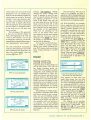
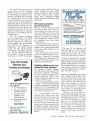
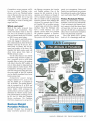
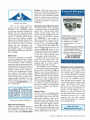
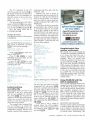
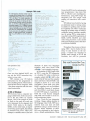
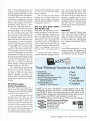
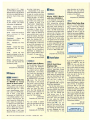
PC IR receiver looks like a PC mouse
that has been cut in half (see drawing
below). It has a cable coming out of
it with a 9-pin connector on the end.
Installing the JetEye PC couldn't
be easier - you simply plug it into the
serial port on your desktop PC (a
9-to-25 adapter is included).
Installing Jet Eye PC
I was surprised when I opened the
JetEye PC box and looked inside there wasn't much there. The JetEye
Jet Eye PC provides
infrared file transfer
A few years back Extended Systems
came out with the JetEye Infrared
Printer interface. This device connected to the parallel port of a LaserJet
printer and let 95LX users and eventually l00/200LX users set their
26 THE HP PALMTOP PAPER JANUARY / FEBRUARY 1995
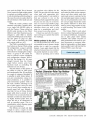
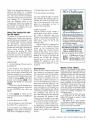
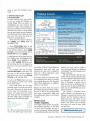
JetEye PC connects to serial port
on the back of your desktop PC
ABOUT THE AUTHOR
Al Harrington works as a Test Engineer for Hewlett Packard's Roseville Networks Division. Al works with JetDirect
products, which provide newtork printing solutions. He has
been using HP Palmtops since the 95LX first came out. Al
sings in an A Cappella Group called "Wild Pitch." AI's
CompuServe ID is {73323,1600].