1
More information on this topic can be found in the
EncoreAnywhere online user manual. Just click ‘Help’ at any
stage to be directed to relevant guides.
EncoreAnywhere Help Guide
3. Downloading SD Cards
Downloading from EncoreAnywhere
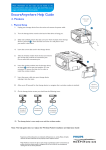
1. Navigate to the patient’s profile page, then click “Data card utilities” in the top right corner of the page.
2. With the data card inserted, the data card server will automatically search for an active card, then give you the option to
‘Download’
Note: The card reader will notify you of any inconsistent patient data prior to download that you can choose to
ignore ( 3 ).
3
2
Respironics and EncoreAnywhere are trademarks of Respironics, Inc. and its affiliates. All rights
reserved. All other trademarks are the property of their respective owners.
Philips Healthcare reserves the right to make changes in specifications and/or to discontinue any
product at any time without notice or obligation and will not be liable for any consequences
resulting from the use of this publication.