1
2.5
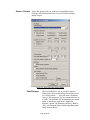
When the following message appears, choose if you
would like to register online by clicking on “Register
now on Imperx website”.
2.6
Click “Next” and then “Finish”. This completes the
software installation.
Reboot your computer.
2.7
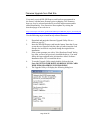
The next step is to install the driver files:
2.8
2.9
2.10
Insert the HD-SDI Express card into the laptop.
For XP:
Wait for the system to prompt you with a
“Found New Hardware Wizard” dialog box.
Proceed to Step 2.10.
For Vista:
The driver will automatically be installed.
Proceed to step 2.15.
Under certain conditions, the following message
may appear:
Page 20 of 65