1
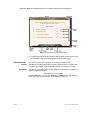
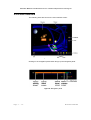
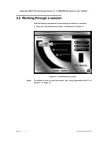
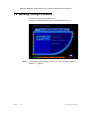
Destination MATH PC User Manual Version 4.0 2001 Riverdeep Interactive Learning Ltd. 3.2.1 Tutorial To work through a tutorial: 1 Click on the Tutorial (T) button from the tutorial/workout screen. This will open the tutorial opening screen, as illustrated in Figure 74. Figure 74 Tutorial opening screen Note: For details on using these screens, see “User interface” Section 3.2.4 page 14. 3.2.1.1 Screen display The following are the items displayed on the opening screen: MODULE The module title. UNIT The unit title. TUTORIAL The title of the chosen tutorial. LEARNING The learning objectives outlining what is to be covered in the tutorial. OBJECTIVES Wo rk in g wi th De s tin a ti o n MA TH Page 3 - 5