1
Output Framelock (x4-1U only)
The Output Framelock is intended to ease the setup of the x4-1u by setting all four outputs to the exact
same timings by replicating the the timings of the first output.
Push and hold the button for approx 3 seconds to activate the Output Framelock. (The three LEDs will
flash to indicate the operation is successful).
If the first output is set to “Use The Monitor’s Preferred Mode”, the EDID timings will be sampled from the
monitor, and written into the x4 defaults. Output 1 will then be set to “Always Use the Default Mode”.
If output 1 is set to “Always Use the Default Mode”, no action is taken on this channel.
Output 2,3 and 4 will have their timing defaults overwritten with those from Output 1 and they will also be
set to “Always Use the Default Mode”.
The onboard micro in the x4 will then enable the framelocking.
The x4 will now ignore the output monitor connections until it is changed using the x4 application.
Rear Panel
Fig.2
Sync Sockets (Not x4-1U)
The Sync sockets are provided for future genlock enhancements. They should be left unconnected.
USB Socket
The USB socket is used to connect the x4 to a PC via a USB connection using the supplied USB Type A to
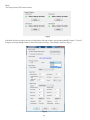
Type B cable. Configuration of the x4 is programmable via an application utility allowing easy control of
cropping, scaling, rotation and gaps.
11