1
7.5
Setting the Genlock
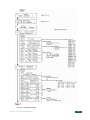
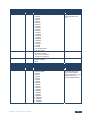
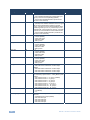
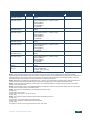
Use this menu to set genlock parameters; activation, source and timing.
To set the genlock:
7.5.1
•
Press MENU to enter the menu mode
•
Press ▼ or ▲ until SET1. GENLOCK (enter submenu) is displayed
•
Press ENTER go into the submenu
•
Press ▼ and ▲ to navigate through the submenu
Resetting the Genlock
To reset the genlock:
•
From SET1. GENLOCK FACTORY RESET, press ENTER to reset the
genlock to its factory settings
•
7.5.2
Save the new genlock using the procedure Saving Setups in Section 7.2
Activating/Deactivating the Genlock from the Genlock Menu
When the genlock is turned OFF, an internal crystal generator is used as the
reference source and all four SDI outputs run synchronously with each other.
To activate or deactivate the genlock:
7.5.3
•
Press ▼ or ▲ until SET1. Genlock State
•
Press ◄ or ► to choose the settings: OFF(FreeRun) or ON
•
Press ENTER to save the setting temporarily (until powered down)
Setting the Genlock Reference Source from the Genlock Menu
Use the genlock reference source to select either a dedicated genlock input or any
one of the four SDI inputs.
18
SP-4D - Using the SP-4D Menus