1
Contents
1 Introduction
1 2 2.1 Getting Started
Achieving the Best Performance
2 2 3 3.1 Overview
Defining the SP-4D 4-Channel HD-SDI Synchronizer
3 4 4 Installing in a Rack
7 5 5.1 Connecting the SP-4D
Connecting to the Product via RS-232
8 9 6 6.1 6.2 6.3 Operating the SP-4D
Using the LCD Display
Using the Front Panel Buttons
Using the Front Panel LEDs
10 10 11 11 7 7.1 7.2 7.3 7.4 7.5 7.6 7.7 7.8 7.9 7.10 7.11 Using the SP-4D Menus
Loading Setups
Saving Setups
Using the Factory Reset
Setting the Video Signal
Setting the Genlock
Monitoring Output
Setting the No-Signal Screen
Setting the Machine Address
Displaying Status
Setting LCD Brightness
Setting the Sleep Mode
12 15 15 15 16 18 20 21 22 22 22 23 8 8.1 Technical Specifications
Default Communication Parameters
24 24 9 Kramer Protocol 2000
25 Figures
Figure 1: SP-4D 4-Channel HD-SDI Synchronizer Front
Figure 2: SP-4D 4-Channel HD-SDI Synchronizer Rear
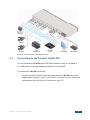
Figure 3: Connecting to the SP-4D Rear Panel
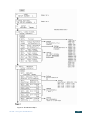
Figure 4: SP-4D Menu Map I
Figure 5: SP-4D Menu Map II
5 6 9 13 14 SP-4D – Contents
i