1
Panel Scoring – User Manual
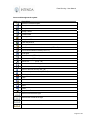
Icons used throughout the system:
Icon
Description
Maintain Potential Answers
Template Header and Details
Template users
Assign Tender
Tender Detail
Scoring
Integrate to RFx
User Maintenance
Change Password
Link Potential Answers to evaluation criteria (CTRL + E)
View linked evaluation Criteria (CTRL + V)
Find again
Add a ……….. (CTRL + A)
Edit a ……….. (CTRL + A)
Remove a ……….. (CTRL + D)
Sort the records descending
Sort the records ascending
Move to the next record (CTRL + N)
Move to the previous record (CTRL + P)
Exit Application
Help
What is new
Known Issues
Save
Undo
Drop Down Error
Move one record to the right
Move all the records to the right
Move one record to the left
Move all the records to the left
Page 3 of 22