1
BACKUP+/iX
User Manual
BACKUP/3000, BACKUP/V, BACKUP/XL, BACKUP+/XL, BACKUP+/iX, Online-BACKUP/V, OnlineBACKUP+/XL, Online-BACKUP+/iX, DELTA, Tape Manager & Librarian, Backup & Restore Wizard, and
Zero-downtime are products and trademarks of ORBiT SOFTWARE, INC., and are distributed worldwide by
the ORBiT group of companies.
NetBase is a product of Quest Software.
HP 3000, MPE, MPE V, MPE XL, MPE/iX, IMAGE, TurboIMAGE, TurboIMAGE/XL, and IMAGE/SQL, and
POSIX Shell/Library on MPE/iX are all products of Hewlett-Packard.
BACKUP+/iX © Copyright 1992 - 2005
ORBiT SOFTWARE, INC.
Printed in U.S.A.
The information in this document was correct at the time of printing. The software products described herein
may undergo changes which can only be reflected in the next edition of this manual. No warranty is therefore
undertaken that this document correctly describes the functions of all past and future versions of the software. If
in doubt, please check with your ORBiT software supplier.
This document contains proprietary information which is protected by copyright. All rights are reserved. No part
of this document may be copied or reproduced in any form without the prior written consent of your ORBiT
software supplier.
Version X6015060O
BACKUP+/iX User Manual
Offices
www.orbitsw.com
ORBiT SOFTWARE Group, Inc.
41841 Albrae Street, Suite 200
Fremont, CA 94538, U.S.A.
1 (800) 896-7248
+1 (510) 686-7913; fax +1 (510) 686.7913
[email protected]
ORBiT SOFTWARE GmbH
Rheinstraße 24
D-12161 Berlin 41, Germany
+49 (30) 859 8840, fax +49 (30) 852 7035
[email protected]
[email protected]
ORBiT SOFTWARE (UK) Ltd.
Suite B1, South House, 21-37 South Street
Dorking, Surrey RH4 2JZ, England
+44 (1306) 741 741, fax +44 (1306) 742 742
[email protected]
[email protected]
www.orbitsw.net
[email protected]
BACKUP+/iX User Manual
iii
BACKUP+/iX User Manual
v
BACKUP+/iX User Manual
Table of Contents
List Of Orbit Offices ............................................................................. iii
About This Manual ............................................................................ xvi
Installation Procedures.................................................................... xviii
Installing BACKUP+.............................................................................. xviii
Step-by-step installation...........................................................................xx
Operations Guide
1
........................... 23
Introduction....................................................................... 1-25
In this chapter ...................................................................................... 1-25
The need for backups .......................................................................... 1-25
Overview .............................................................................................. 1-25
Summary of benefits ............................................................................ 1-26
2
Program Operation ........................................................... 2-29
In this chapter ...................................................................................... 2-29
Running BACKUP+............................................................................. 2-29
Session versus batch mode................................................................. 2-31
Stopping BACKUP+............................................................................. 2-32
Issuing commands ............................................................................... 2-34
REDOing commands ........................................................................... 2-37
Invoking dependent processing ........................................................... 2-38
Online help........................................................................................... 2-41
3
Security and Access Requirements.................................. 3-43
In this chapter ...................................................................................... 3-43
Capabilities and access restrictions..................................................... 3-43
vi
BACKUP+/iX User Manual
Lockwords and user capability............................................................. 3-44
Access control definitions (ACDs) ....................................................... 3-45
File access requirements ..................................................................... 3-45
4
Backup Strategies ............................................................ 4-47
In this chapter ...................................................................................... 4-47
Backup cycles ...................................................................................... 4-47
Archival backup.................................................................................... 4-51
IMAGE and AllBase database backup................................................. 4-52
Temporary files .................................................................................... 4-54
Symbolic links backup.......................................................................... 4-54
FIFOs and streams .............................................................................. 4-54
Spool file backup.................................................................................. 4-55
Password-protected and encrypted backup ........................................ 4-55
INSTALLable backup ........................................................................... 4-56
Backups restorable onto any HPe3000 ............................................... 4-57
5
Backup Methods ............................................................... 5-59
In this chapter ...................................................................................... 5-59
Unattended backups ............................................................................ 5-60
Tape backups versus disk backups..................................................... 5-60
Deferred backups................................................................................. 5-61
Disk backups........................................................................................ 5-63
Appended backups .............................................................................. 5-65
Network backups ................................................................................. 5-67
Online and Zero-downtime™ backup ................................................... 5-68
Delta Backups...................................................................................... 5-69
6
Storing Files...................................................................... 6-71
In this chapter ...................................................................................... 6-71
Specifying files using store command syntax...................................... 6-71
Specifying files with indirect or cycle files ............................................ 6-78
Specifying backup device(s) ................................................................ 6-82
Specifying store directory handling...................................................... 6-85
vii
BACKUP+/iX User Manual
Reporting backup progress.................................................................. 6-87
Reporting on files stored...................................................................... 6-88
Selection of tapes for backups............................................................. 6-90
External tape identification labeling ..................................................... 6-91
Step-by-step tape backup guide .......................................................... 6-91
Step-by-step disk backup guide........................................................... 6-92
Store example...................................................................................... 6-93
7
Online and Zero-Downtime™ Backup ............................... 7-96
In this chapter ...................................................................................... 7-96
A comparison of standard and Online backups................................... 7-96
The synchronization point.................................................................... 7-97
Online backup operation...................................................................... 7-97
Zero-downtime™ backup ..................................................................... 7-99
Zero-downtime™ operation ................................................................ 7-102
Unattended Zero-downtime™ backup................................................ 7-106
Invoking dependent processing during an online backup.................. 7-108
Non-static files during an Online backup ........................................... 7-109
Performance considerations .............................................................. 7-111
8
DELTA Backup Module .................................................. 8-113
In this chapter .................................................................................... 8-113
Overview ............................................................................................ 8-113
Delta store operation.......................................................................... 8-114
Standard and Online Delta backups .................................................. 8-117
Restore operation .............................................................................. 8-117
Procedural notes for using the Delta module .................................... 8-118
Maximum number of concurrent Delta backup cycles....................... 8-119
Errors and exceptional conditions...................................................... 8-120
Miscellaneous Delta notes................................................................. 8-120
9
Restore Strategies .......................................................... 9-121
In this chapter .................................................................................... 9-121
Changing attributes of restored files .................................................. 9-122
viii
BACKUP+/iX User Manual
Creating nonexistent users, groups, accounts, and directories......... 9-124
Restoring files to a specified destination on disk............................... 9-125
Preserving or changing file date attributes ........................................ 9-126
Restoring IMAGE databases ............................................................. 9-127
Restoring symbolic links .................................................................... 9-127
Restoring FIFOs and streams............................................................ 9-127
Restoring spool files........................................................................... 9-128
Defragmenting during restore ............................................................ 9-128
Performing a system INSTALL .......................................................... 9-129
Restoring from a password-protected or encrypted backup.............. 9-130
Restoring onto any HPe3000............................................................. 9-131
10
Restore Methods .................................................. 10-133
In this chapter .................................................................................. 10-133
Restoring from a tape backup.......................................................... 10-133
Restoring from a disk backup .......................................................... 10-133
Restoring from an online backup ..................................................... 10-134
Restoring from an appended backup............................................... 10-134
Restoring over a network ................................................................. 10-135
Restoring with the TML Restore Wizard .......................................... 10-136
11
Restoring Files...................................................... 11-143
In this chapter .................................................................................. 11-143
Identifying backups for a restore...................................................... 11-143
Identifying tapes for a restore .......................................................... 11-144
Specifying files using restore command syntax............................... 11-146
Specifying files in an indirect file...................................................... 11-151
Specifying restore device(s) ............................................................ 11-152
Specifying store directory handling.................................................. 11-153
Reporting restore progress .............................................................. 11-154
Reporting on files restored...............................................................11-154
Overwriting existing files .................................................................. 11-156
Step-by-step tape restore guide ...................................................... 11-158
Step-by-step disk backup restore guide .......................................... 11-159
Restore example..............................................................................11-160
ix
BACKUP+/iX User Manual
12
Labeled Tapes ...................................................... 12-162
In this chapter .................................................................................. 12-162
Introduction ...................................................................................... 12-162
MPE/iX labeled versus BACKUP+-labeled tapes ............................ 12-163
Using BACKUP+ proprietary labeled tapes ..................................... 12-163
Using BACKUP+'s ANSI-labeled tapes ........................................... 12-166
Considerations for appended backup .............................................. 12-167
Labeled tapes and the Tape Manager & Librarian .......................... 12-168
13
Backup Devices .................................................... 13-169
In this chapter .................................................................................. 13-169
Considerations for various backup device types ............................. 13-169
Supported backup device types....................................................... 13-171
Automatic :REPLY to console tape mount requests........................ 13-173
Using multiple backup devices ........................................................ 13-174
Duplicating a backup from one device to another ........................... 13-180
14
ORBiT Library Manager ........................................ 14-182
In this chapter .................................................................................. 14-182
Overview .......................................................................................... 14-182
Basic OLM setup procedures .......................................................... 14-186
More OLM CI Commands ................................................................ 14-191
Using BACKUP+/iX commands with the OLM parameter ............... 14-196
Exception Handling .......................................................................... 14-199
Validation Procedure........................................................................ 14-204
Limitations and Restrictions............................................................. 14-204
15
Ensuring Reliable Backups................................... 15-207
In this chapter .................................................................................. 15-207
Detecting and handling tape errors.................................................. 15-207
Recovering data from a bad tape ....................................................15-209
Validating backups........................................................................... 15-209
x
BACKUP+/iX User Manual
Determining backup contents using LISTDIR.................................. 15-210
16
Maximizing Performance ...................................... 16-213
In this chapter .................................................................................. 16-213
Improving the backup method ......................................................... 16-213
Reducing the number of files to be stored ....................................... 16-214
Using data compression .................................................................. 16-214
Adjusting store optimization............................................................. 16-215
Increasing the number of store processes....................................... 16-216
Maximizing tape block size .............................................................. 16-217
Using a filebuffer .............................................................................. 16-218
Not locking store bits........................................................................ 16-218
Using multiple backup devices ........................................................ 16-218
Using fast backup devices ............................................................... 16-218
17
Tape Manager & Librarian .................................... 17-220
In this chapter .................................................................................. 17-220
An overview of TML ......................................................................... 17-220
Cycles .............................................................................................. 17-221
Generations ..................................................................................... 17-226
Tapes and Pools .............................................................................. 17-232
Backup Schedule Management....................................................... 17-242
Tape Identification Labels................................................................ 17-244
File Register..................................................................................... 17-248
Configuration.................................................................................... 17-254
Storing with Tape Manager & Librarian ........................................... 17-257
Restoring with TML Restore Wizard ................................................ 17-260
Reference Guide
18
............................. 267
BACKUP+ Commands.......................................... 18-269
In this chapter .................................................................................. 18-269
Syntax conventions.......................................................................... 18-269
xi
BACKUP+/iX User Manual
BACKUP+ command list.................................................................. 18-269
COPY...............................................................................................18-270
DO....................................................................................................18-283
DUMP ..............................................................................................18-285
EXIT ................................................................................................. 18-297
FULLBACKUP ................................................................................. 18-297
HELP................................................................................................18-298
LISTDIR ........................................................................................... 18-301
LISTREDO ....................................................................................... 18-310
PARTBACKUP................................................................................. 18-310
PURGE ............................................................................................ 18-311
READALL......................................................................................... 18-312
REDO...............................................................................................18-321
RESTORE........................................................................................ 18-323
STORE............................................................................................. 18-368
19
Tape Manager & Librarian Commands................. 19-410
In this chapter .................................................................................. 19-410
Syntax conventions.......................................................................... 19-410
TML Wizard command list ............................................................... 19-411
ADD FILE......................................................................................... 19-411
ADD TAPE ....................................................................................... 19-412
CHANGE TAPE ............................................................................... 19-414
DEFAULT CYCLE............................................................................ 19-415
DEFAULT TAPE .............................................................................. 19-417
DELETE CYCLE ..............................................................................19-419
DELETE TAPE................................................................................. 19-419
LABEL CYCLE................................................................................. 19-420
LABEL TAPE ................................................................................... 19-421
PREVIEW CYCLE ........................................................................... 19-421
SCRATCH CYCLE........................................................................... 19-422
SCRATCH FILE ...............................................................................19-423
SHOW CONFIG............................................................................... 19-424
SHOW CYCLE................................................................................. 19-424
SHOW FILE .....................................................................................19-426
SHOW POOL................................................................................... 19-428
SHOW TAPE ................................................................................... 19-429
xii
BACKUP+/iX User Manual
20
OLM Command Line Interface Commands .......... 20-431
In this chapter .................................................................................. 20-431
Syntax conventions.......................................................................... 20-431
OLM CI command list ...................................................................... 20-432
OLM CI Parameter Definitions.........................................................20-432
ADD.................................................................................................. 20-433
CONNECT ....................................................................................... 20-433
DEFAULT......................................................................................... 20-434
EXIT ................................................................................................. 20-434
DELETE ........................................................................................... 20-434
EXPORT ..........................................................................................20-434
IMPORT ........................................................................................... 20-435
LIST.................................................................................................. 20-436
LOAD ...............................................................................................20-437
MOVE .............................................................................................. 20-437
OFFLINE.......................................................................................... 20-438
ONLINE............................................................................................ 20-438
QUIT................................................................................................. 20-438
RENAME.......................................................................................... 20-438
SET DRIVE ...................................................................................... 20-439
UNLOAD .......................................................................................... 20-439
UNLOCK .......................................................................................... 20-440
VALIDATE........................................................................................ 20-441
21
Programs, Command Files, and Scripts ............... 21-442
In this chapter .................................................................................. 21-442
Summary list .................................................................................... 21-442
Programs, Command Files, and Scripts descriptions...................... 21-443
22
JCWs .................................................................... 22-449
In this chapter .................................................................................. 22-449
Input and output JCWs .................................................................... 22-449
Job Control Words summary ........................................................... 22-450
xiii
BACKUP+/iX User Manual
Job Control Words descriptions.......................................................22-452
23
Files and File Designators .................................... 23-465
In this chapter .................................................................................. 23-465
BACKUP+ files and file designators summary ................................ 23-465
BACKUP+ files and file designator descriptions.............................. 23-466
24
Reports ................................................................. 24-471
In this chapter .................................................................................. 24-471
File Status ........................................................................................24-472
Online Status ...................................................................................24-472
Restore Status ................................................................................. 24-473
Restore Tape Status ........................................................................ 24-474
SHOW listing....................................................................................24-474
Store Status .....................................................................................24-477
Store Tape Status ............................................................................24-478
Tape Manager & Librarian reporting features.................................. 24-479
DEFAULT CYCLE............................................................................ 24-484
DEFAULT TAPE .............................................................................. 24-485
PREVIEW CYCLE ........................................................................... 24-485
SHOW CONFIG............................................................................... 24-486
SHOW CYCLE................................................................................. 24-487
SHOW FILE .....................................................................................24-491
SHOW POOL................................................................................... 24-491
SHOW TAPE ................................................................................... 24-492
25
Maintenance ......................................................... 25-494
In this chapter .................................................................................. 25-494
Resetting the internal prior backup date .......................................... 25-494
TMLDB dataset capacities............................................................... 25-495
TMLDB run-time parameters ........................................................... 25-496
26
Error Handling....................................................... 26-497
xiv
BACKUP+/iX User Manual
In this chapter .................................................................................. 26-497
Completion JCWs ............................................................................ 26-498
Tape errors and retries during store and restore............................. 26-498
Restoring a file with an error............................................................ 26-499
Disk I/O errors.................................................................................. 26-499
Tape drive errors..............................................................................26-499
System aborts .................................................................................. 26-500
Internal errors................................................................................... 26-500
TML tape identification labeling errors............................................. 26-500
Inconsistent TML generation ........................................................... 26-500
Restored TMLDB database ............................................................. 26-501
TML file register inconsistency ........................................................ 26-502
TMLDB database inconsistency ...................................................... 26-502
Glossary .......................................................................................... 503
In this glossary ...................................................................................... 503
Index................................................................................................ 513
xv
About this manual
About This Manual
Organization
This manual is organized into three major sections:
The beginning pages
These include the title pages, a List of ORBiT Offices, Table of Contents, About This Manual, and Installation
Procedures, which indicate how to install or reinstall the BACKUP+/iX package.
BACKUP+/iX Operations Guide
How to use the BACKUP+/iX package, including strategies and methods for storing and restoring files, using
labeled tapes, information about tape drives, ensuring reliable backups, and maximizing performance. Tips and
techniques for optimizing backup operations are given where appropriate. Functions of the BACKUP+/iX
package are organized by topic, and examples are included throughout.
BACKUP+/iX Reference Guide
Reference information for utilizing the BACKUP+/iX package and the Tape Manager & Librarian module,
including commands, JCWs, files, programs, reports, and error handling. Functions are organized by command
name, JCW name, program name, etc., alphabetically within their respective chapters. Also included is a
glossary and an index.
Conventions
The following conventions are used throughout this manual:
•
The BACKUP+/iX package is referred to as “BACKUP+”.
•
The Tape Manager & Librarian module, identified in the BACKUP+ banner as the Wizard module, is
generally referred to in this manual as “TML” and sometimes as the “Restore wizard”.
•
IMAGE, TurboIMAGE, TurboIMAGE/XL, and IMAGE/SQL are all referred to as “IMAGE”, since they are all
versions of the same package and are treated in the same manner by the BACKUP+/iX package.
•
MPE/iX commands are prefixed by a colon (“:”), the MPE/iX prompt, to avoid confusion with BACKUP+
commands and options of the same names. The user should not type the colon when inputting MPE/iX
commands.
•
Information which is not generally applicable but is important in specific cases is prefixed with “Note:”.
•
All examples of user input and program output are enclosed in boxes, with user input displayed in boldface
type.
•
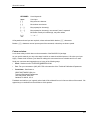
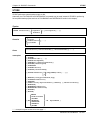
Syntax conventions
xvi
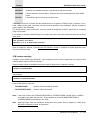
About this manual
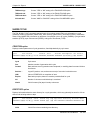
KEYWORD
Literal keywords
Input
User input
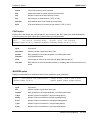
[ ]
May select one element
{ }
Must select one element
[...]
May repeat prior element(s)
[, . . . ]
May repeat prior element(s); use comma if parm is repeated
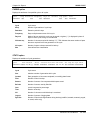
...
Must enter certain prior element(s); may enter others
[±]
“ + “ or “ – "
All keywords and user input are required, unless enclosed within bracket ( “[ ]" ) characters.
Bracket ( “[ ]” ) characters are not input as part of the command, unless they are shown quoted.
Future revisions
Let us know what you think about our documentation of the BACKUP+/iX package.
As you use this manual, you may notice ways in which our manual could be improved. We value your input
highly. Please do tell us about your ideas for making this user manual a more valuable tool for our users.
Send your comments and suggestions to us in any of the following ways:
•
Email - Send an email to [email protected].
•
Fax - Fax your comments to (925) 837-5752 to the attention of the Technical Publications Department.
•
Postal letter - Send letter to:
ORBiT SOFTWARE (USA) Inc.
Technical Publications Department
1300 Clay Street, Suite 600
Oakland, CA 94618, U.S.A.
Feedback received from you is greatly valued and will be collected for use in future revisions of the manual. We
appreciate your contribution to the excellence of this product.
xvii
BACKUP+/iX User Manual
Installation Procedures
BACKUP+ is shipped on a DDS cartridge or other requested media.
All BACKUP+ installations include the optional Tape Manager & Librarian module: either a demonstration copy if
not purchased, or a permanent copy if purchased
Installing BACKUP+
The BACKUP+/iX package is installed into the ORBIT account through the installation program,
ORBINSTP.PUB.SYS, which performs some installation tasks and then streams two jobs to complete the
installation.
The ORBINSTP.PUB.SYS program:
•
Creates the ORBIT account if it does not already exist.
•
Creates the MGR.ORBIT user as account manager if this has not already been done.
•
Restores the files from the installation tape.
The jobs streamed by ORBINSTP include:
•
Logging on as MGR.ORBIT
•
Creating additional groups in the ORBIT account when those groups are not found there
•
Transferring files from PUB.ORBIT (the PUB group of the ORBIT account) into other groups unless they
already contain those files
•
Creating the TMLDB database from a supplied schema if it has not already been created
•
Setting up the BACKUPPL program
•
Setting a User Defined Command (UDC) to make using BACKUP+ easier
To assure that installation is not left in an incomplete state, the break key is disabled during the operation of the
installation program, ORBINSTP.
Note:
The installation procedure uses the DBUTIL program (to create the TMLDB database). If a lockword
has been placed on DBUTIL, it must be removed before starting the installation. The lockword must be
reset when installation is complete.
The installation procedure for a new installation of BACKUP+/iX is slightly different than for an existing
installation. Existing installations contain certain ORBiT-supplied files that, along with updates, should be
retained.
xviii
Installation Procedures
New installation
All files are restored into the PUB group of the ORBIT account, that is, PUB.ORBIT. The CYCLE and DATA
groups are created for the Tape Manager & Librarian, and files are renamed into these groups. Password
prompts are presented for both the ORBIT account and for the MGR.ORBIT user.
Existing installation
All files are restored into PUB.ORBIT. If the ORBIT account already exists, its capabilities and access rights are
reset to their ORBiT-defined default values following installation. The existing ORBIT account password and
MGR.ORBIT user password are preserved. Therefore no password prompt is displayed.
If the CYCLE and DATA groups do not exist, they are created, and the Tape Manager & Librarian files are
installed into these groups.
If the CYCLE and DATA groups do exist, it is assumed that this installation is for an existing Tape Manager &
Librarian, and all information is preserved. All existing CYCLE and DATA files are retained; files on the
installation tape that have the same names as existing files in the CYCLE and DATA groups are left in the PUB
group.
Also for an existing installation, the internal prior backup date is preserved (for use by the PARTBACKUP
command and the GETDATE option of the STORE command). The installation program looks for the prior
backup date in the ORBIT account; if not found, it checks the IJG account (an account into which BACKUP+
was formerly installed).
Depending on the version of the BACKUP+/iX package you are installing, it may be necessary to convert the
TML database or perform other functions. If so, these tasks are either performed automatically as part of
installation, or separate installation instructions are provided.
xix
Installation Procedures
Step-by-step installation
Follow these step-by-step instructions for installation of the BACKUP+/iX package with its Tape Manager &
Librarian module:
1. Mount the BACKUP+ installation tape.
2. Log on as MANAGER.SYS into the PUB group:
:HELLO MANAGER.SYS,PUB
3. Restore the installation program into PUB.SYS:
:FILE T;DEV=TAPE
:RESTORE *T;@.@;LOCAL;SHOW
4. Put the tape drive back online, and run the ORBINSTP program:
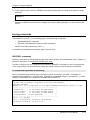
:RUN ORBINSTP
5. The installation program will prompt for a selection of the installation dialog language, the tape drive to use,
and passwords for the ORBIT account and the MGR.ORBIT user. Respond to these prompts as requested.
Installation proceeds automatically and displays a message upon completion of the installation program and
its job streams.
The Tape Manager & Librarian is set up to accommodate, by default, a mid-sized HPe3000 site
•
500 tapes
•
30,000 files, of which 5% are POSIX files with pathnames longer than 28 characters
•
If these values are insufficient, they may be changed. Refer to Chapter 25, Maintenance, in the
BACKUP+/iX Reference Guide for a discussion.
xx
Installation Procedures
xxi
BACKUP+/iX User Manual
BACKUP+/iX
Operations Guide
Chapter
1
BACKUP+/iX Operations Guide
Introduction
In this chapter
BACKUP+/iX is introduced with the following topics:
•
The need for backups
•
Overview
•
Summary of benefits
•
General features
•
Operational features
•
Reporting features
The need for backups
System backups mean regularly copying the information stored in the system to backup media. For the vast
majority of backups, the data stored to tape is never restored–it is simply overwritten with a new backup at a
later time. Backups generally exist as a measure of protection in case something goes wrong: a catastrophic
system crash or major failure, a disaster in the computer room, or a careless user purging or overwriting a
particularly important file.
Backups are also used to archive data, or as a convenient and inexpensive mechanism for distributing data and
software to other systems and sites.
Archiving involves backing up data that is no longer needed for online access but which may someday be
required. For this purpose, files are usually backed up to tape for long-term storage and then purged.
Overview
The BACKUP+/iX package is a high performance backup utility which replaces the MPE/iX :STORE and
:RESTORE commands and the DBSTORE program which are used in the performance of system backups.
BACKUP+ minimizes or eliminates the need for operator intervention in performing backups, and reduces the
amount of time and system resources required for backups. It improves upon the MPE-supplied utilities in
several areas:
•
By using special compression techniques, BACKUP+ reduces the amount of time and storage media
needed for backup. Either a 2:1, 2.5:1 or 4:1 compression algorithm may be used. Tape savings can be up
to 80%, with time savings of 70% or more.
BACKUP+/iX User Manual
1-25
Chapter 1 Introduction
•
Unattended backups may be performed using various methods: compression, to reduce media
requirements; deferred backup, using disk for temporary storage of data that does not fit on tape; disk
backup, with later dump to tape when convenient; backup to multiple tape drives; and multiple backups
appended to a single tapeset.
•
A unique, Zero-downtime™, online, backup functionality permits users to access files normally for both read
and write purposes while those files are being stored. A special logging function ensures file integrity and a
complete and accurate backup.
•
An exclusive set of features, called the Wizard module (available with BACKUP+’s Tape Manager &
Librarian), automates most of the manual operations associated with backup and adds additional
intelligence and automation to backups and restores.
Summary of benefits
In short, BACKUP+ greatly reduces the time, resources, and inconvenience traditionally associated with
backups.
•
Permits reliable backups to be performed while users continue to work normally with unrestricted access to
files during the backup.
•
Reduces the overall time required for backups, thereby increasing system availability.
•
Shrinks tape requirements through data compression.
•
Minimizes operations requirements through faster, unattended, and appended backup functionality.
•
Eliminates the need to use :DBSTORE for IMAGE databases.
•
Provides a method for backing up the system volumeset directory and the directories of nonsystem
volumesets, eliminating the need to use :STORE.
•
Eliminates the need for separate backups to volumeset by providing greater flexibility in storing and
restoring by volumeset.
•
Simplifies the archiving (storing and purging) of seldom used or unused files.
•
Facilitates automated, consistent, and documented backups.
•
Makes possible the use of multiple backup devices for store and restore.
•
Recovers data from bad tapes.
•
Secures data stored on tapes through data encryption.
General features
•
Simple to integrate, learn, and operate; syntactically consistent with MPE/iX :STORE and :RESTORE.
•
Contains an extensive online help facility.
•
Extended command set and included utility programs provide robust functionality and controls.
•
Special internal error recovery functions add security and reliability by validating tape media and recovering
data from bad tapes.
•
Backups can be restored onto any HPe3000 system, including those that are not licensed to use BACKUP+.
BACKUP+/iX User Manual
1-26
Chapter 1 Introduction
Operational features
•
Stores multiple IMAGE databases to a single tapeset as part of a regular backup, while retaining
compatibility with transaction logging recovery.
•
Performs backups to tape or disk, using disk for either temporary or permanent storage; permanent disk
backups can be dumped to tape when convenient.
•
Uses up to 64 backup devices for store and restore.
•
Powerful selection options permit files to be selected by wildcard, range, multiple global and local exclusion,
date and time of creation, access, or modification, and file type.
•
Data compression effectiveness may be adjusted to maximize performance.
•
Backups may be encrypted for greater security using either a fast proprietary algorithm or the DES-standard
algorithm.
•
Provides the ability to store and restore by volumeset, and can restore individual volumesets from any
backup (including those that contain all volumesets).
•
Multiple backups may be appended to the same tapeset.
•
Backups may be performed over a network.
•
Full and partial backups are automated by internally saving the date and time of the full backup and using it
for subsequent partial backups.
•
Permits a backup to be duplicated by copying between multiple backup devices.
•
Can automatically :REPLY to backup devices that are not configured as autoreply.
Reporting features
•
Frequent progress messages indicate percentage of backup and restore
completion. independently for each tape volume used in the backup.
•
Reports error and retry counts
•
On store, reports the number of files based on file type and last modification, as well as the amount of disk
space they consume.
•
Reports and sets JCWs for the number of files stored and not stored, for accumulated errors and retries,
and for other backup attributes.
•
Displays a message indicating the specific reason that a file cannot be stored or restored.
•
Lists the contents of a store volumeset on demand.
•
Validates a store volumeset for reliability on demand.
BACKUP+/iX User Manual
1-27
Chapter 1 Introduction
BACKUP+/iX User Manual
1-28
Chapter
2
BACKUP+/iX Operations Guide
Program Operation
BACKUP+ is installed in PUB.ORBIT and is run as a command-driven program on the HPe3000.
In this chapter
Find information on these topics:
•
Running BACKUP+ from a session, in batch mode, and with TML
•
Session versus batch mode
•
Stopping BACKUP+
•
Issuing commands
•
REDOing commands
•
Invoking dependent processing
•
Online help
The following commands and options are discussed within the topics above.
•
The HELP, EXIT, and REDO commands
•
The ON option of the STORE command
Running BACKUP+
BACKUP+ can be run in either interactive mode or immediate mode from a session, or it can be run in batch
mode from a job stream. If the Tape Manager & Librarian module (TML) is installed, it is automatically loaded
when BACKUP+ is run.
To run BACKUP+ from a session, simply log on, and :RUN the program:
:HELLO OPERATOR.SYS
:RUN BACKUPPL.PUB.ORBIT
Note:
“Execute” file access to the BACKUPPL program is required.
BACKUP+/iX User Manual
2-29
Chapter 2 Program Operaton
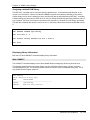
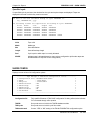
When BACKUP+ is invoked, a banner identifying the product name and version is displayed:
:RUN BACKUPPL.PUB.ORBIT
BACKUP+/iX 6.63 (c)Copyright 1991-01 ORBiT SOFTWARE HOLDING AG 25Sep01 08:48am
Wizard module 3.48 (c)Copyright 1990-01 ORBiT SOFTWARE HOLDING AG
+------------------------------------------------+
! BACKUP+/iX
: IS VALIDATED
!
! Online module : IS VALIDATED
!
! Delta module : IS VALIDATED
!
! Wizard module : 65 DAYS LEFT IN DEMO PERIOD
!
+------------------------------------------------+
Interactive mode
In interactive mode, as many commands as desired may be specified at the BACKUP+ prompt (“>“).
The EXIT command is issued to terminate the program:
:RUN BACKUPPL.PUB.ORBIT
>BACKUP+ command
>BACKUP+ command
...
>EXIT
Immediate mode
In immediate mode, only a single BACKUP+ command with its related options may be passed through
BACKUP+’s INFO string:
:RUN BACKUPPL.PUB.ORBIT;INFO="BACKUP+ command"
Once the command is executed, BACKUP+ automatically terminates.
Batch mode
To run BACKUP+ in batch mode from a job stream, create a standard batch job:
!JOB FULLB,OPERATOR.SYS
!FILE T;DEV=TAPE
!RUN BACKUPPL.PUB.ORBIT
STORE @.@.@;*T
EXIT
!EOJ
The BACKUP+ installation tape includes several job streams for performing backups that generally automate
and secure the backup function.
BACKUP+/iX User Manual
2-30
Chapter 2 Program Operaton
ORBiT-supplied job streams can be customized for use in any environment. If modifying job streams, it is
recommended that the modified versions be placed in an account other than ORBiT to prevent them from being
overwritten on an update or reinstallation of BACKUP+.
Tape Manager & Librarian
When BACKUP+ is run, TML, if installed, is automatically loaded. (The program TML.PUB.ORBIT, also called
the Wizard module, is supplied to all customers with the installation demo. But if this program is expired or not
present in the BACKUPPL group, the Tape Manager & Librarian features will not be available.)
If TML is active, and is configured (using TMLCONF) to automatically scratch backup generations and their
related tapes, scratching is done as soon as BACKUP+ is invoked. This frees up as many tapes as possible
before any new backup is performed.
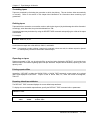
A message like the following is displayed for each generation of every cycle that is scratched.
Scratching generation 93 of cycle PART ...
Scratching generation 27 of cycle FULL ...
completed
completed
If the file register is being maintained, additional messages are displayed when the process that excludes file
information for scratched files starts and completes:
Excluding file information for scratched backup generation(s) ...
... file information exclusion completed
The file register records information for files contained on all backups.
Refer to Chapter 17, Tape Manager & Librarian, for complete information about TML.
Session versus batch mode
Backups may be invoked from a session or in batch from a job stream. When using BACKUP+, batch jobs are
recommended instead of sessions, because batch jobs:
•
Free the console or terminal for use during stores and restores
•
Are quicker than keying in commands every time a backup is performed
•
Organize BACKUP+ for automatic or semi-automatic operation
•
Make backup procedures consistent from day to day
•
Allow system managers control over BACKUP+ commands
•
Improve security
•
Produce output listings that can be used as an audit trail
•
Are convenient for linking the backup to other processes
•
Allow for automatic system tuning and other system settings
•
Allow for scheduling of backups during off-hours
BACKUP+/iX User Manual
2-31
Chapter 2 Program Operaton
•
Provide for better error detection and handling
•
Help ORBiT Technical Support in troubleshooting problems
Stopping BACKUP+
The user normally exits BACKUP+ when the operation is completed, but the operation may also be aborted
before completion.
Exiting
To exit BACKUP+ normally, use the EXIT command:
>EXIT
Aborting
BACKUP+ can be aborted at any time. BACKUP+ termination can take several minutes once an abort is
requested. This is because substantial clean up processing may have to be performed (e.g., unlocking store
bits, releasing system resources, etc.).
When aborting BACKUP+, one or more actions may be necessary to cause BACKUP+ to terminate.
Perform each step listed below to stop BACKUP+ from a session. The steps used in aborting a batch job are
presented following this section. Only continue to the next step if the current step does not work.
Aborting BACKUP+ from Session mode
If running BACKUP+ from a session:
1. If BACKUP+ is waiting for a :REPLY for the tape drive, issue a :REPLY of 0:
:REPLY 143,0
2. If BACKUP+ is not waiting for a :REPLY, hit the BREAK key, and type the :ABORT command:
:ABORT
3. If BACKUP+ has requested that a tape volume be mounted, mount the correct volume, and check that the
tape is online, successfully mounted and available for use.
BACKUP+/iX User Manual
2-32
Chapter 2 Program Operaton
4. At the system console, issue the :ABORTIO command, specifying the ldev number of the tape drive being
accessed:
:ABORTIO 7
Repeat the :ABORTIO command until a message is returned indicating that there is no I/O to abort for the
device.
5. Issue an :ABORTIO to the terminal from which BACKUP+ was run:
:ABORTIO 110
Repeat the :ABORTIO command until there is no I/O to abort for the device.
6. Abort the session using the :ABORTJOB command:
:ABORTJOB #S27
Note:
If running BACKUP+ from the system console, it may be necessary to issue a CONTROL-A sequence
before issuing these commands.
Aborting BACKUP+ from batch mode
If running BACKUP+ in batch from a job stream:
1. If BACKUP+ is waiting for a :REPLY for the tape drive, issue a :REPLY of 0 (zero):
:REPLY 143,0
2. If BACKUP+ is not waiting for a :REPLY, issue an :ABORTJOB command for the job stream:
:ABORTJOB #J30
3. If BACKUP+ has requested that a tape volume be mounted, mount the correct volume and place it online.
BACKUP+/iX User Manual
2-33
Chapter 2 Program Operaton
3. At the system console, issue the :ABORTIO command specifying the ldev number of the tape drive being
accessed:
:ABORTIO 7
Repeat the :ABORTIO command until a message is returned indicating that there is no I/O to abort for the
device.
Issuing commands
At the BACKUP+ prompt (“>”), the following types of commands may be specified:
•
Standard BACKUP+ commands.
•
BACKUP+ Tape Manager & Librarian module commands.
MPE/iX commands, prefixed by a colon (“:”).
Commands are automatically converted to upper case upon entry.
BACKUP+ commands
BACKUP+ commands are documented throughout this manual by topic, and in alphabetical order in Chapter 18,
BACKUP+ Commands, in the BACKUP+/iX Reference Guide.
Provision is made for use of CI variables and expressions in BACKUP+ commands, for use of commands that
are so long that they must be continued on a lower line, and for entering comments into the command line.
CI variable and expression dereferencing
MPE CI variables and expressions may be input as any part of any Backup+ command. CI variables are
identified by the standard CI ‘!’ prefix character. Expressions are identified using the CI’s standard ‘![…]’ syntax.
BACKUP+ interpretation of CI variables is compatible with the MPE/iX CI.
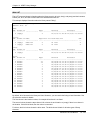
PUS>PUB: setvar Mondays 'Progress=1;Directory;Label=Monday'
OPUS>PUB: backuppl
BACKUP+/iX 6.63 (c)Copyright 1991-01 ORBiT SOFTWARE HOLDING AG 15Oct01 04:24pm
+------------------------------------------------+
! BACKUP+/iX
: 72 DAYS LEFT IN DEMO PERIOD
!
! Online module : 72 DAYS LEFT IN DEMO PERIOD
!
! Delta module : 72 DAYS LEFT IN DEMO PERIOD
!
! Wizard module : IS NOT INSTALLED
!
+------------------------------------------------+
>Store /;*t;!Mondays
Store /;*t;Progress=1;Directory;Label=Monday
Building intermediate scratch files ...
BACKUP+/iX User Manual
2-34
Chapter 2 Program Operaton
If ‘!’ precedes a token that is not a defined CI variable, execution continues compatibly with prior BACKUP+
releases. Hence users may continue to use ‘!’ to identify indirect filesets or TML cycle names. If a CI variable is
defined with the same name as an indirect file, BACKUP+ will select the indirect file for the substitution.
OPUS>PUB: listfile in#
FILENAME
IN2
OPUS>PUB: backuppl
BACKUP+/iX 6.63 (c)Copyright 1991-01 ORBiT SOFTWARE HOLDING AG 15Oct01 04:31pm
+------------------------------------------------+
! BACKUP+/iX
: 72 DAYS LEFT IN DEMO PERIOD
!
! Online module : 72 DAYS LEFT IN DEMO PERIOD
!
! Delta module : 72 DAYS LEFT IN DEMO PERIOD
!
! Wizard module : IS NOT INSTALLED
!
+------------------------------------------------+
>store !IN2;bac2
Building intermediate scratch files ...
NOTE: Previously, ‘!HPTIMEF’ would be dereferenced when the ON event occurred; it will now be dereferenced
when the STORE commend itself is executed. To list the time of the event itself, users should replace ‘!’ with
‘!!’.
>Store /;*t;Online;ON released DO ‘Tellop Release occurred at !!HPTIMEF’
The following example will automatically perform a full backup on Saturday, and a partial backup on all other
days.
!job backjob,operator.sys
!if hpday=7 then
! # Saturday
! setvar storetype 'fullbackup'
!else
! setvar storetype 'partbackup'
!endif
!file tapedev; dev=tape
!run backuppl.pub.orbit
!storetype *tapedev
exit
!eoj
Long commands
BACKUP+ commands that cannot fit on a single line may be continued on additional lines by appending an
ampersand (“&”) to the end of each line, for example:
BACKUP+/iX User Manual
2-35
Chapter 2 Program Operaton
>STORE T00007.PROD.UTILITY,B47300A.PROD.UTILITIES,T4230.PROD.UTILITIES,&
>L32700.PROD.UTILITY;*T;SHOW=DATES,SECURITY
When an ampersand is typed in at the end of a line and followed by RETURN, BACKUP+ reissues its “>”
prompt for additions to the command line entry. The command is not interpreted until RETURN is hit at the end
of a line with no trailing ampersand.
The maximum command line length for BACKUP+ commands is 1024 bytes.
Embedded comments in commands
Comments may be embedded in any BACKUP+ command by enclosing them in curly braces, "{ }".
For example, the following entry would not back up the files @[email protected].
>STORE @[email protected],{@[email protected],}@[email protected];*T
To designate an entire line as a comment or to specify an end-of-line comment, exclude the closing brace. For
example, the following entry would insert a comment line before the STORE command.
>{Perform a partial backup :
>STORE @.@.@;*T;GETDATE;SHOW
Tape Manager & Librarian commands
TML commands form an extended set of BACKUP+ commands and are issued at the normal BACKUP+
prompt, just like any other BACKUP+ commands. TML commands are documented in Chapter 19, Tape
Manager & Librarian Commands, in the BACKUP+/iX Reference Guide.
Executing MPE/iX commands from BACKUP+
MPE/iX commands may be executed from within BACKUP+ by prefixing them with a colon (“:”), for example:
>:FILE T;DEV=TAPE
BACKUP+/iX User Manual
2-36
Chapter 2 Program Operaton
REDOing commands
BACKUP+’s REDO and LISTREDO commands permit BACKUP+ commands to be re-executed and optionally
edited. These commands operate in a similar way to equivalent MPE/iX commands. REDO presents the last
command, and LISTREDO lists the last few commands and provides a numerical identifier that can be used with
the DO or REDO commands.
When the REDO command is issued, with or without parameters, the last BACKUP+ command is displayed with
the cursor positioned in the first column of the next line. If the command length exceeded 60 characters, it is
divided into 60-character segments.
To re-execute the last BACKUP+ command, type REDO, and hit RETURN twice.
Editing commands with REDO
To edit a recently executed BACKUP+ command, type REDO and press RETURN for the last command, or type
REDO and the command number (seen by previously entering LISTREDO), and hit RETURN.
The previously entered command line is displayed with the cursor positioned on the next line below.
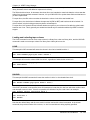
:REDO
STORE @.PUB.SYS;*T;SHOW=LONG
To append a single character to the end of the command line, type the greater-than character (">"), then the
desired character, and press RETURN.
To edit the command or command segment, move the cursor (using the space bar) to the desired position under
the first letter of the command segment to be changed. Then use the following constructs to modify the
command.
Command editing constructs
D
Deletes the character just above the “D”. One or more “D”s may be entered to delete
one or more characters.
I string
Inserts the string immediately following the “I” before the character above the “I”.
R string
Replaces the character string starting from the character above the “R” with the
character string typed in immediately following the “R”. Characters in the original string
are replaced, one-to-one, by characters in the replacement string.
DE
Deletes the string from the character above the “D” through the end of the current line.
string
If a string that does not begin with a “D”, “R”, or “I” is specified, it replaces the string
above it (as if “R” had been specified).
To Exit Editing mode in REDO
Editing continues if at least one character is entered before hitting RETURN. Hitting RETURN without entering
any character completes editing and displays the next command segment for editing. If the current segment is
the last segment of a command, editing is completed and the modified command is executed.
BACKUP+/iX User Manual
2-37
Chapter 2 Program Operaton
Example of editing with REDO
For example, to change the SHOW format from LONG to SHORT, enter REDO at the prompt. The cursor
moves to the line under the newly displayed command. Press the space bar to move the cursor to the spot
under the letter where you want to start editing. Type the editing construct, any replacement characters, one or
more of the special characters described below, and press RETURN.
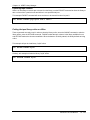
>STORE @.PUB.SYS;*T;SHOW=LONG
>REDO
STORE @.PUB.SYS;*T;SHOW=LONG
RSHORT
Special REDO editing characters
After editing the command, one or more of the following special characters may be specified before hitting
RETURN:
!
Completes editing and executes the command, even if more command segments have not
been displayed. This is useful when necessary editing has been done and no further editing to
any subsequent segments is required.
/
Restarts the editing function and returns to the first segment of the command, while preserving
modifications that were already made.
//
Aborts the redo operation without executing the command.
>
Appends a single character to the command line.
Invoking dependent processing
BACKUP+ is capable of dependent processing, using the STORE command with specific options. This involves
performing an indicated action upon the occurrence of a pre-defined event.
The following list matches STORE command options with corresponding occurrences, recognized as “events”,
that’ will trigger other actions.
Events
STORE options
The storing of a specified file
ON FILE
The occurrence of an error
ON ERROR
Each tape volume change
ON VOLUME
The completion of the backup
ON RELEASED
The start of the waiting period for an operation with
an explicitly delayed synchronization point
ON SYNCWAIT
The point when user interruption begins
ON SUSPEND
The synchronization point
ON SYNCPOINT
BACKUP+/iX User Manual
2-38
Chapter 2 Program Operaton
On storing a file
BACKUP+ can perform an action once a specified file has been stored, when the filename has been indicated in
the ON FILE option of the STORE command.
The filename entry may include wildcards, in which case the condition is satisfied when the first matching file is
stored. The filename may also be qualified with group.account.
For example, the following entry streams the job, PAYDAY, when the tape volume containing any file beginning
with the string, POST, has been completed.
>STORE @.@.@;*T;&
>ON [email protected] DO "STREAM PAYDAY"
On encountering an error
BACKUP+ can be instructed to perform an action upon encountering an error during the store, by using the ON
ERROR option of the STORE command.
For example, this entry causes a message to be sent to the console if an error is encountered.
>STORE @.@.@;*T;&
>ON ERROR DO "TELLOP;BACKUP+ error occurred"
Note:
For an online backup, execution of ON FILE is deferred until after the synchronization point to ensure
that any logging data for the specified file is written to the backup.
In another example, the following entry causes BACKUP+ to be aborted if any error is encountered.
>STORE @.@.@;*T;&
>ON ERROR QUIT
On requiring a new tape volume
BACKUP+ can perform an action when it needs a new tape mounted, by using the ON VOLUME option of the
STORE command.
For example, to direct BACKUP+ to notify the operator when a new tape is needed, type in the following:
>STORE @.@.@;*T;&
>ON VOLUME DO "TELLOP;mount another tape for backup"
BACKUP+/iX User Manual
2-39
Chapter 2 Program Operaton
On completion of the backup
BACKUP+ can perform a specified action when it is safe for users to begin working again by using the ON
RELEASED option of the STORE command.
This moment may be before the BACKUPPL program terminates, and so this option is provided to let user
activity begin at the earliest moment that is safe.
For example, to raise the session and job limits upon completion of the backup:
>STORE @.@.@;*T;&
>ON RELEASED DO "LIMIT 2,40"
Note:
ON RELEASED is invoked in three circumstances: first, when files on tape equal those on disk,
including all logging data, and all disk files are fully accessible; second, for a ZERODOWN backup; and
third, when all suspended processes have been resumed.
ON RELEASED is invoked before the store directory has been written to tape and the TMLDB
(database for TML) has been updated.
At the start of a delayed synchronization waiting period
For an online backup in which synchronization is explicitly delayed until a specific time (via the SYNCWAIT
option of the STORE command), BACKUP+ can perform a specified action when the waiting period begins
using the ON SYNCWAIT option of the STORE command.
For example, to stream a job when the delay is until the SYNCWAIT timeout occurs or the SYNCENABLE
command is issued:
>STORE @.@.@;*T; ONLINE; SYNCWAIT=20:00; ON SYNCWAIT DO "STREAM DBJOB.JOB.SYS"
At the start of user interruption
For an online backup, BACKUP+ is able to perform a specified action when user-interruption begins when the
;ON SUSPEND option of the STORE command has been indicated.
For example, to notify users that they must exit any files they have open prior to an online backup:
>STORE @.@.@;ONLINE;*T;ON SUSPEND DO "TELL @ CLOSE YOUR FILES FOR BACKUP+ SYNCH"
Another occasion for ;ON SUSPEND use is for a Zero-downtime™ backup, to notify users to stop working when
suspension begins, for example:
>STORE @.@.@;*T; ZERODOWN;ON SUSPEND DO "TELL @ YOU WILL BE SUSPENDED FOR BACKUP+"
BACKUP+/iX User Manual
2-40
Chapter 2 Program Operaton
At the synchronization point
For an online backup, the ON SYNCPOINT option of the STORE command performs a specified action when
the synchronization point occurs. This allows some action to be taken once all users are suspended or have
exited files.
For example, to stream a job when the synchronization point occurs:
>STORE @.@.@;*T; ONLINE; ON SYNCPOINT DO "STREAM DBJOB.JOB.SYS"
Online help
A comprehensive online help subsystem is available through the HELP command. BACKUP+’s online help is
functionally identical to MPE/iX’s HELP subsystem.
To open BACKUP+’s HELP subsystem, enter:
>HELP
Once in the HELP subsystem, specify one of the following to display all help information for the specified
command or topic:
•
The name of a BACKUP+ command
•
One of the help topics displayed
•
One of the values shown in the current KEYWORD list
•
A BACKUP+ command or help topic followed by “ALL”
Getting help on commands
Specify the name of a BACKUP+ command. For example, to get all help information for the STORE command,
issue the HELP command at the BACKUP+ prompt:
>HELP
The help subsystem prompt is issued (“>”). This is the same prompt as for BACKUP+.
At this prompt, specify the STORE command, followed by “ALL”.
>STORE ALL
The command syntax, a listing of the command options, descriptions of the options and terms used in the
syntax representation, and examples of command usage are then presented.
BACKUP+/iX User Manual
2-41
Chapter 2 Program Operaton
Exiting HELP
To exit the HELP subsystem, type “EXIT” at the prompt.
>EXIT
Because the HELP subsystem uses the same “>” prompt as BACKUP+, it is possible to be in HELP" but not
realize it. For this reason, the following message is displayed upon exiting the HELP subsystem:
Exiting HELP, returning to BACKUP+ ...
BACKUP+/iX User Manual
2-42
Chapter
3
BACKUP+/iX Operations Guide
Security and Access
Requirements
BACKUP+/iX is installed for access by any user on the system, by default. Security is enforced within
BACKUP+ based on the capabilities assigned to the user running the program and on the access restrictions
configured for files, groups, accounts, and directories.
In this chapter
The various security considerations for BACKUP+ are discussed, including:
•
Capabilities and access restrictions
•
Lockwords and user access
•
Access control definitions (ACDs)
•
Temporary files
•
File access requirements
Capabilities and access restrictions
BACKUP+ imposes the same rules and restrictions on capabilities and access rights as does MPE/iX :STORE
and :RESTORE, with one significant exception: BACKUP+ allows users to store and restore privileged files
without having Privileged Mode (PM) capability. Privileged files (usually displayed as file type, “PRIV”) have a
negative filecode and include IMAGE database files.
Store
The following access restrictions are imposed for store:
•
Users must have read access to any file they wish to store. Users with System Manager (SM) or System
Supervisor (OP) capability can store all files on the system; users with Account Manager (AM) capability can
store any file in their logon account files, except those owned by users from other accounts (i.e. files whose
GROUPID fields don’t match the account where they’re located).
•
Users with AM capability may store spool files created by any user of their home account, while any user
may store spool files of which he is the owner.
•
SM or OP capability is required for users of the DIRECTORY option of the STORE command.
BACKUP+/iX User Manual
3-43
Chapter 3 Security and Access Requiements
•
RD (Read Directory) and TD (Transition Directory) user access are required for reading and transitioning
directories.
•
DD (Delete Directory) access is required when purging files after storing (using the PURGE option of the
STORE command)
•
SM or OP capability is required to store device links.
Note: The BACKUP+ program (BACKUPPL.PUB.ORBIT) and the message catalog
(BACKUPMC.PUB.ORBIT) are stored with tape backups (except remote backups), therefore the user is granted
read access to these message catalog files by the BACKUP+ installation procedure.
Restore
The following access restrictions are imposed for restore:
•
Users must have save access to any file they wish to restore. Users with System Manager (SM) or System
Supervisor (OP) capability can restore all files on the system; users with Account Manager (AM) capability
can restore any file in their logon account files, except those owned by users from other accounts (i.e. files
whose GROUPID fields don’t match the account where they’re located).
•
RD and TD access are required when reading along a POSIX path.
•
BACKUP+ is capable of automatically creating nonexistent users, groups, accounts, and directories based
on files being restored. SM capability is required to create nonexistent accounts, and allows creation of
groups and users anywhere on the system. AM capability is required to create groups and users in the
logon user’s home account. CD (Create Directory) access is required for creating new directories.
•
SM capability is required for building new directories or files directly under root.
•
To change the owner of POSIX files on restore, the user must have SM capability, be the group ID (GID)
manager (a user whose logon account matches the GID of the file and who has AM capability), or be the
current owner.
•
If restoring files that already exist on the system write access to each file being restored, as well as its group
and account, is also required, since the existing file must be purged before the file can be restored.
•
SM or OP capability is required to restore device links.
Lockwords and user capability
When storing and restoring files that have lockwords, the user is prompted for the lockword unless he has
sufficient access capability to determine the lockword, in which case the lockword is automatically supplied by
BACKUP+.
Users with System Manager (SM) or System Supervisor (OP) capability are not prompted for the lockword of
any file on the system; users with Account Manager (AM) capability are not prompted for the lockword of any file
in their logon account, except those owned by users from other accounts (i.e. files whose GROUPID fields don’t
match the account where they’re located). A lockword input as part of an MPE-syntax fileset is used to fulfill any
lockword prompts while the fileset is processed, and, in this case, no interactive prompt will be issued.
In the event a lockword is requested by BACKUPPL, terminal echo is turned off while the lockword is entered
from the terminal.
BACKUP+/iX User Manual
3-44
Chapter 3 Security and Access Requiements
Access control definitions (ACDs)
Access Control Definition (ACDs) security provisions are optional for MPE/iX files and will be preserved on store
and restore.
ACDs are required for all POSIX files and directories and cannot be removed. BACKUP+ automatically and
unconditionally retains ACDs in the following case:
•
Restoring an object directly below an MPE/iX group whose group ID (GID) does not match the GID of its
source account.
BACKUP+/iX automatically and unconditionally creates ACDs in the following cases:
•
Restoring a file that does not have an ACD into the POSIX namespace.
•
Creating a POSIX directory via CREATE=PATH.
File access requirements
Using standard backup methods, files that are open for write access cannot be backed up, but this restriction
does not necessarily mean that users must stop what they are doing and log off the system in order to perform a
backup. Using standard backup methods, files can be stored if they are open for read but not write access.
This means that in many cases valuable processing can continue with only read access allowed to files,
particularly for job streams which may read files and create reports.
Files may be backed up while open for read access. Files which are open for writing are not stored, and an
error message is written to the store listing next to each file that is not stored. By referencing the store listing
and identifying the files which were not stored, it is then possible to store just those files when exclusive access
is available. If this is a daily occurrence, an indirect file containing the names of the files could be created and
referenced, and the backup split into two operations: one to backup files open for read access, and one to
backup files open for write access.
If users require write access to files during a store, BACKUP+’s online backup module may be used to perform
system backup during normal read/write access.
Exclusive access is required to all files that are restored, since existing files must first be purged before the file
can be restored from the backup.
BACKUP+/iX User Manual
3-45
Chapter 3 Security and Access Requiements
BACKUP+/iX User Manual
3-46
Chapter
4
BACKUP+/iX Operations Guide
Backup Strategies
BACKUP+ contains extensive functionality for performing backups that meet a variety of requirements.
In this chapter
Find information on these topics:
•
Backup cycles
•
Archival backup
•
Symbolic links backup
•
IMAGE and ALLBASE database backup
•
FIFOs and streams
•
Spool file backup
•
Password-protected and encrypted backup
•
INSTALLable backups
•
Backups restorable onto any HPe3000
The following commands, options, and JCWs are discussed as the topics above are covered.
•
The FULLBACKUP, PARTBACKUP, and STORE commands
•
The DATE, DBSTORE, DIRECTORY, ENCRYPT, GETDATE, PURGE, SELECT, and SETDATE options of
the STORE command
Backup cycles
The amount of data lost in the event of a major failure largely depends on how recently the last backup was
performed. It is therefore important that backups be performed regularly.
Backups are typically divided into cycles to make them manageable. Since backing up the entire system could
require several hours, backing up every day would in most cases be excessive. The goals in establishing
backup cycles are to minimize the number of files that are backed up, minimize the frequency of backups, and
limit the time required for system recovery in the event of a disaster. The typical environment has only two
backup types within a cycle: full backup and partial backup. Usually, a full backup is performed once a week
and a partial backup is performed each day to reflect all changes since the last full backup.
BACKUP+/iX User Manual
4-47
Chapter 4 Backup Strategies
Some environments use a type of partial backup called an incremental backup, which backs up only the files
changed following the previous incremental backup, rather than all of the files changed since the last full
backup. An incremental backup often needs to store fewer files than a full backup and is therefore faster, but
more time is usually required to recover the files modified after the last full backup.
Many installations additionally define selective or custom backup cycles for special purposes. A defined cycle
designates not only the files contained in the backup but also how the backup is handled. Such details, for
example, as how often the cycle is backed up and how long the backup tapes should be protected from
overwriting before reuse are indicated in the cycle definition.
Tape Manager & Librarian
BACKUP+’s Tape Manager & Librarian (TML) module (the Wizard module) formalizes each cycle by describing,
in a special indirect file called the cycle file, the files to store and how the backups should be handled. The cycle
file is referenced on the STORE command.
Refer to the Cycles section of Chapter 17, Tape Manager & Librarian, for details on this topic.
Full backup
A full backup typically includes all files, regardless of when they were last modified, and is performed once a
week. The full backup is commonly scheduled following the close of production in the evening or on the
weekend, typically on Friday night.
A full backup may be performed by specifying “all files” on the STORE command with the wildcards, "@.@.@".
This use of the STORE command permits a fileset that excludes certain indicated files, while including all other
files. If using TML, the "FULL" cycle is referenced on the STORE command.
All-inclusive, full backups may also be conveniently performed using the FULLBACKUP command.
FULLBACKUP stores all files on the system and the directories of all volumesets (system and nonsystem) and
saves the current date and time internally for future reference. Partial backups may then be based on such a
prior full backup’s date. With the FULLBACKUP command, no files or directories may be excluded from a
backup.
FULLBACKUP example
In this example, all files on the system are stored to device class TAPE.
BACKUP+ automatically generates a :REPLY to the tape request, and the SHOW listing is sent to device class
LP:
:FILE T;DEV=TAPE
:FILE LP;DEV=LP
:RUN BACKUPPL.PUB.ORBIT
>FULLBACKUP *T,*LP;AUTOREPLY=7
The above FULLBACKUP command internally generates the STORE command:
>STORE @.@.@;*T;DIRECTORY;DBSTORE;SETDATE;SHOW;AUTOREPLY=7
The SETDATE option may be specified to save the backup date and time internally for future partial backups.
BACKUP+/iX User Manual
4-48
Chapter 4 Backup Strategies
STORE example
This STORE command example performs a full system backup with all volumeset directories at the beginning of
the tape. This entry, in combination with an SLT tape, can be used to perform an INSTALL:
>STORE @.@.@;*T;DIRECTORY;SETDATE;SHOW;DBSTORE
To perform the same backup using TML to store the FULL backup cycle, enter:
>STORE !FULL;*T;DIRECTORY;SETDATE;SHOW;DBSTORE
Partial backup
A standard partial backup includes all files that were modified since the last full backup. Partial backups are
typically performed daily. This may be in the evening, before night batch processing, or in the middle of the
night or in the early morning, following night batch processing.
Each succeeding partial backup has the potential of growing in size, since it is cumulative from the last full
backup.
Partial backups may be performed using the PARTBACKUP command. This command retrieves the prior
backup date and time (date of the last FULLBACKUP or the date set by use of the SETDATE option or the
SETDATE program) and stores all files that have been modified after that date and time.
PARTBACKUP example
In this example, all files on the system that have been modified since the last FULLBACKUP (which was on
12/10/01 at 7:00 PM) are stored to device class TAPE.
BACKUP+ automatically issues a :REPLY to the tape request, and the SHOW listing is sent to device class LP:
:FILE T;DEV=TAPE
:FILE LP;DEV=LP
:RUN BACKUPPL.PUB.ORBIT
>PARTBACKUP *T,*LP;AUTOREPLY=7
The above PARTBACKUP command internally generates this BACKUP+ command:
>STORE @.@.@;*T;DATE>=12/10/01(19:00);DBSTORE;SHOW;AUTOREPLY=7
STORE examples
Another method of performing a backup involves using the STORE command with the GETDATE option. This
option stores files with a state change after the date of the prior backup, but allows a fileset other than @.@.@
to be used as the file selection parameter.
BACKUP+/iX User Manual
4-49
Chapter 4 Backup Strategies
The following example stores all files on the system that have had a state change since the last backup, but
excludes the TELESUP account.
>STORE @.@.@-@[email protected];*T;GETDATE
A partial backup using the STORE command can also be performed without the GETDATE option by storing
based on a parameter that indicates a specified date using the DATE option.
For example, this command entry stores all the files on the system modified on or after December 1, 2001.
>STORE @.@.@;*T;DATE>=12/01/01
This construct also allows an explicit time of day to be specified, which is useful if more than one backup is
performed on a given day.
For example, if the previous backup were performed at lunchtime, the evening backup could be performed with
the command:
>STORE @.@.@;*T;DATE>=12/01/01(12:00)
Files may also be selected by specifying a relative modification date rather than an explicit date. For a partial
backup, the relative date would vary (between -1 and -7) based on the number of days since the last full backup.
For example, to store all the files on the system modified since yesterday:
>STORE @.@.@;*T;DATE>-1
Incremental backup
An incremental backup is a type of partial backup that includes all files modified since the last backup (rather
than the last full backup). If using incremental backups, Monday’s incremental backup contains all files modified
on Monday, Tuesday’s incremental backup contains files modified on Tuesday, etc.
This method minimizes the size of daily backups but can complicate and lengthen the restore process by
requiring all backups to be restored.
A convenient method for performing incremental backups is to specify both the GETDATE and SETDATE
options on the STORE command.
This combination of options retrieves the date of the last backup (full or incremental) to determine which files to
store, and then replaces the date with the current date at the end of the backup.
Incremental backup example
The following entry example performs an incremental backup.
>STORE @.@.@;*T;GETDATE;SETDATE
BACKUP+/iX User Manual
4-50
Chapter 4 Backup Strategies
Optionally, if a backup is to be performed every day (7 days per week), a constant relative modification
date (of -1) can be specified for the DATE option instead.
Selective backup cycles
In addition to full and partial backup cycles, other types of backups may be required, either on a regular,
periodic, or one-time basis.
Some examples of such special backup cycles are:
•
Archiving (storing and purging) old files that are seldom used or no longer needed
•
Distributing certain files to other sites within a company
•
Mid-day backups of a particularly critical database
•
Periodic storage of static files, those that do not change, such as program files and packaged software files,
and exclusion of those files from regular backups
•
Using BACKUP+’s powerful file selection options, files may be selected by wildcard, exclusion, creation
date, last access date, last modification date, and/or file type (e.g., IMAGE, KSAM, PROG, VPLUS, etc.).
File type descriptions may be found in the glossary.
Selective backups require a strict procedure to make sure that changed files within that cycle are backed up.
In this example, a static backup of all the object programs in PUB.SYS and the SUPPORT account is
performed:
>STORE @.PUB.SYS,@[email protected];*T;SELECT TYPE=PROG
These files could then be excluded from regular backups, resulting in fewer files being stored on a frequent
basis.
Archival backup
Archival backups are performed for the offline, long-term storage of seldom used or unused files.
It is recommended that unused files be purged from the system periodically to make space available for new
files. Before purging files, however, they should be stored to tape and retained in case they are needed at some
later time.
Such a backup is referred to as an archival backup.
Archival backups are made easy by BACKUP+’s powerful selection options and the PURGE option of the
STORE command. The PURGE option causes files to be purged once they are successfully stored.
Archival backups are typically based on files’ last access dates.
This entry, for example, stores all of the files on the system, except object programs, and purges those files that
have not been accessed for one year or more.
>STORE @.@.@;*T;ADATE<-365;SELECT TYPE<>PROG;PURGE
BACKUP+/iX User Manual
4-51
Chapter 4 Backup Strategies
IMAGE and AllBase database backup
IMAGE databases may be backed up using conventional STORE, but transaction logging recovery requires that
three fields in the database root file – the store date, store time, and “dirty” bit fields – be updated to ensure
recoverability by MPE/iX’s DBRECOV program.
MPE/iX includes the DBSTORE utility program to back up entire databases and update the root file as required,
but it can only back up a single database at a time. Therefore a dedicated tape or set of tapes must be used for
each database backup, wasting both tape and time.
The DBSTORE option
By specifying the DBSTORE option of the BACKUP+/iX STORE command, the files that comprise a database,
including the root file, jumbo datasets, “large” datasets1, and third-party index (TPI) files, are stored. The root
files of all databases are also updated as required for recoverability. Additionally, the DBSTORE option
automatically forces a backup of all files that comprise the database if the root file is selected for store. This
includes dataset files that were not modified and would otherwise be excluded by date restriction.
For example, to store all files in the AR accounts that have been modified today and all datasets of any modified
database, regardless of whether all datasets were modified, make the following entry.
>STORE @[email protected]@;*T;DATE>-1;DBSTORE
An important function of the DBSTORE option is to guarantee that either all or no constituent parts of a
database are stored. DBSTORE, in non-ONLINE stores, eliminates the possibility that backup tapes could
contain partial, inconsistent database files, such as when some ‘dependent’ database files are missing or
inaccessible.
When the DBSTORE option is used, parts of a database are not stored without signaling errors.
The DBSTORE option employs an algorithm to detect dependent files, and guarantee that all index files, Jumbo
‘chunks’, and AllBase connect files are included. Both AllBase and TurboIMAGE databases are supported, as
long as the AllBase product is present on the user system.
Individual messages are displayed to indicate if individual, database-dependent files are inaccessible or
missing, and when the list of dependent files cannot be recovered. Whenever a database is excluded from a
store because of dependent file errors, a summary error is displayed in the ‘Not Stored’ report.
Incomplete database processing
When the DBSTORE option is specified, every selected Image or AllBase rootfile is expanded into a complete
list of dependent files. If any of these files are missing or unavailable, the entire database is excluded from the
backup, and an appropriate error message is displayed. BACKUP+/iX also checks that dependent files have
correct filecodes.
Orphan dependent file processing
When the DBSTORE option is specified, and a user attempts to store any database dependent file,
BACKUP+/iX checks that the associated database rootfile is also stored. If it is not, an appropriate error
message is displayed, and the dependent file is not stored.
1
“large” datasets are dataset files, whose files sizes can increase, beyond the jumbo dataset file size limitation
of 80 Giga bytes.
BACKUP+/iX User Manual
4-52
Chapter 4 Backup Strategies
Special handling for OMNIDEX index files:
‘Old-style’, Omnidex, index files are held in PRIV files, whose names follow the sequence 0A..0Z, 1A..1Z,
2A..2Z, etc. Their file codes are –411 (Omnidex 0A ‘rootfile’), and –412 (Omnidex index files).
BACKUP+/iX doesn't determine the exact list of Omnidex index files that should be present in a backup, so all
available files that match the wildcard pattern ‘#[A-Z]’ are included in a backup, then checked for the correct
filecodes. Files that match the Omnidex name pattern, but lack the correct filecode, are not automatically
included. Omnidex indexes are included, even if the database rootfile is moved from inside an MPE Group to
beneath a POSIX directory.
Special handling for Image databases located outside of MPE groups
For databases located inside POSIX directories, a simpler, pattern-matching method allows BACKUP+ to store
consistent databases wherever they’re located, but does not verify that all required files are indeed present.
All files that match the following wildcard patterns (and which have the correct filecodes) are included by the
DBSTORE option when storing a rootfile beneath a POSIX directory:
root
selects rootfile
root?#
selects datasets (including “large” datasets)
root?#.@
selects jumbo sets & index files
root@[A-Z]
selects Omnidex indexes
'File Not Stored' error messages
Any of the following messages may be displayed (preceded by the filename in question) when DBSTORE is
specified:
IMAGE DEPENDENT FILES INACCESSIBLE
ALLBASE DEPENDENT FILES INACCESSIBLE
IMAGE DEPENDENT FILES MISSING
ALLBASE DEPENDENT FILES MISSING
ASSOCIATED IMAGE ROOTFILE NOT STORED
ASSOCIATED ALLBASE DBENV NOT STORED
The SELECT TYPE option
BACKUP+ also provides an easy method to specifically select for backup either all IMAGE databases, or all
IMAGE and AllBase databases, contained in a specified fileset, through the SELECT TYPE construct of the
STORE command.
DB TYPE
SELECT TYPE=DB may be used to select or exclude both IMAGE and AllBase databases with a single
keyword.
This example, using the DB keyword, stores all IMAGE and AllBase databases on the system in a DBSTOREcompatible format:
BACKUP+/iX User Manual
4-53
Chapter 4 Backup Strategies
>STORE @.@.@;*T;SELECT TYPE=DB;DBSTORE
IMAGE TYPE
SELECT TYPE=IMAGE may be used to select or exclude IMAGE databases only.
This example, using the IMAGE keyword, stores all IMAGE databases on the system in a DBSTOREcompatible format:
>STORE @.@.@;*T;SELECT TYPE=IMAGE;DBSTORE
Notes: Jumbo and “large” datasets will be stored as part of the specified database.
BACKUP+ automatically excludes dynamic files from store. TurboIMAGE/XL uses dynamic files as
control blocks and for other internal purposes. These files are created and purged automatically by
TurboIMAGE/XL, and include database control block files (which have the same name as the database
with “GB” appended, e.g., SALESGB) and the file, TURBODBS.PUB.SYS.
Temporary files
Only permanent files are stored; temporary files are not stored. Files which are temporary when the backup
begins and are later :SAVEd as permanent during the backup are also not stored unless an online backup is
performed and the file is saved before the online syncpoint.
Symbolic links backup
Symbolic links are always stored and restored as such links. In storing a symbolic link, only the link is stored,
the data file that it points to is not. In order to store the file pointed to by the link, it is necessary to include it in
the store fileset.
FIFOs and streams
FIFOs and streams may be stored but are always cleared (their contents are removed) on restore, as they are
effectively run-time pipes.
BACKUP+/iX User Manual
4-54
Chapter 4 Backup Strategies
Spool file backup
The MPE/iX Native Mode Spooler handles spool files as permanent disk files in the HPSPOOL account,
allowing them to be stored and restored with certain rules and restrictions. BACKUP+ uses the spool file
handling of MPE/iX :STORE as a model.
The rules and restrictions used by BACKUP+ for storing spool files include the following:
•
Input spool files (contained in IN.HPSPOOL) are designated as non-archivable by MPE/iX and are
automatically excluded from store.
•
Users can store spool files of which they are owner. The owner of a spool file is known internally by the
“spooler” and differs from the MPE/iX file owner.
•
Users with AM (Account Manager) capability can store files created by any user of their home account.
•
When using the PURGE option of the STORE command, the spool file is unlinked. This means that its entry
in the spool file directory is removed, thereby informing the spooler that the spool file no longer exists.
•
When using the PURGE option of the STORE command, any checkpoint files related to the purged spool
files are also purged.
BACKUP+ provides an easy method for storing all spool files contained in a specified fileset, through the
SELECT TYPE construct of the STORE command.
The following example stores all output spool files on the system that were created the previous day.
>STORE @.OUT.HPSPOOL;CDATE=-1;SELECT TYPE=SPOOL
Password-protected and encrypted backup
Backups may be password-protected or encrypted to protect data on tapes from being read by unauthorized
users. Data encryption is especially appropriate for backups that are sent off site.
The ENCRYPT option of the STORE command may be used to specify that a backup be encrypted, which of
two encryption algorithms to use, and what word, or series of characters, to make the encryption key.
The two algorithm choices include a fast, proprietary algorithm and the DES (Data Encryption Standard)
algorithm. The DES algorithm offers better protection and conforms to a standard, but because the DES is
considerably slower, it is recommended only in cases in which it is specifically required.
The encryption key (password) consists of up to 8 alphanumeric or special characters. The key is casesensitive, and, if a key has fewer than 8 characters, is padded with space characters. If no key is specified, 8
space characters are used.
Algorithms are indicated in the STORE command line, following “ENCRYPT=”, by entering the values: 0, 1, or 2.
Enter 0 if no encryption is required, 1 if the proprietary algorithm is to be used, or 2 for the DES algorithm. If 0 is
indicated (for no encryption) a password may still be specified.
For example, to password-protect a backup without specifying encryption, using a key of “SECRET”, enter:
>STORE @.FILES.PAYROLL;*T;ENCRYPT=0,SECRET
BACKUP+/iX User Manual
4-55
Chapter 4 Backup Strategies
To perform the same backup with DES data encryption as the primary protection and with the passwordprotection of the encryption key, enter:
>STORE @.FILES.PAYROLL;*T;ENCRYPT=2,SECRET
A default encryption method (the fast algorithm) and default encryption key (eight spaces) will be assigned by
default if they are not specified.
For example, to encrypt the backup using the fast algorithm and a blank key, enter:
>STORE @.FILES.PAYROLL;*T;ENCRYPT
Note:
Remember the encryption key! It is crucial that the encryption key be remembered as it is required
for decrypting files when restoring. If the encryption key is not known for restore, files cannot be
restored, and it is impossible to determine the key.
INSTALLable backup
On MPE/iX systems, the SYSGEN program is used to create a system load tape (SLT). A :STORE command is
then used with the DIRECTORY option to back up files, the system volumeset directory, and, optionally, the
directories of any nonsystem volumesets.
When performing a STORE with BACKUP+, the same MPE/iX SYSGEN program is used to create an SLT first.
BACKUP+ is then run with the DIRECTORY option of the STORE command to back up the directories of all
volumesets (system and nonsystem) and all the files. The SLT and BACKUP+ store tapes can then be used in
combination to INSTALL the system configuration files, volumeset directories, and the other files.
To perform a full system backup, including the system volumeset directory and the directory of all nonsystem
volumesets, enter the following at the command line.
>STORE @.@.@;*T;DIRECTORY
Note:
It is recommended that the DIRECTORY option be imposed for all full backups to ensure recoverability
using a current system configuration.
Warning:
The DIRECTORY option on a Restore command brings back all directory structures for the
volumesets involved in the restore, thereby replacing those structures on your system. This can
have unpleasant side effects, such as replacing current passwords with old ones.
BACKUP+/iX User Manual
4-56
Chapter 4 Backup Strategies
Backups restorable onto any HPe3000
Tapes written with BACKUP+ can be restored onto any HPe3000 system running the same operating system as
the computer from which the files were stored (i.e., MPE/V or MPE/iX). This includes computers that do not
have BACKUP+ installed. This feature therefore guarantees recoverability even when the restore must be onto
an unlicensed system such as a disaster recovery site.
BACKUP+ accomplishes this by always writing a copy of itself with an unprotected STORE command at the
beginning of every tapeset in MPE/iX :STORE format. Should the need arise, BACKUP+ is :Restored first and
then run to restore the BACKUP+-format files from tape.
Warning:
BACKUP+ does not write itself onto backups that have been performed using ANSI-labeled tapes.
BACKUP+/iX User Manual
4-57
Chapter 4 Backup Strategies
BACKUP+/iX User Manual
4-58
Chapter
5
BACKUP+/iX Operations Guide
Backup Methods
Unlike conventional backup tools, which can only perform backups directly to tape, BACKUP+ can store to
permanent files on disk or use disk for intermediate storage when performing a deferred backup to tape.
Additionally, special add-on modules can extend functionality in several ways. With the ONLINE module,
BACKUP+ can store files while open for read and write access, while with the DELTA module, BACKUP+ will
store only changes within a file, instead of entire files, following a full backup. The Wizard module (TML) is a
valuable resource in creating and maintaining a successful tape library, and with the OLM module, BACKUP+
tape-handling commands can interact with tape media located within a robotic tape library.
The selection of a backup method depends on the computer environment, system resources, uptime
requirements, and Data Processing staffing.
In this chapter
Discussions and examples of various methods and procedures for performing backups are provided here with
important operational notes. Find information on these topics:
•
Unattended backups
•
Tape backups versus disk backups
•
Deferred backups
•
Disk backups
•
Appended backups
•
Network backups
•
Online and Zero-downtime™ (ZDT) backups
•
Delta backups
The following commands, options, and JCWs are discussed as the topics above are covered.
•
The DUMP and PURGE commands
•
The APPEND, BACKUP, DISKDEV, FILEBUFF, and DEFER options of the STORE command
•
The BACKUPFILEBUFFERTAPERI JCW
BACKUP+/iX User Manual
5-59
Chapter 5 Backup Methods
Unattended backups
An unattended backup is a backup that can be performed without an operator in attendance. Several methods
are available in BACKUP+. Each method can be used alone or in combination with another method to perform
an unattended backup.
These methods include:
•
Data compression to reduce the amount of data to tape and therefore fit the backup on a single volume
(e.g., DDS). Refer to Chapter 16, Maximizing Performance, in the BACKUP+/iX Operations Guide for
information.
•
Using multiple tape drives to increase the directly available storage capacity for backup. Refer to Chapter
13, Backup Devices, in the BACKUP+/iX Operations Guide for information.
•
Using a disk buffer for intermediate storage of data that does not fit on the tape volume(s) available. The
additional tapes required to complete the backup to tape are mounted when an operator is present
(discussed in this chapter).
•
Storing the backup in permanent files on disk, which can be dumped to tape at any time in regular store
format (discussed in this chapter).
Tape backups versus disk backups
Backups may be performed to tape or disk. Backing up to disk is faster and more convenient than backing up to
tape. Of course, sufficient disk space is required to accommodate the stored files. Because BACKUP+
compresses data before storing and achieves an average compression ratio of 50 percent, only half of the
space occupied by files is typically required to maintain a disk backup.
Tape backups
Backups are usually to tape. Tape backups provide storage to a nonvolatile medium which can be taken offsite
for protection from environmental mishaps.
Backups can be performed using a single backup device or up to 64 backup devices, serially or in parallel.
Various types of backup devices are supported. Refer to Chapter 13, Backup Devices, in the BACKUP+/iX
Operations Guide for information about backup devices and using multiple backup devices.
Disk backups
Disk backups provide the ability to perform a system backup without the presence of an operator. Backup to
tape requires that an operator be present to change tape volumes. BACKUP+ provides two types of disk
backup, deferred backup and disk backup.
Deferred backup is a backup to tape, using disk for intermediate storage. Data that does not fit on one or more
mounted tape volumes is “deferred”, stored temporarily, on disk, in an area called the filebuffer, until additional
tapes are mounted to complete the tape backup. Upon completion of the tape backup, the disk backup filebuffer
is purged.
Disk backup is a backup to a set of permanent disk files. A disk backup can be kept on disk permanently, and
files can be restored directly from it – just as from a tape backup. The contents of the disk backup can be
dumped to tape at any time, creating a copy of the disk backup that can then be used itself in a restore.
BACKUP+/iX User Manual
5-60
Chapter 5 Backup Methods
Deferred backups
A deferred backup creates a temporary disk file, called the filebuffer, that acts as a buffer to the tape drive. The
result is that when the mounted volumes are full, the remaining data to be stored is written into the filebuffer.
Once the backed up files have been fully stored into the filebuffer, they are released for normal user access.
The data remaining in the filebuffer is automatically written to tape when the next tape volume(s) are mounted.
Performing a deferred backup uses more processes and internal resources, and incurs greater overhead than
other backup methods. Therefore, deferred backups are intended for use primarily during low processing
periods.
The size of the filebuffer can be controlled using the DEFER (or the older FILEBUFF) STORE option, and is
declared in amount of disk sectors.
Note:
The DEFER and FILEBUFF STORE options should not be confused with the JCW BACKUPBUFFSIZE,
which is used to declare the block size (or physical record) used to write to the backup tape.
BACKUPBUFFSIZE is declared in bytes, whereas the FILEBUFF and DEFER STORE options are
declared in disk sectors (4000 sectors = 1MB).
The default size for the filebuffer is zero sectors, which is the recommended setting when not doing a
deferred backup.
Procedure for deferred backups
The following is the procedure for performing a deferred backup:
1. Calculate the size of the filebuffer (as described below) and declare it in sectors using the DEFER option (or
the FILEBUFF option, with versions prior to 6.50) of the STORE command, for example:
>STORE @.@.@;*T;DEFER=2000000
2. If desired, use the DISKDEV option of the STORE command to specify a device class or ldev number, other
than the default, on which the filebuffer should be built. The default is to build the filebuffer on any system
disk. The default device class is "DISC", created with SYSGEN by the system manager.
3. For example, to build the filebuffer on device class SYSDISC, enter:
>STORE @.@.@;*T;DEFER=2000000;DISKDEV=SYSDISC
To build the filebuffer on a nonsystem volume, log on to a group.account that resides on the desired
nonsystem volume.
4. When performing a deferred backup, it is often desirable to have a particular operation invoked once all files
have been written to the filebuffer. This can be specified with the ON RELEASED option of the STORE
command.
BACKUP+/iX User Manual
5-61
Chapter 5 Backup Methods
For example, to stream the job NIGHTJOB when all files have been stored into the filebuffer:
>STORE @.@.@;*T;DEFER=2000000;ON RELEASED DO "STREAM NIGHTJOB"
5. Mount the first tape volume(s) for the backup.
6. Once the first tape volume, or volumes, have been written, BACKUP+ will release files and wait for the next
tape volume(s) to be mounted. When convenient, mount additional tapes to complete the backup.
Operational notes for deferred backups
•
If the deferred backup will be started with no operator present, the tape drive(s) should either be configured
as autoreply device(s) or the AUTOREPLY option of the STORE command should be specified. (See
Chapter 13, Backup Devices, in the BACKUP+/iX Operations Guide for more on how to prepare a device or
a process for autoreply.) Use of AUTOREPLY permits a deferred backup to be performed at any time
without the need to respond to the console :REPLY request.
•
Files are not released for access until they are written into the filebuffer. If the filebuffer fills up before all
files have been written into it, a “filebuffer full” message is displayed. If the filebuffer fills up, after the current
tape is full, mount the next tape. As soon as data is transferred from the filebuffer to tape, BACKUP+ uses
the empty space for further storage by treating the filebuffer as a circular file.
•
When performing a non-deferred backup to tape, the percentage completed messages reflect the
percentage of the data actually stored to tape; however when performing a deferred backup, the progress
shown represents the percentage of store completed to the filebuffer.
•
Deferred backups are normally started with a tape mounted on the tape drive. If performing a deferred
backup with no tape mounted, a special procedure must be followed, as described later in this chapter.
•
The BACKUPFILEBUFFTAPEPRI JCW can be used to set the priority of the process that writes the
remaining data from the filebuffer to tape once additional tape volumes are mounted. Refer to Chapter 22,
JCWs, in the BACKUP+/iX Reference Guide for information.
Determining the filebuffer size
In performing a deferred backup, it is necessary to specify the size of the filebuffer in sectors using the DEFER
option (or the FILEBUFF option) of the STORE command. (See step 1. of Procedure for deferred backup,
above.) The method presented here for determining the size of the filebuffer is to note the filebuffer size, listed
following a backup.
Perform a backup and note the Store Status report
The easiest method for determining the required filebuffer size is to perform the desired backup non-deferred,
then use the “required size for filebuffer” data listed in the Store Status report. If desired, the store can be done
to $NULL, which performs the same operation as a regular store but suppresses the output data. Once the
filebuffer size has been determined for a standard backup, it is generally applicable for future backups and can
be tuned if necessary.
BACKUP+/iX User Manual
5-62
Chapter 5 Backup Methods
Allocating largest filebuffer possible
To allocate the largest filebuffer possible based on available system disk space, use DEFER with no parameter
(or specify a FILEBUFF value of -1). This causes the process to first build a small file, then expand it as
necessary up to 2 gigabytes if available.
Note:
Allocating the largest filebuffer possible can potentially consume all free disk space on the system,
therefore it is not recommended unless the backup is small enough that the resulting filebuffer will leave
sufficient disk space for other processing.
To ensure that a specific amount of system disk space will be preserved while allocating a filebuffer, specify a
negative value as the parameter of the DEFER or FILEBUFF option in the STORE.
>STORE @.@.@;*T;DEFER=-4000
Disk backups
A disk backup creates the equivalent of a tape backup in a set of permanent files on disk.
Restoring a file from a disk backup requires only a fraction of the time required for restoring from tape, since
disk can be scanned and positioned much faster than tape. Disk backup is additionally useful for such common
tasks as backing up program source files or data base files prior to updates or maintenance.
The backup files may permanently remain on disk – perhaps on a special volume class within the system
domain or on a nonsystem volume – or can be dumped to tape at a convenient time using the DUMP command.
The store process for a disk backup is nearly identical to that for disk-to-tape. The exceptions are that a userassigned, four-character file name is specified in place of the tape device, and that a series of permanent files
are created to contain the stored data.
Procedure for disk backups
The following is the procedure for performing a disk backup:
1. Perform a store, specifying the name of the disk backup fileset.
The name may be up to 4 characters in length and must begin with an alphabetic character. It may be
qualified with group or group.account; if not qualified, the disk backup fileset is built in the current group.
For example, the following would be entered to create the disk backup fileset “FULL” in BACKUP.SYS using
the DIRECTORY option:
>STORE @.@.@;FULL.BACKUP.SYS;DIRECTORY
2. If desired, use the DISKDEV option of the STORE command to specify a device class or ldev number, other
than the default (device class "DISC"), on which the disk backup fileset should be built.
BACKUP+/iX User Manual
5-63
Chapter 5 Backup Methods
For example, to build the fileset on device class BACKUP:
>STORE @.@.@;FULL.BACKUP.SYS;DIRECTORY;DISKDEV=BACKUP
To build the disk backup fileset on a nonsystem volume, qualify the disk fileset name with the name of a group
that resides on the nonsystem volume.
3. If desired, copy the disk backup fileset contents to tape in BACKUP+ store format using BACKUP+’s DUMP
command:
>DUMP FULL.BACKUP.SYS;*T;SHOW
To then purge the disk backup fileset, use BACKUP+’s PURGE command :
>PURGE FULL.BACKUP.SYS
Note:
The disk backup fileset must be purged before using the same name again.
Operational notes for disk backups
The following operational notes should be kept in mind when performing a disk backup:
•
BACKUP+ creates multiple disk backup files in the specified group.account. These files are given new file
names that begin with the specified name and are followed by four numbers. For example, the “FULL” disk
fileset would consist of FULL0000, FULL0001, FULL0002, etc.
•
To estimate the amount of disk space required for a disk backup fileset, perform the same store to tape, and
note the number of sectors stored to tape.
•
Disk backup files are built with a privileged filecode so they cannot be purged with the MPE/iX :PURGE
command. To purge these files, use BACKUP+’s PURGE command or a utility (such as MPEX) which is
capable of purging privileged files.
•
If performing regular disk backups under a particular fileset name and later DUMPing to tape, it is
recommended that the disk fileset be left on the system after it is dumped until the next disk backup is due.
This has two benefits: The disk space is reserved for future backups, and files can be restored from the disk
backup.
•
Disk backup files may be stored to tape using BACKUP+’s STORE command. This is faster than DUMPing
the data to tape, but performing a restore would require that the entire disk backup fileset be restored from
tape onto the system and then files restored from it.
•
To build the disk backup fileset on a nonsystem volume, qualify the disk backup fileset name with a
group.account that resides on the desired nonsystem volume.
•
The disc to disc file created by BACKUP+ can be restricted in size to a maximum value set in the
JCW/variable BACKUPDISCDUMPFLIMIT. BACKUPDISCDUMPFLIMIT can now be increased beyond
32K.
BACKUP+/iX User Manual
5-64
Chapter 5 Backup Methods
Refer to Chapter 23, Files and File Designators, in the BACKUP+/iX Reference Guide, for more information
about the creation of disk backup filesets.
The invalid options of the STORE command for a disk backup are listed here with the results that occur should
one be specified:
Invalid disk STORE options
Results
AUTOREPLY
Ignored, no message issued
DISKDIR
Option rejected, message issued
DEFER / FILEBUFF
Command rejected, store aborted
DRIVES
Command rejected, store aborted
MAXERRORS
Option ignored, no message issued
MAXRETRIES
Option ignored, no message issued
NOLABEL
Option ignored, no message issued
SEQUENCE
Command rejected, store aborted
TAPEDIR
Option ignored, no message issued
APPEND
Command rejected, message issued
Appended backups
The appended backup feature takes advantage of the high capacity of DDS and 8mm drives by permitting
multiple backups to be contained on a single volume or on a multiple-tape volumeset, with one backup
appended after the other. A Restore can be performed from any of these backups.
For example, it is possible to load a DDS on Friday, perform a full backup, then append the partial backups from
the following Monday through Thursday onto the same DDS. In this way, an entire week’s backups could be
contained on a single DDS. This is ideal for sites that do not have a regular operator.
Any type of backup (except ANSI) can be appended, so it is possible to create an archival backup by performing
a monthly backup, appending a backup of static files to it, and then appending all source programs to it.
Users of TML (Tape Manager & Librarian module) can use the appended backup feature to append the TMLDB
database once a backup has completed, thereby making sure that the latest version of the database is on tape
with its corresponding backup.
The appended backup feature can also be used in combination with the Zero-downtime™ backup module to
take snapshots of critical databases and other files during the day. So, for example, you can load a DDS in the
morning, back up the critical production database at noon, append a backup at 17:00, then finally append the
normal daily backup at midnight. This can all be done automatically and unattended.
BACKUP+/iX User Manual
5-65
Chapter 5 Backup Methods
Terminology
The following terminology is used for appended backups:
Appended backup
The feature
Backup
One of multiple backups that may be contained on an appended
backup tape volumeset
Backupset
All of the backups on an appended backup tape volumeset
Backupname
An alphanumeric string of up to 8 characters which may be assigned
to a backup by the user when an appended backup is created and which can be
used by RESTORE to reference that backup
Backupspec
A string that may be specified in various formats for selecting a backup
for restore in an appended backupset
Procedure for appended backups
The following is the procedure for performing an appended backup:
1. If this is the first backup of an appended backupset, perform a normal backup (without the APPEND option):
>STORE @.@.@;*T
2. To append the current backup to an existing backupset, use the APPEND option of the STORE command:
>STORE @[email protected];*T;APPEND
If desired, use the BACKUP option of the STORE command as well to specify a name for the backup being
created.
For example, to create a full backup named “PR990701”, enter the following:
>STORE @[email protected];*T;APPEND;BACKUP=PR990701
Note:
The BACKUP option can be used with or without the APPEND option, and therefore can be used to
name the first backup of a backupset.
3. Mount additional tape volumes, if required.
Operational notes for appended backups
•
The appended backup feature supports DLT, DDS and 8mm devices.
The DDS and 8mm devices must be configured as HP DDS drives and fully support HP’s DDS driver
functionality.
BACKUP+/iX User Manual
5-66
Chapter 5 Backup Methods
Note:
Some third party DDS and 8mm drives are not configured as HP DDS drives and do not support
the required driver. Also, some third-party devices do not support the full functionality of HP’s
DDS driver. They therefore cannot support the appended backup feature.
Warning:
All appended backups on a tape or tapeset must be created with the same version of
BACKUP+/iX.
•
The APPEND option is used for appending a backup to a tape volumeset that already contains one or more
backups. If writing to a tape volumeset that does not already contain a backup, the APPEND option will
result in an error message requesting that a suitable tape be mounted.
•
If writing to a tape volumeset that does already contain a backup, the APPEND option must be specified to
prevent existing backups on the tape volumeset from being overwritten.
•
To create an appended, named backup from a disk backup, create the disk backup as usual, then specify
the APPEND and the BACKUP option on the DUMP command.
•
Refer to Chapter 12, Labeled Tapes, in the BACKUP+/iX Operations Guide, and the subsection entitled
“Considerations for appended backups” for information about rules and restrictions to note when using
labeled tapes for appended backups.
•
Appended backups are not supported under the following circumstances:
•
•
•
•
Multiple-device backup (DRIVES option) in parallel (serial is ok)
Network backup
Non-zero BACKUPFILESYS JCW
Store of a TML cycle
Network backups
The disk backup feature can be used to store to foreign devices and over networks. For example, a disk backup
may be performed on a remote machine, the backup files transferred to the local system, using MPE/iX’s
Network Services (NS), and then written to tape locally.
Note:
Only a disk-to-tape backup may be performed directly over a network, a disk backup may not.
Procedure for a network backup
The following is the procedure for performing a network backup:
1. Perform a disk backup, as described above, by entering a STORE at the prompt similar to the following
example:
BACKUP+/iX User Manual
5-67
Chapter 5 Backup Methods
>STORE @.@.@;BACK.BACKUP.SYS;SHOW
2. Use NSCOPY, DSCOPY, or a similar method to transfer the disk backup files to the other system, using the
utility’s FCODE option to specify the filecode of each disk backup file (-993 for the directory, -995 for other
files).
For example:
:DSCOPY BACK0000.BACKUP.SYS,SYS1;BACK0000.BACKUP.SYS,SYS2;FCODE=-993
:DSCOPY BACK0001.BACKUP.SYS,SYS1;BACK0001.BACKUP.SYS,SYS2;FCODE=-995
3. Alternately, use NS to perform a backup over a network by opening the other computer’s tape drive through
a file equation that specifies the nodename (PRODUCTION.CALIFORNIA.USA for the nodename; "ldev 7"
for the tape drive). The command line entries look like this:
:FILE PCUT;DEV=PRODUCTION.CALIFORNIA.USA#7
:RUN BACKUPPL.PUB.ORBIT
>STORE @.LOGS.PROD;*PCUT;SHOW
Operational notes for a network backup
•
When performing a network backup by opening the other computer’s tape drive through a file equation, the
BACKUPPL program and BACKUPMC message catalog are not written to the beginning of the store
volumeset.
•
Fast Search functionality is not available when restoring from backups performed over a network.
•
The default blocking for network backups is 16384 bytes.
Online and Zero-downtime™ backup
Through use of the Online module, a special add-on feature, BACKUP+ is able to store files while those files
continue to be open for read and write access, using the ONLINE or ZERODOWN options of STORE. Please
refer to Chapter 7, Online and Zero-downtime™ Backup, in the BACKUP+/iX Operations Guide.
BACKUP+/iX User Manual
5-68
Chapter 5 Backup Methods
Delta Backups
The Delta Backup module is available as a special add-on feature for storing files. Following a full backup, the
Delta feature only needs to store changes within a file instead of the entire file. Please refer to Chapter 8, Delta
Backup Module, in the BACKUP+/iX Operations Guide.
BACKUP+/iX User Manual
5-69
Chapter 5 Backup Methods
BACKUP+/iX User Manual
5-70
Chapter
6
BACKUP+/iX Operations Guide
Storing Files
BACKUP+/iX offers various techniques for selecting and specifying files for backup. Additionally, several runtime parameters can be used to govern a store.
In this chapter
Find step-by-step backup guides and an example of a store operation as well as details on each of the following
topics.
•
Selecting files using store command syntax
•
Specifying files with indirect or cycle files
•
Specifying backup devices
•
Specifying store directory handling
•
Reporting backup progress
•
Reporting on files stored
•
Selecting tapes to use
•
Tape identification labeling
•
Step-by-step tape backup guide
•
Step-by-step disk backup guide
•
Store example
•
Optional notes for Tape Manager & Librarian
The following commands, options, and JCWs are discussed as the above topics are covered.
•
The FULLBACKUP, PARTBACKUP, and STORE commands
•
The ADATE, CDATE, DATE, DISKDIR, MDATE, SDATE, ONVS, PREVIEW, PROGRESS, SELECT,
SHOW, and TAPEDIR options of the STORE command
•
The FILESNOTSTORED and FILESSTORED JCWs
Specifying files using store command syntax
Files can be selected for store in a variety of ways. The following criteria may be used, alone or in combination:
BACKUP+/iX User Manual
6-71
Chapter 6 Storing Files
•
Selection by MPE/iX or POSIX filesets and wildcards
•
Including multiple filesets
•
Selection by filename range
•
Selection using date and time restrictions
•
Selection by filecode or type
•
Selection by size
•
Selection by volumeset
•
Excluding filesets
Please note that a store fileset must be indicated. If the store fileset is not specified, the STORE command is
rejected. Default filesets are not accepted.
Also note that unqualified filenames are qualified relative to a user's current group, unless their CWD points to a
directory, in which case filenames are qualified relative to that directory. All filenames are processed in this way
(regardless of where the filename is being supplied). This applies to store directory filenames supplied to the
DISKDIR option of STORE, RESTORE, and LISTDIR, filesets to include or exclude with STORE and
RESTORE, and to a disk backup filename.
Selection by MPE/iX or POSIX filesets and wildcards
In the syntax of the STORE command, the filesetlist defines one or more fileset specifications for selecting files
to be stored. Filesets are defined in the same format as for MPE/iX :STORE (and :LISTF). The following
wildcards may be used in defining filesets:
@
None or any number of any characters
#
A single numeric character
?
A single alphanumeric character
[ ]
A range of alphanumeric characters
/
The root directory
./
The current directory
MPE/iX namespace filesets
Here are some examples of how wildcards are used to define MPE-namespace filesets:
@.@.@
All MPE/iX files on the system
@
All files in the current group.account
@[email protected]
All files in the SYS account
LOG[A-M][0-9].PUB.SYS
All files in PUB.SYS, beginning with the string “LOG”, followed by 2
characters: first a letter from A to M, then a number from 0 to 9
LOG####.PUB.SYS
All files in PUB.SYS, beginning with the string “LOG”, followed by any 4
numbers
@DB@.@.@
All files on the system with the string “DB” somewhere in the filename
POST.PROG.PAYROLL
The file POST in the PROG group of the PAYROLL account
??K@[email protected]
All files in the AP account with “K” as the third letter
BACKUP+/iX User Manual
6-72
Chapter 6 Storing Files
POSIX namespace filesets
Here are some examples of how wildcards are used to define POSIX-namespace filesets:
/
All files on the system
./
All files in the current directory and all directories beneath it
./@
All files in the current directory but not below
/SYS/PUB/LOG[A-M][0-9]
All files in PUB.SYS beginning with the string “LOG”, followed by 2
characters: first a letter from A to M, then a number from 0 to 9
/SYS/PUB/LOG####
All log files in PUB.SYS
/ORBIT/DATA/TMLDB@
The TMLDB database in DATA.ORBIT
When using POSIX symbols in file selection:
•
A trailing “/” means all the files that reside in the current directory and below.
•
A trailing “/@” means all the files in the current directory but not below.
•
If the fileset begins with a dot (.) or a slash (/), it is assumed to be in POSIX syntax.
•
The characters composing the name may be selected from the following set:
Filenames may contain the characters:
A-Z a-z 0-9 . _ - $ % *
+
:
^
`
{
|
} and
~
•
Pathnames that exceed 1024 characters are rejected, as are directory names that exceed 256
characters.
•
An object directly below the root, account, and group directories whose name exceeds 16 characters
(except valid MPE/iX group and account names) is illegal. If specified, the invalid objects are reported
in the SHOW listing.
MPE/iX syntax selection of POSIX files
A leading “@” is translated in such a way that if it is the first component of an MPE-namespace filename, the full
name is converted to a POSIX name, with current account and group filled in as necessary. Therefore, any
fileset specification that includes an “@” as the first component of the name implies a store of files in both the
POSIX and MPE/iX namespaces and will be reported as a POSIX-namespace store.
The following conversions are automatically performed:
•
“@.@.@” are reinterpreted as “/”, meaning the entire system.
•
“@” is reinterpreted as “./”, meaning all files in the current directory and all directories beneath it.
•
“@.@” are reinterpreted as “/currentaccount/”, meaning all the files in the current account and all
directories and groups beneath them.
•
“./@” means the current directory.
Mixed filesets
MPE-namespace filesets may be specified in MPE/iX or POSIX format and POSIX filesets may be specified in
MPE-namespace format, where pertinent. MPE-format and POSIX-format fileset specifications may be mixed in
the same command.
BACKUP+/iX User Manual
6-73
Chapter 6 Storing Files
BACKUP+/iX User Manual
6-74
Chapter 6 Storing Files
Including multiple filesets
The fileset list may include multiple filesets delimited by commas (“,”). For example, to store all files in the AP,
AR, GL, and PAYROLL accounts:
>STORE @[email protected],@[email protected],@[email protected],@[email protected];*T
Note:
It is not required that filesets be declared in any particular order in the fileset list.
Selection using date and time restrictions
Filesets may be selected using date restrictions, based on last access date, creation date, modification date, or
state change date. In each case, time of day may also be used to qualify files.
Date and time restrictions may be global, applying to all files in the fileset list, or local, applying to a particular
fileset.
Global date and time restrictions are specified using the ADATE, DATE or SDATE, MDATE, or CDATE options
of the STORE command. For example, to store all files on the system that were modified on or after December
20, 1999:
>STORE @.@.@;*T;MDATE>=12/20/99
To more specifically qualify entries that were modified at or after lunch time on the same date:
>STORE @.@.@;*T;MDATE>=12/20/99(12:00)
Local date restrictions are specified by appending the date restriction to the corresponding fileset. For example,
to store all files in the ACCT1 account which were accessed after July 31, 1999 as well as all files in ACCT2
regardless of last access date, enter the store using this expression:
>STORE @[email protected](ADATE>07/31/99),@[email protected];*T
Selection by filecode or type
Files can be selected by their filecode, using the SELECT CODE construct of the STORE command, or by file
type, using the SELECT TYPE construct of the STORE command. File codes are assigned by the operating
system or backuppl and may be viewed using the MPE ListFile utility. File type descriptions are listed below
and in the glossary.
For example, to select all files with a filecode of 727:
>STORE @.@.@;*T;SELECT CODE=727
BACKUP+/iX User Manual
6-75
Chapter 6 Storing Files
To select all files except IMAGE databases, enter an expression using the IMAGE file type designation:
>STORE @.@.@;*T;SELECT TYPE<>IMAGE
File types
File type designators used with the SELECT TYPE option are: IMAGE, DB, KSAM, SPOOL, PROG, VPLUS,
ASCII, BINARY, BYTE, SYMLINK, DEVLINK, and LARGE. For details on File Types see the Glossary article.
For example, to select all IMAGE databases and all KSAM files:
>STORE @.@.@;*T;SELECT TYPE=IMAGE OR TYPE=KSAM
The same facility can be used to exclude files of a given type. For example, to exclude all object programs from
the backup:
>STORE @.@.@;*T;SELECT TYPE<>PROG
Selection by size
Files can be selected by their size, based on the number of records they contain (eof), using the SELECT SIZE
option of the STORE command.
For example, to store files in the TEST account that have more than 10,000 entries:
>STORE @.@.@;*T;SELECT SIZE>10000
The relational operators “=”, “<”, “>”, “<=”, “>=”, and “<>” may be used when selecting files by size.
Selection by volumeset
One or more volumesets may be specified, using the ONVS option of BACKUP+’s STORE command, to select
files for store. With volumeset as the file selection criteria, a group of disk drives, which comprise a volumeset,
may be stored separately and then restored from in the event that one should crash.
For example, to store files both from system volumesets and from some nonsystem volumesets, enter the
following:
>STORE @.@.@;*T;ONVS=MPEXL_SYSTEM_VOLUME_SET,VOL_SET_A,VOL_SET_B
Note:
The ONVS option has also been implemented for restore, permitting only files from specified
volumesets to be restored from a backup that contains additional volumesets.
BACKUP+/iX User Manual
6-76
Chapter 6 Storing Files
Excluding filesets
Filesets may be excluded from the backup by prefixing them with a minus sign (“-”) for MPE/iX files or a minus
sign with a leading space (“ -”) for POSIX files. Exclusions may be either global or local, meaning that the
exclusion may apply to a particular fileset or to all filesets, and multiple filesets may be excluded in the same
command. Up to 250 fileset exclusions may be specified for any store. Be aware also that BACKUP+
automatically excludes certain files from backups.
To store all files on the system except those in the /ap/test directory:
STORE / -/ap/test;*T
Inserting a comma before the excluded fileset makes the exclusion global.
In this example, all files on the system containing the string “TEMP” would be excluded:
>STORE @[email protected],@[email protected],-@TEMP@.@.@;*T
Local exclusions
In the previous examples, the exclusion is global. To perform a local exclusion, do not specify a comma before
the minus sign. The local exclusion applies only to the fileset that immediately precedes it.
For example, to store all files in the ACCT1 and ACCT2 accounts except files in ACCT2 that contain “TEMP” in
the filename:
>STORE @[email protected],@[email protected]@TEMP@[email protected];*T
Multiple fileset exclusions
Multiple filesets may be excluded, both globally and locally, in the same command.
The first example uses four global fileset definitions and would back up all files on the system except those in
the CSL, SUPPORT, and TELESUP accounts.
>STORE @.@.@,-@[email protected],-@[email protected],-@[email protected];*T
The second example uses one global include and two local exclude fileset definitions to backup the CSL
account, while excluding all files in the USERS group and all files in any group in the CSL account that have
"TEMP" in their filename.
>STORE @[email protected] [email protected] -@TEMP@[email protected];*T
Note:
When using fileset exclusion in an indirect file, BACKUP+ causes each line to be treated as a global
exclusion. To declare a local exclusion in an indirect file, specify the excluded fileset on the same line
as the fileset from which it is being excluded.
Note:
A file name may not begin with the “-“ (dash, hyphen, or minus) character.
BACKUP+/iX User Manual
6-77
Chapter 6 Storing Files
Automatically excluded files
BACKUP+ automatically excludes certain files from backups – even if they qualify based on the selection
criteria. This includes non-archivable files, quarantined files, and TurboIMAGE/XL dynamic files. To avoid
problems during a restore, such files should not be restored onto the system or onto another system.
MPE/iX designates most of the following types of files as non-archivable:
•
Input spool files, which are located in IN.HPSPOOL.
•
Private output spool files, which are located with non-private output spool files in OUT.HPSPOOL.
•
Device description files, which are located in the 3000devs account.
•
Quarantined files, which are files identified by MPE/iX as having their internal structure corrupted.
Additionally, BACKUP+ excludes dynamic files used by TurboIMAGE/XL as control blocks and for other internal
purposes. These files are created and purged automatically by TurboIMAGE/XL and include:
•
Database control block files, which have the same name as the database with “GB” appended (e.g.,
SALESGB).
•
The file TURBODBS.PUB.SYS.
Specifying files with indirect or cycle files
Files to store may be specified in the command line, as shown above, in one or more indirect files, or in a TML
cycle file if the Tape Manager & Librarian (Wizard module) is used.
Indirect file
Rather than specifying the files to store within the STORE command, it is possible to declare them in a text file,
called an indirect file, which is then referenced by the STORE command. An indirect file is recommended when
the fileset specifications are too long to fit on the command line.
More than one indirect file may be specified in a STORE command to define inclusion filesets, as well as local
or global exclusion filesets, and may be used anywhere that filesets may be specified. Indirect files may be
nested, and are efficiently processed regardless of their size, whether they are used to include or exclude files
from a backup.
An indirect file is referenced in a STORE command, prefixed by an exclamation point (“!") or caret (“^”).
Creating an indirect file
When creating an indirect file, note that an indirect file:
•
Must be an unnumbered text file.
•
May be contained in any group.account or HFS directory, provided that the user has read access to it.
•
May contain references to other indirect files, nested up to 3 levels deep.
•
May contain one or more lines; each line may contain any of the three variants of fileset syntax supported by
the BACKUP+ Store command, summarized below.
BACKUP+/iX User Manual
6-78
Chapter 6 Storing Files
•
May contain blank lines. BACKUP+ will continue processing to the end of an indirect file, even if a blank
line is encountered.
•
May contain embedded comments by enclosing them in curly braces, "{ }", or end-of-line comment, by
specify only the opening brace, but not the the closing brace.
Example:
{This is an embedded comment}
{ This is an end of the line comment
Supported Fileset Syntax
BACKUP+ allows indirect files to be specified in place of any fileset(s) shown below.
Include filesets:
@[email protected]@, @[email protected]@, @[email protected]@
Locally Excluded filesets:
@.@.@ -@[email protected]@ -@[email protected]@ -@[email protected]@
Globally Excluded filesets:
@[email protected]@, [email protected].@, -@[email protected]
-@[email protected]@
Fileset exclusion in an indirect file
When using fileset exclusion in an indirect file, care must be taken. BACKUP+ implicitly appends a comma (“,”)
to the end of each line in the file, which causes each line to be treated as a global exclusion.
To declare a local exclusion in an indirect file, specify the excluded fileset on the same line as the fileset from
which it is being excluded (as shown on line 3 in the first example below).
For example, the indirect file, "SPECIAL.PROD", containing the lines:
@.@.@
-@[email protected](DATE<=-5)
-@[email protected]####[email protected]
and then referenced on the STORE command as:
>STORE !SPECIAL.PROD;*T
is equivalent to the command:
>STORE @.@.@,-@[email protected](DATE<=-5),-@[email protected]####[email protected];*T
Note:
Only fileset specifications (filesetspecs) may be specified in the indirect file; other command options
may not be included.
If an indirect file contains any globally excluded filesets, the scope of the globally excluded filesets is limited to
files that are included within the indirect file. This prevents indirect files from having unforeseen side effects.
BACKUP+/iX User Manual
6-79
Chapter 6 Storing Files
Excluding indirect files
As stated above, Indirect files may contain Include, Local Exclude and Global Exclude filesets. But we need to
clarify how Include files are interpreted when they are themselves excluded.
For example, If indirect file IND1 contains the line, "@[email protected] - @.PUB.SYS", the following command is self
explanatory:
>STORE ^IND1
However, the following command requires some explanation:
>STORE @.@.@ - ^IND1
In this case the indirect file, IND1, is expanded into the list of files that represent @[email protected] [email protected], and
the resulting list of files is used to exclude files from the @.@.@ fileset.
The net result of this is that the fileset @.PUB.SYS will be stored along with all other files, groups, and accounts
outside of the SYS account.
As is common with any exclusion fileset, the result of expanding an excluded indirect file cannot result in files
being included that were not already included. For example:
>STORE @[email protected] - ^IND1
will result in just @[email protected] being stored.
In the next example, the indirect file, IND2, contains the following lines:
/SYS/
[email protected].@
When used as a 'traditional' include file:
>STORE @.PUB.@, ^IND2
Although the fileset "[email protected].@" is interpreted as a global exclusion fileset (a ',' is assumed at the start of each
line in an indirect file), the scope of this exclusion fileset is reduced to that of files included by the indirect file.
The result of applying this rule is that "@.PUB.@" files are stored, as well as all files in the ORBIT account.
In the next example, the same indirect file, IND2, is used to specify a local exclusion fileset:
>STORE @.PUB.TELESUP, @.PUB.SYS -^IND2
The line, ‘[email protected].@’, contained within the indirect file, is not interpreted as a global exclusion. The fileset
defined by ^IND2 is evaluated, and is applied as a local exclusion fileset to the fileset, ‘@.PUB.SYS’. The
contents of the indirect file, IND2, have essentially been coerced into a local exclusion fileset.
BACKUP+/iX User Manual
6-80
Chapter 6 Storing Files
Identifying errors within indirect files
The contents of Indirect files are syntax-checked using an optimized version of the normal BACKUP+ command
syntax checker. Any syntax errors will be clearly identified. The error message identifies the actual line
containing the error (delimited by quotes), the location of the error (using a '^' character'), followed by the name
of the indirect file and the line containing the error.
Deferred processing of indirect file global exclusion filesets
The processing of global exclusion filesets specified with indirect files is deferred until after all other filesets in
the indirect file have been processed. This matches the way that global exclusion filesets specified at the
BACKUP+ command prompt are also deferred until after all other filesets have been processed.
Optimizing processing of large indirect files
BACKUP+ efficiently processes even very large indirect files. If you are interested in optimizing the use of
indirect files, BACKUP+ processes indirect files most efficiently if they contain a sorted list of files.
Tape Manager & Librarian cycle file
If using Tape Manager & Librarian (TML), files to be stored are specified in the cycle file, along with other cycle
attributes (e.g.: retention period before expiration, number of tape volumes to use, etc.). The cycle file is
contained in a configured group.account (by default, CYCLE.ORBIT) and referenced on the STORE command
prefixed by an exclamation point (“!”).
A TML cycle file is like an indirect file, with the addition that the TML cycle parameters may be specified after the
store filesets. For example, the cycle file for the cycle named “SPECIAL” could include the lines:
@.@.@
-@[email protected](DATE<=-5)
-@[email protected]####[email protected]
KEEP=1
RETENTION=35
FREQUENCY=7
DAYS=1234567
VOLUMES=1,1
SIZE=LARGE
The cycle file is referenced on the STORE command as:
>STORE !SPECIAL;*T
Notes: BACKUP+ distinguishes between cycle files and indirect files by requiring that cycle files reside in a
designated group.account. For a TML cycle file to be distinguished from a regular indirect file, no other
filesets may be specified in the same command. Refer to the Cycles section of Chapter 17, Tape
Manager & Librarian, in the BACKUP+/iX Operations Guide, for detailed instructions on creating cycle
files.
BACKUP+/iX User Manual
6-81
Chapter 6 Storing Files
Specifying backup device(s)
Backups may be performed either to tape or disk. Disk backups can later be DUMPed to tape in BACKUP+
store format or may be restored from directly.
For backups to tape, BACKUP+ provides the ORBiT Library Manager module (OLM) to enable backups to
media located within a robotic tape library, and the Wizard module (Tape Manager & Librarian) to facilitate
backup scheduling and tape handling. The Tape Manager & Librarian (TML) can not be used when performing
backups to disk. If an attempt is made to store a TML cycle on a disk backup, the command is rejected.
Designating Tape drives for a backup
Typically, if storing to tape, the drive or drives are designated by backreferencing a file equation, which defines
the drives’ device class or a specific ldev number for a drive. To backup to either a single or multiple drives,
define the drives as a device class, and use the DRIVES option with the store.
For example, to define device class TAPE, enter this file equation:
:FILE T;DEV=TAPE
To store to multiple devices (in this case three), create file equations as above for each target device, and use
the DRIVES option with the STORE command:
>STORE @.@.@;*T;DRIVES=3
To store to a single drive, either use device class TAPE as above, or define a file designator as a specific ldev
number.
:FILE T;DEV=7
File designator
The file designator (in this example, “T”) is any user-assigned value, up to 8 characters and beginning with a
letter.
File density
If storing to a dual-density tape drive, the density can also be specified on the file equation. For example, to
store on an HP7980 tape drive using a density of 1600 bpi (rather than the drive’s default density of 6250 bpi):
:FILE T;DEV=TAPE;DEN=1600
Once the file equation has been set, it is backreferenced on the STORE command by prefixing it with an
asterisk (“*”):
BACKUP+/iX User Manual
6-82
Chapter 6 Storing Files
>STORE @.@.@;*T
Note:
No :FILE parameters other than DEV and DEN may be specified on the file equation.
Designating Tape drives for backup with TML
When using TML, the backup device specification is used to determine which tape drive to store to and the type
of backup media to select (e.g., tapes or DATs) as well.
For the greatest ease of operation and flexibility, tape volumes in TML should have media attributes that match
the backup device class. TML then automatically selects corresponding media volumes for backup. When this
is the case, the following typical file equation can be used:
:FILE T;DEV=TAPE
TML will interrogate the system device class table, determine that “TAPE” is a valid device, and select volumes
that have “TAPE” media specified. This is accomplished with a file equation like the following:
:FILE T;DEV=7
TML will interrogate the device class table for the specified ldev and select tapes using the media of the device
class assigned. If multiple device classes are assigned to the specified ldev, the first one listed in the system
device class table is used.
TML also permits a value that does not have a corresponding device class to be specified for tape volumes. For
example, an 8mm tape drive may be configured as device class VIDEO8, and it may be undesirable to have
volumes with a media of “VIDEO8”. Or there may be two tape drives–TAPE and TAPE2–but all media for both
should be configured as “TAPE”. Therefore, it is possible to override the device class name check that TML
performs to determine which media to select.
Simply impose a file equation that includes the configured media, for example:
:FILE T=TAPE;DEV=TAPE2
or
:FILE T=TAPE;DEV=8
Both will select volumes of the media “TAPE” even though the backup device class is TAPE2. The file equation:
:FILE V=VIDEO8;DEV=9
will select volumes with a media of “VIDEO8” regardless of the device class assigned to ldev 9.
BACKUP+/iX User Manual
6-83
Chapter 6 Storing Files
Disk backup
To perform a Disk backup, specify the name of the Disk backup fileset using a maximum of 4 characters with
the first character alphabetic. The fileset name may be qualified with group or group.account; if not, it is built in
the current group or group.account.
For example, to store to the Disk backup fileset “TEMP”:
>STORE @.@.@;TEMP
This will build the TEMP fileset in the current group.account. To create the TEMP fileset in PUB.BACKUP:
>STORE @.@.@;TEMP.PUB.BACKUP
Note:
BACKUP+ will create multiple Disk backup files which begin with the specified name followed by four
numbers ( e.g., “TEMP” would create TEMP0000, TEMP0001, TEMP0002, etc.).
Null backup
A store may be performed to $NULL, which causes BACKUP+ to go through the process of a regular backup
but suppress the output data. The purpose of a $NULL backup is to validate a command or to test BACKUP+
operation without actually creating a store volumeset.
To store all files on the system to $NULL:
:FILE N=$NULL
:RUN BACKUPPL.PUB.ORBIT
>STORE @.@.@;*N
If a TML cycle is stored to $NULL, BACKUP+ assumes it is being done for testing purposes and performs a
$NULL backup without recording any data for TML.
Default backup device
If the backup device is not specified, a tape backup to device class TAPE is assumed and the logon user name
is imposed.
For example:
:HELLO OPERATOR.SYS
:RUN BACKUPPL.PUB.ORBIT
>STORE @.@.@
is the same as:
BACKUP+/iX User Manual
6-84
Chapter 6 Storing Files
:HELLO OPERATOR.SYS
:FILE OPERATOR;DEV=TAPE
:RUN BACKUPPL.PUB.ORBIT
>STORE @.@.@;*OPERATOR
To intentionally have the logon user name imposed while specifying STORE command options, specify a
semicolon (“;”) as the backup device:
>STORE @.@.@;;SHOW
Specifying store directory handling
At the end of every store, a store directory containing information about all the files stored is created and stored
with the backup to facilitate restore.
Store directory location
If performing a disk backup, the store directory is contained within the disk backup fileset. When restoring from
the disk backup, the store directory is processed and files are restored. All store directory handling is done
automatically when performing a disk backup.
When storing to tape, the store directory is written to the tape volumeset and optionally saved in a file on disk.
When restoring, the directory is read from tape or disk, and files are then restored from tape.
It is vital that the store directory be consistent; otherwise, files cannot be restored. Therefore, by default, two
copies of the store directory are written to tape so that in the event one copy of the directory is damaged the
other can be used.
Store directory handling options
To add further security and convenience to tape backups, BACKUP+ provides two STORE options for
specifying how the store directory should be handled:
•
TAPEDIR
•
DISKDIR
TAPEDIR
The TAPEDIR option, when used with the STORE command, specifies how many copies of the store directory
to write to tape and whether they should be written to the last tape volume or a separate volume. The default is
to store two copies of the store directory at the end of the last tape. The purpose of writing the store directory to
a separate volume is to speed up restore, since BACKUP+ would not have to read past the data on the tape to
reach the directory.
BACKUP+/iX User Manual
6-85
Chapter 6 Storing Files
DISKDIR
The DISKDIR option, when used with the STORE command, specifies that the store directory file, created
during a store to tape, should be kept on disk as well as tape. A restore of such a backup will proceed more
quickly, since the store directory does not need to be read from tape. Use of the DISKDIR option is especially
appropriate when using high-capacity tape media, such as DLT or DDS.
The default store directory filename, "BACKUPDF", is assigned if none is provided with DISKDIR.
If the store directory filename entry in the DISKDIR option is not qualified, it is built in the current group.account,
or CWD. If qualified, it is built in the group.account or HFS directory specified.
The DISKDIR file is assigned a special filecode (-7652).
If a DISKDIR file of the same name already exists, it is not automatically overwritten, but the store is aborted
and an error message is displayed.
Example of use of TAPEDIR and DISKDIR
For example, to write one copy of the store directory to a separate tape volume and save a copy on disk under
its default filename in the current group.account, enter:
>STORE @.@.@;*T;TAPEDIR=SEP,1;DISKDIR
This will create the store directory in the file, “BACKUPDF”, in the current group.account. If a store directory file
already exists with that name, an error message is displayed and the store operation is halted. Either the file
specified for DISKDIR must be purged or another name must be used.
To take the default of two copies of the store directory at the end of the last tape and also save it on disk under
the filename, “FULLDIR”, in the current group.account:
>STORE @.@.@;*T;DISKDIR=FULLDIR
To write three copies of the directory at the end of the last tape and not save the directory on disk:
>STORE @.@.@;*T;TAPEDIR=,3
Daily store directory
Using the filename specification feature of the DISKDIR option in combination with MPE/iX system variables, it
is possible to save the store directory from each day’s backup under a unique filename on disk.
Day of week
In the following example, the store directory from a partial backup on Wednesday is saved in a file named
“BKUPWED” in the STOREDIR group.
BACKUP+/iX User Manual
6-86
Chapter 6 Storing Files
The file left by the previous week’s backup is purged:
:SETVAR DAY LFT(HPINTRODATE,3)
:FILE DIRNAME=BKUP!DAY.STOREDIR
:RUN BACKUPPL.PUB.ORBIT
>PURGE DIRNAME
>STORE @.@.@;*T;GETDATE;DISKDIR=DIRNAME
>EXIT
If this backup were performed on Monday, the store directory would be contained in the file, “BKUPMON”. This
example would create a store directory file for each day of the week and overwrite them as new backups were
performed (therefore, a maximum of seven files).
Note:
In this example, the BACKUP+ PURGE command was used, rather than the MPE :PURGE command,
to purge the existing store directory file, because the store directory file is privileged and cannot be
purged with :PURGE.
Date
Alternately, the store directory file from each backup could be saved without overwriting previous backup files by
naming the file based on the day, month, and year rather than the day of the week.
In the following example, the store directory is saved in a file in the STOREDIR group, starting with the letter “B”,
appended by the year (2-digit), the alpha month abbreviation, and the day of the month:
:SETVAR MONTH STR(HPDATEF,6,3)
:FILE DIRNAME=B!HPYEAR!MONTH!HPDAY.STOREDIR
:RUN BACKUPPL.PUB.ORBIT
>STORE @.@.@;*T;GETDATE;DISKDIR=DIRNAME
>EXIT
If this backup were performed on Wednesday, March 20, 1999, the store directory would be contained in the file,
“B99MAR20”. Using this solution, the user would need to purge store directory files as they became obsolete.
Reporting backup progress
To keep the operator informed of the progress of the backup and help predict when it will complete, BACKUP+
displays the percentage of store completion at specified time intervals. If BACKUP+ is run from a session,
progress messages are displayed on the terminal; if run in batch, progress messages are listed on the system
console.
By default, progress messages are displayed every 5 minutes. The time interval can be changed by use of the
PROGRESS option of the STORE command. For example, to display progress messages every minute:
>STORE @.@.@;*T;PROGRESS=1
Progress messages may be suppressed by specifying an interval of 0.
BACKUP+/iX User Manual
6-87
Chapter 6 Storing Files
Reporting on files stored
At the end of a store, BACKUP+ generates several reports, including the total number of files stored and not
stored, and a listing of all the files stored and their attributes, called the SHOW listing.
SHOW listing store reporting
The SHOW listing can be output in a variety of formats, specified by the SHOW option of the STORE command.
The SHOW formats available are:
SHORT
Lists the fully-qualified filename, percent of each file stored in a delta store, file size in
sectors, and mnemonic file code. This is the default output format in a session.
LONG
In addition to the SHORT information, lists record size, file type, eof, file limit, blocking
factor, extents allocated, and maximum extents. This is the default output format in a
job.
DATES
In addition to the default information, lists creation date, last access date, last
modification date, and last state change date.
DIRECTORY
Lists all directory structures (MPE groups, accounts, and POSIX directories) selected for
STORE when the ;DIRECTORY option of STORE is specified. The report identifies
each directory file in the 'CODE' field as an MPE account (ACCT), MPE group
(GROUP), or POSIX directory (HFSDIR).
SECURITY
In addition to the default information, lists file owner and access matrix.
FILENAME
Lists the pathname of restored files. Filename cannot be combined with any other
SHOW format.
OFFLINE
Lists SHOW output to both the screen and printer.
If BACKUP+ is run from a session and the SHOW format is not specified, SHORT format is imposed; if run in
batch, LONG format is used. More than one format may be specified in any combination, with the exception
that LONG and SHORT may not be specified.
The SHOW listing is sent to $STDLIST under the formal file designator SYSLIST, which may be redirected
using a file equation.
For example, to generate a SHOW listing, with basic information about files and their dates, to the system line
printer:
:RUN BACKUPPL.PUB.ORBIT
>STORE @.@.@;*T;SHOW=DATES,OFFLINE
Refer to Chapter 24, Reports, in the BACKUP+/iX Reference Guide for examples of reports generated using the
various SHOW formats.
Total files stored and not stored reporting
In addition to the SHOW listing, BACKUP+ reports the total number of files that were stored and not stored at
the completion of each backup.
BACKUP+/iX User Manual
6-88
Chapter 6 Storing Files
JCWs for store reporting
The total number of files stored and not stored are also available through two JCWs, which can be tested to
determine, for example, if more than the expected number of files were not stored.
These JCWs are:
FILESSTORED
Number of files successfully stored.
FILESNOTSTORED
Number of files not stored.
Note:
Additional JCWs are available for testing other store results.
BACKUP+/iX Reference Guide for information.
Refer to Chapter 22, JCWs, in the
Files not stored
Files selected for a store will not be included in a backup if, for example, they are specified with an invalid path,
if a security violation occurred in selecting them, if they were open for writing, and other less common reasons,
such as when the files have been quarantined, or when a database file has been selected for store but has an
associated rootfile or dependent file that cannot be stored.
When such files are found in a store fileset, BACKUP+ excludes them from being stored, and identifies them
with an appropriate message.
The ‘FILES NOT STORED’ report, identifies the files that were selected for the store, but are unavailable, and
indicates why they are not available.
For example:
PATHNAME
NOT STORED BECAUSE
/filename
/filename
/filename
/filename
/filename
USER LACKS READ ACCESS
FILE IN QUARANTINE
USER LACKS TRAVERSE ACCESS
IMAGE DEPENDENT FILES INACCESSIBLE
ALLBASE DEPENDENT FILES INACCESSIBLE
Reporting without storing
The PREVIEW option may be included in a STORE command, with any of the other STORE options, to gain
useful information about the expected results of the STORE syntax used.
With PREVIEW, you can do such things as check the results of the file selection statement or determine the
space needed on tape or disk for the store without actually storing files.
BACKUP+/iX User Manual
6-89
Chapter 6 Storing Files
Redirecting program output (FILE BPOUT)
It is possible to redirect all BACKUP+ output to a disk file by setting a file equation that redefines the BPOUT
formal designator. The file equation must specify ;SHR and ;ACC=APPEND.
For example:
:BUILD LIST;DEV=DISC;REC=-128,,V
:FILE BPOUT=LIST;SHR;ACC=APPEND
BACKUP+ will check for attempts to redirect its output using an illegal file equation, and, if this is detected, will
display an appropriate error message.
When the BPOUT file equation has been defined, the following messages will be displayed before redirection is
enabled when BACKUP+ is run:
:Run Backuppl
BACKUP+/iX 6.63
(c)Copyright 1991-01...
Redirecting STDLIST to *BPOUT file equation...
When BPOUT is defined, all program output will be redirected, including the interactive '>' prompt normally
displayed.
After BACKUP+ has run, enter the reset command to cancel the effects of the BPOUT file equation.
:RESET BPOUT
Selection of tapes for backups
BACKUP+/iX assists in the selection of tapes for use in backups through the optional creation of internal and
external tape labels.
The LABEL option of the STORE command can be used to create an internal label and thereby set an
expiration date for each tape volume. Use of this option will assure that sufficient backups always exist to
recover the system. When an internally labeled tape is selected for a store, BACKUP+ will require confirmation
that the tape has not expired, rather than overwriting needed data.
If using TML, tape selection may be performed automatically. TML determines the number of tapes required for
the particular backup and selects the proper tapes. Information about tape selection by TML is included in
Chapter 17, Tape Manager & Librarian, in the section titled, Storing with Tape Manager & Librarian.
BACKUP+/iX User Manual
6-90
Chapter 6 Storing Files
External tape identification labeling
It is recommended that all tapes have a physical tape identification label attached, which at minimum describes
which backup the tape belongs to and its creation and expiration dates. The external tape identification label
should be updated after every store with the latest information.
With TML, external tape identification labels may be printed either manually or automatically upon the
completion of storing a cycle. Refer to chapter 17, Tape Manager & Librarian, in the BACKUP+/iX Operations
Guide, for more information.
Step-by-step tape backup guide
The following is a step-by-step guide for performing a tape backup
1. Set a file equation for the backup device:
:FILE T;DEV=TAPE
2. If using the Tape Manager & Librarian module, and tape identification labels will be printed:
a. Make sure that labels are loaded on the printer and that the printer is online.
b. If using a language other than NATIVE-3000 (American English), set the TMLLANGID JCW to the
appropriate langid:
:FILE TMLLANGID=8
c.
Set a file equation for the appropriate printer:
:FILE TMLABLP;DEV=25,10
3. Run BACKUP+ and issue a STORE command, specifying the store fileset list in the command line:
:RUN BACKUPPL.PUB.ORBIT
>STORE @.@.@;*T;SHOW;SETDATE
or referencing an indirect or cycle file:
>STORE !FULL;*T;SHOW;FILES=30000;SETDATE
BACKUP+/iX User Manual
6-91
Chapter 6 Storing Files
Alternately, the FULLBACKUP or PARTBACKUP command may be used:
>FULLBACKUP *T;SHOW
4. Specify any STORE options required (e.g., SHOW, PROGRESS, AUTOREPLY, etc.).
See Chapter 18, BACKUP+/iX Commands, for details on commonly used options for a tape backup.
5. Remove the required tape volumes from the tape rack. If using TML, the volids of the required tapes are
displayed on the system console and $STDLIST. Mount each tape as it is called for by BACKUP+, making
sure that it is write-enabled (e.g., for a reel-to-reel tape, make sure that a write ring is attached).
6. Upon completion of the store, label each tape with descriptive information. If using TML and tape
identification labels have been printed, affix the labels to the tapes.
7. If using TML, for complete security, mount a reserved tape for the TMLDB database and perform a separate
store of it:
>STORE [email protected];*T;SHOW
8. Replace the tapes on the tape rack.
9. Retrieve any BACKUP+ and TML reports that were printed for this backup, such as the SHOW listing and
perhaps a listing of the tape volumes used. Check them for proper completion of the store, and file them in
a safe place.
Step-by-step disk backup guide
The following is a step-by-step guide for performing a store to disk backup.
1. Run BACKUP+ and issue a STORE command, specifying the disk backup fileset and store fileset list in the
command line:
:RUN BACKUPPL.PUB.ORBIT
>STORE @.SOURCE.MFG;POLD.SOURCE;SHOW=DATES
or referencing an indirect file:
>STORE !OLDFILES.SOURCE;POLD.SOURCE;SHOW=DATES
BACKUP+/iX User Manual
6-92
Chapter 6 Storing Files
Alternately, the FULLBACKUP or PARTBACKUP command may be used:
>FULLBACKUP;FULL;SHOW
2. Specify any STORE options required (e.g., SHOW, PROGRESS, AUTOREPLY, etc.).
See Chapter 18, BACKUP+/iX Commands, for details on commonly used options for a tape backup.
3. Retrieve any reports that were printed for this backup, such as the SHOW listing. Check them for proper
completion of the store, and file them in a safe place.
Store example
The following example illustrates a backup to three backup devices in parallel, using the AUTOREPLY and
DRIVES options.
RINGO>BILL: backuppl
BACKUP+/iX 6.63 (c)Copyright 1991-01 ORBiT SOFTWARE HOLDING AG 26Oct01 12:37pm
Wizard module 3.48 (c)Copyright 1990-01 ORBiT SOFTWARE HOLDING AG
+------------------------------------------------+
! BACKUP+/iX
: 61 DAYS LEFT IN DEMO PERIOD
!
! Online module : 61 DAYS LEFT IN DEMO PERIOD
!
! Delta module : 61 DAYS LEFT IN DEMO PERIOD
!
! Wizard module : 60 DAYS LEFT IN DEMO PERIOD
!
+------------------------------------------------+
>STORE [email protected];*t;DRIVES=3;AUTOREPLY=14,15,18;SHOW;PROGRESS=1
54 days left in BACKUP+/iX demo period; expires on 12/26/01
Will perform parallel store to ldev(s) 14,15,18
Building intermediate scratch files ...
This unlabelled BACKUP+/iX volumeset was created Nov 2,2001 04:43:52 on dev 14
NMSTORE of BACKUP+/iX program found at beginning of volumeset
Found backup # 1 named "QA1" created Nov 2,2001 04:44:34 on dev 14
BACKUPPL written to volumeset in NMSTORE format
This unlabelled BACKUP+/iX volumeset was created Nov 2,2001 04:08:34 on dev 15
NMSTORE of BACKUP+/iX program found at beginning of volumeset
Found backup # 1 named "QA1" created Nov 2,2001 04:09:36 on dev 15
This unlabelled BACKUP+/iX volumeset was created Nov 2,2001 04:25:38 on dev 18
NMSTORE of BACKUP+/iX program found at beginning of volumeset
Found backup # 1 named "QA1" created Nov 2,2001 04:26:41 on dev 18
Using block size of 32760 bytes ...
Selecting files for store ...
2 files - 5024 sectors (1.23 megabyte(s)) of disc space to store
Optimizing selected file information for faster backup ...
Storing selected files ...
Store is 100% complete
Finished storing selected files, updating store directory ...
Resetting store bits and compiling file statistics ...
Writing store directory ...
**************************************************************************
* Tape statistics for volume # 1 Volumeset:
Volume:
*
* compression percentage: 98 %
Backup
: # 1
Name:
*
**************************************************************************
* total number of errors : 0
backup ldev number: 14
*
* total number of retries: 0
*
* total number of blocks:
8 (
1016 sectors,
0.25 MBytes) *
* time:
beginning: 13:17:21,
ending: 13:18:58,
elapsed: 00:01:37
*
* amount of disk space stored:
1728 sectors ( 0.42 megabyte(s))
*
**************************************************************************
BACKUP+/iX User Manual
6-93
Chapter 6 Storing Files
**************************************************************************
* Tape statistics for volume # 2 Volumeset:
Volume:
*
* compression percentage: 98 %
Backup
: # 1
Name:
*
**************************************************************************
* total number of errors : 0
backup ldev number: 15
*
* total number of retries: 0
*
* total number of blocks:
4 (
508 sectors,
0.12 MBytes) *
* time:
beginning: 13:17:48,
ending: 13:18:58,
elapsed: 00:01:10
*
* amount of disk space stored:
1728 sectors ( 0.42 megabyte(s))
*
**************************************************************************
**************************************************************************
* Tape statistics for volume # 3 Volumeset:
Volume:
*
* compression percentage: 90 %
Backup
: # 1
Name:
*
**************************************************************************
* total number of errors : 0
backup ldev number: 18
*
* total number of retries: 0
*
* total number of blocks:
9 (
1143 sectors,
0.28 MBytes) *
* time:
beginning: 13:18:14,
ending: 13:18:58,
elapsed: 00:00:44
*
* amount of disk space stored:
1568 sectors ( 0.38 megabyte(s))
*
**************************************************************************
Label tape volume 3 as containing the store directory
Store to ldev 14 completed; drive released
Store to ldev 15 completed; drive released
Store to ldev 18 completed; drive released
BACKUP+/iX version 6.63 , list date 02Nov01 01:19pm, store date 02Nov01 01:16pm
PATHNAME
%ST
/ABSTESTA/FILES6/XL
/ABSTESTA/FILES6/XXXX
FILES STORED:
FILES NOT STORED:
SECTORS CODE
4992 NMXL
32 737
2
0
total number of blocks: 13 (1651 sectors, 0.40 megabyte(s))
compression percentage: 95 %
required size of filebuffer: 1651 sectors (0.40 megabyte(s))
total amount of disk space stored: 5024 sectors (1.23 megabyte(s))
total number of tape errors: 0 + 0 errors in store directory
total number of tape retries: 0 + 0 retries in store directory
This store took 0 hours, 3 minutes, 0 seconds
************************************************************************
* # of files * size (Ksectors/Mb)
* file type
*
************************************************************************
*
0 *
0 /
0 * program files
*
*
0 *
0 /
0 * IMAGE database files
*
*
0 *
0 /
0 * KSAM files
*
*
0 *
0 /
0 * VPLUS files
*
*
0 *
0 /
0 * SPOOL files
*
*
0 *
0 /
0 * ASCII files
*
*
2 *
5.02 /
1.23 * BINARY files
*
*
0 *
0 /
0 * Byte stream files
*
*
0 *
0 /
0 * Symbolic links
*
*
0 *
0 /
0 * Device links
*
*
*
*
*
*
2 *
5.02 /
1.23 * not modified in past 7 days
*
*
2 *
5.02 /
1.23 * not modified in past 30 days
*
*
2 *
5.02 /
1.23 * not modified in past 6 months
*
*
2 *
5.02 /
1.23 * not modified in past 1 year
*
************************************************************************
>E
Refer to Chapter 24, Reports, in the BACKUP+/iX Reference Guide, for an explanation of the reports generated
by STORE.
BACKUP+/iX User Manual
6-94
Chapter 6 Storing Files
BACKUP+/iX User Manual
6-95
Chapter
7
BACKUP+/iX Operations Guide
Online and Zero-Downtime™
Backup
Unlike conventional backup utilities, which require exclusive access to files during the entire store operation,
BACKUP+, through the functionality of its Online module, is able to store files while those files continue to be
open for read and write access, allowing unrestricted access to files during a store operation.
The Online module, purchased as a BACKUP+ option, provides both the traditional Online backup and the Zerodowntime™ (ZDT) backup, and is invoked by the ONLINE or ZERODOWN option of BACKUP+’s STORE
command.
This chapter will describe the operation and features of these two options, and the distinctions between them.
In this chapter
These Online backup topics are covered:
•
Standard backups compared to Online module backups
•
The synchronization point
•
Traditional Online backup operation
•
Zero-downtime™ backup operation
•
Unattended Zero-downtime™ backup
•
Invoking dependent processing during an Online backup
•
Non-static files during an Online backup
•
Performance considerations
The following function, program, command options, and JCWs are covered with the above topics.
•
The SYNCENABLE function
•
The SYNCUTIL program
•
The ONLINE, SYNCWAIT, and ZERODOWN options of the STORE command
•
The BACKUPSYNCANYWAY and BACKUPSYNCYN JCWs
A comparison of standard and Online backups
A standard (non-online) backup can store only those files that are not being accessed, or that, if open, are open
only for read access. New files, created during the store, are not included in a non-online backup, since all files
to be included are selected at the beginning of the store.
BACKUP+/iX User Manual
7-96
Chapter 7 Online and Zero-downtime™ Backup
The store bits of the files selected for backup are set to prevent users from accessing those files. And generally,
all users are logged off the system while a standard backup is in progress.
Online backups, however, both traditional and Zero-downtime™ (ZDT), do not require that file access be
excluded or limited to read-only. Files may be accessed normally during the store operation. New files, created
during the store operation, are included, and files purged during the store are excluded by the backup. File
store bits are not set, so users are able to access files as they are being stored. Users continue to work as they
normally would, without restriction.
The synchronization point
The moment when all files in the backup are identical to their counterparts on the system, the time at which a
backup is accurate and complete, is called the synchronization point.
For a standard (non-online) backup, the synchronization point is the time at which the backup starts. The
backup at that point contains only the qualifying files that existed and could be accessed when the store was
started.
For both the traditional Online and the ZDT (Zero-downtime™ ) backups, however, the synchronization point is
not at the start of the backup but, rather, at the end. This is the moment, after all selected files have been
stored and protected from write access, when all activity logged during the store process is written to the
backup. When this is complete, a message reports that the synchronization point has been reached.
With a traditional Online backup, this condition must be determined by the operator and communicated to
BACKUP+. Thus the traditional Online backup synchronization point is that moment when the operator replies
to the syncpoint request, and may be imposed at any time after the files have been stored. Logging continues
until synchronization is performed.
Following the syncpoint, the remainder of the logging data is stored, and the backup is completed. At that time,
any files left open for write access are effectively not stored and are therefore reported as being excluded from
the backup.
For a ZDT backup, an operator reply is not needed.
Online backup operation
During a traditional Online backup, all changes to permanent files on the system are tracked by a proprietary
logging process, then stored to the backup tape or disk file after all selected files have been stored.
Since no “log files” are created to capture data that is being written to files, very little disk space is required for
Online backup to track changes to files, and the use of system resources by the backup monitoring process is
minimal.
Once all files have been stored, a message notifies the operator, and a :REPLY request is displayed on the
console. At that time, users must release write access to files being backed up for those files to be included in
the store. Users, typically, are instructed to exit their applications for just a few minutes while the
synchronization point completes.
Because very few system resources are used for Online backup logging, synchronization may be delayed until
users can conveniently exit files. Note that such delay may increase the time required for synchronization.
BACKUP+/iX User Manual
7-97
Chapter 7 Online and Zero-downtime™ Backup
The operator then responds to the :REPLY request, the syncpoint occurs, and any file changes are appended to
the end of the backup. When the store is finished, the operator, having been informed by BACKUP+, may notify
users that they can resume normal access to their files.
When restoring a file from an Online backup, only the contents of the file as of the end of backup are restored.
Any data that was changed subsequent to end of the store is not restored. Therefore the file will be restored as
it was at the end of the backup.
Online backup example
BACKUP+’s traditional Online backup (not Zero-downtime™) is invoked with the ONLINE option of the STORE
command. In a traditional Online backup, the store operation will wait for operator reply. The operator may
control when the reply is entered.
Please be aware that the need for an operator to reply may be eliminated by using the ZDT backup functionality
available in the Online module, or by using other options to automate the synchronization reply. See more on
Zero-downtime™ backups, below. Also, other options may be entered with ONLINE in the STORE command.
For example, the following entry invokes a traditional Online backup and includes the SHOW option to display a
listing of all files stored and their attributes.
>STORE @.@.@;*T;ONLINE;SHOW
Refer to Chapter 18, Backup+/iX Commands, in the BACKUP+/iX Reference Guide for more information on
options of the STORE command.
Online backup console displays
After an Online store command is entered, BACKUP+ begins storing files, starts its proprietary logging process,
and displays a series of messages on the console:
Starting ONLINE logging ...
Once BACKUP+ has finished storing all the files, it prepares the logging data and begins to store it to the
backup:
Finished storing selected files, preparing logging data ...
Storing logging data ...
During the storing of logging data, a percentage completed counter is displayed at the same interval as store
progress messages.
When most of the logging data has been stored, BACKUP+ displays a message on $STDLIST, indicating that all
files must be closed for synchronization and that the system console has a prompt for operator reply:
All data has been stored; all files must be closed now
Operator REPLY for synchronization outstanding on console
BACKUP+/iX User Manual
7-98
Chapter 7 Online and Zero-downtime™ Backup
BACKUP+ also displays a message on the system console requesting the operator to indicate whether or not
the backup can be finished:
All data has been stored; all files must be closed now
All files closed for synchronization? (Y/N)
The operator should first have users exit their applications (or take other appropriate action to release write
access to files), and then should :REPLY “Y” to the console request, as in this example:
:REPLY pin,Y
If a :REPLY of “N” is given, the prompt continues to loop until a :REPLY of “Y” is specified.
Once the operator has replied to the console, indicating that all files have been closed, BACKUP+ scans the
system directory to identify files that have been created, purged, and renamed during the backup:
Performing secondary file scan ...
BACKUP+ then stores the remaining logging data and completes the backup. During this time, BACKUP+
requires that files to be stored not be opened for write access, and displays a console message:
Storing final logging data ...
After storing the remaining logging data, BACKUP+ displays a message on both $STDLIST and the console
indicating that logging has completed and all files have been released for normal access:
Logging completed, all files have been released
At this point, the backup is complete, and the Online Status report is generated. See Chapter 24, Reports, for
details on the Online Status report.
Zero-downtime™ backup
A traditional Online backup requires that users release write access to their open files once all files have been
written to the backup. At that time, a console message requesting synchronization is displayed. Users must
then close their open files for just a few minutes (typically by exiting applications).
A Zero-downtime™ (ZDT) backup, however, can be completed without requiring users to close files or exit
applications, yet ensures logical file integrity. Using the ZERODOWN option of the STORE command, all
suspendable processes are automatically suspended when the synchronization point is reached. Users are
interrupted only briefly during synchronization and automatically released once synchronization is complete. A
ZDT backup will store Native Mode files that are open for write.
BACKUP+/iX User Manual
7-99
Chapter 7 Online and Zero-downtime™ Backup
Ensuring data integrity during a ZDT backup
In automatically suspending users, the ZERODOWN option causes certain steps to be taken to ensure logical
file integrity. To understand how this is done and the ramifications, some background information about data
integrity, specifically regarding physical and logical transactions, is required. The issue of file integrity will be
illustrated for IMAGE databases, although the same concepts may apply to other types of files.
Physical and logical transactions
A physical transaction is defined by IMAGE and is generated by a call to an IMAGE intrinsic such as DBPUT.
The physical transaction begins when the intrinsic is entered and ends when it completes. No user code is
executed during a physical transaction. If a physical transaction were to fail, it would result in a physical
database inconsistency, such as a broken chain or other internal IMAGE error.
For programs running in a job (which generally do not require communication between the program and the
user), ZERODOWN cannot recognize a logical transaction and therefore works on a physical transaction basis.
A logical transaction, on the other hand, is defined by an application program and may consist of one or more
physical transactions. For example, the DBPUT of an invoice header to a master dataset and of three line items
to a detail dataset comprise four physical transactions but only one logical transaction. A logical database
inconsistency in this case would appear as a missing invoice header or one or more missing line items.
With BACKUP+/iX version 6.00 and newer, the DBQUIESCE procedure for database quiescence is included for
logical database integrity and improved Zero-Downtime™ backup support for IMAGE transaction logging.
Logical transactions via DBXBEGIN and DBXEND or DBBEGIN and DBEND
BACKUP+’s Zero-downtime™ backup functionality uses the DBQUIESCE procedure — in addition to others —
to recognize logical transactions defined by DBBEGIN / DBEND or DBXBEGIN / DBXEND calls in applications
that use them. BACKUP+ will not suspend a user until a corresponding DBEND or DBXEND call has been
encountered for each DBBEGIN or DBXBEGIN.
The BACKUPDBQUIESCE JCW can be set to enable or disable DBQUIESCE calls. Available settings include
the normal method, which is the traditional ZDT method (wait state), the DBQUIESCE method, or the default,
which is both normal and DBQUIESCE.
This JCW should only be used when advised by Technical Support.
The values for BACKUPDBQUIESCE are unbound, 0, 1, 2, or greater than 3.
unbound
This is the default case.
Use ZDT code (wait state) and DBQuiesce.
0
This is the default case.
Use ZDT code (wait state) and DBQuiesce.
1
Do not use ZDT code (wait state).
Use only DBQuiesce.
2
Use only the traditional ZDT
method (wait state).
Do not use DBQuiesce.
This is the default case.
Use ZDT code (wait state) and DBQuiesce.
3+
This value may be useful when attempting to store databases
that have been opened exclusively.
Logical transactions via wait state
BACKUP+’s Zero-downtime™ backup functionality is also able to define logical transactions by waiting until a
user is idle in a "wait state" before suspending that user. Generally, the wait state is a terminal read, but could
also be one of several other recognized wait states (e.g., programmatic pause, wait on a message file or other
interprocess communication, or parent wait on a child process or vice-versa).
BACKUP+/iX User Manual
7-100
Chapter 7 Online and Zero-downtime™ Backup
Logical transactions generally do not span terminal reads or certain other wait states. BACKUP+ therefore
assumes that if a user is at a terminal read, or is otherwise waiting on an external event, then a logical
transaction is not in progress.
With BACKUP+/iX version 6.00 and newer, a Zero-downtime™ backup can be done with no user downtime for
databases enabled for roll forward recovery. BACKUP+ utilizes an enhancement to the DBRECOV program in
MPE/iX 5.5, which allows a log cycle to span multiple backups with the ability to start recovery from any point in
any log file in the log cycle. (Note however, this feature cannot be used for databases that are opened
exclusively.)
When performing a Zero-downtime™ backup, continue to leave the current log cycle running rather than starting
a new log cycle after performing a backup. When a ZDT backup is performed against a logging-enabled
database, certain information is written to the root files of all databases being backed up and to transaction log
files. In addition, the database is quiesced at the synchronization point.
To recover a restored database, it is only necessary to have the log file that was active at the time of the backup
and all subsequent log files. (The name of the active log file is displayed upon completion of the backup and
can also be determined using DBUTIL). When DBRECOV is invoked, it accesses the correct log file and
positions to the correct location in that log file in order to start recovery. Refer to the HP TurboIMAGE/XL
Database Management System Reference Manual for more information about the DBRECOV program.
Note that files with DBQuiesce errors are stored and are restorable with the ;KeepBad option as of version 6.0,
although integrity of those files cannot be guaranteed. Files restored with KEEPBAD may be corrupted and
should be checked thoroughly.
In summary, the method used by ZDT ensures logical file integrity for accessors working at terminal sessions,
provided that their transactions do not span a terminal read or certain other idle conditions that are logically
equivalent to a terminal read. For programs that perform logical transactions that span terminal reads and for
batch jobs, physical but not logical database integrity is guaranteed. In no case will physical database integrity
be compromised for Native Mode files by use of the ;ZERODOWN option.
Compatibility Mode files not supported with Zero-downtime™ backup
Due to operating system limitations, the Zero-downtime™ backup module supports only Native Mode files.
Compatibility Mode (CM) files, including CIR (circular), RIO (Relative IO), and CM KSAM (data and key files)
files, are not supported. Any users with write access to Compatibility Mode files should exit these files at the
synchronization point; otherwise, physical consistency after restore cannot be guaranteed for these files.
It may be desirable to allow CM files that are unimportant, or can be recreated should they be unrestorable, to
remain open at the synchronization point and proceed with synchronization. This is assumed to be the default
case. Thus by default, synchronization will proceed automatically without any operator intervention regardless
of any open CM files.
However, should you wish to notify users to exit open CM files, the BACKUPSYNCYN JCW may be set before
invoking BACKUP+ with:
:SETJCW BACKUPSYNCYN=1
or
:SETVAR BACKUPSYNCYN 1
or
:SETVAR BACKUPSYNCYN TRUE
BACKUP+ will then report when the sync point has been reached, ask permission to proceed with the store, and
prompt the user for a reply to the console. This provides an opportunity to delay user suspension until users
have complied.
BACKUP+/iX User Manual
7-101
Chapter 7 Online and Zero-downtime™ Backup
Identifying files open at the syncpoint
Native Mode files that were open at the synchronization point will be designated with an “O” in the SHOW listing.
Files that were both open at the synchronization point and modified during the backup will also be flagged with
an “O” (rather than an “M”).
Zero-downtime™ operation
When the synchronization point is reached, BACKUP+ attempts to suspend every process on the system. They
will remain suspended until synchronization is complete, typically for about five minutes.
Suspension techniques
A different suspension technique is used for jobs than is used for sessions.
Suspending batch jobs
BACKUP+ attempts to break each active batch job (by performing the equivalent of a BREAKJOB).
Suspending terminal sessions
For a ZDT backup in a session, BACKUP+ will try every two seconds, for 60 seconds (by default), to suspend all
terminal processes as they enter a terminal read or other recognized wait state. All suspended processes stay
suspended until all remaining processes can be suspended.
The maximum timeout duration may be specified, in seconds, as a parameter of the ;ZERODOWN option. For
example, to increase the timeout to two minutes, specify a ZERODOWN value of 120 seconds:
>STORE @.@.@;*T;ZERODOWN=120
When the timeout period lapses, BACKUP+ will report remaining active jobs and sessions and prompt the
operator to try again to suspend all unsuspendable jobs and sessions and proceed with synchronization or to
abort the backup. This cycle is repeated until either all processes are suspended or until the operator replies
with a 'C' (Continue) or 'A' (Abort).
Suspending process trees
BACKUP+ recognizes process trees and will only suspend a process if all other dependent processes are
suspendable. So either the entire tree is suspended or no process in that tree is suspended.
For example, if a user is running a program (the “father” process), which internally spawns another program (a
“son” process), both must be suspendable in order for the user to be suspended. If one or the other is not
suspendable, neither is suspended.
BACKUP+/iX User Manual
7-102
Chapter 7 Online and Zero-downtime™ Backup
Zero-downtime™ backup example
BACKUP+’s Zero-downtime™ backup is invoked when the ZERODOWN option of the STORE command is
specified. In a traditional Online backup, the store operation will wait for operator reply, and the operator may
control when the reply is entered. But with a Zero-downtime™ backup, the need for an operator to reply is
eliminated.
To perform a Zero-downtime™ backup for Native Mode files, include the ZERODOWN option with the STORE
command. Other options may also be entered with ZERODOWN in the STORE command. For example, the
following entry invokes a Zero-downtime™ backup and includes the SHOW option to display a listing of all files
stored and their attributes.
>STORE @.@.@;*T;ZERODOWN;SHOW
Refer to Chapter 18, Backup+/iX Commands, in the BACKUP+/iX Reference Guide for more information on
options of the STORE command.
ZDT backup console displays
After a Zero-downtime™ store command is entered, BACKUP+ begins storing files, starts its proprietary logging
process, and displays a series of messages on the console.
Once the synchronization point is reached, BACKUP+ proceeds to suspend all sessions and jobs:
Suspending users for ZERODOWN (zero downtime) option ...
Unable to suspend the following processes:
JOBNUM LDEV JOB NAME
PIN (PROGRAM) STEP
#J1
10S LOADPRGS,OPERATOR.SYS
69
:LOADTAPE 14
#S4
20 OPERATOR.SYS
37
:LOADTAPE 14
#S30
102 MGR.SYSTEM
92
:IRMS ssb.source.system
#S31
103 JOE,MANAGER.SYS
86
:DISCFREE c
#S39
112 DEBBIE,OPERATOR.SYS
80
:IRMS ssb.source.system
79
(IRMS.IRMS.IRMS)
#S44
101 JOHN.DEVELOP
93
:B p20700ps.prod
84
(QEDITNM.PUB.ROBELLE) T p20700ps
#S45
111 DAVID,MANAGER.SYS
54
:SHOWPROC;job=@s
The following processes are related to those above and will not be suspended:
#S44
101 JOHN.DEVELOP
93
:B p20700ps.prod
89
p20100n.dev
91
p201333.dev
Retry, Continue, or Abort? (R/C/A) (MAX CHARS. =2
If any sessions or jobs are still active after the timeout period, they are reported to the system console in two
reports: one for processes that BACKUP+ was not able to suspend and the other for related processes.
Both unsuspendable jobs and sessions are displayed, with the job number, ldev number, job or session logon
ID, PIN, and the active program and step. Son processes are indented two spaces.
The first report contains all processes that could not be suspended.
BACKUP+/iX User Manual
7-103
Chapter 7 Online and Zero-downtime™ Backup
The second report shows processes that are related to the unsuspendable processes, which were themselves
not suspended because the entire process tree could not be suspended. The father (main) process – whether it
is suspendable or not – is shown in both reports to identify the process tree relationships.
In this example, #S44 has three sons: PINs 84, 89, and 91. As shown in the second report, the sons with PINs
89 and 91 were suspendable but were not suspended because the son with PIN 84 (shown in the first report)
could not be suspended.
Following such a report, the operator should instruct BACKUP+ to try again to suspend the remaining active
processes:
:REPLY pin,R
Any processes that still cannot be suspended, are identified on the console following the timeout period:
In this example, session #39 is still active.
Unable to suspend the following processes:
JOBNUM LDEV JOB NAME
PIN (PROGRAM) STEP
#S39
112 DEBBIE,OPERATOR.SYS
80 :IRMS ssb.source.system
79
(IRMS.IRMS.IRMS)
Retry, Continue, or Abort? (R/C/A) (MAX CHARS. =2)
BACKUP+ can be instructed to repeat the suspension attempt for
another timeout period, proceed with synchronization, or abort the backup:
:REPLY pin,C
In this example, it was determined that session #39 was not writing to any files, and the operator instructed
BACKUP+ to proceed with synchronization by responding to the :REPLY:
Following the completion of synchronization, suspended processes are reactivated, and a confirmation message
is displayed:
Resuming users for ZERODOWN (zero downtime) option ...
Note:
The “Unable to suspend ...” messages that are displayed on the console are not written to the system
log file.
Automatically perform actions before synchronization
It is possible to delay the synchronization point – and for a Zero-downtime™ backup – also user suspension, in
order to accomplish certain actions before the synchronization.
When performing an Online backup without using the Zero-downtime™ feature, BACKUP+ notifies the operator
through a console message that the synchronization point has been reached and requires that the operator
:REPLY before it performs the synchronization.
BACKUP+/iX User Manual
7-104
Chapter 7 Online and Zero-downtime™ Backup
This :REPLY requirement gives the operator opportunity to perform before synchronization any actions that are
necessary . This generally includes aborting inactive users and requesting active users to release their files
momentarily.
Use of a traditional Online backup assumes, of course, that an operator is present to :REPLY and that the
operator will correctly perform the required steps before :REPLYing. Neither of these cases is always true.
Therefore, it may be desirable to automate the :REPLY as well as the performance of certain actions before the
:REPLY.
Actions that are good candidates for automation may include, for example, streaming a job that runs a logoff
program to log off all inactive users, a job that sends a message to all logged-on users, or a job that runs
DBUTIL against each database to disable logging.
The synchronization point may be delayed in one of the three following ways:
•
Delay until a specific time.
•
Delay until the SYNCENABLE function is explicitly executed (in either a session or in a batch job).
•
Delay until a console request has been replied to (either automatically or manually).
Delay until a specific time
Use the SYNCWAIT option of the STORE command to delay synchronization until a specified time. This is the
time at which users will begin to be suspended for a Zero-downtime™ backup and that the synchronization point
for an Online backup will be imposed. BACKUP+/iX will wait until the specified time before suspending users
and synchronizing.
For example, the following entry will begin to suspend users and/or impose the synchronization point at 19:00
(7:00 PM).
>STORE @.@.@;*T;ZERODOWN;SYNCWAIT=19:00
Note:
Should the synchronization point occur after the specified time (because, for example, the backup takes
longer than expected), use the SYNCENABLE function to proceed with suspension and
synchronization, as described below.
Delay until a function is explicitly executed
To delay suspension and synchronization indefinitely until a specific command has been executed, use the
SYNCWAIT option of the STORE command with no specified time, as shown:
>STORE @.@.@;*T;ZERODOWN;SYNCWAIT
In order to then instruct BACKUP+ to proceed with suspension, use the SYNCENABLE function either from a
session or in batch, as shown:
:RUN BACKUPPL;INFO=“SYNCENABLE”
BACKUP+/iX User Manual
7-105
Chapter 7 Online and Zero-downtime™ Backup
Delay until a console REPLY
To delay synchronization until a console request has been replied to, set the BACKUPSYNCYN JCW, as
described previously.
Note:
The SYNCUTIL program can be run with the SYNCREPLY entry point to automatically reply to the
console request, if desired.
Unattended Zero-downtime™ backup
In order to permit an unattended Zero-downtime™ backup, BACKUP+ may be configured to automatically
proceed with synchronization, regardless of any active processes. An operator :REPLY will then no longer be
needed.
To accomplish this, the BACKUPSYNCANYWAY JCW must be set to "1" before running the BACKUPPL
program, as shown:
:SETVAR BACKUPSYNCANYWAY 1
If the BACKUPSYNCANYWAY JCW is set, the following message is displayed as user suspension begins:
Synchronization continuing anyway (BACKUPSYNCANYWAY JCW is set)
Notes: Using BACKUPSYNCANYWAY can result in physical and logical integrity problems resulting from
unsuspended users. It is therefore strongly advised that this JCW be used only if all processes will
definitely be in a suspendable state when the synchronization point occurs.
If the backup is to be unattended, be sure that the BACKUPSYNCYN JCW is not set to "1" since this
setting would delay synchronization until a :REPLY is entered in response to a console request.
Preventing new logons
Since session or job logons during synchronization are not desirable, BACKUP+ prevents new job and session
logons by dropping the job and session limits to “0,0” immediately before the synchronization point and raising
them to their prior level once all users are resumed.
Note:
No attempt is made to prevent “;HIPRI” session or job logons.
Excluded sessions
Two jobs/sessions are automatically and unconditionally excluded from a backup: the logical system console
and the session or job running BACKUP+.
The console is excluded to allow the operator to reply to requests from BACKUP+. If the console is moved from
its default ldev of 20, the session on the ldev to which it was moved will be excluded.
BACKUP+/iX User Manual
7-106
Chapter 7 Online and Zero-downtime™ Backup
BACKUP+/iX User Manual
7-107
Chapter 7 Online and Zero-downtime™ Backup
A warning message will be sent to that session notifying the user that the console has been reassigned. In this
case, the session on ldev 20 would be suspended, but CTRL-A access at the system console would still be
available.
The job or session running BACKUP+ is excluded to allow BACKUP+ to continue running to complete the
backup.
Invoking dependent processing during an online backup
Four methods are provided in BACKUP+ for recognizing the particular points at which an online backup (Online
or ZDT) may be exited or interrupted. Such an interruption could be for the automatic performance of an action,
or notification of an operator or user to perform an action.
These methods are invoked as MPE/iX commands through the following ON options of the STORE command:
ON SYNCWAIT
Recognizes the beginning of the waiting period for a backup in which the SYNCWAIT
option was used.
ON SUSPEND
Recognizes the point in time when BACKUP+ is ready to synchronize an online backup
with ONLINE or when user suspension begins for a ZERODOWN backup.
ON SYNCPOINT
Recognizes the synchronization point.
ON RELEASED
Recognizes when files are released during an Online backup or when users are
resumed during a ZDT backup.
Refer to the discussion of Invoking dependent processing in Chapter 2, Program Operation, in the BACKUP+/iX
Operations Guide, for information and examples.
IMAGE transaction logging and recovery
The IMAGE transaction logging and recovery options include Rollback recovery and Rollforward recovery.
Although Zero-downtime™ backup has no problem with rollback recovery, some limitations exist for ZDT
backups with IMAGE transaction logging rollforward recovery.
Rollback recovery
Rollback recovery recovers a database after a soft crash, such as a program or system abort. It physically
backs out of any incomplete transactions by processing the log file against the current version of the database
rather than restoring from the last backup. A database may be enabled for rollback recovery using the
ROLLBACK option of DBUTIL; recovery is invoked using the >ROLLBACK command of DBRECOV.
Rollforward recovery
Rollforward recovery recovers the database after a disk crash or other failure that damages the database. Any
missing transactions are physically applied by processing the log file against an older version of the database
restored from a backup.
Use the RECOVER option of DBUTIL to enable the database.
Use the >RECOVER command of DBRECOV to invoke Rollforward recovery.
BACKUP+/iX User Manual
7-108
Chapter 7 Online and Zero-downtime™ Backup
The transaction log file must “match” the database to which it will be applied. For example, the log file must
begin with the first transaction applied after the database was stored, because the entire contents of the log file
are applied to the database on recovery.
Use the DBSTORE option of the BACKUP+ STORE command to set the dirty bit and the DBSTORE flag in
the root file.
Start a new log cycle to match the log file with the version of the database stored.
•
Use the ON SYNCPOINT option of the STORE command to disable logging at the synchronization point.
•
Use the ON RELEASED option of the STORE command to start a new log cycle once the backup
completes but before users access the database.
Note:
The process of starting a new log cycle requires that users exit the database so that the database can
be closed.
If a new log cycle is not started, and transaction logging remains enabled, the following results could occur when
performing a restore and rollforward recovery.
•
First, if the DBSTORE option was used on the store, DBRECOV will abort because the time stamp in the
root file (set by the DBSTORE option) does not match that in the transaction log file (on the DBOPEN
record).
•
Second, if this abort is overridden (using DBRECOV’s >CONTROL NOSTAMPS), entries in the database
will likely be duplicated. This is because some transactions in the log file will probably already exist in the
database and therefore will be reapplied.
A possible method of recovery that would allow a Zero-downtime™ backup of a database enabled for rollforward
recovery would be to start a new log cycle once a week, right after the full backup. A rollforward recovery would
require a restore of the database that was stored right before the log cycle was started. The log file would then
be processed against it.
Note:
This method of recovery could take more time than recovering from a daily backup and log file, since
potentially several days’ worth of transactions would have to be posted to the database.
MUSTRECOVER
If the MUSTRECOVER option (set via DBUTIL) has been set, IMAGE software will prevent database access
following a database failure, until the database has been recovered (restored to a logically consistent state).
When BACKUP+ is used to restore (recover) a database, an internal flag in the root file will be reset just as with
a DBCLOSE.
BACKUP+'s ZDT backup emulates a DBCLOSE of the database (while users are accessing it). DBCLOSE
would normally reset this flag when closing the database. If BACKUP+ did not reset this flag, the first DBOPEN
of the restored database would get an error saying the database has to be recovered.
Refer to the HP TurboIMAGE/XL Database Management System Reference Manual for a detailed treatment of
DBUTIL and the MUSTRECOVER option.
Non-static files during an Online backup
Because users have unrestricted access to files during an Online backup, it is possible that new files will be
created and existing files will be changed in some way or purged while the store is in progress. For these
reasons, it is possible that files that did not qualify for store when the backup was invoked will qualify during the
BACKUP+/iX User Manual
7-109
Chapter 7 Online and Zero-downtime™ Backup
backup, and that files will change during the backup in such a way that they no longer meet the criteria for
inclusion in the store.
BACKUP+ accommodates these dynamics by storing files that qualify during backup and by not storing files that
become disqualified while the backup is running. Files that disqualify after they have been written to the backup
(tape or disk) are flagged in the store directory in such a way as to disallow them from being restored.
Files that qualify during a store are listed in the SHOW listing. Files that disqualify during a store are listed in
the Disqualified Files listing. See Chapter 24, Reports, in the the BACKUP+/iX Reference Guide, for more
details on the SHOW listing.
Effect of changes to files
Let's examine each of the changes that could occur to a file that would qualify or disqualify it from the store.
This will include files that have been modified, created, accessed, renamed, purged, saved, are open at the
syncpoint, or have file-selection attributes change during the store.
Modified
Only files that were actually modified during the store are flagged with an “M” in the SHOW listing, regardless of
whether the file was opened for write access or not.
Created
Files created during an online backup are flagged with a “C” in the SHOW listing. This is also true for files
created before the backup that are selected for store based on creation date using the CDATE option of the
STORE command.
Accessed
If files are being selected for store based on last access date, using the ADATE option of the STORE command,
files opened and accessed during the backup are stored.
Renamed
Based on the filesetlist being stored, files renamed during an online backup may either be renamed into or out of
the store filesetlist, or may still qualify for store if broad parameters are used (as would be the case with a
backup of “@.@.@”).
Files that disqualify for store because they have been renamed out of the store filesetlist are listed in the Online
Disqualified Files listing with the message “RENAMED DURING STORE”.
Files that qualify under both their old and new names are listed in both listings and are flagged with an “R” in the
SHOW listing.
Files that qualify for store because they have been renamed into the store filesetlist are flagged with an “S” in
the SHOW listing.
Purged
Files selected for store, but purged during the backup, are listed in the Online Disqualified Files listing with the
message “PURGED DURING STORE”.
BACKUP+/iX User Manual
7-110
Chapter 7 Online and Zero-downtime™ Backup
Files purged, then recreated under the same name during store, are treated in the same way as a file created
during an Online backup.
Saved
Temporary files saved as permanent during an Online backup are flagged with an “S” in the SHOW listing.
Open
Native Mode files, open at the synchronization point of a Zero-downtime™ backup, are flagged with an “O” in the
SHOW listing
File attribute change
If files are selected for store based on filecode, type, or size, and the attributes of files change during the store in
such a way that they qualify during the store, they are listed on the SHOW listing as normal.
Files that disqualify during a store because their attributes change are listed in the Disqualified Files listing with
the message “DISQUALIFIED DURING STORE”.
Performance considerations
The number of file transactions during an Online backup is not restricted. However, it is advisable to minimize
the number of write requests because they generate logging activity and degrade performance. For this reason,
write-intensive tasks should not be run during an Online backup. If write-intensive batch processing is required
during an Online backup, it is recommended that the system be :TUNEd appropriately for optimum performance.
BACKUP+/iX User Manual
7-111
Chapter 7 Online and Zero-downtime™ Backup
BACKUP+/iX User Manual
7-112
Chapter
8
BACKUP+/iX Operations Guide
DELTA Backup Module
The BACKUP+ Delta module, purchased as a BACKUP+/iX add-on, provides the ability to store entire files in an
initial backup, then store only the changes to those files in later backups within the same backup cycle. Thus,
those later backups of even very large files could consume very little time and space.
A Delta backup cycle is invoked by the BASELINE option of the STORE command, while later backups in the
delta cycle are performed with the DELTA option. A Delta restore would require both the baseline store and one
delta store in the same Delta Backup cycle, typically the latest.
This chapter will describe the operation and features of the BASELINE and DELTA options, and the distinctions
between them, for both STORE and RESTORE.
In this chapter
Find detailed information about Delta backups, including these topics:
•
Overview
•
Delta store operation
•
Standard and Online Delta backups
•
Delta restore operation
•
Procedural notes for using the DELTA module
•
Maximum number of concurrent Delta backup cycles
•
Errors and exceptional conditions
•
Miscellaneous Delta notes
Overview
The term, Delta backup cycle, will be used to express the concept of the entire backup process using the
BACKUP+ Delta module. Both a baseline store and one or more delta stores associated with the baseline are
included in a Delta Backup cycle. Each time a baseline store is performed, a new Delta backup cycle is begun.
The baseline store is a standard backup that stores the entire contents of the selected files, gives the Delta
backup cycle a unique name, and activates the Delta monitor process. When a baseline store is complete, the
Delta monitor continues to record all activity related to files stored in the baseline store, and will only record disk
pages within files where a change has occurred.
BACKUP+/iX User Manual
8-113
Chapter 8 DELTA Backup Module
The second or later backups in a Delta backup cycle, up to the next baseline, use the DELTA option and are
called delta stores. Delta stores are differential rather than incremental. That is, delta stores will only store
changes to the files stored in their baseline, or in prior associated delta stores. Subsequent associated delta
stores will continue to backup file changes in reference to the baseline store. If only a few records were
changed between the first and second or later backups in the cycle, delta stores could be very small, even
though the files may be very large.
Every baseline store must be followed by one or more delta stores to form a complete Delta backup cycle. The
same cycle name must be used with both the baseline and any and all later delta stores that are part of the
same cycle.
Multiple active Delta backup cycles may exist simultaneously as multiple baseline stores, perhaps of different
filesets, and their related delta stores. To achieve this, each Delta backup cycle must be assigned its own
unique cycle name. A maximum of 5 Delta backup cycles, Online stores, or a combination of both, can be
running at any one time. This means, for example, that no more than 4 active Delta backup cycles and one
Online backup can run simultaneously. Or, if 5 Delta backup cycles are running, then no Online stores would be
possible. The Delta monitor is always active for a Delta backup cycle. Therefore, each active Delta monitor
would count toward the limit of 5 cycles, even when an actual baseline or delta store is not running.
Restoring from a Delta backup cycle includes two steps: restoring from a baseline store (a baseline restore),
and then restoring from a delta store (a delta restore).
Delta store operation
Typical use of Delta backup
In a typical case, complete stores are performed weekly, while partial stores are run daily to store disk page
changes of files that have been changed, and full files that have been created since the last complete store.
Historically, a complete backup would be done on Friday, while smaller, differential, backups would be done on
Monday, Tuesday, Wednesday, and Thursday.
Now, with BACKUP+ and its Delta backup module, a complete baseline backup could be done on Friday, as
before, except the BASELINE option is included on the STORE (or FULLBACKUP) command to make it a Delta
baseline store. On the weekdays, partials could be done as always (using STORE or PARTBACKUP), but now
the DELTA option is included to make them delta stores.
Although a typical baseline store uses a fileset of “@.@.@”, any valid store fileset may be selected.
Note:
A delta store fileset must be either a subset of the baseline store fileset or the same as the baseline.
When the files selected in the backups are to be restored, both the baseline store and the last delta store in that
cycle are needed. The restore is run first from the last baseline store (in this example, from last Friday). The
last delta store (Thursday’s) is then run to restore the files as of Thursday’s backup.
Syntax
The BASELINE and DELTA options are used with both the STORE and RESTORE commands.
BACKUP+/iX User Manual
8-114
Chapter 8 DELTA Backup Module
The syntax for each option is:
>STORE
...;BASELINE[=deltacyclename]
>STORE
...;DELTA[=deltacyclename]
>RESTORE ...;BASELINE[=deltacyclename]
>RESTORE ...;DELTA[=deltacyclename]
The deltacyclename can be a maximum of 8 alphanumeric characters, starting with an alpha character. All
alpha characters are upshifted to capitals. If a cycle name is not specified, the cycle name, “DELTA”, is used.
See Chapter 18, BACKUP+ Commands, for details on the BASELINE and DELTA options of the Store and
Restore commands.
Delta monitor
During a Delta backup cycle, the Delta monitor tracks and saves only the changes to the files, groups, accounts,
and directories selected and backed up by the baseline store. The Delta monitor becomes active when the
baseline store is run and continues to be active between backups throughout the cycle.
The Delta backup monitor records file attribute changes. BACKUP+’s secondary file scan is able to determine
the file attributes at the completion of a backup as well as properly handle dynamic files that have been created,
purged, renamed, etc., during a backup.
In the event of a system abort, a baseline store must always be done in order to restart the Delta monitor
following a reboot.
Delta store directory
A Delta store directory is used by each Delta backup cycle to relate a baseline store with its delta stores and to
ensure continuity between the baseline store and subsequent delta stores.
The Delta store directory is created automatically whenever a baseline store is performed. It is given the same
name as the deltacyclename and is built in the DELTA group of the account in which the BACKUPPL program
resides (by default, the ORBIT account). (If the DELTA group does not already exist, BACKUP+/iX creates it
with default capability and access rights). All subsequent Delta backups for that Delta backup cycle will
reference and utilize the same Delta store directory.
When a Delta backup cycle is active (meaning that the Delta monitor is running and tracking updates for that
cycle), the Delta store directory file is accessed. So, if :LISTF,2 is entered and the name of the Delta store
directory file is specified, an asterisk (“*”) will be displayed for an active cycle while no asterisk (“*”) will be
displayed for an inactive cycle.
If a Delta backup cycle is active, and a baseline store of that same cycle is invoked, the existing Delta backup
cycle is replaced by the new cycle. Subsequent delta stores will now be related to the most recent cycle’s
baseline store.
Delta store directories have a filecode of -7653, starting with BACKUP+/iX, version 6.50.
Note:
This section, Delta store directory, is for informational purposes only since the BACKUP+ user does not
directly use or reference the delta store directory.
BACKUP+/iX User Manual
8-115
Chapter 8 DELTA Backup Module
Delta cycle example
If a Delta backup cycle is to be performed weekly, the baseline store would be performed once a week and
followed by a series of delta stores, perhaps daily, until the next baseline.
If the weekly baseline store is started with the command
>STORE @.@.@;*T;BASELINE=DC1
a baseline store will run, while starting the Delta monitor and assigning the Delta backup cycle the name, "DC1".
Then, for the delta stores in the same backup cycle, the command,
>STORE @.@.@;*T;DELTA=DC1
would be used, giving the Delta backup cycle name, "DC1".
If no Delta backup cycle name is specified with the baseline store, the default cycle name will be “DELTA”.
So, the command
>STORE @[email protected];*T;BASELINE
assigns the default a cycle name, "DELTA".
Subsequent delta stores related to this baseline could use a delta store command that either relied on the
default Delta cycle name or used the default name, "DELTA", explicitly:
>STORE @.@. PAYROLL;*T;DELTA
or
>STORE @.@. PAYROLL;*T;DELTA=DELTA
If all stores were to tape, at the end of the week one baseline tapeset and multiple delta tapesets (one tapeset
for each delta store) would have been created. The tapes from these backups could be given a name (such as
the Delta cycle name) as an internal label by using the LABEL option of STORE with both the baseline and delta
stores, or could be identified by other methods.
The next baseline store, the initial backup for the next week's backup cycle, could then reuse the same Delta
cycle file name; however, a new set of tapes would be used and appropriately identified.
The weekly Delta backup cycle is only a suggested method. There is no limit to the number of delta stores that
can be made after a baseline. However, it is recommended that periodic full baselines are repeated.
BACKUP+/iX User Manual
8-116
Chapter 8 DELTA Backup Module
Standard and Online Delta backups
Delta’s baseline and delta stores can be performed as either standard (non-Online) backups or Online backups,
both traditional and Zero-downtime™ (ZDT).
The baseline store is performed in the same manner as a non-Delta backup, whether standard or Online, using
the BASELINE option of STORE. A standard (non-Online) baseline store contains the selected fileset and the
Delta store directory, which reflects the status of the files at the beginning of the backup. An Online baseline
store reflects file status at backup completion.
A delta store is performed as the second or later backup in a particular Delta cycle, using the DELTA option of
STORE. Whether standard or Online, a delta store contains only the updates to files that have occurred
between the completion of the baseline store and the start of the delta store, along with a Delta store directory.
Some delta stores will contain baseline versions of some files. Baseline versions of files are complete files that
did not exist when the baseline store was done because they were created since the baseline store. These files
would in fact not appear anywhere in the baseline store.
Note: To ensure data integrity, the baseline and delta store filesets must either be identical, or the delta store
must be a subset of the baseline store. If delta filesets are not either identical to their baselines or a subset
thereof, then restores may be incomplete and unpredictable, compromising data integrity.
Restore operation
To restore from a Delta backup, a baseline store and a single differential delta store (usually the latest delta
store) are needed.
Note: A restore from a baseline store must always be completed before a restore from a delta store. (The
baseline store may be used alone for a restore.)
The baseline store is restored first; then the related delta store is restored. This causes the baseline version of
the selected files (complete files) to be restored from the baseline store and then updated based on the delta
store.
Files are selected for restore based on selection criteria specified by the user. If the user has specified options
like DATE, SDATE, MDATE, ADATE, or CDATE, and/or SELECT TYPE, SELECT SIZE, SELECT CODE, and
ONVS, the store directory is examined to filter out files that would not qualify.
With a restore from a non-Delta backup, the same RESTORE command is used whether restoring from the full
backup or an associated partial backup. However, to restore from a delta store, the baseline restore must use
the BASELINE option and the delta restore must use the DELTA option.
The Delta backup cycle name used with the DELTA option of RESTORE must be the same Delta backup cycle
name specified with the BASELINE option of RESTORE.
The COPY, LISTDIR, or READALL commands may directly use a baseline or delta store.
Delta restore directory
When restoring from a Delta backup cycle, a Delta restore directory is built to properly relate the baseline and
delta stores for restore purposes. One important function of the Delta restore directory is to ensure that files
which exist on both a baseline and a delta store are properly related--even if their characteristics change.
BACKUP+/iX User Manual
8-117
Chapter 8 DELTA Backup Module
The Delta restore directory is created automatically whenever a restore is performed from a baseline store and
is given the same name as the deltacyclename with a “.1” appended. The Delta restore directory is built in the
POSIX namespace beneath the DELTA group of the account in which BACKUPPL resides (by default, ORBIT).
So, the default Delta restore directory name is /ORBIT/DELTA/DELTA.1.
If restoring from a delta store, the existing Delta restore directory for that cycle is used. Delta verifies that this
directory was created from the proper baseline store and that it relates to the current delta store. If restoring
from a baseline store, an existing Delta restore directory is automatically purged and recreated.
Note:
This section, Delta restore directory, is for informational purposes only since the BACKUP+ user does
not directly use or reference the delta restore directory.
Procedural notes for using the Delta module
Please take note of the following caveats for operations using BACKUP+'s Delta module. In each of these
cases the cause is presented, the effects are described, and suggestions are made for user action.
Baseline store must be restored first
The traditional backup technique of restoring in reverse order from multiple backups, last backup first, while
specifying the KEEP option, cannot be used when restoring from baseline and delta stores. Rather, the
baseline store (which is always performed earlier than its related delta stores) must be restored first.
The Delta monitor stops
If a system abort occurs, you must run a new baseline store to begin a new Delta backup cycle.
If the Delta monitor stops for any reason, it cannot resume tracking from the point where it left off. The user
must start a new Delta backup cycle by performing a baseline store. A delta store cannot be run without a
corresponding baseline store.
A file cannot be restored from a delta store
If the baseline version of a file has not been restored or has been purged after the baseline restore (but prior to
the delta restore), the delta version of the file cannot be restored. If this occurs, an error message will indicate
that the file cannot be restored. The file will be listed in the Files Not Restored Report with the error message:
“Baseline not restored”.
A delta store may contain an entire file if the file was built after the baseline store ran. In such a case a delta
restore will restore the entire file. However, the baseline restore must still be done first!
Restoring from a delta store with KEEP, KEEPNEW and KEEPOLD
The KEEP, KEEPNEW and KEEPOLD options of the RESTORE command function normally when restoring
from a baseline store; however when restoring from a delta store these options behave differently.
BACKUP+/iX User Manual
8-118
Chapter 8 DELTA Backup Module
Because KEEP, KEEPNEW and KEEPOLD determine whether files will be restored based upon the existence
of the same-named files on disk, respecting these options when restoring from a delta store would cause the
just-restored files on disk to be overwritten rather than being updated with the disk pages in the delta store.
Therefore, the KEEP, KEEPNEW and KEEPOLD options are generally ignored when restoring from a delta
store. If a file was created after the baseline and is only contained on the delta store, the KEEP and KEEPNEW
options are respected.
Private volume availability during a Delta backup cycle
If disks and/or volume sets, not mounted when the baseline store was taken, are mounted during that Delta
backup cycle, or if they were dismounted during a delta store, files on those disks and/or volumesets will not be
considered part of the backup cycle.
Even though a baseline store may have been performed with a file selection of all files (“@.@.@”), if any
volumesets are not mounted when the baseline store is taken, but are mounted when the delta store is taken for
that cycle, the files in those volumesets will appear in the delta store (as updates only). They will not appear in
the baseline store and are therefore not restorable.
In such cases, a baseline store or a conventional backup must be done with all volumesets mounted.
Attempting file access between baseline and delta restores
If a restore from a baseline store is run, and the restored files are accessed before the corresponding delta store
is applied, those file changes will be overwritten by the delta restore. Always perform both the baseline and
delta restores before allowing access to the files.
Purging a baseline version before delta restore is complete
If a file is successfully restored from a baseline store, and then purged before the restore from a delta store is
done, an error message will be issued during the restore from the delta store. The baseline restore for that file
must be repeated before the subsequent delta is applied.
Maximum number of concurrent Delta backup cycles
Multiple Delta backup cycles may run at any given time, subject to the following limitations.
•
Only one combination Online and Delta cycle backup can be running at any time. During an Online-Delta
backup, a maximum of 4 other Online and/or Delta backup cycles can be active.
•
A maximum of five concurrent Delta backup cycles can be active at any time (with the Delta monitor
running), whether or not a backup is actually in progress.
•
The total number of active Delta backup cycles and Online stores is five. For example, if two Delta backup
cycles are active, no more than three non-Delta Online backups can be run concurrently.
BACKUP+/iX User Manual
8-119
Chapter 8 DELTA Backup Module
Errors and exceptional conditions
The following is a list of conditions that could occur in Delta backup operations that are known to cause
problems and generate error messages.
The primary caution: a delta store must never be more inclusive than its baseline store. It is strongly
recommended that the baseline and delta filesets of the same Delta backup cycle be identical.
•
A delta store is attempted without a corresponding baseline store. An error message is displayed, and the
process terminates.
This condition could be due to the misspelling of the Delta cycle name, the fact that the baseline store never
ran, or that the Delta store directory has been purged.
•
A restore from a delta store is attempted without a previous restore from its related baseline store. An error
message is displayed, and the process terminates.
•
A delta store is attempted following a system abort. An error message is displayed and the store
terminates. A baseline store must be run first following a system abort.
•
A failed restore from a delta store, following a successful restore from a baseline store, will generate an
error and leave the baseline data intact on disk.
•
If a delta store is more inclusive than its baseline store (that is, if a delta store includes files not in its
baseline store), a restore from that delta store will not restore those files that were not included in the
baseline fileset.
•
A restore from a delta store that contains files on volumesets that were not mounted when the baseline
store was taken will not restore files that were not stored with the baseline.
•
A restore from a delta store that contains files on volumesets that were unmounted at any point during the
Delta backup cycle will not restore files that were not stored with the baseline store.
•
A file whose security settings are modified using the MPE :RELEASE, :SECURE, or :ALTSEC commands
will not be stored by a ;DELTA store if no other file data or attributes have also been modified. This is
because these MPE commands do not update file label State-Change timestamps, and Delta store does not
classify the file as being modified.
Miscellaneous Delta notes
•
A baseline store must select at least one file.
•
The APPENDED option of STORE (Appended backup functionality) is ideal for use with Delta backups,
since the baseline store and multiple delta stores can be contained on the same tapeset.
•
File store bits will be set for the duration of a baseline store. During delta store, the file store bits will be set
for all files, including those that only have file attribute changes (ACD, etc.). Store bits will not be set if the
ONLINE option is used in conjunction with BASELINE or DELTA.
BACKUP+/iX User Manual
8-120
Chapter
9
BACKUP+/iX Operations Guide
Restore Strategies
BACKUP+ provides extensive flexibility for restoring files.
If a Delta backup was used to store files, then please refer to Chapter 8, DELTA Backup Module, in the
BACKUP+/iX Operations Guide, for procedures, cautions, and examples to restore your backup.
In this chapter
Find information on these topics:
•
Changing attributes of restored files
•
Creating nonexistent users, groups, accounts, and directories
•
Restoring files to a specified destination on disk
•
Preserving or changing file date attributes
•
Restoring IMAGE databases
•
Restoring symbolic links
•
Restoring FIFOs and streams
•
Restoring spool files
•
Defragmenting during restore
•
Performing a system INSTALL
•
Restoring from a password-protected or encrypted backup
•
Restoring between MPE versions
•
Restoring onto any HPe3000
The following command and options are discussed as the above topics are covered.
•
The RESTORE command
•
The ACCOUNT, BACKUP, CREATE, DBRESTORE, DEFRAG, DEV, ENCRYPT, GROUP, LOCAL,
OLDDATE, NEWDATE, OWNER, VOL, VOLCLASS, and VOLSET options of the RESTORE command
BACKUP+/iX User Manual
9-121
Chapter 9 Restore Strategies
Changing attributes of restored files
When restoring files, BACKUP+, by default, retains the original file attributes, such as flimit, extent assignments,
location, owner, creation date, last access and modification dates.
With BACKUP+’s restore function, provision has been made for changing file attributes.
The file attributes that may be changed individually on restore include, specifically:
•
•
•
•
Account
Group
Owner
Creator
Changing the account attribute
To redirect files on restore to a particular account, use the ACCOUNT option of the RESTORE command. This
restores files into their original groups in the specified account. If some groups do not exist in the specified
account, the files originating in those groups are not restored.
For example, to restore files into their respective groups in the TEST account.
>RESTORE *T;@[email protected];ACCOUNT=TEST
If the specified account does not exist, it may be created by using the CREATE option in combination with the
ACCOUNT option, as shown:
>RESTORE *T;@[email protected];ACCOUNT=TEST;CREATE=ACCT
To create required groups that do not exist in the specified account:
>RESTORE *T;@[email protected];ACCOUNT=TEST;CREATE=ACCT,GROUP
Note:
Some special rules and restrictions are imposed for the ACCOUNT option when restoring spool files.
Refer to the discussion of Restoring spool files later in this chapter.
Changing the group attribute
To redirect files on restore to a particular group, use the GROUP option of the RESTORE command. This
restores files into the specified group in the original account. If the specified group does not exist for certain
accounts, those files are not restored.
For example, to restore files into the ARCHIVE group of their respective source accounts:
>RESTORE *T;@.@.@;GROUP=ARCHIVE
If the specified group does not exist, it may be created by using the CREATE option in combination with the
GROUP option, as shown:
BACKUP+/iX User Manual
9-122
Chapter 9 Restore Strategies
>RESTORE *T;@.@.@;GROUP=ARCHIVE;CREATE=GROUP
Note:
Some special rules and restrictions are imposed for the GROUP option when restoring spool files.
Refer to the discussion of Restoring spool files later in this chapter.
Changing the owner attribute
By default, the file owner attribute (both username and account) is preserved on restore. The owner need not
be a user of the target account (the account to be restored into) for the file to be restored.
The owner attribute for restored files may be changed through the OWNER option of the RESTORE command.
For example, to change the owner of all restored files to MANAGER:
>RESTORE *T;@.PUB.SYS;OWNER=MANAGER
The OWNER option may be used in combination with the CREATE option to create the specified user if it does
not exist, as shown:
>RESTORE *T;@.@;OWNER=MGR;CREATE=OWNER
Note:
Some special rules and restrictions are imposed for the OWNER option when restoring spool files.
Refer to the discussion of Restoring spool files later in this chapter.
Changing the creator attribute
By default, the file creator attribute (both username and account) is preserved on restore. The creator need not
be a user of the target account (the account to be restored into) for the file to be restored.
The creator attribute for restored files may be changed through the CREATOR option of the RESTORE
command. The function of this command is limited to two choices: either the username, or the account name, of
the creator can be modified. The change applies to all files in the restore set.
In the example below, all stored files from PUB.PAYROLL will be restored to the HISTORY account, and the
creator’s account for these files will be changed to HISTORY.
>RESTORE *T;@.PUB.PAYROLL;ACCOUNT=HISTORY;[email protected]
Similarly, to change the user name of the creator to MGR:
>RESTORE *T;@.PUB.PAYROLL;CREATOR=MGR.@
Notes: Using CREATOR=@.@ is equivalent to the default of NOT using the CREATOR option in the restore.
No other wildcards (i.e. ?,#) are allowed.
Partial wildcarding (i.e. S@S) is not permitted.
BACKUP+/iX User Manual
9-123
Chapter 9 Restore Strategies
Specifying logon group, account, and owner
The LOCAL option of the RESTORE command restores files into the current group.account and sets the owner
to the logon user name.
For example, the following operation:
:HELLO OPERATOR.SYS,SYSOPER
:RUN BACKUPPL.PUB.ORBIT
>RESTORE *T;@.UTIL.TOOLS;LOCAL
would restore files into SYSOPER.SYS and set the owner of all files to OPERATOR.SYS.
The above command is equivalent to the command:
>RESTORE *T;@;OWNER=OPERATOR;ACCOUNT=SYS;GROUP=SYSOPER
Note:
Some special rules and restrictions are imposed for the ACCOUNT, GROUP, and OWNER options
when restoring spool files which have the equivalent effect on the LOCAL option. Refer to the
discussion of Restoring spool files later in this chapter.
Creating nonexistent users, groups, accounts, and directories
As described above in the discussions of the GROUP, ACCOUNT, and OWNER options, the CREATE option of
the RESTORE command can be used to create non-existent users, groups, and/or accounts.
Accounts, groups, paths, and users are created with default capability and access restrictions, and no
passwords. A message is displayed for each account, group, directory, and user which has been successfully
created.
SM (System Manager) capability is required to create nonexistent accounts, and allows creation of groups and
users anywhere on the system. AM (Account Manager) capability is required to create groups and users in the
logon user’s home account. CD (Create Directory) access is required for creating new (POSIX) directories.
It is possible to selectively specify which should be created: accounts, groups, directories and users or just
accounts, or groups, or directories or users, in any combination.
For example, to create only nonexistent users, enter:
>RESTORE *T;@[email protected];CREATE=OWNER
To create nonexistent users and groups, enter:
>RESTORE *T;@[email protected];CREATE=OWNER,GROUP
To create nonexistent directories, use any valid fileset in HFS syntax, and enter:
>RESTORE *T;/;CREATE=PATH
To create nonexistent accounts, groups, and users, enter:
BACKUP+/iX User Manual
9-124
Chapter 9 Restore Strategies
>RESTORE *T;@.@.@;CREATE=OWNER,GROUP,ACCT
To create nonexistent accounts, groups, directories, and users, use any valid fileset in HFS syntax, and enter:
>RESTORE *T;/;CREATE=OWNER,GROUP,ACCT,PATH
An alternate method for creating accounts, groups, directories, and users is to specify the CREATE option with
no parameters, and any valid fileset in HFS syntax, as shown:
>RESTORE *T;/;CREATE
Note:
If an account, group, or directory cannot be created, files of that account, group, or directory are not
restored. However, if an owner cannot be created, the files are restored, since file owners do not need
to exist as users on the system.
Note:
Some special rules and restrictions are imposed for the ACCOUNT, GROUP, and OWNER options
when restoring spool files which have the equivalent effect on the LOCAL option. Refer to the
discussion of Restoring spool files later in this chapter.
Note:
When a store includes POSIX files that reside in directories below group level, use the GROUP,
ACCOUNT, CREATE=GROUP, and CREATE=PATH options of the Restore command to restore them
to a new location that does not have the same group, account, and/or directory structure,
Restoring files to a specified destination on disk
By default, files are restored using the disk volume restriction in the file labels. Alternately, it is possible to direct
files to a particular disk in one of the following ways:
•
To restore files to a specific volumeset, using the VOLSET option
•
To restore files to a specific volume class, using the VOLCLASS option
•
To restore files to a specific volume, using the VOL option
•
To restore files to a specific disk ldev or volume class, using the DEV option
Restore to volumeset
For example, to restore files to the volume named VOL_C within the PRIVATE_VOL_A volumeset, enter:
>RESTORE *T;@.@.@;VOLSET=PRIVATE_VOL_A;VOL=VOL_C
BACKUP+/iX User Manual
9-125
Chapter 9 Restore Strategies
Restore to volume class
To restore files to the volume class CLASS_B within the PRIVATE_VOL_A volumeset:
>RESTORE *T;@.@.@;VOLSET=PRIVATE_VOL_A;VOLCLASS=CLASS_B
Restore to volume
To restore files to the volume named VOL_C within the PRIVATE_VOL_A volumeset, enter:
>RESTORE *T;@.@.@;VOLSET=PRIVATE_VOL_A;VOL=VOL_C
Restore to disk ldev number or volume class
To specify a particular disk ldev number or volume class onto which files should be restored, use the DEV
option of the restore command.
For example, to restore all files from the logon account onto ldev 3:
>RESTORE *T;@.@;DEV=3
To restore the first 8 datasets of the GLDB database onto volume class MASTER:
>RESTORE *T;GLDB01:GLDB08;DEV=MASTER
Preserving or changing file date attributes
Preserving the file date attributes (access and modification timestamps)
By default, the file creation, access, modification and state change dates are preserved on restore. This is a
change in the default behavior when compared to the earlier versions of BACKUP+.
In the earlier versions, the last access date, the last modification date, and the last state change date were
changed to the date and time of the restore. To retain the former last access, modification, and state change
dates for all files being restored, specify the OLDDATE option on the RESTORE command. The option OLDATE
cntinues to be supported eventhough it is not required anymore.
Example:
BACKUP+/iX User Manual
9-126
Chapter 9 Restore Strategies
>RESTORE *T;@.@.@;OLDDATE
Changing the file date attributes (access and modification timestamps)
The NEWDATE option of the RESTORE command sets the access and modification date and time of the
restored files to the date and time of restore. The creation date remains unchanged.
Example:
>RESTORE *T;@.PUB.CUSTDB;NEWDATE
Changes the access and modification date and time of the files in the PUB.CUSTDB group to the current time
and date.
Restoring IMAGE databases
The DBRESTORE option of the RESTORE command makes restoring IMAGE databases more reliable by
restoring an entire database if the root file is specified.
For example, to restore the entire GLDB database:
>RESTORE *T;GLDB.DATA.GL;DBRESTORE
Note:
Jumbo and “large” datasets are restored using ;DBRESTORE.
Restoring symbolic links
Symbolic links are always stored and restored as links. In restoring a symbolic link, only the link is restored: the
data file that it points to is not. In order to restore the file pointed to by the link, it is necessary to include it in the
restore fileset. However if a symbolic link to a directory or a group or account appears in the middle of a path
specification for a fileset to be stored, the symbolic link is followed and the fileset itself is stored.
Restoring FIFOs and streams
FIFOs and streams are always cleared (their contents are deleted) on restore, as they are effectively run-time
pipes.
BACKUP+/iX User Manual
9-127
Chapter 9 Restore Strategies
Restoring spool files
MPE/iX’s Native Mode Spooler handles spool files as permanent disk files in the HPSPOOL account, allowing
them to be stored and restored with certain rules and restrictions. BACKUP+/iX uses the spool file handling of
MPE/iX :RESTORE as a model.
BACKUP+’s rules and restrictions for restoring spool files are:
•
To facilitate restoring spool files, BACKUP+ must build a new group called BACKUPPL in the HPSPOOL
account. BACKUP+ builds the group if it does not exist, and leaves it in place for future restores.
•
A spool file will not be restored unless its owner has ND (Non-shareable Device) capability, since this
capability is required for accessing the system line printer.
•
If the user performing the restore has OP (system supervisor) or SM (System Manager) capability, the spool
file owner need not exist on the system.
•
Restored spool files are linked into the spool file directory so they may be governed by the spooler.
•
The output spool file name will change on restore, since an output spool file may already exist with the same
name. The LONG format of the SHOW listing displays both the old name of the output spool file and the
new name under which the file is restored.
•
If the output device to which the spool file is directed exists, it is retained. If the device does not exist on the
system to which the spool file is restored, it is set to device class LP (system line printer).
•
All restored output spool files are put into a READY state.
•
All restored output spool files retain their output priority.
•
Users with AM (Account Manager) capability can restore files created by any user of their home account.
•
If the CREATE=ACCOUNT construct of the RESTORE command is specified, the spool file owner’s account
will be created, if necessary. The CREATE option will not create the HPSPOOL account, as it should
already exist.
•
Spool files will not be restored if the CREATE=GROUP construct is specified, as all output spool files must
reside in the OUT group of the HPSPOOL account.
•
If the CREATE=OWNER construct is specified, the user is created in his home account, not the HPSPOOL
account. Created users are assigned ND (Non-shareable Device) capability, which is required by the
spooler.
Defragmenting during restore
BACKUP+ is able to perform disk defragmentation during restore, whereby files are reallocated on restore into
larger pieces and small chunks of disk space are recombined into larger pieces.
Defragmentation works best when performing an INSTALL, as more disk space is available to work with, but
defragmentation can benefit any restore.
To defragment files when restoring the APPROD account:
>RESTORE *T;@[email protected];DEFRAG
BACKUP+/iX User Manual
9-128
Chapter 9 Restore Strategies
Performing a system INSTALL
To perform a system INSTALL, the following are required:
•
A current SLT (System Load Tape)
•
A backup stored with the DIRECTORY option
•
The latest full and partial backups
We suggest that the restore be performed in a batch job, if possible, and that the included files for the SLT
(System Load Tape) within SYSGEN be modified to include the EDITOR program on the SLT.
Use the following procedure to perform a system INSTALL that includes a restore from a session:
1. Mount the SLT tape. Restart the system from the tape drive (the secondary path), specify interaction with
IPL, and then perform an INSTALL:
ISL>INSTALL
2. Mount the first tape volume of the backup.
3. Log on as MANAGER.SYS or OPERATOR.SYS, and restore the BACKUPPL program and its message
catalog into PUB.SYS:
:HELLO MANAGER.SYS
:FILE T;DEV=TAPE
:RESTORE *T;@.@.@;OLDDATE;DIRECTORY
4. Run the BACKUPPL program to recover the volumeset directories and to restore the SYS account from
tape:
:RUN BACKUPPL
>RESTORE *T;@[email protected];OLDDATE;SHOW
Note: If doing a restore from a session as part of a system INSTALL, do not use the SHOW option.
5. Put the tape back online, and restore the remaining files from tape:
>RESTORE *T;@.@.@ -@[email protected];OLDDATE;SHOW
or use whatever RESTORE command options ARE required.
6. At this point, the operating system has been re-INSTALLed, and all of the files from the last full backup have
been restored. Any partial backups performed following the full backup must now be restored. See below
for the appropriate procedure for either partial or incremental backups.
BACKUP+/iX User Manual
9-129
Chapter 9 Restore Strategies
INSTALLing from full and partial backups
To INSTALL the system from full and partial backups, two approaches are possible. The first is to restore the
latest full backup followed by the most recent partial backup. The other is to restore the partial backup first, then
the full backup using the KEEPNEW option. The second method is substantially faster.
Restoring the partial backup first, followed by the full backup specifying the KEEPNEW option, causes only the
newest version of the file to be restored. This method is much faster because each file is restored only once.
The first method results in many files being restored twice (first from the full backup, then overwritten from the
partial backup). Another advantage of the second method is that disk space fragmentation is minimized.
INSTALLing from full and incremental backups
To INSTALL the system from full and incremental backups, the latest full backup is restored first, followed by
each incremental backup in ascending order by date. This sequence must absolutely be followed; otherwise,
Tuesday’s files would be overwritten by Monday’s files, and the latest version of each file would not be restored.
An alternate and faster method with BACKUP+ is to restore the most recent incremental backup first, followed
by each previous incremental backup in reverse chronological order, followed by the full backup, specifying
KEEPNEW for all restores. The speed advantage is that each file is restored only once, whereas the other
method could restore many files multiple times and tend to fragment the available disk space.
Restoring from a password-protected or encrypted backup
If a backup has been encrypted (using the ENCRYPT option of the STORE command), it is necessary when
restoring to specify the encryption method and key. If ENCRYPT is not specified on restore for an encrypted
backup, or if its attributes are specified incorrectly, the files will not be properly decrypted and restored.
If the backup was encrypted using the proprietary algorithm, a value of 1 must be specified; if the DES (Data
Encryption Standard) algorithm was used, the value, "2", is specified. The key is case sensitive, and a key of
less than 8 characters is padded with blanks. If no key is specified, 8 blanks are used. The algorithm and key
must be the same as those used to encrypt the backup.
Note:
Encryption keys are case sensitive.
For example, to decrypt and restore a backup which was encrypted using the DES algorithm and a key of
“SECRET”:
>RESTORE *T;@.@.@;ENCRYPT=2,SECRET
To decrypt and restore a file that was encrypted in a backup using the fast algorithm and a key of “PROTECT”:
>RESTORE *T;SOMEFILE;ENCRYPT=1,PROTECT
Both the encryption method and key will default if not specified. For example, to restore from a backup
encrypted using the fast algorithm and a blank key:
BACKUP+/iX User Manual
9-130
Chapter 9 Restore Strategies
>RESTORE *T;@.@.@;ENCRYPT
Restoring onto any HPe3000
BACKUP+ can be used to restore files onto any HPe3000 system running the same operating system as the
computer from which the files were stored (i.e., MPE/V or MPE/iX). This includes computers that are not
licensed to use BACKUP+.
BACKUP+ makes this possible by writing a copy of itself, with its RESTORE function unrestricted, onto the
beginning of every store volumeset.
To restore files, MPE/iX :RESTORE is used to restore the BACKUPPL program and message catalog from
tape; then BACKUP+ is run to restore the BACKUP+-format data files.
Performing a restore onto a system lacking BACKUP+
The following procedure shows how to restore files onto a system that is not running BACKUP+, as well as
when recovering onto a licensed system on which BACKUP+ is not installed.
Before beginning, the following are needed:
•
The first tape in the backup, which contains a copy of the BACKUPPL program and BACKUPMC (the
BACKUP+ message catalog) in MPE/iX :STORE format.
•
The tape of the backup volumeset which contains the store directory (typically, the last tape in the
backup).
•
Any additional tapes containing the files to restore.
Once these materials have been prepared, follow these steps:
1. Log on as OPERATOR.SYS or MANAGER.SYS:
:HELLO MANAGER.SYS
2. Issue a file equation for the tape drive:
:FILE T;DEV=TAPE
3. Mount the first tape of the store volumeset and place it online. Then restore BACKUPPL and BACKUPMC
into PUB.SYS using NM RESTORE:
:RESTORE *T;@.@.@;LOCAL;OLDDATE;SHOW
BACKUP+/iX User Manual
9-131
Chapter 9 Restore Strategies
4. Run the BACKUPPL program:
:RUN BACKUPPL
5. Proceed to restore files. If the DIRECTORY option was used on the store, you can also specify it on restore
to recover nonexistent users, groups, and accounts:
>RESTORE *T;@.@.@;SHOW;DIRECTORY
If the DIRECTORY option was not used on store, specify the CREATE option to create nonexistent users,
groups, and accounts:
>RESTORE *T;@.@.@;SHOW;CREATE
6. When the restore is completed, purge the BACKUPPL program and BACKUPMC message catalog from
PUB.SYS (since they should have been successfully restored into PUB.ORBIT).
BACKUP+/iX User Manual
9-132
Chapter
BACKUP+/iX Operations Guide
10 Restore Methods
In this chapter
Find information describing methods and instructions for restoring from various backups:
•
Restoring from a tape backup
•
Restoring from a disk backup
•
Restoring from an online backup
•
Restoring from an appended backup
•
Restoring over a network
•
Restoring with the TML Restore Wizard
Restoring from a tape backup
Backups can be restored from using a single backup device or up to 64 backup devices in parallel. Various
types of backup devices are supported. Refer to Chapter 13, Backup Devices, in the BACKUP+/iX Operations
Guide for information about backup devices and using multiple backup devices.
Restoring from a disk backup
To restore from a disk backup, the name of the disk backup fileset is specified, as shown:
>RESTORE NUDB;@
The RESTORE command options that are invalid for a disk backup are listed below with the message resulting
if use is attempted:
AUTOREPLY
Ignored, no message issued
DISKDIR
Ignored, message issued
DRIVES
Message issued; restore aborted
NOLABEL
Ignored, message issued
SEQUENCE
Message issued; restore aborted
BACKUP+/iX User Manual
10-133
Chapter 10 Restore Methods
Restoring from an online backup
Restoring from an Online backup involves additional processing by BACKUP+, since writes that occurred during
the store must be posted from log files.
The following steps are performed by BACKUP+ when restoring from an Online backup on tape:
1. Specified data files are restored.
2. If any writes occurred during the store to one or more of the files being restored, log files are scanned for log
entries corresponding to the restored data files.
When restoring from an Online disk backup, the same steps are performed, but no tape mounts are required.
To restore from an Online tape backup, a normal RESTORE command (no special options) is issued. For
example, to restore files from an online tape backup, enter:
>RESTORE *T;@.@.@
BACKUP+ automatically determines whether or not the store volumeset has been created as an online backup.
If it has, BACKUP+ then determines whether any logging data corresponds to the files being restored. If
corresponding logging data is found, both the tape containing the data file and the tape containing the logging
data must be mounted. Requests for these tape mounts by volume number will automatically be generated by
BACKUP+.
Restoring from an appended backup
A specified fileset may be restored from any one of the backups on an appended backup. A separate restore
command must be entered for each backup used as the source of a restore. The desired backup is specified
via the RESTORE BACKUP option. The BACKUP option of RESTORE permits selection of the desired
appended backup by a preassigned backup name, its sequence number, as the first backup, or as the last.
Parameters for RESTORE's BACKUP option
Any of the following can be specified for the BACKUP option:
•
A user-assigned backupname by which the backup is referenced, having up to 8 alphanumeric characters;
the first character must be alpha.
•
A number indicating the sequence of the desired backup within the backupset, where 1 is the first backup in
the backupset. (The sequence number does not reset on volume change.)
•
“FIRST”, meaning the first backup in the backupset.
•
“LAST”, meaning the last backup in the backupset.
•
A number preceded by a minus sign (“-”), indicating a backup relative to the last backup. May be used in
combination with “LAST” (e.g., “LAST-1”).
•
A number preceded by a plus sign (“+”), indicating a backup relative to the first backup. May be used in
combination with “FIRST” (e.g., “FIRST+1”).
If the BACKUP option is not specified on the COPY, LISTDIR or RESTORE commands for an appended
backup, “LAST” is assumed.
BACKUP+/iX User Manual
10-134
Chapter 10 Restore Methods
Examples of RESTORE from an appended backup volume
For example, to restore the AP database from the last backup on the backup volumeset:
>RESTORE *T; [email protected]; BACKUP=LAST
To restore the TEST.SOURCE group from the next-to-last backup on the backup volumeset:
>RESTORE *T; @.TEST.SOURCE; BACKUP=LAST-1
or
>RESTORE *T; @.TEST.SOURCE; BACKUP=-1
To restore the TEST.SOURCE group from the second backup on the backup volumeset:
>RESTORE *T; @.TEST.SOURCE; BACKUP=FIRST+1
or
>RESTORE *T; @.TEST.SOURCE; BACKUP=+1
To restore some programs from the backup named PROGS:
>RESTORE *T; [email protected]; BACKUP=PROGS
Restoring over a network
To restore files across a network, a disk backup must be performed on a remote machine, then the disk backup
fileset must be transferred to the local system and then restored.
Refer to the discussion of Network backup in Chapter 5, Backup Methods, in the BACKUP+/iX Operations
Guide for the procedure for network backup, and Restoring from a disk backup above.
A restore may also be performed over a network by opening the remote computer’s tape drive through a file
equation.
For example, if using NS (Network Services), with the tape drive on the remote system identified as ldev 7, and
a nodename of PRODUCTION.CALIFORNIA.USA:
BACKUP+/iX User Manual
10-135
Chapter 10 Restore Methods
:FILE PCUT;DEV=PRODUCTION.CALIFORNIA.USA#7
:RUN BACKUPPL.PUB.ORBIT
>RESTORE *PCUT;@.LOGS.PROD
Note:
The Fast Search feature is not available when restoring directly over a network.
Restoring with the TML Restore Wizard
With BACKUP+’s Restore Wizard (a component of the Tape Manager & Librarian module), a restore may be
performed without having identified either the backup in which a specified fileset exists or the tapes that are
needed. A RESTORE command specifying the desired files is simply issued.
The tapes containing the desired version of the files are determined by BACKUP+ and TML working together;
then a console request is displayed, as needed, for the restore tapes.
This extremely powerful feature, unique to BACKUP+, saves time and manual effort when restoring files, and is
especially useful for sites that have no operator.
Note:
The Restore Wizard requires the use of TML, BACKUP+’s Tape Manager & Librarian, and is available
only to owners and users of the TML module. Restores with Restore Wizard can only be performed
from backups created using TML.
Enabling Restore Wizard
The Restore Wizard, disabled by default, can either be enabled via a configuration option or by setting a JCW.
When the BACKUPTMLRESTORE JCW is set to a value other than 0, Restore Wizard is enabled, and the
setting in the configuration file is overridden. This feature makes it possible to enable Restore Wizard systemwide but disable it for certain users, or to disable it system-wide but enable it for the system operator.
TMLRESTORE configuration option
The TMLRESTORE configuration option in the TMLCONF file describes whether Restore Wizard will be used or
not.
{[YES]}
TMLRESTORE={[NO] }
If not specified, the default for the TMLRESTORE parameter is NO.
Note:
The BACKUPTMLRESTORE JCW overrides this setting: set to 1 to enable, or 0 to disable the Restore
Wizard.
BACKUP+/iX User Manual
10-136
Chapter 10 Restore Methods
Selecting files to restore
In addition to the extensive number of other RESTORE command options, the following methods can be used in
any combination to select files for restore:
•
Specifying a single backup or multiple backups, by cycle name and generation (using the CYCLE and GEN
options of the RESTORE command).
•
Specifying a date/time period during which files were last modified and/or backed up (using the MDATE or
BDATE options of the RESTORE command).
•
Specifying the earliest or latest version of the qualifying file, or a version in between, (using the FIRST or
LAST options of the RESTORE command) if multiple versions of a file qualify for restore.
Restore Wizard command options
The RESTORE command has several command options, used alone or in combination, that facilitate restores
with Restore Wizard:
CYCLE
Restricts the restore to certain cycles or all cycles.
GENERATION
Restricts the restore to certain generations of certain cycles or all cycles.
MDATE
Restricts files to those that fall before, on, or after a specified date and/or time of
modification.
BDATE
Restricts files to those that fall before, on, or after a specified date and/or time of backup.
FIRST
Selects the earliest version of a file if multiple versions qualify.
LAST
Selects the latest version of a file if multiple versions qualify.
Refer to the RESTORE command in Chapter 18, BACKUP+/iX Commands, in the BACKUP+/iX Reference
Guide, for syntax and explanations.
Note:
TML’s SHOW FILE command supports the same selection options as above. Refer to the File register
section in Chapter 17, Tape Librarian & Manager, in this manual, for examples.
Command usage notes
The following are usage notes for pertinent RESTORE command options:
•
CYCLE, GEN, BDATE, and MDATE are all optional, and can be specified in any combination. However,
GEN takes precedence over BDATE and MDATE (i.e. BDATE and MDATE are filters applied to the selected
generations). If GEN is not used, all generations are selected and BDATE and MDATE apply to all
generations.
•
To select the earliest or latest version (or a version in between) from multiple versions of files qualifying for
restore, use the FIRST or LAST options. LAST is automatically imposed if neither option is used.
•
To search all backups (all generations of all cycles), use neither the CYCLE nor the GEN option.
•
To search all generations of a particular cycle, specify the cycle name with the CYCLE option and do not
use the GEN option.
•
To search the same generation of all cycles, specify “CYCLE=@” and the absolute or relative generation
number (e.g., “GEN=0” for the last generation of all cycles).
•
To search multiple generations of different cycles, specify multiple CYCLE=, GEN= options pairs.
BACKUP+/iX User Manual
10-137
Chapter 10 Restore Methods
•
If selection criteria fails to find any qualifying files (for example, “LAST-3” when only two copies of the file
exist), the desired file(s) will not be restored (since they do not exist) and no message will be issued.
•
If a nonexistent generation is specified, it will be ignored, and no error message will be issued.
Restore Wizard examples
To restore the latest version of the files in SOURCE.AP from all backups:
>RESTORE *T;@.SOURCE.AP;LAST
To restore the earliest version of the file APREG.DATA.AP that was modified at or after 2/1/99 at 10:00:
>RESTORE *T;APREG.DATA.AP;MDATE>=2/1/99(10:00);FIRST
To restore the next-to-last backed up version of DEVLOG.DATA.DEV:
>RESTORE *T;DEVLOG.DATA.DEV;CYCLE=@,GEN=-1
To restore the latest version of all files from the last full and last two partial backups:
>RESTORE *T;@.@.@;CYCLE=FULL,GEN=0;CYCLE=PART,GEN=0;CYCLE=PART,GEN=-1
Restore Wizard confirmation dialog
When performing a restore with Restore Wizard, an opportunity is provided to confirm that the proper files are
being restored. This prevents files from being restored unintentionally. The qualifying generations are
displayed, and the option of viewing the list of files to be restored is provided. The list may be refined by
deselecting particular files.
The following examples show the differences between a restore with Restore Wizard and a normal restore.
Restore
If the reply, “R,” is entered, the restore proceeds as usual:
BACKUP+/iX User Manual
10-138
Chapter 10 Restore Methods
>RESTORE *T;@.DATA.AP;CYCLE=PART,GEN=0
The following generations and tape volumes are required for this restore:
Cycle
Gen Created Seq Volid
XXXXXXXX ##### mm/dd/yy ### XXXXXX
### XXXXXX
XXXXXXXX ##### mm/dd/yy ### XXXXXX
3 files selected:
...
Media
XXXXXXXX
XXXXXXXX
XXXXXXXX
Length
XXXXXX
XXXXXX
XXXXXX
Dir
###
###
###
Restore, List, Confirm, or Abort? (R/L/C/A) R
List
If the reply, “L,” is entered, the selected files are listed with their attributes. Options such as proceeding with the
restore or verifying each file may then be indicated:
>RESTORE *T;@.DATA.AP;CYCLE=PART,GEN=0
The following generations and tape volumes are required for this restore:
Cycle
Gen Created Seq Volid
XXXXXXXX ##### mm/dd/yy ### XXXXXX
### XXXXXX
XXXXXXXX ##### mm/dd/yy ### XXXXXX
Media
XXXXXXXX
XXXXXXXX
XXXXXXXX
Length
XXXXXX
XXXXXX
XXXXXX
Dir
###
###
###
3 files selected: Restore, List, Verify, or Abort? (R/L/C/A) L
The Restore Wizard has selected the following files for restore:
Pathname
XXXXXXXXXXXXXXXXXXXXXXXXXX
XXXXXXXXXXXXXXXXXXXXXXXXXX
XXXXXXXXXXXXXXXXXXXXXXXXXX
3 files selected:
...
Stored
Cycle
Gen
mm/dd/yy hh:mm XXXXXXXX #####
mm/dd/yy hh:mm XXXXXXXX #####
mm/dd/yy hh:mm XXXXXXXX #####
Volid
XXXXXX
XXXXXX
XXXXXX
Last modified
mm/dd/yy hh:mm
mm/dd/yy hh:mm
mm/dd/yy hh:mm
Restore, List, Confirm, or Abort? (R/L/C/A) R
Confirm
If the reply, “C", for Confirm, is entered, each file is listed in succession, and each file may be accepted or
rejected for restore by specifying “Y” or “N”:
BACKUP+/iX User Manual
10-139
Chapter 10 Restore Methods
>RESTORE *T;@.DATA.AP;CYCLE=PART,GEN=0
The following generations and tape volumes are required for this restore:
Cycle
Gen Created Seq Volid
XXXXXXXX ##### mm/dd/yy ### XXXXXX
### XXXXXX
XXXXXXXX ##### mm/dd/yy ### XXXXXX
3 files selected:
Length
XXXXXX
XXXXXX
XXXXXX
Dir
###
###
###
Restore, List, Verify, or Abort? (R/L/C/A) C
Pathname
Restore?
Restore XXXXXXXXXXXXXXXXXXXXXXXXXX
Restore XXXXXXXXXXXXXXXXXXXXXXXXXX
Restore XXXXXXXXXXXXXXXXXXXXXXXXXX
2 files selected:
Media
XXXXXXXX
XXXXXXXX
XXXXXXXX
Cycle
Gen Volid
Last modified
XXXXXXXX ##### XXXXXX mm/dd/yy hh:mm? (N/Y) Y
XXXXXXXX ##### XXXXXX mm/dd/yy hh:mm? (N/Y) N
XXXXXXXX ##### XXXXXX mm/dd/yy hh:mm? (N/Y) Y
Restore, List, Confirm, or Abort? (R/L/C/A) R
Abort
If the reply, “A,” is entered, the restore is aborted, and the BACKUP+ prompt appears:
>RESTORE @.DATA.AP; CYCLE=PART,GEN=0
The following generations and tape volumes are required for this restore:
Cycle
Gen Created Seq Volid
XXXXXXXX ##### mm/dd/yy ### XXXXXX
### XXXXXX
XXXXXXXX ##### mm/dd/yy ### XXXXXX
Media
XXXXXXXX
XXXXXXXX
XXXXXXXX
Length
XXXXXX
XXXXXX
XXXXXX
Dir
###
###
###
3 files selected: Restore, List, Confirm, or Abort? (R/L/C/A) A
Restore operation aborted by user request
>
Note:
The confirmation dialog can be disabled, if desired, by setting the BACKUPIRNOCONFIRM JCW to 1.
Note:
The confirmation dialog is not invoked in batch, therefore special care should be exercised when
performing a restore with Restore Wizard in a batch job.
Reporting changes
When performing a restore with Restore Wizard that involves a single backup, reporting is done in the same
manner as in a conventional restore. However, if a restore of files with Restore Wizard that spans multiple
backups is performed, each backup’s restore information is shown separately.
BACKUP+/iX User Manual
10-140
Chapter 10 Restore Methods
Operational notes for Restore Wizard
When using Restore Wizard, the following issues should be considered in planning backup strategy.
DBRESTORE option
The DBRESTORE option may not be used when restoring using Restore Wizard.
Encrypted backups
Backups may be encrypted to protect data on tapes from being read by unauthorized users. If Restore Wizard
is being used, however, only a single encrypt key is allowed. The designated encrypt key will then be used for
all backups.
Labels
During restore, Restore Wizard ignores any specified tape volume labels. Instead, the correct volids are
retrieved from the TML database and used during restore to ensure that the correct tape volumes are used.
BACKUP+/iX User Manual
10-141
Chapter 10 Restore Methods
BACKUP+/iX User Manual
10-142
Chapter
BACKUP+/iX Operations Guide
11 Restoring Files
BACKUP+ offers various techniques for selecting and specifying files for restore and several run-time
parameters that can be used to govern a restore.
In this chapter
Find information on these topics:
•
Identifying backups for a restore
•
Identifying tapes for a restore
•
Selecting files to restore
•
Specifying restore device(s)
•
Specifying store directory handling
•
Reporting restore progress
•
Reporting on files restored
•
Overwriting existing files
•
Step-by-step tape restore guide
•
Step-by-step disk restore guide
•
Restore example
The following command options and JCWs are discussed as the topics above are covered.
•
The DISKDIR, KEEP, KEEPNEW, KEEPOLD, PREVIEW, ONVS, PROGRESS, SELECT, and SHOW
options of the RESTORE command
•
The FILESNOTRESTORED and FILESRESTORED JCWs
Identifying backups for a restore
Before starting a restore, it is necessary to determine which backup or backups from which to restore. This can
be done in one of three ways:
•
Manually, using whichever system has been set up
•
Manually, assisted by TML (BACKUP+ ‘s Tape Manager & Librarian module) to find volumes
BACKUP+/iX User Manual
11-143
Chapter
•
BACKUP+/iX Operations Guide
Using the Restore Wizard functionality of TML
With the first method, each backup is loaded independently, and files are restored from each. For example, if
restoring from the latest full and partial backups, the full backup would be loaded and a RESTORE command
issued to restore its files. Then the partial backup would be loaded and a RESTORE command issued to
restore its files.
With the second method, the TML command, SHOW FILE, is used to locate the backup volumes, then each
backup is loaded independently, and files are restored from each. For example, if restoring files stored at
different times, first use SHOW FILE to discover which volumes contain the desired files, then load each
volume, and issue a RESTORE command to restore its files.
With TML’s Restore Wizard and Intelligent Restore feature, however, multiple backups can be selected, using a
single RESTORE command, and be restored from in a single operation. This is an extremely powerful feature
that facilitates a file-oriented restore rather than a backup-oriented restore.
Refer to the discussion of the Restore Wizard functionality in Chapter 10, Restore Methods, in the BACKUP+/iX
Operations Guide.
Identifying tapes for a restore
It is critical that the correct tapes be used for a restore; otherwise, the incorrect version of a correct file could be
restored. This could occur, for example, if restoring from a partial backup from the wrong day. In this section,
methods are provided for checking tapes for desired files to restore, and determining the tape volumes to use
for a restore. The TML Restore Wizard and Intelligent Restore may also be used to identify tapes. For details,
refer to Chapter 17, Tape Manager & Librarian, and the section titled,
Check for desired files on tapes
A BACKUP+ STORE command, with the SHOW option, generates a listing of the files captured by the backup,
which can be used to determine which store volumeset contains the latest or a particular version of a file. To
display the file listing without actually storing any files, use the PREVIEW option of the STORE command.
Determining required volumes
When restoring files, BACKUP+ displays a list of the tape volumes in the store volumeset that contains the
specified fileset.
To display the required volumes without actually restoring any files, use the PREVIEW option of the RESTORE
command, as shown:
:FILE T;DEV=TAPE
:RUN BACKUPPL.PUB.ORBIT
>RESTORE *T;@.PUB.GLFILES;SHOW;DISKDIR=PARTMON;PREVIEW
Standard unlabeled BACKUP+/iX store volumeset, created: Dec 7,1999 17:36:50
Searching for store directory ...
Retrieving and preparing store directory ...
Building intermediate scratch files ...
Selecting files to restore ...
23 files selected for restore (store volumeset contains 1546 files)
NOTE: this is a restore preview only; no files will actually be restored
BACKUP+/iX User Manual
11-144
Chapter
Locating data blocks to restore ...
The following volumes are required for restore: 3, 4, 7
BACKUP+/iX Operations Guide
BACKUP+/iX User Manual
11-145
Chapter
BACKUP+/iX Operations Guide
For unlabeled tapes, the sequence numbers of the volumes within the store volumeset are displayed; for labeled
tapes, the tape volids are displayed. Also note that the DISKDIR option was used to access a store directory on
disk. If the store directory were not on disk, its tape volume would need to be mounted.
Specifying files using restore command syntax
Files can be selected for restore in a variety of ways.
combination:
•
Selection by volumeset
•
Selection by MPE/iX and POSIX filesets and wildcards
•
Including multiple filesets
•
Selection by fileset range (POSIX syntax only)
•
Selection by filecode or file type
•
Selection by size
•
Excluding filesets
The following methods may be used, alone or in
Selection by volumeset
Files may be selected by volumeset by specifying one or more volumesets using the ONVS option. This is
useful for restoring files from one volumeset to another, or for recovering if a disk drive fails and all data on the
volumeset to which it belongs must be restored.
Note:
The backup does not need to be restricted to just those volumesets being restored: files belonging to
the specified volumeset(s) will be sub-selected from the backup.
BACKUP+/iX User Manual
11-146
Chapter
BACKUP+/iX Operations Guide
For example, to restore only those files originally on volumeset PRIVATE_VOL_D to the volume named VOL_C
within the PRIVATE_VOL_A volumeset:
>RESTORE *T;@.@.@;ONVS=PRIVATE_VOL_D;VOLSET=PRIVATE_VOL_A;VOL=VOL_C
Note:
The ONVS option has also been implemented for STORE, permitting a backup to be created containing
only files residing on specified volumesets.
Selection by MPE/iX and POSIX filesets and wildcards
The filesetlist defines one or more fileset specifications for selecting files to be restored. Filesets are defined in
the same format as for MPE/iX :RESTORE (and :ListF) and may include the same wildcards, where:
@
None or any number of any characters
#
A single numeric character
?
A single alphanumeric character
/
The root directory
./
The current directory
MPE/iX namespace
Examples of some MPE-namespace filesets are:
@.@.@
All files in the store volumeset
@
All files that originated from the current group.account
@[email protected]
All files from the TELESUP account
K#######.PUB.SYS
All files from PUB.SYS beginning with the letter “K” followed by any 7 numbers
@CYA@.@.@
All files from the system with the string “CYA” somewhere in the filename
POST.SOURCE.PAYROLL The file POST in the SOURCE group of the PAYROLL account
??K@[email protected]
All files in the AP account with “K” as the third letter
POSIX namespace
Examples of some POSIX-namespace filesets are:
/
All files on the system
./
All files in the current directory and all directories beneath it
./@
All files in the current directory but not below
/SYS/PUB/LOG####
All log files in PUB.SYS
/ORBIT/DATA/TMLDB@
The TMLDB database in DATA.ORBIT
BACKUP+/iX User Manual
11-147
Chapter
BACKUP+/iX Operations Guide
Some notes for POSIX file selection are:
•
A trailing “/” means all the files that reside in the current directory and below.
•
A trailing “/@” means all the files in the current directory but not below.
•
Filenames may contain the characters:
A-Z a-z 0-9 . _ - $ % *
+
:
^
`
{
|
} and
~
•
Pathnames that exceed 1024 characters are rejected, as are directory names that exceed 256 characters.
•
An object directly below the root, account, and group directories whose name exceeds 16 characters
(except valid MPE/iX group and account names) is illegal. If specified, the invalid objects are reported in the
SHOW listing.
MPE/iX syntax selection of POSIX files
On MPE/iX 5.0 and beyond, all internal file selection is done in POSIX format by default. This requires the
reinterpretation of MPE/iX syntax in order to qualify POSIX files:
Leading “@” is translated such that if it is the first component of an MPE-namespace filename then the full name
is converted to a POSIX name, with current account and group filled in as necessary. Therefore, any fileset
specification that includes an “@” as the first component of the name implies a store of files in both the POSIX
and MPE/iX namespaces and will be reported as a POSIX-namespace store.
The following conversions are automatically performed:
•
“@.@.@” are reinterpreted as “/”, meaning the entire system.
•
“@” is reinterpreted as “./”, meaning all files in the current directory and all directories beneath it.
•
“@.@” are reinterpreted as “/logonaccount/”, meaning all the files in the logon account and all directories
and groups beneath them.
•
“./@” means the current directory.
Mixed filesets
MPE-namespace filesets may be specified in MPE/iX or POSIX format, and POSIX filesets may be specified in
MPE-namespace format, where possible. MPE-format and POSIX-format fileset specifications may be mixed in
the same command.
Including multiple filesets
The fileset list may include multiple filesets delimited with commas (“,”). For example, to restore all files that
were stored from the HISTORY and TRANS accounts:
>RESTORE *T;@[email protected],@[email protected]
Note:
Filesets need not be declared in any particular order in the fileset list.
BACKUP+/iX User Manual
11-148
Chapter
BACKUP+/iX Operations Guide
Selection by filecode or file type
Files can be selected by their filecode, using the SELECT CODE construct of the RESTORE command, or by
file type, using the SELECT TYPE construct of the RESTORE command.
For example, to select all files with a filecode of -1234:
>RESTORE *T;@.@.@;SELECT CODE=-1234
To select all files except output spool files:
>RESTORE *T;@.@.@;SELECT TYPE<>SPOOL
File types
The file type designators used with the SELECT TYPE construct of the RESTORE command include: IMAGE,
DB, KSAM, SPOOL, PROG, VPLUS, ASCII, BINARY, BYTE, SYMLINK, DEVLINK, and LARGE. For details on
File Types see the Glossary article.
For example, to select all IMAGE databases and all KSAM files:
>RESTORE *T;@.@.@;SELECT TYPE=IMAGE OR TYPE=KSAM
The same facility can be used to exclude files of a given type.
For example, to exclude all VPLUS forms files from the restore:
>RESTORE *T;@.@.@;SELECT TYPE<>VPLUS
Selection by size
Files can be selected by their size, based on the number of records they contain (eof), using the SELECT SIZE
option of the RESTORE command.
Selecting by filename range
Regular expression syntax is used for POSIX fileset range selection.
For example, to restore the files /AP/test/apdb through /AP/test/apdb17 (the APDB database):
>RESTORE *T;/AP/test/apdb,/AP/test/apdb0[1-9],/AP/test/apdb1[0-7]
Note:
Fileset ranges cannot be specified with MPE syntax.
BACKUP+/iX User Manual
11-149
Chapter
BACKUP+/iX Operations Guide
For example, to restore only files from the TEST account that have less than 5,000 entries:
>RESTORE *T;@.@.@;SELECT SIZE<5000
The relational operators “=”, “<”, “>”, “<=”, “>=”, and “<>” may be used when selecting files by size.
Excluding filesets
Filesets may be excluded from restore by prefixing them with a minus sign (“-”) for MPE/iX files or a minus sign
with a leading space (“ -”) for POSIX files. The leading space is necessary since a POSIX file can end with a
minus sign.
Exclusions may be either global or local, meaning that the exclusion may apply to a particular fileset or to all
filesets. Up to 250 fileset exclusions may be specified for any restore.
Global exclusions
For example, to restore all files from tape, except those that originated from the CSL account:
>RESTORE *T;@.@.@,-@[email protected]
To restore all files on the system, except those in the /ap/test directory:
RESTORE *T;/ -/ap/test
Inserting a comma before the excluded fileset makes the exclusion global; in this example, all files on the
system containing the string “TEMP” would be excluded:
>RESTORE *T;@[email protected],@[email protected],-@TEMP@.@.@
Local exclusions
In the previous examples, the exclusion is global. To perform a local exclusion, do not specify a comma before
the minus sign. The local exclusion applies only to the fileset that immediately precedes it. For example, to
restore all files from the ACCT1and ACCT2 accounts except files in ACCT2 that contain “TEMP” in the filename:
>RESTORE *T;@[email protected],@[email protected]@TEMP@.@.@
Multiple fileset exclusions
Multiple filesets may be excluded, both globally and locally, in the same command. For example, to restore all
files in the SYS and TELESUP accounts except files in the TEMPSYS group, and also exclude all files in either
account containing “TEMP”:
BACKUP+/iX User Manual
11-150
Chapter
BACKUP+/iX Operations Guide
>RESTORE *T;@[email protected]@.TEMPSYS,@[email protected],-@TEMP@.@.@
Note:
When using fileset exclusion in an indirect file, BACKUP+ implicitly appends a comma (“,”) to the end of
each line in the file. This causes each line to be treated as a global exclusion. To declare a local
exclusion in an indirect file, specify the excluded fileset on the same line as the fileset from which it is
being excluded.
Note:
Ranges may not be specified for fileset exclusions.
Default restore fileset
A restore fileset must be specified. Default filesets are invalid.
Specifying files in an indirect file
Files may be specified in the command line, as shown in the previous example, or in an indirect file.
Rather than specifying the files to restore within the RESTORE command, it is possible to instead declare them
in an ordinary file which is then referenced by the RESTORE command.
An indirect file is recommended when the fileset specification is too long to fit comfortably on the command line.
The indirect file may be contained in any group.account, provided that the user has read access to it. The
indirect file is referenced in the RESTORE command, prefixed by an exclamation point (“!or carat (“^
An indirect file may contain one or more fileset specifications per line.
For example, the indirect file SPECIAL.PROD containing:
1 @.@.@
2 @[email protected] (DATE<=-5)
3 -LOG####[email protected]
and then referenced on the RESTORE command as:
>RESTORE *T;!SPECIAL.PROD
is equivalent to the command:
>RESTORE *T;@.@.@,@[email protected] (DATE<=-5),-LOG####[email protected]
Warning: Care must be taken when using fileset exclusion in an indirect file. BACKUP+ implicitly appends a
comma (“,”) to the end of each line in the file, which causes each line to be treated as a global
exclusion. To declare a local exclusion in an indirect file, specify the excluded fileset on the same
line as the fileset from which it is being excluded.
BACKUP+/iX User Manual
11-151
Chapter
Note:
BACKUP+/iX Operations Guide
Only filesetspecs may be specified in the indirect file; other command options may not be included.
Specifying restore device(s)
A restore may be performed from either tape or disk. Disk backups may be restored from directly; if DUMPed to
tape, files can be restored from tape just as if they had been stored directly to tape.
Restoring from tape
If restoring from tape, the drive is designated by backreferencing a file equation which defines the drives’ device
class or ldev number.
For example, to restore from device class DDS on ldev 14, the file equation can be either:
:FILE D;DEV=DDS
or
:FILE D;DEV=14
The file designator (in this example “D” ) is any user-assigned value, up to 8 characters and beginning with a
letter.
If multiple backup devices are being used for restore, they must all belong to the same device class, and that
device class must be referenced on the file equation.
Once the file equation has been set, it is backreferenced on the RESTORE command by prefixing it with an
asterisk (“*”):
>RESTORE *D;@.@.@
Note:
No :FILE parameters other than DEV and DEN may be specified on the file equation.
Restoring from a disk backup
To restore from a disk backup, specify the name of the disk backup fileset. The fileset name may be qualified
with group or group.account as needed.
For example, to restore from the disk backup fileset “TEST”:
>RESTORE TEST;@.@.@
BACKUP+/iX User Manual
11-152
Chapter
BACKUP+/iX Operations Guide
Unspecified restore device
To intentionally have the logon user name imposed while specifying RESTORE command options, specify a
semicolon (“;”) as the restore device; for example:
:HELLO OPERATOR.SYS
:FILE OPERATOR;DEV=TAPE
:RUN BACKUPPL.PUB.ORBIT
>RESTORE ;@.@.@
is the same as:
>RESTORE *OPERATOR;@.@.@;SHOW
Specifying store directory handling
In order to perform a restore, BACKUP+ first requires the store directory, which is created by store and contains
information about all the files stored. The way that the store directory was handled on store will determine how
it should be accessed for restore.
Store directory on disk
If the DISKDIR option was specified on the STORE command, the store directory is saved in a file on disk and
can be used by restore. To do so, it is necessary to specify the DISKDIR option on the RESTORE command.
Also, if the directory was not created under its default filename in the current group.account, it is also necessary
to specify the name of the file that contains the store directory.
For example, to restore a file using a store directory which was saved under its default filename (BACKUPDF) in
the current group.account:
>RESTORE *T;SOMEFILE;DISKDIR
To restore all files using a stored directory saved under the filename FULLDIR in the current group.account:
>RESTORE *T;@.@.@;DISKDIR=FULLDIR
Once BACKUP+ processes the store directory on disk, it calls for each tape by its sequential volume number as
it is needed.
Note:
When restoring with DISKDIR, be sure that the correct directory file is being used, that is the directory
file created during the backup selected for this restore. Other backups using DISKDIR could purge a
DISKDIR file if their DISKDIR file has an identical name. This could then lead to a restore attempt using
an incorrect directory file. The correct directory file is always available on tape because, during a store
to tape using the DISKDIR option, it is created on tape as well as on disk. The store directory can be
processed from tape by excluding the DISKDIR option of the RESTORE command.
BACKUP+/iX User Manual
11-153
Chapter
BACKUP+/iX Operations Guide
Store directory on tape
If the store directory is processed from tape (DISKDIR option not specified), BACKUP+ requests that the tape
volume containing the store directory be mounted first. BACKUP+ reads the store directory from tape, displays
the required tape volumes, and then calls for each tape as needed.
If using multiple backup devices for restore, the DRIVES option may be used to specify which ldev contains the
store directory; otherwise, all devices are automatically searched.
Refer to Chapter 13, Backup Devices, in the BACKUP+/iX Operations Guide, for complete information on
multiple-device restores.
Reporting restore progress
To keep the operator informed of the restore progress and help predict when it will complete, BACKUP+
displays the percentage of restore completion at specified time intervals. If BACKUP+ is run from a session,
progress messages are displayed on the terminal; if run in batch, progress messages are listed on the system
console.
By default, progress messages are displayed every 5 minutes. The time interval can be changed by the
PROGRESS option. For example, to display progress messages every 10 minutes:
>RESTORE *T;@.@.@; PROGRESS=10
Progress messages may be suppressed by specifying PROGRESS=0.
Reporting on files restored
At the end of a restore, BACKUP+ generates several reports, including a report of all the files restored and their
attributes, called the SHOW listing, and reports resulting from the setting of JCWs that provide information on
the number of files restored, the number of files not restored, or other store results.
SHOW listing restore reporting
The SHOW listing can be output in a variety of formats, specified by the SHOW option of the restore command.
The SHOW formats available are:
SHORT
Lists the fully-qualified filename, tape volumeset, file size in sectors, and mnemonic file
code. This is the default format.
LONG
In addition to the SHORT information, lists record size, file type, eof, file limit, blocking
factor, extents allocated, and maximum extents. For restored output spool files, the old
filename (in OUT.HPSPOOL) is also shown.
DATES
In addition to the default information, lists creation date, last access date, and last
modification date.
BACKUP+/iX User Manual
11-154
Chapter
BACKUP+/iX Operations Guide
SECURITY
In addition to the default information, lists file owner and access matrix.
FILENAME
Lists the pathname of restored files. Filename cannot be combined with any other SHOW
format.
OFFLINE
Lists SHOW output to both the screen and printer.
If BACKUP+ is run from a session and the SHOW format is not specified, SHORT format is imposed; if run in
batch, LONG format is used. More than one format may be specified in any combination, with the exception of
LONG, SHORT, and FILENAME.
The SHOW listing is sent to $STDLIST under the formal file designator SYSLIST, which may be redirected
using a file equation.
For example, to generate a SHOW listing to the system line printer, with basic information about files and their
dates, enter:
:RUN BACKUPPL.PUB.ORBIT
>RESTORE *T;@.@.@;SHOW=DATES,OFFLINE
Refer to Chapter 24, Reports, in the BACKUP+/iX Reference Guide, for examples of reports generated using
the various SHOW formats.
JCW restore reporting
In addition to the SHOW listing, BACKUP+, upon completion of each restore, reports both the number of files
restored and the number of files not restored.
Reports of these values are available through two output JCWs that can be tested by entering:
:SHOWJCW FILESRESTORED
or by entering:
:SHOWJCW FILESNOTRESTORED
These JCWs and their output are:
FILESRESTORED
Number of files successfully restored.
FILESNOTRESTORED
Number of files not restored.
Note:
If the value of either JCW, FILESNOTRESTORED or FILESRESTORED, exceeds 32767, an MPE/iX
CI-variable is set rather than the JCW. These variables are named FILESNOTRESTORED or
FILESRESTORED corresponding to the JCWs.
Note:
Additional output JCWs are available for testing other store results. Refer to Chapter 22, JCWs, in the
BACKUP+/iX Reference Guide, for information.
BACKUP+/iX User Manual
11-155
Chapter
BACKUP+/iX Operations Guide
Redirecting program output (FILE BPOUT)
It is possible to redirect all BACKUP+ output to a disk file by setting a file equation that redefines the BPOUT
formal designator. The file equation must specify ;SHR and ;ACC=APPEND.
For example:
:BUILD LIST;DEV=DISC;REC=-128,,V
:FILE BPOUT=LIST;SHR;ACC=APPEND
BACKUP+ will check for attempts to redirect its output using an illegal file equation, and, if this is detected, will
display an appropriate error message.
When the BPOUT file equation has been defined, the following messages will be displayed before redirection is
enabled when BACKUP+ is run:
:Run Backuppl
BACKUP+/iX 6.63
(c)Copyright 1991-01...
Redirecting STDLIST to *BPOUT file equation...
When BPOUT is defined, all program output will be redirected, including the interactive '>' prompt normally
displayed.
After BACKUP+ has run, enter the reset command to cancel the effects of the BPOUT file equation.
:RESET BPOUT
Overwriting existing files
By default, files restored from tape will overwrite existing files on disk in the target group.account that have the
same names, unless the file being restored encounters an error.
By using any of the following RESTORE options, a file on disk can be retained even though it has the same
name as a file being restored from tape:
KEEP
Specifies that a file should only be restored from tape if no file with the same name is on
disk in the target group.account.
KEEPNEW
Specifies that a file should only be restored from tape (1) if no target disk file exists or (2)
if the target disk file is older than the file of the same name on disk based on its
modification date and time. This option is especially useful for restoring from partial
backups, since it allows files to be restored from any day’s partial backup without regard
to the order in which files are restored from the partial backups.
KEEPOLD
Specifies that a file should only be restored from tape (1) if no target disk file exists or (2)
if the file on the disk is newer than the file of the same name in the backup, based on its
modification date and time. This option is especially useful for undoing the changes in a
file since the last backup.
BACKUP+/iX User Manual
11-156
Chapter
KEEPBAD
BACKUP+/iX Operations Guide
Restores files even if an error occurred at store time or during restore. Restores files
open for write during an online store. Files restored with KEEPBAD may be corrupted
and should be checked thoroughly.
The KEEP option may be used to restore only those files that do not already exist on the system:
>RESTORE *T;@.@.@;KEEP
Or, the KEEPNEW option may be used to restore only files that have been modified more recently than their
counterparts on disk:
>RESTORE *T;@.@.@;KEEPNEW
Or, the KEEPOLD option may be used to restore files to an older version present on the backup.
>RESTORE *T;@.@.@;KEEPOLD
BACKUP+/iX User Manual
11-157
Chapter
BACKUP+/iX Operations Guide
Step-by-step tape restore guide
The following is a step-by-step guide for performing a restore from a tape backup:
1. Remove the required tape volume(s) from the tape rack. If using TML, the SHOW CYCLE; TAPES
command or the SHOW FILE command may be used to determine which tapes contain the desired files.
2. Set a file equation for the restore device:
:FILE T;DEV=TAPE
3. Run BACKUP+, and issue a RESTORE command specifying the restore fileset list in the command line:
:RUN BACKUPPL.PUB.ORBIT
>RESTORE *T;@.SOURCE.MFG;KEEPNEW
or reference an indirect file:
:RUN BACKUPPL.PUB.ORBIT
>RESTORE *T;!OLDPROG.SOURCE.MFG
4. Specify
any
RESTORE
options
required
(e.g.,
SHOW,
PROGRESS,
AUTOREPLY,
etc.).
See Chapter 18, BACKUP+/iX Commands, in the BACKUP+/iX Reference Guide, for details on commonly
used options for a restore from tape.
5. It is recommended that each tape be write-protected to prevent accidental overwriting (e.g., for a reel-to-reel
tape, remove the write ring.)
BACKUP+/iX User Manual
11-158
Chapter
BACKUP+/iX Operations Guide
6. If the store directory was saved on disk when storing, and the DISKDIR option is specified on the RESTORE
command, BACKUP+ displays the required tape volumes and then calls for each tape as it is needed.
If DISKDIR is not specified, the store directory is read from tape.
If multiple backup devices are being used for restore, the DRIVES option may be used to specify which
backup device contains the store directory volume. Otherwise, if a single backup device is being used for
restore, BACKUP+ requests that the tape volume containing the store directory be mounted first by issuing
a message on both the system console and, if run from a session, the terminal.
BACKUP+ then reads the directory from tape, displays the required tape volumes, and subsequently calls
for each tape as needed by issuing console messages.
For an online backup, the first volume containing online log files, and all such subsequent volumes, will be
required.
Note:
If the store volumeset consists of only one tape volume, the tape drive must be put back online once
the store directory has been read.
7. Replace the tapes on the tape rack.
8. Retrieve any reports that were printed for this restore, such as the SHOW listing. Check them for proper
completion of the restore, and file them in a safe place.
Step-by-step disk backup restore guide
The following is a step-by-step guide for performing a restore from a disk backup:
Run BACKUP+, and issue a RESTORE command, specifying the disk backup fileset and the restore fileset list:
:RUN BACKUPPL.PUB.ORBIT
>RESTORE POLD.SOURCE.MFG;@.SOURCE.MFG;KEEPNEW;SHOW=DATES
or referencing an indirect file:
:RUN BACKUPPL.PUB.ORBIT
>RESTORE POLD.SOURCE.MFG;!OLDPROG.SOURCE.MFG;KEEPNEW;SHOW=DATES
2. Specify any RESTORE options required (e.g., SHOW, OLDDATE, KEEP, KEEPNEW, etc.).
See Chapter 18, BACKUP+/iX Commands, in the BACKUP+/iX Reference Guide, for details on commonly
used options for a restore from a disk backup.
3. Retrieve any reports that were printed for this restore, such as the SHOW listing. Check them for proper
completion of the restore, and file them in a safe place.
BACKUP+/iX User Manual
11-159
Chapter
BACKUP+/iX Operations Guide
Restore example
The following listing illustrates a restore from multiple backup devices in parallel.
:FILE T;DEV=TAPE
:RUN BACKUPPL.PUB.ORBIT
BACKUP+/iX 6.63 (c)Copyright 1991-01 ORBiT SOFTWARE HOLDING AG 26Oct01
Wizard module 3.48 (c)Copyright 1990-01 ORBiT SOFTWARE HOLDING AG
+------------------------------------------------+
! BACKUP+/iX
: 61 DAYS LEFT IN DEMO PERIOD
!
! Online module : 61 DAYS LEFT IN DEMO PERIOD
!
! Delta module : 61 DAYS LEFT IN DEMO PERIOD
!
! Wizard module : 60 DAYS LEFT IN DEMO PERIOD
!
+------------------------------------------------+
>RESTORE *T;/;ACCOUNT=ABSTESTB;GROUP=ACCT;DRIVES=3;AUTOREPLY=14,15,18;&
>SHOW=FILENAME;PROGRESS=1
Will perform parallel restore from ldev(s) 14,15,18
Mount tape volume containing store directory on any dev
This unlabelled BACKUP+/iX volumeset was created Nov 2,2001 13:16:13 on
NMSTORE of BACKUP+/iX program found at beginning of volumeset
Found backup # 1 (unnamed) created Nov 2,2001 13:17:21 on dev 14
This unlabelled BACKUP+/iX volumeset was created Nov 2,2001 13:16:13 on
Found backup # 1 (unnamed) created Nov 2,2001 13:17:48 on dev 15
This unlabelled BACKUP+/iX volumeset was created Nov 2,2001 13:16:13 on
Found backup # 1 (unnamed) created Nov 2,2001 13:18:14 on dev 18
Searching for the end of backupset on volume 3 on ldev 18 ...
Searching for store directory for backup # 1 on all devs
Store directory located; retrieving information ...
Building intermediate scratch files ...
Selecting files to restore ...
2 files selected for restore (store volumeset contains 2 files)
Beginning restore of 5024 sectors of disk space ...
Locating data blocks to restore ...
Restoring data to selected files ...
Restoring files from all mounted tapes ...
Restore from ldev 14 completed; drive released
Restore from ldev 15 completed; drive released
Restore from ldev 18 completed; drive released
Restore is 100% complete
Resetting restore bits and compiling file statistics ...
BACKUP+/iX version 6.63 , list date 02Nov01 01:42pm, store date 02Nov01
12:37pm
dev 14
dev 15
dev 18
01:16pm
PATHNAME
/ABSTESTB/ACCT/XL
/ABSTESTB/ACCT/XXXX
FILES RESTORED:
FILES NOT RESTORED:
2
0
**************************************************************************
* Tape statistics for volume # 1 Volumeset:
Volume:
*
* compression percentage: 98 %
Backup
: # 1
name:
*
**************************************************************************
* total number of errors : 0
backup ldev number: 14
*
* total number of retries: 0
*
* total number of blocks:
4 (
508 sectors,
0.12 MBytes) *
* time:
beginning: 13:41:17,
ending: 13:42:03,
elapsed: 00:00:46
*
* amount of disk space stored:
1728 sectors ( 0.42 megabyte(s))
*
**************************************************************************
**************************************************************************
* Tape statistics for volume # 2 Volumeset:
Volume:
*
* compression percentage: 98 %
Backup
: # 1
name:
*
**************************************************************************
* total number of errors : 0
backup ldev number: 15
*
* total number of retries: 0
*
* total number of blocks:
4 (
508 sectors,
0.12 MBytes) *
* time:
beginning: 13:41:19,
ending: 13:42:03,
elapsed: 00:00:44
*
* amount of disk space stored:
1728 sectors ( 0.42 megabyte(s))
*
**************************************************************************
BACKUP+/iX User Manual
11-160
Chapter
BACKUP+/iX Operations Guide
**************************************************************************
* Tape statistics for volume # 3 Volumeset:
Volume:
*
* compression percentage: 90 %
Backup
: # 1
name:
*
**************************************************************************
* total number of errors : 0
backup ldev number: 18
*
* total number of retries: 0
*
* total number of blocks:
5 (
635 sectors,
0.16 MBytes) *
* time:
beginning: 13:41:22,
ending: 13:42:05,
elapsed: 00:00:43
*
* amount of disk space stored:
1728 sectors ( 0.38 megabyte(s))
*
**************************************************************************
total number of blocks read: 13 (1651 sectors, 0.40 megabyte(s))
total number of blocks in volumeset: 17 (2159 sectors, 0.53 megabyte(s))
total amount of disk space restored: 5024 sectors (1.23 megabyte(s))
tape errors, retries on restore: 0, 0
tape errors, retries on store: 0, 0
This restore took 0 hours, 1 minutes, 11 seconds
************************************************************************
* # of files * size (ksectors/Mb)
* file type
*
************************************************************************
*
0 *
0 /
0 * program files
*
*
0 *
0 /
0 * IMAGE database files
*
*
0 *
0 /
0 * KSAM files
*
*
0 *
0 /
0 * VPLUS files
*
*
0 *
0 /
0 * SPOOL files
*
*
0 *
0 /
0 * ASCII files
*
*
2 *
5.02 /
1.23 * BINARY files
*
*
0 *
0 /
0 * Byte stream files
*
*
0 *
0 /
0 * Symbolic links
*
*
0 *
0 /
0 * Device links
*
************************************************************************
Verifying completeness of restored files ...
Files verified as being completely restored
>E
Refer to Chapter 24, Reports, in the BACKUP+/iX Reference Guide, for an explanation of the reports generated
by RESTORE.
BACKUP+/iX User Manual
11-161
Chapter
BACKUP+/iX Operations Guide
12 Labeled Tapes
Tapes may be either labeled or unlabeled. In this context, labeling does not mean physically affixing a label to
the tape volume (external label) but rather the encoding of a label as data on the tape (internal label).
In this chapter
In the following topics, find information on labeled tapes and how their use can result in more secure backups:
•
MPE/iX labeled versus BACKUP+-labeled tapes
•
Using BACKUP+ Proprietary-labeled tapes
•
Using BACKUP+'s ANSI-labeled tapes
•
Considerations for appended backup
•
Labeled tapes and the Tape Manager & Librarian
The following commands and options are discussed as the topics above are covered.
•
The LABEL, NOLABEL, and VOLID options of the STORE and RESTORE commands and the VOLID
option of the COPY command
Introduction
The purpose for using labeled tapes is to assure that the proper tape volumes are mounted for a given store or
restore operation and to safeguard against accidentally overwriting tapes.
By default, tapes are unlabeled in both MPE/iX and BACKUP+.
BACKUP+ supports two types of tape labels, BACKUP+ proprietary labels and ANSI standard labels.
Proprietary tape labels are applied when data is written if an alphanumeric volume set identifier (volsetid) has
been specified. In contrast, ANSI tape labels are applied when data is written if both an alphanumeric volsetid
and a volume identifier (volid) for each volume have been provided.
When attempting to write to a proprietary labeled tape, the volsetid on the tape volume must match the volsetid
specified in the BACKUP+ command. However, for an ANSI labeled tape, the volid on the tape volume must
match the volid specified in the BACKUP+ command.
For both proprietary and ANSI labeled tapes the current date must meet or exceed the store volumeset’s
expiration date. Also, if either of these conditions is violated, the operator must authorize BACKUP+ to
overwrite the volume or must mount a correct volume for the store to proceed.
BACKUP+/iX User Manual
12-162
Chapter 12 Labeled Tapes
MPE/iX labeled versus BACKUP+-labeled tapes
MPE/iX only supports the ANSI standard for labeled tapes which requires that both headers and trailers be
written around each file. This results in an increased usage of both time and tape for labeled tapes as opposed
to unlabeled tapes. BACKUP+ also supports ANSI labels, but with BACKUP+, labels are written only once per
volume. This results in more efficient backups and retains the security features of ANSI labels.
BACKUP+ proprietary labels also offer an efficient, secure, and convenient alternative to MPE/iX-labeled (ANSI
standard) tapes. With BACKUP+ proprietary labeled tapes:
•
To conserve time and tape, when using its proprietary labels, BACKUP+ does not write header and trailer
records (header and trailer records are ignored by MPE/iX anyway).
•
As a convenience and for additional security, a descriptive comment may be included on the label for each
volume. BACKUP+ will also store the comment when using ANSI labels with BACKUP+.
•
When tapes are written through BACKUP+’s Tape Manager & Librarian (TML), the volsetid and volids are
provided by TML. For proprietary labels, the TML tape number is the volsetid. For ANSI labels, the cycle
name is used as the volsetid and the TML tape number is the volid.
Using BACKUP+ proprietary labeled tapes
BACKUP+-labeled tapes are specified through the LABEL option of commands that read from and write to tape
(STORE, RESTORE, DUMP, etc.).
When a labeled tape is mounted, the label contents are displayed on the system console and on $STDLIST to
identify the tape. If an unlabeled tape is mounted, a message indicating that the tape is unlabeled is displayed.
Storing with proprietary labeled tapes
The LABEL option is used with BACKUP+ commands such as STORE that write to tape to create a tape label.
Values specified with the LABEL option are assigned to each tape in the store volumeset.
BACKUP+ tape labels can include up to three attributes:
Volsetid
The ID of each tape volume, up to a maximum of 6 characters in length.
Expiration date
The date on which each tape expires; if blank, the tape is considered expired.
Comment
Optional, freeform, alphanumeric string of up to 40 characters for user comments.
For example, to write a label with volsetid “ACCT”, an expiration date of 09/20/99, and a comment of
“ACCOUNTING TRANSACTION REGISTER” to each tape volume in the backup:
>STORE @;*T;LABEL=ACCT,09/20/99,ACCOUNTING TRANSACTION REGISTER
Storing to a proprietary labeled tape
When a labeled tape is being written to, the volsetid specified in the LABEL option must match the volsetid of
the tape label or the tape . This is verified by BACKUP+, and if the volsetids match, the expiration date in the
label is checked against the current date.
BACKUP+/iX User Manual
12-163
Chapter 12 Labeled Tapes
If either the specified volsetid does not match the volsetid on tape or the tape has not expired, the problem is
reported to the system console and a console request is issued asking if the tape can be overwritten.
A :REPLY must then be entered to specify whether the tape should or should not be overwritten. If the tape is
not to be overwritten, it is rejected by BACKUP+ and another tape is requested.
An unlabeled tape, a tape having the correct volsetid, or an unexpired tape (depending on the problem) must be
mounted or BACKUP+ will continue to request an appropriate tape. If such a tape is not available, the store
must be aborted.
Ignoring existing proprietary tape labels on store
By specifying the NOLABEL option of the STORE command, proprietary tape label verification can be disabled.
Any existing proprietary tape labels will then be ignored. Note that ANSI labeled tapes are always validated.
Specifying NOLABEL can also speed up the store, since BACKUP+ tape label checking is bypassed. This is
especially true when using tapes that have previously been stored to using the DIRECTORY option, since the
directory portion of the tape would have to be skipped in order to read the label, and could take several minutes.
For example, to ignore BACKUP+ tape labels on all tape volumes for the store:
>STORE @.@.@;*T;NOLABEL
Note:
The NOLABEL option should be used with caution. NOLABEL sacrifices some security, since the
overwriting of an unexpired tape could occur. Also, if a tape was remounted after being written,
NOLABEL could permit the tape to be mistaken for a new tape.
Restoring from proprietary labeled tapes
By default, no proprietary tape label validation is performed on restore: files can be restored regardless of the
contents of the tape label.
Because tape labels are not verified, some security is sacrificed. Problems such as allowing the wrong tape to
be used for restore could occur. However, because tape labels are not verified, the restore will be faster.
ANSI labeled tapes are always validated.
Verifying proprietary tape labels on restore
The LABEL option of the RESTORE command compares the volsetid specified in the restore command against
the BACKUP+ label and prevents files from being restored if the volsetids do not match. If a tape with a wrong
volsetid is mounted, the tape is rejected, and a tape with a matching volsetid is requested. This request is
repeated until either the correct tape is mounted or the user aborts the restore.
For example, to restore from a tape with the volsetid 000123 while making sure that the correct tape is mounted:
>RESTORE *T;@;LABEL=000123
Using the LABEL option can slow down restore, since BACKUP+ must verify the tape label. This is especially
true when using tapes that were stored to using the DIRECTORY option, since the portion of the tape containing
the DIRECTORY file would otherwise have been skipped but now must be read, and could take several
minutes. However, using the LABEL option gives the security of knowing the correct volume set is being used
for the operation.
BACKUP+/iX User Manual
12-164
Chapter 12 Labeled Tapes
BACKUP+/iX User Manual
12-165
Chapter 12 Labeled Tapes
Using BACKUP+'s ANSI-labeled tapes
BACKUP+ is able to label tapes with an ANSI-format label instead of using its proprietary label. BACKUP+'s
ANSI labels provide the same benefits as MPE/iX labels but also provide better security and a standard format
for interchange with non-HPe3000 systems.
Note:
ANSI-labeled tapes written by BACKUP+/iX use a proprietary tape format: only the label is in standard
ANSI-format.
Note:
ANSI volsetid labels are case sensitive.
Unique tape labeling with the ANSI-format
For ANSI labels, two identifiers are used for each volume’s labels: a volsetid and a volid. The volsetid is the
same for all volumes in the volume set. The volid may be different for each volume.
Conventionally, an MPE/iX tape label may be specified via a file equation, and the values specified in the file
equation are then used to label each tape.
However, with BACKUP+, the identifiers are specified in two ways depending on whether the store is directed by
TML or not. If TML is NOT directing the store, the identifiers are specified in the LABEL and VOLID options of
STORE (and various other BACKUP+ commands). If TML is directing the store, the cycle name is used for the
volumesetid and the TML tape number is used for the volid.
Enforcing the ANSI-labeled tape standard
BACKUP+ enforces the standards for controlling access to ANSI-labeled tapes. Most notable among these are:
•
An ANSI-labeled tape cannot be accessed unless the correct volid is specified.
•
An unexpired ANSI-labeled tape can be written to only if the operator confirms the write operation.
•
An ANSI-labeled tape retains its volid for life: its volid cannot be replaced by a different volid (unless the
tape is erased or normal MPE/iX file system access is circumvented), however the expiration date and
comment can be changed from backup to backup.
Restrictions in using ANSI-labeled tapes
The handling of tapes labeled by BACKUP+'s LABEL option and tapes labeled in the ANSI format differs
somewhat in that ANSI-labeled tapes are under the control of MPE/iX while BACKUP+-labeled tapes are under
the control of BACKUP+. The following restrictions therefore apply when using ANSI-labeled tapes:
•
If an ANSI-labeled tape is mounted and no volid, or the wrong volid, is specified, BACKUP+ will be blocked
until the tape request is aborted or a volume matching the specified volid is mounted. This blocking of
BACKUP+ will appear to the user as a hung program.
•
If a BACKUP+ proprietary labeled tape is mounted for a backup during which ANSI-labeled tapes are to be
written, BACKUP+ is unable to check whether the mounted volume is the correct one or if it has expired;
therefore, the tape will be overwritten. So, caution must be used if switching from BACKUP+-labeled to
ANSI-labeled tapes.
BACKUP+/iX User Manual
12-166
Chapter 12 Labeled Tapes
•
When ANSI-labeled tapes are used, the restoration of a backup on systems that do not have BACKUP+
installed can not occur because BACKUP+ can not be written in NMStore format at the beginning of each
tape volumeset as it normally would.
•
A maximum of 8 volids may initially be specified in advance with BACKUP+. If more tapes (volumes) are
needed for the store, additional prompts for volids are displayed at the system console as each additional
volume is required. Volids can be specified via :REPLY:
Tape backup in progress:
volid of next volume to store to?
When using TML, TML will automatically provide volids for each tape to BACKUP+ as tapes are written.
Note that, when using TML, the store options LABEL and VOLID are not allowed.
Command operation
ANSI-labeled tapes are specified by the LABEL, VOLID options of the STORE, RESTORE, and other BACKUP+
commands that use labeled tapes.
These options do the following:
LABEL
Specifies the volumesetid, expiration date, and optional comment for each tape volume in the
volumeset.
VOLID
Specifies the volids of the tapes to be written as ANSI-labeled tapes by store or read by any
other operations.
Considerations for appended backup
The appended backup feature introduces a fundamental change in the recognition of tape expiration. Without
appended backup functionality, an expiration date can be set for a tape and that tape will not be written to
(unless a user specifically indicates that it is to be overwritten) until the tape has expired. By using the
appended backup feature, however, additional backups may be appended to the tape regardless of whether the
tape volumeset has expired. So, the fundamental change in philosophy is that the single expiration date applies
to each individual backup on the tape.
Each appended backup tape volume has a single label, which is written at the front of each tape and, is not
overwritten thereafter. Therefore, once a label has been written for a tape, any appended backups to that
volume can not alter that label. Such a label can only be modified by restarting the volume with a nonappended backup and then overwriting the label with a new label.
Because of these restrictions, several rules apply when performing an appended backup:
1. Because the tape volume has a single label, attributes of the LABEL option apply to all the backups in the
volume set.
2. If the LABEL option is specified for the first backup to a tape volume (APPEND not specified), its parameters
are used to establish the label for that volume set. All subsequent backups to that volumeset must specify
the same volsetid, or the NOLABEL option must be specified to disable label checking.
3. If the LABEL option is specified in combination with the APPEND option for a volume set:
BACKUP+/iX User Manual
12-167
Chapter 12 Labeled Tapes
a. The volsetid specified in the LABEL option must match the volsetid on the tape; otherwise, BACKUP+/iX
will behave in the same way as for a non-appended backup (by prompting to overwrite the tape for store
or accept it for restore).
b. The expiration date, if specified, is ignored.
c.
The comment, if specified, is ignored.
4. The expiration date on the tape label is ignored for an appended backup. If an attempt is made to append
backups to an unexpired tape, BACKUP+/iX will proceed without error or warning.
Appended backups and ANSI-labeled tapes
When performing an appended backup using ANSI-labeled tapes, specify the volid of the last volume in the
volume set as the first volid in the VOLID parameter. You may specify additional volids if you think more
volumes will be needed. If more volumes are needed, and you did not specify them during the store, the
operator will be prompted for them as needed.
Labeled tapes and the Tape Manager & Librarian
TML and Proprietary-labeled tapes
When performing a store of a TML cycle, the LABEL option for tape volume labeling is internally invoked by
TML, imposing a different volid for each tape. If, when storing a TML cycle, the LABEL option is specified with
volid and/or expiration date, these values are replaced with values assigned by TML, while the comment is
retained if specified.
If you wish to use label checking when restoring a TML backup, specify the volid of the volume on which the
directory is located as a parameter of the LABEL option. For example, if restoring a backup that has its
directory on volid 000115, this command could be used:
>RESTORE *T;MYFILE;LABEL=000115
TML and ANSI-labeled tapes
TML will create labeled tapes using either BACKUP+/iX proprietary labels or ANSI-format labels. The
VOLUMELABEL option in the TMLCONF configuration file specifies which label format to use, either “BACKUP”
or “ANSI” (the default is BACKUP).
The volsetid assigned by TML is the cycle name, truncated to six characters as required, and upshifted. (Note
that in prior releases of BACKUP+/iX, the volsetid was the same as the volid of the first volume.)
The volids are determined by TML’s normal tape selection process. The LABEL= and VOLID= parameters are
not required and should not be specified for a TML-involved backup or a restore with Restore Wizard.
BACKUP+/iX User Manual
12-168
Chapter
BACKUP+/iX Operations Guide
13 Backup Devices
BACKUP+ supports HP and third-party backup devices for its various operations. Backup devices used by the
HPe3000 include 1/2” tape, DDS, 8mm, DLT, and tape libraries.
In this chapter
Find detailed information regarding backup devices on the following topics, including:
•
Considerations for various backup device types
•
DDS drives
•
8mm drives
•
DLT drives
•
Autochangers and stackers
•
Tape libraries
•
Automatic :REPLY to console tape mount requests
•
Using multiple backup devices
•
Duplicating a backup from one device to another
The following commands and options are discussed as the topics above are covered.
•
The AUTOREPLY option of all commands that read from and write to tape
•
The OLM option of commands that read from and write to tape
•
The DRIVES and SEQUENCE options of the STORE and RESTORE commands
•
The COPY command
Considerations for various backup device types
For the most part, BACKUP+ automatically adjusts itself based on the type of backup device to be used. The
backup device type is determined by BACKUP+ from the driver configuration for the specified ldev(s).
BACKUP+/iX User Manual
13-169
Chapter 13 Backup Devices
Data compression
Most backup devices (such as DLT drives and most DDS drives) offer hardware data compression. For backup
devices that support data compression and have this feature enabled, consider disabling BACKUP+’s software
data compression (set "COMPRESS=0" in the store command) to reduce BACKUP+'s CPU usage. Be aware
that using software compression with such drives could actually result in data expansion.
However, for high speed drives (e.g. DLT), using the BACKUP+ compression functionality could increase store
performance by minimizing the amount of data sent through the SCSI port to the drive. If you are unsure which
approach is best, you may want to run some performance tests. ORBiT technical support is available to assist
you and may have suggestions.
Software data compression is enabled by default and can be disabled by including “COMPRESS=0” in the
STORE command; for example:
>STORE @.@.@;*T;COMPRESS=0
Block size
BACKUP+ blocks data for output based on the block size supported by the backup device. (See the table in the
discussion of the MAXBLOCK option in Chapter 16, Maximizing Performance, in the BACKUP+/iX Operations
Guide, to see what block sizes BACKUP+ uses for different backup devices.)
Some third-party backup devices do not support the maximum block size suggested by the drivers with which
they are configured (see discussion below). If this is the case, it is necessary to reduce the block size used by
BACKUP+ to the maximum supported by the backup device for store, copy and dump operations. This is done
using the BACKUPBUFSIZE JCW. For example, to specify a 16K block size for a store:
:SETVAR BACKUPBUFSIZE 16384
Third-party backup devices
On the HPe3000, drivers are provided for the backup devices that HP manufactures. Historically however,
neither HP nor the third-party device vendors have provided drivers for third-party devices. Most third-party
backup devices on the HPe3000 therefore emulate HP devices.
Because BACKUP+ determines how to handle a backup device by checking its driver configuration, an 8mm
tape drive may be mistaken for an HP DDS drive, for example, because the drive may configured as such. For
this reason, BACKUP+ checks some optional JCWs that the user may set to indicate that the backup device
behaves differently than the device suggested by its configured driver.
The issues here are generally:
•
Maximum supported block size (See Block size above)
•
Support of Save Set Marks (SSMs) (See below)
BACKUP+/iX User Manual
13-170
Chapter 13 Backup Devices
Supported backup device types
DDS drives
HP-manufactured DDS drives are fully supported and automatically configured. A special feature of DDS, called
Save Set Marks (SSMs), is used to speed up both FastSearch (quick positioning within the backup) and
appended backup.
Most third-party DDS drives are configured as HP-manufactured DDS drives, but many do not support SSMs.
Also, some non-HP drives do not support a block size greater than 16 Kb (HP’s DDS drives support 32 Kb
blocks).
For backup devices which are configured as DDS drives but which do not support SSMs use the following:
:SETVAR BACKUPNOSSM 1
When using third-party DDS drives that don't support SSMs, this JCW setting should be included in the userdefined command (UDC), command file, or job used for invoking BACKUP+/iX.
When using DDS drives, BACKUP+ will determine the maximum block size at the beginning of a store. To
reduce program startup time, use the BACKUPBUFSIZE JCW to set the maximum block size for your backup
device.
8mm drives
Most 8mm drives are configured as DDS. A special feature of DDS, called Save Set Marks (SSMs), is used to
speed up both FastSearch (quick positioning within the backup) and appended backup.
Many 8mm drives do not support SSMs but still may support BACKUP+’s appended backup feature.
For backup devices which are configured as DDS drives but which do not support SSMs use the following:
:SETVAR BACKUPNOSSM 1
When using third-party 8mm drives that don't support SSMs, this JCW setting should be included in the userdefined command (UDC), command file, or job used for invoking BACKUP+/iX.
When using 8mm drives, BACKUP+ will determine the maximum block size at the beginning of a store. To
reduce program startup time, use the BACKUPBUFSIZE JCW to set the maximum block size for your backup
device.
DLT drives
DLT drives are fully supported and automatically configured for the HPe3000. They support 32 Kb blocks and
appended backups. HP provides supported drivers for DLT devices.
Autochangers and stackers
Autochangers and stackers can be used to automatically change tape volumes when necessary. They do this
by advancing to the next tape in sequence when the drive is told to change tapes.
BACKUP+/iX User Manual
13-171
Chapter 13 Backup Devices
BACKUP+/iX User Manual
13-172
Chapter 13 Backup Devices
If using such a device when storing with BACKUP+, tapes are written in sequence. If using BACKUP+’s TML
module for tape management, tapes must be sequenced in the order in which TML will call for them (which can
be determined using TML’s PREVIEW command). It is recommended that the store directory be retained on
disk (using the DISKDIR option of the STORE command) so that it can be read from disk on restore.
When restoring using an autochanger, either the tape volume containing the store directory must be loaded first
in the stack or it must be accessed from disk (using the DISKDIR option of the RESTORE command). Once the
store directory is located and processed, each tape will be accessed in sequence and only the tapes that
contain data to be restored will be read. With the exception of the store directory volume, if DISKDIR is not
used, tape volumes can be sequenced in any order for restore.
Tape libraries
A tape library is a robotic device that typically contains several elements, or components, including one or more
arms, drives, slots, and zero or more ports. These elements are for I/O of data to be written to or read from a
tape, for movement of media between the library elements, for storage of media in the library, and for adding or
removing library media from a port, if available.
BACKUP+, with the OLM module, notes the volume ID of tapes in the library, whether library elements contain a
tape volume, their location within the library, and the name by which OLM may direct them. BACKUP+ tapehandling commands, with the OLM option, can be performed on tape volumes located within a tape library
without operator intervention. Additionally, the OLM Command Line Interpreter (OLM CI) is provided in the OLM
module for remote interaction with a tape library from the command line.
See Chapter 14, ORBiT Library Manager, and Chapter 20, OLM Command Line Interpreter Commands.
Automatic :REPLY to console tape mount requests
MPE/iX permits tape drives to be configured as autoreply, meaning that a :REPLY command need not be issued
for them because they will automatically :REPLY to console tape mount requests. The system configuration
must be changed to designate a device as autoreply.
BACKUP+, on the other hand, by use of the AUTOREPLY option, is capable of automatically issuing a :REPLY
for tape drives that are not configured as autoreply. Such a :REPLY is effective only for a single BACKUP+
operation. The AUTOREPLY option may be specified for BACKUP+ commands which read from or write to
tape.
The AUTOREPLY option is especially useful when performing a deferred backup, since the backup may be
started when no operator is present to :REPLY to the console request.
The AUTOREPLY option specifies the ldev number(s) for which the :REPLY should be issued. If reading from
or writing to more than one backup device, it is only necessary to specify the particular devices for which the
:REPLY should be issued. All devices need not be specified since some devices may already be configured as
autoreply or the operator may want to :REPLY to them manually.
For example, to store to ldev 7, 8, and 9 and have BACKUP+ automatically :REPLY to the console requests for
each of these devices:
>STORE @.@.@;*T;DRIVES=3;AUTOREPLY=7,8,9
BACKUP+/iX User Manual
13-173
Chapter 13 Backup Devices
Note:
If using the DRIVES option in combination with the AUTOREPLY option, the DRIVES option must
appear first in the command line.
Using multiple backup devices
Sites with multiple tape drives can speed up stores, restores, and readalls/verifies by using more than one drive,
up to a maximum of 64. Tape drives must be of the same type (e.g., tape or DDS but not mixed) and written at
the same density.
All backup devices are opened through a single file equation, so they must all be configured with the same
device class.
There is no requirement to use the same number of backup devices for restore as store, so it is possible if you
have four backup devices, for example, to store to three of them (in order to keep one available for unexpected
stores or restores) and restore from four.
Tape volumes can be mounted in any order for restore, and not all tapes may be required for restore. If not
using DISKDIR, the volume containing the directory must be mounted at the start of the restore.
Parallel versus serial
BACKUP+ can store to, restore from, and verify all tape drives simultaneously in parallel mode. This greatly
improves the overall speed of the backup and restore. Alternately, backup devices may be stored to serially.
Parallel backup is the preferred method for store, since it is much faster than serial backup. However, a parallel
backup may require more volumes than a serial backup since a serial backup, though slower, ensures that each
tape is used to its capacity.
Selection of the parallel versus the serial backup mode may be specified in the DRIVES option of the store
command. The restore and readall commands only work in parallel.
Differing backup device models
If multiple backup devices of different models are used (e.g.: DDS2 and DDS3), all drives may not support the
same block size or tape format. Because BACKUP+ by default uses the maximum block size supported for
certain tape drives, the issue of what drives will be available for a restore should be considered. When
performing a restore, a drive must be used that supports the maximum block size and format with which the
backup was created. The BACKUPBUFSIZE JCW may be used when storing to enforce a lower block size.
However, usually there is no way to control tape format at least through JCW control. Both topics are
documented in Chapter 16, Maximizing Performance, in the BACKUP+/iX Operations Guide.
Using the DRIVES option
The DRIVES option of the STORE, RESTORE, and READALL/VERIFY commands allows up to 64 backup
devices. For STORE, the DRIVES option can be used to specify that the drives will be accessed either in a
parallel fashion or serially. For restore, the DRIVES option can optionally specify the backup device that
contains the tape volume with the store directory. For READALL, only parallel access to drives is used.
BACKUP+/iX User Manual
13-174
Chapter 13 Backup Devices
STORE command example with DRIVES option
The DRIVES option of the STORE command is used for both parallel and serial stores.
Parallel stores
In the following example, the DRIVES option is used for a parallel store to two backup devices configured as
device class TAPE on ldevs 7 and 8:
:FILE T;DEV=TAPE
:RUN BACKUPPL.PUB.ORBIT
>STORE @.@.@;*T;DRIVES=2,P
The following message appears on the system console:
Will perform parallel store to 2 drives
Mount tape volume 1 of volumeset unnamed on dev TAPE
LDEV# FOR "T" ON TAPE (NUM)?
Reply with the ldev number of the first tape drive:
:REPLY pin,7
The tape drive on ldev 7 is activated and the following message appears on the console:
Mount tape volume 1 of volumeset unnamed on dev TAPE
LDEV# FOR "T" ON TAPE (NUM)?
Reply with the ldev number of the second tape drive:
:REPLY pin,8
The tape drive on ldev 8 is activated.
Serial stores
In the following example, the DRIVES option is used to store using the serial method. In this case a file
equation is not specified. The default file name is the logon user name, and the device class is tape. In this
example, the SEQUENCE option is used to specify which drive will be stored to first. When the volume on ldev
14 is full, store will then start writing on the volume on ldev 15.
>STORE @.@;;DRIVES=2,S;SEQUENCE=14,15
BACKUP+/iX User Manual
13-175
Chapter 13 Backup Devices
RESTORE command example with DRIVES option
For example, to restore from three backup devices configured as device class TAPE on ldevs 7, 8, and 9 with
the store directory volume mounted on ldev 9 and BACKUP+ automatically replying to console requests:
:FILE T;DEV=TAPE
:RUN BACKUPPL.PUB.ORBIT
>RESTORE *T;@.@.@;DRIVES=3;SEQUENCE=7,8,9:9;AUTOREPLY=7,8,9
Using the SEQUENCE option
The SEQUENCE option of the STORE and RESTORE commands controls the order in which backup devices
are opened.
The order of backup device selection is determined in the following ways, using various combinations of the
DRIVES, SEQUENCE, and AUTOREPLY options:
•
If specified, the SEQUENCE option determines the order in which backup devices are opened. The number
of backup devices (ldevs) specified with SEQUENCE must equal the drive count indicated by the DRIVES
option.
•
If the SEQUENCE option is not specified, the AUTOREPLY option determines the order in which devices
are opened as well as causing AUTOREPLYs to be issued for the specific drives. When the DRIVES option
is used with AUTOREPLY, the number of ldevs indicated by the DRIVES option must equal the number
specified by AUTOREPLY.
•
If the SEQUENCE option is specified with the AUTOREPLY option, the AUTOREPLY option indicates which
devices are to receive AUTOREPLYs, and the DRIVES option may have a value greater than the number of
devices specified for AUTOREPLY.
•
If neither SEQUENCE nor AUTOREPLY is specified, backup devices are opened in the order in which the
REPLYs are issued by the operator.
Note:
If the SEQUENCE option is used, the DRIVES option must precede the SEQUENCE option.
Device sequence with ANSI-labeled tapes
Neither SEQUENCE nor AUTOREPLY can be used with ANSI-labeled tapes. To specify the drive opening
sequence using ANSI-labeled tapes, list the volids in the VOLID option in the order in which you want the drives
opened.
Mounting tapes in any order for restore
Once the store directory has been processed, tapes may be mounted in any order. This feature is especially
useful for users of stacking and autochanging backup devices, where it may be inconvenient to mount tapes in a
particular order.
Restore first locates and processes the store directory; then restores from each tape exactly what is needed
from that tape. The order in which the tape drives are opened is the same as for STORE, except if a dirldev is
specified (see below).
BACKUP+/iX User Manual
13-176
Chapter 13 Backup Devices
Use the DISKDIR option of the STORE command to create a copy of the store directory on disk, then use the
DISKDIR option for restore. This will eliminate the need in a restore to first mount the tape volume containing
the store directory, and will allow all tapes to be mounted in any order for restore.
Tape handling during a multi-drive restore
Additionally, a number of issues affect multiple drive handling on restore in the following areas:
•
Opening drives
•
Locating the store directory
•
Calling for and processing tapes
•
Handling wrong tapes
Opening the drives and locating the store directory
The order in which backup devices are opened and the method by which the store directory is located generally
determine whether a restore will be done in attended or unattended mode.
With an attended restore, the tape volume containing the store directory is mounted on a particular device (the
dirldev), - and BACKUP+ initially opens only that drive to read it. Once the store directory has been processed,
BACKUP+ requests the tapes needed to complete the restore.
With an unattended restore, initially, one of the tapes from the store volumeset must be mounted on each of the
drives, including the tape on which the store directory resides, and BACKUP+ then opens all of the drives and
accesses all of the tapes for restore. All mounted tapes must belong to the store volumeset being restored
from; otherwise, the offending tapes will be rejected.
Multi-drive restore with dirldev specified (Attended Restore)
If an attended restore is to be performed, mount the directory volume in one of the drives, and specify its ldev in
the dirldev parameter of the SEQUENCE option. Restore then opens that drive, reads the store directory, and
directs the operator to mount other volumes on the drives as needed and in the order specified in the
SEQUENCE option.
When dirldev is specified, the following messages are displayed:
Mount tape volume containing store directory on dev 7
Searching for store directory for backup # 1 on dev 7 ...
If the store directory volume is not found on the dirldev drive, the mounted tape is rejected and the correct tape
is requested:
Unable to locate store directory
Mount tape volume containing store directory on dev 7
Multi-drive restore with dirldev not specified (Unattended Restore)
The store directory volume must be mounted on one of the drives that will be used for restore. BACKUP+ will
automatically locate the store directory and will then restore from all tapes mounted on the specified drives
which contain data needed for the restore.
BACKUP+/iX User Manual
13-177
Chapter 13 Backup Devices
The following message is displayed:
Mount tape volume containing the store directory on any dev
Searching for store directory for backup # 1 on all devs
If the store directory volume was not found on any ldev, the store directory volume must then be mounted on the
first drive in the sequence:
Unable to locate store directory on any dev
Mount tape volume containing store directory on dev 7
Restore from ANSI-labeled tapes
When restoring from ANSI-labeled tapes, dirldev is not used with the SEQUENCE option to locate the store
directory. In fact, the entire SEQUENCE option is disallowed because drives are opened by volid, not ldev.
For ANSI-labeled tapes, an attended restore may be indicated by specifying only the volid of the store directory
volume. BACKUP+ locates the specified tape volume on any drive, opens it, and thereafter automatically
supplies the remaining volids of all tapes used in the restore. Because the volid of the store directory volume
has been specified, the message will specifically ask for that tape:
Mount tape volume with volid ABC123 on any dev
Searching for store directory for backup # 1 ...
An unattended restore may be indicated by mounting the tapes from the store volumeset on all drives to be
used in the restore and specifying, in the restore command, the volids of all the mounted tapes. Once the store
directory volume is read, BACKUP+ is able to determine the volids for the remaining tapes to be mounted.
Therefore, only the volids for the first “round” of tapes need be specified. (However, if volids are requested for
tapes that are not needed, an error in the processing does not result.)
Note:
Both the LABEL and VOLID options must be specified when restoring from ANSI-labeled tapes, and the
number of volume IDs specified cannot exceed the count indicated in the DRIVES option.
Calling for first tapes
Once the store directory has been retrieved and processed, BACKUP+ tells the user which tapes are required
for restore:
The following volume(s) are required for restore: ABC123, ABC126
or
For volumeset FULL, these volume(s) are required for restore: ABC123, ABC126
BACKUP+/iX User Manual
13-178
Chapter 13 Backup Devices
DirLDev specified
If dirldev has been specified, BACKUP+ then opens the maximum number of ldevs that would be needed for the
restore, starting with the earliest ones, and releases the other drives. It will retain the store directory volume on
its ldev if it contains data to be restored.
For example, if you specified DRIVES=5; SEQUENCE=14/18:14, but only four tape volumes were required for
restore including the store directory volume (mounted on ldev 14), BACKUP+ would open only ldevs 14, 15, 16,
and 17.
BACKUP+ prompts the user as follows to indicate the available ldevs that will be used for restore:
The following devices(s) will be used for restore: 15, 16, 17
BACKUP+ closes the unnecessary drives and displays the following message:
5 drives specified for restore, only 4 needed; ldev(s) 18 released
DirLDev not specified
If dirldev is not specified, BACKUP+ will have already opened all drives to search for the store directory, so will
determine which mounted tapes are needed and begin to restore from those drives. If tapes are mounted that
are not needed for the restore, yet additional tapes are required, BACKUP+ will prompt for the user to mount the
particular tapes that are needed. If no more tapes are required, the unneeded drives will be released.
Processing first tapes
When BACKUP+ starts to process the mounted tapes, the following message is displayed:
Restoring files from all mounted tapes ...
If the store directory volume is required for the restore, that tape will be used immediately and no prompt for a
tape to be mounted on that ldev will be displayed. Otherwise, that tape is unloaded, and BACKUP+ will call for
a new tape on that ldev if one is required.
Calling for more tapes
Once a tape volume is finished and a new one is needed, the following messages are posted showing those
volumes that are still needed and asking that any of the needed volumes be mounted on that ldev:
The following tape volume(s) are still required for restore: ABC126
Mount any of the required tape volumes on dev 15
Wrong tape mounted
BACKUP+ will reject a mounted tape and request a replacement tape under various circumstances:
•
The tape is not a member of the store volumeset being restored from (as determined from the store
directory volume or diskdir).
BACKUP+/iX User Manual
13-179
Chapter 13 Backup Devices
•
The tape is part of the store volumeset but not required for restore.
•
The tape has already been used for the restore and has been remounted.
•
The tape is a member of an appended backup volumeset but does not contain any piece of the particular
backup being restored.
Releasing backup devices when finished
When BACKUP+ is finished with a drive, it rewinds the volume and releases the drive.
For example, when releasing a drive from STORE, the following message is displayed on the console:
Store to ldev 14 completed; drive released
Note:
It may appear as though the drives are kept open until after the backup is completed. Typically, this is
because the drive is idle but still opened by BACKUP+ as the store directory is being assembled.
Duplicating a backup from one device to another
BACKUP+’s COPY command copies the contents of a store volumeset on one tape drive to tape volumes on
another tape drive. If the tape volume contains a BACKUP+ tape label, it is not written to the copy.
For example, to copy the backup from the DDS drive on ldev 14 to the DDS drive on ldev 15:
:FILE DDS1;DEV=14
:FILE DDS2;DEV=15
:RUN BACKUPPL.PUB.ORBIT
>COPY *DDS1 TO *DDS2
BACKUP+/iX User Manual
13-180
Chapter 13 Backup Devices
BACKUP+/iX User Manual
13-181
Chapter 14 ORBiT Library Manager
14 ORBiT Library Manager
The ORBiT Library Manager (OLM), purchased separately, provides the ORBiT Library Manager daemon
(OLMRPCD) and Command line Interface (OLM CI), and adds an OLM parameter to BACKUP+/iX commands,
enabling them to interact with tape volumes in tape libraries.
In this chapter
Find detailed information about the ORBiT Library Manager, including these topics:
•
Overview
•
Basic OLM setup procedures
•
Using the OLM CI for remote library control
•
Using BACKUP+/iX commands with the OLM parameter
•
Exception handling
•
Limitations and restrictions
Please refer to Chapter 18, BACKUP+ Commands, and Chapter 20, OLM Command Line Interface Commands,
in the BACKUP+/iX Reference Guide, for command syntax details.
Overview
The ORBiT Library Manager (OLM) is supported on MPE/iX version 6.0 or later and first appeared in V6.60 of
BACKUP+/iX. Full library support is available with the BACKUP+/iX and OLM products.
Each BACKUP+/iX command with the OLM parameter informs BACKUP+/iX that the volumes and the archive
devices are under the control of the ORBiT Library Manager (OLM), and that BACKUP+/iX must communicate
with the OLM process to move volumes.
The OLM command line interface (OLM CI) provides a way to use the library outside of BACKUP+/iX , as well
as perform the necessary tasks to prepare OLM to provide library services to BACKUP+/iX.
The use of library support is even easier with TML, since it automatically determines what volume IDs are
needed for BACKUP+/iX store and restore commands. However, volume IDs can be specified directly in
appropriate BACKUP+/iX commands.
Tape libraries and terminology
A tape library is a robotic device that contains several elements or components: one or more arms (medium
transport elements), drives (data transport elements), slots (storage elements), and zero or more ports
(import/export elements). Drives do the I/O of data to/from a tape volume. Robotic arms move volumes around
between the various other library elements. (Sometimes the “arm” is nothing more than the mechanism moving
BACKUP+/iX User Manual
14-182
Chapter 14 ORBiT Library Manager
a tray of volumes in a DLT changer. Sometimes it is far more sophisticated.) Slots provide locations for volumes
to be stored in the library. And ports, if present, are used to add/remove (import or export) volumes to/from the
library without opening the library “door”. Ports are also sometimes called “mail slots.” Not all libraries have
ports.
OLM software components and architecture
The library robotics hardware, which moves volumes within the library, is controlled by the OLM daemon,
OLMRPCD. OLMRPCD also maintains a database for each library it controls on its particular host. The
database is especially important for libraries without barcode readers, since it contains the volume id of each
volume in the library among other things. The names, by which BACKUP+/iX knows library drives, also are
stored in the database.
Applications that use the library send instructions to OLMRPCD, which then carries them out. The OLM CI,
mentioned above, is just an application that uses a library. When you use it to move a volume from a slot to a
drive, for example, the OLM CI sends the move command to OLMRPCD running on the appropriate host.
OLMRPCD, moves the volume and when done returns a status to the OLM CI.
BACKUP+/iX does the same thing the OLM CI does. For example, if you are doing a store command using olm
and need to get volume 1234 mounted on ldev 14, BACKUP+/iX sends a move request to OLMRPCD, which
does the move and returns a status to BACKUP+/iX.
OLMRPCD also provides support for some tape drive peculiarities. For example, for some libraries an
instruction must be sent to the drive to put the volume online after the library robot has moved a volume to the
drive. OLMRPCD provides this functionality. The program that requests drive operations like this is OLMRPCD
itself. This means that if a library drive is not connected to the same host as the library robotics, then OLMRPCD
must be run on more than one host: the host with the library robotics and the host with the drive.
A program called PORTMAP is responsible for routing the various olm commands and status returns across the
network. It must be run even if all this is happening on the same host.
In client/server terminology, the OLM CI and BACKUP+/iX are clients and OLMRPCD is a server. In
provider/consumer terminology, the OLM CI and BACKUP+/iX are consumers and OLMRPCD is a provider.
Library device configuration
OLM supports complex library configurations. For example, a library with 3 drives can be configured as follows:
the Library Host (HostA) has the robotic control and one drive connected to it; two other systems in the network,
HostB, and HostC, each have a single drive connected to them.
BACKUP+/iX User Manual
14-183
Chapter 14 ORBiT Library Manager
Library
HostA
(Library Host)
Robotics
Controller
Drive 0
HostB
Drive 1
Drive 2
HostC
= Network
= SCSI Device I/O
In this configuraiton, all commands for moving volumes and other library robot control are automatically sent to
the OLMRPCD running on the Library host. OLMRPCD must also be running on HostB and HostC to provide
drive functionality to eject volumes or put them online as needed to successfully access and move the volumes.
On all systems that run OLMRPCD, OLM CI and BACKUP+/iX (using olm), PORTMAP is run.
A backup running on HostB communicates a tape mount request to the OLMRPCD running on HostA. HostA’s
OLMRPCD then directs the library to mount the tape on Drive 1. Once the volume has been moved to the drive,
if the library hardware will not put the volume online for the backup’s use, then the OLMRPCD on HostA would
send a request to the OLMRPCD on HostB to place the volume on line programmatically.
Some terminology:
Library Host is the host to which the library’s robotics is connected. (HostA in the example)
Local host is the host at which the user is entering commands.
Local drive is a library tape drive connected to the local host. (Drive 2 is a local drive on HostC)
Local library is a library (its robotics actually) connected to the local host. (The library is local to HostA)
Remote library is a library connected to a host other than the local host. (The library is remote to HostB)
Remote drive is a library tape drive connected to a host other than the local host. (Drive 0 is remote to
HostB)
The OLM parameter for BACKUP+/iX commands
The new OLM parameter of the BACKUP+/iX commands indicates (1) that olm and a library are to be used for
the commands, (2) the name of the library, and (3) optionally, the name of the host the library is connected to.
This parameter is available only with the OLM module installed, and OLMRPCD and PORTMAP jobs running on
the appropriate machines (see previous section). When the OLM parameter is used in a command,
BACKUP+/iX uses OLMRPCD to mount and dismount volumes for that command. One library can be
referenced in each command.
BACKUP+/iX User Manual
14-184
Chapter 14 ORBiT Library Manager
For more on the OLM parameter of the STORE, RESTORE, DUMP, LISTDIR, and READALL commands, see
the section in this chapter titled, Using BACKUP+/iX commands with the OLM parameter, or for details on
syntax for all BACKUP+/iX commands and options, see Chapter 18, BACKUP+/iX Commands, in the
BACKUP+/iX Reference Guide.
OLM CI
The ORBiT Library Manager Command Interface (OLM CI) program provides a way to control a tape library
outside of BACKUP+/iX. It can be run on the library host or another system in the network. OLM CI commands
provide the functionality for setting up OLM and tape libraries for use with BACKUP+/iX, tape-handling, and
other tape library management tasks.
See the sections in this chapter entitled, Prepare OLM to Support a Tape Library and Other OLM CI
Commands, for examples of how to use OLM CI to perform library management tasks, and also see Chapter 20,
OLM Command Line Interface Commands, in the BACKUP+/iX Reference Guide.
BACKUP+/iX User Manual
14-185
Chapter 14 ORBiT Library Manager
Basic OLM setup procedures
Follow these steps and procedures to prepare BACKUP+/iX with OLM to provide library services.
•
Install the OLM module
•
Create an OLM device file for the library
•
Launch background jobs
•
Prepare OLM for library support
•
Add a new library to OLM
•
Set the current default OLM host system for the library
•
Name the library tape drives
•
Import tapes into the library (Optional)
•
Enter volume IDs into OLM (Optional)
•
Add tape volumes to a TML cycle pool (Optional)
Install the OLM module
See the Installation Procedures section at the front of the BACKUP+/iX User Manual for installation details.
Restore the installation tape. This will place the OLM module files into PUB.ORBIT.
Specifically, the following four files will be restored:
* the RPC port mapper (PORTMAP), which facilitates communication between OLM components
* the OLMRPCD daemon, which communicates SCSI commands directly to libraries
* LIBIFACE, which provides middle management of communication between BACKUP+/iX, OLMRPCD, and
the HP/3000 operator console.
* LIBMC, which is the message catalog for LIBIFACE.
* the OLM CI, which allows direct user interaction with OLMRPCD
* OLMDEV, which is used to create an OLM device file for the library
* VALIDATE which is the customer side of olm copy protection.
Create an OLM device file for the library
A "device file" provides the connection between the library robotics’ ldev and OLMRPCD. It functions much like
an MPE file equation.
To create one, first use SYSGEN to define devices within MPE, then use the OLMDEV program to create the
device file for the library. In the example that follows, assume that you are adding a tape library and want to put
the robotics control on LDev 27 with the drives on LDev 28 and LDev 29.
Logon as MANAGER.SYS, and enter SYSGEN.
BACKUP+/iX User Manual
14-186
Chapter 14 ORBiT Library Manager
At the SYSGEN prompt, enter "io".
sysgen> io
io> ap 56/48.0;id=pseudo
io> ad 27;id=HPC1194F;path=56/48.0.0
io> ad 28;id=DLT7000;path=56/48.1.0
io> ad 29;id=DLT7000;path=56/48.2.0
io> hold
io> exit
sysgen> keep
sysgen> exit
Reboot or use the DOIONOW command. (See the system manuals for your model.)
Then, run OLMDEV with two parameters: the device file name to be created, and the ldev number for the
library's robotic controller. The device file name must be of the format "/dev/name" and is case sensitive.
Assuming the library name is to be "libchg", enter the following to create the device file,
:OLMDEV.PUB.ORBIT "/dev/libchg 27"
The ldev number used in the OLMDEV command, must be the ldev associated with the library robotics, not one
of the library drives.
If you need to purge a device file, use the purgelink command.
Launch background jobs
On the OLM host system and on any system which hosts an OLM tape drive (if different), stream the
JPORTMAP.PUB.ORBIT and JOLMRPCD.PUB.ORBIT jobs to support OLM. The first is the RPC port mapper,
and the second is the OLM daemon (or OLM provider). Also stream JPORTMAP.PUB.ORBIT on any system on
which you want to use the OLM CI or BACKUP+/iX with olm.
JPORTMAP does not need any customization.
In JOLMRPCD, the OLM database will be created and accessed in the job’s login group, unless the
environment variable OLM_DIR directs otherwise. This variable indicates the base directory for OLM databases.
Changing or adding the OLM_DIR variable means that any existing OLM database must be moved to the new
directory as well.
Stream the jobs, and then you'll be ready to use OLM with the OLM CI program.
Prepare OLM to support a tape library
•
Run the OLM CI program
•
Add the library to OLM
•
Set the current default OLM host system for the library
•
Name the library tape drives
•
Import tape volumes
•
Enter volume IDs into OLM (Optional)
•
Add tape volumes to a TML cycle pool (Optional)
BACKUP+/iX User Manual
14-187
Chapter 14 ORBiT Library Manager
An element is specified in OLM CI commands by giving the type of element and the relative element number.
For example, slot 0, drive 3, and port 1. Currently only arm 0 is used so the arm is never specified in OLM CI
commands. In OLM terminology the combination of element type and number is called a library location. All
elements of a particular type are numbered sequentially, starting at 0. For example, the first drive is identified as
drive 0 and the first slot as slot 0. See the reference section for more detail on the syntax and function of OLM
CI commands.
1. Start the OLM CI by entering "OLM" at the colon prompt. If you need to execute only one OLM command,
you can specify it in the MPE info string.
:OLM
2. Use the ADD command to add a new library to OLM.
At the OLM prompt, enter the ADD command with the LIBRARY keyword, followed by the name of the host
system followed by a colon, the name you wish to give the library, and the full path for the device file name
created with the OLMDEV command.
The hostname identifies the system to which the library robotics is attached. The hostname must be resolvable
either in the /etc/hosts file, or through a DNS lookup.
The following example causes olm to create the OLM databases needed to support a library named "dltchg",
associated on host "opus", with the device file, "/dev/dltchg". Note that the device file name is case sensitive.
olm> ADD LIBRARY opus:dltchg /dev/dltchg
The hostname and colon are not necessary if the command is entered from that host system.
So, the ADD command,
olm> ADD LIBRARY dltchg /dev/dltchg
would be equivalent to the previous command example if the command is entered on opus.
3. Enter the LIST command to display a listing of the library.
The LIBRARY keyword must be used, followed by the hostname, a colon, and the libraryname.
olm> LIST LIBRARY opus:dltchg
4. Establish a name for each tape drive in the library to identify each drive with its host.
For example, these two commands will identify drive 0 and drive 1 in the library named "dltchg", with ldev 17 and
ldev 19 which are connect to the host RINGO.
BACKUP+/iX User Manual
14-188
Chapter 14 ORBiT Library Manager
olm> RENAME LIBRARY opus:dltchg DRIVE 0 RINGO:17
olm> RENAME LIBRARY opus:dltchg DRIVE 1 RINGO:19
The ldev number used by that system for the drive must come after the colon. The host name in the last field is
always required for this command.
Note that library drives must be named for BACKUP+/iX and its OLM parameter to identify and use tapes in the
library. In this BACKUP+/iX command executed on RINGO, the AUTOREPLY parameter indicates the ldev
number for a drive that has been named RINGO:17 using the RENAME command as shown above. The
SEQUENCE parameter also may be used to specify the ldev number in the BACKUP+/iX command if you want
to reply manually to the MPE mount command or the device is configured for autoreply in MPE.
>STORE /;*T;AUTOREPLY=17;LABEL=5;VOLID=5;OLM=opus:dltchg
Using the RENAME command, name each drive to be used by BACKUP+/iX with the format
DriveHostName:LDev#..
5. If tapes have not yet been imported into the library, use the IMPORT command to import tapes through the
library port, load them into storage slots, and give the tape volumes their volume IDs. The following
command moves the volume in port 0 to slot 9 and names the volume 000110.
olm> IMPORT LIBRARY opus:dltchg SLOT 9 PORT 0 000110
If your library does not have import/export ports, then you will need to load volumes into the library by
opening the door, removing the tray, etc. and manually putting the volumes into the library. This also
may be more convenient for the initial set up of any library, whether or not the libraries have ports.
Populate the library in this way before doing the ADD command. Or do a VALIDATE command after
closing the door.
6. If the library has no bar code reader and unnamed tape volumes are listed in the list command output, use
the RENAME command to assign volume Ids, either one volume at a time, or as a range of volume IDs.
olm> RENAME LIBRARY opus:dltchg SLOT 0 000110
or
olm> RENAME LIBRARY opus:dltchg SLOT 0-7 000110
In this example, the first command assigns a volid to one tape, but the second command, which
indicates a range of volume IDs, will create eight volume IDs, from 000110 to 000117. Volume ids must
be 1-6 characters in length.
7. If the Wizard module (TML) is installed, whether the library has a bar code reader or not, the user must
additionally add tapes to a TML cycle pool using BACKUP+/iX (with the TML) ADD TAPE command. If there
is a bar code reader, the names added to TML must match names of volumes in the library to be useful.
> ADD TAPE=110/117;MEDIA=DDS;LENGTH=90M;SIZE=MEDIUM;CYCLE=FULL
In this example, eight DDS tapes are added to the TML cycle pool, named "FULL".
See the section titled "Tapes and Pools" in Chapter 17, Tape Manager & Librarian, for more information on this
topic.
BACKUP+/iX User Manual
14-189
Chapter 14 ORBiT Library Manager
At this point, you should be able to use the olm parameter with BACKUP+/iX commands.
BACKUP+/iX User Manual
14-190
Chapter 14 ORBiT Library Manager
More OLM CI Commands
OLM CI commands are provided for various library management tasks, such as setting up a tape library for olm,
displaying library and volume information, or moving tape volumes within the library, or to and from the library.
One or more OLM CI commands may be entered after first running the OLM CI program, or one command may
be specified in the info string. OLM CI commands may be entered in all caps or all lowercase, but not mixed.
The only exception is that the device file name, which is only used in the ADD command, is case dependent.
Several library management tasks are described in this section to illustrate how to use the OLM CI program.
See Chapter 20, OLM Command Line Interface commands, in the BACKUP+/iX Reference Guide, for details on
syntax.
The following topics are presented here:
•
Deleting a library from OLM
•
Assigning a temporary default OLM host and library
•
Displaying library information
•
Connecting to the daemon
•
Loading and unloading tape volumes
•
Exporting tape volumes
•
Putting the tape library online or offline
Other topics are discussed in the preceding section.
Deleting a library from OLM
The DELETE command deletes an existing library from the library database so that olm is no longer configured
to control it.
If a tape library is no longer to be used with the host system, the DELETE command must be used to remove
the library records from the OLM database.
The following example deletes an OLM library named "dltchg", associated with the host system, "opus".
olm> DELETE LIBRARY opus:dltchg
BACKUP+/iX User Manual
14-191
Chapter 14 ORBiT Library Manager
Assigning a default OLM library
The DEFAULT command may be entered to specify a default library. Commands entered after that, in the
current run of the OLM CI, need not include the LIBRARY keyword, the hostname, and library name unless
another library is to be used. A default port, drive, and slot may also be specified with the DEFAULT command.
A default setting only lasts until you EXIT the CI or until you change the default by specifying a different value in
any command. The effect of the first two commands in the example is to list slots 0-9 in the library opus:dltchg.
That last two commands will move the volume in slot 1 in the library called LIB on the host call Gandalf to drive
0.
olm> DEFAULT LIBRARY opus:dltchg
olm> List Slot 0 – 9
olm> default library Gandalf:lib slot 1 drive 0
olm> Load
Displaying library information
Both the LIST and CONNECT commands display library information.
With CONNECT
The CONNECT command displays a list of the available libraries managed by OLM on a particular host.
This example shows that the host system, Opus, has one valid library with the name, "libchg", and has a
corresponding device file. The line with $VERSIO shows the version of the olm database being used. This is
only needed for tech support questions.
olm> connect
Valid libraries on host opus:
NAME
DEVICE NAME
----------- --------------------------------libchg
/dev/libchg
$VERSIO
OLM Data Base Version 1
BACKUP+/iX User Manual
14-192
Chapter 14 ORBiT Library Manager
With LIST
The LIST command shows information about the library arms(s), drive(s), slot(s), and port(s) and their contents.
Default port, drive, and slot are also listed if the defaults have been set.
This example displays information about the library named "libchg".
olm> list library libchg
default slot: s2
Arms:
Num Volume ID
Hops
Created
Accessed
---- --------- -------------- ---- -------- ----------------- ----------------0 (empty)
0
12/31/69 19:00:00 12/31/69 19:00:00
Drives:
Num Volume ID
---- --------0 (empty)
1 (empty)
Name
Hops Prev Loc Lock Host:PID
OAL
-------------- ---- -------- ------------------------------ --OPUS:102
0
no lock
F
OPUS:101
0
no lock
F
Ports:
Num Volume ID
Hops
Created
Accessed
---- --------- -------------- ---- -------- ----------------- ----------------0 (empty)
0
12/31/69 19:00:00 12/31/69 19:00:00
Slots:
Num Volume ID
Hops
Created
Accessed
---- --------- -------------- ---- -------- ----------------- ----------------0 000003
16
10/18/02 10:14:38 11/05/02 17:23:02
1 000002
10
10/18/02 10:14:38 11/05/02 17:23:01
2 000008
3
10/18/02 10:14:38 11/05/02 17:23:53
3 000288
3
10/18/02 10:14:38 11/05/02 17:23:53
4 000024
5
10/18/02 10:14:38 11/05/02 17:23:52
5 000012
2
11/05/02 17:04:18 11/05/02 17:23:02
6 000007
2
11/05/02 21:55:44 11/05/02 21:55:44
7 000291
5
10/18/02 10:14:36 11/05/02 17:23:02
8 000027
3
10/18/02 10:14:38 11/05/02 17:23:52
9 000292
3
10/18/02 10:14:38 11/05/02 17:23:52
10 000025
3
10/18/02 10:14:38 11/05/02 17:23:52
11 000295
3
10/18/02 10:14:38 11/05/02 17:23:52
12 000286
3
10/18/02 10:14:38 11/05/02 17:23:52
13 000028
3
10/18/02 10:14:38 11/05/02 17:23:53
14 000029
3
10/18/02 10:14:38 11/05/02 17:23:53
15 000030
3
10/18/02 10:14:38 11/05/02 17:23:53
By default, all of elements in the library are listed. However, you can restrict the listing to less information. See
the reference section for details.
The first column is the location number, for example drives 0 and 1 are listed.
The second column shows the tape volume Id for volumes in each location or (empty) if there is no volume in
the location. If this field is blank, then the volume is unnamed.
For drives, the third column shows the drive name. The third column is blank for all other types of library
elements.
BACKUP+/iX User Manual
14-193
Chapter 14 ORBiT Library Manager
Column four reports the "Hops", which are the number of movements that a tape volume has made between
library elements since it was added or imported to the library.
The fifth and sixth columns, for elements other than drives, are intended to contain the date the volume was last
written from its start and last accessed. However, it is up to BACKUP+/iX to update these fields and that has not
yet been implemented.
For tape drives, the fifth column contains the location the volume in the drive was loaded from.
For tape drives, the sixth column indicates what process id (PIN for MPE) and host has the drive locked. If a
drive is locked, only the locking process may load or unload tapes it.
For tape drives, the seventh column indicates whether an option to put a volume on line after the robot loads it
has been set or not. This is generally not needed and should only be used when advised by ORBiT technical
support.
Loading and unloading tape volumes
The LOAD command is used to move a tape volume in a library from a slot to a library drive, and the UNLOAD
command is used to move a tape volume in a library from a library drive to a slot.
LOAD
This example LOAD command will cause the volume in slot 9 to be loaded into drive 1.
olm> LOAD LIBRARY pogo:mylib SLOT 9 DRIVE 1
This example will move the volume 000012 to drive 3, regardless of what slot the volume is in.
olm> Default library pogo:mylib drive 3
olm> LOAD 000012
UNLOAD
This example UNLOAD command will cause the medium in drive 1 to be unloaded into slot 9.
olm> UNLOAD LIBRARY pogo:mylib DRIVE 1 SLOT 9
If the SLOT parameter is not specified, then OLM attempts to locate the prior slot from which the medium came
and attempts to return it there. If that is not possible, the defaults if any are used. Here is an example.
olm> Default Library pogo:mylib drive 1
olm> Load Slot 9
olm> UNLOAD
Note that the default library and drive are used in both the load and the unload commands. In the unload
command, the previous location of the volume, i.e. slot 9 is used without it being explicitly specified.
BACKUP+/iX User Manual
14-194
Chapter 14 ORBiT Library Manager
Exporting tape volumes
When it is necessary to remove tape volumes from the library, use the EXPORT command to direct the library to
take a volume from a particular slot and deliver it to a specified mail port.
This example EXPORT command will cause a volume to be moved from slot 9 to port 0.
olm> EXPORT LIBRARY pogo:mylib SLOT 9 PORT 0
Putting the tape library online or offline
These commands are rarely used. In order to place the library online, enter the ONLINE command; to take the
library offline, enter the OFFLINE command. ONLINE makes the tape volumes in the library available for use
and OFFLINE makes the volumes unavailable. When the daemon is initially started, the library defaults to being
online.
This example will put the local library "mylib" online.
olm> ONLINE LIBRARY mylib
Similarly, this example will take the library "mylib" offline.
olm> OFFLINE LIBRARY mylib
BACKUP+/iX User Manual
14-195
Chapter 14 ORBiT Library Manager
Using BACKUP+/iX commands with the OLM parameter
OLM can be used in the STORE, RESTORE, READALL/VERIFY, DUMP, and LISTDIR commands.
A BACKUP+/iX command with the OLM parameter informs BACKUP+/iX that the volumes and the archive
device are under the control of the ORBiT Library Manager (OLM), and that BACKUP+/iX must communicate
with OLMRPCD to move volumes.
If the command also specifies one or more tape volumes, explicitly by volume ID and label or implicitly via TML,
BACKUP+/iX will ask OLM to load that specific tape into the appropriate drive. If it does not contain a volume id,
then the operator will be prompted to provide them as needed.
The main syntax for use of the OLM parameter with BACKUP+/iX tape handling commands is:
> backupcommand
. . . ;OLM=[hostname:]library [,ANSI|NOANSI]
The examples below illustrate a few situations the user may encounter in using the OLM parameter to support
the use of a tape library while performing backup tasks with BACKUP+/iX. The default is NOANSI.
Use other parameters of BACKUP+/iX with OLM
The use of an OLM parameter with a BACKUP+/iX command will require the additional use of either the
AUTOREPLY or the SEQUENCE parameter, to coordinate the mounting of the volume on the correct logical
device.
For OLM operations, the AUTOREPLY and SEQUENCE parameters, including the DirLDev parm, can be used
with the VOLID parameter. (This is unlike non-OLM operations with BACKUP+/iX, when the AUTOREPLY and
SEQUENCE parameters cannot be used with the VOLID parameter) In RESTORE or LISTDIR, if a DirLDev is
specified with SEQUENCE, and more than one volume ID is listed in the VOLID parameter, the volumes listed
are candidates for having all or part of the directory. They are mounted in turn to search for and read directory
data until the entire directory has been retrieved.
If the Wizard (TML) module is installed, volume s will be automatically determined and passed to OLM.
However, if TML is not used, then the LABEL and VOLID parameters are required.
When the OLM parameter is used, the presence of the VOLID parameter in a command will NOT indicate ANSI
labeled tapes by default. If ANSI labels are desired, use the OLM parameter's ANSI parameter, as in the syntax
below, or refer to information on the BackupOLMANSI MPE CI variable.
BACKUP+/iX User Manual
14-196
Chapter 14 ORBiT Library Manager
Performing a Store with OLM
A two-drive, parallel backup
The following command performs a non-TML, two-drive, parallel backup on the library host system. The OLM
hostname: parameter is not supplied, since the library host is the same as the local host.
> STORE / - /SYS/;*t;DRIVES=2;AUTOREPLY=14,15;OLM=mylib; &
> LABEL=myback;VOLID=RND101,RND102
The LABEL and VOLID parameters are used to label the backup tapes. In this example ANSI labels are not
created as they would be in a non-OLM store, since NOANSI is the default. (The label information is contained
in the BACKUP+/iX internal label.) If the OLM "ANSI" parm is used, an ANSI label would be created in the
above store.
In its requests to OLMRPCD, BACKUP+/iX uses a drive name in the form “hostname:ldev”, where hostname is
where BACKUP+/iX is being run and ldev is the tape drive. This generated drive name must exactly match the
drive name previously defined within OLM with the RENAME command.
An OLM Store on the library host system, using TML
The following command, indicates that the user wants to use the cycle "FULL", and a library called “mylib”. The
volume is to be mounted on the library drive associated with LDEV 7.
> STORE !FULL;*t;OLM=mylib;AUTOREPLY=7
An OLM Store using a remote library and TML
The following command performs a backup of the cycle "PART", using ldev 14 and the library “mylib” on library
host "pogo" to move volumes.
> STORE !PART;*t;OLM=pogo:mylib;AUTOREPLY=14
BACKUP+/iX User Manual
14-197
Chapter 14 ORBiT Library Manager
Performing a Restore with OLM
The following examples illustrate a few situations the user may encounter in using OLM with BACKUP+/iX
restores.
A Restore with a local library
The following command restores files into SOURCE.AP from a volume with the volid "RND101" and volume set
id "myback" in library “mylib” attached to the local host. The volume is mounted on the library drive LDev 14.
> RESTORE *t;@.SOURCE.AP;OLM=mylib;AUTOREPLY=14;LABEL=myback; &
> VOLID=RND101
A Restore, with TML, issued from an OLM consumer system
This RESTORE command, with TML active, directs that the latest version of all files be restored from the last full
backup and the last two partial backups. The Restore command is issued from a system other than the library
host, so the hostname is included in the OLM parameter.
> RESTORE *t;@.@.@;CYCLE=FULL,GEN=0;CYCLE=PART,GEN=0;CYCLE=PART,GEN=-1 &
> ;OLM=pogo:mylib;AUTOREPLY=7
A Restore command using the OLM and DISKDIR parameters
A Restore command using the DISKDIR parameter will be considered "attended". Thus, no attempt will be
made to access any tape drives until after BACKUP+/iX has examined the disk directory file to determine what
tapes are needed. (Though this Restore is considered "attended", if the needed volumes are in the library, then
no operator action is required.)
At that point, the required library drives will be opened in the order specified in the ;SEQUENCE parameter, or
implied in the ;AUTOREPLY parameter if the ;SEQUENCE parameter is not specified.
If the ;DISKDIR parameter is not used, the current attended vs. unattended processing will be used, with OLM
used to mount volumes.
> RESTORE *t;/;DISKDIR=bdir;OLM=mylib;DRIVES=2;SEQUENCE=14,18
Performing a Copy with OLM
The OLM parameter of the Copy command tells BACKUP+/iX to copy data from one tape to another. One or
both tapes can be in a tape library.
This example copies data from a tape on ldev14, to a tape in ldev 13, in the library named "mylib", attached to
the host system named "pogo". The operator on the local host will be prompted for the volume id to be used.
> COPY *S;AUTOREPLY=14 to *T;AUTOREPLY=13;OLM=pogo:mylib;label=vs23;volid
BACKUP+/iX User Manual
14-198
Chapter 14 ORBiT Library Manager
If the tape on ldev14 is also in the library named "mylib", attached to the host system named "pogo". The
command would be:
COPY *S;AUTOREPLY=14; OLM=pogo:mylib;label=vs23;volid=vol1
to *T;AUTOREPLY=13;OLM=pogo:mylib;label=vs24;volid=vol2
Performing a Dump with OLM
The OLM parameter of the DUMP command tells BACKUP+/iX to copy data from a disk backup file to a tape in
a tape library.
This example copies data from the disk file, DALY, to a tape in ldev 13, in the library named "mylib", attached to
the host system named "pogo". The operator on the local host will be prompted for the volume id to be used.
> DUMP DALY;*T;AUTOREPLY=13;OLM=pogo:mylib;label=vs23;volid
Performing a Listdir with OLM
The OLM parameter is not allowed with the DISKDIR parameter of LISTDIR since that makes no sense.
This example lists the directory of a backup from volume ABC0001 located in the “mylib” library, which is on the
host "pogo".
> LISTDIR *T;AUTOREPLY=13;OLM=pogo:mylib;volid=ABC001
Performing a Readall with OLM
This example verifies a backup on a volume 000010 in library "mylib", attached to the host system, named
"pogo".
> READALL *T;AUTOREPLY=13;OLM=pogo:mylib;volid=000010
If READALL is used to verify a store to multiple tapes, you can use the DRIVES parameter.
> READALL *T;DRIVES=2;SEQUENCE=17,19;OLM=pogo:mylib; &
> LABEL=myback;VOLID=RND101,RND102
Exception Handling
This section describes how Backup+/iX and the OLM program will act when various exceptions are
encountered.
BACKUP+/iX User Manual
14-199
Chapter 14 ORBiT Library Manager
Note that all console messages and requests (the latter require a reply) will be on the system console where
Backup+/iX is running, NOT on the system console where the library’s robotics is connected and OLM is
running. Messages, but not requests, will also be written to $STDLIST.
When a command is aborted or if an exception occurs in a job, BACKUP+/IX will also abort.
In the exception handling examples that follow, tape volumes, the library, library host, and library elements are
identified as:
Volume ID:
Vol1 and Vol2
Library Name:
DLTLIB
Library Host Name:
RINGO
LDev Number:
14
Slot Numbers:
44 and 55
Exception summary
The recognized exceptions covered here include:
•
Needed volume not found in library by OLM
•
None of needed volumes found in library by OLM
•
An unneeded volume in the required drive
•
Needed volume is in the library but not in a slot
•
Tape write protected
•
Already a volume in needed slot
•
Drive is not part of the library (ERR_NO_SUCH_DRIVE)
•
No such library (ERR_NO_SUCH_LIBRARY)
•
No previous location
•
Incorrect volume mounted
•
No empty slot available
Note that most parameters are keyworded (e.g. the keyword drive must precede a drive identifier). However
volume id and device file are not. This means that if you misspell a keyword (e.g. driv) it may get interpreted
initially as a volume id, for example. The syntax error message that will be printed is most likely to say
something like “No such volume id” than that the keyword is invalid.
Exception examples
Needed volume not found in library by OLM
If Backup+/iX needs a particular volume (e.g. Vol1), but OLM determines the volume does not currently reside in
the library, and if the library has a mail port:
BACKUP+/iX User Manual
14-200
Chapter 14 ORBiT Library Manager
Volume Vol1 not found in library RINGO:DLTLIB
Volume Vol1 in RINGO:DLTLIB port 0? (Y/N)
will be displayed. If the operator replies "Y", then BACKUP+/iX will attempt to move the volume from the port to
the drive via an empty slot. If the operator replies "N", BACKUP+/iX will abort the operation.
If the library does not have a mail port, then the Backup+/iX command will abort with the message:
Volume Vol1 not found in library RINGO:DLTLIB.
None of needed volumes found in library by OLM
When BACKUP+/iX needs any of a list of volumes (e.g. Vol1, Vol2), but OLM determines that no volumes
currently reside in the library, if the library has a mail port:
None of volumes Vol1, Vol2 found in library RINGO:DLTLIB
Volume in RINGO:DLTLIB port 0? (Vol ID or A to abort)
will be displayed. If the operator enters a volume ID, BACKUP+/iX will attempt to move the volume from the port
to the drive. If the operator replies "A", BACKUP+/iX will abort the operation.
If the library does not have a mail port, then BACKUP+/iX will abort with the message:
None of volume Vol1, Vol2 found in library RINGO:DLTLIB
An unneeded volume in the required drive
If BACKUP+/iX needs to mount a particular volume in a particular drive, but OLM indicates to Backup+/iX that a
volume is already in that drive, the messages,
Required LDev 14 is already loaded with volume Vol2.
OK to use Ldev 14 for volume Vol1? (Y/N)
will be displayed on the console. The latter message will remain recallable until satisfied or Backup+/iX is
aborted.
To direct Backup+/iX to remove the volume that currently occupies the drive, and load the needed volume into
the drive, the operator should reply "Y". At this point, Backup+/iX will attempt to move the volume in the drive
back to its previous location. (See below for exceptions associated with this operation).
If the drive cannot be made available for the Backup+/iX volume, then the operator should reply "N" and
BACKUP+/iX would abort the operation with
LDev 14 not available.
BACKUP+/iX User Manual
14-201
Chapter 14 ORBiT Library Manager
Needed volume is in the library but not in a slot
When the volume is in a drive, an arm, or a mail port, or if the volume is in the desired drive, then no attempt to
load the volume will be made. If the volume is in another element, then Backup+/iX will provide the message:
Volume Vol1 is not in a storage slot or in Ldev 14.
Move to storage slot and reply Continue or Abort. (C/A)
If the operator types "C", then the volume location will be checked again. If the operator types "A", then
BACKUP+/iX will abort the operation.
Tape write protected
When a tape is write-protected, the situation is handled basically as it is without OLM. The operator must
manually, or with the OLM CI, move the volume out of the drive, write enable it, and move it back into the drive.
Already a volume in needed slot
When Backup+/iX is finished with a volume previously in a storage slot, it will move the volume back to its
previous location as recorded in the OLM database. If that slot contains some other volume, Backup+/iX will
provide the message:
Can not move volume from LDev 14 to occupied slot 44 in RINGO:DLTLIB.
Moving to slot 55 instead.
where 55 is an empty slot. If no more empty slots are available, “No empty slot available” exception condition,
listed below, will occur.
Drive is not part of the library (ERR_NO_SUCH_DRIVE)
If the targeted drive is not a library drive, the following will be printed, and BACKUP+/IX will abort the command.
LDev 14 is not in library RINGO:DLTLIB
No such library (ERR_NO_SUCH_LIBRARY)
If a library name is misspelled or omitted, the following will be printed, and BACKUP+/IX will abort the command.
OLM daemon for library RINGO:DLTLIB not found.
BACKUP+/iX User Manual
14-202
Chapter 14 ORBiT Library Manager
No previous location
When BACKUP+/IX needs to move a volume that came from a mail port, was already in an arm, or was in a
drive but had no previous location in the OLM database, to a storage slot, Backup+/iX will provide the message:
Volume on LDev 14 in RINGO:DLTLIB has no previous location.
Moving to slot 55
Where slot 55 represents an empty slot. If no more empty slots are available, “No empty slots available”
exception condition, listed below, will occur.
Incorrect volume mounted
When an incorrect volume has been mounted, BACKUP+/iX will write a message on the console requesting that
the operator mount another tape, and wait for a new tape to be mounted.
The operator must use OLM CI commands to dismount the incorrect volume, remove it from the library, add the
correct tape to the library, and move that tape to the needed drive.
OLM identifies volumes by an OLM volume ID. However, since OLM volume IDs are only unique within the
OLM controlled library, more than one volume with the same ID may exist in the customer’s inventory.
BACKUP+/iX will accept a volume as correct based upon a number of criteria. The command parameters used,
among other things, will determine this. A matching BACKUP+/iX or ANSI volume ID is sometimes necessary,
but frequently not sufficient. So, OLM may mount a volume identified to it as 12345, but BACKUP+/iX still may
not accept it because of other criteria.
In addition, OLM does not check the machine-readable data on its volumes to enforce the correctness of the
volume ID. So, a user can easily give OLM incorrect information, and OLM cannot detect this. For example, if
BACKUP+/iX volume 12345 is put into a library, and this volume is identified to OLM as volume ABCDE, then, if
BACKUP+/iX requests volume ABCDE, OLM will select the volume it knows as ABCDE, which is the volume
12345 to BACKUP+/iX. BACKUP+/IX will detect this error, and write the "incorrect volume mounted" message.
This situation is somewhat like having a mislabeled tape, when the external label and the machine-readable
labels are not the same.
No empty slot available
When BACKUP+/iX needs an empty storage slot and none are available, the following will be printed:
No empty storage slots available in library RINGO:DLTLIB
If the library has no mail port, the operation will be aborted, but if a mail port is present, the operator will be
requested:
To Continue export an unneeded volume. Otherwise Abort. (C/A)
If the operator replies "C", the program will try to find a volume that is not needed currently for exporting. If it fails
to find such a volume, the operation will be aborted.
BACKUP+/iX User Manual
14-203
Chapter 14 ORBiT Library Manager
Library invalid
The synchronization between the library itself and the olm database may be lost. This can happen when the
library door is opened or magazine dismounted, since there is no way for the olm daemon to know if volumes in
the library have been moved manually. In this case the message:
The door is/was open. Follow validation procedure.
is printed. Also if a volume is moved without olm control, e.g. with the ORBiT TapeCtrl utility, an internal olm
check may detect the inconsistency and set the library into an invalid state. In addition the following will be
printed:
The database does not agree with the current library state. Follow validation
procedure.
In both of these cases, the library will not be useful with olm until the validation procedure is followed.
Other error conditions returned by OLM
Some error conditions returned by OLM are not discussed in the above. For these conditions, BACKUP+/iX will
print the message:
Unexpected OLM error for library RINGO:DLTLIB, olm_xxxx operation aborted.
(error text appears here)
Validation Procedure
Use the validation procedure to get the olm database consistent with the state of the library. The steps are to
use the Validate command and then rename any volumes that may be named wrong in the database. E.g.
Validate Library Dltchg
Default Library Dltchg
List
Unload drive 1 slot 3
Rename slot 3 tape3
The first command will scan the library and update the olm database depending on any inconsistencies. This
may result in some volumes now having blank volume ids because of an inconsistency. The next step is for you
to rename any volumes, including ones with blank names, to their correct name. (This step may not be needed if
the library has a bar code reader.) You cannot rename a volume in a drive, so any volumes with blank names
need to be unloaded. Then rename all the volumes as needed in their slots.
Limitations and Restrictions
BACKUP+/iX will use arm 0 and port 0 every time whether or not more than one of these elements, arms or
ports, is in the library.
BACKUP+/iX User Manual
14-204
Chapter 14 ORBiT Library Manager
All volumes used in an operation must be accessible through the library if the OLM parameter of any
BACKUP+/iX command is used. The term, "accessible" indicates both those volumes in the library at the start
of the operation as well as volumes that can be imported into the library during the operation.
BACKUP+/iX User Manual
14-205
Chapter 14 ORBiT Library Manager
BACKUP+/iX User Manual
14-206
Chapter
BACKUP+/iX Operations Guide
15 Ensuring Reliable Backups
Backups are only as reliable as the equipment with which they are written and the media on which they are
stored. It is vital that both tape drives and tapes be kept clean and that a few simple rules about the storage,
handling, and selection of magnetic tapes be followed to ensure trouble-free, error-free backups.
In this chapter
Find detailed information regarding the following backup reliability topics, including:
•
Detecting and handling tape errors
•
Recovering data from a bad tape
•
Validating backups
•
Determining backup contents using LISTDIR
The following commands, options, JCWs, and program are discussed as the above topics are covered.
•
The LISTDIR and READALL / VERIFY commands
•
The MAXERRORS, MAXRETRIES, and ON ERROR options of the STORE command
•
The BACKUPMAXERRORS, BACKUPMAXRETRIES, BACKUPTAPEERRORS, and
BACKUPTAPERETRIES JCWs
•
The VERIFY utility program
Detecting and handling tape errors
If a tape error occurs during a read operation, the tape is repositioned to the beginning of the block and a reread
is attempted. This procedure is repeated until the data is recovered. This type of error is commonly called a
“soft read” error. If several retries are attempted, the condition is called a “hard read” error.
BACKUP+ reports the total number of tape errors and retries encountered during a store operation to $STDLIST
and sets JCWs to reflect these values. If more than 10 retries are attempted on a single tape reel, a :TELLOP
warning message is sent. BACKUP+ can even be configured to terminate upon encountering a specified
number of retries or hard errors.
BACKUP+/iX User Manual
15-207
Chapter 15 Ensuring reliable backups
The following facilities are available in BACKUP+ for detecting and responding to tape errors and retries:
BACKUPTAPEERRORS
Output JCW which returns the total number of tape errors that occurred on all
tapes during store
BACKUPTAPERETRIES
Output JCW which returns the total number of tape retries that occurred on all
tapes during store
BACKUPMAXERRORS
Output JCW that returns the total number of errors that occurred during store,
on the tape that had the most errors
BACKUPMAXERRORSLDE V
Output JCW that returns the Ldev number of the drive where the volume
having the most errors was mounted. READALL/VERIFY only.
BACKUPMAXERRORSVOL
Output JCW that returns the volume number of the volume having the most
errors. READALL/VERIFY only.
BACKUPMAXRETRIES
Output JCW that returns the total number of retries that occurred during store
on the tape that had the most retries
BACKUPMAXRETRIESLDE V
Output JCW that returns the Ldev number of the drive where the volume
having the most retries was mounted. READALL/VERIFY only.
BACKUPMAXRETRIESVOL
Output JCW that returns the volume number of the volume having the most
retries. READALL/VERIFY only.
MAXERRORS
STORE command option which specifies the threshold maximum number of
errors which, if exceeded, require that a tape should be terminated
prematurely
MAXRETRIES
STORE command option which specifies the maximum number of retries at
which a tape should be terminated prematurely
ON ERROR
BACKUP+ can be configured, using the ON ERROR function of the STORE command, to take a particular
action, such as aborting the backup or executing a specified MPE command, if a tape error occurs during a
backup.
The following constructs are available:
ON ERROR DO mpecmd
Executes the specified MPE command
ON ERROR QUIT
Aborts the backup on any error
Tape Manager & Librarian and tape reliability
BACKUP+ reports the number of errors and retries that occurred for each tape in the Tape Status reports at the
end of the store.
This Tape Status report information is saved by TML for later review and to identify unreliable tapes.
TML features for reporting tape reliability are:
SHOW CYCLE; TAPES
The number of times each tape in a generation has been used and the number of
errors and retries that have occurred on the particular store are reported
SHOW TAPE; ERRORS
The number of errors and retries that occurred on the last five stores to each tape
SHOW TAPE; USAGE
The date of the first store to each tape, as well as the number of times each tape
has received a store
BACKUP+/iX User Manual
15-208
Chapter 15 Ensuring reliable backups
Recovering data from a bad tape
If a tape containing required data is of low reliability, its contents should be copied to another tape. If two tape
drives are available, the data can be copied from the bad tape on one drive directly to a good tape on the other
drive using the COPY command. Otherwise, if only one tape drive is available, back up the current copies of
the files on the system to a good tape or to disk, restore the files from the bad tape onto the system, store those
files to a good tape, and then restore the current copies.
Validating backups
It is recommended that tapes be validated from time to time to identify errors, which may exist, and to ensure
that all files on each tape can be read.
BACKUP+ implements a unique data identification scheme to ensure that all tape blocks are valid and to enable
data to be restored from any portion of a tape–even one that contains hard read or write errors. This is done by
writing a sequential identifier and various control information to each data block on the tape.
The integrity of these block headers, the existence of all required data blocks, and the consistency of the store
directory can be verified using BACKUP+/iX’s READALL command or the VERIFY utility that comes with
BACKUP+.
READALL/VERIFY command
READALL verifies tapes using one or more backup devices, and can also verify a disk backup fileset. VERIFY
is a synonym for READALL.
For example, to verify a volumeset using three tape drives:
:FILE T;DEV=TAPE
:RUN BACKUPPL.PUB.ORBIT
>READALL *T;DRIVES=3;AUTOREPLY=14,15,16
To verify the integrity of the disk backup fileset, TEST:
>READALL TEST
Statistics and any errors detected in the volume set are reported to SYSLIST, which is by default sent to
$STDLIST.
VERIFY utility
The VERIFY utility is a stand-alone program that has many of the features of the READALL/VERIFY command
in BACKUP+.
BACKUP+/iX User Manual
15-209
Chapter 15 Ensuring reliable backups
For example, to verify the backup tapes on ldevs 7 and 8 (which are configured as device class TAPE) and
complain if any errors or more than one retry have occurred in the backup:
:FILE T;DEV=TAPE
:RUN BACKUPPL.PUB.ORBIT
>VERIFY *T;AUTOREPLY=7,8;DRIVES=2;ERRORS=0;RETRIES=1
Use VERIFY’s HELP command for more information about VERIFY and its command options and JCWs.
Comparison of READALL/VERIFY command and the VERIFY utility
These two facilities are quite similar, but, however, have some key differences:
The READALL/VERIFY command by default uses MPE IO routines that are below the file system. It will use the
file system if the JCW BACKUPFILESYS is set to 1. The VERIFY utility always uses the file system.
The READALL/VERIFY command can read blocks much larger than 32760 bytes, while the VERIFY utility will
read blocks only up to that size.
The READALL/VERIFY command will check that the data on the tape has been correctly compressed and
encrypted if compression and/or encryption features were used during the backup.
Determining backup contents using LISTDIR
The LISTDIR command may be used to determine the contents of any tape or disk backup. With LISTDIR, a
Tape Status report is also generated for each tape volume. In performing a LISTDIR, the tape volume with the
directory should be mounted since it contains the most information. For volume sets without appended stores,
this will normally be the last volume. However, LISTDIR can produce results with any tape volume of the
backup volumeset mounted.
If the DISKDIR option was used on the STORE command to save the store directory in a disk file, the store
directory disk file may be accessed by LISTDIR. This lists the contents of a store volumeset without requiring
that any tapes be mounted and is much faster.
For example, to instruct the printer to generate a hardcopy of a SHOW listing of a store volumeset in DATES
and SECURITY format, mount the last tape in the store volumeset, and issue the following commands:
:FILE T;DEV=TAPE
:RUN BACKUPPL.PUB.ORBIT
>LISTDIR *T;SHOW=DATES,SECURITY,OFFLINE
If the store directory resides on disk, in the file, PARTDIR, the following command may be issued:
>LISTDIR ;SHOW=DATES,SECURITY,OFFLINE;DISKDIR=PARTDIR
BACKUP+/iX User Manual
15-210
Chapter 15 Ensuring reliable backups
BACKUP+/iX User Manual
15-211
Chapter
BACKUP+/iX Operations Guide
16 Maximizing Performance
Many factors can affect the performance of BACKUP+, including the characteristics of the data being stored, the
physical connection of the disk and backup devices, loading of channels, and I/O traffic.
BACKUP+ has several controls that can be tuned to improve performance under a variety of circumstances.
Generally, BACKUP+ performs optimally with its default settings, however, performance may often be further
enhanced under certain circumstances. Additionally, certain performance analysis tools, provided both by HP
and third parties, may be helpful in improving performance.
In this chapter
Find information on the various techniques that can be used to maximize the performance of BACKUP+,
including:
•
Improving the backup method
•
Reducing the number of files to be stored
•
Using data compression
•
Adjusting store optimization
•
Increasing the number of store processes
•
Maximizing tape block size
•
Using a filebuffer
•
Not locking store bits
•
Using multiple backup devices
•
Using fast backup devices
The following command options and JCWs are discussed as the above topics are covered.
•
The COMPRESS, NOLOCK, and OPTIMIZE options of the STORE command
•
The BACKUPPROCESSES, RESTOREPROCESSES, and BACKUPTAPEBUF JCWs
Improving the backup method
Several methods of accomplishing backups are available, some of which offer better performance than others.
For example, disk backup is faster than backup to tape. Refer to Chapter 5, Backup Methods, in the
BACKUP+/iX Operations Guide, in this manual for more information.
BACKUP+/iX User Manual
16-213
Chapter 16 Maximizing Performance
Reducing the number of files to be stored
Of course, one certain technique for speeding up backups is to reduce the number of files to be stored. This
can be accomplished in a variety of ways, including:
•
Using incremental instead of partial backups
•
Performing separate, infrequent backups of static files and excluding these files from regular backups
•
Keeping some files on disk in compressed format (using a third party or other data compression program)
Using data compression
By using compression when performing backups, BACKUP+ is able to reduce the amount of data transferred to
tape or disk and thereby speed up overall performance. For backups to tape, the amount of tape used is also
reduced. Data compression is performed, using method #2, unless it is explicitly disabled and may be tuned
using the COMPRESS option of the STORE command.
Setting data compression
Data compression is accomplished in BACKUP+ using one of three methods, selected by number:
Method #
Description
0
Disables data compression.
1
A run-length compression which typically yields 2:1 compression (50% reduction in data) by
replacing strings of any repetitive characters with an identifier that describes the character
and number of occurrences.
2
A run-length compression which typically yields 2.5:1 compression using the same technique
as the 2:1 algorithm but with a shorter code word. (Default if COMPRESS is either not
specified or is specified with no parameter.)
3
A table-driven algorithm which can yield 4:1 compression or better by representing repetitive
character strings with space-efficient tokens.
Greater compression and CPU utilization results from using the higher-numbered compression methods.
Overall performance is dependent upon the environment, generally the match of the CPU speed to the backup
device performance.
For example, compression method 1 will always use less CPU than the other methods, but it may result in a
slower backup overall for slow backup devices. This is because with a fast CPU the backup device would be
the bottleneck, and it would be best to transfer less data (data that is more compressed) to slower backup
devices, even if this means burdening the CPU (e.g., by using compression method 3) to do so.
Experimentation may be needed to determine the best compression algorithm.
For example, to perform a full system backup with method #3, the COMPRESS option may be used:
>STORE @.@.@;*T;COMPRESS=3
If the COMPRESS option is specified without a method, method #2 is performed. If the COMPRESS option is
not specified with the STORE command, method #2 is performed by default.
BACKUP+/iX User Manual
16-214
Chapter 16 Maximizing Performance
Disabling data compression
Data compression may be disabled by specifying a value of 0 for the COMPRESS option.
For example, to back up the system with no compression:
>STORE @.@.@;*T;COMPRESS=0
Note:
BACKUP+ uses a more efficient tape format than MPE/iX :STORE, so disabling data compression may
still yield a tape savings over MPE/iX :STORE.
Adjusting store optimization
In performing a store, BACKUP+ analyzes the storage of data on disk and applies various optimization
techniques to take advantage of the locality of data being backed up. This can result in a faster backup but may
fragment files on tape so that the content of any file is written in pieces on a single tape volume or across
multiple tapes in the store volumeset.
The amount of optimization with which the store is run determines the amount of fragmentation: the lower the
optimization, the lower the file fragmentation. With low optimization, files are contained on a single reel or may
span consecutive tape volumes; with high optimization, files may be spread out over all the tapes.
High optimization generally results in improved performance, although performance may be the same as with a
low optimization or perhaps worse, depending on how widely files are spread out on the system. This can vary
from backup to backup.
The OPTIMIZE option of the STORE command is used to select the amount of optimization. If not specified,
low optimization is performed, resulting in a fast store and restore. A different optimization factor that fragments
files more may be specified to speed up store, but this could slow the restore.
BACKUP+ uses optimization factor #1as the default value.
Valid optimization factors are:
1
Low optimization; files kept together
2
High optimization; file blocks fragmented and spread throughout tapes
For example, to perform a full backup using high optimization:
>STORE @.@.@;*T;OPTIMIZE=2
OPTIMIZE may be specified without a factor, in which case factor #1 is used.
BACKUP+/iX User Manual
16-215
Chapter 16 Maximizing Performance
Increasing the number of store processes
BACKUP+ uses multiple processes when performing a backup. Increasing the number of processes used for
store may improve performance on larger HPe3000 systems.
Increasing store processes
The number of processes to be used for a backup can be specified as the number of processes per backup
device. By default, four processes per backup device are used. This value may be overridden using the
BACKUPPROCESSES JCW, which is set before invoking BACKUP+.
For example, doubling the default number of processes on a large HPe3000 could allow better throughput and
would be specified by:
:SETVAR BACKUPPROCESSES 8
Note:
Using multiple backup processes fragments data within the backup by interleaving data from various
backup processes. This fragmentation can lead to longer restore times when performing partial
restores. The more backup processes, the greater the fragmentation on the backup media.
Increasing restore processes
BACKUP+ uses multiple processes when performing a restore. Increasing the number of processes used for
restore may improve performance on larger HPe3000 systems.
The number of processes to be used for a restore can be specified as the number of processes per backup
device being used for the backup. By default, four processes per device are used. This value may be
overridden using the RESTOREPROCESSES JCW, which is set before invoking BACKUP+.
For example, doubling the number of processes used in a restore on a large HPe3000 could allow better
throughput and would be specified by:
:SETVAR RESTOREPROCESSES 8
BACKUP+/iX User Manual
16-216
Chapter 16 Maximizing Performance
Maximizing tape block size
For maximum efficiency, BACKUP+ reads and writes data in large blocks. By default, BACKUP+ blocks are
sized at the maximum supported size for HP DDS drives (normally, 32 Kbytes) and 16 Kbytes for non-DDS
drives.
Note:
BACKUP+ will use a block size of 32 Kbytes on HP DDS drives, which all support this block size. Some
third-party DDS and 8mm drives do not support 32 Kbyte block sizes. For these drives, BACKUP+ will
use the maximum block size each drive supports.
The 16 Kbyte block size used by BACKUP+ for non-DDS drives is supported by all backup devices, thereby
permitting backups to be stored to and restored from all backup devices. By default, disk backups are also
blocked at 16 Kbytes, so they can be dumped to any backup device (using the DUMP command).
The MAXBLOCK option of the STORE command can be used to force the block size up to the maximum block
size supported by the backup device. This results in greater efficiency and improved performance.
When using MAXBLOCK for a backup to tape, BACKUP+ interrogates the backup device, determines its
maximum block size (up to 32760 bytes), and imposes it. MAXBLOCK also causes BACKUP+ to use a block
size of 32760 for disk backups (the maximum block size for almost any MPE/iX backup device).
For example, if storing to a 7978B or 7980 tape drive or creating a disk backup that will be DUMPed to one
these tape drives or to a DDS drive, maximum performance can be achieved by specifying MAXBLOCK on the
STORE command. If later a disk backup is performed that will be dumped to one of these tape drives, the
MAXBLOCK option should be specified on the STORE command for the disk backup.
MAXBLOCK imposes the following block sizes for the STORE command:
Model
Description
Block size
Various DDS
Various 8mm
DLT
7974
7976
7878A
7878B
7979
7980A
7980XC
4mm cassette
8mm cassette
DLT cartridge
1/2” tape
1/2” tape
1/2” tape
1/2” tape
1/2” tape
1/2” tape
1/2” tape
disk
varies by vendor (approx. 32Kb for HP)
varies by vendor (most are 16Kb)
32760 bytes (approx. 32 Kbytes)
16384 bytes (approx. 16 Kbytes)
16384 bytes (approx. 16 Kbytes)
16384 bytes (approx. 16 Kbytes)
32760 bytes (approx. 32 Kbytes)
32760 bytes (approx. 32 Kbytes)
32760 bytes (approx. 32 Kbytes)
32760 bytes (approx. 32 Kbytes)
32760 bytes (approx. 32 Kbytes)
Note:
The MAXBLOCK option should not be used if the anticipated restore is to be from a backup device that
cannot support the maximum block size of the backup device to which the store was performed (e.g.,
storing to a 7980 and restoring from a 7978A). Likewise, the MAXBLOCK option should not be
specified for a disk backup if the intention is to dump to a backup device that cannot support the
maximum block size.
Note:
The BACKUPBUFSIZE JCW can be used instead of MAXBLOCK and allows a specific block size to be
explicitly set. Refer to Chapter 22, JCWs, in the BACKUP+/iX Reference Guide, for more information.
BACKUP+/iX User Manual
16-217
Chapter 16 Maximizing Performance
Using a filebuffer
If storing to a slow backup device (e.g., 7974), specifying the FILEBUFF option can improve performance for a
non-deferred backup by permitting additional parallel processing.
Refer to the discussions of deferred backups in Chapter 5, Backup Methods, in the BACKUP+/iX Operations
Guide in this manual, for more information.
Not locking store bits
A significant amount of the time during a backup is spent locking the store bits of all files being stored at the
beginning of the backup to prevent them from being accessed, and then unlocking the store bits at the end of
the store to release them.
The locking (and unlocking) of store bits can be disabled by using the NOLOCK option of the STORE command.
Using NOLOCK reduces the overall backup duration but does not prevent files from being accessed during the
store, therefore the integrity of the backup cannot be guaranteed.
For example, to perform a faster system backup by not locking store bits:
>STORE @.@.@;*T;NOLOCK
Note:
To avoid potential integrity problems, the NOLOCK option should be used only when no users will be
logged on during the backup, thereby assuring no access to files.
Using multiple backup devices
BACKUP+ is capable of splitting a backup between up to 64 backup devices of the same type by storing and
restoring in parallel. Refer to Chapter 13, Backup Devices, in the BACKUP+/iX Operations Guide in this
manual, for details.
With the availability of inexpensive backup devices, like the DDS and 8mm drives, it may be cost-effective to
purchase multiple backup devices for the purpose of permitting this type of backup. Of course, sites that
already have multiple backup devices dedicated to multiple HPe3000 systems can pool the drives and alternate
between systems.
Using fast backup devices
All backup devices are not equal when it comes to speed. Some are much faster than others. The speed of a
backup device is determined by various factors, including the storage technology (e.g., tape versus DDS), the
size of the on-board cache, and whether the drive has hardware data compression.
BACKUP+/iX User Manual
16-218
Chapter 16 Maximizing Performance
BACKUP+/iX User Manual
16-219
Chapter
BACKUP+/iX Tape Manager and Librarian Operations Guide
17 Tape Manager & Librarian
In this chapter
Find detailed information regarding the following Tape Manager and Librarian topics:
•
An overview of TML
•
Cycles
•
Generations
•
Tapes and Pools
•
Backup Schedule Management
•
Tape Identification Labels
•
File Register
•
Configuration
An overview of TML
BACKUP+’s Tape Manager & Librarian (TML), also called the Wizard module, is an optional, add-on module
with features that automate many manual operations associated with backups, restores, and tape handling while
eliminating all of the paperwork. TML is a valuable resource in creating and maintaining a successful tape
library, assuring that tapes are organized and rotated properly, that unreliable tapes are identified for discarding,
and that tapes are scratched in a timely manner.
Backup schedule planning, tape selection, internal and external tape identification labeling, tape usage and
reliability tracking, and scratching of expired backup tapes may be performed with TML. Additionally, all backup
statistics are catalogued by TML, while online lookup and offline reporting are provided for all backup
information, including records of all files contained on all tapes.
A summary of benefits
•
Prevents overwriting active (non-expired) tapes
•
Safeguards against restoring the wrong version of a file
•
Identifies tape requirements for each backup
•
Assures tape reliability
•
Satisfies auditing requirements
•
Eliminates all paperwork associated with a backup
BACKUP+/iX User Manual
17-220
Chapter 17 Tape Manager & Librarian
•
Automates ID label printing
•
Simple to learn and use
•
Facilitates correct stores and restores in the absence of an operator
•
Provides automatic tracking of backups and tapes for restore
•
Facilitates locating files on backups in the absence of an operator
Cycles
Backup organization and management, performed with BACKUP+’s Tape Manager & Librarian (TML) module, is
based on the concepts of cycles and generations. Each unique type of backup (e.g., full, partial, incremental) is
created as a separate cycle, with its own name, cycle file, and set of attributes. Each time a cycle is stored, a
generation of that cycle is created.
A cycle is defined by the files contained in the backup, the number of generations of the cycle to be kept onhand, the amount of time to retain each generation before expiration, and other attributes.
In this section, find information about cycle name, cycle files, cycle attributes, creating a cycle, setting default
cycle attributes, reporting cycle attributes, and modifying and deleting cycles using the DEFAULT CYCLE,
DELETE CYCLE, and SHOW CYCLE commands.
Cycle name and cycle file
Each cycle is identified by a unique name of up to 8 characters, in which the first character is alphabetic. A
cycle name, given to a cycle when it is created, can be synonymous with the type of backup and descriptive of
the files to be backed up.
The cycle file contains a definition of the backup fileset and settings for the six other cycle attributes. The cycle
file has the same name as the cycle and is stored in a designated group.account (by default, CYCLE.ORBIT).
The designated cycle group must contain only cycle files; other types of files are not allowed in the cycle group.
Cycle attributes
Each cycle is defined by attributes that describe the files selected for backup, the number of backup generations
to retain, how long to retain each generation, how often to perform the backup, the specific days of the week on
which to perform the backup, the number of tapes to reserve for each backup, and the size of tapes to use for
backups.
These cycle attributes are listed by their identifying keywords and explained in detail below. The cycle attribute
keywords may be abbreviated to 3 characters when used with TML commands. The DEFAULT CYCLE,
DELETE CYCLE, and SHOW CYCLE commands are provided for changing or reporting cycle attribute values
(See chapter 19, Tape Manager & Librarian Commands).
filesetlist
Indicates the files to include in the backup, as specified for BACKUP+’s STORE
command.
KEEP
The number of cycle generations to keep before a specific generation expires.
RETENTION
The number of days that each cycle generation should be retained before expiring.
BACKUP+/iX User Manual
17-221
Chapter 17 Tape Manager & Librarian
FREQUENCY
The number of days to skip before performing a backup of this cycle again; for example,
“1” means that the backup should be performed every day, “7” means every week.
DAYS
The days of the week to run the backup cycle, identified by a mask (the Daymask) which
describes the valid days.
The daymask is a numeric value of up to 7 numbers in length, ascending, where
1=Monday, 2=Tuesday, etc.; for example, “12345” means every weekday, and “135”
means Monday, Wednesday, and Friday.
VOLUMES
The number of media volumes TML will select for a cycle store. Both the number of
required volumes (req) and the number of spare volumes to reserve are specified.
Spare volumes may be needed in case the required number of volumes is insufficient due
to growth or if a tape must be terminated prematurely due to an error.
For example, the value “8,3” reserves a total of 11 tapes: 8 required and 3 spare. The
value “?,2” would reserve the number of tapes that the backup needed last time plus 2
spares.
required
An integer value or blank.
If left blank, the default number of required volumes are allocated.
If “?” is specified, the number of required volumes is determined from the last generation
of the cycle. The first time the cycle is stored (no previous generation exists), 1 volume is
allocated if a required value is not specified.
spare
An integer value or blank.
If left blank, the default number of spare volumes is allocated. To reserve no spare
volumes, specify a value of 0.
SIZE
Identifies the size of the media used for stores of this cycle. For example, a cycle used for
regular transfer of data to another site may require only a 600’ tape reel, which could be
designated as SMALL, while regular backups would be stored to LARGE, 2400’, reels.
Because TML can back up a cycle to a variety of media (e.g., reel tapes and DATs), an
arbitrary size classification is used to describe media size, rather than an absolute
measurement like tape length in feet. The size classification permits media of various
lengths to be maintained and TML to select appropriate length media for storing the cycle.
For example, a cycle that is alternately stored to a 1200’ tape reel and a 600’ cartridge
tape could be configured with a size of MEDIUM and both types of media configured with
the same size classification.
Size classification is specified as a freeform alphanumeric value of up to 8 characters with
no embedded spaces. Descriptive size classifications, such as “SMALL”, “MEDIUM”, and
“LARGE”, should be used.
Assign the size classification parameter a blank value to allow any size media to be
selected for any backup of this cycle.
Creating a cycle
To create a new cycle, use an editor to build a cycle file in the group.account designed to contain cycle files. By
default, the group.account is CYCLE.ORBIT, but this may be overridden as a configuration option in the
TMLCONF file. (Please refer to the TML Configuration section, later in this chapter.)
Give the cycle file a name descriptive of its backup type (e.g.: FULL, PART, etc.). Remember, the cycle file
name may have up to 8 characters, and the first character must be alphabetic. Lines in the cycle file must be
kept unnumbered.
BACKUP+/iX User Manual
17-222
Chapter 17 Tape Manager & Librarian
Next, review the default cycle attribute settings by entering the DEFAULT CYCLE command. If any default
settings are not desired for the new cycle, make an entry in the cycle file itself for those attributes. Cycle
attribute settings written into the cycle file take precedence over the default settings. Not all cycle attributes
need be specified, but an unspecified attribute will have the default value.
For information on setting cycle defaults, see the section in this chapter entitled, Setting default cycle attributes.
Sample cycle files
Examples of cycle files for both FULL and partial (PART) backup cycles are presented here. To create a
backup cycle file, enter statements, one on a line, to indicate cycle file selection and to assign other cycle
attribute values where the default values are not desired.
Sample of a Full cycle file
A cycle file for a FULL backup cycle could contain the following statements:
@.@.@
KEEP=2
RETENTION=35
FREQUENCY=7
DAYS=5
VOLUMES=5,2
SIZE=XLARGE
Note:
A cycle file is saved as unnumbered; line numbers do not occur in a cycle file.
This sample of a FULL backup cycle includes all files on the system. It is stored every Friday on 5 to 7 volumes
of XLARGE media (e.g., DLT tapes), with each generation retained for at least 35 days, and at least 2
generations are always kept on hand.
Sample of a PART cycle file
A sample cycle file for a partial (PART) backup could contain:
@.@.@
[email protected]
-@[email protected]
-@[email protected]
KEEP=4
RETENTION=5
FREQUENCY=1
DAYS=1234
VOLUMES=2,1
SIZE=LARGE
This sample of a PART backup cycle includes all files on the system, with the exception of files in PUB.SYS and
the SUPPORT and TELESUP accounts. It is stored every Monday, Tuesday, Wednesday, and Thursday on 2
to 3 volumes of LARGE media, with each generation retained for 5 days, and 4 generations always kept on
hand. To restrict files by date for the PART backup cycle, specify one of the DATE options or GETDATE on the
STORE command.
BACKUP+/iX User Manual
17-223
Chapter 17 Tape Manager & Librarian
Setting default cycle attributes
The default cycle attribute values will be used when attributes are not specified in a cycle file. When BACKUP+
with the Wizard module is first installed, the default cycle attributes are given an initial set of values. However,
these default cycle settings can be changed using the DEFAULT CYCLE command. If default cycle attributes
are changed, they are not applied to existing cycles. Only cycles created after the default settings are changed
will make use of them. And, any default, once set, will remain from run to run until explicitly set to another value.
The initial, ORBiT-defined, default cycle attributes, displayed by entering DEFAULT CYCLE with no parameters,
are:
Keep Retention Frequency
1
30
7
Days ok
1234567
Volumes: req spare
1
1
Size
The size classification parameter is assigned a blank value, by default, to allow any size media to be selected
for any backup of this cycle.
Changing default cycle attribute settings
To change existing defaults, use the DEFAULT CYCLE command with the appropriate options.
For example, to change the default for FREQUENCY to 1 and the default for VOLUMES to 3 required and 1
spare, enter:
>DEFAULT CYCLE;FREQUENCY=1;VOLUMES=3,1
After any cycle default is changed, all cycle default settings are displayed, including the newly changed
attributes, as shown:
>DEFAULT CYCLE;FRE=1;VOL=3,1
Keep Retention Frequency
1
30
1
Note:
Days ok
1234567
Volumes: req spare
3
1
Size
Cycle attribute keywords may be abbreviated to 3 characters for both commands and cycle files.
Modifying and deleting a cycle
To change cycle attribute settings in a cycle file, open the cycle file with an editor, modify the attribute settings
listed there, and save the file. TML checks the cycle file's modification date and time each time the cycle is
referenced and updates the information stored in the TML database if any changes have been made to the
cycle file.
In deleting a cycle, both the cycle file and any information pertaining to the cycle must be deleted from the
TMLDB database. For this reason, the cycle file should not be :PURGEd, but, rather, the DELETE CYCLE
command should be used.
BACKUP+/iX User Manual
17-224
Chapter 17 Tape Manager & Librarian
For example:
>DELETE CYCLE=SPECIAL
would delete the cycle, SPECIAL, from the TMLDB database and the cycle file, SPECIAL, located in the cycle
group.account (by default PUB.ORBIT).
Notes
•
A cycle should not be deleted until all active generations of the cycle have been scratched. If a cycle is
deleted while active generations still exist, TML will delete the cycle file to prevent the cycle from being
stored but will leave the cycle definition entry in its database. Should this occur, reissue the DELETE
CYCLE command after all generations have been scratched, to delete the cycle definition as well.
•
TML can allocate tapes for use with a specific cycle in a pool for that cycle. Deleting a cycle transfers all
tapes contained in the cycle’s pool into the global pool. The global tape pool contains all tapes that are not
specifically allocated for use with a particular cycle. If any generations of the deleted cycle are still active,
the user must transfer tapes assigned to that cycle’s pool to the global pool once the generations are
scratched.
Reporting cycle attributes
Reports may be generated that display the default cycle attributes, the cycle attributes for a specified cycle or all
cycles, or that cause output to be printed offline and displayed on $STDLIST.
Reporting default cycle attributes
To display the current cycle defaults, issue the DEFAULT CYCLE command with no parameters:
>DEFAULT CYCLE
Generations Retention Frequency
1
30
1
Days ok
1234567
Volumes: req spare
3
1
Size
Reporting specified cycle attributes
The PARMS option of the SHOW CYCLE command displays the attributes of all cycles, or of an individual cycle.
To display the attributes of an individual cycle, use the SHOW CYCLE command with the name of the cycle
specified as shown below, along with the PARMS keyword. In this example, the command specifies the FULL
cycle.
>SHOW CYCLE=FULL;PARMS
Cycle
FULL
Keep Retention Frequency
4
35
7
Days ok
----5--
Volumes: req spare
?
2
Size
BACKUP+/iX User Manual
17-225
Chapter 17 Tape Manager & Librarian
To display the attributes of all cycles, specify "SHOW CYCLE=@".
>SHOW CYCLE=@;PARMS
Cycle
FULL
PART
PAYROLL
SALESDB
Keep Retention Frequency
4
35
7
4
5
1
1
13
14
2
2
1
Days ok
----5-1234-----4--12345--
Volumes: req spare
?
2
?
1
1
0
1
0
Size
SMALL
In the example above, 4 backup cycles are used, including FULL and PART backups, a PAYROLL cycle, and a
SALESDB cycle. The PAYROLL cycle is a bimonthly payroll run, sent offsite to a bank. The SALESDB cycle is
a daily backup of the sales database and supporting KSAM file.
The FULL backup cycle is executed once a week (every 7 days), on Friday (day 5), and 4 backup generations
are retained for 35 days each. Two spare volumes are allocated for every backup of this cycle. Because “?” is
specified for required volumes, the number of required volumes is automatically determined from the last
generation of the cycle.
The PART backup cycle is executed Monday through Thursday; with required tape volumes determined from
the most recent cycle and 1 spare tape allocated for store. Only 4 generations are kept, for a period of 5 days
each, because the FULL backup on Friday makes them obsolete.
The PAYROLL cycle is executed every other Thursday and is written to a single small tape. Only the latest
generation is kept, for a duration of 13 days, which is the time period until the cycle is next stored.
The SALESDB cycle is executed every weekday (Monday through Friday), written to a single tape volume, and
kept for two days.
Printing reports
To print output offline while displaying it on $STDLIST as well, append “;OFFLINE” to the SHOW CYCLE
command. Output is sent to device class, LP, under the formal file designator, TMLLIST.
Generations
Each time a cycle is backed up, a generation of that cycle is created. A generation is a version or occurrence of
the backup of a given cycle and is assigned a unique number which is associated with its cycle name to
differentiate between each separate occurrence of that backup cycle. For example, this Friday’s full backup and
last Friday’s full backup are both generations of the FULL cycle and have their own identifying number.
Generation information remains in BACKUP+’s Tape Manager & Librarian (TML) until the generation is
scratched, at which time the generation information is removed. A generation that has not been scratched is
considered to be an active generation.
In this section, information is presented about creating and scratching a generation, reporting cycle generation
information, using the SCRATCH CYCLE and SHOW CYCLE commands and the TMLAUTOSCRATCH
configuration option.
BACKUP+/iX User Manual
17-226
Chapter 17 Tape Manager & Librarian
Creating a generation
Generations are automatically created as a byproduct of storing a cycle. The generation number is assigned at
that time, and all backup information is captured and cataloged.
Generation number
The purpose of the generation number is to distinguish between different backups of a given cycle. The first
backup of each cycle starts at generation number 1. The generation is incremented with each backup of the
cycle and does not reset. It is also possible that generation numbers will be skipped (due to aborted backups).
The higher the generation number, the more recently the backup has been performed.
Scratching a generation
When a backup generation is no longer needed, it is recommended that it be scratched to release the tapes
used in the backup for reuse. Scratching a generation deletes all information about that generation from the
TML database and updates file information accordingly.
TML provides both an automated method for scratching generations, by which generations are scratched based
upon various criteria, and a manual method, by which generations may be scratched explicitly by the user.
Automatic scratching
Generation scratching is performed automatically when the TMLAUTOSCRATCH configuration option is
enabled. TMLAUTOSCRATCH is enabled by default, but the setting may be specified by entering it with a
"YES" or "NO" value.
>TMLAUTOSCRATCH={YES|NO}
Generations that are due to be scratched are determined each time the BACKUPPL program is invoked, and
scratched at that time in order to free up as many tapes as possible for any new backups.
Generations qualify for scratching when these two conditions are met:
1. The expiration date, based on the cycle’s configured RETENTION period, is less than or equal to the current
date.
2. The configured number of generations of the cycle to KEEP exists.
Manual scratching
Generations may be scratched manually by using the SCRATCH CYCLE command to specify the name of the
cycle and the number of the generation to be scratched:
>SCRATCH CYCLE=FULL;GEN=10
In this example, TML will scratch generation 10 of the FULL backup cycle.
Note:
If an attempt is made to scratch an unexpired generation, or if the number of generations that would
remain is less than the configured number of KEEP generations, TML requires for safety that the
request be confirmed. The following message is displayed for confirmation:
BACKUP+/iX User Manual
17-227
Chapter 17 Tape Manager & Librarian
Generation not expired or not enough KEEP generations; scratch anyway? (NO/YES)
Reply “YES” to proceed with the scratch or “NO” to cancel the request.
Reporting cycle generation information
The SHOW CYCLE command is used to display or print information about cycle generations. Seven output
modes, each designated with a three-character parameter abbreviation, may be used with the SHOW CYCLE
command to indicate the cycle generation information to be displayed. These seven parameters display
creation information, store statistics, the types of files stored, the date of the last modification of files stored,
store directory characteristics, the tape volumes used, and the names and attributes of files stored.
The SHOW CYCLE command output may include all cycles or a specified cycle. Output may be further
restricted to a particular generation of a cycle or of all cycles, or to the latest generation of a cycle or all cycles.
To display information about the generations of all cycles, specify a cycle name of “@”.
generations of an individual cycle, specify the cycle name instead.
To display the
For example:
>SHOW CYCLE=FULL
By default, all active generations of the specified cycle (or all cycles) are displayed. To restrict output to a
particular generation, include a GENERATION parameter on the command to specify either the absolute or
relative number of the cycle generation.
For example:
>SHOW CYCLE=FULL;GEN=7
will display information about generation 7 of the FULL backup cycle.
Assuming there are only 8 GENERATIONS, this command is equivalent to:
>SHOW CYCLE=FULL;GEN=-1
which, because the generation number is prefixed by a minus sign (“-”), displays information about the next-tolast FULL backup generation.
To display information about the latest generation of a cycle, specify a generation of either 0 or -0. For
example, to display information about the most recent generation of all cycles:
>SHOW CYCLE=@;GEN=0
Printing reports
Appending “;OFFLINE” to the SHOW CYCLE command causes output to be printed offline as well as being
displayed on $STDLIST. Output is sent to device class, LP, under the formal file designator, TMLLIST.
BACKUP+/iX User Manual
17-228
Chapter 17 Tape Manager & Librarian
Creation information
The CREATION mode of SHOW CYCLE displays information about the creation (storing) of cycle generations.
This is the default mode, meaning that information is displayed in this format if the mode is not specified with
SHOW CYCLE.
The information includes the date and time the store completed, the logon ID of the user (session or job), the
StoreJCW value, the expiration date, the number of volumes written to, and the volid of the first tape volume in
the store volumeset.
In the following example, information about the creation of all generations of all backup cycles is requested:
>SHOW CYCLE=@;CREATION
Cycle
FULL
PART
PAYROLL
SALESDB
Gen
5
6
7
8
25
26
27
28
5
11
12
Created
09/01/99
09/07/99
09/14/99
09/21/99
09/24/99
09/25/99
09/26/99
09/27/99
09/26/99
09/26/99
09/27/99
21:20
21:00
21:45
21:30
22:12
22:05
22:00
22:01
23:30
12:00
12:00
Session ,User
.Account JCW Expires Vol Vsetid
LARRY
,OPERATOR.SYS
8 10/05/99
7 000123
LARRY
,OPERATOR.SYS
8 10/12/99
7 000130
DEBBIE ,OPERATOR.SYS
8 10/19/99
8 000137
FSB
,OPERATOR.SYS
8 10/26/99
8 000145
PSB
,OPERATOR.SYS
0 09/29/99
2 000207
PSB
,OPERATOR.SYS
0 09/30/99
2 000214
PSB
,OPERATOR.SYS
0 10/01/99
3 000204
PSB
,OPERATOR.SYS
0 10/02/99
3 000209
DEBBIE ,OPERATOR.SYS
0 11/10/99
1 000905
SALEBKUP,MGR
.SALES
0 09/28/99
1 001011
SALEBKUP,MGR
.SALES
0 09/29/99
1 001012
Note that in this example, later generations of both FULL and PART backups required more volumes than
previous generations. This indicates that files grew in size and/or there were more files to back up. Also note
that the StoreJCW value for the FULL backups is 8, which indicates that some files were in use during the store,
a normal occurrence for a full backup.
Resource statistics
The statistics mode of SHOW CYCLE displays store statistics, which are also included in the Store Status
report. Statistics about each backup are displayed, including the number of files stored, the number of sectors
on disk they occupied, the filebuffer size (for a deferred backup), the compression percentage achieved, the
duration of the backup, and the number of volumes in the store volumeset.
For online backups, the number of sectors of logging data and the number of dynamic files that changed status
during the backup (created, purged, renamed, etc.) are also shown.
This command requests statistics of all generations of all backup cycles:
>SHOW CYCLE=@;STATS
BACKUP+/iX User Manual
17-229
Chapter 17 Tape Manager & Librarian
Cycle
FULL
PART
PAYROLL
SALESDB
Gen
5
6
7
8
25
26
27
28
5
11
12
Created
09/01/99
09/07/99
09/14/99
09/21/99
09/24/99
09/25/99
09/26/99
09/27/99
09/26/99
09/26/99
09/27/99
Files
8485
8520
8535
8603
827
860
930
1027
3
13
13
Sectors Buf size
1369522
146560
1429003
148362
1652352
157035
2023335
189035
23535
0
30866
0
40337
0
53253
0
18327
0
168022
0
168022
0
Com Time Vol Log sec Dyn files
64% 1:57
7
40372
120
64% 2:03
7
1003
107
57% 2:13
8
52933
316
56% 2:37
8
10353
212
48%
:38
2
337
12
46%
:41
2
0
36
50%
:53
3
604
553
46% 1:01
3
702
87
78%
:04
1
0
0
57% 18:03
1
0
0
57% 18:03
1
0
1
Note in this example that the FULL and PART backups were performed online, and that their statistics varied
from generation to generation. For example, the number of files and disk sectors increased from one generation
to the next.
Files by type
The TYPE mode of SHOW CYCLE shows the number of files stored, with a breakdown of the files by type (this
information is also shown in the File Status report at the end of the backup).
Output includes the number of files and those that are IMAGE database root files or datasets, KSAM data or key
files, VPLUS or VFAST files, output SPOOL files, object programs, ASCII-format files, and binary-format files.
This example requests the types of files for all generations of all cycles:
>SHOW CYCLE=@;TYPE
Cycle
FULL
PART
PAYROLL
SALESDB
Gen
5
6
7
8
25
26
27
28
5
11
12
Created
09/01/99
09/07/99
09/14/99
09/21/99
09/24/99
09/25/99
09/26/99
09/27/99
09/26/99
09/26/99
09/27/99
Files
8600
8627
8628
8705
864
915
973
1081
3
13
13
IMAGE
513
513
513
543
485
513
513
543
0
11
11
KSAM
34
34
34
40
28
34
34
40
0
2
2
VPLUS
24
24
24
26
0
0
0
2
0
0
0
SPOOL
115
107
93
102
37
55
43
54
0
0
0
PROG
1497
1457
1456
1504
0
0
1
6
0
0
0
ASCII Binary
4649
3947
4678
3947
4678
3948
4715
3992
351
513
368
547
425
548
490
591
0
3
0
27
0
27
Files by last modification
The MODIFIED mode of SHOW CYCLE shows the number of files that have not been modified in the past 7
days, for more than a month, 6 months, a year, and 2 years (this information is also shown in the Store Status
report at the end of the backup).
This example requests information about all generations of the FULL backup cycle .
>SHOW CYCLE=FULL;MODIFIED
BACKUP+/iX User Manual
17-230
Chapter 17 Tape Manager & Librarian
Cycle
FULL
Gen
5
6
7
8
Created Not modified for > 7 days 30 day
09/01/99
7581
7088
09/07/99
7590
7102
09/14/99
7588
7108
09/21/99
7590
7110
6 mos 1 year 2 year
4554
2780
727
4554
2780
727
4554
2780
727
4554
2780
727
Tapes used
The TAPES mode of SHOW CYCLE shows the tapes that comprise the tape volumeset for each generation,
with one line per volume.
Each volume description includes the sequence number within the store volumeset, volid, type of media, length,
density at which it was written, number of times written to, and number of tape retries and errors which occurred
during that store. Any zero value is displayed as “-” (rather than “0”) to make non-zero values easier to
recognize. Also, the tape volume(s) that contain the store directory are flagged.
This example requests only the tapes for the last generation of each cycle.
>SHOW CYCLE=@;GEN=0;TAPES
Cycle
FULL
PART
PAYROLL
Gen Created Seq Volid
8 09/21/99
1 000123
2 000124
3 000125
4 000126
5 000127
6 000128
7 000129
8 000130
28 09/27/99
1 000210
2 000203
3 000201
5 09/26/99
1 000905
Media
TAPE
TAPE
TAPE
TAPE
TAPE
TAPE
TAPE
TAPE
TAPE
TAPE
TAPE
TAPE
Length
2400FT
2400FT
2400FT
2400FT
2400FT
2400FT
2400FT
2400FT
2400FT
2400FT
2400FT
600FT
Den Used Retry Error
6250
2
2
6250
2
1
6250
2
6250
2
3
6250
2
1
1
6250
2
6250
2
1
6250
2
6250
12
3
6250
14
3
1
6250
15
6
2
1600
3
1
-
Dir
1
2
1
1
Files on tape
The FILES mode of SHOW CYCLE lists all the files successfully stored in the backup.
The listing is similar to the SHOW listing output by the store except files are displayed in alphabetical order by
account, group, and filename rather than in the order stored. Also, the actual volid is shown rather than the
sequence of the tape volumes within the store volumeset. The last modification date and time of each file is
also shown.
This example requests a listing of the files contained on a generation of the SALESDB cycle.
>SHOW CYCLE=SALESDB;GEN=12;FILES
BACKUP+/iX User Manual
17-231
Chapter 17 Tape Manager & Librarian
Cycle
SALESDB
Note:
Gen Created Filename.Group
12 09/27/99 SALEDB .DATA
SALEDB01.DATA
SALEDB02.DATA
SALEDB03.DATA
SALEDB04.DATA
SALEDB05.DATA
SALEDB06.DATA
SALEDB07.DATA
SALEDB08.DATA
SALEDB09.DATA
SALEDB10.DATA
SALENDX .DATA
SALENDXK.DATA
.Account
.SALES
.SALES
.SALES
.SALES
.SALES
.SALES
.SALES
.SALES
.SALES
.SALES
.SALES
.SALES
.SALES
Volid
001012
001012
001012
001012
001012
001012
001012
001012
001012
001012
001012
001012
001012
Last modified
09/27/99 12:10
09/27/99 12:10
09/27/99 12:10
09/27/99 12:10
09/27/99 12:10
09/27/99 12:10
09/27/99 12:10
09/27/99 12:10
09/27/99 12:10
09/27/99 12:10
09/27/99 12:10
09/27/99 12:03
09/27/99 12:03
SHOW CYCLE; FILES is unable to report file information that is not present in the file register.
Therefore, if file information for any generation has not been loaded into the TML database, a warning
message is issued and TML continues to report on file information that is available.
Tapes and Pools
BACKUP+’s Tape Manager & Librarian (TML) keeps track of all tapes by pool within the TMLDB database.
Tapes are added into pools, where they are selected for backups. Once tapes have been used in a store, their
cycle name and backup generation number can be used to reference them.
In this section, information is provided about TML and tape pools, volids, attributes, adding and labeling tapes,
scratching or deleting tapes, and reporting on tapes, using the ADD TAPE, CHANGE TAPE, DEFAULT TAPE,
DELETE TAPE, SHOW POOL, and SHOW TAPE commands.
Tape pools
A tape pool is a collection of tapes that are either assigned to a particular cycle or are part of the global pool. All
volumes of all media are contained in a tape pool, with a dedicated pool for each backup cycle plus a single
global pool. The global pool is a special default pool that contains tapes that have not been assigned to a
particular cycle's pool.
By default, all volumes are contained in the global pool. Tapes having an available disposition status are drawn
from the global pool whenever needed for a store. Tapes used for a store cycle are automatically transferred
into the dedicated pool for that cycle, and remain there until scratched for reuse. Once scratched, the tapes
return to the global pool. So tapes may in effect be borrowed from the global pool, reside temporarily in a
cycle’s pool, and then return to their home pool, the global pool.
Tapes may also be explicitly assigned to a cycle’s pool. This dedicates a specific set of tapes for use with one
particular cycle, making that cycle pool the home pool for those tapes. For example, to allocate particular tapes
for use only in full backups, a number of tapes could be assigned to the pool for the FULL cycle.
Tapes assigned to a particular cycle pool remain in that cycle’s pool, now their home pool (CYCLE attribute),
and are not used for any other cycle – even when tapes are scratched.
Volumes of various media may belong to the same pool and yet still be distinguished by their media type
(MEDIA attribute). TML selects volumes of the correct media type (e.g., tape, DDS) based on the backup
device to which the store is directed.
BACKUP+/iX User Manual
17-232
Chapter 17 Tape Manager & Librarian
Within each pool, volumes can also be distinguished by SIZE. Thus, volumes of various lengths (referred to by
SIZE classification) may be in the same pool, and the proper volumes may be selected based on the SIZE
requirement (SIZE attribute) as specified for a backup of a certain cycle.
Tape volid
Each tape is identified by a user-assigned, alphanumeric, 6-character volid (volume identifier). Note that
numeric volids should be used so that volids can be selected by range. Ranges are not supported for
alphanumeric volids because of potential ambiguity. Numeric volids are right-shifted and left-padded with
zeroes; alphanumeric volids are left-shifted.
The volume identifier (volid) is fundamental to tape library organization. For example, a numeric volid can be
assigned that increments by one for each new tape. The tapes can then be hung on a rack in numerical order,
making it easy to quickly locate tapes or see if any tape is missing.
As an alternate method for organizing tapes, volids can be assigned so as to group certain tapes together. For
example, tapes for full backups can be numbered starting with 000100, while volids for partial backup tapes can
start with 000500. Tapes of the various media types can be numbered uniquely as well.
Because the volid is user-assigned, any desired scheme can be implemented.
Tape attributes: setting or modifying defaults
In addition to volid, each tape volume is described by up to four other attributes that define:
•
Media type (tape, DDS, DLT, etc.)
•
Tape length (e.g., 1200’, 2400’)
•
Tape size (e.g., small, medium, large)
•
Tape pool (named for the cycle to which the tape belongs)
Tape attribute details
A detailed explanation of the four tape volume attributes follows:
MEDIA
This attribute indicates the type of media. Any 8-character string, beginning with an alphabetic
character and containing no embedded blanks may be used, but the device class configured for
the backup device (e.g., “TAPE”) should be specified.
If the device class is specified for MEDIA, TML will automatically select media of the type
appropriate for that device when the backup is performed. For example, if storing to device
class TAPE, TML will select volumes with a media of “TAPE”, or if storing to DDS, TML will
select volumes with a media of “DDS”. If something other than device class is specified for
media, TML can be instructed to select volumes using a file equation when performing the
store.
LENGTH
This attribute, used for display purposes only, is a freeform, 6-character, tape length. For tape
reels and other media measured in length, the number of feet/meters should be specified. For
DDS and other media measured in time, the number of minutes of storage time should be used.
Values with embedded spaces must be surrounded by single or double quotes.
SIZE
The SIZE attribute is an 8-character, freeform, classifier with no embedded spaces and is used
to group media of various lengths (e.g., “SMALL”, “MEDIUM”, and “LARGE”).
BACKUP+/iX User Manual
17-233
Chapter 17 Tape Manager & Librarian
It allows media of various lengths to be maintained and TML to select media of the appropriate
length for storing the cycle.
For example, a cycle used for regular transfer of data to another site may require only a 600’
tape reel, which could be designated as “SMALL”, while regular backups would be stored to
“LARGE”, 2400’ reels, and archives would be stored to “XLARGE”, 3600’ reels.
The SIZE classifier is used instead of absolute measurement to allow proper media selection for
cycles that may be stored to more than one type of media (e.g., the same cycle may be stored
to TAPE and DDS) and which have inconsistent tape lengths.
CYCLE
This attribute defines the tape volume’s home pool; if blank, the volume is added to the global
pool.
Setting default tape attributes
Default tape attribute values may be established for automatic assignment to each new tape as it is added. For
example, if a site uses only DDS cassettes, the default MEDIA attribute can be set to “DDS” and LENGTH to
“90M”. These attributes will then be automatically assigned to each new volume added.
A default setting will remain from run to run until explicitly set to another value. The correct defaults for the
environment should be set before any volumes are added into TML. ORBiT-defined default tape attributes are:
Media
TAPE
Size
LARGE
Length Cycle
2400FT
These defaults may be changed using the DEFAULT TAPE command. For example, to change the default
MEDIA attribute to “DDS” and the default LENGTH to “90M”:
>DEFAULT TAPE;MEDIA=DDS;LENGTH=90M
When any tape default is changed, the resulting current tape default settings are displayed, as shown:
>DEFAULT TAPE;MED=DDS;LEN=90M
Media
DDS
Note:
Size
LARGE
Length Cycle
90M
Tape attribute keywords, such as “MEDIA” or “LENGTH”, may be abbreviated to 3 characters, as shown
above.
Modifying tape attributes
Attributes of existing tapes may be changed using the CHANGE TAPE command.
unprotected tapes may be changed.
Upon changing the attributes of any tape, the new attributes are displayed.
transfers 4 tapes into the pool of the FULL backup cycle:
Only attributes of
For example, this command
>CHANGE TAPE=160/163;CYCLE=FULL
BACKUP+/iX User Manual
17-234
Chapter 17 Tape Manager & Librarian
Volid
000160
000161
000162
000163
Media
TAPE
TAPE
TAPE
TAPE
Size
LARGE
LARGE
LARGE
LARGE
Length
2400FT
2400FT
2400FT
2400FT
Cycle
FULL
FULL
FULL
FULL
New tapes: adding and labeling
All tapes should be added into TML and labeled (both internally and externally) as soon as they are received.
This will allow TML to keep track of all available tapes and properly manage them.
Adding new tapes
New tapes are added into TML by using the ADD TAPE command and specifying the volid(s) and attributes.
Volids may be specified either singly, individually delimited by commas, or as a range. Volids must be unique –
if an attempt is made to add a tape with a volid that already exists in any tape pool, the entire command is
rejected.
Here are some examples of commands that add various kinds of tapes into TML:
This command adds ten 2400’ tapes with volids 000200 through 000209:
>ADD TAPE=200/209;MEDIA=TAPE;LENGTH=2400FT;SIZE=LARGE
This command adds two 90M DATs with volids D420 and D430:
>ADD TAPE=D420, D430;MEDIA=DDS;LENGTH=90M;SIZE=MEDIUM
This command adds a DDS tape with volid 000330 into the pool for the cycle SALESDB:
>ADD TAPE=330;MEDIA=DDS;LENGTH=150FT;SIZE=SMALL;CYCLE=SALESDB
Labeling new tapes
New tapes are not initialized with a volid by TML until the first time they are used by BACKUP+ in a store. For
this reason, the LABEL TAPE command should be used to generate tape identification labels for each tape.
Troubleshooting point
If a STORE to tape is attempted, and TML says that no tapes are available even though a tape has just been
added to the cycle (or general pool), check that the size attribute specified in the cycle file matches the size
attribute of the tape that was added. If they are not same, ensure that they are same by modifying the size
attribute in the cycle file or that of the tape that was added.
BACKUP+/iX User Manual
17-235
Chapter 17 Tape Manager & Librarian
Scratching tapes
Tapes are scratched by eliminating the generation to which they belong. This can be done either automatically
or manually. Refer to the section in this chapter titled Generations for information about scratching cycle
generations.
Deleting tapes
Tapes which have excessive errors and/or retries or which show signs of physical damage should be discarded.
Accordingly, when discarded, they should be deleted from TML.
Unprotected tapes may be deleted by using the DELETE TAPE command and specifying the volids of the tapes
to be deleted.
For example:
>DELETE TAPE=10,12,21
would delete the tapes with volids 000010, 000012, and 000021.
Note:
If an attempt is made to delete a tape that is protected or does not exist, the delete request is rejected
for that tape but proceeds to delete other selected tapes.
Reporting on tapes
Reports generated in TML can be printed offline as well as being displayed to $STDLST, and provide three
different kinds of information regarding tapes and tape attributes: a tape's default attributes, tapes by pool, and
tapes by volid.
Printing reports offline
Appending “;OFFLINE” to either the SHOW POOL or SHOW TAPE command, causes output to be printed
offline and displayed to $STDLIST. Output is sent to device class, LP, under the formal file designator,
TMLLIST.
Reporting default tape attributes
The DEFAULT TAPE command displays the current default tape attributes.
To display the current default tape attributes, specify the DEFAULT TAPE command with no parameters.
>DEFAULT TAPE
Media
TAPE
Size
LARGE
Length Cycle
3600FT FULL
BACKUP+/iX User Manual
17-236
Chapter 17 Tape Manager & Librarian
Reporting on tapes by pool
The SHOW POOL command is used to display information on the tapes contained in a specified cycle pool or
on the tapes in all pools. A pool is displayed only if it contains tapes; empty pools are not shown. Tapes are
listed by cycle pool in the order in which they were selected for stores within each pool. The information
displayed for each tape includes the media, size, length, sequence of selection by store, volid, date of first use,
number of times used, and the expiration and scratch dates.
All pools may be displayed by specifying a cycle of “@”. To display tapes in the global pool, specify a blank
cycle. SHOW POOL can also restrict output to information on tapes that are of a specified disposition, using a
disposition qualifier.
SHOW POOL disposition qualifiers
A disposition qualifier may be specified with the SHOW POOL command to show information on tapes that are
of a specified disposition. All tapes in the pool are assigned one or more disposition qualifiers, which determine
how they are treated.
The possible SHOW POOL disposition qualifiers are:
ALL
Tapes of all dispositions (the default)
AVAILABLE
Tapes that can receive a store (new tapes or scratch tapes)
EXPIRED
Tapes that have expired
SCRATCHED
Tapes that have been scratched
PROTECTED
Tapes that belong to an unscratched generation and will not be overwritten
Note:
A tape can have more than one disposition; for example, a tape that has been scratched is
SCRATCHED, AVAILABLE, and normally EXPIRED.
The ALL qualifier
The ALL qualifier of SHOW POOL causes all tapes in the specified pool to be listed regardless of disposition.
The following command lists all tapes in the PART cycle pool. By default, all tapes are listed, so the ALL
qualifier could have been omitted:
>SHOW POOL=PART;ALL
Cycle
PART
Media
TAPE
TAPE
TAPE
TAPE
TAPE
TAPE
TAPE
TAPE
TAPE
TAPE
TAPE
TAPE
TAPE
TAPE
Size
LARGE
LARGE
LARGE
LARGE
LARGE
LARGE
LARGE
LARGE
LARGE
LARGE
LARGE
LARGE
LARGE
LARGE
Length Seq Volid Used Expires Scratched
2400FT
1 000201
15 10/02/99 00/00/00
2400FT
2 000202
12 09/28/99 00/00/00
2400FT
3 000203
14 09/28/99 00/00/00
2400FT
4 000204
11 10/01/99 00/00/00
2400FT
5 000205
10 10/01/99 00/00/00
2400FT
6 000206
10 10/01/99 00/00/00
2400FT
7 000207
12 09/29/99 00/00/00
2400FT
8 000208
12 09/29/99 00/00/00
2400FT
9 000209
12 10/02/99 00/00/00
2400FT 10 000210
13 09/30/99 00/00/00
2400FT 11 000211
3 09/30/99 00/00/00
2400FT 12 000212
3 10/02/99 00/00/00
2400FT 13 000213
2 09/27/99 09/27/99
2400FT 14 000214
0 00/00/00 00/00/00
Home pool
PART
PART
PART
PART
PART
PART
PART
PART
PART
PART
BACKUP+/iX User Manual
17-237
Chapter 17 Tape Manager & Librarian
Note in this example that tape volumes 000201 through 000210 have PART as their home pool, meaning that
they were explicitly assigned to that pool, while the other tapes were borrowed from the global pool.
The AVAILABLE qualifier
The AVAILABLE qualifier of SHOW POOL lists all tapes in the specified pool that are available for use by
STORE, namely new tapes that have never been used and tapes that have been scratched.
The following command lists all available tapes in all pools:
>SHOW POOL=@;AVAILABLE
Cycle
FULL
PART
SALESDB
Media
DDS
TAPE
TAPE
TAPE
TAPE
TAPE
TAPE
TAPE
TAPE
CTAPE
Size
LARGE
LARGE
LARGE
LARGE
LARGE
LARGE
LARGE
LARGE
LARGE
SMALL
Length Seq Volid Used Expires Scratched
90M
1 D00500
2 09/22/99 09/22/99
2400FT
2 000010
17 09/27/99 09/27/99
2400FT
3 000011
17 09/27/99 09/27/99
2400FT
1 000131
0 00/00/00 00/00/00
2400FT
2 000132
0 00/00/00 00/00/00
2400FT
3 000133
0 00/00/00 00/00/00
2400FT
1 000213
2 09/27/99 09/27/99
2400FT
2 000214
0 00/00/00 00/00/00
2400FT
3 000215
0 00/00/00 00/00/00
150FT
1 001010
27 09/27/99 09/27/99
Home pool
FULL
FULL
FULL
FULL
SALESDB
The EXPIRED qualifier
The EXPIRED qualifier of SHOW POOL lists all tapes in the specified pool that have expired on or before the
current date.
The following command lists all expired tapes in the PART cycle pool
>SHOW POOL=PART;EXPIRED
Cycle
PART
Media
TAPE
TAPE
TAPE
Size
LARGE
LARGE
LARGE
Length Seq Volid Used Expires Scratched Home pool
2400FT
2 000202
12 09/28/99 00/00/00 PART
2400FT
2 000203
14 09/28/99 00/00/00 PART
2400FT
2 000213
2 09/27/99 09/27/99
The SCRATCHED qualifier
The SCRATCHED qualifier of SHOW POOL lists all tapes in the specified pool that have been scratched on or
before the current date. The following command lists all scratched tapes in all cycle pools:
BACKUP+/iX User Manual
17-238
Chapter 17 Tape Manager & Librarian
>SHOW POOL=@;SCRATCHED
Cycle
PART
SALESDB
Media
DDS
TAPE
TAPE
TAPE
CTAPE
Size
LARGE
LARGE
LARGE
LARGE
SMALL
Length Seq Volid Used Expires Scratched Home pool
90M
1 D00500
2 09/22/99 09/22/99
2400FT
2 000010
17 09/27/99 09/27/99
2400FT
3 000011
17 09/27/99 09/27/99
2400FT
1 000213
2 09/27/99 09/27/99
150FT
1 001010
27 09/27/99 09/27/99 SALESDB
The PROTECTED qualifier
The PROTECTED qualifier of SHOW POOL lists all tapes in the specified pool that are protected, meaning that
they belong to an unscratched generation and will therefore not be overwritten.
The following command lists all protected tapes in the PART pool:
>SHOW POOL=@;PROTECTED
Cycle
PART
Media
TAPE
TAPE
TAPE
TAPE
TAPE
TAPE
TAPE
TAPE
TAPE
TAPE
TAPE
TAPE
Size
LARGE
LARGE
LARGE
LARGE
LARGE
LARGE
LARGE
LARGE
LARGE
LARGE
LARGE
LARGE
Length Seq Volid Used Expires Scratched
2400FT
1 000201
15 10/02/99 00/00/00
2400FT
2 000202
12 09/28/99 00/00/00
2400FT
2 000203
14 09/28/99 00/00/00
2400FT
2 000204
11 10/01/99 00/00/00
2400FT
2 000205
10 10/01/99 00/00/00
2400FT
2 000206
10 10/01/99 00/00/00
2400FT
2 000207
12 09/29/99 00/00/00
2400FT
2 000208
12 09/29/99 00/00/00
2400FT
2 000209
12 10/02/99 00/00/00
2400FT
2 000210
13 09/30/99 00/00/00
2400FT
2 000211
3 09/30/99 00/00/00
2400FT
2 000212
3 10/02/99 00/00/00
Home pool
PART
PART
PART
PART
PART
PART
PART
PART
PART
PART
Reporting on tapes by volid
The SHOW TAPE command displays information about tapes by volid, with their attributes and usage in order of
volid, regardless of the pool to which they are assigned and regardless of their disposition. Information may be
displayed for all tapes or for a specified tape.
SHOW TAPE specification
The selection of tapes to be reported on may be specified with the SHOW TAPE command in several formats:
•
“@” for all tape volumes.
•
A specific volid (e.g., “000100” or “100”).
•
A range of volids (e.g., “100/199”), disallowed for non-numeric volids.
•
Selected volids (e.g., “D100, D102, D200”).
•
Using embedded @, #, and ? wildcards, like :LISTF (e.g., ““D@”” or ““D####?””)–strings must be enclosed
in quotes, and ranges are disallowed.
•
Any combination of the above (e.g., “100/106, D100, ““E@””).
SHOW TAPE display modes
SHOW TAPE displays three different types of tape information:
USAGE
Tape usage characteristics
BACKUP+/iX User Manual
17-239
Chapter 17 Tape Manager & Librarian
ERRORS
Tape error history
FILES
Files contained on tapes
Tape usage characteristics
The USAGE mode of SHOW TAPE displays information about the most recent use of each tape. The following
command displays usage information for tapes with volids 000120 through 000130.
This is the default mode in which tape information is reported, so the USAGE keyword need not be specified.
>SHOW TAPE=120/130;USAGE
Volid
000120
000121
000122
000123
000124
000125
000126
000127
000128
000129
000130
Media
TAPE
TAPE
TAPE
TAPE
TAPE
TAPE
TAPE
TAPE
TAPE
TAPE
TAPE
Size
LARGE
LARGE
LARGE
LARGE
LARGE
LARGE
LARGE
LARGE
LARGE
LARGE
LARGE
Length
2400FT
2400FT
2400FT
2400FT
2400FT
2400FT
2400FT
2400FT
2400FT
2400FT
2400FT
First use Used Cycle
8/01/99
2 FULL
8/01/99
2 FULL
8/01/99
2 FULL
8/01/99
2 FULL
8/01/99
2 FULL
8/01/99
2 FULL
8/01/99
2 FULL
8/01/99
2 FULL
8/01/99
2 FULL
8/01/99
2 FULL
8/01/99
2 FULL
Gen
8
8
8
8
8
8
8
8
8
8
8
Expires Scratched
10/26/99 00/00/00
10/26/99 00/00/00
10/26/99 00/00/00
10/26/99 00/00/00
10/26/99 00/00/00
10/26/99 00/00/00
10/26/99 00/00/00
10/26/99 00/00/00
10/26/99 00/00/00
10/26/99 00/00/00
10/26/99 00/00/00
The information displayed for each tape also includes the media type, size, length, date of first use, number of
times used, the assigned cycle pool, the cycle generation, and the expiration and scratch dates.
For tapes belonging to active generations, the cycle name indicates the cycle to which the tape is currently
allocated, and the generation is also shown. For blank or scratched tapes, the cycle name indicates the tape
pool and the generation is left blank. A blank cycle name indicates that the tape belongs to the global pool.
Tape error history
The ERRORS mode of SHOW TAPE displays the number of times each tape has been used, as well as the
number of errors and retries encountered on the last five stores to each tape, shown chronologically left-to-right.
Any zero value is displayed as “-” (rather than “0”) to make non-zero values easier to recognize.
The following command lists retry and error statistics for tapes with volids from 000120 through 000130:
>SHOW TAPE=120/130;ERRORS
Volid
000120
000121
000122
000123
000124
000125
000126
000127
000128
000129
000130
Media
TAPE
TAPE
TAPE
TAPE
TAPE
TAPE
TAPE
TAPE
TAPE
TAPE
TAPE
Used
2
2
2
2
2
2
2
2
2
2
2
Retries occurred last 5 uses
2
2
1
3
2
1
1
1
-
Errors occurred last 5 uses
1
1
-
BACKUP+/iX User Manual
17-240
Chapter 17 Tape Manager & Librarian
Note in this example that all requested tapes had been used only 2 times, volid 000126 had 3 retries on its last
store and 2 on its previous store, and volid 000125 had 1 error on each of its last two uses.
Files contained on tapes
The FILES mode of SHOW TAPE displays all the files contained on the specified volumeset, sorted
alphabetically by filename within tape. In this example, an offline listing of all files contained on tape 001012 is
requested:
>SHOW TAPE=1012;FILES;OFFLINE
Volid Filename.Group
001012 SALEDB .DATA
SALEDB01.DATA.
SALEDB02.DATA.
SALEDB03.DATA.
SALEDB04.DATA.
SALEDB05.DATA.
SALEDB06.DATA.
SALEDB07.DATA.
SALEDB08.DATA.
SALEDB09.DATA.
SALEDB10.DATA.
SALENDX .DATA.
SALENDXK.DATA.
Note:
.Account
.SALES
.SALES
.SALES
.SALES
.SALES
.SALES
.SALES
.SALES
.SALES
.SALES
.SALES
.SALES
.SALES
Stored
09/27/99
09/27/99
09/27/99
09/27/99
09/27/99
09/27/99
09/27/99
09/27/99
09/27/99
09/27/99
09/27/99
09/27/99
09/27/99
12:00
12:00
12:00
12:00
12:00
12:00
12:00
12:00
12:00
12:00
12:00
12:00
12:00
Cycle
SALESDB
SALESDB
SALESDB
SALESDB
SALESDB
SALESDB
SALESDB
SALESDB
SALESDB
SALESDB
SALESDB
SALESDB
SALESDB
Gen
12
12
12
12
12
12
12
12
12
12
12
12
12
Last modified
09/27/99 17:03
09/27/99 17:03
09/27/99 17:03
09/27/99 17:03
09/27/99 17:03
09/27/99 17:03
09/27/99 17:03
09/27/99 17:03
09/27/99 17:03
09/27/99 17:08
09/27/99 17:08
09/27/99 17:05
09/27/99 17:05
SHOW TAPE; FILES is unable to accurately report against any file information that is not present in the
file register; therefore, if file information for any tape has not been loaded, a warning message is issued
and SHOW TAPE; FILES continues to report on the current file register contents.
BACKUP+/iX User Manual
17-241
Chapter 17 Tape Manager & Librarian
Backup Schedule Management
BACKUP+’s Tape Manager & Librarian (TML) can keep track of backup schedules, based on the information
recorded in the TML database as cycle attributes. It can also preview any backup, displaying the next date that
backups are due to run and the specific tapes required for them.
In this section, information is provided about the ability of TML to track and display backup schedules, and
preview backup tape requirements, using the PREVIEW CYCLE command.
Viewing backup schedules
TML is capable of determining from cycle attributes when backups are scheduled to be executed. A report may
be displayed of the next due date for all cycles, or, for an individual cycle, a report of the next due date and the
specific volumes needed.
The FREQUENCY and DAYS cycle parameters are used to determine when backups are due. For example, a
cycle with a FREQUENCY of 1 and a DAYS mask of 12345 (indicating Monday through Friday) would be stored
every weekday (like most partial backups). A cycle with a FREQUENCY of 7 and DAYS value of 5 would be
stored once per week, on Friday (as are most full backups).
The next required backup date is determined by adding the date of the last backup of the cycle to the configured
FREQUENCY value. If the resulting day is not permitted by the DAYS mask, the nearest valid backup date is
displayed.
Displaying backup schedules
To determine the next due date of all cycles, use the PREVIEW CYCLE command with a cycle of “@”:
>PREVIEW CYCLE=@
The dates
Next
Fri,
Fri,
Mon,
Thu,
of the next scheduled backups of all cycles are:
due date Cycle
09/28/99 FULL
09/28/99 SALESDB
10/01/99 PART
10/10/99 PAYROLL
The due dates for all cycles are displayed in chronological order.
Previewing backup tape requirements
To determine the next due date and the tapes needed for the store, use the PREVIEW CYCLE command with
the name of the cycle, for example:
>PREVIEW CYCLE=FULL
BACKUP+/iX User Manual
17-242
Chapter 17 Tape Manager & Librarian
The date of the next scheduled backup of cycle FULL is:
Friday, September 28, 1999
The following volumes are required for the backup of cycle FULL:
Volid
Media
Size
Length Pool
000131 TAPE
LARGE
2400FT FULL
000132 TAPE
LARGE
2400FT FULL
000133 TAPE
LARGE
2400FT FULL
000134 TAPE
LARGE
2400FT FULL
000135 TAPE
LARGE
2400FT FULL
000136 TAPE
LARGE
2400FT FULL
000137 TAPE
LARGE
2400FT FULL
000138 TAPE
LARGE
2400FT FULL
000139 TAPE
LARGE
2400FT FULL
000140 TAPE
LARGE
2400FT FULL
SPARE
000141 TAPE
LARGE
2400FT FULL
SPARE
Non-default media
Media other than the default media may be previewed by including a MEDIA parameter on the PREVIEW
CYCLE command, as shown:
>PREVIEW CYCLE=FULL;MEDIA=CTAPE
The date of the next scheduled backup of cycle FULL is:
Friday, September 28, 1999
The following volumes are required for the backup of cycle FULL:
Volid
Media
Size
Length Pool
001013 CTAPE
LARGE
150FT
001014 CTAPE
LARGE
150FT
001015 CTAPE
LARGE
150FT
001016 CTAPE
LARGE
150FT
001017 CTAPE
LARGE
150FT
001018 CTAPE
LARGE
150FT
001019 CTAPE
LARGE
150FT
001020 CTAPE
LARGE
150FT
001021 CTAPE
LARGE
150FT
001022 CTAPE
LARGE
150FT
001023 CTAPE
LARGE
150FT
SPARE
001024 CTAPE
LARGE
150FT
SPARE
Printing reports
Appending “;OFFLINE” to the PREVIEW CYCLE command, causes output to be printed offline as well as being
displayed on $STDLIST. Output is sent to device class, LP, under the formal file designator, TMLLIST.
BACKUP+/iX User Manual
17-243
Chapter 17 Tape Manager & Librarian
Tape Identification Labels
BACKUP+’s Tape Manager & Librarian (TML) is capable of printing tape identification labels (external labels) for
each tape, which can be attached to each tape for identification purposes. Tape labels may be printed when
tapes are added into TML. Updated labels may be printed automatically when each store is completed, or on
demand at any time.
In this section, external and internal labels are contrasted, information is provided about tape identification label
specifications, dedicating a printer device for labels, external tape label formats, automatic label printing, and
manual label printing, using the LABEL CYCLE and LABEL TAPE commands and the TMLPRINTLABELS
configuration option.
External vs. internal labels
Two distinct types of labels are used by TML: external and internal.
The external label type is a physical tape identification label, which is optionally printed and affixed to each tape.
This TML labeling facility eliminates the need to use hand-written labels for tape volume identification.
The internal label type used by TML is a BACKUP+ tape volume label containing the tape’s volid, written by
BACKUP+ to the beginning of each volume. TML references the internal tape label to verify that the correct
volume has been mounted. TML uses BACKUP+ tape labels, which are different from MPE/iX tape labels.
Refer to Chapter 12, Labeled Tapes, in the BACKUP+/iX Operations Guide, for more information about labeled
tapes.
Note:
Although BACKUP+ tape labels support expiration dates, TML does not make use of this facility. This is
because a user may scratch a tape that has not yet expired, freeing it for reuse, yet a store to this tape
would fail because the tape had not yet expired. Instead, TML internally prevents protected tapes from
being overwritten by rejecting unscratched tapes for store.
External tape identification label specifications
Tape identification labels are by default configured for printing on a removable adhesive label, which can be
replaced with every backup. The default tape label specifications are:
•
Avery #4052 removable tape labels, which are 3 7/8” x 1 13/16”, one-across, on continuous form stock
•
10 characters per inch
•
6 lines per inch
The tape identification label is customizable. Such attributes as volid, store date and time, expiration date, and
error and retry statistics can be printed on them, as shown:
0
0
0
1
2
3
Volid :
Cycle :
Density:
Retries:
Stored :
Expires:
000123
Seq :
FULL
Gen :
6250
JCW :
00002
Errors:
09/21/99, 12:00
10/26/99 Used:
1 of 8
00008
008
00000
0002
Tape identification labels are provided in several international languages; the language in which to print the label
may be set as a configuration option. Refer to the section in this chapter titled Configuration for instructions on
customizing the tape label format and setting the language.
BACKUP+/iX User Manual
17-244
Chapter 17 Tape Manager & Librarian
A dedicated printer device for external labels
It is recommended that a separate printer, permanently loaded with the proper label stock, be reserved for
printing tape identification labels. An inexpensive, dot-matrix, RS232 printer is advised. However, it is possible
to use any printer for printing tape identification labels, since output contains no special control codes.
To specify the printer device on which to print labels, issue a file equation for TMLABLP which identifies the
device class or ldev number of the printer, as shown:
:FILE TMLABLP;DEV=25
The output priority and number of copies may be included on the file equation, if desired.
Note:
If the TMLABLP file equation is not set, the labels are not printed and the following message is
displayed:
WARNING: tape identification labels not printed.
External tape identification label formats
Standard tape identification label formats are provided in multiple languages with corresponding date and time
formats. By default, the NATIVE-3000 label is used.
Specifying the language of the label
To set the label to a different language, use the TMLLANGID JCW to specify the language using one of the
following NLS (Native Language Support) language IDs (Langids):
Langid Language
0
1
2
4
5
7
8
12
NATIVE-3000
AMERICAN/ENGLISH
CANADIAN-FRENCH
DUTCH
ENGLISH (UK)
FRENCH
GERMAN
SPANISH
Date format
Time fmt
Set #
mm/dd/yy
mm/dd/yy
mm/dd/yy
dd.mm.yy
dd-mm-yy
dd.mm.yy
dd.mm.yy
dd/mm/yy
AM/PM
AM/PM
AM/PM
24-hour
AM/PM
24-hour
24-hour
24-hour
2
2
8
4
5
7
1
12
For example, to select the German-language label, enter:
:SETJCW TMLLANGID=8
If TMLLANGID is not set, or is set to an unrecognized value, the default NATIVE-3000 label is utilized.
BACKUP+/iX User Manual
17-245
Chapter 17 Tape Manager & Librarian
Default tape identification labels
Default tape identification labels for each language are stored in the BCKUPMSG message catalog file.
The NATIVE-3000 label, for example, is stored in the following format:
1000
1001
1002
1003
1004
1005
1006
1007
1008
1009
1010
1011
!
!
!
!
!
!
Volid :
Cycle :
Density:
Retries:
Stored :
Expires:
!
Seq : ! of !
! Gen : !
!
JCW : !
!
Errors: !
!, !
! Used: !
TML replaces the “!"s with the appropriate values when the label is printed. The blank lines before and after the
label (1000-1002 and 1009-1011) determine the spacing of the first label and spacing between labels.
Customizing the tape identification label
Default labels may be customized to accommodate a specific label form or to change content. The following
label characteristics may be changed:
•
Vertical positioning
•
Vertical spacing between labels
•
Horizontal positioning
•
Keyword descriptions
•
Elimination of the rightmost fields on a line
•
Blanking out an entire line or replacing it with hard-coded text
To change the characteristics of a default tape label for any language, modify the appropriate label format in the
message catalog and then run MAKECAT.PUB.SYS. These steps are the same as those you would use when
making changes to any MPE/iX message catalog (refer to the appropriate HP manual for more information
about modifying and recompiling message catalogs).
Once the message catalog has been modified, :RESET the INPUT file equation.
A separate label format is included for each supported language in a separate SET in the catalog; refer to the
table above for the set that corresponds to the language of choice. Message numbers 1000 through 1020 are
allocated for each label.
Vertical spacing for each label is determined by leaving blank lines with message numbers. To increase the
number of lines following the label, add blank lines with consecutive message numbers up to and including
1020. The end of a label is determined by the end of consecutive message numbers. Message numbers within
each label must also be consecutive, and the 6 lines that contain dynamic information must be kept together (no
blank lines in between) in the order shown.
To alter horizontal spacing, insert blank spaces at the beginning of each line, following the message number.
BACKUP+/iX User Manual
17-246
Chapter 17 Tape Manager & Librarian
To change the keyword descriptions, simply change the wording as desired. Fields can be removed from the
right side of the label by deleting the keyword and its corresponding “!”. A line can be cleared by removing all
text following the message number, or similarly it can be changed to hard-coded text by excluding all “!”s on the
line.
Previewing the tape identification label
If experimenting with tape label formatting, the TMLABPRT program may be run to preview results. This
program generates dummy values to produce a label representative of the tape identification label that will be
printed by the LABEL command. This preview label is displayed on the monitor screen before actually printing
the label. Refer to Chapter 21, Programs, Command Files, and Scripts, in the BACKUP+/iX Reference Guide,
for more information.
Automatic label printing
Tape identification labels are printed automatically upon completion of store if the following two conditions are
met:
1. The TMLPRINTLABELS configuration option is enabled (refer to the Configuration section in this chapter for
more information).
2. The TMLABLP file equation is set, to identify the printer.
The file equation for TMLABLP specifies the ldev or device class of the printer on which to output the labels.
For example, this file equation would output labels to ldev 25, at an output priority of 10.
:FILE TMLABLP;DEV=25,10
Because tape identification labels should be affixed to the tapes upon completion of the backup, an output
priority higher than the system outfence should be assigned so that labels print immediately and are not
deferred (of course, the proper labels must be loaded on the printer).
Even with automatic labeling, if the printer jams or some other problem with label printing arises, label printing
can be requested manually.
Manual label printing
Tape identification labels may be explicitly printed with the LABEL command, for either a specified generation or
specified tapes. For example:
>LABEL TAPE=100/110
would print tape identification labels for volumes 000100 through 000110, inclusive, while:
>LABEL CYCLE=FULL;GEN=0
would print labels for the tapes used for the latest generation of the FULL backup cycle.
BACKUP+/iX User Manual
17-247
Chapter 17 Tape Manager & Librarian
When labels have been sent to the printer (as specified by the TMLABLP file equation), the following message
is displayed:
Tape identification labels are ready
File Register
In this section, information is provided about the TML file register, its resource requirements, file information
loading, the result if it is not maintained, how the file register is updated and maintained, how to generate
various file information reports, and how to use the ADD FILE, SCRATCH FILE, and SHOW FILE command
operations and the TMLAUTOLOAD and TMLSAVELOGS configuration options.
The TML file register
BACKUP+’s Tape Manager & Librarian (TML) file register maintains information about all files contained on
tapes for active generations. This information includes such things as the last modification date and the tape ID
of the store. Such file statistics are referred to as file information. File information can be selectively maintained
for all generations or for specified generations, or this facility can be disabled using a configuration option in
TMLCONF, the configuration file.
TML’s reporting features permit all copies of specified files on all active (unexpired) backups to be identified and
their file information to be displayed. This functionality is similar in syntax and operation to performing a :ListFile
of the files in all active backups.
Additionally, the file register allows reporting of all files belonging to a specific backup generation, similar to
regenerating the SHOW listing on demand, and of all files on a specified volume set (volset).
Resource requirements
File register maintenance requires extra disk and CPU resources when storing and scratching. This facility has
been designed to minimize the resource requirements for both the STORE and SCRATCH processes.
However, the use of the file register does require additional processing that consumes some system resources.
Disk space requirements for the file register are based on the number of files contained on all active backup
generations. Because typically all files on the system are contained on at least one active backup generation
(e.g., a full backup), this figure is generally the same as the number of files on the system.
Time requirements when running a store process are based on the number of files being stored. The time
requirements for a SCRATCH operation are based on the number of files on the tapes being scratched and on
the number of files in all active backups.
Result if file register not maintained
Some sites may not want to expend the resources to have the file information reporting functionality that the file
register affords; therefore, file register maintenance may be selectively deferred or disabled.
BACKUP+/iX User Manual
17-248
Chapter 17 Tape Manager & Librarian
If the file register is disabled, file information will not be loaded at store time, and the Intelligent Restore feature
of BACKUP+ will not work.
Further, the following commands will not display file information:
•
•
•
SHOW CYCLE; FILES
SHOW FILE
SHOW TAPE; FILES
If an attempt is made to report file information related to a generation for which no file information has been
loaded, an appropriate message will be issued.
For example, this message would be displayed if SHOW CYCLE; FILES was requested regarding a generation
that had no file information loaded:
NOTE: no file information exists for specified generation
File information loading
File information is loaded through a two-stage process that includes both the creation and the loading of a file
information log. Either or both of these stages may be turned off to disable file information loading. To defer file
information loading, the second stage, file information log loading, may be turned off, then performed manually
at a later time.
Creating the log file
Whenever a cycle is stored, a cycle generation is created and information about the files contained on that
generation's tapes is saved in a separate file information log file. Log files are named TMLCnnnx (where nnn
stands for the numerical day of the year and x represents the characters, 0-9 or A-Z) with unique file names,
and are saved in the current group.account.
Loading the log file
The second stage is the loading of the file information log into the TMLDB database where it is then available for
reporting.
Disabling file information log saving
If the file register will not be used, both the saving of log files and the automatic loading of file information may
be disabled. By doing so, the disk space otherwise occupied by log files may be saved. With file information
log saving disabled, the file register cannot be updated.
To disable the saving of file information logs as well as the loading of file information, the configuration option,
TMLSAVELOGS, must be turned off. Refer to the section in this chapter titled Configuration for more
information.
Disabling or deferring file information loading
If automatic file information loading is disabled, (while the ability to create and save the file information log
continues) the file information logs are saved, but the contents of these logs are not loaded into the file register.
BACKUP+/iX User Manual
17-249
Chapter 17 Tape Manager & Librarian
File information for any active cycle generation may be loaded at a later time–perhaps later in the night after
nightly batch processing or on the weekend. In addition, the choice of loading only file information pertaining to
selected generations is provided. Such explicit file information loading is done through the ADD FILE command,
specifying the cycle and generation for the file information that is to be loaded.
Regardless of whether the file information for a given log file has been loaded or not, each log file remains on
the system until its corresponding generation has been scratched. Then the log file is automatically purged
(provided the logon user has read and write access to it). This minimizes the amount of disk space required for
file information logs, since they exist only as long as the generation is active.
To disable automatic file information loading while still permitting manual loading at a later time, the
configuration option, TMLAUTOLOAD, must be turned off. Refer to the section in this chapter titled
Configuration for more information.
Updating the file register
The file register requires updating when storing cycles and scratching cycle generations. The file register may
be updated in two ways: loading and unloading.
File information is loaded when storing cycles, as information about files stored to tape is added into the file
register. File information is unloaded when scratching generations, as corresponding file information must be
deleted from the file register. File register loading may be invoked either automatically or manually when
storing; unloading is performed automatically when scratching.
Automatic loading
File information is loaded automatically, as needed, at the end of a store when both the TMLSAVELOGS and
TMLAUTOLOAD configuration options are enabled.
The following message is displayed when loading begins:
Loading file information for backup generation(s) ...
File information loading continues at the rate of several thousand files per minute depending on system load and
system model. When loading has completed, the following message is displayed:
... file information loading complete
Manual loading
File information loading can be requested manually for any generation for which a file information log has been
saved. To load file information for a generation, specify the cycle and generation on the ADD FILE command.
This command loads file information for the most recent generation of the FULL backup cycle:
>ADD FILE=FULL;GEN=0
BACKUP+/iX User Manual
17-250
Chapter 17 Tape Manager & Librarian
To load file information for all generations for which file information is not present, specify an “@” in place of the
cycle name and exclude the GENERATION parameter:
>ADD FILE=@
In the above example, TML will load file information for any generations that require it and for which file
information log files exist. The same status messages as for automatic loading are displayed.
Reporting fileset information
The SHOW FILE command is used to display or print information about a specific fileset in active cycle
generations. This is particularly useful, for example, when the latest version of one or more files must be
located for use in restoring files that have been corrupted or accidentally purged.
The fileset is specified as a parameter of the SHOW FILE command in :LISTF format and may include the @, ?,
and # wildcards for file, group, and/or account name. Searches for specific files are much faster than for filesets
using expressions that include wildcards. If not qualified with group.account, the current group.account is used
by default (as with :LISTF).
By default, all copies of the specified fileset are displayed by SHOW FILE. SHOW FILE can also restrict output
to information on files selected using one of the following fileset selection keywords.
The SHOW FILE fileset selection keywords are:
CYCLE
Report on certain generations of certain cycles in the indicated generations
GENERATION
Report on certain generations of certain cycles in the indicated generations
MDATE
Report on files having particular modification dates and times
BDATE
Report on files having particular backup dates and times
FIRST
Report on the first and last versions of files.
LAST
Report on the first and last versions of files.
Note:
SHOW FILE is unable to accurately report on file information that is not in the file register (due to
disabled file information log saving). Therefore, if file information for any active generation has not been
loaded, a warning message is issued in response to the SHOW FILE command, and SHOW FILE
continues to report using available information.
Printing reports
Appending “;OFFLINE” to the SHOW FILE command, causes output to be printed offline as well as being
displayed on $STDLIST. Output is sent to device class, LP, under the formal file designator, TMLLIST.
All copies of a fileset
SHOW FILE lists files in chronological order by last modification date. If multiple versions of a file with the same
modification date exist, they are further ordered chronologically by store date and time. For each occurrence of
the file, the modification date, cycle and generation, store date and time, and volid of the tape on which the file is
contained are displayed.
BACKUP+/iX User Manual
17-251
Chapter 17 Tape Manager & Librarian
In the following example, SHOW FILE is being used to display ALL versions of the file,
SALENDX.DATA.SALES. By default, all versions of the specified fileset are displayed, so ALL could have been
omitted from this command statement.
>SHOW FILE=SALENDX.DATA.SALES;ALL
Filename.Group
SALENDX .DATA
.Account
.SALES
Stored
09/01/99
09/07/99
09/14/99
09/21/99
09/24/99
09/25/99
09/26/99
09/26/99
09/27/99
09/27/99
21:20
21:00
21:45
21:30
22:12
22:05
12:00
22:00
12:00
22:01
Cycle
FULL
FULL
FULL
FULL
PART
PART
SALESDB
PART
SALESDB
PART
Gen
5
6
7
8
25
26
11
27
12
28
Volid
000127
000134
000142
000150
000211
000216
001011
000206
001012
000231
Last modified
09/01/99 17:08
09/07/99 17:10
09/14/99 16:50
09/21/99 16:55
09/24/99 17:15
09/25/99 17:11
09/26/99 12:22
09/26/99 17:03
09/27/99 12:03
09/27/99 17:03
In this example, 10 versions of the specified file have been found on all active backups, with 4 copies on FULL
backups, 4 copies on PART backups, and 2 copies on SALESDB backups. Varying modification dates and
times suggest that all versions of this file are different.
Latest copy of a fileset
The latest, or “last”, file is considered to be the one which has the most recent modification date and time. If
multiple versions of the file with the same modification date and time exist, the one that has the most recent
store date and time is considered as “last”.
In this example, the LAST keyword is used to restrict output to the latest copy of the fileset,
[email protected].
>SHOW [email protected];LAST
Filename.Group
SALENDX .DATA
SALENDXK.DATA
.Account
.SALES
.SALES
Stored
Cycle
09/27/99 22:01 PART
09/27/99 22:01 PART
Gen Volid Last modified
28 000231 09/27/99 17:03
28 000232 09/27/99 17:03
In this example, compared with the previous example, it can be seen that this version of SALENDX is
considered the LAST, because its modification date and store date and time are most recent.
Earliest copy of a fileset
The earliest, or ”first”, file is that file which has the most distant modification date and time, with the FIRST copy
of identical versions distinguished by oldest store.
In this example, the FIRST keyword is used to restrict output to the earliest copy of the fileset
[email protected].
>SHOW [email protected];FIRST
BACKUP+/iX User Manual
17-252
Chapter 17 Tape Manager & Librarian
Filename.Group
SALENDX .DATA
SALENDXK.DATA
.Account
.SALES
.SALES
Stored
Cycle
09/01/99 21:20 FULL
09/01/99 21:20 FULL
Gen Volid Last modified
5 000127 09/01/99 17:08
5 000127 09/01/99 17:08
By modification date
The MDATE keyword lists files based on when they were last modified, by date and optionally time.
In this example, the MDATE keyword is used to restrict output to versions of the file, /APTESTA/G1/FULLIST,
that were last modified before 2/1/96 at 12:00.
>SHOW FILE=F.G.ABSTESTA;MDATE<2/1/96(12:00)
/APTESTA/G1/FULLLIST
01/27/96
01/20/96
01/13/96
01/06/96
4:23
5:03
2:06
2:07
FULL
FULL
FULL
FULL
183
182
181
180
RND128
RND103
RND121
RND139
01/05/96
01/05/96
01/05/96
01/05/96
15:06
15:06
15:06
15:06
By backup date
The BDATE keyword lists files based on when they were backed up, by date and optionally time.
In this example, the BDATE keyword is used to restrict output to versions of the file, /APTESTA/G1/FULLIST,
that were backed up after 3/1/99.
>SHOW FILE=/APTESTA/G1/FULLLIST;BDATE>3/1/99
Pathname
/APTESTA/G1/FULLLIST
Stored
03/23/99 3:04
03/16/99 3:33
03/09/99 3:32
03/02/99 20:08
Cycle
FULL
FULL
FULL
FULL
Gen
193
192
191
190
Volid
RND125
RND124
RND120
RND119
Last modified
01/05/99 15:06
01/05/99 15:06
01/05/99 15:06
01/05/99 15:06
By cycle and generation
The CYCLE and GENERATION keywords can be used separately or together to list files based on the cycles
and generations on which they appear. If CYCLE is used alone, all generations of that cycle are searched; if
GENERATION is used with “CYCLE=@”, the specified generation of all cycles are searched.
In this example, the CYCLE and GENERATION keywords are used together to specify the latest generation of
the FULL backup cycle.
>SHOW FILE=/APTESTA/GL/FULLLIST;CYCLE=FULL;GEN=0
Pathname
/APTESTA/G1/FULLLIST
Stored
03/23/99
Cycle
3:04 FULL
Gen
Volid Last modified
193 RND125 01/05/99
BACKUP+/iX User Manual
17-253
Chapter 17 Tape Manager & Librarian
Configuration
BACKUP+’s Tape Manager & Librarian (TML) has several different configuration options that govern its
operation.
In this section, information is provided about setting default cycle and tape attributes, the TML configuration file,
the location of the TMLDB database and cycle files, automatically scratching expired generations, saving file
information logs following store and automatically loading them into the file register, automatically printing tape
identification labels upon completion of store, enabling or disabling Restore Wizard, specifying tape volume
label format, setting the language for tape identification labels, and customizing the tape identification label
format.
The SHOW CONFIG command, the TMLAUTOLOAD, TMLAUTOSCRATCH, TMLCYCLES, TMLDB,
TMLPRINTLABELS, TMLSAVELOGS, and VOLUMELABEL configuration options, the TMLLANGID JCW, and
the TMLCONF configuration file are provided for making configuration choices.
Default cycle and tape attributes
Default cycle attributes are established and displayed by the DEFAULT CYCLE command, and default tape
attributes are established and displayed using the DEFAULT TAPE command. Refer to the Cycles section and
the Tapes and pools section in this chapter for instructions.
TML configuration file
TML global configuration parameters are stored in a configuration file, TMLCONF, supplied by ORBiT. The
TMLCONF file is located in the DATA group of the account in which BACKUP+ is installed. The information in
the configuration file is checked every time TML is invoked.
The TMLCONF file contains the address of the TML database file and settings for the eight other TML global
configuration parameters.
Note:
TML expects to find its configuration file in the DATA group of the account in which BACKUP+ is
installed. If the TMLCONF file is located in a different group.account, the TMLCONF file must be
redirected, before starting BACKUP+, by entering a fully-qualified file equation, for example:
:FILE TMLCONF.DATA.ORBIT=TMLCONF.PUB.SYS
Default configuration parameters
The ORBiT-defined default configuration parameters for TML are:
1
2
3
4
5
6
7
8
TMLDB=DATA.ORBIT
TMLCycles=CYCLE.ORBIT
TMLAutoScratch=YES
TMLSaveLogs=YES
TMLAutoLoad=YES
TMLPrintLabels=NO
TMLRestore=NO
VOLUMELABEL=BACKUP
BACKUP+/iX User Manual
17-254
Chapter 17 Tape Manager & Librarian
Changing configuration parameters
BACKUP+ initially sets default TML configuration parameters, but they may be changed.
To modify or add TML configuration parameters, use an editor to open the TMLCONF file, and modify the
parameter settings listed there.
Note:
When modifying the TMLCONF file, “YES” and “NO” configuration values may be abbreviated as “Y”
and “N”.
Displaying current configuration
Current configuration options and their current values may be displayed using the SHOW CONFIG command:
>SHOW CONFIG
---------- Tape Manager & Librarian configuration values ---------* Configuration File: TMLCONF.DATA.ORBIT
*
* TMLDB
: .DATA.ORBIT
*
* TMLCycles
: .CYCLE.ORBIT
*
* TMLAutoScratch
: YES
*
* TMLSaveLogs
: YES
*
* TMLAutoLoad
: YES
*
* TMLPrintLabels
: NO
*
* TMLRestore
NO
* VolumeLabel
: BACKUP
*
-------------------------------------------------------------------
TML configuration options
Each TML configuration option is presented here with a description of its purpose, the syntax used in specifying
values for the option in the TMLCONF file, and the default setting provided by BACKUP+.
TMLDB
The TMLDB configuration option identifies the group and account in which the TML database, TMLDB, resides.
To change the location of the TML database to another group.account, designate the address at the TMLDB
configuration option line in the TMLCONF file; any file equation for TMLDB is reset.
>TMLDB=group.account
If not specified, the default TMLDB location is DATA.ORBIT.
BACKUP+/iX User Manual
17-255
Chapter 17 Tape Manager & Librarian
TMLCYCLES
The TMLCYCLES configuration option identifies the group and account in which the cycle definition files reside.
If relocating cycle files to another group/account, it must be specified here; file equations are disabled for cycle
files.
>TMLCYCLES=group.account
If not specified, the default cycle file location is CYCLE.ORBIT.
Note:
The designated cycle group may contain only cycle files; other types of files should not be present in the
cycle group and are ignored by TML.
TMLAUTOSCRATCH
The TMLAUTOSCRATCH configuration option describes whether cycle/generations should be automatically
scratched when they expire (upon invoking the BACKUPPL program) or whether they may only be scratched
explicitly (using the SCRATCH command).
{[YES]}
>TMLAUTOSCRATCH={[NO] }
If not specified, the default for the TMLAUTOSCRATCH parameter is YES.
TMLSAVELOGS
The TMLSAVELOGS configuration option describes whether file information logs should be saved on disk so
that they can be loaded either automatically or manually, or if these logs should not be created.
{[YES]}
>TMLSAVELOGS={[NO] }
If not specified, the default for the TMLSAVELOGS parameter is YES.
TMLAUTOLOAD
The TMLAUTOLOAD configuration option describes whether file information should be loaded automatically at
the end of the store or whether file information loading will be invoked manually (through the ADD FILE
command).
{[YES]}
>TMLAUTOLOAD={[NO] }
If not specified, the default for the TMLAUTOLOAD parameter is YES.
BACKUP+/iX User Manual
17-256
Chapter 17 Tape Manager & Librarian
TMLPRINTLABELS
The TMLPRINTLABELS configuration option describes whether tape identification labels should be printed
automatically upon completion of each store.
{[YES]}
>TMLPRINTLABELS={[NO] }
If not specified, the default for the TMLPRINTLABELS parameter is NO.
TMLRESTORE
The TMLREST0RE configuration option enables and disables the Restore Wizard.
{[YES]}
>TMLRESTORE={[NO] }
If not specified, the default for the TMLRESTORE parameter is NO.
Note:
The BACKUPTMLRESTORE JCW overrides the TMLRESTORE configuration option setting.
VOLUMELABEL
The VOLUMELABEL configuration option specifies whether TML should use BACKUP+ proprietary or ANSIformat tape volume labels.
{[BACKUP]}
>TMLVOLUMELABEL={[ANSI] }
If not specified, the default for the TMLSAVELOGS parameter is the BACKUP format.
Storing with Tape Manager & Librarian
This section provides information regarding storing Tape Manager & Librarian cycles and how TML determines
tape requirements, selects tapes, what to do in the event that the correct tape is not used, and backing up the
TMLDB database.
Pre-selecting tapes
TML expects that tapes will be pulled for use in advance, immediately before performing a backup, and selects
and reserves the tapes when the backup is started. TML displays the tape identifiers so that they may be pulled.
TML is also capable of pre-determining what tapes are required without actually starting a backup, through the
PREVIEW command. Tapes are not reserved by PREVIEW but are reserved by STORE, so care must be
taken when using PREVIEW to make sure that multiple backups are not competing for the same tapes.
BACKUP+/iX User Manual
17-257
Chapter 17 Tape Manager & Librarian
For more information on previewing backups, refer to Backup Schedule Maintenance, in this chapter.
How TML determines tape requirements
TML determines the number of tape volumes to select for a cycle, based on its configuration and past backups
as follows:
1. If the number of required volumes was defined for the cycle as an explicit value (e.g., 5 tapes), TML uses it
literally. If the value was left blank, the default number of required volumes are used. If a “?” was specified,
TML looks up the number of volumes that were required for the latest generation of the cycle that used the
same media, as required by the device currently being stored to, and uses it. If no generations exist and the
number of required volumes is non-zero, 1 required volume is selected.
2. TML then adds to this a number of spare volumes defined for the cycle, to accommodate more data that
may exist since the last backup of the cycle and to allow for tape errors which may require a tape to be
terminated prematurely. If the spare tape count was left blank, the default number of spare volumes is used.
3. The required tapes and spare tapes are added together to determine the number of tapes that will be
selected for the backup.
Note:
SIZE is never taken into consideration when determining required volumes. It is the user’s responsibility
to account for SIZE when specifying volume requirements for each cycle.
How TML selects tapes
TML selects tapes for store using the following rules:
1. TML attempts to select the tapes from the pool of available tapes for the specified cycle. In chronological
order, blank tapes are selected from the cycle pool first, followed by tapes in the order scratched.
2. If insufficient tapes are in the cycle’s pool, tapes are selected from the global tape pool. Within the global
pool, blank tapes are selected first, followed by tapes in order of scratching. Tapes selected from the global
pool are only borrowed: they are returned to their home pool when they are scratched for reuse.
3. If insufficient tapes are in both the cycle’s pool and the global pool, the store is not started. The user must
either:
a. Add new volumes into TML, into the current cycle’s pool or the global pool.
b. Transfer volumes from other cycles’ pools into the current cycle’s pool or the global pool.
c.
Free up tapes by scratching one or more generations of the current cycle or of cycles that use tapes
from the global pool.
d. Change the cycle configuration to reduce the number of required and/or spare volumes.
Result of tape shortage
The calculated number of volumes are selected and displayed at the beginning of the backup. If insufficient
volumes exist at the time the store is started, the store is not performed.
If during the backup it is determined that the number of volumes are insufficient, TML selects additional
volumes, one-by-one, and reports them on volume mount requests. If TML is unable to open the database for
read/write access to perform this task, the store is aborted.
BACKUP+/iX User Manual
17-258
Chapter 17 Tape Manager & Librarian
Result of wrong tape mounted
TML expects upon requesting a volume that either a labeled volume of the matching label will be mounted or an
unlabeled (new) volume will be mounted.
If neither the volume with the requested label nor an unlabeled tape is mounted, permission is requested at the
console to overwrite the mounted (wrong) tape, as shown:
BACKUP volume # 2 on ldev 7 with id '000263' does not match
Ok to overwrite tape (Y/N) ?
Reply “N” to this prompt. The mounted tape is rejected and an opportunity is provided to mount the correct tape:
:REPLY 38,N
Tape startup error on ldev 2; unloading volume # 2
Please (re)mount volume # 2 on ldev 7
BACKUP+ will attempt to rewrite tape
At this point, mount the tape volume requested by BACKUP+. If the requested tape volume does not exist or
cannot be located, abort the backup, assure that the correct tape is available, and restart the backup.
Note:
It is possible to override the request and force the mounted tape to be accepted, but this will cause the
volume to be labeled with an inappropriate volid. This results in both the absence of a volume with the
old volid and two volumes with the new volid, and can cause various problems and confusion later.
Therefore, overriding BACKUP+’s request for overwriting tapes is strongly discouraged.
Backing up the TMLDB database
All information about each backup is contained in the TMLDB database, which is updated at the end of the
backup after all tapes have been written (since all information is not known until that time). This, of course,
means that the latest TML information is not included with the backup.
For this reason, a separate backup of the TML database should be performed for complete security in the event
of a problem. Because only the latest copy of the TML database is needed, a single tape can be reserved for
this purpose and overwritten with each backup.
Note:
When performing an appended backup of the TMLDB database to a labeled tape, specify the tape
volume’s volid.
Also, we recommend that TMLDB be specified to be stored at the beginning of the backup, so that it will be
released early, in case TML should need to reopen the database to allocate additional tapes.
BACKUP+/iX User Manual
17-259
Chapter 17 Tape Manager & Librarian
Restoring with TML Restore Wizard
With BACKUP+’s Restore Wizard (a component of the Tape Manager & Librarian module), a restore may be
performed without having identified either the backup in which a specified fileset exists or the tapes that are
needed. A RESTORE command specifying the desired files is simply issued.
The tapes containing the desired version of the files are determined by BACKUP+ and TML working together;
then a console request is displayed, as needed, for the restore tapes.
This extremely powerful feature, unique to BACKUP+, saves time and manual effort when restoring files, and is
especially useful for sites that have no operator.
Note:
The Restore Wizard requires the use of TML, BACKUP+’s Tape Manager & Librarian, and is available
only to owners and users of the TML module. Restores with Restore Wizard can only be performed
from backups created using TML.
Enabling Restore Wizard
The Restore Wizard, disabled by default, can either be enabled via a configuration option or by setting a JCW.
When the BACKUPTMLRESTORE JCW is set to a value other than 0, Restore Wizard is enabled, and the
setting in the configuration file is overridden. This feature makes it possible to enable Restore Wizard systemwide but disable it for certain users, or to disable it system-wide but enable it for the system operator.
TMLRESTORE configuration option
The TMLRESTORE configuration option in the TMLCONF file describes whether Restore Wizard will be used or
not.
{[YES]}
TMLRESTORE={[NO] }
If not specified, the default for the TMLRESTORE parameter is NO.
Note:
The BACKUPTMLRESTORE JCW overrides this setting: set to 1 to enable, or 0 to disable the Restore
Wizard.
Identifying tapes for a Restore with TML Restore Wizard and Intelligent Restore
The tapes needed to restore a particular generation of a cycle can be identified automatically, using TML's
Restore Wizard with its Intelligent Restore feature, or, manually, by entering the TML command, SHOW CYCLE.
Refer to the Cycles section in Chapter 17, Tape Manager & Librarian, in the BACKUP+/iX Operations Guide, for
information.
Identifying files on tape volumes with TML
TML can be used manually to display the tapes needed to restore a specific file or fileset by entering the TML
command, SHOW CYCLE; TAPES, and specifying either the fileset or the generation of the cycle to restore.
Refer to the File register section in Chapter 17, Tape Manager & Librarian, in the BACKUP+/iX Operations
Guide, for details.
BACKUP+/iX User Manual
17-260
Chapter 17 Tape Manager & Librarian
Identifying tape volumes with Restore Wizard
If performing a restore with Restore Wizard, the appropriate tapes are automatically identified at the start of the
restore, and each tape is called for in the appropriate sequence.
Selecting files to restore
In addition to the extensive number of other RESTORE command options, the following methods can be used in
any combination to select files for restore:
•
Specifying a single backup or multiple backups, by cycle name and generation (using the CYCLE and GEN
options of the RESTORE command).
•
Specifying a date/time period during which files were last modified and/or backed up (using the MDATE or
BDATE options of the RESTORE command).
•
Specifying the earliest or latest version of the qualifying file, or a version in between, (using the FIRST or
LAST options of the RESTORE command) if multiple versions of a file qualify for restore.
Restore Wizard command options
The RESTORE command has several command options, used alone or in combination, that facilitate restores
with Restore Wizard:
CYCLE
Restricts the restore to certain cycles or all cycles.
GENERATION
Restricts the restore to certain generations of certain cycles or all cycles.
MDATE
Restricts files to those that fall before, on, or after a specified date and/or time of
modification.
BDATE
Restricts files to those that fall before, on, or after a specified date and/or time of backup.
FIRST
Selects the earliest version of a file if multiple versions qualify.
LAST
Selects the latest version of a file if multiple versions qualify.
Refer to the RESTORE command in Chapter 18, BACKUP+/iX Commands, in the BACKUP+/iX Reference
Guide, for syntax and explanations.
Note:
TML’s SHOW FILE command supports the same selection options as above. Refer to the File register
section in Chapter 17, Tape Librarian & Manager, in this manual, for examples.
Command usage notes
The following are usage notes for pertinent RESTORE command options:
•
CYCLE, GEN, BDATE, and MDATE are all optional, and can be specified in any combination. However,
GEN takes precedence over BDATE and MDATE (i.e. BDATE and MDATE are filters applied to the selected
generations). If GEN is not used, all generations are selected and BDATE and MDATE apply to all
generations.
BACKUP+/iX User Manual
17-261
Chapter 17 Tape Manager & Librarian
•
To select the earliest or latest version (or a version in between) from multiple versions of files qualifying for
restore, use the FIRST or LAST options. LAST is automatically imposed if neither option is used.
•
To search all backups (all generations of all cycles), use neither the CYCLE nor the GEN option.
•
To search all generations of a particular cycle, specify the cycle name with the CYCLE option and do not
use the GEN option.
•
To search the same generation of all cycles, specify “CYCLE=@” and the absolute or relative generation
number (e.g., “GEN=0” for the last generation of all cycles).
•
To search multiple generations of different cycles, specify multiple CYCLE=, GEN= options pairs.
•
If selection criteria fails to find any qualifying files (for example, “LAST-3” when only two copies of the file
exist), the desired file(s) will not be restored (since they do not exist) and no message will be issued.
•
If a nonexistent generation is specified, it will be ignored, and no error message will be issued.
Restore Wizard examples
To restore the latest version of the files in SOURCE.AP from all backups:
>RESTORE *T;@.SOURCE.AP;LAST
To restore the earliest version of the file APREG.DATA.AP that was modified at or after 2/1/99 at 10:00:
>RESTORE *T;APREG.DATA.AP;MDATE>=2/1/99(10:00);FIRST
To restore the next-to-last backed up version of DEVLOG.DATA.DEV:
>RESTORE *T;DEVLOG.DATA.DEV;CYCLE=@,GEN=-1
To restore the latest version of all files from the last full and last two partial backups:
>RESTORE *T;@.@.@;CYCLE=FULL,GEN=0;CYCLE=PART,GEN=0;CYCLE=PART,GEN=-1
Restore Wizard confirmation dialog
When performing a restore with Restore Wizard, an opportunity is provided to confirm that the proper files are
being restored. This prevents files from being restored unintentionally. The qualifying generations are
displayed, and the option of viewing the list of files to be restored is provided. The list may be refined by
deselecting particular files.
The following examples show the differences between a restore with Restore Wizard and a normal restore.
Restore
If the reply, “R,” is entered, the restore proceeds as usual:
BACKUP+/iX User Manual
17-262
Chapter 17 Tape Manager & Librarian
>RESTORE *T;@.DATA.AP;CYCLE=PART,GEN=0
The following generations and tape volumes are required for this restore:
Cycle
Gen Created Seq Volid
XXXXXXXX ##### mm/dd/yy ### XXXXXX
### XXXXXX
XXXXXXXX ##### mm/dd/yy ### XXXXXX
3 files selected:
...
Media
XXXXXXXX
XXXXXXXX
XXXXXXXX
Length
XXXXXX
XXXXXX
XXXXXX
Dir
###
###
###
Restore, List, Confirm, or Abort? (R/L/C/A) R
List
If the reply, “L,” is entered, the selected files are listed with their attributes. Options such as proceeding with the
restore or verifying each file may then be indicated:
>RESTORE *T;@.DATA.AP;CYCLE=PART,GEN=0
The following generations and tape volumes are required for this restore:
Cycle
Gen Created Seq Volid
XXXXXXXX ##### mm/dd/yy ### XXXXXX
### XXXXXX
XXXXXXXX ##### mm/dd/yy ### XXXXXX
Media
XXXXXXXX
XXXXXXXX
XXXXXXXX
Length
XXXXXX
XXXXXX
XXXXXX
Dir
###
###
###
3 files selected: Restore, List, Verify, or Abort? (R/L/C/A) L
The Restore Wizard has selected the following files for restore:
Pathname
XXXXXXXXXXXXXXXXXXXXXXXXXX
XXXXXXXXXXXXXXXXXXXXXXXXXX
XXXXXXXXXXXXXXXXXXXXXXXXXX
3 files selected:
...
Stored
Cycle
Gen
mm/dd/yy hh:mm XXXXXXXX #####
mm/dd/yy hh:mm XXXXXXXX #####
mm/dd/yy hh:mm XXXXXXXX #####
Volid
XXXXXX
XXXXXX
XXXXXX
Last modified
mm/dd/yy hh:mm
mm/dd/yy hh:mm
mm/dd/yy hh:mm
Restore, List, Confirm, or Abort? (R/L/C/A) R
Confirm
If the reply, “C", for Confirm, is entered, each file is listed in succession, and each file may be accepted or
rejected for restore by specifying “Y” or “N”:
BACKUP+/iX User Manual
17-263
Chapter 17 Tape Manager & Librarian
>RESTORE *T;@.DATA.AP;CYCLE=PART,GEN=0
The following generations and tape volumes are required for this restore:
Cycle
Gen Created Seq Volid
XXXXXXXX ##### mm/dd/yy ### XXXXXX
### XXXXXX
XXXXXXXX ##### mm/dd/yy ### XXXXXX
3 files selected:
Length
XXXXXX
XXXXXX
XXXXXX
Dir
###
###
###
Restore, List, Verify, or Abort? (R/L/C/A) C
Pathname
Restore?
Restore XXXXXXXXXXXXXXXXXXXXXXXXXX
Restore XXXXXXXXXXXXXXXXXXXXXXXXXX
Restore XXXXXXXXXXXXXXXXXXXXXXXXXX
2 files selected:
Media
XXXXXXXX
XXXXXXXX
XXXXXXXX
Cycle
Gen Volid
Last modified
XXXXXXXX ##### XXXXXX mm/dd/yy hh:mm? (N/Y) Y
XXXXXXXX ##### XXXXXX mm/dd/yy hh:mm? (N/Y) N
XXXXXXXX ##### XXXXXX mm/dd/yy hh:mm? (N/Y) Y
Restore, List, Confirm, or Abort? (R/L/C/A) R
Abort
If the reply, “A,” is entered, the restore is aborted, and the BACKUP+ prompt appears:
>RESTORE @.DATA.AP; CYCLE=PART,GEN=0
The following generations and tape volumes are required for this restore:
Cycle
Gen Created Seq Volid
XXXXXXXX ##### mm/dd/yy ### XXXXXX
### XXXXXX
XXXXXXXX ##### mm/dd/yy ### XXXXXX
Media
XXXXXXXX
XXXXXXXX
XXXXXXXX
Length
XXXXXX
XXXXXX
XXXXXX
Dir
###
###
###
3 files selected: Restore, List, Confirm, or Abort? (R/L/C/A) A
Restore operation aborted by user request
>
Note:
The confirmation dialog can be disabled, if desired, by setting the BACKUPIRNOCONFIRM JCW to 1.
Note:
The confirmation dialog is not invoked in batch, therefore special care should be exercised when
performing a restore with Restore Wizard in a batch job.
Reporting changes
When performing a restore with Restore Wizard that involves a single backup, reporting is done in the same
manner as in a conventional restore. However, if a restore of files with Restore Wizard that spans multiple
backups is performed, each backup’s restore information is shown separately.
BACKUP+/iX User Manual
17-264
Chapter 17 Tape Manager & Librarian
Operational notes for Restore Wizard
When using Restore Wizard, the following issues should be considered in planning backup strategy.
DBRESTORE option
The DBRESTORE option may not be used when restoring using Restore Wizard.
Encrypted backups
Backups may be encrypted to protect data on tapes from being read by unauthorized users. If Restore Wizard
is being used, however, only a single encrypt key is allowed. The designated encrypt key will then be used for
all backups.
Labels
During restore, Restore Wizard ignores any specified tape volume labels. Instead, the correct volids are
retrieved from the TML database and used during restore to ensure that the correct tape volumes are used.
BACKUP+/iX User Manual
17-265
BACKUP+/iX User Manual
BACKUP+/iX
Reference Guide
BACKUP+/iX User Manual
267
Chapter
BACKUP+/iX Reference Guide
18 BACKUP+ Commands
In this chapter
BACKUP+’s standard commands (STORE, RESTORE, etc) are documented. Please see Chapter 26, Tape
Manager & Librarian commands, in the BACKUP+/iX Reference Guide, for a description of the TML Wizard
module commands.
The BACKUP+ commands first are listed with a brief description, then they, with their command options, are
presented individually in more detail. A description, syntax diagram, parameter list, and examples are provided
for each command and option.
Syntax conventions
BACKUP+/iX syntax as of release 6.63 is reflected.
KEYWORD
Literal keywords
Input
User input
[ ]
May select one element
{ }
Must select one element
[...]
May repeat prior element(s)
[, . . . ]
May repeat prior element(s); use comma if parm is repeated
...
Must enter certain prior element(s); may enter others
[±]
“ + “ or “ – "
All keywords and user input are required, unless enclosed within bracket ( “[ ]" ) characters.
Bracket ( “[ ]” ) characters are not input as part of the command, unless they are shown quoted.
BACKUP+ command list
COPY
Copies a backup from one tape drive to another.
DO
Re-executes the last (or a recent) command.
BACKUP+/iX User Manual 1 8 - 2 6 9
Chapter 18 BACKUP+ Commands
COPY - DO
DUMP
Copies data from a disk backup fileset to a tape drive.
EXIT
Exits the BACKUPPL program.
FULLBACKUP
Performs a full system backup to tape or disk.
HELP
Provides help on BACKUP+ commands.
LISTDIR
Lists the contents of the file directory of a backup.
LISTREDO
Lists the last 10 commands, for use by REDO or DO.
PARTBACKUP
Performs a partial system backup to tape or disk.
PURGE
Purges a disk backup fileset or store directory file.
READALL
Verifies the integrity of a tape or disk backup.
REDO
Re-executes the last (or a recent) command, with optional editing.
RESTORE
Restores files from tape or disk that have been stored by BACKUP+.
VERIFY
Synonym for READALL.
STORE
Stores files to tape or disk.
COPY
Copies a backup from one tape drive to another. COPY now supports:
•
•
•
•
•
•
•
•
•
•
Multiple drives for source and target tapes.
Single drive copy.
Source tapes given in any order.
Tapes contained in robotic tape library.
TML tapes as source or/and target tapes.
Progress reporting.
Tape statistics of the source and target tapes.
BACKUP+ labels.
ANSI labels.
Copy of tapes across DS line.
Syntax
>COPY *tapefile1 [;Incopyoption[;...]] TO *tapefile2 [;Outcopyoption[;...]]
Parameters
tapefile1
Backreferences a file equation for the source tape drive.
tapefile2
Backreferences a file equation for the target tape drive.
BACKUP+/iX User Manual 1 8 - 2 7 0
Chapter 18 BACKUP+ Commands
Incopyoption
COPY - DO
One or more of the following COPYcommand options associated with the source(input)
tape drive:
[;AUTOREPLY=ldevlist
]
[;BACKUP=backupspec
]
[;CYCLE=cyclename,GEN[ERATION]=[-]gen#]
[;DRIVES=n
]
[;LABEL=volsetid
]
[;OLM=[hostname:libname[,ansi|noansi]]
[;ON VOLUME DO “mpe command”]
[;SEQUENCE=ldevlist
]
[;VOLID=volidlist
]
Details of the options with their parameters in the pages that follow.
Outcopyoption
One or more of the following COPYcommand options associated with the target(output)
tape drive:
[;AUTOREPLY=ldevlist
]
[;BACKUP=backupname
]
[;CYCLE=cyclename
]
[;DRIVES=n[,{P|S}]
]
[;LABEL=volsetid[,expirationdate[,comment]]]
[;OLM=[hostname:libname[,ansi|noansi]]
[;ON VOLUME DO “mpe command”]
[;SEQUENCE=ldevlist
]
[;SINGLEDRIVE | MULTIDRIVE ]
[;VOLID[=volidlist]
]
[;PROGRESS[=n]
]
Details of the options with their parameters in the pages that follow.
Example
To copy the backup data on device class TAPE to device class DAT:
:FILE T;DEV=TAPE
:FILE D;DEV=DAT
:RUN BACKUPPL.PUB.ORBIT
>COPY *T TO *D
Input Copy Options summary (InCopyOption)
AUTOREPLY
Automatically REPLYs to console requests for specified ldev(s) associated with the source
tape.
BACKUP
Identifies and selects on the source tape, the backup to be copied to the target tape drive.
CYCLE
For a copy with the Wizard product, specifies the cycle(s) from which to copy.
DRIVES
Allows multiple backup devices to be used in parallel with the source tape.
LABEL
Validates volsetid specified against volsetid in the source tape label; prevents copy if they do
not match.
OLM
Permits copy from one or more tape volumes in a robotic tape library.
BACKUP+/iX User Manual 1 8 - 2 7 1
Chapter 18 BACKUP+ Commands
COPY - DO
ON VOLUME
DO command
Performs a Mpe/iX command on source tape volume change.
SEQUENCE
Specifies the order in which multiple backup devices associated with the source tape are
opened.
VOLID
Specifies ANSI-format tape volids for up to eight source backup volumes.
Output Copy Options summary (OutCopyOption)
AUTOREPLY
Automatically REPLYs to console requests for specified ldev(s) associated with the target
tape.
BACKUP
Assigns a specified name to an appended backup, by which it is later referenced.
CYCLE
For a copy with the Wizard product, specifies the cycle(s) into which to copy.
DRIVES
Allows multiple backup devices to be used in parallel with the source tape.
LABEL
Writes a tape label containing volid, expiration date, and comment to each tape volume.
OLM
Permits copy to one or more tape volumes in a robotic tape library.
ON VOLUME
DO command
Performs a Mpe/iX command on target tape volume change.
SEQUENCE
Specifies the order in which multiple backup devices associated with the target tape are
opened.
SINGLEDRIVE
Indicates that the copy will use a single drive for the copy operation by staging the copy to
disk.
PROGRESS
Specifies the time interval at which the percentage completed progress messages need to be
displayed.
Option: AUTOREPLY
Automatically REPLYs to console requests for specified ldev(s).
Syntax with Input (source) tape
>COPY *T1;AUTOREPLY=ldevlist ;.. TO ..
Syntax with Output (target) tape
>COPY ..
TO *T2; AUTOREPLY=ldevlist ;..
ldev
Logical device number of tape drive.
ldevlist
The logical device number(s) of the backup device(s) for which BACKUP+ should
automatically reply, specified in one of the following formats:
•
•
A specific ldev (e.g., “14”).
A range of ldevs (e.g., “14/16”).
BACKUP+/iX User Manual 1 8 - 2 7 2
Chapter 18 BACKUP+ Commands
•
Selected ldevs (e.g., “14, 17”).
•
Any combination of the above (e.g., “14/16, 18, 22/24”).
COPY - DO
Examples
To copy from ldev 7 and have BACKUP+ automatically :REPLY to the console request:
>COPY *T1; AUTOREPLY=7
TO *T2
To copy from the tapes on ldevs 7and 8, to the tape on ldev 9, with REPLYs for ldevs 7, 8 and 9 done
automatically:
>COPY *T1; DRIVES=2;AUTOREPLY=7,8
TO *T2;AUTOREPLY=9
Notes
•
AUTOREPLY option also determines the order in which the backup devices are opened.
•
DRIVES option is required when AUTOREPLY specifies more than one drive.
•
The AUTOREPLY option may not be used with VOLID (for ANSI labeled tapes) options.
Option: BACKUP
With Input (source) tape
Specifies which backup in an appended backupset to copy.
Syntax
>COPY *T1;BACKUP=backupspec .. TO ..
With Output (target) tape
Assigns a specified backupname to the copied backup, by which it can be referenced later.
Syntax
>COPY ..
TO *T2;BACKUP=backupname ;..
BACKUP+/iX User Manual 1 8 - 2 7 3
Chapter 18 BACKUP+ Commands
COPY - DO
Parameters
Backupspec
Backupname
Note:
References the desired appended backup in one of the following formats:
•
A user-assigned backup name with up to 8 characters; alphanumeric; first character
must be alpha.
•
A number indicating the sequence of the desired backup within the backupset, where 1
is the first backup in the backupset. (The sequence number does not reset on volume
change.)
•
“FIRST”, meaning the first backup in the backupset (same as 1).
•
"LAST", meaning the last backup in the backupset. (This is the default.)
•
A number preceded by a minus sign ("-"), indicating a backup relative to the last
backup. May be used in combination with "LAST" (e.g., "LAST-1").
•
A number preceded by a plus sign ("+"), indicating a backup relative to the first backup.
May be used in combination with “FIRST” (e.g., "FIRST+1").
An alphanumeric string of up to 8 characters, first character must be alphabetic. "FIRST"
and "LAST" are reserved and cannot be used as a user defined “backupname”.
If the BACKUP option is not specified when copying an appended backup, "LAST" is assumed.
Example
To COPY “bkup1” from the appended backup tape on drive 7:
> COPY *T1;BACKUP=BKUP1;AUTOREPLY=7 TO *T2
To COPY the LAST backup from an appended backup tape on drive 7 as “bkupcopy” to the tape on drive 8:
> Copy *T1; Autoreply=7 To *T2; Autoreply=8; ;Backup=BkupCopy
The option “BACKUP=LAST” is not required to be specified with the source tape in the COPY command shown
above, as this is the default action for an appended source tape.
Option: CYCLE
This option is available with the COPY command only with the Wizard (TML) module.
With Input (source) tape
This option is used when the source tape is created using TML store. It specifies the TML cycle and generation
associated with the source tape.
Syntax
BACKUP+/iX User Manual 1 8 - 2 7 4
Chapter 18 BACKUP+ Commands
COPY - DO
>COPY *T1;CYCLE=cyclename,GEN[ERATION]=gen# .. TO ..
With Output (target) tape
This option is used to create a target tape that needs to be associated with the TML cycle, “cyclename”. The
generation value will be assigned automatically as the next available value for that cycle.
Syntax
>COPY ..
TO *T2;CYCLE=cyclename ;..
Parameters
Cyclename
Refers to the TML cycle.
Gen#
The generation value of the TML cycle of the source tape. It could be:
• 0, for most recent generation
• Positive integer, for absolute generation number
Note:
Please note that generation must be specified when using CYCLE as an input option.
Examples
To COPY the tape associated with the last FULL (TML cyclename) backup on drive 7:
>COPY *T1;CYCLE=FULL,GEN=0;AUTOREPLY=7 TO *T2
To COPY the tape associated with the last FULL (TML cyclename) backup on drive 7 to the TML cycle
FULLCOPY
>COPY *T1;CYCLE=FULL,GEN=0;AUTOREPLY=7 TO *T2;CYCLE=FULLCOPY
Option: DRIVES
This option allows multiple tape drives to be used with the COPY command. Tape drives must be of the same
type (e.g., DLT or DDS but not mixed) density, configuration and device class.
With Input (source) tape
Multiple drives can be used in only in parallel with the source tape.
Syntax
BACKUP+/iX User Manual 1 8 - 2 7 5
Chapter 18 BACKUP+ Commands
COPY - DO
>COPY *T1;DRIVES=numdrives .. TO ..
With Output (target) tape
Multiple drives can be used both in parallel or serial with the target tape.
Syntax
>COPY ..
TO *T2;DRIVES=numdrives[, S
P
] ;..
Parameters
numdrives
Total number of drives associated with the source tape. It can be any value between 1 and
64.
P
Specifies parallel handling of multiple tape drives.
S
Specifies serial handling of multiple tape drives.
Note:
If DRIVES option is not specified then default of one drive is assumed.
If “P or S” is not specified, then “P” is the default behavior.
Examples
To COPY from 2 tape drives: 7 and 8, and have BACKUP+ automatically reply to Console tape requests:
>COPY *T1;DRIVES=2;AUTOREPLY=7,8 TO *T2
To COPY from one drive, 7 to two drives 8 and 9 in a serial fashion, and have BACKUP+ automatically reply to
Console tape requests:
>COPY *T1;AUTOREPLY=7 TO *T2;DRIVES=2,s; Autoreply=8,9
Option: LABEL
The BACKUP+ tape label is not automatically validated in a COPY command. The LABEL option must be used
with COPY for a tape label in proprietary BACKUP+ format to be checked. Using the VOLID option with the
LABEL option can check ANSI-format labels.
With Input (source) tape
This option validates the volsetid specified against the volsetid in the source tape label and prevents the COPY
command from executing if they do not match.
BACKUP+/iX User Manual 1 8 - 2 7 6
Chapter 18 BACKUP+ Commands
COPY - DO
Syntax
>COPY *T1;LABEL=volsetid .. TO ..
With Output (target) tape
This option writes a tape label containing the volsetid, expiration date, and comment to each tape volume.
Syntax
>COPY ...
TO *T2;LABEL=volsetid[,expirationdate[,comment]]
Parameters
volsetid
Specifies the user-defined tape volumeset ID of the source tape volume set, has a
maximum of 6 alphanumeric characters, and is case sensitive.
expirationdate
Specifies the date on which all tapes in the tape volume set expire (and before which it may
not be overwritten), specified in mm/dd/[yy]yy format.
comment
Specifies the freeform, user-specified comment and has an alphanumeric string of up to 40
characters.
Examples
To cause BACKUP+ to ensure that the source tape has a label with a volsetid of "ARCHIVE" :
>COPY *T1; LABEL=ARCHVE TO *T2
To make a copy of a tape with label “ACCT”, that needs to expire on Sept 20th, 1991 and a comment
“ACCOUNTING COPY”:
>COPY *T1 TO *T2;LABEL=ACCT, 09/20/91,accounting copy
Notes
If the LABEL option is used when copying ANSI-labeled tapes, the VOLID option of the COPY command must
also be specified.
>COPY *T1; LABEL=ARCHVE;VOLID=vol3 TO *T2
LABEL cannot be used with the CYCLE option.
BACKUP+/iX User Manual 1 8 - 2 7 7
Chapter 18 BACKUP+ Commands
COPY - DO
Option: OLM
With the OLM option, a user may specify the host name and the library name to copy data into, or from tape
media located within a robotic tape library. Only one library can be referenced at a time. This option is available
only with the OLM module installed, and the OLM provider (daemon) background job running on the library host
machine.
Either AUTOREPLY, or the SEQUENCE option (with DRIVES), must be used with the OLM option to coordinate
the mounting of the media on the correct logical device.
The LABEL and VOLID options are both required to identify each volume to the OLM database and to provide
identifying internal labels for each volume, unless TML is used. If TML is involved, the volume labels will be
automatically determined and passed to OLM.
With Input (source) tape
This option is used when the source tape being copied is contained in a tape library.
Syntax
>COPY *T1; OLM=[hostname:]libraryname [,
ANSI
NOANSI
] ;.. TO ..
With output (target) tape
This option is used when the target tape is contained in a tape library.
Syntax
>COPY ..
TO *T2; OLM=[hostname:]libraryname [,
ANSI
NOANSI
] ;..
Parameters
Hostname
The (optional) name of the host machine running the OLM provider is indicated. This is
optional if the command is performed on the OLM host. Note that the hostname must be
terminated with a colon (:). This name must be resolvable through a DNS lookup, and the
OLM daemon must be running on the named host.
Libraryname
The name given to the library. Because multiple libraries can be on the same host, a library
name must be entered in this field. Note that the library name is case-sensitive.
ANSI
This literal will indicate ANSI labels are to be used in the operation. See also the
BackupOLMANSI MPE CI variable.
NOANSI
This literal will indicate ANSI labels are NOT to be used in the operation. NOANSI is the
default when the MPE CI variable BackupOLMANSI is not bound or is set to False. See
also the BackupOLMANSI MPE CI variable.
Example
BACKUP+/iX User Manual 1 8 - 2 7 8
Chapter 18 BACKUP+ Commands
COPY - DO
To make a copy of the following source tape volumes:
• volume ids ABC123, ABC234
• label SRC1
• contained in the drives 51 and 52, where the drives are part of the library named st4x30, which is connected
to the system on which Backup+ is being run,
as the following target tape volumes:
• volume ids XYZ456, XYZ567
• label TGT1
• contained in the drives 53 and 54, where the drives are part of the library named st4x30, which is connected
to the system on which Backup+ is being run.
>COPY *T1;OLM=st4x30; Drives=2; Autoreply=51,52; LABEL=SRC1; VOLID=ABC123,ABC234
TO *T2; OLM=st4x30; Drives=2; Autoreply=53,54; LABEL=TGT1; VOLID=XYZ456, XYZ567
Notes
•
AUTOREPLY or SEQUENCE option has to be specified in order to identify the ldevs to be used. The ldevs
specified must be part of the library.
•
If TML (Wizard) is not being used, VOLID and LABEL options must be specified. VOLID and LABEL do not
specify ANSI labels during OLM operations unless the ANSI option is specified.
Option: ON VOLUME DO
With Input (source) tape
This option allows a MPE/iX command to be executed on a mount request for a new tape volume of the source
tape.
Syntax
>COPY *T1;ON VOLUME DO “mpe command” .. TO ..
With Output (target) tape
This option allows a MPE/iX command to be executed on a mount request for a new tape volume of the target
tape.
Syntax
>COPY ...
TO *T2;ON VOLUME DO “mpe command” ;..
Parameters
Mpe command
Any MPE/iX command.
BACKUP+/iX User Manual 1 8 - 2 7 9
Chapter 18 BACKUP+ Commands
COPY - DO
Example
To display the message “changing output tape volumes” on the console, when a request for a new target tape
volume is issued by COPY:
>COPY *T1 TO *T2;ON VOLUME DO “tellop changing output tape volumes”
Option: SEQUENCE
Specifies the order in which the multiple backup devices are opened.
Syntax with Input (source) tape
>COPY *T1;SEQUENCE=ldevlist ;.. TO ..
Syntax with Output (target) tape
>COPY ..
TO *T2; SEQUENCE=ldevlist ;..
ldev
Logical device number of tape drive.
ldevlist
The logical device number(s) of the backup device(s) for which BACKUP+ should
automatically reply, specified in one of the following formats:
•
A specific ldev (e.g., “14”).
•
A range of ldevs (e.g., “14/16”).
•
Selected ldevs (e.g., “14, 17”).
•
Any combination of the above (e.g., “14/16, 18, 22/24”).
Example
To copy from ldev 7 and 8 and have BACKUP+ open ldev 7 and then ldev 8:
>COPY *T1; DRIVES=2; SEQUENCE=7,8
TO *T2
Notes
•
DRIVES option is required when SEQUENCE specifies more than one drive.
•
The SEQUENCE option may not be used with VOLID (for ANSI labeled tapes) options.
Option: SINGLEDRIVE/MULTIDRIVE
Specifies that the copy is to be made using a single drive, but staging the contents of the tape(s) to the disk.
MULTIDRIVE is the default operation and the MULTIDRIVE option is not required, but is provided for
consistency’s sake.
Syntax with Output (target) tape
BACKUP+/iX User Manual 1 8 - 2 8 0
Chapter 18 BACKUP+ Commands
>COPY ..
COPY - DO
TO *T2; SINGLEDRIVE
;..
Example
To copy from ldev 7 to ldev 7:
>COPY *T1;AUTOREPLY=7 TO *t;AUTOREPLY=7;SINGLEDRIVE
To copy from ldev 7 to ldev 7 using OLM to handle the tape mounts:
>COPY T1;AUTOREPLY=7;OLM=st4x30;LABEL=IN;VOLID=AHE471 TO &
*t;OLM=st4x30;LABEL=OUT;VOLID=AHE472;AUTOREPLY=7;SINGLEDRIVE
Notes
•
A single drive copy will consume more disk space than the original backup consumed due to overhead
such as the Backup+ directory and other overhead such as tape block headers. A single drive copy is
not recommended but for the smallest of backups. You need to ensure that you have enough disk
space for the copy because Backup+ can not predetermine the amount needed and will potentially
consume all available disk space on the system.
BACKUP+/iX User Manual 1 8 - 2 8 1
Chapter 18 BACKUP+ Commands
COPY - DO
Option: VOLID
VOLID specifies ANSI-format tape labels for the source and/or target tape volumes unless used with the OLM
option. It may only be used in combination with the LABEL option which specifies the volumeset identification.
Syntax with Input (source) tape
This option can specify upto eight volids for the source drive . In the event that the eight-volid list becomes
exhausted, BACKUP+ will prompt for additional volids.
>COPY *T1;VOLID=volidlist ;.. TO ..
Syntax with Output (target) tape
This option can write upto eight volids for the target drive . In the event that the eight-volid list becomes
exhausted, BACKUP+ will prompt for additional volids.
>COPY ..
volidlist
TO *T2; VOLID=volidlist ;..
Specifies a comma-delimited list of up to 8 volume IDs to be used for the first 8 tapes in the
target tapeset. Each volid may be a maximum of 6 alphanumeric characters for each volid
and is case sensitive.
Example
To copy the volumeset named "ACCT", comprised of volids "ACT123" and "ACT124", to the volumes "CYA123"
and "CYA124". The volumes ACT123 and ACT124 are in the drives 7 and 8. The volumes CYA123 and
CYA124 are in ldevs 51 and 52 of a robotic tape library st4x30
>COPY *T1;LABEL=ACCT;VOLID=ACT123,ACT124;Drives=2 TO
*T2;LABEL=ACCT;VOLID=CYA123,CYA124; OLM=st4x30,ANSI; Autoreply=51,52
Notes
•
•
•
•
VOLID must be specified along with LABEL option.
VOLID cannot be used with the CYCLE option.
VOLID cannot be used with AUTOREPLY or SEQUENCE unless used with OLM.
If used with the OLM option, the “ansi/noansi” parameter of the OLM option determines whether an ansi
label is created or not.
Option: PROGRESS
This option applies to the entire COPY command, rather than the source or target tape(s). It has been placed in
the list of output copy options arbitrarily. It specifies the time interval between the progress messages. The
progress of the copy command is in terms of the number of blocks written to the output ( or target) volumeset. If
this option is not specified, progress messages are displayed every 5 minutes.
If BACKUP+ is run from a session, progress messages are displayed on the terminal; if run in batch, progress
messages are listed on the system console.
BACKUP+/iX User Manual 1 8 - 2 8 2
Chapter 18 BACKUP+ Commands
COPY - DO
Syntax
>COPY ...;PROGRESS[=minutes]
Indicates the frequency of progress messages and is specified as an integer value. To
suppress progress messages, specify 0 minutes.
minutes
Example
To display progress messages every minute:
>COPY *T1 TO
*T2;PROGRESS=1
DO
Re-executes the last command when DO has no parameter. Also re-executes the most recent command
matching the character string entered following DO, or a command identified by number, either a negative
number relative to the most recent command, or the specific number from the history stack for the command as
displayed by the BACKUP+ LISTREDO command.
Syntax
>DO
-relativenumber
command
redonumber
firstchar
Parameters
relativenumber
A number in the command line stack relative to the value (-1) of the most recent command.
(e.g., The 7th command entered prior to the most recent one is re-executed with >DO -7.)
BACKUP+/iX User Manual 1 8 - 2 8 3
Chapter 18 BACKUP+ Commands
DO
command
Any BACKUP+ command previously entered during the current session.
firstchar
The first character, whether a letter, number, or special character, of a command in the
command line stack
redonumber
A number assigned to a command entered during the current session and displayed by
entering BACKUP+'s LISTREDO command.
Examples
Do the last store command, including all of the options used with it.
>DO STORE
Do the last command that started with “s”.
>DO s
Do command number “11” in the history stack, which is displayed by entering LISTREDO at the BACKUP+
prompt.
>DO 11
Do the command indicated by a negative number relative to the most recent command (e.g.: the command
entered 7 entries prior to the most recent command).
>DO -7
Do the last command entered. This is the default when DO is entered without any parameters.
>DO
Notes
Use LISTREDO to see a numbered list of previous commands used in the current session of BACKUP+.
BACKUP+/iX User Manual 1 8 - 2 8 4
Chapter 18 BACKUP+ Commands
DUMP
DUMP
Copies data from a disk backup file to tape in store format.
Syntax
>DUMP diskfile;*tapefile[;dumpoption[;...]]
dumpoption
[;APPEND]
[;AUTOREPLY=ldevlist]
[;BACKUP=backupname]
[;CYCLE=cyclename]
[;DRIVES=n[,P|S]]
[;LABEL=volsetid [,expirationdate[,comment]]
[;MAXERRORS=numerrors]
[;MAXRETRIES=numretries]
[;NOLABEL]
[;OLM=[hostname:]libraryname [,[NO]ANSI]]
[;PROGRESS[=minutes]]
[;SEQUENCE=ldevlist]
[;SHOW [=
SHORT
LONG
,DATES
DIRECTORY ,SECURITY
[,OFFLINE]
[,...] ]]
FILENAME
[;VOLID=volid [,...]]
Parameters
diskfile
Name of disk backup fileset as a maximum of 16 characters, first character must be
alphabetic, and optionally qualified with group and account. The diskfile may be specified
using any legal MPE or POSIX syntax filename, or may backreference a file equation that
specifies ";DEV=DISC".
tapefile
Backreferences a file equation for the tape drive.
dumpoption
One or more of the DUMP command options, documented with their parameters in detail in
the pages that follow.
Example
To dump the backup data in the disk backup file, PART, to tape and produce a SHOW listing in LONG format,
issue the file equation, then use the following BACKUP+ command:
BACKUP+/iX User Manual 1 8 - 2 8 5
Chapter 18 BACKUP+ Commands
DUMP
BACKUP+/iX User Manual 1 8 - 2 8 6
Chapter 18 BACKUP+ Commands
DUMP
:FILE T;DEV=TAPE
:RUN BACKUPPL.PUB.ORBIT
>DUMP PART;*T;SHOW=LONG
Options summary
APPEND
Appends the backup to an existing tape backupset.
AUTOREPLY
Automatically REPLYs to console requests for specified ldev list.
BACKUP
Assigns a specified name, by which it can later be referenced, to the tape copy of the
backup.
CYCLE
DRIVES
When used with the Wizard product, specifies the cycle(s) under which to make the store
tape.
Allows multiple backup devices to be used with the created store tape.
LABEL
Writes a tape label containing volsetid, expiration date, and comment to each tape volume.
MAXERRORS
Maximum number of tape errors allowed.
MAXRETRIES
Maximum number of tape retries allowed.
NOLABEL
Disables checking of BACKUP+ tape labels.
OLM
Permits dumps to one or more tape volumes in a robotic tape library.
PROGRESS
Specifies the time interval between percentage completed messages.
SEQUENCE
Specifies the order with which multiple backup devices associated with the tape are
opened.
SHOW
Defines display format of information about files dumped.
VOLID
Specifies ANSI-format tape labels and the volids for up to eight backup volumes.
Option: APPEND
The APPEND option of the DUMP command appends the backup to an existing volumeset.
If APPEND is specified for the first dump of a backup to a tape volumeset, the command is rejected. To create
a new appended backup volumeset (thereby overwriting all backups on tape), do not use the APPEND option.
Syntax
>DUMP ...;APPEND
Example
To create a new backupset containing the FULL disk backup:
BACKUP+/iX User Manual 1 8 - 2 8 7
Chapter 18 BACKUP+ Commands
DUMP
>DUMP FULL;*T;SHOW
To append the PART disk backup to the backupset:
>DUMP PART;*T;SHOW;APPEND
Option: AUTOREPLY
Automatically REPLYs to console requests for a specified list of ldev(s).
Syntax
>DUMP ...;AUTOREPLY=ldevlist
ldev
Logical device number of tape drive.
ldevlist
The logical device number(s) of the backup device(s) for which BACKUP+ should
automatically reply, specified in one of the following formats:
•
•
•
•
A specific ldev (e.g., “14”).
A range of ldevs (e.g., “14/16”).
Selected ldevs (e.g., “14, 17”).
Any combination of the above (e.g., “14/16, 18, 22/24”).
Example
To dump to the tape on ldev 7 and 8, and have BACKUP+ automatically reply to the console requests:
>DUMP TEMP;*T;DRIVES=2; AUTOREPLY=7,8
Option: BACKUP
Assigns a name, when dumping to the tape backup, by which the specific backup is later referenced.
Syntax
>DUMP ...;BACKUP=backupname
backupname
Note:
An alphanumeric string of up to 8 characters; the first character must be alpha.
The backupnames, "FIRST" and "LAST", are reserved and will be rejected if specified.
Example
BACKUP+/iX User Manual 1 8 - 2 8 8
Chapter 18 BACKUP+ Commands
To assign the backupname, "PB930704", when appending a disk backup to an existing backupset:
DUMP
>DUMP PART;*T;APPEND;BACKUP=PB930704
Option: CYCLE
This option is available with the DUMP command only with the Wizard (TML) module. This option is used to
create a target tape that needs to be associated with the TML cycle, “cyclename”. The generation value will be
assigned automatically as the next available value for that cycle.
Syntax
>DUMP ...;CYCLE=cyclename
cyclename
Name of the TML cycle to which the target tape will be associated.
Example
To DUMP a disc-to-disc backup, “D2D” onto a tape on drive 7, and create a new generation of the TML cycle
FULL:
>DUMP D2D;*T;CYCLE=FULL;Autoreply=7
Option: DRIVES
This option allows multiple tape drives to be used in parallel or serial with the “dumped” tapes. Tape drives must
be of the same type (e.g., DLT or DDS but not mixed) density, configuration and device class.
Syntax
>DUMP ...;DRIVES=numdrives[,P|S]
numdrives
Total number of drives associated with the dump tape. It can be any value between 1 and
64.
P
Specifies parallel handling of multiple tape drives.
S
Specifies serial handling of multiple tape drives.
Note:
If DRIVES option is not specified then default of one drive is assumed.
If “P or S” is not specified, then “P” is the default behavior.
Example
BACKUP+/iX User Manual 1 8 - 2 8 9
Chapter 18 BACKUP+ Commands
DUMP
To DUMP a disc-to-disc backup, “D2D” onto two drives 8 and 9 in a serial fashion, and have BACKUP+
automatically reply to Console tape requests:
>DUMP D2D;*T;DRIVES=2,s;Autoreply=8,9
Option: LABEL
Writes a tape label, containing the volsetid, expiration date, and a comment, to each tape volume. LABEL
ensures that the correct tape is used and that an unexpired tape is not overwritten. By default, a label is written
in proprietary BACKUP+ format. To write ANSI-format labels, the VOLID and LABEL options are used together.
Syntax
>DUMP ...;LABEL=volsetid[,expirationdate[,comment]]
Parameters
volsetid
Specifies user-defined tape volumeset ID (maximum of 6 alphanumeric characters).
expirationdate
Specifies the expiration date of all tapes in the tape volume set, in mm/dd/yyyy format.
Tapes may not be overwritten before this date.
comment
Specifies a freeform, user-written comment: an alphanumeric string of up to 40 characters.
Example
To write the label, "ACCT", with an expiration date of 09/20/2000 and the comment, "ACCOUNTING", to each
volume in the dump:
>DUMP PART;*T;LABEL=ACCT,09/20/2000,ACCOUNTING
Option: MAXERRORS
Maximum number of irrecoverable errors allowed on any tape. When this occurs, the tape is removed from the
volume set. The dump continues by asking for another tape, which replaces the bad tape in the volume set. If
MAXERRORS is not specified, DUMP will reject a tape due to one error.
Syntax
>DUMP ...;MAXERRORS=numerrors
numerrors
Indicates the count of allowable errors on any tape; specified as an integer value.
Example
BACKUP+/iX User Manual 1 8 - 2 9 0
Chapter 18 BACKUP+ Commands
To terminate a tape if it contains more than 5 errors:
DUMP
>DUMP TEMP;*T;MAXERRORS=5
Option: MAXRETRIES
Maximum number of retries (recoverable errors) allowed on any tape. When this occurs, the tape is removed
from the volume set. The dump continues by asking for another tape, which replaces the bad tape in the
volume set. If not specified, no limit is imposed on the number of errors that may occur on any tape.
Syntax
>DUMP ...;MAXRETRIES=numretries
numretries
Indicates the count of allowable retries on any tape, specified as an integer value.
Example
To terminate a tape if it has had more than 20 retries:
>DUMP TEMP;*T;MAXRETRIES=20
Option: NOLABEL
Disables checking of BACKUP+ tape labels.
Specifying NOLABEL can speed up the dump, since BACKUP+ tape label checking is not done. This is
especially true when the DIRECTORY option has been used, since both the label and the directory are written
to the beginning of the tape. When a directory is present on the tape, the backup must skip over the directory in
attempting to read the label. This could take several seconds.
The NOLABEL option does sacrifice some security, and therefore should be used with caution. An unexpired
tape could be overwritten,
Syntax
>DUMP ...;NOLABEL
Example
To ignore any BACKUP+ tape label:
BACKUP+/iX User Manual 1 8 - 2 9 1
Chapter 18 BACKUP+ Commands
DUMP
>DUMP TEMP;*T;NOLABEL
Notes
NOLABEL cannot be used with ANSI-labeled tapes.
Option: OLM
With the OLM option, a user may specify the host name and the library name to copy data from a backup disk
file to tape media located within a robotic tape library. Only one library can be referenced at a time.
This option is available only with the OLM module installed, and the OLM daemon job running on the library host
machine.
The AUTOREPLY option must be used with the OLM option to coordinate the mounting of the media on the
correct logical device. Only one drive is allowed.
The LABEL and VOLID options are also required to identify each volume to the OLM database and to provide
identifying internal labels for each volume.
TML is not used with DUMP.
At least one volume ID must be provided to perform the DUMP command with OLM. If media must be changed,
additional volume IDs must be listed with the VOLID option, or the user will be prompted for a volid.
See Chapter 13, ORBiT Library Manager, in the BACKUP+/iX Operations Guide, for information on using the
OLM CI to label media for use in a tape library with BACKUP+.
Syntax
>DUMP ...;OLM=[hostname:]libraryname [,[NO]ANSI]
Parameters
hostname:
The (optional) name of the host machine running the OLM provider is indicated. This is
optional if the command is performed on the OLM host. Note that the hostname must
terminated with a colon (:). This name must be resolvable through a DNS lookup, and the OLM
daemon must be running on the named host.
libraryname
The name given to the library. Because multiple libraries can be on the same host, a library
name must be entered in this field. Note that the library name is case-sensitive.
ANSI
This literal will indicate ANSI labels are to be used in the operation. See also the
BackupOLMANSI MPE CI variable.
NOANSI
This literal will indicate ANSI labels are NOT to be used in the operation. NOANSI is the
default when the MPE CI variable BackupOLMANSI is not bound or is set to False. See also
the BackupOLMANSI MPE CI variable.
Error messages
BACKUP+/iX User Manual 1 8 - 2 9 2
Chapter 18 BACKUP+ Commands
The following error messages may be returned when using the OLM option.
DUMP
OLM requires that you specify the drive logical devices with the AUTOREPLY or SEQUENCE keywords.
OLM requires that you specify a LABEL and VOLID when not using TML.
Examples
To perform a dump:
>DUMP TEMP;*T;AUTOREPLY=14;OLM=pogo:mylib; &
>LABEL=FULL;VOLID=100002
See Chapter 13, ORBiT Library Manager, in the BACKUP+/iX Operations Guide, for more examples of
performing dumps to tape media located on a robotic tape library.
Notes
•
All volumes used in a BACKUP+ OLM operation must be located in the library at the start of the operation or
imported into the library during the operation.
•
The OLM keyword is also available with the STORE, LISTDIR, DUMP, READALL, and VERIFY commands.
Option: PROGRESS
Specifies the time interval between percentage completed messages. If this option is not specified, progress
messages are displayed every 5 minutes.
If BACKUP+ is run from a session, progress messages are displayed on the terminal; if run in batch, progress
messages are listed on the system console.
Syntax
>DUMP ...;PROGRESS[=minutes]
minutes
Indicates the frequency of progress messages and is specified as an integer value. To
suppress progress messages, specify 0 minutes.
Example
To display progress messages every minute:
>DUMP TEMP;*T;PROGRESS=1
To suppress progress messages:
BACKUP+/iX User Manual 1 8 - 2 9 3
Chapter 18 BACKUP+ Commands
DUMP
>DUMP TEMP;*T;PROGRESS=0
Option SEQUENCE
Specifies the order in which the multiple backup devices are opened.
Syntax
>DUMP ...;SEQUENCE=ldevlist
ldev
Logical device number of tape drive.
ldevlist
The logical device number(s) of the backup device(s) for which BACKUP+ should
automatically reply, specified in one of the following formats:
•
•
•
•
A specific ldev (e.g., “14”).
A range of ldevs (e.g., “14/16”).
Selected ldevs (e.g., “14, 17”).
Any combination of the above (e.g., “14/16, 18, 22/24”).
Example
To dump to the tape on ldev 7 and 8, and have BACKUP+ open the ldev 7 and then the ldev 8:
>DUMP TEMP;*T;DRIVES=2; SEQUENCE=7,8
Notes
•
•
DRIVES option is required when SEQUENCE specifies more than one drive.
SEQUENCE cannot be used with ANSI labeled tape volumes. To specify the drive opening sequence using
ANSI-labeled tapes, list the volids in the desired order in the VOLID option.
Option: SHOW
Defines display format of information about files dumped in various ways. The SHOW listing is sent to
$STDLIST under the formal file designator, SYSLIST, which may be redirected using a file equation.
Syntax
>DUMP ...;SHOW=showformat
BACKUP+/iX User Manual 1 8 - 2 9 4
Chapter 18 BACKUP+ Commands
DUMP
Parameters
showformat
Specifies one or more of the following information listings, delimited by commas:
[;SHOW [=
SHORT
LONG
DIRECTORY
,SECURITY
,DATES
[,OFFLINE]
[,...] ]]
FILENAME
SHORT
Lists the fully qualified filename, ldev number, disk address, volume
number, file size in sectors, and mnemonic file code. For V6.60 and later,
only the fully qualified filename, percentage of each file stored (if a delta
store), file size in sectors, and mnemonic file code are listed.
LONG
In addition to the SHORT information, lists record size, file type, EOF, file
limit, blocking factor, extents allocated, maximum extents, and, for output
spool files, the old filename (from OUT.HPSPOOL).
DIRECTORY
Lists the names of all directory structures (MPE Groups, Accounts, and
POSIX directories) selected for STORE when the ;DIRECTORY option of
STORE is specified. Directory files are tagged with one of the following
‘CODE’ field values:
ACCT
GROUP
HFSDIR
…
…
…
MPE Account
MPE Group
POSIX Directory
Directory files are NOT included in the ‘Files to store’ total.
FILENAME
Lists the filename or pathname only across a full line. Designed to provide
a shorter listing for users with long POSIX pathnames.
DATES
In addition to SHORT, LONG, or DIRECTORY information, lists creation
date, last access date, last modification date, and last state change date.
SECURITY
In addition to SHORT, LONG, or DIRECTORY information, lists file owner
and access matrix.
OFFLINE
Lists SHOW output to both the screen and printer (formal file designator
OFFLINE).
BACKUP+/iX User Manual 1 8 - 2 9 5
Chapter 18 BACKUP+ Commands
DUMP
If BACKUP+ is run from a session and showformat is not specified, SHORT format is imposed; if run in batch,
showformat defaults to LONG.
All combinations of showformats are valid, with the exceptions that LONG, SHORT, and FILENAME are
exclusive of each other, and FILENAME must be used alone.
Example
To send instructions to the printer to generate a hard-copy listing of all the files dumped, with basic information
about them, enter:
:RUN BACKUPPL.PUB.ORBIT
>DUMP TEMP;*T;SHOW=OFFLINE
Option: VOLID
Used in combination with the LABEL option, VOLID specifies ANSI-format tape labels and the volids for up to
eight backup volumes.
The VOLID option may only be used in combination with the LABEL option, which specifies the volsetid, optional
expiration date, and an optional comment.
In the event that the eight-volid list becomes exhausted, BACKUP+ will request more volids on the console.
Syntax
>DUMP ...;LABEL= ...[;VOLID=volidlist[,...]]
volidlist
Specifies a comma-delimited list of up to 8 volume IDs to be used for the first 8 tapes in the
target tapeset. Each volid may be a maximum of 6 alphanumeric characters for each volid
and is case sensitive.
Example
To dump the disk backup named DAILYBU; expecting three volumes:
>DUMP DAILYBU;*T;LABEL=TUESBU,02/01/98;VOLID=TUES01,TUES02,TUES03
BACKUP+/iX User Manual 1 8 - 2 9 6
Chapter 18 BACKUP+ Commands
EXIT - FULLBACKUP
EXIT
Exits the BACKUPPL program.
Syntax/Example
>E[XIT]
The EXIT command, entered with either the single letter, "e", or with the entire word, "exit", has no parameters
or options
FULLBACKUP
Performs a full system backup to tape or disk.
The FULLBACKUP command internally saves the date and time of the backup for later use when performing
partial or incremental backups. Partial or incremental backups must use either the PARTBACKUP command or
the GETDATE option of the STORE command.
Syntax
>FULLBACKUP
*tapefile
diskfile
[,*listfile][;storeoption[;...]]
Parameters
tapefile
Backreferences a file equation for the tape drive. Tape is the default; if not specified, the
current username is imposed as the tapefile name, and prompts to mount the tape and
enter the ldev are presented.
diskfile
Name of disk backup fileset as a maximum of 16 characters, first character must be
alphabetic, and optionally qualified with group and account. The diskfile may be specified
using any legal MPE or POSIX syntax filename, or may backreference a file equation that
specifies ";DEV=DISC". Tape is the default; if not specified, *tapefile is assumed.
listfile
Backreferences a file equation for the SHOW listing.
storeoption
One or more of the STORE command options, except ADATE, CDATE, DATE, MDATE,
SDATE, SETDATE, DBSTORE, DIRECTORY, and SHOW.
BACKUP+/iX User Manual 1 8 - 2 9 7
Chapter 18 BACKUP+ Commands
FULLBACKUP - HELP
Example
To perform a full backup to device class TAPE, enter:
:FILE Full;DEV=TAPE
:run BACKUPPL.PUB.ORBIT
>FULLBACKUP *Full;AUTOREPLY=7
The full backup shown just above includes all files and internally generates the following BACKUP+ command:
>STORE @.@.@;*Full;SETDATE;DBSTORE;SHOW;AUTOREPLY=7
This command, then, automatically replies to the tape request and sends the SHOW listing to the console.
Note: See coverage of the STORE command in this chapter for details on the STORE command options and
their parameters.
HELP
Provides help on BACKUP+ commands. HELP is provided either by Direct access or by Interactive access
using the help subsystem in BACKUP+, a hierarchy of menus and submenus. In HELP, one can find
information on BACKUP+ Changes, Commands, JCWs, Spool files, TML commands, and TML reporting.
Syntax
Direct access
To access a specific HELP article:
>HELP
[helpentry [,]
[ ]
ALL
keyword
]
Interactive (subsystem) access
To access the interactive HELP subsystem from the BACKUP+ prompt, simply enter “help”. The HELP menu is
then displayed (see below).
>HELP
BACKUP+/iX User Manual 1 8 - 2 9 8
Chapter 18 BACKUP+ Commands
HELP
To exit the HELP subsystem:
>E[XIT]
Note: Both BACKUPPL and the Help system use the same prompt (>).
Parameters
helpentry
A BACKUP+ command or any valid Help entry
keyword
A valid keyword for this command, as shown in a “KEYWORD:” list following a menu or
submenu
ALL
Display all information available for this command, including syntax, parameters, options,
and examples
Example
Direct access
To access HELP directly, view a specific topic, and return to the BACKUP+ prompt, enter HELP followed by the
particular command name or other “keyword”. For example, to access examples of the RESTORE command:
>HELP RESTORE EXAMPLES
To access HELP directly and view all articles on a command, including parameters, options, and examples, as
one continuous file, enter HELP, a space or a comma, followed by the particular command name, and "ALL".
For example, to view all HELP articles on the RESTORE command:
>HELP RESTORE ALL
The help article is displayed and concludes with: "Exiting HELP, returning to BACKUP ..."
Interactive (subsystem) access
To get help using interactive access to the HELP subsystem, enter “help” at the help system prompt.
>HELP
The initial HELP menu is displayed:
BACKUP+/iX User Manual 1 8 - 2 9 9
Chapter 18 BACKUP+ Commands
HELP
Help is available on the following topics:
Changes
Changes in this and recent BACKUP+ versions.
Commands
STORE, RESTORE, and other BACKUP+ commands.
JCWs
User-configurable JCWs that influence BACKUP+
operation and information JCWs set by BACKUP+.
Spool files
Information on handling of NM spool files.
TML commands
Tape Manager & Librarian module commands.
TML reporting
Tape Manager & Librarian reporting
capabilities.
KEYWORDS: CHANGES,COMMANDS,JCWS,SPOOLFILES,TMLCOMMANDS,
TMLREPORTING ("MENU" returns to this menu.)
Once in the help subsystem, enter a keyword from the KEYWORDS list, at the “olm>“ prompt. Or, just press
enter to view the first and following KEYWORD topics.
>COMMANDS
Keywords for accessing information on commands or other items are provided at the bottom of each sub menu.
When finished, to exit the help subsystem:
>EXIT
BACKUP+/iX User Manual 1 8 - 3 0 0
Chapter 18 BACKUP+ Commands
LISTDIR
LISTDIR
Lists the contents of the file directory of a disk or tape backup. Also displays tape statistics for each tape
volume. Any tape volume of a backup volumeset may be initially mounted, but the volume with the backup's file
directory will be needed before the command will complete. When using LISTDIR on an appended backup, the
directory information from the last backup will be reported by default unless the BACKUP option is used to
identify a specific backup.
LISTDIR supports file selection while listing from the directory of a disk or tape backup. This is an optional field
and defaults to “@.@.@” when not specified. When file selection is specified, the LISTDIR command has the
same behavior as a RESTORE;PREVIEW command.
Syntax
>LISTDIR
*tapefile
diskfile
listdiroption
[; [filesetlist] [;listdiroption [;...]]
[;AUTOREPLY=ldev]
[;BACKUP=backupspec]
[;DISKDIR[=dirfilename]]
[;ENCRYPT[=encryptionmethod,key]]
[;LABEL=volsetid]
[;OLM=[hostname:]libraryname [,[NO]ANSI]]
[;SHOW [=
SHORT
LONG
,DATES
DIRECTORY ,SECURITY
[,OFFLINE]
[,...] ]]
FILENAME
[;VOLID=volidlist]
Parameters
tapefile
Backreferences a file equation for the tape drive.
diskfile
Name of disk backup fileset as a maximum of 16 characters, first character must be
alphabetic, and optionally qualified with group and account. The diskfile may be specified
using any legal MPE or POSIX syntax filename, or may backreference a file equation that
specifies ";DEV=DISC".
filesetlist
This is an optional field and specifies the files to be listed. If nothing is specified, this field
defaults to “@.@.@”.
When this field is specified, it can be specified in the form:
Indirectfile
-
Filesetspec
^Indirectfile
-
!Indirectfile
Unnumbered flat file containing file selection specification for files to be listed. May be
prefixed by either “!” or “^”.
BACKUP+/iX User Manual 1 8 - 3 0 1
Chapter 18 BACKUP+ Commands
Fileset [,fileset] …
filesetspec
LISTDIR
fileset
Files to include in and/or exclude, with optional date and time restrictions, in one of the
following formats:
filespec [(xDATE relop datetimespec)]
–filespec
filespec1 – filespec2
filespec
Files specified in the MPE (file.group.account), or in the HFS format
(/ACCOUNT/GROUP/FILE or /DIRECTORY).
If group and account are not specified in the MPE format, then they default to the current
group and account. Wildcards like “@”, “#”, and “?” can be used at any position.
xDATE
Imposes date restriction; one of the following values:
BDATE
Backup date and, optionally, time (only on Restore from tape with
Restore Wizard)
DATE
Last state change date and, optionally, time
MDATE
Last modification date and, optionally, time
SDATE Last state change date and, optionally, time
relop
One of the following relational operators:
=
<
>
<=
>=
<>
datetimespec
Equal to
Less than
Greater than
Less than or equal to
Greater than or equal to
Not equal to
Date and optionally time, in the following format:
-
mm/dd/[yy]yy [HH:MM]
-
days
where:
“mm” is the month in 2 digits
“dd”
is the day in 2 digits
“[yy]yy” is the 4 digit year, the first 2 digits being optional
“HH” is the hour using 24 hour time
“MM” is the minute
“days” is relative to today.
listdiroption
One or more of the LISTDIR command options, documented with their parameters in detail
in the pages that follow.
Example
To send a SHOW listing in DATES and SECURITY format to the printer (device class LP):
BACKUP+/iX User Manual 1 8 - 3 0 2
Chapter 18 BACKUP+ Commands
LISTDIR
:FILE T;DEV=TAPE
:RUN BACKUPPL.PUB.ORBIT
>LISTDIR *T;SHOW=DATES,SECURITY,OFFLINE
Options summary
AUTOREPLY
Automatically REPLYs to console requests for specified ldev.
BACKUP
Specifies which backup in an appended backupset for which to list the contents.
DISKDIR
When listing the contents of a tape backup, specifies that the store directory should be read
from disk.
ENCRYPT
Specifies that store volumeset has been secured or encrypted, the encryption method, and
the encryption key.
LABEL
Validates volsetid specified against volsetid in tape label, prevents directory listing if they do
not match.
OLM
Permits LISTDIR to search one or more tape volumes in a robotic tape library.
SHOW
Defines display format of information about stored files.
VOLID
Specifies ANSI-format tape labels and the volids for up to eight backup volumes.
Option: AUTOREPLY
Automatically REPLYs to console requests for specified ldev.
Note:
The AUTOREPLY option is invalid and ignored for a disk backup.
Syntax
>LISTDIR ... [;AUTOREPLY=ldev ]
LDev
The logical device number of tape drive.
Example
To list the directory of the backup volume on ldev 7 and have BACKUP+ automatically :REPLY to the console
request:
>LISTDIR;*T;AUTOREPLY=7
BACKUP+/iX User Manual 1 8 - 3 0 3
Chapter 18 BACKUP+ Commands
LISTDIR
Option: BACKUP
Specifies a backup in an appended backupset.
Syntax
>LISTDIR ... [;BACKUP=backupspec]
Parameters
Backupspec
References the desired appended backup in one of the following formats:
•
A user-assigned backupname by which the backup is referenced. Up to 8 characters,
alphanumeric, first character must be alpha.
•
A number indicating the sequence of the desired backup within the backupset, where 1
is the first backup in the backupset. (The sequence number does not reset on volume
change.)
•
"FIRST", meaning the first backup in the backupset.
•
"LAST", meaning the last backup in the backupset. (This is the default.)
•
A number preceded by a minus sign ("-"), indicating a backup relative to the last
backup. May be used in combination with "LAST" (e.g., "LAST-1").
•
A number preceded by a plus sign ("+"), indicating a backup relative to the first backup.
May be used in combination with "FIRST" (e.g., "FIRST+1").
Note: If the BACKUP option is not specified when listing the contents of an appended backup volumeset,
"LAST" is assumed.
Example
To list the contents of the third backup of the backup volumeset:
>LISTDIR *T;SHOW=LONG;BACKUP=3
Option: DISKDIR
When performing a LISTDIR on a tape backup, the DISKDIR option specifies that the store directory should be
read from disk. This permits the files of a tape backup to be listed without requiring that any tapes be mounted,
since all information is contained in the store directory on disk.
Syntax
>LISTDIR ... [;DISKDIR[=dirfilename]]
BACKUP+/iX User Manual 1 8 - 3 0 4
Chapter 18 BACKUP+ Commands
dirfilename
LISTDIR
A store directory filename of up to 16 characters, optionally qualified with group and
account, or partially or fully qualified Posix filename.
Note:
If dirfilename is not specified, the directory is read from the file, “BACKUPDF”.
Example
To list the directory of a tape backup using a store directory which was saved under the name, “MONDIR”, in the
current group of the logon account, enter:
>LISTDIR *T;DISKDIR=MONDIR
Option: ENCRYPT
Specifies that store volumeset has been secured or encrypted, the encryption method, and key. If ENCRYPT is
not specified for an encrypted backup, or if its attributes are specified incorrectly, an error message is issued,
and files are not restored.
Note:
Encryption keys are case sensitive.
Note:
If this option is specified when restoring from a backup that was not encrypted, an error is issued and
the LISTDIR command is aborted.
Syntax
>LISTDIR ... [;ENCRYPT[=encryptionmethod,key]
Parameters
encryptionmethod
key
The encryption algorithm used for STORE, specified as an integer value (0 to 2) as
follows:
0
No encryption; keyword-protection only
1
Fast, proprietary algorithm (the default)
2
DES (Data Encryption Standard) algorithm
The key used for encryption of up to 8 alphanumeric characters, which can include
special characters other than quotes and spaces.
The encryption key is case sensitive: lower case characters are not upshifted.
BACKUP+/iX User Manual 1 8 - 3 0 5
Chapter 18 BACKUP+ Commands
LISTDIR
Examples
To LISTDIR a backup encrypted using the DES algorithm with a key of "SECRET":
>LISTDIR *T;ENCRYPT=2,SECRET
To LISTDIR a backup encrypted using the fast algorithm with a key of "PROTECT":
>LISTDIR *T;ENCRYPT=1,PROTECT
Both the encryption method and the encryption key will default if not specified. For example, to LISTDIR a
backup encrypted using the fast algorithm and a blank key:
>LISTDIR *T;ENCRYPT
Option: LABEL
Validates volsetid specified against volsetid in BACKUP+ tape label; prevents LISTDIR if they do not match. By
default, the BACKUP+ tape label is checked.
Syntax
>LISTDIR ... [;LABEL=volsetid]
volsetid
Specifies the user-defined tape volumeset ID of the tape volume set, has a maximum of 6
alphanumeric characters, and is case sensitive.
Example
To list the directory of a backup volumeset with the store directory on volume "FULL07":
>LISTDIR *T;LABEL=FULL07
Notes
If used on ANSI-labeled tapes, the VOLID option must also be specified.
BACKUP+/iX User Manual 1 8 - 3 0 6
Chapter 18 BACKUP+ Commands
LISTDIR
Option: OLM
With the OLM option, a user may specify the host name and the library name to list the contents of the file
directory of a tape backup located within a robotic tape library. Only one library can be referenced at a time.
This option is available only with the OLM module installed, and the OLM provider (daemon) background job
running on the library host machine.
The LABEL and VOLID options are both required to identify each volume to the OLM database, unless TML is
used. If TML is involved, the volume labels will be automatically determined and passed to OLM.
A LISTDIR command must identify the directory volume by supplying at least one volume ID, with the ;VOLID
option, for each drive in the library.
When a backup drive is indicated with the AUTOREPLY option, each volume ID will be searched for the
directory as if the operator were manually loading the volumes. If the directory is not found in any of the listed
volumes, the operator will be prompted to import more volumes.
With TML, the Restore Wizard will identify the directory volume, load that volume on the first drive listed with
AUTOREPLY, and identify that drive as the directory ldev.
In searching for the directory, volumes will be picked for a reel change from the volid list in the order listed with
the ;VOLID option.
See Chapter 13, ORBiT Library Manager, and Chapter 27, OLM Command Line Interface Commands, for
information on using the OLM CI to label media for use in a tape library with BACKUP+.
Syntax
>LISTDIR ...;OLM=[hostname:]libraryname [,[NO]ANSI]
Parameters
hostname:
The (optional) name of the host machine running the OLM provider is indicated. This is
optional if the command is performed on the OLM host. Note that the hostname must be
terminated with a colon (:). This name must be resolvable through a DNS lookup, and the OLM
daemon must be running on the named host.
libraryname
The name given to the library. Because multiple libraries can be on the same host, a library
name must be entered in this field. Note that the library name is case-sensitive.
ANSI
This literal will indicate ANSI labels are to be used in the operation. See also the
BackupOLMANSI MPE CI variable.
NOANSI
This literal will indicate ANSI labels are NOT to be used in the operation. NOANSI is the
default when the MPE CI variable BackupOLMANSI is not bound or is set to False. See also
the BackupOLMANSI MPE CI variable.
Examples
To list the file directory contents of a backup to tape in the library named "mylib", attached to the OLM host
system, "POGO":
BACKUP+/iX User Manual 1 8 - 3 0 7
Chapter 18 BACKUP+ Commands
LISTDIR
>LISTDIR *t;AUTOREPLY=14;OLM=pogo:mylib; &
>LABEL=FULL;VOLID=100002
See Chapter 13, ORBiT Library Manager, in the BACKUP+/iX Operations Guide, for more examples of
performing restores from tape media located on a robotic tape library.
Error messages
The following error messages may be returned when using the OLM option.
OLM requires that you specify the drive logical devices with the AUTOREPLY or SEQUENCE keywords.
OLM requires that you specify a LABEL and VOLID when not using TML.
Option: SHOW
Defines display format of information about files stored in various ways. The SHOW listing is sent to $STDLIST
under the formal file designator SYSLIST, which may be redirected using a file equation.
Syntax
>LISTDIR ...;SHOW[=showformat]]
Parameters
showformat
May be one or more of the following, delimited by commas:
[;SHOW [=
SHORT
LONG
DIRECTORY
,SECURITY
,DATES
[,OFFLINE]
[,...] ]]
FILENAME
SHORT
Lists the fully qualified filename, ldev number, disk address, volume
number, file size in sectors, and mnemonic file code. For V6.60 and
later, only the fully qualified filename, percentage of each file stored (if a
delta store), file size in sectors, and mnemonic file code are listed.
LONG
In addition to the SHORT information, lists record size, file type, EOF,
file limit, blocking factor, extents allocated and maximum extents.
FILENAME
Lists the filename or pathname only across a full line. Designed to
provide a shorter listing for users with long POSIX pathnames.
BACKUP+/iX User Manual 1 8 - 3 0 8
Chapter 18 BACKUP+ Commands
LISTDIR
DIRECTORY
In addition to the SHORT or LONG information, lists the names of all
directory objects stored when the ;DIRECTORY option was specified.
DATES
In addition to the SHORT, LONG, or DIRECTORY information, lists
creation date, last access date, last modification date, and last state
change date.
SECURITY
In addition to SHORT, LONG, or DIRECTORY information, lists file
owner and access matrix.
OFFLINE
Lists SHOW output to both the screen and printer (formal file designator
OFFLINE).
If LISTDIR is run from a session and showformat is not specified, SHORT format is imposed; if run in batch,
showformat defaults to LONG.
All combinations of showformats are valid, with the exceptions that LONG, SHORT, DIRECTORY and
FILENAME are exclusive of each other, and FILENAME must be used alone.
Example
To send instructions to the printer to generate a hard-copy listing of all the files in the backup, with basic
information about them, enter:
:RUN BACKUPPL.PUB.ORBIT
>LISTDIR TEMP;*T;SHOW=OFFLINE
Option: VOLID
Specifies ANSI-format tape labels and volids for up to eight backup volumes. The VOLID option may only be
used in combination with the LABEL option, which specifies the volsetid, and, optionally, an expiration date and
comment. If the volid list is empty or becomes exhausted, more volids will be requested on the console.
Syntax
>LISTDIR ...;LABEL=...[;VOLID=volidlist]]
volidlist
Specifies a comma-delimited list of up to 8 volume IDs to be used for the first 8 tapes in the
target tapeset. Each volid may be a maximum of 6 alphanumeric characters for each volid
and is case sensitive.
Example
To list the directory of the ANSI-labeled volumeset "TUESBU" containing the store directory on volume TUES03:
>LISTDIR *T;LABEL=TUESBU;VOLID=TUES03
BACKUP+/iX User Manual 1 8 - 3 0 9
Chapter 18 BACKUP Commands
LISTREDO - PARTBACKUP
LISTREDO
Entered at the BACKUP+ prompt (">"), this BACKUP+ command lists the last 20 commands issued from within
BACKUP+ for use by REDO or DO. It is used in basically the same manner as the MPE :LISTREDO.
Syntax
>LISTREDO
PARTBACKUP
Performs a partial system backup to tape or disk.
The PARTBACKUP command requires that the internal prior backup date already be set, either via the
FULLBACKUP command or the SETDATE option of the STORE command, otherwise the backup is aborted.
Syntax
>PARTBACKUP
*tapefile
diskfile
[,*listfile][;storeoption[;...]]
Parameters
tapefile
Backreferences a file equation for the tape drive. Tape is the default; if not specified, the
current username is imposed as the tapefile name, and prompts to mount the tape and
enter the ldev are presented.
diskfile
Name of disk backup fileset as a maximum of 16 characters, first character must be
alphabetic, and optionally qualified with group and account. The diskfile may be specified
using any legal MPE or POSIX syntax filename, or may backreference a file equation that
specifies ";DEV=DISC".
listfile
Backreferences a file equation for the SHOW listing
storeoption
One or more of the STORE command options, except ADATE, CDATE, DATE, MDATE,
SDATE, SETDATE, DBSTORE, DIRECTORY, and SHOW.
Example
To perform a partial backup to device class TAPE, enter:
BACKUP+/iX User Manual 1 8 - 3 1 0
Chapter 18 BACKUP Commands
PARTBACKUP - PURGE
:FILE T;DEV=TAPE
:FILE LP;DEV=LP
:RUN BACKUPPL.PUB.ORBIT
>PARTBACKUP *T,*LP;AUTOREPLY=7
The partial backup shown just above includes all files modified since the last FULLBACKUP and internally
generates the following BACKUP+ command:
>STORE @.@.@;*T;DATE>=12/10/98(19:00);DBSTORE;SHOW;AUTOREPLY=7
This command, then, automatically replies to the tape request and sends the SHOW listing to device class LP.
The last FULLBACKUP date and time are indicated as 12/10/98 at 7:00 PM (19:00).
Note: See the STORE command in this chapter for details on the STORE command options and parameters.
PURGE
Purges the diskdir file or a disk backup fileset. The PURGE command purges all files comprising the disk
backup fileset. (These files are privileged and cannot be purged with the MPE/iX :PURGE command.)
If the diskdir file has an unqualified MPE or POSIX syntax filename, BACKUP+ converts it to a fully qualified
path. If the user’s Current Working Directory (CWD) was changed using the :CHDIR or :CHGROUP commands,
a partially qualified diskdir filename is qualified relative to the user’s CWD.
Syntax
>PURGE diskfile
Parameters
diskfile
Name of the diskdir file or the disk backup fileset (excluding 4-digit suffix), maximum of 16
characters, optionally qualified with group.account, or partially or fully qualified Posix filename.
Example
To purge the disk backup fileset, FULL:
>PURGE FULL.BACKUP.SYS
or
>PURGE /SYS/BACKUP/FULL
BACKUP+/iX User Manual 1 8 - 3 1 1
Chapter 18 BACKUP+ Commands
READALL
READALL
Verifies the integrity of a tape or disk backup.
Any errors detected in the backup are reported to SYSLIST, which is by default sent to $STDLIST.
Syntax
>READALL
*tapefile
diskfile
readalloption
[;readalloption[;...]]
[;AUTOREPLY=ldev]
[;LABEL=volid]
[;VOLID=volidlist]
* * * The following options are available with * * *
* * * version 6.50 and newer.
* * *
[;CYCLE=cyclename,GEN= [-] gen# ]
[;DRIVES=numdrives [;SEQ[UENCE]=ldev[,...][:dirldev]]]
[;ENCRYPT[=encryptionmethod,key]]
[;MAXERRORS=numerrors]
[;MAXRETRIES=numretries]
[;OLM=[hostname:]libraryname [,[NO]ANSI]]
[;ON ERROR QUIT]
[;ON
ERROR
RETRY
VOLUME
DO mpecommand ]
[;PROGRESS[=minutes]]
Parameters
tapefile
Backreferences a file equation for the tape drive
diskfile
Name of disk backup fileset as a maximum of 16 characters, first character must be
alphabetic, and optionally qualified with group and account. The diskfile may be specified
using any legal MPE or POSIX syntax filename, or may backreference a file equation that
specifies ";DEV=DISC".
readalloption
One or more of the READALL command options, documented with their parameters in
detail in the pages that follow.
BACKUP+/iX User Manual 1 8 - 3 1 2
Chapter 18 BACKUP+ Commands
READALL
Example
To verify the backup on device class TAPE:
BACKUP+/iX User Manual 1 8 - 3 1 3
Chapter 18 BACKUP+ Commands
READALL
>READALL *T
Options summary
AUTOREPLY
Automatically REPLYs to console requests for specified ldev.
CYCLE
Specifies the name and generation of the TML cycle upon which to perform the
validation.
VOLID
Specifies ANSI-format tape labels and the volids for up to eight backup volumes.
DRIVES
Allows multiple backup devices to be used in parallel for READALL.
MAXERRORS
Maximum number of tape errors allowed on any tape.
MAXRETRIES
Maximum number of retries allowed on any tape.
ENCRYPT
Selects either proprietary or DES encryption and specifies the encryption key.
OLM
Permits readalls from one or more tape volumes in a robotic tape library.
ON ERROR QUIT
Terminates on any error.
ON
Performs a specified action when a predefined event has occurred.
PROGRESS
Specifies the time interval between percentage completed messages.
Option: AUTOREPLY
Automatically REPLYs to console requests for specified ldev.
Note:
The AUTOREPLY option is invalid and ignored for a disk READALL.
Syntax
>READALL ...;AUTOREPLY=ldev
ldev
The logical device number of one or more tape drives.
Example
To perform a READALL on ldev 7 and have BACKUP+ automatically :REPLY to the console request:
>READALL *T;AUTOREPLY=7
BACKUP+/iX User Manual 1 8 - 3 1 4
Chapter 18 BACKUP+ Commands
READALL
Option: CYCLE
Specifies the name and generation of the TML cycle upon which to perform the validation.
Syntax
>READALL ...;CYCLE=cyclename,GEN= [-] gen# ]
cyclename
The
Thename
nameofofthe
theTML
TMLcycle.
cycle.
gen#
The generation number within the cycle.
Example
To perform a READALL on ldev 7 for the last backup of cycle “FULL”:
>READALL *T;CYCLE=FULL,GEN=0
To perform a READALL on ldev 51 in the OLM controlled library for the next to last backup of cycle “FULL”:
>READALL *T;CYCLE=FULL,GEN=-1;OLM=st4x30;AUTOREPLY=51
BACKUP+/iX User Manual 1 8 - 3 1 5
Chapter 18 BACKUP+ Commands
READALL
Option: DRIVES
Allows the parallel use of multiple backup devices for READALL. The serial handling of multiple backup devices
is not permitted with the READALL command.
Tape drives must be of the same type (e.g., tape or DDS but not mixed) and density and configured with the
same device class.
Syntax
>READALL ...;DRIVES=numdrives
numdrives
The number of backup devices, between 1 and 64. If the DRIVES option is not specified, a
default of 1 drive is used.
Examples
To perform a parallel READALL to two backup devices:
>READALL *T;DRIVES=2
To perform a parallel READALL to three backup devices:
>READALL *T;DRIVES=3
Notes
•
If using the DRIVES option in combination with the AUTOREPLY option, the DRIVES option must be
specified before AUTOREPLY.
•
The DRIVES option may not be specified in combination with the APPEND option; otherwise, the command
is rejected.
•
In earlier releases of BACKUP+, the DRIVES option was called TAPES.
Option: LABEL
Validates the volsetid specified against the volsetid in the BACKUP+ tape label; prevents READALL if they do
not match. By default, the BACKUP+ tape label is not checked.
Syntax
>READALL ...;LABEL=volsetid
BACKUP+/iX User Manual 1 8 - 3 1 6
Chapter 18 BACKUP+ Commands
READALL
Specifies the user-defined tape volumeset ID of the tape volume set, has a maximum of 6
alphanumeric characters, and is case sensitive.
volsetid
Example
To ensure that the READALL tape has a volsetid of "ARCHIVE":
>READALL *T;LABEL=ARCHIVE
Notes
If used on ANSI-labeled tapes, the VOLID option must also be specified.
Option: MAXERRORS
Maximum number of errors (parity or transmission errors) allowed on any tape or tapeset, after which the
operation is terminated prematurely. If not specified, no limit is imposed on the number of errors that may occur
on any tape.
Note:
The MAXERRORS option is invalid and ignored for a disk READALL.
Syntax
>READALL ...;MAXERRORS=numerrors
numerrors
Count of allowable errors on any tape, specified as an integer value.
Example
To terminate a tape if it contains more than 5 errors:
>READALL *T;MAXERRORS=5
Option: MAXRETRIES
Maximum number of retries allowed on any tape, after which the tape is terminated prematurely and the
READALL continues. If not specified, no limit is imposed on the number of errors that may occur on any tape.
Note:
The MAXRETRIES option is invalid for a disk READALL, and is ignored if specified.
BACKUP+/iX User Manual 1 8 - 3 1 7
Chapter 18 BACKUP+ Commands
READALL
Syntax
>READALL ...;MAXRETRIES=numretries
Count of allowable retries on any tape, specified as an integer value.
numretries
Example
To terminate a tape if it has had more than 20 retries:
>READALL *T;MAXRETRIES=20
Option: OLM
With the OLM option, a user may specify the host name and the library name to verify the integrity of a backup
to tape media located within a robotic tape library. Only one library can be referenced at a time. This option is
available only with the OLM module installed, and the OLM daemon job running on the library host machine.
The AUTOREPLY option must be used with the OLM option to coordinate the mounting of the media on the
correct logical device. Only one drive is allowed.
The LABEL and VOLID options are also required to identify each volume to the OLM database and to provide
identifying internal labels for each volume.
At least one volume ID must be provided to perform the READALL command with OLM. If media must be
changed, additional volume IDs must be listed with the VOLID option, or the user will be prompted for a volid.
Syntax
The basic syntax for the OLM option is as follows:
>READALL ...;OLM=[hostname:]libraryname [,[NO]ANSI]
Parameters
hostname:
The (optional) name of the host machine running the OLM provider is indicated. This is
optional if the command is performed on the OLM host. Note that the hostname must be
terminated with a colon (:). This name must be resolvable through a DNS lookup, and the OLM
daemon must be running on the named host.
libraryname
The name given to the library. Because multiple libraries can be on the same host, a library
name must be entered in this field. Note that the library name is case-sensitive.
ANSI
This literal will indicate ANSI labels are to be used in the operation. See also the
BackupOLMANSI MPE CI variable.
BACKUP+/iX User Manual 1 8 - 3 1 8
Chapter 18 BACKUP+ Commands
NOANSI
READALL
This literal will indicate ANSI labels are NOT to be used in the operation. NOANSI is the
default when the MPE CI variable BackupOLMANSI is not bound or is set to False. See also
the BackupOLMANSI MPE CI variable.
Error messages
The following error messages may be returned when using the OLM option.
OLM requires that you specify the drive logical devices with the AUTOREPLY or SEQUENCE keywords.
OLM requires that you specify a LABEL and VOLID when not using TML.
Examples
To perform a readall on a backup to tape in a library:
>READALL *t;AUTOREPLY=14;OLM=pogo:mylib; &
>LABEL=FULL;VOLID=100002
See Chapter 13, ORBiT Library Manager, in the BACKUP+/iX Operations Guide, for more examples of
performing Readalls to tape media located on a robotic tape library.
Notes
•
All volumes used in a BACKUP+ OLM operation must be located in the library at the start of the operation or
imported into the library during the operation.
•
The OLM keyword is also available with the STORE, LISTDIR, DUMP, READALL, and VERIFY commands.
Option: ON
Performs a specified command when a particular event has occurred.
Multiple ON options may be specified in the same READALL command. The specified commands are MPE
commands, performed with DO. A special variation of the ON command is ON ERROR QUIT, which must be
specified exactly, "ON ERROR QUIT".
Syntax
>READALL ...;ON event DO mpecommand
>READALL ...;ON ERROR QUIT
event
One of the following conditions on which to DO a specific MPE command.
BACKUP+/iX User Manual 1 8 - 3 1 9
Chapter 18 BACKUP+ Commands
[;ON
ERROR
RETRY
VOLUME
DO mpecommand
[;ON
ERROR
QUIT]
READALL
]
Parameters
mpecommand
Any MPE command.
ON ERROR QUIT
A variation of the "ON" commands. The READALL is terminated on any error.
Event summary
ERROR
This event is the occurrence of any error.
RETRY
This event is the occurrence of any recoverable tape read problem.
VOLUME
This event is the mount request for a new tape volume.
Example
To perform a READALL on ldev 7 and have BACKUP+ automatically :REPLY to the console request, or if an
error occurs, halt the READALL:
>READALL *T;AUTOREPLY=7;ON ERROR QUIT
Option: PROGRESS
Specifies the time interval between percentage completed messages. If this option is not specified, progress
messages are displayed every 5 minutes.
Syntax
>READALL ...;PROGRESS[=minutes]
minutes
The frequency of progress messages, specified as an integer value between 0 and 1000.
To suppress progress messages, specify minutes of 0.
Example
To display progress messages every minute:
BACKUP+/iX User Manual 1 8 - 3 2 0
Chapter 18 BACKUP+ Commands
READALL - REDO
>READALL *T;PROGRESS=1
To suppress progress messages:
>READALL *T;PROGRESS=0
Option: VOLID
Specifies ANSI-format tape labels and the volids for up to eight backup volumes. The VOLID option may only
be used in combination with the LABEL option. In the event that the eight-volid list becomes exhausted, more
volids will be requested on the console.
Syntax
>READALL ...;LABEL= ...;VOLID=volidlist
volidlist
Specifies a comma-delimited list of up to 8 volume IDs to be used for the first 8 tapes in the target
tapeset. Each volid may be a maximum of 6 alphanumeric characters and is case sensitive.
Example
To READALL the volumeset "FULL", consisting of ANSI-labeled volumes with IDs FRI01, FRI02, and FRI03:
>READALL *T;LABEL=FULL;VOLID=FRI01,FRI02,FRI03
REDO
Re-executes a previous BACKUP+ command, with optional editing. Use the BACKUP+ command, LISTREDO,
to select a previous command. REDO, without a command, will edit/execute the last command.
Syntax
>REDO
-relativenumber
command
redonumber
BACKUP+/iX User Manual 1 8 - 3 2 1
Chapter 18 BACKUP+ Commands
REDO
Parameters
relativenumber
A number in the command line stack relative to the value (-1) of the most recent command.
(e.g., The 7th command entered prior to the most recent one is re-executed with >DO -7.)
command
Any BACKUP+ command previously entered during the current session.
redonumber
A number assigned to a command entered during the current session and displayed by
entering BACKUP+'s LISTREDO command.
To append a single character to the end of the command line, type the greater-than character (">"), then the
desired character, and press RETURN.
If REDO is used with a redonumber, as presented by first entering LISTREDO, use the following characters to
edit the command or manage REDO.
D
Delete character
I string
Insert string
R string
Replace string
DE
Delete through end of line
string
If a string that does not begin with a “D”, “R”, or “I” is specified, it replaces the string
above it (as if “R” had been specified).
!
Complete editing and execute command
/
Restart editing
//
Abort redo
>
Appends a single character to the command line.
Example
To change the SHOW format from LONG to SHORT:
>STORE @.PUB.SYS;*T;SHOW=LONG
>REDO
>STORE @.PUB.SYS;*T;SHOW=LONG
RSHORT
>STORE @.PUB.SYS;*T;SHOW=SHORT
BACKUP+/iX User Manual 1 8 - 3 2 2
Chapter 18 BACKUP+ Commands
RESTORE
RESTORE
The RESTORE command is used to perform all restores from BACKUP+ store.
Syntax
>RESTORE
filesetlist
*tapefile
diskfile
;filesetlist[;restoreoption[;...]]
fileset
^indirectfile
[,...]
fileset
filestorestore[...][ -localexclude[-...]][, -globalexclude][, -...]
restoreoption
[;ACCOUNT=accountname]
[;AUTOREPLY=ldev[,...]]
[;BACKUP=backupspec]
[;CREATE[=
ACCOUNT
GROUP
OWNER
PATH
[,...]]]
[;CREATOR=username.accountname]
[;CWD=pathname ]
[;CYCLE=cyclespec][,GEN[ERATION]=[-]value]
[;DBRESTORE]
[;DEFRAG]
[;DEV=device]
[;DIRECTORY] *** disabled ***
[;DISKDIR[=dirfilename][,[UN]ATTENDED]]
[;DRIVES=numdrives [;SEQ[UENCE]=ldev[,...][:dirldev]]]
[;ENCRYPT[=encryptionmethod,key]]
[;GROUP=groupname]
;KEEP
;KEEPNEW
;KEEPOLD
;KEEPNONPVZ
[;KEEPBAD]
[;LABEL=volid] [;VOLID=volidlist]
[;LOCAL]
[;NEWDATE]
[;NOLABEL]
[;NOPATH]
[;OLDDATE]
[;OLM=[hostname:]libraryname [,[NO]ANSI]]
BACKUP+/iX User Manual 1 8 - 3 2 3
Chapter 18 BACKUP+ Commands
RESTORE
* * * restoreoption syntax continued from previous page * * *
[;ON
ERROR
VOLUME
DO
mpecommand ]
[;ON
ERROR
QUIT]
[;ONVS=[-]volumeset[,[-]volumeset][,...]]
[;OWNER=username[,accountname]]
[;PREVIEW]
[;PROGRESS[=minutes]]
[;SELECT selectspec[
[;SHOW[=
SHORT
LONG
DIRECTORY
AND
OR
...]]
,SECURITY
,DATES
[,OFFLINE]
[,...] ]]
FILENAME
[;VOL=volumename]
[;VOLCLASS=volumeclassname]
[;VOLSET=volumesetname]
DATE
[; ADATE
CDATE
MDATE
SDATE
relop
mm/dd/[yy]yy
-days
[; FIRST [+offset]
LAST [-offset]
[; BASELINE
DELTA
[(hh:mm)]]
]
[=deltacyclename]]
Parameters
tapefile
Backreferences a file equation for the tape drive. If not specified, the current username is
used as the tapefile name.
diskfile
Name of disk backup fileset as a maximum of 16 characters, first character must be
alphabetic, and optionally qualified with group and account. The diskfile may be specified
using any legal MPE or POSIX syntax filename, or may backreference a file equation that
specifies ";DEV=DISC".
filesetlist
Files to restore, specified in the form:
fileset [,fileset][,...][,fileset]
Note: A maximum of 200 filesets may be specified using an indirect file.
BACKUP+/iX User Manual 1 8 - 3 2 4
Chapter 18 BACKUP+ Commands
RESTORE
BACKUP+/iX User Manual 1 8 - 3 2 5
Chapter 18 BACKUP+ Commands
RESTORE
Parameters (continued)
fileset
Files to include in and/or exclude from the restore, with optional date and time restrictions,
in one of the following formats:
filestorestore [(xDATE relop datetimespec)]
-filesetexcluded
filestorestore [ -localexclude] [, -globalexclude] [, -...]
Filesets are defined the same as for MPE. Traditional MPE/iX files may be specified in
file.group.account format, where group and account default to current, if not specified, and
may include the "@", "#", and "?" wildcards in any position. POSIX files are specified in
/directory/.../basename format.
File ranges may be specified for both MPE and POSIX files using regular expressions.
Neither the starting nor ending file need exist.
Note: Ranges cannot be specified with MPE syntax.
Note: For fileset exclusion, ranges cannot be specified for POSIX filesets.
filestorestore
Filesets specified for inclusion in the store or restore
filesetexcluded
Filesets preceded by a minus sign ("-") are excluded, and multiple exclusions may be
specified for any fileset. The minus sign ("-") must have a leading space if specified for
exclusion of POSIX filesets.
localexclude
Fileset, preceded by a minus sign ("-"), excluded from the fileset specified for inclusion.
globalexclude
Fileset, preceded by a comma and a minus sign ("-"), excluded from all specified filesets.
xDATE
Imposes date restriction; one of the following values:
relop
BDATE
Backup date and, optionally, time (only on Restore from tape with
Restore Wizard)
DATE
Last state change date and, optionally, time
MDATE
Last modification date and, optionally, time
SDATE
Last state change date and, optionally, time
One of the following relational operators:
=
<
>
<=
>=
<>
Equal to
Less than
Greater than
Less than or equal to
Greater than or equal to
Not equal to
BACKUP+/iX User Manual 1 8 - 3 2 6
Chapter 18 BACKUP+ Commands
RESTORE
Parameters (continued)
datetimespec
Date and optionally time, in the following format:
datespec[(time)]
datespec
Date or days in one of the following formats:
mm/dd/[yy]yy
- days
Days relative to today
time
Time of day, in the form hh:mm using 24-hour time.
indirectfile
Unnumbered disk file containing file selection specification for files to be restored. May be
prefixed by either “!” or “^”. (Unlike MPE/iX :RESTORE, only filesetspecs may be specified
in the indirect file; other command options may not be included).
restoreoption
One or more of the RESTORE command options, documented with their parameters in
detail in the pages that follow.
Examples
To restore all the files that originated in the current group (@), from device class DAT (*D), which do not already
exist on the system (;KEEP):
:FILE D;DEV=DAT
:RUN BACKUPPL.PUB.ORBIT
>RESTORE *D;@;KEEP;SHOW
To restore all files on the system (@.@.@), with the exception of those files having a later modification date
(;KEEPNEW) than the files of the same name, from a store to tape (*T):
:FILE T;DEV=TAPE
:RUN BACKUPPL.PUB.ORBIT
>RESTORE *T;@.@.@;KEEPNEW;SHOW
To restore all (@.@.@) output spool files (;SELECT TYPE=SPOOL), from a disk backup fileset (SPFL.TEMP),
and display information about each file (;SHOW), including the output spool file names under which the spool
files are linked into the spooler:
>RESTORE SPFL.TEMP;@.@.@;SELECT TYPE=SPOOL;SHOW=LONG
BACKUP+/iX User Manual 1 8 - 3 2 7
Chapter 18 BACKUP+ Commands
RESTORE
Options summary
ACCOUNT
Restores files from their source accounts into the specified account.
AUTOREPLY
Automatically REPLYs to console requests for specified ldev(s).
BACKUP
Specifies which backup in an appended backupset from which to restore.
BDATE
For a restore with Restore Wizard, selects files based on backup date and optionally time.
BASELINE
Use a specific cycle name for a baseline restore.
CREATE
Creates non-existent users, groups, accounts, and/or directories.
CREATOR
Changes creator’s username or accountname for restored files.
CWD
Restores files from a POSIX store with their paths directly below the specified path.
CYCLE
For a restore with Restore Wizard, specifies the cycle(s) from which to restore.
DATE
Selects files for restore based on last label state change date and optionally time (same as
SDATE option). The state-change timestamp tracks when a file was last modified, as well as
when the file's label (containing security and ownership info) was last modified.
DBRESTORE
Restores an entire database if the root file is specified (not used with Restore Wizard).
DEFRAG
Defragments the disk space to be occupied by the restored files.
DELTA
Use a specific cycle name for a delta restore.
DEV
Restores files onto specified disk device.
DIRECTORY *
* The ;DIRECTORY option of RESTORE is disabled. Contact Technical Support if you need
to restore the system directory.
DISKDIR
When restoring from a tape backup, specifies that the store directory should be read from
disk; indicates the directory file name and whether the restore is to be attended (default) or
unattended.
DRIVES
Allows multiple backup devices to be used in parallel for restore.
ENCRYPT
Specifies that store volumeset has been encrypted, the encryption method and key.
FIRST
For a restore with Restore Wizard that qualifies multiple versions of the same file, specifies
that the earliest version should be restored.
GENERATION
For a restore with Restore Wizard, specifies the generation(s) to restore from.
GROUP
Restores files from their source groups into a specified group.
KEEP
Prevents files from being restored if files of the same name exist on the system.
KEEPBAD
Restores file even if an error occurs. If restoring from an Online backup, restores files that
were open for write access at the synchronization point.
KEEPNEW
Prevents files from being restored unless they are more recent than the version on disk, as
determined by modification and state change date and time.
KEEPOLD
Prevents files from being restored unless they are less recent than the version on disk, as
determined by modification and state change date and time.
BACKUP+/iX User Manual 1 8 - 3 2 8
Chapter 18 BACKUP+ Commands
RESTORE
Options summary (continued)
KEEPNONPVZ
Causes only those files that were not fully restored in a previous, aborted restore to be
included in the current restore. Files that were successfully restored in the previous, aborted
restore are not included in the current restore.
LABEL
Validates volid specified against volid in BACKUP+ tape label; prevents restore if not a
match.
LAST
For a restore with Restore Wizard that qualifies multiple versions of the same file, specifies
that the most recent version should be restored.
LOCAL
Restores files directly below the current working directory (CWD).
MDATE
For a restore with Restore Wizard, selects files based on modification date and time.
NEWDATE
Allows the last modification and last access dates to be set to the restore date.
NOLABEL
Disables checking of BACKUP+ tape labels. By default, label checking is used.
NOPATH
Restores the basename from a POSIX store into the target location.
OLDDATE
Prevents the last modification and last access dates from being reset to the restore date.
OLM
Permits restores from one or more tape volumes in a robotic tape library.
ON ERROR
QUIT
Terminates on any error.
ON
Performs a specified action when a pre-defined event has occurred.
ONVS
Restores only files that were located on specified volumesets.
OWNER
Changes file's owner to a specified user.
PREVIEW
Displays tape volume(s) and disk space required for restore without restoring files.
PROGRESS
Specifies the time interval between percentage completed messages.
SDATE
Selects files for restore based on last label state change date and optionally time (same as
DATE option). The state-change timestamp tracks when a file was last modified, as well as
when the file's label (containing security and ownership info) was last modified.
SELECT
Selects files for restore based on filecode, type, and/or size.
SEQUENCE
Specifies the order in which multiple backup devices are opened.
SHOW
Defines display format of information about files restored.
VOL
Restores files to a specified volume.
VOLCLASS
Restores files to a specified volume class.
VOLID
Specifies ANSI-format tape labels and the volids for up to eight backup volumes.
VOLSET
Restores files to a specified volume set.
BACKUP+/iX User Manual 1 8 - 3 2 9
Chapter 18 BACKUP+ Commands
RESTORE
Option: ACCOUNT
Restores files from a tape or disk backup into the specified account, instead of the source account.
Files originating from MPE/iX accounts are restored into groups of the same name in the specified account. If
some groups do not exist in the specified target account, files targeted to those accounts are not restored. To
restore these files, use the ;GROUP option with the ;ACCOUNT option.
The target account is substituted for each source account. If files have no source account (e.g., files in POSIX
directories), they are not restored, unless additional options for restoring POSIX files and directories are used.
Syntax
>RESTORE ...;ACC[OUN]T=accountname
accountname
Account name of up to 8 characters.
Example
To restore files into their respective groups in the TEST account.
>RESTORE *T;@.@.@;ACCOUNT=TEST
The ACCOUNT option may be used in combination with the CREATE option to create the specified account if it
does not exist, as shown:
>RESTORE *T;@;ACCOUNT=TEST;CREATE=ACCT
Notes
•
Use the CREATE option to create nonexistent users, groups, accounts, and/or directories on restore. See
page 319 in this chapter for details on the ;CREATE option of RESTORE.
•
Use the CREATE=PATH option to restore POSIX directories that are in the path of the source account.
•
Use the CREATE =PATH option with the GROUP and ACCOUNT options to restore both MPE and POSIX
files to nonexistent accounts and groups and to directories below group level.
•
The ACCOUNT option may be used in combination with the GROUP option, but neither ACCOUNT nor
GROUP can be specified with the LOCAL or CWD options in the same RESTORE command.
•
Use either the CWD or LOCAL option to explicitly restore POSIX-namespace files into an account.
BACKUP+/iX User Manual 1 8 - 3 3 0
Chapter 18 BACKUP+ Commands
RESTORE
Option: AUTOREPLY
Automatically :REPLYs to console requests for the specified ldev(s).
Syntax
>RESTORE ...;AUTOREPLY=ldevlist
ldev
Logical device number of tape drive.
ldevlist
The logical device number(s) of the backup device(s) for which BACKUP+ should
automatically reply, specified in one of the following formats:
•
A specific ldev (e.g., “14”).
•
A range of ldevs (e.g., “14/16”).
•
Selected ldevs (e.g., “14, 17”).
•
Any combination of the above (e.g., “14/16, 18, 22/24”).
Examples
To restore from ldev 7 and have BACKUP+ automatically :REPLY to the console request:
>RESTORE *T;@.@.@;AUTOREPLY=7
To restore from ldevs 7, 8, and 9 with REPLYs for ldevs 7 and 8 done automatically:
>RESTORE *T;@.@.@;DRIVES=3;AUTOREPLY=7,8
Notes
•
The AUTOREPLY option is invalid and ignored for a disk backup.
•
If the SEQUENCE option is not specified, the AUTOREPLY option determines the order in which the backup
devices are opened.
•
The AUTOREPLY option may not be used with either the SEQUENCE or VOLID (for ANSI labeled tapes)
options.
BACKUP+/iX User Manual 1 8 - 3 3 1
Chapter 18 BACKUP+ Commands
RESTORE
Option: BACKUP
Specifies the particular backup in an appended backupset from which to restore.
Syntax
>RESTORE ...;BACKUP=backupspec
backupspec
References the desired appended backup in one of the following formats:
•
A user-assigned backupname by which the backup is referenced. Up to 8 characters,
alphanumeric, first character must be alpha.
•
A number indicating the sequence of the desired backup within the backupset, where 1
is the first backup in the backupset. (The sequence number does not reset on volume
change.)
•
"FIRST", meaning the first backup in the backupset.
•
"LAST", meaning the last backup in the backupset. (This is the default.)
•
A number preceded by a minus sign ("-"), indicating a backup relative to the last
backup. May be used in combination with "LAST" (e.g., "LAST-1").
•
A number preceded by a plus sign ("+"), indicating a backup relative to the first backup.
May be used in combination with "FIRST" (e.g., "FIRST+1").
Examples
To restore the AP database from the last backup on the backup volumeset:
>RESTORE *T;[email protected];BACKUP=LAST
To restore the TEST.SOURCE group from the next-to-last backup on the backup volumeset:
>RESTORE *T;@.TEST.SOURCE;BACKUP=LAST-1
or
>RESTORE *T;@.TEST.SOURCE;BACKUP=-1
To restore the TEST.SOURCE group from the second backup on the backup volumeset:
BACKUP+/iX User Manual 1 8 - 3 3 2
Chapter 18 BACKUP+ Commands
RESTORE
>RESTORE *T;@.TEST.SOURCE;BACKUP=FIRST+1
or
>RESTORE *T;@.TEST.SOURCE;BACKUP=+1
To restore some programs from the backup named PROGS:
>RESTORE *T;[email protected];BACKUP=PROGS
Note
•
When restoring from an appended backup, "FIRST" and "LAST" are interpreted as meaning restore from the
first or last backup in the backupset — not restore the first or last occurrence of the file on the volumeset.
•
If the BACKUP option is not specified when restoring from an appended backup, “LAST” is assumed.
Option: BASELINE
For a Delta baseline restore, specifies the baseline store of a specific Delta backup cycle as the initial source of
the restore. The delta store(s) that followed the baseline in the same cycle could be used as a supplementary
source.
Syntax
>RESTORE ...;BASELINE[=deltacyclename]
deltacyclename
A specific Delta cycle name given to a baseline store and any associated delta stores.
Examples
To restore the DEV account from the last baseline backup:
>RESTORE *T;@[email protected];BASELINE=DAILY;GEN=0
To restore the TESTDB.PLAY.DEV database from the most recent baseline store and the next-to-last delta
store:
>RESTORE *T;TESTDB.PLAY.DEV;BASELINE=DAILY,GEN=0;DELTA=DAILY,GEN=-1
BACKUP+/iX User Manual 1 8 - 3 3 3
Chapter 18 BACKUP+ Commands
RESTORE
Option: BDATE
See the page titled: Options: xDATE (BDATE, DATE, MDATE, and SDATE).
Option: CREATE
Creates nonexistent users, groups, accounts, and/or directories.
Accounts, groups, and users are created with default capability and access restrictions, and no passwords;
directories are created with default ACDs. A message is displayed for each directory, account, group, and user
that has been successfully created.
Special capabilities are required for creating nonexistent users, groups, accounts, and directories; generally, the
same capabilities needed for creating these objects outside of BACKUP+. SM capability is required to create
nonexistent accounts, and allows creation of groups and users anywhere on the system. AM capability is
required to create groups and users in the current user's home account.
Syntax
>RESTORE ...;CREATE[=createoption[,...]]
createoption
One or more of the following keywords separated by commas:
PATH
Causes any nonexistent directory to be created.
ACC[OUN]T
Causes any nonexistent account to be created.
GROUP
Causes any nonexistent group to be created.
OWNER
Causes any nonexistent user to be created.
If createoption is not specified, "CREATE=PATH,ACCT,GROUP,OWNER" is assumed.
Examples
To restore all files from the TEST account, and create any nonexistent users:
>RESTORE *T;@[email protected];CREATE=OWNER
To restore all files, creating nonexistent directories, accounts, groups, and users:
>RESTORE *T;@.@.@;CREATE
To create the directories, accounts, and groups specified by the source path (such that source accounts and
groups are created as accounts and groups rather than directories):
BACKUP+/iX User Manual 1 8 - 3 3 4
Chapter 18 BACKUP+ Commands
RESTORE
>RESTORE *T;/;CREATE=PATH,ACCOUNT,GROUP
To restore a file, including its original path, /SYS/PUB/DIR1/FILE1, into a specified group and account location:
>RESTORE *T;/;GROUP=TEST;ACCOUNT=AP;CREATE=PATH
The file is restored to /AP/TEST/SYS/PUB/DIR1/FILE1.
Notes
•
To restore both MPE and POSIX files to nonexistent accounts and groups and to directories below group
level, use CREATE =PATH with the GROUP and ACCOUNT options.
•
If a directory, account, or group cannot be created, files targeted to that location will not be restored. If
restoring files into the POSIX namespace and their owners cannot be created, files having those owners are
not restored.
•
If the CREATE option is used in combination with the VOL, VOLCLASS, or VOLSET option to create
nonexistent account(s) and/or group(s) on restore, the newly-created account(s) and/or group(s) will
automatically be spanned.
Option: CREATOR
Changes creator name and/or account for all files in the restore set.
Syntax
>RESTORE ...;CREATOR=username.accountname
Examples
In the example below, all stored files from PUB.PAYROLL will be restored to the HISTORY account, and the
creator’s account for these files will be changed to HISTORY.
> RESTORE *T;@.PUB.PAYROLL;ACCOUNT=HISTORY;[email protected]
To change the user name of the creator to MGR:
> RESTORE *T;@.PUB.PAYROLL;CREATOR=MGR.@
Notes
•
Using CREATOR=@.@ is equivalent to the default of NOT using the CREATOR option in the restore.
BACKUP+/iX User Manual 1 8 - 3 3 5
Chapter 18 BACKUP+ Commands
•
No other wildcards (i.e. ?,#) are allowed.
•
Partial wildcarding (i.e. S@S) is not permitted.
RESTORE
Option: CWD
Restores files, with their full paths, directly below the path specified with the CWD option (i.e., the specified path
is prepended to the source pathname). If the target path does not exist, files targeted to that location are not
restored (unless the appropriate CREATE option is specified).
Note:
The CWD option may not be used in combination with the ACCOUNT, GROUP, or LOCAL options.
Syntax
>RESTORE ... ;CWD=pathname
pathname
A pathname of up to 1023 characters to indicate the directory path that will be the target
location of the restore. The pathname will be prepended to the restored files.
Examples
To restore files, with their paths, below the path /ap/bin:
>RESTORE *T;/;CWD=/ap/bin
If files, with the path, /pub/sys/, were stored, then a restore of those files using the RESTORE command above,
would result in a new location for the restored files: /ap/bin/pub/sys.
To restore files directly below the root.
>RESTORE *T;/;CWD=/
The CWD option may be used in combination with the CREATE option to create the target directories, if they do
not exist, as shown:
>RESTORE *T;@;CWD=ap/bin;CREATE=PATH
Option: CYCLE
See Chapter 17, Tape Manager and Librarian.
BACKUP+/iX User Manual 1 8 - 3 3 6
Chapter 18 BACKUP+ Commands
RESTORE
Option: DATE
See the page titled: Options: xDATE (BDATE, DATE, MDATE, and SDATE).
Option: DBRESTORE
Restores an entire database if the root file is specified.
Syntax
>RESTORE ...;DBRESTORE
Example
To restore the entire GLDB database:
>RESTORE *T;GLDB.DATA.GL;DBRESTORE
Notes
•
DBRESTORE will not attempt to restore a database if the root file is being accessed.
•
The DBRESTORE, KEEPNEW, KEEPOLD and KEEP options may not be specified in the same RESTORE
command.
•
The DBRESTORE option cannot be used when performing a restore with Restore Wizard.
Option: DEFRAG
Defragments files that are being restored, thereby reducing the overall fragmentation of disk space on the
system. Additionally, DEFRAG causes restored files to be built on fewer extent blocks than they would
otherwise be built.
Syntax
>RESTORE ...;DEFRAG
Example
To defragment the disk space occupied by the database GLDB17 when restoring the database:
BACKUP+/iX User Manual 1 8 - 3 3 7
Chapter 18 BACKUP+ Commands
RESTORE
>RESTORE *T;GLDB17.DATA.GL;DEFRAG
Option: DELTA
For a delta restore, specifies that the delta store having the specified Delta cycle name be used with the
associated baseline backup as the source of the restore.
Syntax
>RESTORE ...;DELTA=deltacyclename
deltacyclename
A specific Delta cycle name given to a baseline store and any associated delta stores.
Example
To restore the DEV account from the last baseline backup:
>RESTORE *T;@[email protected];BASELINE=DAILY
To restore the DEV account from the most recent baseline backup and the most recent delta backup:
>RESTORE *T;@[email protected];BASELINE=DAILY;DELTA=DAILY
Option: DEV
Restores files onto specified disk device. If the DEV option is not specified, files are restored to the volume
class contained in their file labels.
Syntax
>RESTORE ...;DEV=device
device
Either an ldev number or a volume class name.
Example
To restore a specified dataset onto ldev 3:
BACKUP+/iX User Manual 1 8 - 3 3 8
Chapter 18 BACKUP+ Commands
RESTORE
>RESTORE *T;GLDB17.DATA.GL;DEV=3
Notes
The VOL, the VOLCLASS, and the VOLSET options may not be specified together with the DEV option.
Option: DIRECTORY
The ;DIRECTORY option of RESTORE is disabled. Contact Technical Support if you need to restore the system
directory.
Option: DISKDIR
When restoring from a tape backup, specifies that the store directory should be read from disk, indicates the
directory file name, and whether the restore is to be attended (default) or unattended.
Note:
Disk backups always include a copy of the store directory; therefore, DISKDIR is ignored when restoring
from a disk backup.
Syntax
>RESTORE ...;DISKDIR[=dirfilename][,[UN]ATTENDED]
dirfilename
A store directory filename of up to 16 characters, optionally qualified with group and
account, or partially or fully qualified Posix filename.
Note:
If dirfilename is not specified, the directory is read from the file, “BACKUPDF”.
ATTENDED
An attended multi-device restore with DISKDIR will direct the user where to mount only
those volumes needed for the restore. This is the default.
UNATTENDED
An unattended multi-device restore with DISKDIR will examine all drives for needed data
once the directory work has been done.
Example
To restore a file in attended mode using a store directory that was saved under its default filename
(BACKUPDF) in the current group.account:
>RESTORE *T;SOMEFILE;DISKDIR
To restore all files in unattended mode using a stored directory saved under the filename PARTDIR in the
current group.account:
BACKUP+/iX User Manual 1 8 - 3 3 9
Chapter 18 BACKUP+ Commands
RESTORE
>RESTORE *T;@.@.@;DISKDIR=PARTDIR,UNATTENDED
Option: DRIVES
Allows multiple tape drives to be used in parallel for restore. Tape drives must be of the same type (e.g., tape or
DDS but not mixed) density, configuration and device class.
Syntax
>RESTORE ...;DRIVES=numdrives
numdrives
The number of backup devices, between 1 and 64. If the DRIVES option is not specified,
a default of 1 drive is used.
Example
To restore in parallel from two backup devices:
>RESTORE *T;@.@.@;DRIVES=2
Notes
•
If using the DRIVES option in combination with the AUTOREPLY or SEQUENCE option, the DRIVES option
must appear first in the command line.
Option: ENCRYPT
Specifies that the store volumeset has been encrypted, using either proprietary or DES encryption, and the key.
If ENCRYPT is not specified for an encrypted backup, or if its attributes are specified incorrectly, the files will not
be properly decrypted.
Note:
If this option is specified when restoring from a backup that was not encrypted, it is ignored.
Syntax
>RESTORE ...;ENCRYPT[=encryptionmethod,key]
encryptionmethod
Encryption algorithm, specified as an integer value:
BACKUP+/iX User Manual 1 8 - 3 4 0
Chapter 18 BACKUP+ Commands
RESTORE
0
no encryption; password-protection only
1
fast, proprietary algorithm (the default)
2
DES (Data Encryption Standard) algorithm
The key used for encryption of up to 8 alphanumeric characters, which can include
special characters except quotes and spaces. The key is case sensitive; keys less than
eight characters are padded with blanks. If no key is specified, 8 blanks are used.
key
Note: The key must be remembered, since it is required for decrypting the files when
restoring. If the key is not known for restore, files cannot be restored, and it is
impossible for ORBiT or anyone else to determine the key.
Example
To decrypt and restore a backup which was encrypted using the proprietary algorithm and a key of "PROTECT":
>RESTORE *T;@.@.@;ENCRYPT=1,PROTECT
To decrypt and restore a backup using the DES algorithm and a key of "SECRET":
>RESTORE @.@.@;*T;ENCRYPT=2,SECRET
Both the encryption method and key will default if not specified. For example, to restore from a backup
encrypted using default settings:
>RESTORE *T;@.@.@;ENCRYPT
Notes
•
When restoring an encrypted backup with Restore Wizard, the specified encryption key is applied to all
backups.
Option: FIRST
For a restore with Restore Wizard that qualifies multiple versions of the same file, specifies that the earliest
stored version or an offset thereto should be restored.
Syntax
BACKUP+/iX User Manual 1 8 - 3 4 1
Chapter 18 BACKUP+ Commands
RESTORE
>RESTORE ...;FIRST[+offset]
offset
A numerical value (maximum offset value is 5) used to specify the version of files, relative
to the earliest version of the files. Omit the offset value to restore the earliest version.
Examples
To restore the earliest version of each of the files in the LOG####.PUB.SYS fileset on all backups:
>RESTORE *T;LOG####.PUB.SYS;FIRST
Notes
If neither the FIRST or LAST option is specified, LAST is used automatically.
Option: GENERATION
For a restore with Restore Wizard, specifies the generation(s) to restore from. It is generally used in
combination with the CYCLE option to specify a specific generation of a particular cycle.
Syntax
>RESTORE ...;GEN[ERATION]=[-]value
value
The generation(s) to restore from, specified in one of the following formats:
•
All generations (omit the GENERATION parameter).
•
Most recent generation (specify “0”).
•
Absolute generation number (e.g., “33”).
•
Relative generation number (e.g., “-1” means the next-to-last generation, “-2” the
previous generation, etc.).
Examples
To restore the next-to-last backed up version of DEVLOG.DATA.DEV:
>RESTORE *T;DEVLOG.DATA.DEV;CYCLE=@;GEN=-1
To restore the TESTDB.PLAY.DEV database from the most recent generation of cycle named FULL and the
next-to-last generation of cycle named PART:
BACKUP+/iX User Manual 1 8 - 3 4 2
Chapter 18 BACKUP+ Commands
RESTORE
>RESTORE *T;DEVLOG.DATA.DEV;CYCLE=FULL,GEN=0;CYCLE=PART,GEN=-1
Notes
•
If the GENERATION option is specified in combination with xDATE option(s), it takes precedence. If GEN is
excluded, meaning that all generations are selected, then any xDATE option(s) used apply to all
generations. (The xDATE options are filters that are applied to any generations that are selected and, for
Restore, include: DATE, BDATE, MDATE and SDATE.)
•
If neither the CYCLE nor GENERATION option is specified, all backups are searched.
•
To search all generations of a particular cycle, specify the name of the cycle in the CYCLE option and
exclude the GEN option.
•
To search the same generation of all cycles, specify “CYCLE=@” and the absolute or relative generation
number (e.g., “GEN=0” for the last generation of all cycles).
•
To search multiple generations of different cycles, specify multiple CYCLE=, GEN= options pairs.
•
If a specified selection criteria (including use of the GENERATION option) fails to find any qualifying files (for
example, “GEN=-11” but only 10 generations exist), the desired (nonexistent) file(s) will not be restored, and
no message will be issued.
BACKUP+/iX User Manual 1 8 - 3 4 3
Chapter 18 BACKUP+ Commands
RESTORE
Option: GROUP
Restores files from their source groups into the specified group.
Files originating from MPE/iX groups are restored into the specified group in accounts with the source name. If
the specified group does not exist in the accounts being restored to, files targeted to those groups are not
restored.
The target group is substituted for each source group. If files have no source group (e.g., files in POSIX
directories), they are not restored.
Syntax
>RESTORE ...;GROUP=groupname
groupname
The group name of up to 8 characters.
Example
To restore files into the ARCHIVE group of their respective source accounts:
>RESTORE *T;@.@.@;GROUP=ARCHIVE
The GROUP option may be used in combination with the CREATE option to create the specified group if it does
not exist, as shown:
>RESTORE *T;@.@;GROUP=ARCHIVE;CREATE=GROUP
Notes
•
To explicitly restore POSIX-namespace files into a group, use the CWD or LOCAL option.
•
The CREATE option can be used to create nonexistent groups, accounts, users, and/or directories on
restore.
•
To restore both MPE and POSIX files to nonexistent accounts and groups and to directories below group
level, use CREATE =PATH with the GROUP and ACCOUNT options
•
The GROUP option may be used in combination with the ACCOUNT option, but neither GROUP nor
ACCOUNT can be specified with the LOCAL or CWD options on the same RESTORE command.
•
If the GROUP option is specified with the NOPATH option, the ACCOUNT option must also be specified.
Option: KEEP
BACKUP+/iX User Manual 1 8 - 3 4 4
Chapter 18 BACKUP+ Commands
RESTORE
Prevents files from being restored if files of the same name exist on the system. If KEEP is not specified, files
on disk are overwritten with files from tape of the same names.
Syntax
>RESTORE ...;KEEP
Example
To restore only those files which do not already exist on the system:
>RESTORE *T;@.@.@;KEEP
Note
•
The KEEP, KEEPNEW, KEEPOLD and DBRESTORE options may not be specified in the same RESTORE
command.
•
The KEEP and KEEPNONPVZ options may not be used together.
Option: KEEPBAD
Restores a file even if an error occurs. By default, a file is not restored if an error occurs. KEEPBAD is useful in
emergency situations in which no other backup copy of the file is available.
KEEPBAD will also restore a file that was open for write access at the synchronization point of an online
backup, although integrity of that file cannot be guaranteed. With KEEPBAD, the contents of some files may be
corrupted and should be checked thoroughly. The names of suspect files are displayed.
Syntax
>RESTORE ...;KEEPBAD
Example
The ;KEEPBAD option is used to restore a file, whether an error occurs or not.
For example, this command restores the file, TRANLOG, from an online backup, though it was open for write at
the synchronization point:
BACKUP+/iX User Manual 1 8 - 3 4 5
Chapter 18 BACKUP+ Commands
RESTORE
>RESTORE *T;TRANLOG;KEEPBAD
Option: KEEPNEW
The KEEPNEW restore option will restore the more recent version of a file. If the date and time of one or more
files being restored is older than or the same as that of the existing file(s) on disk, the backup file is not restored
(the existing file is preserved).
Syntax
>RESTORE ...;KEEPNEW
Example
To restore only files that have been changed more recently than their counterparts on disk:
>RESTORE *T;@.@.@;KEEPNEW
Notes
•
The KEEP, KEEPNEW, KEEPOLD and DBRESTORE options may not be specified in the same RESTORE
command.
•
The KEEPNEW and KEEPNONPVZ options may not be used together.
•
If a file does not have a State Change date, the modification date is used to determine which version of a file
is newer.
Option: KEEPOLD
The KEEPOLD restore option will restore the less recent version of a file. If the date and time of one or more
files being restored is newer than or the same as that of the existing file(s) on disk, the backup file is not
restored (the older file is preserved).
Syntax
>RESTORE ...;KEEPOLD
Example
To restore only files that have not been changed more recently than their counterparts on disk:
BACKUP+/iX User Manual 1 8 - 3 4 6
Chapter 18 BACKUP+ Commands
RESTORE
>RESTORE *T;@.@.@;KEEPOLD
Notes
•
The KEEP, KEEPNEW, KEEPOLD and DBRESTORE options may not be specified in the same RESTORE
command.
•
The KEEPNEW and KEEPNONPVZ options may not be used together.
•
If a file does not have a State Change date, the modification date is used to determine which version of a file
is older.
Option: KEEPNONPVZ
Restores only priv level zero files: those files that were not fully restored in a previous, aborted restore.
If a restore is aborted, files not fully restored are left at priv level zero so they can not be accessed. They are
given a temporary file code of 9876, which indicates to BACKUP+, during a restore, those files that have not yet
been fully restored. The file code will not be changed back to the normal file code unless the file has been
restored fully. Use this restore option to recover from an aborted restore.
Syntax
>RESTORE ...;KEEPNONPVZ
Example
To restore only files that have a priv level of zero:
>RESTORE B;/;GROUP=TEMP;KEEPNONPVZ;SHOW
Notes
•
The KEEP, KEEPNEW, KEEPOLD and KEEPNONPVZ options may not be specified in the same
RESTORE command.
Option: LABEL
Validates volsetid specified against volsetid in BACKUP+ tape label; prevents restore if they do not match. By
default, the BACKUP+ tape label is checked on restore. The LABEL option can be used to ensure that the
correct tape is being used for restore.
Syntax
BACKUP+/iX User Manual 1 8 - 3 4 7
Chapter 18 BACKUP+ Commands
RESTORE
>RESTORE ...;LABEL=volid
volid
Specifies the user-defined tape volumeset ID of the tape volume set, has a maximum of 6
alphanumeric characters, and is case sensitive.
Example
To cause BACKUP+ to ensure that the tape being restored from has a label with a volsetid of "ARCHIVE":
>RESTORE *T;@;LABEL=ARCHIVE
Notes
•
If the LABEL option is used to restore from ANSI-labeled tapes, the VOLID option must also be specified.
•
TML internally invokes the LABEL option for tape volume labeling. If restoring from a TML cycle backup, it
is recommended that the LABEL option not be used; otherwise, files that span tape volumes will not be
restored.
•
If the LABEL option is omitted, or the NOLABEL option is specified, the tape label will be reported, but no
tape validation will be done.
Option: LAST
For a restore, with Restore Wizard, that qualifies multiple versions of the same file, and specifies that the most
recently stored version of the file, or an offset thereto, should be restored.
Syntax
>RESTORE ...;LAST[-offset]
offset
Specifies the version of files, relative to the earliest version; omits the offset value to
restore the earliest version. The maximum offset value is 5.
Example
To restore the next-to-last version of the HISTORY.OPERATOR.SYS file from all backups:
>RESTORE *T;HISTORY.OPERATOR.SYS;LAST-1
Notes
If neither the FIRST or LAST option is specified, LAST is applied automatically.
BACKUP+/iX User Manual 1 8 - 3 4 8
Chapter 18 BACKUP+ Commands
RESTORE
Option: LOCAL
Restores files, with their paths, directly into the current logon MPE group.
If the current location is a group, files that originated in accounts and groups other than the current logon group
and account, will have their account and group substituted by the current logon group and account. Additionally,
the owner of each file is changed to the current user name. (This is done to preserve functionality that existed
before POSIX was introduced into MPE.)
Note:
The LOCAL option may not be used in combination with the ACCOUNT, CWD, or GROUP options in
the same RESTORE command.
Syntax
>RESTORE ...;LOCAL
Examples
To restore files directly below the current logon MPE group:
>RESTORE *T;/;LOCAL
To restore files that originated in or below the account and group, PUB.AP, to the current logon MPE group:
>RESTORE *T;@.PUB.AP;LOCAL
If stored files had the path, /D1/D2/FN, the following restore command would restore the files below the current
logon MPE group.
>RESTORE *T;/;LOCAL
So, if the restore was issued from the location, /pub/sys, the new location created for the restored files would be:
/pub/sys/D1/D2/FN.
Option: MDATE
See the page titled: Options: xDATE (BDATE, DATE, MDATE, and SDATE).
BACKUP+/iX User Manual 1 8 - 3 4 9
Chapter 18 BACKUP+ Commands
RESTORE
Option: NEWDATE
Allows the last modification and last access dates to be set to the time and date of the restore operation.
However the creation date (CDATE) does not get updated to the restore date.
Syntax
>RESTORE ...;NEWDATE
Example
To restore manufacturing programs so that the access and modification dates are set to the time of restore:
>RESTORE *T;@.PROG.MFG;NEWDATE
Option: NOLABEL
Disables checking of BACKUP+ tape labels. By default, NOLABEL is not imposed.
Specifying NOLABEL can speed up the restore, since BACKUP+ tape label checking is not done. This is
especially true when the DIRECTORY option has been used, since both the label and the directory are written
to the beginning of the tape. When a directory is present on the tape, the backup must skip over the directory in
attempting to read the label. This could take several seconds.
The NOLABEL option does sacrifice some security, and therefore should be used with caution. It could allow
the wrong tape to be used for restore.
Syntax
>RESTORE ...;NOLABEL
Example
To ignore any BACKUP+ tape label:
>RESTORE *T;@.@.@;NOLABEL
Notes
•
The NOLABEL option is invalid and ignored for a disk backup.
•
NOLABEL is disallowed for ANSI-labeled tapes.
BACKUP+/iX User Manual 1 8 - 3 5 0
Chapter 18 BACKUP+ Commands
RESTORE
Option: NOPATH
Restores POSIX files from a tape or disk backup into the target location.
The NOPATH option strips the source path, including accounts, groups, and directories (if they are part of the
pathname), leaving only the file's basename (i.e., filename), and restores the basename into the location
specified by other restore options (e.g., CWD=).
Syntax
>RESTORE ...;NOPATH
Examples
To restore the files in /ap/test/bin, under their basenames only, into /ap/bin:
>RESTORE *T;/ap/test/bin/;CWD=/ap/bin;NOPATH
To restore the files that originated in TEST.AP into /ap/test/bin:
>RESTORE *T;@.TEST.AP;CWD=/ap/test/bin;NOPATH
To restore a file, including its original path, /SYS/PUB/DIR1/FILE1, into a specified group and account location:
>RESTORE *T;/;GROUP=TEST;ACCOUNT=AP;CREATE=PATH
The file is restored to /AP/TEST/SYS/PUB/DIR1/FILE1.
To restore a file having the original path, /SYS/PUB/DIR1/FILE1, into a specified group and account location
without its original path:
>RESTORE *T;/;GROUP=TEST;ACCOUNT=AP;CREATE=PATH;NOPATH
The file is restored to /AP/TEST/FILE1.
Notes
•
The NOPATH option must be used in combination with the ACCOUNT, CWD, GROUP, or LOCAL options; it
may not be specified alone.
•
If the NOPATH and GROUP options are specified together, the ACCOUNT option must also be specified.
BACKUP+/iX User Manual 1 8 - 3 5 1
Chapter 18 BACKUP+ Commands
RESTORE
Option: OLDDATE
This option is no longer required to be specified as the default behavior of the RESTORE command is as though
the OLDDATE is specified. Nevertheless Backup+/iX ‘s RESTORE command still considers this a valid option
for backward compatibility and hence is documented in this manual.
OLDDATE prevents the last modification and last access dates from being reset to the current date when
restored. When OLDDATE is used, the creation date (CDATE) does not change, and the modification date and
the last label state change date, and optionally time, retain their original values and are not updated to the
restore date.
Syntax
>RESTORE ...;OLDDATE
Example
To restore manufacturing programs while preserving their former access and modification dates:
>RESTORE *T;@.PROG.MFG;OLDDATE
Option: OLM
With the OLM option, a user may specify the host name and the library name to restore data from tape media
located within a robotic tape library. Only one library can be referenced at a time. This option is available only
with the OLM module installed, and the OLM provider (daemon) background job running on the library host
machine.
Either AUTOREPLY, or the SEQUENCE option (with DRIVES), must be used with the OLM option to coordinate
the mounting of the media on the correct logical device.
The LABEL and VOLID options are both required to identify each volume to the OLM database and to provide
identifying internal labels for each volume, unless TML is used. If TML is involved, the volume labels will be
automatically determined and passed to OLM.
When the DirLDev drive is indicated with the SEQUENCE option, each volume ID, provided with ;VOLID, will be
searched for the directory as if the operator were manually loading the volumes. If the directory is not found in
any of the listed volumes, the operator will be prompted to import more volumes. If no DirLDev drive is specified
in an OLM restore to identify the directory volume, at least one volume ID must be supplied, with the ;VOLID
option, for each drive in the library.
If the DirLDev drive is incorrectly indicated with the SEQUENCE option, the restore operation itself will obtain
volume IDs to search for the directory, one per drive. If fewer drives are needed than the ones provided,
BACKUP+ will release the unneeded drives.
With TML, the Restore Wizard will identify the directory volume, load that volume on the first drive listed with
SEQUENCE or AUTOREPLY, and identify that drive as the DirLDev.
In searching for the directory, volumes will be picked for a reel change from the volid list in the order listed with
the ;VOLID option. When the directory volume is found, any other media needed for the restore will then be
mounted.
BACKUP+/iX User Manual 1 8 - 3 5 2
Chapter 18 BACKUP+ Commands
RESTORE
See Chapter 13, ORBiT Library Manager, or Chapter 27, OLM Command Line Interface Commands, for
information on using the OLM CI to label media for use in a tape library with BACKUP+.
Syntax
The main syntax for the OLM option is as follows:
>RESTORE . . . ;OLM=[hostname:]libraryname [ANSI|NOANSI]
Parameters
hostname:
The (optional) name of the host machine running the OLM provider is indicated. This is
optional if the command is performed on the OLM host. Note that the hostname must be
terminated with a colon (:). This name must be resolvable through a DNS lookup, and the OLM
daemon must be running on the named host.
libraryname
The name given to the library. Because multiple libraries can be on the same host, a library
name must be entered in this field. Note that the library name is case-sensitive.
ANSI
This literal will indicate ANSI labels are to be used in the operation. See also the
BackupOLMANSI MPE CI variable.
NOANSI
This literal will indicate ANSI labels are NOT to be used in the operation. NOANSI is the
default when the MPE CI variable BackupOLMANSI is not bound or is set to False. See also
the BackupOLMANSI MPE CI variable.
Error messages
The following error messages may be returned when using the OLM option.
OLM requires that you specify the drive logical devices with the AUTOREPLY or SEQUENCE keywords.
OLM requires that you specify a LABEL and VOLID when not using TML.
Examples
To perform a parallel restore on the OLM host:
>RESTORE *t;/;keep;olddate;drives=2;autoreply=14,15;OLM=mylib; &
>label=FULL;volid=100001,10022
See Chapter 13, ORBiT Library Manager, in the BACKUP+/iX Operations Guide, for more examples of
performing restores from tape media located on a robotic tape library.
Notes
•
All volumes used in a BACKUP+ OLM operation must be located in the library at the start of the operation or
imported into the library during the operation.
BACKUP+/iX User Manual 1 8 - 3 5 3
Chapter 18 BACKUP+ Commands
•
RESTORE
The OLM keyword also affects the STORE, LISTDIR, DUMP, READALL, and VERIFY commands.
Option: ON
Performs a specified command when a particular event has occurred. A special variation of the ON command is
ON ERROR QUIT, which must be specified exactly, " ON ERROR QUIT".
Syntax
>RESTORE ...;ON event DO mpecommand
>RESTORE ...;ON ERROR QUIT
One of the following conditions on which to DO a specific MPE command.
Event
VOLUME
This event is the mount request for a new tape volume. It is not supported
for a disk backup.
ERROR
This event is the occurrence of any error.
Mpecommand
Any MPE command.
ON ERROR QUIT
A variation of the "ON" commands. The restore is terminated on any error.
Multiple ON options may be specified in the same restore command. The specified commands are MPE
commands, performed with DO.
Examples
To send the message to the console if an error is encountered:
>RESTORE *T; @.@.@; ON ERROR DO "TELLOP BACKUP+ error occurred"
To exit on error:
>RESTORE *T; @.@.@; ON ERROR QUIT
To stream the job CHECKRUN once the tape volume needs to be changed:
>RESTORE *T; @.@.@; ON VOLUME DO "STREAM CHECKRUN"
BACKUP+/iX User Manual 1 8 - 3 5 4
Chapter 18 BACKUP+ Commands
RESTORE
Option: ONVS
The ONVS option references a particular volume set from which the files were stored (the original volume set).
This is useful for restoring files from one volume set to another, or for recovering if a disk drive fails and all data
on the volume set to which it belongs must be restored.
Syntax
>RESTORE ...;ONVS=[-]volumesetname[,[-]volumesetname][,...]
volumesetname
The name of the volume set, for example, MPEXL_SYSTEM_VOLUME_SET.
Example
To restore only those files originally on volume set PRIVATE_VOL_D to the volume named VOL_C within the
PRIVATE_VOL_A volume set:
>RESTORE *T;@.@.@;ONVS=PRIVATE_VOL_D; VOLSET=PRIVATE_VOL_A;VOL=VOL_C
Notes
•
The ONVS option may appear only once in the command options list. To specify multiple volume sets,
delimit them with commas in a single ONVS specification.
•
There may be no more that 20 volume set names in the list. If more than 20 volume sets are specified, the
command is rejected. This restriction may be changed in a future release.
•
The wildcard "@" can be used to reference all mounted volume sets.
•
If a volume set is preceded by a minus sign ("-"), "@" is assumed and that volume set is excluded.
•
"$SYS" may be specified in place of MPEXL_SYSTEM_VOLUME_SET.
•
There is no restriction for using VOL, VOLCLASS, or VOLSET along with ONVS, as ONVS is used to select
files from the backup and the other options are used to specify the placement of the files being restored.
Option: OWNER
Changes files' owner to a specified user.
If specifying the OWNER option, the current user must have SM capability, be the GID manager (a user whose
logon account matches the group ID (GID) of the file and who has AM capability), or be the current owner.
Syntax
>RESTORE ...;OWNER=username[,accountname]
username
The user and account name of up to 8 characters each.
BACKUP+/iX User Manual 1 8 - 3 5 5
Chapter 18 BACKUP+ Commands
RESTORE
BACKUP+/iX User Manual 1 8 - 3 5 6
Chapter 18 BACKUP+ Commands
RESTORE
Examples
To change the owner of all restored files to MANAGER.SYS:
>RESTORE *T;@.PUB.SYS;OWNER=MANAGER.SYS
The OWNER keyword may be used in combination with the CREATE option to create the specified user if it
does not exist, as shown:
>RESTORE *T;@.@;OWNER=MGR;CREATE=OWNER
Option: PREVIEW
Displays tape volume(s) and disk space required for restore without restoring files, and is intended for use in
determining which tapes contain files for restore, so that they may be located before actually restoring the files.
When using the PREVIEW option, NO RESTORE IS PERFORMED. The steps performed when selecting files
to be restored are taken without actually restoring any data.
PREVIEW allows users to quickly verify if a RESTORE command they have composed accurately represents
the fileset they intended to restore, determine the size of the backed up body of data, and identify which files
cannot be restored.
PREVIEW may be used in combination with any other RESTORE command options.
When PREVIEW is used with the SHOW option, the names of all files available to be restored are displayed,
and the report is titled ‘FILES TO RESTORE’ rather than ‘FILES RESTORED’.
A RESTORE with PREVIEW generates the ‘FILES NOT RESTORED’ report, identifying the files that are
unavailable for the restore, and why they are not available.
When used with the DBRESTORE option, database last-store timestamps are not modified. Similarly, using
PREVIEW with the SETDATE option does not modify the system last-store timestamp.
PREVIEW does not extract information from TML cycles at this time.
Syntax
>RESTORE ...;PREVIEW
Example
To determine which tape volume(s) contain a specified fileset:
BACKUP+/iX User Manual 1 8 - 3 5 7
Chapter 18 BACKUP+ Commands
RESTORE
>RESTORE *T;@.SOURCE.GL;PREVIEW
The required tape volume(s), number of files to be restored, and amount of disk space occupied by the stored
files are displayed.
Option: PROGRESS
Specifies the time interval between percentage completed messages. If this option is not specified, progress
messages are displayed every 5 minutes.
If BACKUP+ is run from a session, progress messages are displayed on the terminal; if run in batch, progress
messages are listed on the system console.
Syntax
>RESTORE ...;PROGRESS[=minutes]
minutes
The frequency of progress messages, specified as an integer value between 0 and 1000.
To suppress progress messages, specify 0 minutes.
Examples
To display progress messages every 10 minutes:
>RESTORE *T;@.@.@;PROGRESS=10
To suppress progress messages:
>RESTORE *T;@.@.@;PROGRESS=0
Option: SDATE
See the page titled: Options: xDATE (BDATE, DATE, MDATE, and SDATE)".
Option: SELECT
Selects files for restore based on filecode, type, and/or size.
Syntax
BACKUP+/iX User Manual 1 8 - 3 5 8
Chapter 18 BACKUP+ Commands
>RESTORE ...;SELECT selectspec
RESTORE
AND
OR
selectspec [...]]
ANDed and ORed specifications are evaluated from left to right.
Parentheses may be used to enforce grouping.
selectspec
Files to select for restore, in one of the following formats:
TYPE relop typespec
CODE relop filecode
SIZE relop eof
relop
For TYPE, one of the following relational operators:
=
<>
equal to
not equal to
For CODE and SIZE, one of the following relational operators:
=
<
>
<=
>=
<>
equal to
less than
greater than
less than or equal to
greater than or equal to
not equal to
filecode
A numeric file code.
typespec
One the following file types: IMAGE, DB, KSAM, SPOOL, PROG, VPLUS, ASCII, BINARY,
BYTE, SYMLINK, DEVLINK, LARGE.
For details on File Types see the Glossary article.
eof
End of file
Example
To restore all VPLUS forms files:
>RESTORE *T;@.DEV.DIST;SELECT TYPE=VPLUS
Option: SEQUENCE
For a restore from multiple backup devices, specifies the order in which the devices are opened.
Syntax
BACKUP+/iX User Manual 1 8 - 3 5 9
Chapter 18 BACKUP+ Commands
RESTORE
>RESTORE ...;DRIVES=numdrives;SEQ[UENCE]=ldevlist[:dirldev]
ldevlist
The logical device number(s) of the backup device(s) for which BACKUP+ should
automatically reply, specified in one of the following formats:
•
•
•
•
Dirldev
A specific ldev (e.g., “14”)
A range of ldevs (e.g., “14/16”)
Selected ldevs (e.g., “14, 17”)
Any combination of the above (e.g., “14/16, 18, 22/24”)
A sub-parameter with which to indicate the logical device number of the backup device on
which to read the store directory, prefixed by a colon (“:”).
The dirldev must be included as one of the ldevs in the ldevlist.
The dirldev may be specified without ldevlist by using a comma (“,”) place-holder for
ldevlist.
Examples
To restore from ldevs 7, 8, and 9 and open the drives in that order:
>RESTORE *T;@.@.@;DRIVES=3;SEQUENCE=7,8,9
To restore from ldevs 7, 8, and 9, opening the drives in that order, and reading the store directory on ldev 7 by
use of the dirldev sub parameter following the colon:
>RESTORE *T;@.@.@;DRIVES=3;SEQUENCE=7/9:7
Notes
•
The SEQUENCE option cannot be used with the VOLID option, unless used with the OLM option.
•
To specify the drive opening sequence using ANSI-labeled tapes, list the volids in the desired order in the
VOLID option.
•
If using the DRIVES option in combination with the SEQUENCE option, the number of ldevs specified in the
SEQUENCE option must equal the number indicated in the DRIVES option.
•
If using the DRIVES option in combination with the SEQUENCE option, the DRIVES option must appear
first in the command line.
•
The SEQUENCE option may not be used with the AUTOREPLY option, except with the OLM option.
Option: SHOW
Specifies the display format of information about restored files. The SHOW listing is sent to $STDLIST under
the formal file designator SYSLIST, which may be redirected using a file equation.
Syntax
BACKUP+/iX User Manual 1 8 - 3 6 0
Chapter 18 BACKUP+ Commands
RESTORE
>RESTORE ...;SHOW[=showformat]
showformat
Specifies one or more of the following information listings, delimited by commas:
[;SHOW[=
SHORT
LONG
,DATES
,SECURITY
[,OFFLINE]
[,...] ]]
FILENAME
SHORT
Lists the fully qualified filename, ldev number, disk address, volume number,
file size in sectors, and mnemonic file code. For V6.60 and later, only the
fully qualified filename, percentage of each file stored (if a delta store), file
size in sectors, and mnemonic file code are listed.
LONG
In addition to the SHORT information, lists record size, file type, EOF, file
limit, blocking factor, extents allocated, maximum extents, and, for output
spool files, the old filename (from OUT.HPSPOOL).
FILENAME
Lists the filename or pathname only across a full line. Designed to provide a
shorter listing for users with long POSIX pathnames.
DATES
In addition to SHORT or LONG information, lists creation date, last access
date, last modification date, and state change date.
SECURITY
In addition to SHORT or LONG information, lists file owner and access
matrix.
OFFLINE
Lists SHOW output to both the screen and printer (formal file designator
OFFLINE).
If BACKUP+ is run from a session, and showformat is not specified, SHORT format is imposed; if run in batch,
showformat defaults to LONG.
The showformat parameters may be used in combination, with the exceptions that LONG, SHORT, and
FILENAME are exclusive of each other, and that FILENAME must be used alone.
Examples
To send instructions to the printer to generate a hard-copy listing of all the files restored, with basic information
about them, enter:
:RUN BACKUPPL.PUB.ORBIT
>RESTORE *T;@.@.@;SHOW=OFFLINE
Option: VOL
Restores files to a specified volume.
Syntax
BACKUP+/iX User Manual 1 8 - 3 6 1
Chapter 18 BACKUP+ Commands
RESTORE
>RESTORE ...;VOL=volumename
volumename
Specifies the name of the volume.
Example
To restore files to the volume named VOL_C within the PRIVATE_VOL_A volume set:
>RESTORE *T;@.@.@;VOLSET=PRIVATE_VOL_A;VOL=VOL_C
Notes
•
VOL may not be specified without VOLSET; otherwise, the command is rejected.
•
If VOL and VOLSET are specified but the specified volume does not reside within the specified volume set,
the command is rejected.
•
If VOL and VOLCLASS are specified but the specified volume does not reside within the specified volume
class, the command is rejected.3
•
If there is insufficient room in the volume class to which the specified volume belongs, the files that do not fit
are restored to the volume class "DISC" within the volumeset to which the volume belongs. If there is
insufficient room on the specified volume and volume class DISC to restore all the files or if the volume
class DISC does not exist in the specified volume set, the remaining files are not restored and are listed in
the Files Not Restored report.
Impact
The VOL option has some effect on existing Options:
•
If the CREATE option is specified to create nonexistent account(s) and/or group(s) on restore, the newlycreated account(s) and or group(s) will automatically be spanned.
•
The VOL option may not be specified together with the DEV option.
•
If the DIRECTORY option is specified along with the VOL option, the minimal accounting structure required
for the files being restored is created. If none of the options, VOL, VOLCLASS, nor VOLSET, are specified,
the full directory structures as contained in the backup are created.
BACKUP+/iX User Manual 1 8 - 3 6 2
Chapter 18 BACKUP+ Commands
RESTORE
Option: VOLCLASS
Restores files to a specified volume class.
Syntax
>RESTORE ...;VOLCLASS=volumeclassname
volumeclassname
Specifies the name of the volume class.
Example
To restore files to the volume class CLASS_B within the PRIVATE_VOL_A volume set:
>RESTORE *T;@.@.@;VOLSET=PRIVATE_VOL_A;VOLCLASS=CLASS_B
Notes
•
VOLCLASS may not be specified without VOLSET; otherwise, the command is rejected.
•
If VOLSET and VOLCLASS are specified but the specified volume class does not reside within the specified
volume set, the command is rejected.
•
If there is insufficient room in the volume class specified, the files that do not fit are restored to the volume
class "DISC" within the volume set to which the specified volume class belongs. If there is insufficient room
on the specified volume class and volume class DISC to restore all the files or if volume class DISC does
not exist on the specified volume set, the remaining files are not restored and are listed in the Files Not
Restored report.
Impact
The VOLCLASS option has some effect on existing Options:
•
If the CREATE option is specified to create nonexistent account(s) and/or group(s) on restore, the newlycreated account(s) and or group(s) will automatically be spanned.
•
The VOLCLASS option may not be specified together with the DEV option.
•
If the DIRECTORY option is specified along with the VOLCLASS option the minimal accounting structure
required for the files being restored is created. If neither the VOL, VOLCLASS, or VOLSET option is not
specified, the full directory structures as contained in the backup are created.
Option: VOLID
With the LABEL option, VOLID specifies ANSI-format tape labels and the volids for up to eight backup volumes,
unless used with the OLM option.
BACKUP+/iX User Manual 1 8 - 3 6 3
Chapter 18 BACKUP+ Commands
RESTORE
The VOLID option may only be used when it is combined with the LABEL option, which specifies the volsetid,
optional expiration date, and an optional comment.
In the event that the eight-volid list becomes exhausted, more volids will be requested from the console
operator.
If used with OLM, the ANSI / NOANSI parms of the OLM option determine whether an ANSI label is created.
Syntax
>RESTORE ...;VOLID=volidlist
volidlist
Specifies a comma-delimited list of up to 8 volume IDs to be used for the first 8 tapes in the
target tapeset. Each volid may be a maximum of 6 alphanumeric characters for each volid
and is case sensitive.
Example
To restore the AP data base from the tape volumeset "PART" with the directory contained on the volume
"ACT124":
>RESTORE *T;[email protected];LABEL=PART;VOLID=ACT124
Notes
•
The VOLID option cannot be used with the SEQUENCE option, unless used with the OLM option. To
specify the drive opening sequence using ANSI-labeled tapes, list the volids in the desired order in the
VOLID option.
•
If the VOLID option is used on ANSI-labeled tapes, the LABEL option must also be specified.
•
The VOLID option (for ANSI labeled tapes) may not be used with the AUTOREPLY option, unless used with
the OLM option.
Option: VOLSET
Restores files to a specified volume set.
Syntax
>RESTORE ...;VOLSET=volumesetname
volumesetname
Specifies the name of the volume set.
Example
BACKUP+/iX User Manual 1 8 - 3 6 4
Chapter 18 BACKUP+ Commands
RESTORE
To restore files to the volume set PRIVATE_VOL_A:
>RESTORE *T;@.@.@;VOLSET=PRIVATE_VOL_A
Notes
•
If there is insufficient room in the specified volume set, whatever files can be restored in the available space
are restored and the files that cannot be restored are listed in the Files Not Restored report.
•
If a file's group and account do not exist on the volume set specified with VOLSET, the files are not restored
and are listed in the Files Not Restored report.
Impact
The VOLSET option can effect existing Options:
•
If the CREATE option is specified to create nonexistent account(s) and/or group(s) on restore, the newlycreated account(s) and or group(s) will automatically be spanned.
•
The VOLSET option may not be specified together with the DEV option.
•
If the DIRECTORY option is specified along with the VOLSET option the minimal accounting structure
required for the files being restored is created. If neither the VOL, VOLCLASS, or VOLSET option is not
specified, the full directory structures as contained in the backup are created.
Options: xDATE (BDATE, MDATE, SDATE, and DATE)
Selects files for restore based on:
BDATE
Last backup date and optionally time (used only with Restore Wizard).
MDATE
Last modification date and optionally time.
SDATE
Selects files for restore based on last label state change date and optionally time (same
as DATE option). The state-change timestamp tracks when a file was last modified, as
well as when the file's label (containing security and ownership info) was last modified.
DATE
Selects files for restore based on last label state change date and optionally time (same
as SDATE option).
Syntax
>RESTORE ...;xDATE relop datetimespec
xDATE
Represents use of one of the BDATE, MDATE, SDATE, and DATE options
relop
For CODE and SIZE, one of the following relational operators:
=
<
equal to
less than
BACKUP+/iX User Manual 1 8 - 3 6 5
Chapter 18 BACKUP+ Commands
>
<=
>=
<>
datetimespec
RESTORE
greater than
less than or equal to
greater than or equal to
not equal to
Date and optionally time, in the following format:
datespec[(time)]
datespec
Date or days in one of the following formats:
mm/dd/[yy]yy
- days
time
Days relative to today
Time of day, in the form hh:mm using 24-hour time.
Example
Use DATE or SDATE to restore the earliest version of the file, APREG.DATA.AP, with a label state change on
or after 10:00 AM, 2/15/2003:
>RESTORE *T;APREG.DATA.AP;DATE>=2/15/2003(10:00);FIRST
Use BDATE (with the Restore Wizard) to restore all the files backed up on or after 10/01/2004 at 8:00 PM:
>RESTORE *T;@.@.@;BDATE>=10/01/2004(20:00)
Use MDATE to restore the file, APREG.DATA.AP, if it was modified on or after 10:00 AM, 2/15/2004:
>RESTORE *T;APREG.DATA.AP;MDATE>=2/15/2004(10:00)
Use DATE or SDATE to restore all the files on the system having a label state change after December 1, 2001:
>RESTORE *T;@.@.@;SDATE>12/1/2001
Use DATE or SDATE to restore all the files that had a label state change during the past five days:
>RESTORE *T;@.@.@;SDATE>=-5
Use DATE or SDATE as part of the local file selection expression to restore all files in the account, “ACA”, that
had a label state change before December 1, 2001, and all files in “ACB” (ignoring last label state change date):
BACKUP+/iX User Manual 1 8 - 3 6 6
Chapter 18 BACKUP+ Commands
RESTORE
>RESTORE @[email protected](SDATE<12/1/2001),@[email protected];*T
Notes
•
If the GENERATION option is specified in combination with xDATE option(s), it takes precedence. If GEN is
excluded, meaning that all generations are selected, then any xDATE options used apply to all generations.
(The xDATE Restore options are filters that are applied to any generations selected and include: DATE,
BDATE, MDATE and SDATE.)
•
If a selection criteria is specified that fails to find any qualifying files (for example, “MDATE>10/10/2003” but
no files were modified after that date or, “SDATE>10/10/2004”, but no files had a label state change after
that date), the desired file(s) will not be restored (since they do not exist) and no message will be issued.
BACKUP+/iX User Manual 1 8 - 3 6 7
Chapter 18 BACKUP+ Commands
STORE
STORE
STORE performs a system backup to tape or disk.
Alternately, the FULLBACKUP and PARTBACKUP commands may be used instead of STORE for performing
full and partial backups (See sections on FULLBACKUP and PARTBACKUP earlier in this chapter).
Syntax
>STORE filesetlist[;
filesetlist
fileset
storeoption
*tapefile
diskfile
fileset
^indirectfile
!cyclename
][;storeoption[;...]]
[,...]
filestostore[-filestoexclude][,-filestoexclude][,-...]
[;APPEND]
[;AUTOREPLY=ldev [,...]]
[;BACKUP=backupname]
[;COMPRESS[=compressionmethod]]
[;DBSTORE[=dbstoreparm]
[;DIRECTORY
[;DISKDEV=device]
[;DISKDIR[=dirfilename]]
[;DRIVES=numdrives ,P [;SEQ[UENCE]=ldev[,...]]]
,S
[;ENCRYPT[=encryptionmethod,key]]
[;FILEBUFF=numsectors]
[;GETDATE]
[;LABEL=volid[,expirationdate[,comment]] [;VOLID=volidlist]]
[;MAXBLOCK]
[;MAXERRORS=numerrors]
[;MAXRETRIES=numretries]
[;NOLABEL]
[;NOLOCK]
[;ON
ERROR
FILE=filename
SUSPEND
RELEASED
SYNCPOINT
SYNCWAIT
VOLUME
DO
mpecommand ]
* * * storeoption syntax continued on next page * * *
BACKUP+/iX User Manual 1 8 - 3 6 8
Chapter 18 BACKUP+ Commands
STORE
BACKUP+/iX User Manual 1 8 - 3 6 9
Chapter 18 BACKUP+ Commands
STORE
* * storeoption syntax continued from previous page * * *
[;ON ERROR QUIT]
[;OLM=[hostname:]libraryname [,[NO]ANSI]]
[;ONLINE]
[;ONVS=[-]volumeset[,...]]
[;OPTIMIZE[=optimizationfactor]]
[;PREVIEW]
[;PROGRESS[=minutes]]
[;PURGE]
[;SELECT selectspec[
AND
OR
[...]]
[;SETDATE[=datetimespec]]
[;SHOW[=
SHORT
LONG
DIRECTORY
,SECURITY
,DATES
[,OFFLINE]
[,...] ]]
FILENAME
[;SYNCWAIT[=time]]
[;TAPEDIR[=[SEP][,numcopies]]
[;ZERODOWN[=timeout]]
[;
[;
DATE
ADATE
CDATE
MDATE
SDATE
relop
BASELINE
DELTA
mm/dd/yy[yy]
-days
[(hh:mm)]]
[=deltacyclename]]
selectspec
CODE relop numeric-filecode
TYPE relop typespec
SIZE relop eof
typespec
IMAGE
KSAM
SPOOL
PROG
ASCII
BINARY
BYTE
SYMLINK
DEVLINK
LARGE
BACKUP+/iX User Manual 1 8 - 3 7 0
Chapter 18 BACKUP+ Commands
STORE
Parameters
tapefile
Backreferences a file equation for the tape drive. If not specified, the current username is
imposed as the tapefile name.
diskfile
Name of disk backup fileset as a maximum of 16 characters, first character must be
alphabetic, and optionally qualified with group and account. The diskfile may be specified
using any legal MPE or POSIX syntax filename, or may backreference a file equation that
specifies ";DEV=DISC".
filesetlist
Files to store, specified in the form:
filesetspec [,filesetspec] ... [,filesetspec]
Note: A maximum of 200 filesetspecs may be specified.
filesetspec
Files to include in and/or exclude from the store, with optional date and time restrictions, in
one of the following formats:
fileset [( xDATE relop datetimespec
GETDATE
-fileset
)]
fileset -fileset [ -fileset] ... [ -fileset]
Filesets are defined the same as for MPE. Traditional MPE/iX files may be specified in
file.group.account format, where group.account defaults to current if not specified, and may
include the "@", "#", and "?" wildcards in any position. POSIX and MPE files may be
specified in /directory/.../basename format.
Filesets preceded by a minus sign ("-") are excluded, and multiple exclusions may be
specified for any fileset. A minus sign("-") must have a leading space if specified for
exclusion of POSIX filesets.
File ranges may be specified for both MPE and POSIX files using regular expressions.
Neither the starting nor ending file need exist.
xDATE
Imposes date restriction; one of the following values:
ADATE
Last access date and, optionally, time
CDATE
Creation date and, optionally, time
DATE
Last state change date and, optionally, time
MDATE
Last modification date and, optionally, time
SDATE
Last state change date and, optionally, time
BACKUP+/iX User Manual 1 8 - 3 7 1
Chapter 18 BACKUP+ Commands
STORE
Parameters (continued)
relop
One of the following relational operators:
=
<
>
<=
>=
<>
datetimespec
Equal to
Less than
Greater than
Less than or equal to
Greater than or equal to
Not equal to
Date and optionally time, in the following format:
datespec[(time)]
datespec
Date or days in one of the following formats:
Mm/dd/[yy]yy
- days
Days relative to today
time
Time of day, in the form hh:mm using 24-hour time.
indirectfile
Unnumbered disk file containing file selection specification for files to be stored. May be
prefixed by either “!” or “^”. (Unlike MPE/iX :STORE, only filesetspecs may be specified in
the indirect file; other STORE options may not be included).
cyclename
Name of a Tape Manager & Librarian cycle.
storeoption
One or more of the STORE command options, documented with their parameters in detail
in the pages that follow.
Examples
To store all the files in the PROGRAMS group to the device class TAPE and generate a SHOW listing to
$STDLIST (terminal in session mode, device class LP in job mode):
:FILE T;DEV=TAPE
:RUN BACKUPPL.PUB.ORBIT
>STORE @.PROGRAMS;*T;SHOW
The above command could alternately be issued in immediate mode with an INFO string:
:FILE T;DEV=TAPE
:RUN BACKUPPL.PUB.ORBIT;INFO="STORE @.PROGRAMS;*T;SHOW"
To store all the files on the system which were modified on or after January 1, 2002 at 12:30 PM:
BACKUP+/iX User Manual 1 8 - 3 7 2
Chapter 18 BACKUP+ Commands
STORE
:FILE T;DEV=TAPE
:RUN BACKUPPL.PUB.ORBIT
>STORE @.@.@;*T;DATE>=01/01/02(12:30)
To store all the files on the system which were modified since yesterday:
:FILE T;DEV=TAPE
:RUN BACKUPPL.PUB.ORBIT
>STORE @.@.@;*T;DATE>-1
To store all the files on the system except those in PUB.SYS, with the most detailed SHOW information. The
SHOW listing is sent to $STDLIST (terminal, in session mode, device class, LP, in batch mode).
:RUN BACKUPPL.PUB.ORBIT
>STORE @.@.@[email protected];;SHOW=LONG,DATES,SECURITY,OFFLINE
In the above example, no disk or tapefile was specified, so it defaulted to a tape file equal to the current user
name.
To store all the files specified in the file !FILELIST (which specifies the file, "FILE1", in the current
group.account, the files in PROD.GL, and all files in the SYS account except those in the groups PUB and
UTIL):
:EDITOR
/ADD
1
FILE1,@.PROD.GL
2
@[email protected]@[email protected]
//
...
/K FILELIST,UNN;EXIT
:FILE T;DEV=TAPE
:RUN BACKUPPL.PUB.ORBIT
>STORE !FILELIST;*T;SHOW=LONG,DATES
To store all the files in the account ACCTA except those in the group TEMP, and all files of the account ACCTB
except the EDITOR workfiles (which begin with “K” followed by 7 numbers):
>STORE @[email protected]@.TEMP.ACCTA,@[email protected]#######[email protected];&
>*T;SHOW=LONG,DATES
To perform a full system backup with the directories of all available volumesets at the beginning of the tape,
which in combination with an SLT tape can be used to perform an INSTALL:
>STORE @.@.@;*T;DIRECTORY
BACKUP+/iX User Manual 1 8 - 3 7 3
Chapter 18 BACKUP+ Commands
STORE
To perform a full deferred backup using as much disk space as possible for the filebuffer and launching
NIGHTJOB.JOB.SYS at the end of the backup:
>STORE @.@.@;*T;SHOW;DBSTORE;FILEBUFF=-1;&
>SETDATE;ON RELEASED DO "STREAM NIGHTJOB.JOB.SYS"
To perform a full ONLINE backup of the system, while users continue to access stored files:
:FILE T;DEV=TAPE
:RUN BACKUPPL.PUB.ORBIT
>STORE @.@.@;*T;SHOW;ONLINE;DBSTORE;SETDATE
Options summary
ADATE
Selects files for store based on last access date and optionally time.
APPEND
Appends the backup to an existing backupset.
AUTOREPLY
Automatically :REPLYs to console requests for specified ldev(s).
BACKUP
Assigns a specified name to an appended backup, by which it is later referenced.
BASELINE
Specify a cycle name for a baseline store.
CDATE
Selects files for store based on creation date and optionally time.
COMPRESS
Selects no compression, low-density, medium-density, or high-density compression.
DATE
Selects files for restore based on last label state change date and optionally time (same as
SDATE option). The state-change timestamp tracks when a file was last modified, as well
as when the file's label (containing security and ownership info) was last modified.
DBSTORE
Equivalent to MPE/iX’s DBSTORE; assures that all datasets are backed up if the root file is
selected.
DEFER
Specifies size of internal filebuffer used to perform a deferred backup to tape. A synonym
for FILEBUFF with a default setting of –1.
DEFRAG
Defragments the disk space occupied by files being restored over.
DELTA
Specify a cycle name for a delta store.
DIRECTORY
Causes the system volumeset directory and all available nonsystem volumesets to be
written to the beginning of the first tape.
DISKDEV
Specifies disk device for the internal filebuffer (which is used for a deferred backup) or disk
backup fileset
DISKDIR
Specifies for a tape backup that store directory should be kept on disk as well as tape.
DRIVES
Allows multiple backup devices to be used serially or in parallel for backup.
ENCRYPT
Selects either proprietary or DES encryption and specifies the key.
BACKUP+/iX User Manual 1 8 - 3 7 4
Chapter 18 BACKUP+ Commands
STORE
Options summary (continued)
FILEBUFF
Specifies size of internal filebuffer in a deferred backup to tape. Synonym for DEFER.
GETDATE
Facilitates partial and incremental backups by generating a “DATE>=datetimespec” option
using the internal prior backup date and time.
LABEL
Writes a tape label containing volid, expiration date, and comment to each tape volume.
MAXBLOCK
Reads and writes datablocks at the maximum size supported by the tape drive.
MAXERRORS
Maximum number of tape errors allowed on any tape.
MAXRETRIES
Maximum number of retries allowed on any tape.
MDATE
Selects files for store based on last modification date and optionally time.
NOLABEL
Disables checking of BACKUP+ tape labels.
NOLOCK
Disables locking of store bits during store.
OLM
Permits stores to one or more tape volumes in a robotic tape library.
ON ERROR
QUIT
Terminates on any error.
ON
Performs a specified action when a pre-defined event has occurred.
ONLINE
Permits read, write, create, and purge access during the backup while guaranteeing data
integrity.
ONVS
Stores files located on particular volume sets.
OPTIMIZE
Specifies the store optimization level.
PREVIEW
Displays the results of a STORE without storing files.
PROGRESS
Specifies the time interval between percentage completed messages.
PURGE
Purges successfully stored files upon backup completion.
SDATE
Selects files for restore based on last label state change date and optionally time (same as
SDATE option). The state-change timestamp tracks when a file was last modified, as well
as when the file's label (containing security and ownership info) was last modified.
SELECT
Selects files for store based on filecode, type, and/or size.
SEQUENCE
Specifies the order for opening multiple backup devices. Must follow DRIVES option.
SETDATE
Saves backup date and time for future use by GETDATE; also may be used to force
desired backup date.
SHOW
Defines display format of information about files stored.
SYNCWAIT
For an online backup, delays synchronization indefinitely or until a specified time.
TAPEDIR
Specifies if a tape backup’s store directory should be written to a separate tape volume, and
the number of copies to write.
VOLID
Specifies ANSI-format tape labels and the volids for up to eight backup volumes.
ZERODOWN
Performs a Zero-downtime™ online backup of Native Mode files.
BACKUP+/iX User Manual 1 8 - 3 7 5
Chapter 18 BACKUP+ Commands
STORE
Option: ADATE
See the page titled: Options: xDATE (ADATE, CDATE, DATE, MDATE, and SDATE)".
Option: APPEND
Appends the backup to an existing backupset. If APPEND is specified for the first backup to a tape volumeset,
the command is rejected. To create a new appended backup volumeset (thereby overwriting all backups on
tape), omit the APPEND option.
Note:
Use the BACKUP option on the first backup in an appended volumeset and with the APPEND option on
the following appended backups. The BACKUP option assigns a name to each specific tape backup by
which that backup may be referenced to append later backups.
Note: APPEND may not be specified in combination with DRIVES.
Syntax
>STORE ...;APPEND
Examples
To append the current backup to the backupset on the loaded tape:
>STORE @.@.@;*T;MDATE=08/09/99;SHOW;APPEND
To create a new backupset, thereby overwriting any backups on tape:
>STORE @.@.@;*T;SHOW
Option: AUTOREPLY
Automatically REPLYs to console requests for specified ldev(s).
Syntax
>STORE ...;AUTOREPLY=ldevlist
ldevlist
The logical device number(s) of the backup device(s) for which BACKUP+ should
automatically reply, specified in one of the following formats:
•
•
A specific ldev (e.g., “14”).
A range of ldevs (e.g., “14/16”).
BACKUP+/iX User Manual 1 8 - 3 7 6
Chapter 18 BACKUP+ Commands
•
•
STORE
Selected ldevs (e.g., “14, 17”).
Any combination of the above (e.g., “14/16, 18, 22/24”).
Examples
To store to ldev 7 and have BACKUP+ automatically REPLY to the console request:
>STORE @.@.@;*T;AUTOREPLY=7
To store to ldevs 7, 8, and 9 with REPLYs for ldevs 7 and 8 done automatically:
>STORE @.@.@;*T;DRIVES=3;AUTOREPLY=7,8
Notes
•
The AUTOREPLY option is invalid and ignored for a disk backup.
•
AUTOREPLY may not be used with the SEQUENCE option nor with VOLID (for ANSI labeled tapes).
Option: BACKUP
Assigns a name to a specific tape backup by which that backup may be referenced to append later backups.
This option may be specified without the APPEND option to give the first backup in a backup set a name.
Note:
The BACKUP option is not supported for disk backups. However, a backup name may be assigned by
specifying the BACKUP option on the DUMP command when dumping a disk backup to tape.
Syntax
>STORE ...;BACKUP=backupname
backupname
An alphanumeric string of up to 8 characters, first character must be alpha.
Note: The backupnames "FIRST" and "LAST" are reserved and will be rejected if specified
with the STORE command. Both "FIRST" and "LAST" can be specified with RESTORE.
Example
To assign the backupname "FB930701" when starting a new appended backupset:
>STORE @.@.@;*T;BACKUP=FB930701
BACKUP+/iX User Manual 1 8 - 3 7 7
Chapter 18 BACKUP+ Commands
STORE
Option: BASELINE
With the Delta module installed, the BASELINE option of STORE performs a Delta baseline store to serve as
the starting backup of a Delta cycle, specifies the Delta cycle name, and activates the Delta monitor process.
The same Delta cycle name must be indicated in the delta stores that follow in the same cycle. A Delta baseline
store must include at least one file. See details on use of the DELTA option of STORE below in this chapter.
See Chapter 15, DELTA Backup Module, in the BACKUP+/iX Operations Guide, for an explanation of the Delta
module.
Syntax
>STORE ...;BASELINE[=deltacyclename]
deltacyclename
A specific delta cycle name given to a baseline store and any associated delta stores;
defaults to "DELTA".
Example
To assign the delta cycle name, "DAILY", to a baseline store:
>STORE @.@.@;*T;BASELINE=DAILY
Note
The BASELINE store option may be used with either ONLINE or ZERODOWN. When a baseline backup is
entered, an informational message identifies the store as being a "BASELINE" store, "ONLINE BASELINE", or
"ZERODOWN BASELINE", and indicates the name of the Delta cycle; in this example, "DAILY':
This backup was BASELINE with name DAILY
This backup was ONLINE BASELINE with name DAILY
This backup was ZERODOWN BASELINE with name DAILY
Option: CDATE
See the page titled: Options: xDATE (ADATE, CDATE, DATE, MDATE, and SDATE)".
Option: COMPRESS
Indicates that a compression method be used, either no compression, low-density compression, mediumdensity compression, or high-density compression. If the COMPRESS option is not specified, medium-density
2.5:1 compression is performed.
BACKUP+/iX User Manual 1 8 - 3 7 8
Chapter 18 BACKUP+ Commands
STORE
Syntax
>STORE ...;COMPRESS[=compressionmethod]
compressionmethod
Compression algorithm used, specified as an integer value:
0
no compression
1
low-density 2:1 compression
2
medium-density 2.5:1 compression
3
high-density 4:1 compression
Examples
To perform medium-density compression, the default method, enter the option with no argument, indicate
compression method 2, or just don’t use the COMPRESS option:
>STORE @.@.@;*T;COMPRESS
or
>STORE @.@.@;*T;COMPRESS=2
To disable compression:
>STORE @.@.@;*T;COMPRESS=0
Note
•
When storing to a tape device having high-density hardware compression, do not use the high-density
compression method of BACKUP+ (COMPRESS=3).
Option: DATE
See the page titled: Options: xDATE (ADATE, CDATE, DATE, MDATE, and SDATE).
Option: DBSTORE
Equivalent to MPE/iX’s :DBSTORE of TurboIMAGE/XL databases, setting the dirty bit and store date and time in
the database root file. BACKUP+'s DBSTORE assures that all datasets are backed up if the root file is selected.
Databases that use transaction logging should use BACKUP+'s DBSTORE option to ensure recoverability by
MPE/iX’s DBRECOV program.
BACKUP+/iX User Manual 1 8 - 3 7 9
Chapter 18 BACKUP+ Commands
STORE
Syntax
>STORE ...;DBSTORE[=dbstoreparm]
Dbstoreparm
Indicates either FULL or PART[IAL]. FULL requests an all-or-nothing behavior in storing
database dependent files; whereas, PARTIAL specifies that, if any part of the database
cannot be stored, a store of all possible database dependent files is attempted.
Example
To back up all databases on the system and retain compatibility with MPE/iX’s :DBSTORE:
>STORE @.@.@;*T;DIRECTORY;SETDATE;SHOW;DBSTORE=FULL
To back up all possible root and dependent files for the databases selected:
>STORE @.@.@;*T;DIRECTORY;SETDATE;SHOW;DBSTORE
or
>STORE @.@.@;*T;DIRECTORY;SETDATE;SHOW;DBSTORE=PART
Notes
•
The DBSTORE option will not function on databases that are open exclusively. For any database that
BACKUP+ is unable to access, a message is displayed saying that the root file could not be updated, and
the store continues.
•
The DBSTORE option overrides any other selection criteria (e.g., DATE) which may have deselected
datasets.
•
•
Jumbo and “large” datasets are automatically included when using DBSTORE.
Option: DEFER
Specifies size of internal filebuffer used in performing a deferred backup to tape. The filebuffer is a temporary
file that contains data to be written to tape. All data is stored via the filebuffer and, once a mounted tape is full,
waits in the filebuffer until another tape is mounted on the drive.
If storing to a slow tape drive, specifying the FILEBUFF or DEFER option can improve performance for a nondeferred backup by permitting additional parallel processing. However, for fast tape drives, DEFER / FILEBUFF
may decrease performance due to increased CPU utilization.
The DEFER option, added in version 6.50, is basically a synonym for FILEBUFF, but has a default value of -1.
Note:
The DEFER / FILEBUFF option uses more disk space.
BACKUP+/iX User Manual 1 8 - 3 8 0
Chapter 18 BACKUP+ Commands
STORE
Syntax
>STORE ...;DEFER=numsectors
Number of sectors, as an integer value up to 2097152 (2,097,152 sectors) or the value -1.
numsectors
If numsectors exceeds the amount of free disk space available on the system, BACKUP+
creates the filebuffer of the maximum allowable size and displays a warning message.
To allocate the largest file buffer possible, based on available system disk space, specify
numsectors of -1 (DEFER has a default value of -1).
Allocating the largest file buffer possible can potentially consume all free disk space on the
system, therefore it is not recommended unless the backup is small enough that the
resulting file buffer will leave sufficient disk space for other processing.
Example
This command performs a full deferred system backup using a filebuffer of 500,000 sectors:
>STORE @.@.@;*T;DEFER=500000;DRIVES=2
Option: DELTA
With the Delta module installed, the DELTA option of STORE is used to perform the second or later backups in
a Delta backup cycle, following the baseline store. A delta store specifies the Delta cycle name to associate the
delta store with its baseline store in the same Delta store cycle. Delta stores will only backup changes to the
files stored in the baseline, or the prior delta store. See details on the BASELINE option of STORE above in
this chapter. See Chapter 15, DELTA Backup Module, in the BACKUP+/iX Operations Guide, for more
explanation of the Delta module.
Syntax
>STORE ...;DELTA[=deltacyclename]
deltacyclename
A specific Delta cycle name assigned in the baseline store which must be used in any
associated delta stores; defaults to "DELTA".
Example
To assign the cycle name, "DAILY", to a delta store:
BACKUP+/iX User Manual 1 8 - 3 8 1
Chapter 18 BACKUP+ Commands
STORE
>STORE @.@.@;*T;DELTA=DAILY
To assign the default cycle name, "DELTA", to a delta store, use no parameter:
>STORE @.@.@;*T;DELTA
Note
The DELTA store option may be used with either ONLINE or ZERODOWN. When a delta store is entered, an
informational message identifies the store as being a "DELTA" store, "ONLINE DELTA", or "ZERODOWN
DELTA", and indicates the name of the Delta cycle; in this example, "DAILY':
This backup was DELTA with name DAILY
This backup was ONLINE DELTA with name DAILY
This backup was ZERODOWN DELTA with name DAILY
Option: DIRECTORY
The DIRECTORY option causes BACKUP+ to recover the directories of all available volumesets from the
backup. These directories include the system volumeset as well as all available nonsystem volumesets.
The directory(ies), and the BACKUPPL program, are written in MPE/iX :STORE format, followed by the
specified fileset in BACKUP+ store format.
Syntax
>STORE ...;DIRECTORY
Example
To perform a full system backup with all available volumeset directories at the beginning of the tape, which in
combination with an SLT tape can be used to perform an INSTALL:
>STORE @.@.@;*T;DIRECTORY
Notes
•
SM or OP capability is required to use the DIRECTORY option.
•
If the writing of the directories fails, the store is aborted.
BACKUP+/iX User Manual 1 8 - 3 8 2
Chapter 18 BACKUP+ Commands
STORE
•
If the DIRECTORY option is specified along with ONVS, only the directories specified with ONVS are
matched when building the full directory structures for those volume sets.
•
The DIRECTORY option is not supported for ANSI-labeled tapes, and if specified together with the Label
and Volid options, a warning message is displayed.
•
The DIRECTORY option of RESTORE is disabled. Contact Technical Support if you need to restore the
system directory.
Option: DISKDEV
Specifies disk device for the internal filebuffer (which is used for a deferred backup) or disk backup fileset
Syntax
>STORE ...;DISKDEV=device
Either an ldev number or device class name.
device
Examples
To build the filebuffer on device class SYSDISC:
>STORE @.@.@;*T;FILEBUFF=10000;DISKDEV=SYSDISC
To build a disk backup on device class TEMPDISK:
>STORE @[email protected];PROGS.TEMP;DISKDEV=TEMPDISK
Option: DISKDIR
Specifies that the store directory should be kept on disk as well as tape.
Using DISKDIR in a store speeds up restore, since the store directory does not need to be read from tape;
however, care must be taken to ensure that the correct disk directory is used for restore.
The store directory is built in the current group.account, or /account/group/directory, under the filename,
“BACKUPDF”, or in a specified name and path, and is assigned a special filecode (-7652).
Note:
Disk backups always include a copy of the store directory; therefore, DISKDIR is ignored when
performing a disk backup.
BACKUP+/iX User Manual 1 8 - 3 8 3
Chapter 18 BACKUP+ Commands
STORE
Syntax
>STORE ...;DISKDIR[=dirfilename]
dirfilename
A store directory filename of up to 16 characters, optionally qualified with group and
account, or partially or fully qualified Posix filename.
Examples
To save the store directory in a disk file, using the default filename, "BACKUPDF", in the current group.account:
>STORE @.@.@;*T;DISKDIR
To save the store directory in a disk file, using the filename, "FULLDIR", in the current group.account:
>STORE @.@.@;*T;DISKDIR=FULLDIR
Option: DRIVES
Allows multiple backup devices to be used serially or in parallel for backup.
Tape drives must be of the same type (e.g., tape or DDS but not mixed) and density and configured with the
same device class.
Syntax
>STORE ...;DRIVES=numdrives[,P|S]
numdrives
The number of backup devices, between 1 and 64. If the DRIVES option is not specified,
default of 1 drive is used.
P
Specifies parallel handling of multiple backup devices. If not specified, this is the default.
S
Specifies serial handling of multiple backup devices. If not specified, the default is
parallel.
Examples
To store in parallel to two backup devices:
>STORE @.@.@;*T;DRIVES=2
To store to three backup devices serially:
BACKUP+/iX User Manual 1 8 - 3 8 4
Chapter 18 BACKUP+ Commands
STORE
>STORE @.@.@;*T;DRIVES=3,S
Notes
•
If using the DRIVES option in combination with the AUTOREPLY option, the DRIVES option must be
specified before AUTOREPLY.
•
The DRIVES option with the S option only, may be specified in combination with the APPEND option.
•
In earlier releases of BACKUP+, the DRIVES option was called TAPES.
Option: ENCRYPT
Selects proprietary or DES encryption or keyword-protection only and specifies the key. The ENCRYPT option
may be used to protect data on tapes from being read by unauthorized users, and is especially appropriate for
backups that are sent off site.
Syntax
>STORE ...;ENCRYPT[=encryptionmethod,key]
encryptionmethod
key
Encryption algorithm, specified as an integer value:
0
no encryption; password-protection only
1
fast, proprietary algorithm (the default)
2
DES (Data Encryption Standard) algorithm
Key used for encryption of up to 8 alphanumeric characters, which can include special
characters except quotes and spaces. The key is case sensitive; a key of less than 8
characters is padded with blanks. If no key is specified, 8 blanks are used.
Note: The key must be remembered, since it is required for decrypting the files when
restoring. If the key is not known for restore, files cannot be restored, and it is
impossible for ORBiT or anyone else to determine the key.
Examples
To encrypt the backup using the fast algorithm and a key of "PROTECT":
>STORE @.@.@;*T;ENCRYPT=1,PROTECT
To encrypt the backup using the DES algorithm and a key of "SECRET":
BACKUP+/iX User Manual 1 8 - 3 8 5
Chapter 18 BACKUP+ Commands
STORE
>STORE @.@.@;*T;ENCRYPT=2,SECRET
A default encryption method (the fast algorithm) and default encryption key (eight spaces) will be assigned by
default if they are not specified. To encrypt the backup using the fast algorithm and a blank key:
>STORE @.@.@;*T;ENCRYPT
To protect the backup using a key of SECURE:
>STORE @.@.@;*T;ENCRYPT=0,SECURE
Option: FILEBUFF
See the article titled Option: DEFER.
Option: GETDATE
Facilitates partial and incremental backups by generating a "DATE>=datetimespec" option using the internallysaved prior backup date and time, which is set by either the SETDATE option of STORE or the FULLBACKUP
command.
Note:
Specifying GETDATE in combination with the ADATE, CDATE, DATE, MDATE, or SDATE option is not
allowed, therefore whichever option is specified last will be ignored.
Syntax
The GETDATE option can be used in two ways in the STORE command:
As a part of file selection specification
If the “DATE >=datetimespec” has to be local to a specific fileset of the storeset, use the syntax:
>STORE fileset(GETDATE);...
As one of the store options.
If the “DATE >=datetimespec” has to be applied to all the files in the storeset, use the syntax:
>STORE ...;GETDATE
Examples
BACKUP+/iX User Manual 1 8 - 3 8 6
Chapter 18 BACKUP+ Commands
STORE
To perform a partial backup using the internally-saved date and time of the prior backup (which was performed
on 12/10/2000 at 7:00 PM):
>STORE @.@.@;*T;GETDATE
This command internally generates the BACKUP+ command:
>STORE @.@.@;*T;DATE>=12/10/2000(19:00)
To perform the above partial backup on the customer database, @[email protected], but do an entire backup SYS
account:
>STORE @[email protected], @[email protected](GETDATE);*T
This command internally generates the BACKUP+ command:
>STORE @[email protected], @[email protected](DATE>=12/10/2000(19:00));*T
To perform an incremental backup based on the internal date and time and reset the internal date for the next
backup:
>STORE @.@.@;*T;GETDATE;SETDATE
Option: LABEL
Writes a tape label containing volsetid, expiration date, and comment to each tape volume.
The LABEL option can be used to ensure that the correct tape is being used when storing, restoring, and
dumping and to safeguard against overwriting a tape that has not expired.
By default, a label in proprietary BACKUP+ format is written. Alternately, ANSI-format labels can be written by
using the VOLID option.
Syntax
>STORE ...;LABEL=volsetid[,expirationdate[,comment]]
volsetid
Specifies the user-defined tape volumeset ID of the tape volume set, has a maximum of 6
alphanumeric characters, and is case sensitive.
expirationdate
Date on which all tapes in the tape volume set expire (and before which it may not be
overwritten), specified in mm/dd/[yy]yy format.
comment
Freeform, user-specified comment; alphanumeric string of up to 40 characters.
Example
BACKUP+/iX User Manual 1 8 - 3 8 7
Chapter 18 BACKUP+ Commands
STORE
To write the label "ACCT" with an expiration date of 09/20/2003 and comment of "ACCOUNTING" to each
volume in the backup:
>STORE @.@;*T;LABEL=ACCT,09/20/2003,ACCOUNTING
Notes
•
TML internally invokes the LABEL option for tape volume labeling, using a different volid for each tape. If
the LABEL option is specified when storing a TML cycle with volid and/or expiration date, both values are
overridden by TML, while the comment is retained.
•
Any existing BACKUP+ tape label is ignored if the NOLABEL option is specified.
•
The LABEL option is invalid and ignored for a disk backup.
•
The LABEL option is used with the VOLID option to create and store to ANSI labeled tapes.
Option: MAXBLOCK
For backup devices other than DDS drives, causes BACKUP+ to use the maximum block size supported by the
drive.
BACKUP+ uses the maximum supported block size for backup devices configured as DDS drives, which include
all HP DDS drives and some third-party DDS and 8mm drives. However, for non-DDS backup devices,
BACKUP+ uses a block size of 16 Kb. BACKUP+ uses a common block size of 16 Kbytes for non-DDS drives
so that a backup may be restored from any model tape drive (older tape drives use smaller block sizes). This
impairs performance, since better throughput can be achieved with larger block sizes.
The MAXBLOCK option causes BACKUP+ to use the maximum block size supported by the backup device,
which enhances performance. It should be used if intending to restore from the same model tape drive from
which the store is performed, or a model which supports the same maximum block size.
Refer to Chapter 16, Maximizing performance, in the BACKUP+/iX Operations Guide, for a table of equivalent
tape drive models.
Note:
Do not use the MAXBLOCK option when storing across a network or when performing a store which will
be restored over a network.
Syntax
>STORE ...;MAXBLOCK
Example
To store to a 7980 tape drive at its maximum supported block size of 32 Kbytes rather than the default block
size of 16 Kbytes:
>STORE @.@.@;*T;MAXBLOCK
BACKUP+/iX User Manual 1 8 - 3 8 8
Chapter 18 BACKUP+ Commands
STORE
Option: MAXERRORS
Maximum number of (irrecoverable) errors allowed on any tape or tapeset, after which the operation is
terminated prematurely. If not specified, no limit is imposed on the number of errors that may occur on any
tape.
Note:
The MAXERRORS option is invalid and ignored for a disk backup.
Syntax
>STORE ...;MAXERRORS=numerrors
numerrors
Count of allowable errors on any tape, specified as an integer value.
Example
To terminate an operation if a tape contains more than 5 errors:
>STORE @.@.@;*T;MAXERRORS=5
Option: MAXRETRIES
Maximum number of retries allowed on any tape, after which the tape is terminated prematurely and the store
continues. If not specified, no limit is imposed on the number of errors that may occur on any tape.
Note:
The MAXRETRIES option is invalid for a disk backup, and is ignored if specified.
Syntax
>STORE ...;MAXRETRIES=numretries
numretries
Count of allowable retries on any tape, specified as an integer value.
Example
To terminate a tape if it has had more than 20 retries:
>STORE @.@.@;*T;MAXRETRIES=20
Option: MDATE
See the page titled: Options: xDATE (ADATE, CDATE, DATE, MDATE, and SDATE).
BACKUP+/iX User Manual 1 8 - 3 8 9
Chapter 18 BACKUP+ Commands
STORE
Option: NOLABEL
Disables checking of BACKUP+ tape labels.
Specifying NOLABEL can speed up the store, since BACKUP+ tape label checking is not done. This is
especially true when the DIRECTORY option has been used, since both the label and the directory are written
to the beginning of the tape. When a directory is present on the tape, the backup must skip over the directory in
attempting to read the label. This could take several seconds.
The NOLABEL option does sacrifice some security, and therefore should be used with caution. An unexpired
tape could be overwritten, or a newly-written tape could be mistaken for a new tape and be overwritten if
inadvertently remounted after being written.
Syntax
>STORE ...;NOLABEL
Example
To ignore any BACKUP+ tape label:
>STORE @.@.@;*T;NOLABEL
Notes
•
The NOLABEL option is invalid and ignored for a disk backup.
•
NOLABEL is disallowed for ANSI-labeled tapes.
Option: NOLOCK
Disables locking of store bits during store.
Using NOLOCK reduces the overall backup duration but does not prevent files from being accessed during the
store, therefore the integrity of the backup cannot be guaranteed. It is therefore recommended that the
NOLOCK option be used only in cases in which no users will be logged on during the backup, thereby assuring
no access to files.
The NOLOCK option is automatically used if the ONLINE or ZERODOWN option is specified.
Syntax
>STORE ...;NOLOCK
Example
BACKUP+/iX User Manual 1 8 - 3 9 0
Chapter 18 BACKUP+ Commands
To perform a faster system backup with no users accessing files:
STORE
>STORE @.@.@;*T;NOLOCK
Option: OLM
With the OLM option, a user may specify the host name and the library name to perform backups to tape media
located within a robotic tape library. Only one library can be referenced at a time. This option is available only
with the OLM module installed, and the OLM provider (or daemon) background job running on the library host
machine.
Either the AUTOREPLY option or the SEQUENCE option, with the DRIVES option, must be used with the OLM
option to coordinate the mounting of the media on the correct logical device. Volumes will be mounted on drives
in the order indicated by SEQUENCE or AUTOREPLY, and in that order of precedence.
The LABEL and VOLID options are both required to identify each volume to the OLM database and to provide
identifying internal labels for each volume, unless TML is used. If TML is involved, the volume labels will be
automatically determined and passed to OLM. For OLM to handle reel changes, at least one volid must be
supplied. If more than one volid is provided, volumes will be taken for reel changes in the order listed with the
;VOLID option. If the expected volume IDs are not found, the user will be prompted for additional tapes, or TML
will be queried for them.
See Chapter 13, ORBiT Library Manager, and Chapter 27, OLM Command Line Interface Commands, for
information on using the OLM CI to label media for use in a tape library with BACKUP+.
Syntax
The syntax for the OLM option is as follows:
>STORE . . . ;OLM=[hostname:]libraryname [,ANSI|NOANSI]
Parameters
hostname:
The (optional) name of the host machine running the OLM provider is indicated. This is
optional if the command is performed on the OLM host. Note that the hostname must be
terminated with a colon (:). This name must be resolvable through a DNS lookup, and the OLM
daemon must be running on the named host.
libraryname
The name given to the library. Because multiple libraries can be on the same host, a library
name must be entered in this field. Note that the library name is case-sensitive.
ANSI
This literal indicates that ANSI labels are to be used in the operation. See also the
BackupOLMANSI MPE CI variable.
NOANSI
This literal indicates that ANSI labels are NOT to be used in the operation. NOANSI is the
default when the MPE CI variable BackupOLMANSI is not bound or is set to False. See also
the BackupOLMANSI MPE CI variable.
Error messages
The following error messages may be returned when using the OLM option.
OLM requires that you specify the drive logical devices with the AUTOREPLY or SEQUENCE keywords.
BACKUP+/iX User Manual 1 8 - 3 9 1
Chapter 18 BACKUP+ Commands
OLM requires that you specify a LABEL and VOLID when not using TML.
STORE
Examples
The following command performs a non-TML, two-drive, parallel backup on the OLM host system, which has
two drives connected directly to the library. This syntax specifies a store fileset. The OLM hostname:
parameter is not supplied since the host for the OLM provider is the machine used to run the backup.
>STORE / - /SYS/;*t;DRIVES=2;AUTOREPLY=14,15;OLM=mylib; &
>LABEL=myback;VOLID=RND101,RND102
With an OLM store, the LABEL and VOLID options label the backup tapes, yet do not create an ANSI label as
they would in a non-OLM store. If the OLM "ANSI" parm is used, an ANSI label can be created in an OLM
store. The NOANSI parameter for the OLM option is the default, as in this example.
See Chapter 13, ORBiT Library Manager, for more examples of performing backups to tape on a robotic tape
library with the OLM option.
Notes
•
All volumes used in a BACKUP+ OLM operation must be located in the library at the start of the operation,
or imported into the library during the operation.
•
The OLM keyword also affects the RESTORE, LISTDIR, DUMP, READALL, and VERIFY commands.
Option: ON
Performs a specified command when a particular event has occurred.
Multiple ON options may be specified in the same store command, however only one ON FILE condition may be
specified. The specified commands are MPE commands, performed with DO. A special variation of the ON
command is ON ERROR QUIT, which must be specified exactly, " ON ERROR QUIT".
Syntax
>STORE ...;ON event DO mpecommand
>STORE ...;ON FILE=filename [.groupname [.accountname ]] DO mpecommand
>STORE ...;ON ERROR QUIT
event
One of the following conditions on which to DO a specific MPE command.
BACKUP+/iX User Manual 1 8 - 3 9 2
Chapter 18 BACKUP+ Commands
STORE
[;ON
SUSPEND
RELEASED
SYNCPOINT
SYNCWAIT
VOLUME
ERROR
FILE=filename[.groupname[.accountname]]
DO
[;ON
ERROR
QUIT]
mpecommand]
mpecommand
Any MPE command.
filename
A file name of up to 8 characters, the file name may include wildcards, in which case the
condition is satisfied when the first qualifying file is stored.
groupname
A group name of up to 8 characters, which may include wildcards. If not specified,
defaults to current group.
accountname
An account name of up to 8 characters, which may include wildcards. If not specified,
defaults to current account.
ON ERROR QUIT
A variation of the "ON" commands. The store is terminated on any error.
Event summary
RELEASED
This event is the point in time, near the completion of a backup, when all disk files are fully
accessible, having been released for users to resume working, and is also the point at
which all files on tape equal those on disk, including all logging data.
The point in time that the event occurs varies based on the type of backup, ONLINE or
ZERODOWN, or on the particular additional options used with the store.
•
For an ONLINE backup, following the syncpoint when all data has been stored,
BACKUP+ will display the message, "Logging completed, all files have been released."
•
For a ZERODOWN backup, the specified action is to occur when all suspended
processes have been resumed.
•
If the FILEBUFF store option is specified in combination with ON RELEASED for a
deferred backup, the MPE command is invoked when the last file is stored into the
filebuffer (rather than to tape).
•
If the NOLOCK store option is specified in combination with ON RELEASED, the MPE
command is invoked just as files begin to be stored.
Note: ON RELEASED is invoked before the store directory has been written to tape and
(for TML) before the TMLDB database has been updated.
SUSPEND
This event is the point in time, during an online backup, at which users are interrupted.
This varies based on the type of online backup: ONLINE or ZERODOWN.
•
For an ONLINE backup, it is when the "Ok to synch?" console request is displayed.
•
For a ZERODOWN backup, if the BACKUPSYNCYN JCW is set, it is when the "OK to
synch?" console request is displayed; otherwise, it is when process suspension begins.
BACKUP+/iX User Manual 1 8 - 3 9 3
Chapter 18 BACKUP+ Commands
SYNCPOINT
STORE
This event is the synchronization point for an online backup.
The point at which this occurs for an online backup varies based on the type of backup:
ONLINE or ZERODOWN.
•
For an ONLINE backup, it is when the operator has replied "Y" to the "Ok to synch?"
console request.
•
For a ZERODOWN backup, it is once all processes are suspended or when the
operator has replied "C" to the RCA prompt.
SYNCWAIT
This event is at the start of the waiting period for an online backup, a period during which
synchronization is explicitly delayed until a time specified in the STORE command, or when
the "SYNCENABLE" function is executed.
See the article on the SYNCWAIT option of STORE for an example of invoking the
SYNCENABLE function.
VOLUME
This event is the mount request for a new tape volume. It is not supported for a disk
backup.
ERROR
This event is the occurrence of any error.
FILE
The point in time of the FILE event is the point at which a specified file
is stored.
•
For an ONLINE store, the ON event will occur when the file is
stored prior to the syncpoint. The timing of the ON FILE event is not
affected by any changes to the file captured by the online logging process.
Note:
Only one ON FILE condition may be specified in the same store command.
Examples
To send the message to the console if an error is encountered:
>STORE @.@.@;*T;ON ERROR DO "TELLOP BACKUP+ error occurred"
To stream the job CHECKRUN once the tape volume containing the file AP79 (the last dataset in the AP
database) has been written:
>STORE @.@.@;*T;ON FILE=AP79.DATA.AP DO "STREAM CHECKRUN"
To stream the job PAYDAY when any file beginning with the string "POST" has been stored:
>STORE @.@.@;*T;ON [email protected] DO "STREAM PAYDAY"
To raise the session and job limits upon completion of the backup:
>STORE @.@.@;*T;ON RELEASED DO "LIMIT 2,40"
BACKUP+/iX User Manual 1 8 - 3 9 4
Chapter 18 BACKUP+ Commands
STORE
To send a message to users during a Zero-downtime™ online backup indicating that they will be disabled
momentarily:
>STORE @.@.@;*T;ZERODOWN; &
>ON SUSPEND DO "TELL @ You will be disabled momentarily for backup"
To send a message to users during a Zero-downtime™ online backup indicating they can continue working:
>STORE @.@.@;*T;ZERODOWN; &
>ON RELEASED DO "TELL @ Backup is done: you may now resume working"
Option: ONLINE
Permits read, write, create, and purge access during the backup while guaranteeing data integrity.
When the ONLINE option is used, all transactions against files during the backup are logged to separate log
files, which are written to tape along with the store fileset. Also, created, purged, and renamed files are
accommodated.
On restore, the log files are searched and transactions are posted in a roll-forward recovery fashion.
Syntax
>STORE ...;ONLINE
Example
To perform a full ONLINE backup:
>STORE @.@.@;*T;ONLINE
Notes
•
The NOLOCK option is automatically imposed for online backups. Files open for write access during an
online store will not be stored.
•
When an ONLINE backup is entered, an informational message identifies the store as being an online store:
This backup was ONLINE
•
The ONLINE store option may be used with BASELINE or DELTA. When a baseline or delta store is
entered with ONLINE, an informational message identifies the store as being an "ONLINE DELTA" store or
an "ONLINE BASELINE" store and indicates the name of the Delta backup cycle; in these examples,
"DAILY':
BACKUP+/iX User Manual 1 8 - 3 9 5
Chapter 18 BACKUP+ Commands
STORE
This backup was ONLINE DELTA with name DAILY
This backup was ONLINE BASELINE with name DAILY
•
The restriction to performing an Online store operation while mirrored disk repair is underway has been
lifted.
A number of diagnostic messages indicate if mirrored disks are unavailable at the start of a BACKUP+
store, and also if their status changes during a BACKUP+ store operation.
Any of the following messages may be displayed at the start of a store operation:
Ldev \ is being repaired from mirrored Ldev \.
Ldev \ is a split backup volume.
Mirroring is suspended on Ldev \.
Mirrored ldev \ is disabled.
Any of the following messages may be displayed at the end of a store operation:
Ldev \ is still being repaired from mirrored Ldev \.
Ldev \ is now repaired from mirrored Ldev \.
Ldev \ is now being repaired from mirrored Ldev \.
Ldev \ is still a split backup volume.
Ldev \ is no longer a split backup volume.
Ldev \ is now a split backup volume.
Mirroring is still suspended on Ldev \.
Mirroring is no longer suspended on Ldev \.
Mirroring is now suspended on Ldev \.
Ldev \ is still disabled.
Option: ONVS
Stores files located on particular volume sets.
If ONVS is not specified, files from the system volume set and all mounted non-system volume sets are stored.
BACKUP+/iX User Manual 1 8 - 3 9 6
Chapter 18 BACKUP+ Commands
STORE
Syntax
>STORE ...;ONVS=[-]volumesetname[,[-]volumesetname][,...]
Example
To store the files located on the system volume set and on the nonsystem volumesets "SET_A" and "SET_B":
>STORE @.@.@;*T;ONVS=MPEXL_SYSTEM_VOLUME_SET,SET_A,SET_B
Notes
•
The ONVS option may appear only once in the command options list. To specify multiple volume sets,
delimit them with commas in a single ONVS specification. This restriction may change with a future release.
•
There may be no more that 20 volume set names in the list. If more than 20 volume sets are specified, the
command is rejected.
•
The wildcard "@" can be used to reference all mounted volume sets.
•
If a volume set is prefaced by a minus sign ("-"), "@" is assumed and that volume set is excluded.
•
"$SYS" may be specified in place of MPEXL_SYSTEM_VOLUME_SET.
•
If the DIRECTORY option is specified along with ONVS, only the directories related to the volumesets
specified with ONVS are stored.
Option: OPTIMIZE
Specifies the store optimization level. If this option is not specified, STORE performs low optimization resulting
in a fast store and restore. A high optimization factor may be specified to speed up store, which fragments files
more and could take longer to restore.
Syntax
>STORE ...;OPTIMIZE[=optimizationfactor]
Optimizationfactor
Integer value; the higher the optimizationfactor, the faster the store but the longer the
restore.
The following values are valid:
1
low optimization; files kept together
2
high optimization; file blocks fragmented and spread throughout tapes
BACKUP+/iX User Manual 1 8 - 3 9 7
Chapter 18 BACKUP+ Commands
STORE
Example
To perform a full backup using high optimization:
>STORE @.@.@;*T;OPTIMIZE=2
Option: PREVIEW
Displays the results of a STORE without storing files.
When using the PREVIEW option, NO STORE IS PERFORMED, and store bits are not locked. The steps
performed when selecting files to be stored are taken without actually storing any data.
PREVIEW allows users to quickly verify if a STORE command they issued accurately represents the fileset they
intended to store, determine the size of the backup, and identify which files are not available to be stored.
PREVIEW may be used in combination with any other STORE command options.
When PREVIEW is used with the SHOW option, the names of all files available to be stored are displayed, and
the report is titled ‘FILES TO STORE’ rather than ‘FILES STORED’.
A STORE with PREVIEW generates the ‘FILES NOT STORED’ report, identifying the files that are unavailable
for the store, and why they are not available.
When used with the DBSTORE option, database last-store timestamps are not modified. Similarly, using
PREVIEW with the SETDATE option does not modify the system last-store timestamp.
PREVIEW does not extract information from TML cycles at this time.
Syntax
>STORE ...;PREVIEW
Example
This command displays all files on a system that are currently open for writing, and thus are unavailable to be
stored, along with the size of the intended store:
>STORE /;BAC;PREVIEW
The following command could be used to verify that the file selection syntax used is correct:
>STORE /SYS/PUB/@,@[email protected] &
>,@[email protected](MDATE>=03/01/01);BAC;PREVIEW;SHOW
PREVIEW could also be used in conjunction with the ;SHOW option to verify that files indicated in the STORE
filesetlist will be stored, and to check the space required for the store:
BACKUP+/iX User Manual 1 8 - 3 9 8
Chapter 18 BACKUP+ Commands
STORE
>STORE @.SOURCE.GL;*T;SHOW;PREVIEW
Option: PROGRESS
Specifies the time interval between percentage completed messages. If this option is not specified, progress
messages are displayed every 5 minutes.
If performing a deferred backup, the percentage completed reflects the amount of data stored into the filebuffer;
otherwise, the percentage completed to the backup device is shown.
If BACKUP+ is run from a session, progress messages are displayed on the terminal; if run in batch, progress
messages are listed on the system console.
Syntax
>STORE ...;PROGRESS[=minutes]
minutes
The frequency of progress messages, specified as an integer value between 0 and 1000.
To suppress progress messages, specify minutes of 0.
Example
To display progress messages every minute:
>STORE @.@.@;*T;PROGRESS=1
To suppress progress messages:
>STORE @.@.@;*T;PROGRESS=0
Option: PURGE
Purges files once successfully stored, upon completion of the backup. This feature is useful for archiving and
purging old files.
Syntax
>STORE ...;PURGE
BACKUP+/iX User Manual 1 8 - 3 9 9
Chapter 18 BACKUP+ Commands
STORE
Example
To store and purge all files not accessed for more than a year:
>STORE @.@.@;*T;ADATE<-365;PURGE
Option: SDATE
See the page titled: Options: xDATE (ADATE, CDATE, DATE, MDATE, and SDATE).
Option: SELECT
Selects files to include in or exclude from a store based on filecode, type, and/or size.
Syntax
>STORE ...;SELECT selectspec [AND|OR selectspec [...]]
ANDed and ORed specifications are evaluated from left to right. Parentheses may be used to enforce grouping.
selectspec
Files to select for store, in one of the following formats:
TYPE relop typespec
CODE relop filecode
SIZE relop eof
relop
For TYPE, one of the following relational operators:
=
<>
equal to
not equal to
For CODE and SIZE, one of the following relational operators:
=
<
>
<=
>=
<>
equal to
less than
greater than
less than or equal to
greater than or equal to
not equal to
filecode
A numeric file code.
typespec
One the following file types: IMAGE, DB, KSAM, SPOOL, PROG, VPLUS, ASCII, BINARY,
BYTE, SYMLINK, DEVLINK, LARGE. For details on File Types see the Glossary article.
Eof
End of file
BACKUP+/iX User Manual 1 8 - 4 0 0
Chapter 18 BACKUP+ Commands
STORE
Example
To store all IMAGE and all KSAM files:
>STORE @.@.@;*T;SELECT TYPE=KSAM OR TYPE=IMAGE
To store all ASCII files that contain 10,000 records or more and all binary files:
>STORE @.@.@;*T;SELECT (TYPE=ASCII AND SIZE>=10000) OR TYPE=BINARY
Option: SEQUENCE
For a backup to multiple backup devices, specifies the order in which the devices are opened.
Syntax
>STORE ...;SEQ[UENCE]=ldevlist
ldevlist
The logical device number(s) of the backup device(s) for which BACKUP+ should
automatically reply, specified in one of the following formats:
•
A specific ldev (e.g., “14”).
•
A range of ldevs (e.g., “14/16”).
•
Selected ldevs (e.g., “14, 17”).
•
Any combination of the above (e.g., “14/16, 18, 22/24”).
Example
To store to ldevs 7, 8, and 9 serially and open the drives in that order:
>STORE @.@.@;*T;DRIVES=3,S;SEQUENCE=7,8,9
Notes
•
The SEQUENCE option cannot be used to specify the drive opening sequence with ANSI-labeled tapes.
List the volids in the desired order in the VOLID option.
•
The number of ldevs specified must equal the number indicated in the DRIVES option.
•
The SEQUENCE option may not be used with either the AUTOREPLY or VOLID options, unless used with
the OLM option.
BACKUP+/iX User Manual 1 8 - 4 0 1
Chapter 18 BACKUP+ Commands
STORE
Option: SETDATE
Saves a backup date and time for future use by the GETDATE option; also may be used to force a desired
backup date.
For a non-online backup, the date and time at which the store was started is set. For an online backup, the date
and time of the console :REPLY to the synchronization point request is set as the backup date and time.
To force the setting of specific backup date and time (without performing a backup), perform a dummy store of a
file to $NULL while specifying the SETDATE option with the desired backup date as its argument. Another
alternative is to use the SETDATE utility program.
Possible reasons for forcing a specific prior backup date include:
•
After an INSTALL, to set the date to the date of the INSTALL.
•
After an accidental BACKUP+ update having used RESTORE.
•
After a backup performed with a utility other than BACKUP+ (e.g., MPE/iX :STORE).
Note:
Do not use SETDATE with a specified backup date and GETDATE in the same store command.
Note:
SETDATE sets the internal date even if a successful backup is performed in which no files are stored.
Syntax
>STORE ...;SETDATE[=datetimespec]
datetimespec
Date and optionally time, in the following format:
datespec[(time)]
datespec
Date in mm/dd/[yy]yy format.
time
Time of day, in the form hh:mm using 24-hour time. If not specified, midnight on the
specified date is imposed.
Example
To perform a full backup and set the internal date for future use by a partial backup:
>STORE @.@.@;*T;SETDATE
Note:
The previous command is equivalent to the FULLBACKUP command.
To perform an incremental backup based on the internal date and reset the internal date for the next backup:
>STORE @.@.@;*T;SETDATE;GETDATE
BACKUP+/iX User Manual 1 8 - 4 0 2
Chapter 18 BACKUP+ Commands
STORE
To perform a dummy backup to set the internal date to the last full backup date and time, in this example
December 1, 1998 at 8:00 PM:
:FILE NULL=$NULL
:RUN BACKUPPL.PUB.ORBIT
>STORE anyfile;*NULL;SETDATE=12/1/98(20:00)
Option: SHOW
Defines display format of information about files stored in various ways. The SHOW listing is sent to $STDLIST
under the formal file designator SYSLIST, which may be redirected using a file equation.
Syntax
>STORE ...;SHOW[=showformat]
showformat
Specifies one or more of the following information listings, delimited by commas:
[;SHOW[=
SHORT
LONG
DIRECTORY
,SECURITY
,DATES
[,OFFLINE]
[,...] ]]
FILENAME
SHORT
Lists the fully qualified filename, ldev number, disk address, volume
number, file size in sectors, and mnemonic file code. For V6.60 and
later, only the fully qualified filename, percentage of each file stored (if a
delta store), file size in sectors, and mnemonic file code are listed.
LONG
In addition to the SHORT information, lists record size, file type, EOF,
file limit, blocking factor, extents allocated, maximum extents, and, for
output spool files, the old filename (from OUT.HPSPOOL).
DIRECTORY
Lists the names of all directory structures (MPE Groups, Accounts, and
POSIX directories) on the system when the ;DIRECTORY option of
STORE is specified. Directory files are tagged with one of the following
‘CODE’ field values:
ACCT
GROUP
HFSDIR
…
…
…
MPE Account
MPE Group
POSIX Directory
Directory files are NOT included in the ‘Files to store’ total.
FILENAME
Lists the filename or pathname only, across a full line. Designed to
provide a shorter listing for users with long POSIX pathnames.
BACKUP+/iX User Manual 1 8 - 4 0 3
Chapter 18 BACKUP+ Commands
STORE
DATES
In addition to SHORT, LONG, or DIRECTORY information, lists creation
date, last access date, last modification date, and last state change
date.
SECURITY
In addition to SHORT, LONG, or DIRECTORY information, lists file
owner and access matrix.
OFFLINE
Lists SHOW output to both the screen and printer (formal file designator
OFFLINE).
If BACKUP+ is run from a session and showformat is not specified, SHORT format is imposed; if run in batch,
showformat defaults to LONG.
All combinations of showformats are valid, with the exceptions that LONG, SHORT, and FILENAME are
exclusive of each other, and FILENAME must be used alone.
Example
To send instructions to the printer to generate a hard-copy listing of all the files stored, with basic information
about them, enter:
:RUN BACKUPPL.PUB.ORBIT
>STORE @.@.@;*T;SHOW=OFFLINE
Option: SYNCWAIT
For an online backup, delays suspension and subsequent synchronization until a specified time, thereby
allowing it to be pre-defined. It also allows suspension to be delayed indefinitely, until the SYNCENABLE
function is executed.
Note:
Should the synchronization point occur after the specified time (because, for example, the backup takes
longer than expected), use the SYNCENABLE function to proceed with suspension.
Syntax
>STORE ...;SYNCWAIT[=time]
time
Time of day, in the form hh:mm using 24-hour time. If not specified, synchronization is
deferred until BACKUP+ is run with the SYNCENABLE function.
Example
To perform a zero downtime backup with user suspension beginning at 7:00 PM:
>STORE @.@.@;*T;ZERODOWN;SYNCWAIT=19:00
BACKUP+/iX User Manual 1 8 - 4 0 4
Chapter 18 BACKUP+ Commands
STORE
To perform a zero downtime backup with suspension and subsequent synchronization deferred until the
SYNCENABLE function is invoked:
>STORE @.@.@;*T;ZERODOWN;SYNCWAIT
To then invoke the SYNCENABLE function:
:RUN BACKUPPL.PUB.ORBIT;INFO="SYNCENABLE"
Option: TAPEDIR
Specifies for a tape backup if the store directory should be written to a separate tape volume, as well as the
number of copies to write. If TAPEDIR is specified with no parameters, or if the option is excluded, two copies
of the store directory are written to the current tape.
Multiple copies of the store directory are written by default to provide redundancy in the event of a tape error.
The purpose of writing the store directory to a separate volume is to speed up restore, since restore does not
have to read past the data on the tape to reach the directory.
Note:
If TAPEDIR is specified for a disk backup, it is ignored.
Syntax
>STORE ...;TAPEDIR[=[SEP][,numcopies]]
SEP
Specifies that the store directory should be written to a separate tape volume. If not
specified, the store directory is written to the end of the current (last) volume.
Specifying SEP also causes an additional copy of the BACKUPPL program and support
files to be written to the beginning of the tape directory volume, for additional recoverability.
To skip this parameter, thereby placing the store directory (or directories) at the end of the
current tape volume, specify a comma for this parameter.
numcopies
Specifies the number of copies of the store directory that should be written, as an integer
with a minimum value of 1.
Examples
To write the default two copies of the store directory at the end of the last tape:
>STORE @.@.@;*T
BACKUP+/iX User Manual 1 8 - 4 0 5
Chapter 18 BACKUP+ Commands
STORE
To write one copy of the store directory onto a separate tape volume:
>STORE @.@.@;*T;TAPEDIR=SEP,1
To write three copies of the store directory at the end of the last tape:
>STORE @.@.@;*T;TAPEDIR=,3
Option: VOLID
With the LABEL option, specifies ANSI-format tape labels and the volids for up to eight backup volumes. The
VOLID option may only be used when it is combined with the LABEL option, which specifies the volsetid,
optional expiration date, and an optional comment.
In the event that the volid list is not provided or becomes exhausted, more volids will be requested from the
console operator.
If used with OLM, the ANSI / NOANSI parms of the OLM option determine whether an ANSI label is created.
Syntax
>STORE ...;LABEL= ...;VOLID=volidlist
volidlist
Specifies a comma-delimited list of up to 8 volume IDs to be used for the first 8 tapes in the
target tapeset. Each volid may be a maximum of 6 alphanumeric characters for each volid
and is case sensitive.
Example
To create a two-volume backup with a volsetid of "ACCT", an expiration date of 2/20/2000, a comment of
"ACCOUNTING PERIOD 1", and volids of "ACT123" and "ACT124":
>STORE @.@;*T;LABEL=ACCT,02/20/2000, ACCOUNTING PERIOD 1;VOLID=ACT123,ACT124
Note
•
The VOLID option may not be used with either the SEQUENCE or AUTOREPLY option, unless the OLM
option is used as well.
•
The VOLID option must be used with the LABEL option.
BACKUP+/iX User Manual 1 8 - 4 0 6
Chapter
BACKUP+/iX Reference Guide
Options: xDATE (ADATE, CDATE, DATE, MDATE, and SDATE)
Selects files for store based on:
ADATE
Last access date and optionally time.
CDATE
Creation date and optionally time.
DATE
Last label state change date and optionally time (same as SDATE option). DATE may restrict
selection to either all files in the store or a specific fileset.
MDATE
Last modification date and optionally time.
SDATE
Selects files for restore based on last label state change date and optionally time (same as SDATE
option). The state-change timestamp tracks when a file was last modified, as well as when the file's
label (containing security and ownership info) was last modified.
Syntax
>STORE ...;xDATE relop datetimespec
xDATE
Represents use of one of the ADATE, CDATE, DATE, MDATE, and SDATE options. (Do
not use "xDATE".)
relop
For CODE and SIZE, one of the following relational operators:
datetimespec
=
<
>
<=
equal to
less than
greater than
less than or equal to
>=
<>
greater than or equal to
not equal to
Date and optionally time, in the following format:
datespec[(time)]
datespec
Date or days in one of the following formats:
mm/dd/[yy]yy
- days
time
Days relative to today
Time of day, in the form hh:mm using 24-hour time.
Example
Use ADATE to store all files that start with the letter “a”, are in the DATA group in the AP account, and were last
accessed on or after 10:00 AM, 2/15/2003:
>STORE [email protected];*T;ADATE>=2/15/2003(10:00)
BACKUP+/iX User Manual 1 8 - 4 0 7
Chapter
BACKUP+/iX Reference Guide
Use CDATE to store all files in the DATA group and AP account that were created after 10:00 AM, 2/15/2004:
>STORE @.DATA.AP;*T;CDATE>2/15/2004(10:00)
Use MDATE to store the file, APREG.DATA.AP, if it was modified before 2/15/2004:
>STORE APREG.DATA.AP;*T;MDATE<2/15/2004
Use DATE or SDATE to store all the files on the system having a label state change on or after 12:30 PM,
December 1, 2001:
>STORE @.@.@;*T;SDATE>=12/1/2001(12:30)
Use DATE or SDATE to store all the files that had a label state change during the past five days:
>STORE @.@.@;*T;SDATE>=-5
Use DATE or SDATE in a local date selection expression to store all files in the account, “ACA”, that had a label
state change before December 1, 2001, and all files in the “ACB” account.
>STORE @[email protected](SDATE<12/1/2001),@[email protected];*T
Notes
•
If the GENERATION option is specified in combination with xDATE option(s), it takes precedence. If GEN is
omitted, all generations are selected, and any xDATE option(s) used apply(ies) to all generations.
(The xDATE options are filters that are applied to any generations selected and include: DATE, ADATE,
CDATE, MDATE and SDATE.)
•
If the specified selection criteria fails to find any qualifying files (for example, if "MDATE>10/10/2003" is
specified, but no files were modified after that date, or, if "CDATE>10/10/2004" is specified, but no files were
created after that date), no files will be stored, since they are all disqualified by the date selection criteria.
BACKUP+/iX User Manual 1 8 - 4 0 8
Chapter
BACKUP+/iX Reference Guide
Option: ZERODOWN
Performs a Zero-downtime™ online backup of Native Mode files.
The ZERODOWN option permits all files, except some Compatibility Mode files (CM KSAM, circular, and
relative), to be still open for writing when synchronization is done.
Syntax
>STORE ...;ZERODOWN[=timeout]
timeout
Number of seconds during which BACKUP+ attempts to suspend active processes before
synchronizing as a value between 15 and 10000, with a default value of 60.
Example
To attempt to suspend active processes for 3 minutes:
>STORE @.@.@;*T;ONLINE;ZERODOWN=180
Notes
•
The NOLOCK option is automatically imposed for ZERODOWN backups.
•
When a ZERODOWN backup is entered, an informational message identifies the store as being a
ZERODOWN store:
This backup was ZERODOWN
•
The ZERODOWN option may be used with BASELINE or DELTA. When a baseline or delta store is
entered with ZERODOWN, an informational message identifies the store as a " ZERODOWN DELTA" store
or a " ZERODOWN BASELINE" store and indicates the name of the Delta backup cycle (e.g., "DAILY'):
This backup was ZERODOWN DELTA with name DAILY
This backup was ZERODOWN BASELINE with name DAILY
BACKUP+/iX User Manual 1 8 - 4 0 9
Chapter
BACKUP+/iX Reference Guide
19 Tape Manager & Librarian
Commands
In this chapter
With the addition of the optional Tape Manager & Librarian module to BACKUP+, several extended commands
provide a greater variety of functionality for managing backups and tapes.
All TML commands are documented in alphabetical order. For each command, a description, syntax diagram,
and parameter list is shown.
Syntax conventions
BACKUP+/iX syntax as of release 6.63 is reflected.
KEYWORD
Literal keywords
Input
User input
[ ]
May select one element
{ }
Must select one element
[...]
May repeat prior element(s)
[, . . . ]
May repeat prior element(s); use comma if parm is repeated
...
Must enter certain prior element(s); may enter others
[±]
“+” or “–"
All keywords and user input are required, unless enclosed within bracket ( “[ ]” ) characters.
Bracket ( “[ ]” ) characters are not input as part of the command, unless they are shown quoted.
BACKUP+/iX User Manual 1 9 - 4 1 0
Chapter 19 Tape Manager & Librarian Commands
ADD FILE
TML Wizard command list
ADD FILE
Loads file information into the file register for selected generations.
ADD TAPE
Adds new tapes into tape pool(s)for a specified cycle or into the global pool.
CHANGE TAPE
Changes attributes of existing tapes.
DEFAULT CYCLE
Displays current cycle attributes and sets default attributes for new cycles.
DEFAULT TAPE
Displays current tape attributes and sets default attributes for new tapes.
DELETE CYCLE
Deletes cycle and its corresponding cycle file.
LABEL CYCLE
Prints tape identification labels for specified cycle generations.
LABEL TAPE
Prints tape identification labels for specified tapes.
PREVIEW CYCLE
Displays the next scheduled backup date of all cycles or the next scheduled
backup date and the specific tapes required for a specified cycle.
SCRATCH CYCLE
Scratches a generation of a cycle, thereby scratching its associated tapes.
SCRATCH FILE
Unloads file information for selected generations.
SHOW CONFIG
Displays information about TML configuration.
SHOW CYCLE
Displays cycle generation backup attributes to the screen and/or printer.
SHOW FILE
Displays file backup attributes to the screen and/or printer. Unloads file
information from the file register for selected generations, while leaving the
generation information intact.
SHOW POOL
Displays backup attributes to the screen and/or printer. Shows tapes in pools
and their disposition.
SHOW TAPE
Displays tape backup attributes to the screen and/or printer. Displays
information about tapes and their usage.
ADD FILE
Loads file information into the file register for specified generations.
Syntax
>ADD FILE[S]=cyclespec[;GEN[ERATION]=[-]value]
BACKUP+/iX User Manual 1 9 - 4 1 1
Chapter 19 Tape Manager & Librarian Commands
ADD FILE - ADD TAPE
Parameters
cyclespec
The name of a cycle, or “@” for all cycles. If “@” is specified, TML loads file information for
only those generations which require loading.
GENERATION
Absolute or relative generation number.
value
Specified in one of the following formats:
•
All generations (exclude the GENERATION parameter)
•
Most recent generation (specify “0”)
•
Absolute generation number (e.g., “33”)
•
Relative generation number (e.g., “-1” means the next-to-last generation, “-2” the
previous generation, etc.)
Example
To load file information for the most recent generation of the FULL backup cycle:
>ADD FILE=FULL;GEN=0
To load file information for all generations of all cycles that do not have file information loaded:
>ADD FILE=@
ADD TAPE
Adds new tapes into the tape pool for a specified cycle or into the global pool.
Syntax
>ADD TAPE=volset
;MED[IA]=mediatype
;LEN[GTH]=measurement
;SIZ[E]=classification
;CYC[LE]=pool
[;...]
Parameters
volset
The tape volumeset, specified as:
•
A specific volid (e.g., “000100” or “100”)
•
A range of volids (e.g., “100/199”), disallowed for alphanumeric volids
BACKUP+/iX User Manual 1 9 - 4 1 2
Chapter 19 Tape Manager & Librarian Commands
MEDIA
ADD TAPE
•
Selected volids (e.g., “D100, D102, D200”)
•
Any combination of the above (e.g., “100/106, D100”)
Type of media
Specify the backup device class for MEDIA (the media type) to cause TML to automatically
select the media appropriate for that device when the backup is performed.
For example, if storing to device class "TAPE", TML will select volumes with a media of
“TAPE”, if storing to DAT, TML will select media “DAT”, etc.
Note: To instruct TML to select volumes or media based on something other than device
class, use a file equation when performing the store.
mediatype
User-assigned media type; alphanumeric string of up to 8 characters beginning with an
alphabetic character and containing no embedded spaces
LENGTH
Freeform tape length used for display purposes only
For media measured in length, such as tape or cartridges, specify the number of feet. For
DAT and other media measured in time, indicate the number of minutes of storage time.
measurement
Freeform alphanumeric string of up to 6 characters, surrounded by single or double quotes if
it contains embedded spaces
SIZE
Identifies the size of the media that should be selected for stores
The "SIZE" classifier is used to group and maintain media of various lengths (e.g., “SMALL”,
“MEDIUM”, and “LARGE”) and allows TML to select the media of the appropriate length for
storing the cycle.
For example, a cycle used for regular transfer of data to another site, and requiring only a
600’ tape reel, could be designated as “SMALL”; regular backups could be stored to
“LARGE”, 2400’ reels, while archives could be stored to “XLARGE”, 3600’ reels.
The "SIZE" classifier is used instead of absolute measurement to allow proper media
selection for cycles that could be stored to more than one type of media and therefore could
have inconsistent tape lengths (e.g., the same cycle could be stored to either "TAPE" or
"DAT").
The SIZE parameter in the cycle file must match the size value when creating tapes (ADD
TAPES). For example:
Cycle file:... SIZE=large
ADD TAPES ... SIZE=large
The SIZE parameter is not case sensitive.
classification
A freeform alphanumeric value of up to 8 characters with no embedded spaces. It is
recommended that descriptive size classifications be used, such as “SMALL,” “MEDIUM,”
and “LARGE”.
If the size classification is to be ignored – allowing media of any size to be selected for any
backup of this cycle – assign this parameter a blank value.
CYCLE
Defines the tape volume’s home pool.
pool
Name of an existing cycle, or blank for the global pool
BACKUP+/iX User Manual 1 9 - 4 1 3
Chapter 19 Tape Manager & Librarian Commands
ADD TAPE - CHANGE TAPE
Example
To add 20 new 2400’ tapes, with volids 000100 through 000119, into the tape pool for the "FULL" cycle (only
used for FULL backups), enter:
>ADD TAPE=100/119;MEDIA=TAPE;LENGTH=2400FT;SIZE=LARGE;CYCLE=FULL
CHANGE TAPE
Changes attributes of existing tapes.
Syntax
>CHANGE TAPE=volset
;MED[IA]=mediatype
;LEN[GTH]=measurement
;SIZ[E]=classification
;CYC[LE]=pool
[;...]
Parameters
volset
MEDIA
The tape volumeset, specified as:
•
A specific volid (e.g., “000100” or “100”)
•
A range of volids (e.g., “100/199”), disallowed for alphanumeric volids
•
Selected volids (e.g., “D100, D102, D200”)
•
Any combination of the above (e.g., “100/106, D100”)
Type of media
Specify the backup device class for MEDIA to cause TML to automatically select the media
appropriate for that device when the backup is performed.
For example, if storing to device class "TAPE", TML will select volumes with a media of
“TAPE”, if storing to DAT, TML will select media “DAT”, etc.
Note: To instruct TML to select volumes or media based on something other than device
class, use a file equation when performing the store.
mediatype
User-assigned media type; alphanumeric string of up to 8 characters beginning with an
alphabetic character and containing no embedded spaces
LENGTH
Freeform tape length used for display purposes only
For media measured in length, such as tape or cartridges, specify the number of feet. For
DAT and other media measured in time, indicate the number of minutes of storage time.
BACKUP+/iX User Manual 1 9 - 4 1 4
Chapter 19 Tape Manager & Librarian Commands
CHANGE TAPE - DEFAULT CYCLE
measurement
Freeform alphanumeric string of up to 6 characters, surrounded by single or double quotes if
it contains embedded spaces
SIZE
Identifies the size of the media that should be selected for stores
The "SIZE" classifier is used to group and maintain media of various lengths (e.g., “SMALL”,
“MEDIUM”, and “LARGE”) and allows TML to select the media of the appropriate length for
storing the cycle.
For example, a cycle used for regular transfer of data to another site, and requiring only a
600’ tape reel, could be designated as “SMALL”; regular backups could be stored to
“LARGE”, 2400’ reels, while archives could be stored to “XLARGE”, 3600’ reels.
The "SIZE" classifier is used instead of absolute measurement to allow proper media
selection for cycles that could be stored to more than one type of media and therefore could
have inconsistent tape lengths (e.g., the same cycle could be stored to either "TAPE" or
"DAT").
The SIZE parameter in the cycle file must match the size value when creating tapes (ADD
TAPES). For example:
Cycle file:... SIZE=large
ADD TAPES ... SIZE=large
The SIZE parameter is not case sensitive.
classification
A freeform alphanumeric value of up to 8 characters with no embedded spaces. It is
recommended that descriptive size classifications be used, such as “SMALL,” “MEDIUM,”
and “LARGE”.
If the size classification is to be ignored – allowing media of any size to be selected for any
backup of this cycle – assign this parameter a blank value.
CYCLE
Defines the tape volume’s home pool.
pool
Name of an existing cycle, or blank for the global pool
Example
To transfer five tapes from the pool for the cycle FULL into the global pool:
>CHANGE TAPE=115/119;CYCLE=
DEFAULT CYCLE
Displays current cycle attributes and is used to set default attributes for new cycles.
BACKUP+/iX User Manual 1 9 - 4 1 5
Chapter 19 Tape Manager & Librarian Commands
DEFAULT CYCLE
Syntax
>DEFAULT CYCLE
;KEE[P]=numberofdays
;RET[ENTION]=numberofdays
;FRE[QUENCY]=numberofdays
;DAY[S]=daymask
;VOL[UMES]=required,spare
;SIZ[E]=classification
[;...]
Parameters
KEEP
Number of generations of the cycle, in days, that the cycle should be kept before expiring
RETENTION
Number of days that each generation of the cycle should be retained before expiring
FREQUENCY
Number of days to skip between backups of this cycle before performing this backup again.
For example, numberofdays of “1” means that the backup should be performed every day;
“7” means every week.
numberofdays
An integer value
DAYS
Days of the week on which the cycle should be backed up, identified by a mask which
describes the valid days
daymask
A numeric value of up to 7 numbers in length, ascending, where 1=Monday, 2=Tuesday, etc.
For example, “12345” means every weekday, and “135” means Monday, Wednesday, and
Friday.
VOLUMES
Number of volumes of media to be selected by TML for a store of the cycle.
Both the number of volumes required and the number of spare volumes to reserve may be
specified.
Spare volumes may be needed in case the required number of volumes is insufficient due to
an increased amount of data or if a tape is terminated prematurely due to an error.
For example, the value “8,3” reserves a total of 11 tapes: 8 required and 3 spare. The value
“?,2” would reserve the same number of tapes as the backup needed last time plus 2
spares.
required
An integer value or blank
If left blank, the default number of required volumes are allocated.
If “?” is specified, the number of required volumes is determined from the last backup
generation of the cycle. If this is the first time the cycle is being stored (so there is no
previous generation) 1 volume is allocated if not specified.
spare
An integer value or blank
If left blank, the default number of spare volumes are allocated. To reserve no spare
volumes, specify a value of 0.
SIZE
Identifies the size of the media that should be selected for stores
The "SIZE" classifier is used to group and maintain media of various lengths (e.g., “SMALL”,
“MEDIUM”, and “LARGE”) and allows TML to select the media of the appropriate length for
storing the cycle.
BACKUP+/iX User Manual 1 9 - 4 1 6
Chapter 19 Tape Manager & Librarian Commands
DEFAULT CYCLE - DEFAULT TAPE
For example, a cycle used for regular transfer of data to another site, and requiring only a
600’ tape reel, could be designated as “SMALL”; regular backups could be stored to
“LARGE”, 2400’ reels, while archives could be stored to “XLARGE”, 3600’ reels.
The "SIZE" classifier is used instead of absolute measurement to allow proper media
selection for cycles that could be stored to more than one type of media and therefore could
have inconsistent tape lengths (e.g., the same cycle could be stored to either "TAPE" or
"DAT").
The SIZE parameter in the cycle file must match the size value when creating tapes (ADD
TAPES). For example:
Cycle file:... SIZE=large
ADD TAPES ... SIZE=large
The SIZE parameter is not case sensitive.
classification
A freeform alphanumeric value of up to 8 characters with no embedded spaces. It is
recommended that descriptive size classifications be used, such as “SMALL,” “MEDIUM,”
and “LARGE”.
If the size classification is to be ignored – allowing media of any size to be selected for any
backup of this cycle – assign this parameter a blank value.
Example
To set the default cycle attributes for new cycles such that each backup is retained for 4 weeks (30 days) and
two generations of any cycle backup are kept, enter:
>DEFAULT CYCLE;RETENTION=30;KEEP=2
DEFAULT TAPE
Displays current tape attributes and sets default attributes for new tapes.
Syntax
>DEFAULT TAPE
;MED[IA]=mediatype
;LEN[GTH]=measurement
;SIZ[E]=classification
;CYC[LE]=pool
[;...]
BACKUP+/iX User Manual 1 9 - 4 1 7
Chapter 19 Tape Manager & Librarian Commands
DEFAULT TAPE
Parameters
MEDIA
Type of media
Specify the backup device class for MEDIA (the media type) to cause TML to automatically
select the media appropriate for that device when the backup is performed.
For example, if storing to device class "TAPE", TML will select volumes with a media of
“TAPE”, if storing to DAT, TML will select media “DAT”, etc.
Note: To instruct TML to select volumes or media based on something other than device
class, use a file equation when performing the store.
mediatype
User-assigned media type; alphanumeric string of up to 8 characters beginning with an
alphabetic character and containing no embedded spaces.
LENGTH
Freeform tape length used for display purposes only
For media measured in length, such as tape or cartridges, specify the number of feet. For
DAT and other media measured in time, indicate the number of minutes of storage time.
measurement
Freeform alphanumeric string of up to 6 characters, surrounded by single or double quotes if
it contains embedded spaces.
SIZE
Identifies the size of the media that should be selected for stores
The "SIZE" classifier is used to group and maintain media of various lengths (e.g., “SMALL”,
“MEDIUM”, and “LARGE”) and allows TML to select the media of the appropriate length for
storing the cycle.
For example, a cycle used for regular transfer of data to another site, and requiring only a
600’ tape reel, could be designated as “SMALL”; regular backups could be stored to
“LARGE”, 2400’ reels, while archives could be stored to “XLARGE”, 3600’ reels.
The "SIZE" classifier is used instead of absolute measurement to allow proper media
selection for cycles that could be stored to more than one type of media and therefore could
have inconsistent tape lengths (e.g., the same cycle could be stored to either "TAPE" or
"DAT").
The SIZE parameter in the cycle file must match the size value when creating tapes (ADD
TAPES). For example:
Cycle file:... SIZE=large
ADD TAPES ... SIZE=large
The SIZE parameter is not case sensitive.
classification
A freeform alphanumeric value of up to 8 characters with no embedded spaces. It is
recommended that descriptive size classifications be used, such as “SMALL,” “MEDIUM,”
and “LARGE”.
If the size classification is to be ignored – allowing media of any size to be selected for any
backup of this cycle – assign this parameter a blank value.
CYCLE
Defines the tape volume’s home pool.
pool
Name of an existing cycle, or blank for the global pool.
Example
To set the default tape media to “DAT” and length to “90M” for new tapes:
BACKUP+/iX User Manual 1 9 - 4 1 8
Chapter 19 Tape Manager & Librarian Commands
DEFAULT TAPE - DELETE CYCLE - DELETE TAPE
>DEFAULT TAPE;MEDIA=DAT;LENGTH=90M
DELETE CYCLE
Deletes cycle and its corresponding cycle file.
Syntax
>DELETE CYCLE=cyclename
Parameters
cyclename
Name of an existing cycle.
Example
To delete the cycle SPECIAL:
>DELETE CYCLE=SPECIAL
DELETE TAPE
Deletes tapes from the system.
Syntax
>DELETE TAPE=volset
BACKUP+/iX User Manual 1 9 - 4 1 9
Chapter 19 Tape Manager & Librarian Commands
DELETE TAPE - LABEL CYCLE
Parameters
volset
The tape volumeset, specified as:
•
A specific volid (e.g., “000100” or “100”)
•
A range of volids (e.g., “100/199”), disallowed for alphanumeric volids
•
Selected volids (e.g., “D100, D102, D200”)
•
Any combination of the above (e.g., “100/106, D100”)
Example
To delete the tapes with volids 000114 and 00147 (which are being discarded due to excessive retries):
>DELETE TAPE=114,147
LABEL CYCLE
Prints tape identification labels for specified cycle generations.
Syntax
>LABEL CYCLE=cyclename [;GEN[ERATION]=[-]value]
Parameters
cyclename
Name of an existing cycle
GENERATION
Absolute or relative generation number
value
Specified in one of the following formats:
•
All generations (exclude the GENERATION parameter)
•
Most recent generation (specify “0”)
•
Absolute generation number (e.g., “33”)
•
Relative generation number (e.g., “-1” means the next-to-last generation, “-2” the
previous generation, etc.)
Example
To print tape identification labels for the last PART backup:
BACKUP+/iX User Manual 1 9 - 4 2 0
Chapter 19 Tape Manager & Librarian Commands
LABEL CYCLE - LABEL TAPE - PREVIEW CYCLE
>LABEL CYCLE=PART;GEN=0
LABEL TAPE
Prints tape identification labels for specified tapes.
Syntax
>LABEL TAPE=volset
Parameters
volset
The tape volumeset, specified as:
•
A specific volid (e.g., “000100” or “100”)
•
A range of volids (e.g., “100/199”), disallowed for alphanumeric volids
•
Selected volids (e.g., “D100, D102, D200”)
•
Any combination of the above (e.g., “100/106, D100”)
Example
To print a tape identification label for the tape with volid C127:
>LABEL TAPE=C127
PREVIEW CYCLE
Displays the next scheduled backup date of all cycles, or the next scheduled backup date and tapes required for
a specified cycle.
BACKUP+/iX User Manual 1 9 - 4 2 1
Chapter 19 Tape Manager & Librarian Commands
PREVIEW CYCLE - SCRATCH CYCLE
Syntax
>PREVIEW CYCLE=cyclespec [;MED[IA]=mediatype][;OFFLINE]
Parameters
cyclespec
The name of a cycle, or “@” for all cycles. If “@” is specified, TML loads file information for
only those generations which require loading.
MEDIA
Type of media
Specify the backup device class for MEDIA (the media type) to cause TML to automatically
select the media appropriate for that device when the backup is performed.
For example, if storing to device class "TAPE", TML will select volumes with a media of
“TAPE”; if storing to DAT, TML will select media “DAT”, etc.
Note: To instruct TML to select volumes or media based on something other than device
class, use a file equation when performing the store.
mediatype
User-assigned media type; alphanumeric string of up to 8 characters beginning with an
alphabetic character and containing no embedded spaces.
OFFLINE
Print output on device class LP under formal file designator TMLLIST, as well as $STDLIST.
Example
To display and print a listing of the tapes (of default media) that are designated for the next FULL backup:
>PREVIEW CYCLE=FULL;OFFLINE
To display a listing of the next scheduled backup of all cycles:
>PREVIEW CYCLE=@
SCRATCH CYCLE
Scratches a generation, thereby scratching its associated tapes.
Syntax
>SCRATCH CYCLE=cyclename;GEN[ERATION]=[-]value
BACKUP+/iX User Manual 1 9 - 4 2 2
Chapter 19 Tape Manager & Librarian Commands
SCRATCH CYCLE - SCRATCH FILE
Parameters
cyclename
Name of an existing cycle
GENERATION
Absolute or relative generation number
value
Specified in one of the following formats:
•
All generations (exclude the GENERATION parameter)
•
Most recent generation (specify “0”)
•
Absolute generation number (e.g., “33”)
•
Relative generation number (e.g., “-1” means the next-to-last generation, “-2” the
previous generation, etc.)
Example
To scratch the fourth most recent generation of the PART backup cycle:
>SCRATCH CYCLE=PART;GEN=-4
SCRATCH FILE
Unloads file information from the file register for specified generations, while leaving the generation information
intact.
Syntax
>SCRATCH FILE[S]=cyclespec[;GEN[ERATION]=[-]value]
Parameters
cyclespec
The name of a cycle, or “@” for all cycles. If “@” is specified, TML loads file information for
only those generations which require loading.
GENERATION
Absolute or relative generation number.
value
Specified in one of the following formats:
•
All generations (exclude the GENERATION parameter)
•
Most recent generation (specify “0”)
•
Absolute generation number (e.g., “33”)
•
Relative generation number (e.g., “-1” means the next-to-last generation, “-2” the
previous generation, etc.)
BACKUP+/iX User Manual 1 9 - 4 2 3
Chapter 19 Tape Manager & Librarian Commands
SCRATCH FILE - SHOW CONFIG - SHOW CYCLE
Example
To unload file information for the first generation of the ARCHIVE cycle:
>SCRATCH FILES=ARCHIVE;GEN=1
SHOW CONFIG
Displays information about TML configuration.
Syntax
>SHOW CONFIG[;OFFLINE]
Parameters
OFFLINE
Print output on device class LP under formal file designator TMLLIST, as well as $STDLIST.
Example
To display the current TML configuration:
>SHOW CONFIG
SHOW CYCLE
Displays cycle configuration and information about active backup generations.
BACKUP+/iX User Manual 1 9 - 4 2 4
Chapter 19 Tape Manager & Librarian Commands
SHOW CYCLE
Syntax
>SHOW CYCLE=cyclespec [;GEN[ERATION]=[-]value]
;CRE[ATION]
;STA[TS]
;TYP[E]
;MOD[IFIED]
;TAP[ES]
;FIL[ES]
;DIR[ECTORY]
[;OFFLINE]
Parameters
cyclespec
The name of a cycle, or “@” for all cycles. If “@” is specified, TML loads file information for
only those generations which require loading.
GENERATION
Absolute or relative generation number.
value
Specified in one of the following formats:
•
All generations (exclude the GENERATION parameter)
•
Most recent generation (specify “0”)
•
Absolute generation number (e.g., “33”)
•
Relative generation number (e.g., “-1” means the next-to-last generation, “-2” the
previous generation, etc.)
PARMS
Cycle attributes
CREATION
(Default). Information about the creation (storing) of cycle generations, including the store
date and time, user logon ID, StoreJCW, expiration date, number of tape volumes written to,
and volid of the first volume
STATS
Statistics about each backup generation, including the number of files stored and number of
sectors on disk they occupied, filebuffer size, compression percentage achieved, backup
duration, and number of logging sectors and dynamic files for online backups
TYPE
Number of files stored with a breakdown of files by type, i.e., IMAGE, DB, KSAM, SPOOL,
PROG, VPLUS, ASCII, BINARY. For details on File Types see the Glossary article.
MODIFIED
Number of files that have not been modified in the past 7 days, month, 6 months, year, and 2
years
TAPES
Tapes stored to, including sequence number within the store, volid, media type, length,
density, number of times used, and tape error and retry counts
FILES
Information about files contained on tapes, including store date and time, cycle generation,
and modification date and time
DIRECTORY
Information about the store directory, including the volid of the first tape volume containing
the store directory, how many copies are on tape, and if the store directory is also saved on
disk and its filename
OFFLINE
Print output on device class, LP, under formal file designator, TMLLIST, as well as
$STDLIST
BACKUP+/iX User Manual 1 9 - 4 2 5
Chapter 19 Tape Manager & Librarian Commands
SHOW CYCLE - SHOW FILE
Example
To display the attributes of all existing cycles:
>SHOW CYCLE=@;PARMS
To display a listing of the tapes used for the latest FULL backup:
>SHOW CYCLE=FULL;GEN=0
To generate a printed report of all files contained on the last generation of the ARCHIVE cycle:
>SHOW CYCLE=ARCHIVE;GEN=0;FILES;OFFLINE
SHOW FILE
Locates and displays information about files contained in active backup generations.
Syntax
>SHOW FILE=filesetlist
;CYCLE=cyclespec[,GEN[ERATION]=[-]value][...]
;BDATE relop backupdate (backuptime)
;MDATE relop modifydate (modifytime)
[;OFFLINE]]
;FIRST[+offset]
;LAST[-offset]
;ALL
Parameters
filesetlist
Files to display, specified in the form:
filesetspec [,filesetspec] ... [,filesetspec]
Note: A maximum of 200 filesetspecs may be specified.
BACKUP+/iX User Manual 1 9 - 4 2 6
Chapter 19 Tape Manager & Librarian Commands
SHOW FILE
Parameters (continued)
filesetspec
Files to include in and/or exclude from the display in one of the following formats:
fileset [(xDATE relop datetimespec)]
fileset:fileset [(xDATE relop datetimespec)]
-fileset
fileset -fileset [-fileset] ... [-fileset]
Traditional MPE files may be specified in file.group.account format, where group.account
default to user's current logon if not specified. POSIX files may be specified in
/directory/.../filename format. Fileset specifications may include the "@", "#", and "?"
wildcards in any position.
Filesets preceded by a minus sign ("-") are excluded, and multiple exclusions may be
specified for any fileset. A minus sign ("-") must have a leading space if specified for
exclusion of POSIX filesets.
Ranges of POSIX files and MPE files in POSIX syntax may be specified using regular
expressions. Neither the starting or ending file need exist.
CYCLE
Defines the tape volume’s home pool.
cyclespec
The name of a cycle, or “@” for all cycles. If “@” is specified, TML loads file information for
only those generations which require loading.
GENERATION
Specifies which generation(s) to select for restore
value
Specified in one of the following formats:
•
All generations (exclude the GENERATION parameter)
•
Most recent generation (specify “0”)
•
Absolute generation number (e.g., “33”)
•
Relative generation number (e.g., “-1” means the next-to-last generation, “-2” the
previous generation, etc.)
BDATE
Backup date and, optionally, time
relop
One of the following relational operators:
=
<
>
<=
>=
<>
Equal to
Less than
Greater than
Less than or equal to
Greater than or equal to
Not equal to
backupdate
Date of the backup, in mm/dd/[cc]yy format
backuptime
Time of the backup, in hh:mm format
MDATE
Date and optionally the time the file was last modified
modifydate
Date of last file modification, in mm/dd/[cc]yy format
modifytime
Time of last file modification, in hh:mm format
BACKUP+/iX User Manual 1 9 - 4 2 7
Chapter 19 Tape Manager & Librarian Commands
SHOW FILE - SHOW POOL
Parameters (continued)
FIRST
Restore the first (earliest) version of the file, if multiple versions qualify, or a version relative
to the first (specified by n). The maximum offset value is 5.
LAST
Restore the last (latest) version of the file if multiple versions qualify or a version relative to
the last (specified by a numerical offset value). The maximum offset value is 5.
ALL(Default)
All occurrences of the specified fileset in all backups
OFFLINE
Print output on device class, LP, under formal file designator, TMLLIST, as well as
$STDLIST
Example
To display a listing of files to be restored that are in the third from the latest backup generation of the WEEKLY
cycle, enter:
>SHOW FILE=@.@.@;LAST-3;CYCLE=WEEKLY
To display a listing of files to be restored that are in the most recent generation of the DAILY cycle and were last
modified after 6:00 PM on June 15, 2001, enter:
>SHOW FILE=@.@.@;MDATE>06/15/2001,18:00:00;GENERATION=0;CYCLE=DAILY;
SHOW POOL
Shows tapes in pools and their disposition.
Syntax
>SHOW POOL=cyclespec
;ALL
;AVA[ILABLE]
;EXP[IRED]
;SCR[ATCHED]
;PRO[TECTED]
[;OFFLINE]
Parameters
cyclespec
The name of a cycle, or “@” to indicate the pools of all cycles and the global pool; blank
value (“POOL=”) specifies global pool only.
ALL(Default).
All tapes assigned to the pool, regardless of disposition.
AVAILABLE
Tapes that can be written to (new or scratched).
BACKUP+/iX User Manual 1 9 - 4 2 8
Chapter 19 Tape Manager & Librarian Commands
SHOW POOL - SHOW TAPE
EXPIRED
Tapes that have expired (expiration date <= today).
SCRATCHED
Tapes that have been scratched (scratched date <= today).
PROTECTED
Tapes that belong to unscratched generations.
OFFLINE
Print output on device class, LP, under formal file designator TMLLIST, as well as
$STDLIST.
Example
To display a listing of tapes that are available and may be overwritten:
>SHOW POOL=@;AVAILABLE
To display all protected FULL backup tapes which may not be overwritten:
>SHOW POOL=FULL;PROTECTED
SHOW TAPE
Displays information about tapes and their usage.
Syntax
>SHOW TAPE=volset
;USA[GE]
;ERR[ORS]
;FIL[ES]
[;OFFLINE]
Parameters
volset
The tape volumeset, specified as:
•
“@” for all tape volumes
•
A specific volid (e.g., “000100” or “100”)
•
A range of volids (e.g., “100/199”), disallowed for alphanumeric volids
•
Selected volids (e.g., “D100, D102, D200”)
•
Using embedded “@”, “#”, and “?” wildcards (e.g., ““D@”” or ““D####?””)–strings must
be enclosed in quotes, and ranges are disallowed
•
Any combination of the above (e.g., “100/106, D100, ““E@””)
BACKUP+/iX User Manual 1 9 - 4 2 9
Chapter 19 Tape Manager & Librarian Commands
SHOW TAPE
USAGE
(Default) Information about the most recent use of each tape, including tape attributes, first
use, pool, and expiration and scratch dates
ERRORS
The number of times each tape has been used, as well as the number of errors and retries
encountered on the last five stores to each tape
FILES
Information about files contained on tapes, including store date and time, cycle generation,
and modification date and time
OFFLINE
Print output on device class, LP, under formal file designator, TMLLIST, as well as
$STDLIST
Example
To print a report of all tapes and their usage (to be posted on the tape rack):
>SHOW TAPE=@;OFFLINE
BACKUP+/iX User Manual
19-430
Chapter
BACKUP+/iX Operations Guide
20 OLM Command Line Interface
Commands
In this chapter
With the addition of the ORBiT Library Manager module to BACKUP+/iX, the ORBiT Library Manager Command
Interface (OLM CI) program is also available to control a tape library outside of BACKUP+/iX.
The OLM CI commands provide the functionality for setting up OLM and tape libraries for use with BACKUP+/iX,
tape-handling commands, and for other tape library management tasks.
The OLM CI commands (ADD, LIST, etc) are first listed with a brief description, and then presented individually,
in alphabetical order, with a description, syntax diagram, parameter list, and examples. Parameters and their
formats are described in the table OLM CI Parameter Definitions.
OLM CI commands may be entered after first running the OLM CI program or may be called directly from the
MPE prompt bye using an info string to specify a single OLM command.
Nothing is case sensitive in the olm CI except for the device file name which is used in the add command.
Syntax conventions
BACKUP+/iX syntax conventions as of release 6.5 are reflected.
KEYWORD
Literal keywords
input
User input
[ ]
May select one element
{ }
Must select one element
[...]
May repeat prior element(s)
[, . . . ]
May repeat prior element(s); use comma if parm is repeated
...
Must enter certain prior element(s); may enter others
[±]
“ + “ or “ – "
All keywords and user input are required, unless enclosed within bracket ( “[ ]" ) characters.
Bracket (“[ ]” ) characters are not input as part of the command, unless they are shown quoted.
BACKUP+/iX User Manual
20-431
Chapter 20 OLM Command Line Interface Commands
Backup+/iX Operations Guide
OLM CI command list
ADD
Adds a library to the library database.
CONNECT
Connects to the OLM daemon (OLMRPCD) running on the specified host and lists
the available libraries attached to the OLM host system.
DELETE
Deletes an existing library from the library database.
DEFAULT
Assigns current defaults for the library.
EXPORT
Causes a volume to be unloaded from a slot in the library to a mail port.
IMPORT
Causes a volume to be loaded from a mail port and inserted to a slot in the library.
LIST
Shows various information about the library.
LOAD
Causes a volume to be loaded from a slot in the library into a drive.
MOVE
Causes a volume to be moved from one library element to another.
OFFLINE
Causes the library to be placed offline.
ONLINE
Causes the library to be placed online.
RENAME
Allows a volume to be renamed and the device node and / or the drive name to be
changed.
SET DRIVE
Set an option for special tape drive processing.
UNLOAD
Causes a volume to be unloaded from a drive into a slot in the library.
OLM CI Parameter Definitions
Parameter
Value
LibraryID
LIBRARY [LibraryHost:]LibraryName
DestinationID
DriveID|PortID|SlotId
DriveID
DriveName|DriveLocation|VolumeId
DriveName
DRIVE DriveHost:LDev
DriveLocation
DRIVE n
PortID
VolumeID|PortLocation
PortLocation
PORT n
SlotID
VolumeID|SlotLocation
SlotLocation
SLOT n
SourceID
DriveID|PortID|SlotId
BACKUP+/iX User Manual
20-432
Chapter 20 OLM Command Line Interface Commands
VolLocation
VolumeID|DriveID|SlotLocation|PortLocation
Backup+/iX Operations Guide
VolumeID
The name of a volume up to 6 characters in length.
n
The number of a library element. E.g. if the library has 100 slots, legal values would 0 –
99.
Notes:
1. “LibraryHost:” is only needed if the library robotics is not connected to the host where you are logged
on.
ADD
The ADD command adds a library to the library database. A database will be created on the host if none
already exists.
Syntax
olm> ADD LIBRARY LibraryID DeviceFileName
DeviceFileName
This is the device file for the robotic controller as created using OLMDEV.
CONNECT
The CONNECT command connects to the OLMRPCD running on the specified host system, and reports the
names of libraries attached to that host.
Syntax
CONNECT [LibraryHost]
BACKUP+/iX User Manual
20-433
Chapter 20 OLM Command Line Interface Commands
RENAME - UNLOAD
DEFAULT
The DEFAULT command sets temporary defaults for the LibraryName, slot, port and drive. Note at least one of
the optional parms must be provided. Once a default has been set in an OLM CI run, that default will be used in
place of any missing parameters in OLM CI Commands until overridden by another Default command with an
overriding argument.
Syntax
DEFAULT [LibraryID][SlotLocation][PortLocation][DriveName|DriveLocation]
Examples
The following example loads volume 000201 into drive 0 in library Stick on host Pogo. Then it unloads the
volume back into its original slot. Finally it loads the volume in slot 1 into drive1.
olm>
olm>
olm>
olm>
olm>
DEFAULT Library Pogo:Stick Drive 0 Slot 1
Load 000201
Unload
Default Drive 1
Load
EXIT
Exit the olm CI.
DELETE
The DELETE command deletes an existing library from the olm database and terminates olm’s control of the
library.
Syntax
DELETE LIBRARY LibraryID
EXPORT
The EXPORT command will move a volume from a library slot to a mail port. Note that the volume must be in a
slot.
Syntax
EXPORT [LibraryID] [SlotId] [PortLocation]
BACKUP+/iX User Manual
20-434
Chapter 20 OLM Command Line Interface Commands
RENAME - UNLOAD
Example
Olm> EXPORT LIBRARY hacker:dltchg SLOT 5 PORT 0
This would unload the volume from slot 5 to port 0 in dltchg on hacker.
IMPORT
The IMPORT command moves a volume from a mail port and to a slot in the library. The VolumeID (last) field is
only allowed when there is no bar code reader installed.
If SlotLocation is not specified and the default command has been used previously to set a default slot, then the
default slot’s location will be where the volume gets moved to. If a default slot has not been set, then the first
empty slot will be used.
Syntax
IMPORT [LibraryID] [SlotLocation] [PortID] [VolumeID]
Examples
olm> Import LIBRARY hacker:dltchg PORT 0 Slot 5
This would import the volume in port 0 to slot 5.
olm> IMPORT LIBRARY hacker:dltchg PORT 0 SLOT 5 tape01
The above would load the volume from port 0 to slot 5 in dltchg on hacker and assign a volid of “tape01”. This is
legal only if there is no barcode reader.
:olm
olm> Default Library Pogo:Stick
olm> Import 000010
The above example would import volume 000010 to the first empty slot in the library. Usually this would only
happen if there was a volume with id 000010 in a port and there was a barcode reader on the library that could
read the volume’s id.
BACKUP+/iX User Manual
20-435
Chapter 20 OLM Command Line Interface Commands
:olm
olm> Default Library Pogo:Stick Slot 1
olm> Import 000010
RENAME - UNLOAD
Would import volume 000010 into slot 1 because slot 1 has been set as the default.
:olm
olm> Default Library Pogo:Stick Slot 1
olm> Import 000010 Slot 3
Would import volume 000010 into slot 3. Since “slot 3” was specified in the import command, it overrides the
default of slot 1.
LIST
The LIST command will show various pieces of information about a given library.
Syntax
LIST [LibraryID]
LIST [LibraryID] DRIVE [n [– n]]|DriveName]
LIST [LibraryID] SLOT [n [– n]]
LIST [LibraryID] Port [n [- n]]
LIST [LibraryID] VolumeID
In the first format, all elements in the library are listed. In formats 2 – 4, one or more elements of the specified
type are listed. In the last format only the element with the specified VolumeID is listed.
Examples
olm> LIST LIBRARY hacker:dltchg
Lists the entire library and its contents.
olm> LIST LIBRARY hacker:dltchg DRIVE
Lists all the drives in the library and their contents.
BACKUP+/iX User Manual
20-436
Chapter 20 OLM Command Line Interface Commands
RENAME - UNLOAD
olm> Default LIBRARY hacker:dltchg
olm> LIST Port 2 - 4
olm> LIST slot 207
The two commands will list the information for ports 2 – 4 and slot 207
olm> LIST 000100
This would list information for volume 000100 and the library element it is in.
LOAD
The LOAD command moves a volume from a slot into a drive.
Syntax
LOAD [LibraryID] [SlotID] [DRIVE {name|number}]
Example
olm> LOAD LIBRARY hacker:dltchg SLOT 3 DRIVE 0
This would move the volume from slot 3 to drive 0 in dltchg on hacker.
MOVE
The MOVE command moves a volume from one library element to another. A move from a slot to a drive does
the same as a load command. Unload is the reverse. Move from a slot to a port does the same thing as an
export command. In some libraries a move between slots and other variations are allowed.
Syntax
MOVE [LibraryID] SourceId DestinationId
BACKUP+/iX User Manual
20-437
Chapter 20 OLM Command Line Interface Commands
RENAME - UNLOAD
Example
olm> MOVE LIBRARY hacker:dltchg SLOT 3 DRIVE 0
This would move the volume in slot 3 to drive 0 in dltchg on hacker.
OFFLINE
The OFFLINE command will place the library offline.
Syntax
OFFLINE [LibraryID]
ONLINE
The ONLINE command will put the library online.
Syntax
ONLINE [LibraryID]
QUIT
Exit the olm CI.
RENAME
The RENAME command serves multiple purposes - renaming a volume and changing a drive name.
When renaming volumes, if more than one slot is included in the rename command, then VolumeID must end in
enough digits to support the number of slots in the range. No two volumes can be named the same within the
library. Renaming volumes is illegal if the library has a bar code reader.
BACKUP+/iX User Manual
20-438
Chapter 20 OLM Command Line Interface Commands
RENAME - UNLOAD
Syntax
RENAME [LibraryID] SLOT number1 [- number2] VolumeID
RENAME [LibraryID] DriveName|DriveLocation DriveHost:LDev
Examples
This RENAME command would rename the tapes in slots 3 through 5 to “tape304”, “tape305” and “tape306”.
olm> RENAME LIBRARY hacker:dltchg SLOT 3 – 5 tape304
To give a name to drive 3 in the library dltchg with the library attached to the host system hacker, enter:
olm> RENAME LIBRARY hacker:dltchg DRIVE 3 pogo:23
SET DRIVE
For some library – drive configurations, olm has to be configured to do particular operations after a load.
Currently the only operation implemented is to put the volume online when the drive has not yet been opened in
order to force MPE to do an AVR. These options should generally only be used when ORBiT technical support
indicates it is necessary.
SET [LibraryID] DriveName|DriveLocation ONLINE timing
Parameter
timing
The only values currently supported are AFTER LOAD and NEVER
UNLOAD
The UNLOAD command moves a volume from a drive into a slot. If no SlotLocation is entered, then the slot the
volume was in prior to being loaded is used. If olm cannot determine what slot that was, then the first empty slot
in the library is used.
BACKUP+/iX User Manual
20-439
Chapter 20 OLM Command Line Interface Commands
RENAME - UNLOAD
Syntax
UNLOAD [LibraryID] [DriveID] [SlotLocation]
Examples
olm> UNLOAD LIBRARY hacker:dltchg DRIVE 0 SLOT 3
This would move the volume from drive 0 to slot 3 in dltchg on hacker.
:olm
olm> Default Library Pogo:Stick Drive 0
olm> Load 001234
olm> UNLOAD
Say volume 001234 is initially in slot 5. The above example moves the volume from slot 5 to drive 0 and then
back into slot 5.
:olm
olm> Default Library Pogo:Stick Drive 0
olm> Move Port 1 Drive 0
olm> UNLOAD
Will move the volume in port 1 to drive 0 and then into the first empty slot. Note that the above move is not
supported in all libraries.
UNLOCK
When BACKUP+/iX uses olm, it locks the drive so that another user cannot change volumes until the
BACKUP+/iX operations are completed. In the event of a system crash or a BACKUP+/iX failure, which is so
serious that BACKUP+/iX, cannot complete its termination clean up, BACKUP+/iX may not unlock the drive
before it terminates. If this happens no other process will be able to access the locked drive. Use the UNLOCK
command to free the drive “manually” once you are sure no process has it legitimately locked. The LIST
LIBRARY llll DRIVE nn command will indicate any locks under the Locker column. Note the id of the locker and
enter them in the UNLOCK command.
Syntax
UNLOCK [LibraryID] DriveName|DriveLocation LOCKER lockid
Parameters
lockid
The Locker ID from the List command.
BACKUP+/iX User Manual
20-440
Chapter 20 OLM Command Line Interface Commands
RENAME - UNLOAD
Example
olm> List Library hacker:dltchg drive 0
Drives:
Num Volume ID Name
Hops Prev Loc Lock Host:PID
---- --------- -------------- ---- -------- --------------------------0 (empty)
OPUS:102
0
OPUS:128
olm> UNLOCK LIBRARY hacker:dltchg DRIVE 0 LOCKER OPUS:128
VALIDATE
Syntax
Validate LibraryID
If the library status has been changed out of control of olm (such as a moving a volume from it’s slot), then use
the VALIDATE command to get the olm database consistent with the state of the library. After using this
command, use the RENAME command to rename any volumes that may be wrongly named in the database.
E.g.
olm>
olm>
olm>
olm>
olm>
Validate Library Dltchg
Default Library Dltchg
List
Unload drive 1 slot 3
Rename slot 3 tape3
The first command will scan the library and update the olm database depending on any inconsistencies. This
may result in some volumes now having blank volume ids because of an inconsistency. The next step is for you
to rename any volumes, including ones with blank names, to their correct name. (This step may not be needed if
the library has a bar code reader.) You cannot rename a volume in a drive, so any volumes with blank names
need to be unloaded. Then rename all the volumes as needed in their slots.
BACKUP+/iX User Manual
20-441
Chapter
BACKUP+/iX Reference Guide
21 Programs, Command Files,
and Scripts
BACKUP+ includes several utility programs, command files, scripts, and job streams which provide certain
functionality. All such files, except the installation programs, are located in PUB.ORBIT.
In this chapter
Descriptions of all programs, command files, scripts, and job streams, what they do, and how to operate them
are included.
Summary list
File types are described with the letters “C” and “P” (“C” for command file and “P” for program).
EJECTDAT
C
Ejects a DDS tape volume from a DDS drive (replaced by TAPECTRL)
INITIAL
P
Initializes and validates the BACKUP+ program
LOADTAPE
P
Places an available tape drive online
ORBINSTP
P
Installs or re-installs BACKUP+
SETDATE
P
Sets the prior backup date to a desired date
SYNCUTIL
P
Detects when the synchronization point has been reached and :REPLYs to
the outstanding console request for synchronization
TAPECTRL
P
Performs utility operations on DDS drives and other backup devices and is
especially useful in unattended backup environments
TMLABPRT
P
Previews TML tape identification labels
VERIFY
P
Verifies a backup tape volume on multiple backup devices in parallel
BACKUP+/iX User Manual
21-442
Chapter 21 Programs, Command Files, and Scripts
EJECTDAT - LOADTAPE
Programs, Command Files, and Scripts descriptions
EJECTDAT
The EJECTDAT command file can be executed to eject a DDS tape volume from a DDS drive. It is useful for
making sure that a DDS tape is not accidentally placed online and overwritten before it can be unloaded. It is
recommended that EJECTDAT be used in nightly backup job streams to protect the backup tape.
Note: The TAPECTRL program may also be used for the tape handling tasks of LOADTAPE and EJECTDAT.
Syntax
:EJECTDAT.PUB.ORBIT ldev
Where ldev is the ldev number of the specified DDS drive.
Example
The EJECTDAT command file requires that the ldev number of the DDS drive be specified.
To eject the DDS tape in the DDS drive on ldev 7:
:EJECTDAT.PUB.ORBIT 7
Notes
•
The EJECTDAT command file works only on DDS drives.
•
The user executing EJECTDAT must have either SM (System Manager) capability or both OP (System
Supervisor) and DI (Diagnostician) capability.
INITIAL
The INITIAL program is used to initialize and validate BACKUP+. Please call ORBiT tech support to install
BACKUP+/iX (BACKUPPL) on your system.
LOADTAPE
The LOADTAPE program places a tape drive online. It is intended for use when remotely restoring from a tape
and then putting the tape drive back online to perform other restores, but can be used in any situation in which a
backup device needs to be placed online.
The backup device must be in an available state with a tape loaded. If no tape is loaded, LOADTAPE will wait
indefinitely until a tape is loaded or until the program is aborted.
BACKUP+/iX User Manual
21-443
Chapter 21 Programs, Command Files, and Scripts
LOADTAPE - SETDATE
The LOADTAPE program requires that the ldev number of the backup device be specified as a PARM value or
through an INFO string.
Note: The TAPECTRL program may also be used for the tape handling tasks of LOADTAPE and EJECTDAT.
Syntax
:RUN LOADTAPE.PUB.ORBIT;PARM=ldev
or
:RUN LOADTAPE.PUB.ORBIT;INFO="ldev"
Where ldev is the ldev number of the specified backup device.
Example
To place ldev 7 online:
:RUN LOADTAPE.PUB.ORBIT;PARM=7
or
:RUN LOADTAPE.PUB.ORBIT;INFO="7"
Notes
The user running LOADTAPE must have ND (Non-shareable Device) capability.
ORBINSTP
The ORBINSTP.PUB.SYS program installs or re-installs BACKUP+.
Refer to the Installation procedures provided in the BACKUP+/iX Installation Guide for detailed information on
ORBINSTP.
SETDATE
The SETDATE program permits the prior backup date, normally saved by the SETDATE option of the STORE
command, to be set to a desired date.
BACKUP+/iX User Manual
21-444
Chapter 21 Programs, Command Files, and Scripts
SETDATE - TAPECTRL
Syntax
:SETDATE
Example
Use SETDATE to set the last backup date to a specific date.
:SETDATE
** PROGRAM TO DISPLAY/SET ORBIT PRIOR BACKUP DATE - Version 2.00 **
BACKUP+/iX currently set prior backup date & time -> FRI, JAN
7, 2001, 12:00 AM
You may specify CD or CT for current date or time
Enter prior backup date as mm/dd/[cc]yy hh:mm [PM] ->
At the SETDATE prompt, type "CD" or "CT" to specify that you will enter just the date or time, press <enter> and
type in the specific date or time at the new prompt, or type in the combined date and time in the format shown.
SYNCUTIL
The SYNCUTIL program facilitates an unattended online backup by detecting when the synchronization point
has been reached and :REPLYing to the outstanding console request for synchronization.
If run with the SYNCWAIT entry point, SYNCUTIL checks periodically to see if the synchronization point has
been reached. If so, it terminates normally; if not, it goes to sleep for a period of time specified as a PARM
value, or for a default period of 60 seconds, and then checks again.
:RUN SYNCUTIL.PUB.ORBIT;INFO="SYNCWAIT"
SYNCUTIL will reply to a syncpoint request; in this case, the store command used the SYNCWAIT store option.
If run with the SYNCREPLY entry point, SYNCUTIL issues a :REPLY command to the outstanding console
request for synchronization.
:RUN SYNCUTIL.PUB.ORBIT;INFO="SYNCREPLY"
TAPECTRL
The TAPECTRL utility (TapeCtrl.3.10) is used to perform utility operations on DDS drives and other backup
devices and is especially useful in unattended backup environments. (This program may be used instead of the
LOADTAPE and EJECTDAT programs to perform tape handling tasks.)
BACKUP+/iX User Manual
21-445
Chapter 21 Programs, Command Files, and Scripts
TAPECTRL
The TAPECTRL program is run with two parameters: a command (an action or a question) and the ldev number
of the tape drive. If :TAPECTRL is entered with no parameters, the help article is displayed.
Note:
If TAPECTRL is used on a device that is not in an AVAILable state, it will return an error.
Syntax
:TAPECTRL {action | question}, ldev
action
E[JECT]
L[OAD]
O[NLINE]
question
A[VAIL[ABLE]]
F[ULL]
W[RITE[ABLE]]
H[ELP]
Parameters
action
A TAPECTRL program command that performs an action
question
A TAPECTRL program command that asks a question
ldev
The numeric logical device number of the backup device
Example
To eject the tape volume in ldev 14:
:TAPECTRL EJECT 14
To determine if tape drive 14 is available:
:TAPECTRL A,14
or
:TAPECTRL AVAIL,14
BACKUP+/iX User Manual
21-446
Chapter 21 Programs, Command Files, and Scripts
TAPECTRL
To view a brief help screen, enter:
:TAPECTRL
or
:TAPECTRL h
This display appears:
TapeCtrl.3.10
Usage: TapeCtrl {Action | Question}, LDevNumber
Actions:
E[ject]
- Unload and eject the media.
L[oad]
- Load media and put drive online.
O[nline]
- Put drive back online.
Questions:
A[vail[able]]
F[ull]
W[rite[able]]
- Is tape drive available?
- Is media in the drive?
- Can data be written now?
Results:
Ok or True
Failure or False
- JCW set to zero.
- JCW set >= FATAL0 (value varies).
TAPECTRL command list
EJECT
An action command that unloads and ejects a loaded tape, assuming the tape drive has
software support for this operation (most newer drives do).
LOAD
An action command that loads an unloaded tape, puts a loaded tape and the drive online,
and positions it at BOT.
Warning:
If the LOAD command is used on a SCSI-interface device that is offline
and empty, the program may hang until a tape is inserted into the drive.
ONLINE
An action command that puts a loaded tape and drive (back) online if the tape is loaded at
BOT in the drive. If it is not, TAPECTRL will attempt to load it and put it online. If the drive
is already online, TAPECTRL says so and sets the JCW to 0.
Warning:
If the ONLINE command is used on a SCSI-interface device that is offline
and empty, the program may hang until a tape is inserted into the drive.
AVAILABLE
A question command that determines if a tape drive is available. Sets the system JCW to
0 if the tape drive is available for use, or to an error value if it is not.
:TAPECTRL AVAILABLE ldev
BACKUP+/iX User Manual
21-447
Chapter 21 Programs, Command Files, and Scripts
TAPECTRL - VERIFY
FULL
A question command that determines if the drive has a tape loaded. Sets the system JCW
to 0 if the tape drive contains a tape or to an error value if it is empty.
WRITEABLE
A question command that determines if the tape drive has a tape loaded and is ready to
receive a write. Sets the system JCW to 0 if the tape drive is write enabled and to an error
value if it is not.
This command would typically be executed immediately before starting a backup to ensure
that the drive is in the proper state with a loaded tape.
Note: If TAPECTRL can detect that a tape is in the drive but the drive is offline, it will
attempt to put the drive online with no risk of a hang.
HELP
Displays a help screen.
Return status
TAPECTRL communicates the results of command execution via the system JCW.
A zero system JCW value always indicates either a successful operation or a “TRUE” response to an
AVAILABLE, FULL, or WRITEABLE inquiry.
Warning and error conditions, and "NO" answers, are indicated by various non-zero JCW settings (e.g.,
WARN0, WARN1, FATAL0, FATAL185, SYSTEM0, etc.). The non-numeric portion of the JCW indicates the
type of condition, while the numeric portion reports the type of error, if non-zero, or a general or unknown
problem, if zero ("0").
TMLABPRT
The TMLABPRT program may be used to preview TML tape identification labels. It uses the label configured in
BCKUPMSG, the BACKUP+ TML message catalog, and generates dummy values for dynamic parameters.
Before invoking TMLABPRT, make sure that a file equation for TMLABLP has been set to the desired printer
device.
To print labels in various languages, set the TMLLANGID JCW to an allowed value.
Refer to the Configuration section in Chapter 17, Tape Manager & Librarian, for more information.
VERIFY
The VERIFY utility verifies a backup tape volume, like the READALL command. Refer to the README file on
the installation tape and VERIFY’s HELP command for documentation on VERIFY.
BACKUP+/iX User Manual
21-448
Chapter
BACKUP+/iX Reference Guide
22 JCWs
BACKUP+ uses several Job Control Words (JCWs) both to control program operation and to report status
information.
In this chapter
Input and output JCWs are briefly described with their syntax, the various input and output JCWs available in
BACKUP+ and in the Wizard module are summarized in the chart below, and then are documented in more
detail through the remainder of the chapter.
Input and output JCWs
JCWs are classified as either input or output JCWs. Input JCWs can be set by the user to govern BACKUP+'s
operation, while output JCWs report information back to the user.
JCWs are set using the MPE/iX command, :SETJCW.
:SETJCW jcwname 1
JCW settings are verified using MPE/iX's :SHOWJCW command.
:SHOWJCW jcwname
Where jcwname is the name of the desired JCW.
In the event that an output JCW value exceeds 32767, a variable is set rather than a JCW. If using the :IF
command to test the variable, it will continue to function as a JCW so no changes are required; however, to
display the value of the variable, the :SHOWVAR command must be used.
Using Variables
Variables may be used instead of JCWs in any instance, and BACKUP+ will recognize them accordingly. This
gives the user the added advantage of using wildcards in the :SHOWVAR command.
BACKUP+/iX User Manual
22-449
Chapter 22 JCWs
:SETVAR varname true
:SHOWVAR var@
Job Control Words summary
BACKUPBUFSIZE
input
BACKUPCONTINUEIFANSILABELLED
input
Used to set the block size, in bytes, for tape and disk
backups, and the buffer size used for data transfer
Instructs BACKUP+ to automatically proceed without
requiring an operator :REPLY when storing to an ANSIlabeled tape
Displays and counts non-archivable files
BACKUPCOUNTNONARCHIVE
input
BACKUPDBQUIESCE
input
Used to enable or disable DBQUIESCE calls
BACKUPEXPIRES
output
Displays the number of days left in the demo product
BACKUPFILEBUFFTAPEPRI
input
Used to specify the priority at which the filebuffer-to-tape
process will be executed during a deferred backup
BACKUPMAXERRORS
output
Returns the total number of store process tape errors for the
tape with the most errors
BACKUPMAXRETRIES
output
Returns the total number of store process retries for the tape
that had the most retries
BACKUPNOSSM
input
An input JCW for STORE and RESTORE that must be set if a
backup device configured as an HP DDS drive, but not
supporting Save Set Marks, is to be used
BACKUPOLDSHOW
input
An input JCW for STORE that may be set to enable the report
format used prior to BACKUP+/iX version 6.60
BACKUPPROCESSES
input and
output
As an input JCW, its value (default is 4) may be set prior to a
store, is checked when BACKUP+ is invoked, and determines
the number of processes used per tape drive for the store
As an output JCW, reports the number of processes used by
BACKUP+ during a store
BACKUPSYNCANYWAY
input
Instructs BACKUP+ to automatically synchronize without
requiring an operator :REPLY when a process cannot be
suspended
BACKUPSYNCYN
input
Instructs BACKUP+ to put up a console :REPLY request at
the synchronization point (Used with online ZERODOWN
backups)
BACKUPTAPEERRORS
output
Returns total number of tape errors occurring during a store
BACKUP+/iX User Manual
22-450
Chapter 22 JCWs
BACKUPTAPERETRIES
output
Returns the total number of tape retries that occurred during
a store
BACKUPVOLUMES
output
Returns the total number of tape volumes contained in the
store volumeset (at completion of a store, dump, or copy)
FILEBUFF
output
Returns the size of the disk filebuffer in Ksectors
FILESNOTRESTORED
output
Returns the number of files selected for restore but, due to
error, were not restored
FILESRESTORED
output
Set by restore, this output JCW returns the number of files
restored
FILESNOTSTORED
output
Returns the number of files selected but not stored, due to
error or to being open for write access
FILESSTORED
output
Returns the number of files stored
JCW (system JCW)
output
Set by BACKUP+ based on the final value of the STOREJCW
NBDISABLE
Input and
output
As an input JCW, governs whether NetBase is enabled or
disabled
As an output JCW, reports the state of NetBase as enabled
or disabled
RESTOREJCW
output
Reports the success or failure of a restore
RESTOREPROCESSES
Input and
output
As an input JCW, checks its value when BACKUP+ is
invoked and uses this value to determine the number of
processes per tape drive to use for the restore
As an output JCW, reports the number of processes used
STOREJCW
output
Reports the success or failure of a store
STOREJCWDISCRETE
input
Governs whether or not the STOREJCW is set to the same
value as the RESTOREJCW
BACKUPIRNOCONFIRM
input
Disables the confirmation dialog displayed after files are
selected for a restore with the Restore Wizard
BACKUPTML
output
Used for the Tape Manager & Librarian, under control of
BACKUP+
BACKUPTMLRESTORE
input
Enables or disables Restore Wizard, overriding the
TMLRESTORE configuration setting in the TMLCONF
configuration file
TMLLANGID
input
Used to specify the language to be used for the text on TML
tape identification labels
BACKUP+/iX User Manual
22-451
Chapter 22 JCWs
BACKUPBUFSIZE - BACKUPCONTINUEIFANSILABELLED
Job Control Words descriptions
BACKUPBUFSIZE
BACKUPBUFSIZE is an input JCW which sets the block size for tape and disk backups as well as the buffer
size used for data transfer:
:SETVAR BACKUPBUFSIZE buffersize
Where buffersize is specified in bytes as an integer, up to 1048576.
By default, BACKUP+ imposes a block size of 16 Kbytes for all backups, a size which is supported by all HP
tape drives under MPE/iX. However, newer tape drives can support block sizes up to 32 Kbytes, and greater
efficiency and performance can be achieved by using a larger block size.
It is generally recommended that the MAXBLOCK option of the STORE command be used to force the
maximum block size for a backup based on what the tape drive can support. But there may be circumstances
under which a specific block size needs to be explicitly set. Do this using the BACKUPBUFSIZE JCW.
Refer to Chapter 16, Maximizing performance, in the BACKUP+/iX Operations Guide for block sizes used for
various tape drives. Also refer to Chapter 18, BACKUP+ Commands, in the BACKUP+/iX Reference Guide for
more information on the MAXBLOCK option of the STORE command.
Note:
It is not possible to override the maximum block size that a backup device can support. Any attempt to
do so will reset the JCW value to the maximum block size supported by the backup device.
BACKUPCONTINUEIFANSILABELLED
BACKUPCONTINUEIFANSILABELLED is an input JCW which may be set to disable the console request,
"NMSTORE DIRECTORY will be omitted. Continue? (Y/N)", which pauses job execution and awaits operator
reply when ANSI-labeled tapes are used in a backup.
This JCW suppresses the console request, so that the store will continue without operator intervention.
To suppress the console request, use:
:SETJCW BACKUPCONTINUEIFANSILABELLED 1
or
:SETVAR BACKUPCONTINUEIFANSILABELLED TRUE
The store will proceed without a reply. Use this JCW with caution.
BACKUPCOUNTNONARCHIVE
BACKUPCOUNTNONARCHIVE is an input JCW which allows you to display and count non-archivable files in
the FILES NOT STORED report. By default, these files are not displayed or counted.
:SETJCW BACKUPCOUNTNONARCHIVE 1
or
:SETVAR BACKUPCOUNTNONARCHIVE TRUE
BACKUP+/iX User Manual
22-452
Chapter 22 JCWs
BACKUPTML - FILESNOTRESTORED
BACKUPDBQUIESCE
BACKUPDBQUIESCE is an input JCW which may be set to enable or disable DBQUIESCE calls. This JCW
should only be used when advised by ORBiT Technical Support.
:SETVAR BACKUPDBQUIESCE value
Where value is specified as an integer value, either 0, 1, or 2.
0
Use DBQUIESCE and traditional ZDT code (wait state). This is the default case.
1
Use only DBQUIESCE. Do not use ZDT.
2
Use only traditional ZDT method (wait state). Do not use DBQUIESCE.
This value may be useful when attempting to store databases that have been opened
exclusively.
Note: Use of DBQUIESCE does not work with exclusively opened databases.
BACKUPDISCDUMPFLIMIT
BACKUPDISCDUMPFLIMIT is an input JCW, that restricts the file size of the disc to disc backup, to a maximum
value set in the JCW. BACKUPDISCDUMPFLIMIT can now be increased beyond 32K, but by keeping the file
size to less than 2 GB would allow it to be FTP’d.
:SETVAR BACKUPDISCDUMPFLIMIT 1000
restricts the disc to disc backup to a 1000 records.
BACKUPEXPIRES
BACKUPEXPIRES is an output JCW that displays the number of days left in the demo product.
:SHOWJCW BACKUPEXPIRES
The number of days should be the same as shown in the BACKUP+ banner.
BACKUPFILEBUFFTAPEPRI
BACKUPFILEBUFFTAPEPRI is an input JCW which can be used to specify the priority at which the filebuffer-totape process executes during a deferred backup. This permits the user to set the process's priority as equal to
or less than the priority at which users are running.
BACKUP+/iX User Manual
22-453
Chapter 22 JCWs
BACKUPTML - FILESNOTRESTORED
The process is launched at a relatively high priority by default, to assure that the final stage of a deferred backup
completes in a timely manner. In some cases, however, the process can degrade system performance
noticeably for users competing for limited system resources.
For example, to cause the filebuffer-to-tape process to run at a priority of 160 – competing with sessions in the
middle of the CS subqueue – issue the following command before invoking BACKUP+:
:SETVAR BACKUPFILEBUFFTAPEPRI 160
The BACKUPFILEBUFFTAPEPRI JCW can be set with any value in the range of 150 to 255. The lower the
number, the higher the priority. The process is launched at the specified priority and remains at that priority for
its duration. The JCW must be set before invoking BACKUP+; changing the value after BACKUP+ has been
started will have no effect.
Note:
Caution should be exercised in using this JCW. Setting the priority too high (i.e. a lower number) could
severely impact overall system responsiveness, while setting the priority too low (i.e. a higher number)
could result in unacceptable delays in backup completion. This JCW should therefore not be used
without an understanding of the performance implications.
BACKUPIRNOCONFIRM
BACKUPIRNOCONFIRM is an input JCW which can be used to disable the confirmation dialog displayed after
files are selected to be restored using the Restore Wizard.
Disables the dialog that allows the user to choose listing or confirming the file selection for a restore using the
Restore Wizard. To disable the confirmation dialog, set the JCW to 1.
:SETVAR BACKUPIRNOCONFIRM 1
BACKUPMAXERRORS
BACKUPMAXERRORS is an output JCW that returns the total number of tape errors that occurred during store
on the tape that had the most errors.
The JCW is displayed by:
:SHOWJCW BACKUPMAXERRORS
BACKUPMAXRETRIES
BACKUPMAXRETRIES is an output JCW that returns the total number of retries that occurred during store on
the tape that had the most retries.
The JCW is displayed by:
:SHOWJCW BACKUPMAXRETRIES
BACKUP+/iX User Manual
22-454
Chapter 22 JCWs
BACKUPTML - FILESNOTRESTORED
BACKUPNOSSM
BACKUPNOSSM is an input JCW for the STORE and RESTORE command which must be set if using a
backup device that is configured as an HP DDS drive but does not support Save Set Marks. Save Set Marks
(SSMs) are supported by all HP and compatible DDS drives, and by some third-party DDS and 8mm drives.
Failure to set the BACKUPSSM JCW for HP-DDS-configured backup devices that do not support SSMs can
result in poor restore performance or even prevent BACKUP+ from functioning.
If no SSMs are to be used, enter
:SETVAR BACKUPNOSSM
1
or, if SSMs are to be used, enter
:SETVAR BACKUPNOSSM
0
BACKUPOLDSHOW
BACKUPOLDSHOW is an input JCW for the STORE command which enables the old report formats prior to
V6.60) to be displayed when the ;SHOW option is used.
This JCW may be needed by users who relied on the disk address information columns. To activate the preV6.60 report formats, enter the following command:
:SETVAR BACKUPOLDSHOW
TRUE
BACKUPPROCESSES
BACKUPPROCESSES is both an input and output JCW.
As an input JCW, this JCW may be set prior to running the store so that it is checked when BACKUP+ is
invoked and its value is used to determine the number of processes per tape drive to use for the store.
Increasing the number of processes used for backup may improve performance on fast HPE3000 systems.
The JCW is set by:
:SETVAR BACKUPPROCESSES processcount
Where processcount is specified as an integer.
A maximum of 12 BACKUP+ processes per tape drive may be utilized. The default is 4 processes per tape
drive. Following completion of the store, the BACKUPPROCESSES value is reset to the actual number of
processes that were used for the store.
As an output JCW, this JCW may be read to discover the number of processes that were used by
BACKUP+ during a store. Such output is available whether the JCW was set prior to the store or not.
BACKUP+/iX User Manual
22-455
Chapter 22 JCWs
BACKUPTML - FILESNOTRESTORED
The JCW is displayed by:
:SHOWJCW BACKUPPROCESSES
BACKUPSYNCANYWAY
For an online backup performed with the ZERODOWN option, this JCW instructs BACKUP+ to automatically
synchronize without requiring an operator to :REPLY in the event that any processes cannot be suspended.
This JCW is set by:
:SETVAR BACKUPSYNCANYWAY 1
BACKUPSYNCYN
For an online backup performed with the ZERODOWN option, instructs BACKUP+ to put up a console request
at the synchronization point requiring a :REPLY before proceeding.
This JCW allows the operator to delay the user suspension and synchronization until ready, at which time the
user must reply to the console request. It is intended to give users the opportunity to exit CM files or to have
user suspension occur at a specific time. This JCW is set by:
:SETVAR BACKUPSYNCYN 1
BACKUPTAPEERRORS
BACKUPTAPEERRORS is an output JCW which returns the total number of tape errors that occurred during a
store. It is also set by READALL when validating a backup volumeset.
The JCW is displayed by:
:SHOWJCW BACKUPTAPEERRORS
BACKUPTAPERETRIES
BACKUPTAPERETRIES is an output JCW that returns the total number of tape retries that occurred during a
store. It is also set by READALL when validating a backup volumeset.
The JCW is displayed by:
:SHOWJCW BACKUPTAPERETRIES
BACKUP+/iX User Manual
22-456
Chapter 22 JCWs
BACKUPTML - FILESNOTRESTORED
BACKUPTML
BACKUPTML is an output JCW used for the Tape Manager & Librarian under control of BACKUP+.
The JCW is displayed by:
:SHOWJCW BACKUPTML
BACKUPTMLRESTORE
BACKUPTMLRESTORE is an input JCW that enables or disables Restore Wizard, overriding the
TMLRESTORE configuration setting in the TMLCONF configuration file.
To enable Restore Wizard, set this JCW to 1; to disable, set to 0; for example:
:SETVAR BACKUPTMLRESTORE 1
BACKUPVOLUMES
BACKUPVOLUMES is an output JCW that, upon completion of a store, dump, or copy, returns the total number
of tape volumes contained in the store volumeset.
The JCW is displayed by:
:SHOWJCW BACKUPVOLUMES
FILEBUFF
FILEBUFF is an output JCW which returns the size of the disk filebuffer in Ksectors (sectors * 1024).
The JCW is displayed by:
:SHOWJCW FILEBUFF
Note:
The size returned by the FILEBUFF JCW may differ from the size specified in the FILEBUFF option
since there may have been insufficient disk space to build the file of the requested size.
FILESNOTRESTORED
FILESNOTRESTORED is an output JCW which returns the number of files that were selected for restore but not
restored due to an error.
The JCW is displayed by:
BACKUP+/iX User Manual
22-457
Chapter 22 JCWs
BACKUPTML - FILESNOTRESTORED
:SHOWJCW FILESNOTRESTORED
BACKUP+/iX User Manual
22-458
Chapter 22 JCWs
Note:
FILESRESTORED - FILESSTORED
If the value of FILESNOTRESTORED exceeds 32767, an MPE/iX CI-variable called
FILESNOTRESTORED is set rather than a JCW.
FILESRESTORED
FILESRESTORED is an output JCW, set by restore, which returns the number of files restored.
The JCW is displayed by:
:SHOWJCW FILESRESTORED
Note:
If the value of FILESRESTORED exceeds 32767, an MPE/iX CI-variable called FILESRESTORED is
set rather than a JCW.
FILESNOTSTORED
FILESNOTSTORED is an output JCW which returns the number of files that were selected but not stored, either
because they were open for write access or because an error occurred.
The JCW is displayed by:
:SHOWJCW BACKUPFILENOTSTORED
Note:
If the value of FILESNOTSTORED exceeds 32767, an MPE/iX CI-variable called FILESNOTSTORED is
set rather than a JCW.
FILESSTORED
FILESSTORED is an output JCW that returns the number of files stored.
The JCW is displayed by:
:SHOWJCW FILESSTORED
Note:
If the value of FILESSTORED exceeds 32767, an MPE/iX CI-variable called FILESNOTSTORED is set
rather than a JCW.
BACKUP+/iX User Manual
22-459
Chapter 22 JCWs
JCW (system JCW) - NBDISABLE
JCW (system JCW)
BACKUP+ sets the system JCW that is based on the final value of the STOREJCW (see below).
Values for JCW are:
STOREJCW value
1
2
3
4
5
6
7
8
Corresponding JCW value
FATAL1
FATAL2
FATAL3
FATAL4
FATAL5
FATAL6
WARN7
WARN8
NBDISABLE
NBDISABLE is both an input and output JCW.
As an input JCW, this JCW governs whether or not a product called NetBase is enabled or disabled. Backup
performance may be adversely affected if NetBase is running during a backup. This JCW is used to stop
NetBase from running during a backup.
The JCW is set by:
:SETJCW NBDISABLE=value
Where value is specified as an integer, "0" or "1".
Values for the NBDISABLE JCW are:
Value
0
1
Meaning
NetBase is enabled
NetBase is disabled
The default is for NetBase to be enabled. Following completion of the store, the NBDISABLE value is reset to
the default, 0, value.
As an output JCW, this JCW may be read to discover the state of NetBase as enabled or disabled. Such output
is available whether the JCW was set prior to the store or not.
The JCW is displayed by:
:SHOWJCW NBDISABLE
BACKUP+/iX User Manual
22-460
Chapter 22 JCWs
RESTOREPROCESSES - RESTOREJCW
RESTOREPROCESSES
RESTOREPROCESSES is both an input and output JCW.
As an input JCW, it is checked when BACKUP+ is invoked, and its value is used to determine the number of
processes per tape drive to use for the restore. Increasing the number of processes used for restore may
improve performance on fast HPe3000 systems.
The JCW is set by:
:SETVAR RESTOREPROCESSES processcount
Where processcount is specified as an integer. A maximum of 12 BACKUP+ processes per tape drive may be
utilized. The default is 4 processes per tape drive.
Following completion of the restore, the RESTOREPROCESSES value is reset to the actual number of
processes that were used for the restore.
The JCW is displayed by:
:SHOWJCW RESTOREPROCESSES
RESTOREJCW
RESTOREJCW is an output JCW which returns a value that indicates whether the restore was successful or
not.
The JCW is displayed by:
:SHOWJCW RESTOREJCW
Note:
The RESTOREJCW is cumulative and, if multiple events have occurred, reflects the most severe error
that may have occurred during the restore and is indicated by the highest JCW value.
For example, if one or more files specified for store did not exist (value 7) and one or more files could
not be stored because they were open for write access (value 8), the STOREJCW would be set to 8; if
the program were then to terminate abnormally, the STOREJCW would be set to 99.
Values for RESTOREJCW are:
Value
Meaning
0
No errors
1
Syntax error in command
2
Error while opening internal (utility) file(s)
3
Error while opening indirect file
4
Error while opening backup device file
5
Error in scanning files to be restored
BACKUP+/iX User Manual
22-461
Chapter 22 JCWs
RESTOREJCW - STOREJCW
6
Error occurred during execution
7
Either one or more files specified for restore does not exist or error in finding matching files
8
One or more files not restored because they were open for write access
99
Initial value when B+ is launched and indicates program terminated abnormally
Notes: BACKUP+ sets the system JCW to a corresponding value when setting the RESTOREJCW, where
RESTOREJCW values of 1-6 are fatal and 7-8 are warnings.
The RESTOREJCW values used by BACKUP+, except for "99", are the same as for MPE/iX :STORE.
The STOREJCW and RESTOREJCW are initialized to 99 at program startup time, and on a successful
command operation, are set to 0. Once set to nonzero, they remain non-zero until they are reset (by reinvoking the program or explicitly resetting them).
STOREJCW and RESTOREJCW are also set by LISTDIR and READALL.
STOREJCW
STOREJCW is an output JCW which returns a value that indicates whether the store was successful or not; if
unsuccessful, the reason is given. STOREJCW is also set when performing a READALL or LISTDIR against an
existing store volumeset.
The JCW is displayed by:
:SHOWJCW STOREJCW
Note:
The STOREJCW is cumulative and reflects the most severe error that may have occurred during the
backup.
Values for STOREJCW are:
Value
Meaning
0
No errors
1
Syntax error in command
2
Error while opening internal (utility) file(s)
3
Error while opening indirect file
4
Error while opening tape file
5
Error in scanning files to be stored
6
Error occurred in store
7
Either one or more files specified for store does not exist or error in finding matching files
8
One or more files not stored because they were open for write access
99
Initial value when B+ is launched and indicates program terminated abnormally
BACKUP+/iX User Manual
22-463
Chapter 22 JCWs
STOREJCW - TMLLANGID
Note: BACKUP+ sets the system JCW to a corresponding value when setting the STOREJCW, where
STOREJCW values of 1-6 are fatal and 7-8 are warnings.
The STOREJCW values used by BACKUP+ are the same as for MPE/iX :STORE.
STOREJCW and RESTOREJCW are also set by LISTDIR and READALL.
STOREJCWDISCRETE
STOREJCWDISCRETE is an input JCW that governs whether or not the STOREJCW is set to the same value
as the RESTOREJCW.
The JCW is set by:
:SETVAR STOREJCWDISCRETE value
Where value is specified as an integer, "0" or "1".
Values for the STOREJCWDISCRETE JCW are:
Value
0
1
Meaning
STOREJCW and RESTOREJCW equivalent on RESTORE and READALL
STOREJCW not set by RESTORE or READALL
TMLLANGID
TMLLANGID is an input JCW which specifies the language to be used for the text on TML tape identification
labels.
Refer to the Configuration section in Chapter 17, Tape Manager & Librarian, for more information.
BACKUP+/iX User Manual
22-464
Chapter
BACKUP+/iX Reference Guide
23 Files and File Designators
BACKUP+ comes with several support files, such as help and message catalogs. Additionally, BACKUP+
builds various external files while performing certain functions.
In this chapter
The various files included with BACKUP+, with the exception of programs, are documented. (For information on
programs, see Chapter 26, Programs, command files , and scripts.) Additionally, information is presented
about the various formal file designators used by BACKUP+ when creating files, the way BACKUP+ utilizes disk
space for various functions, and how to control file attributes.
BACKUP+ files and file designators summary
BACKUPDF
Contains the store directory if the STORE command DISKDIR option is used
BACKUPHC
The BACKUP+ online help catalog
BACKUPMC
The message catalog used by TML for user messages and online help
BCKUPHLP
Used by TML for user messages and online help
BCKUPMSG
A message catalog that contains TML tape identification label formats in various languages
Diskfile
Disk backup files created with a user-specified 4-character name
FINFO
A temporary file that contains the file directory
FULL
The default full backup cycle file used by TML
IJGCONF
Contains the prior backup date
OFFLINE
The formal file designator used for the SHOW=OFFLINE listing
PART
The default partial backup cycle file used by TML
SYSLIST
The formal file designator used for the SHOW listing
TMLABLP
The formal file designator for the TML tape identification label printer
TMLCnnnx
TML file information log files, built whenever a new generation is created with the
TMLSAVELOGS configuration option enabled
TMLCONF
The TML configuration file
BACKUP+/iX User Manual
23-465
Chapter 23 Files and File Designators
BACKUPDF - BCKUPMSG
TMLDBnn
The TML database
TMLDBSC
The ORBiT-supplied schema file for the TMLDB database
TMLLIST
The formal file designator for printed output from the TML PREVIEW or SHOW command
BACKUP+ files and file designator descriptions
BACKUPDF
The BACKUPDF file contains the store directory, which is saved on disk if the DISKDIR option is specified on
the STORE command. The store directory file is built in the current group.account under the name,
“BACKUPDF”, or a specified name, and assigned a filecode of -7652.
BACKUPHC
BACKUPHC.PUB.ORBIT is the BACKUP+ online help catalog. This file is accessible through BACKUP+’s
HELP command.
The help catalog is in MAKECAT HELP format. If desired, this file may be modified by the user and recompiled
using MAKECAT.PUB.SYS.HELP. Refer to the relevant HP documentation for information about working with
help catalogs
BACKUPMC
The BACKUPMC.PUB.ORBIT message catalog is used by TML for user messages and online help. The
catalog is in a proprietary format, so user modifications are disallowed.
This file, along with BACKUPHLP.PUB.ORBIT, must be present for TML to function properly.
BCKUPHLP
BCKUPHLP.PUB.ORBIT is used by TML for user messages and online help.
This file, along with BACKUPMC.PUB.ORBIT, must be present for TML to function properly.
The catalog is in MAKECAT HELP format. If desired, this file may be modified by the user and recompiled using
MAKECAT.PUB.SYS,HELP. Refer to the relevant HP documentation for information about working with help
catalogs.
BCKUPMSG
The BCKUPMSG.PUB.ORBIT message catalog contains TML tape identification label formats in various
languages.
The catalog is in MAKECAT format, so it is necessary to run MAKECAT if any modifications are made.
BACKUP+/iX User Manual
23-466
Chapter 23 Files and File Designators
diskfile - IJGCONF
diskfile
Disk backup files are created, using any legal MPE or HFS syntax filename, with a name specified by the user,
having a maximum of 16 characters, with a 4-digit sequence number that is automatically appended by
BACKUP+. The first character of the diskfile name must be alphabetic, and may optionally be qualified with
group and account.
The filename may also be specified using a file equation. If <diskfile> is specified as "*Feq", then "Feq" must be
a file equation specifying a tape device. BACKUP+ allows "*Feq", syntax to be used with file equations that
specify ';DEV=DISC'.
MPE filenames may be fully or partially qualified in any group or account where the user has write access. HFS
syntax filenames may be specified using absolute or relative HFS pathnames.
Two or more files are created, depending on the characteristics of the files being stored and the system disk
utilization. The following disk backup files are always created:
diskfile0000
Contains volume label and directory.
diskfile0001
Contains stored data; continuation files are numbered from 0002 upwards.
Where diskfile is the specified 1-character to 8-character name.
Disk backup files are privileged ("PRIV") files, and have the filecodes –993 (for file0000) and –995 (for
file0001+). A disk backup file is of the type "fixed length binary" (FB) and, as such, allows DSCOPY/FTP.
BACKUP+ converts unqualified MPE or HFS syntax filenames to fully qualified paths. If the user's Current
Working Directory (CWD) was changed using the :CHDIR or :CHGROUP commands, partially qualified
filenames are qualified relative to the user's current CWD. This method of qualifying filenames is compatible
with the way MPE CI commands (e.g., :BUILD, :LISTF, :PURGE, etc.) qualify filenames.
The Store, Restore, Listdir and Purge commands all use this way of qualifying filenames.
FINFO
The FINFO file is created by BACKUP+ as a temporary file in the logon group.account during a backup and
contains the file directory.
FULL
The FULL.CYCLE.ORBIT file is the default full backup cycle file used by TML. This file is supplied with TML
and can be used or modified as required.
IJGCONF
The IJGCONF.PUB.SYS file holds the prior backup date. This date is saved when the SETDATE option of the
STORE or FULLBACKUP command is used. It is accessed during a later backup using the STORE command
with the GETDATE option or by the PARTBACKUP command.
BACKUP+/iX User Manual
23-467
Chapter 23 Files and File Designators
OFFLINE - TMLCnnnx
OFFLINE
OFFLINE is the formal file designator used for the SHOW=OFFLINE listing.
By default, it is assigned to device class LP but may be redirected to a file or printer with a file equation in the
form:
:FILE OFFLINE;DEV=DISC;SAVE;DISC=linesexpected
PART
The PART.CYCLE.ORBIT file is the default partial backup cycle file used by TML. This file is supplied with TML
and can be used as-is or modified as required.
SYSLIST
SYSLIST is the formal file designator used for the SHOW listing. By default, it is assigned to $STDLIST, but
may be redirected to a file or printer with a file equation in the form:
:FILE SYSLIST;DEV=DISC;SAVE;DISC=linesexpected
Note:
Setting up File equations with long POSIX-syntax filenames (over 80 characters) on the right of the
equal sign will cause a system failure if or when RESET is attempted against the file equation.
TMLABLP
TMLABLP is the formal file designator for the TML tape identification label printer. If not set, tape identification
labels are not printed.
TMLCnnnx
TML file information log files are built when a new store cycle generation is created with the TMLSAVELOGS
configuration option enabled. This option is set by the user in the TMLCONF file. If the TMLSAVELOGS option
is disabled, log files are not created.
Each TML file information log file is built in the current group.account and assigned a unique coded name:
TMLCnnnx, where nnn = day of year (001-365) and x = 0-9, A-Z. The TML database contains the fully-qualified
filename of each TML file information log file corresponding to each generation.
TML file information log files are automatically purged by TML whenever their corresponding generations are
scratched. Purging TML log files requires that the user running BACKUP+ has read and write access to the file
information log file; otherwise, a message is displayed, and the file is not purged. If this is the case, the file may
be explicitly :PURGEd later.
BACKUP+/iX User Manual
23-468
Chapter 23 Files and File Designators
TMLCONF - TMLLIST
TMLCONF
TMLCONF.DATA is the TML configuration file, which TML looks for in the group.account in which TML is
installed. If located in a different group.account, a fully qualified file equation is required.
TMLDBnn
TMLDB is the TML database, in the format of the version of IMAGE running on the system. TMLDB may be
redirected by specifying its group.account in the TMLDB configuration option. File equations are disallowed for
TMLDB; if set, they are automatically reset by TML.
TMLDBSC
TMLDBSC is the ORBiT-supplied schema file for the TMLDB database. It can be used as source schema for a
DBUNLOAD/DBLOAD of the TMLDB database, if required.
TMLLIST
TMLLIST is the formal file designator for printed output from the TML PREVIEW or SHOW command, requested
by specifying “;OFFLINE” in the command. By default, TMLLIST is directed to device class LP.
BACKUP+/iX User Manual
23-469
Chapter
BACKUP+/iX Reference Guide
24 Reports
BACKUP+/iX generates several informative reports when storing and restoring files. Tape Manager & Librarian
commands produce various online and offline reports based on commands entered by the user.
In this chapter
All reports produced by BACKUP+ and TML are listed with a description of each.
Documented BACKUP+ reports include:
•
File Status
•
Online Status
•
Restore Status
•
Restore Tape Status
•
SHOW listing
•
Store Status
•
Store Tape Status
Documented TML reporting includes:
•
Summary of all TML reports, organized by cycles, files, generations, labels, and tapes
•
All modes of TML’s PREVIEW and SHOW commands
BACKUP+/iX User Manual
24-471
Chapter 24 Reports
File Status - Online Status
File Status
The File Status report displays summary information about the files stored, including the number and disk space
requirements of files by type and last modification date. Files may fall into more than one category.
************************************************************************
* # of files * size (Ksectors/Mb)
* file type
*
************************************************************************
*
######## * ######.## / ######.## * program files
*
*
######## * ######.## / ######.## * IMAGE database files
*
*
######## * ######.## / ######.## * KSAM files
*
*
######## * ######.## / ######.## * VPLUS files
*
*
######## * ######.## / ######.## * SPOOL files
*
*
######## * ######.## / ######.## * ASCII files
*
*
######## * ######.## / ######.## * BINARY files
*
*
######## * ######.## / ######.## * BYTE STREAM files
*
*
######## * ######.## / ######.## * SYMBOLIC LINK files
*
*
######## * ######.## / ######.## * DEVICE LINK files
*
*
*
*
*
*
######## * ######.## / ######.## * not modified in past 7 days
*
*
######## * ######.## / ######.## * not modified in past 30 days
*
*
######## * ######.## / ######.## * not modified in past 6 months
*
*
######## * ######.## / ######.## * not modified in past 1 year
*
************************************************************************
# of files
Number of files in this category
Ksectors/Mb
Total amount of disk space that files in this category occupy, shown in kilosectors and
megabytes
file type
Type of file or files not modified for a specified period of time, in the same categories as
used for the SELECT option of the STORE command
Online Status
When an Online backup has completed, an Online Status report, containing information about the quantity and
overhead of logging, is displayed just above the Store Status report and below the FILES STORED/FILES NOT
STORED report.
**************************************************************************
*
BACKUP+/iX online logging statistics
*
**************************************************************************
*
number of
I
number of files
*
* logging sectors I modified I created I renamed I purged I saved
*
*
####
I
####
I ####
I ####
I
####
I ####
*
**************************************************************************
number of logging sectors
Number of sectors of logging data
BACKUP+/iX User Manual
24-472
Chapter 24 Reports
Online Status - Restore Status
number of files:
modified
Number of files modified during the backup
created
Number of files created during the backup
renamed
Number of files renamed within the store filesetlist during the backup
purged
Number of files purged during the backup
saved
Number of temporary files saved and number of files renamed into the
store filesetlist during the backup
Restore Status
A status report is displayed at the completion of restore, indicating various characteristics of the restore.
FILES RESTORED: #########
FILES NOT RESTORED: ##### (listed above)
total number of blocks: ### (##### sectors, ####.# megabyte(s))
number of blocks on first tape: ### (##### sectors, ##.# megabyte(s))
total amount of disk space restored: ######## sectors (####.# megabyte(s))
tape errors, retries on restore: ###, ###
tape errors, retries on store: ###, ###
This restore took # hours #### minutes, ## seconds
FILES RESTORED
Number of files that were successfully restored
FILES NOT RESTORED
Number of files that could not be restored, each of which is listed above the
Restore Status report with an explanation
# data blocks
Number of datablocks on all tapes and amount of data they represent, in
sectors and megabytes; if compression was used for store, amounts represent
compressed data
# blocks on first tape
Number of datablocks on the first tape volume and the number of sectors and
megabytes they occupy on all tapes
disk space restored
Amount of disk space occupied by files that were restored, shown in sectors
and megabytes
tape errors
Accumulated number of errors on all tapes
tape retries
Accumulated number of retries on all tapes
hours/minutes/secs.
Duration of restore, in wall time, from the beginning of the restore until
BACKUP+’s “>” prompt is redisplayed
BACKUP+/iX User Manual
24-473
Chapter 24 Reports
Restore Tape Status - SHOW listing
Restore Tape Status
As each tape volume is completed for restore, a status report is displayed.
**************************************************************************
*
BACKUP+/iX tape statistics for RESTORE volume #
1
*
**************************************************************************
* total number of tape errors : ###
backup ldev number: ###
*
* total number of tape retries: ###
*
* number of data blocks read : }}}} (}}}}}}}}}} sectors, }}}} Mbytes)
*
**************************************************************************
tape errors
Number of tape errors that occurred when reading the tape
ldev number
Logical device number of backup device on which restore was performed
tape retries
Number of tape retries that occurred when reading from tape
data blocks
Number of datablocks read from this tape and amount of data it comprises, in sectors
and megabytes; if compression was used, amounts are for compressed data
Occasionally, a tape will contain only the continuation of the store directory from the previous tape. These tapes
include the words “dir only” on the last line.
SHOW listing
The SHOW listing describes the files stored or restored, and varies based on the showoption(s) specified. One
or more SHOW formats may be specified in any combination, with the exception of LONG, SHORT,
DIRECTORY, and FILENAME, which are mutually exclusive.
If BACKUP+ is run from a session, and a SHOW format is not specified, SHORT format is imposed as the
default; if run in batch, the SHOW format defaults to LONG.
When the DIRECTORY keyword is specified with SHOW, and the ;DIRECTORY option of STORE is in use, the
names of all directory structures (MPE Groups, Accounts, and POSIX directories) are displayed instead of the
files stored.
SHORT format
The SHOW listing in SHORT format displays basic information about files. This is the default format if the
command is executed in a session and the SHOW format is not specified.
PATHNAME
/XXXXXXXX/XXXXXXXX/XXXXXXXX
/XXX/XXXXX/XXXX/XXXXXXX/XXXXXXXXXXXXXX
%ST
SECTORS CODE
##
##
######## XXXXX
######## XXXXX
BACKUP+/iX User Manual
24-474
Chapter 24 Reports
SHOW listing
PATHNAME
Filename with the Account and Group or Directories in which the file resides
%ST
The "percentage stored" for each file listed in a store, using the DELTA option.
SECTORS
File size in sectors
CODE
Mnemonic file code
Note:
Tape volume numbers are not displayed on the SHOW listing, since a file may be fragmented on
multiple volumes. Required volume numbers are automatically determined and displayed when
restoring a file. Alternately, to determine the volume numbers for a fileset without actually performing a
restore, issue an appropriate RESTORE command specifying the PREVIEW option.
LONG format
In addition to the information displayed in the SHORT format of the SHOW listing, the LONG format of SHOW
displays information about file size characteristics and the allocation on disk. This is the default format if the
command is executed in a job and the SHOW format is not specified.
... CODE
SIZE TYPE
EOF
LIMIT R/B MX/#X OUTSPOOL
... XXXXX
###X XXX ########
######## ### ##/## XXXXXXXX
SIZE
Record length of the file, indicated by “B” for bytes or “W” for words
TYPE
File type characteristic
EOF
End of file in records
LIMIT
File limit in records
R/B
Blocking factor
MX/#X
Number of maximum extents (“*” means unlimited maximum extents), compared to
number of extents currently allocated
OUTSPOOL
The old output spool file name (in OUT.HPSPOOL) for restored spool files
DATES format
In addition to the information displayed in the default format of the SHOW listing (SHORT or LONG), the DATES
format of SHOW displays the dates associated with each file.
... CREATED ACCESSED MODIFIED STATE CH
... mm/dd/yy mm/dd/yy mm/dd/yy mm/dd/yy
CREATED
Date the file was created, in mm/dd/yy format
ACCESSED
Date the file was last accessed, in mm/dd/yy format
BACKUP+/iX User Manual
24-475
Chapter 24 Reports
SHOW listing
MODIFIED
Date the file was last modified, in mm/dd/yy format
STATE CH
Date of the last file label state change, in mm/dd/yy format
SECURITY format
In addition to the information displayed in the default format of the SHOW listing (SHORT or LONG), the
SECURITY format of SHOW displays the owner of and access rights to each file.
...
OWNER
...
XXXX.XXXXXXXX
SECURITY
(R:XXX; A:XXX; W:XXX; L:XXX; X:XXX)
OWNER
User name of the file owner
SECURITY
File security access matrix, showing classes of users allowed read (“R”),
append (“A”), write (“W”), lock (“L”), and execute (“X”) access
For an online backup
The SHOW listing for an online backup flags files that have been created, modified, and/or renamed between
the start of the store and its completion with a “C”, “M”, and/or “R” following the physical disk address. Files
which have been purged during the backup are not shown on the listing. Files which have been renamed during
the backup are listed under their new names.
Files that were still open for write access when synchronization was performed are indicated on the SHOW
listing with the message “NOT STORED BECAUSE OPEN FOR WRITING”.
Disqualified Files listing
Preceding the SHOW listing for an online backup, files which disqualified during the store are displayed with a
message describing why they disqualified.
Files are generally disqualified during an online backup because they are purged or renamed out of the store
filesetlist, or their attributes are changed such that they no longer qualify by a specified SELECT option.
Note:
Files listed in the Disqualified Files listing are not reflected in the value of the FILESNOTSTORED JCW.
BACKUP+/iX User Manual
24-476
Chapter 24 Reports
Store Status
Store Status
A status report is displayed at the completion of store, indicating various characteristics of the store.
FILES STORED: ###########
FILES NOT STORED: ####### (listed above)
total number of blocks: ### (##### sectors, ####.## megabyte(s))
number of blocks on first tape: ### (##### sectors, ##.## megabyte(s))
compression percentage: ## %
required size of filebuffer: ####### sectors (####.## megabyte(s))
total amount of disk space stored: ######## sectors (####.## megabyte(s))
total number of tape errors: # + # errors in store directory
total number of tape retries: # + # retries in store directory
This store took # hours, ## minutes, ## seconds
FILES STORED
Number of files that were successfully stored
FILES NOT STORED
Number of files that could not be successfully stored, each of which
is listed above the Store Status report with an explanation
total number of blocks
Number of datablocks on all tapes and amount of data they
comprise, in sectors and megabytes; if compression was used,
amounts are for compressed data
number of blocks on first tape
Number of (compressed) datablocks on the first tape volume and the
number of sectors and megabytes they occupy on all tapes
compression percentage
Amount of compression achieved
required size of filebuffer
Amount of disk space required for the filebuffer (used when
performing a deferred backup), shown in sectors and megabytes
total amount of disk space stored
Amount of (uncompressed) disk space occupied by files that were
stored, shown in sectors and megabytes
total number of tape errors
Accumulated number of errors on all tapes
total number of tape retries
Accumulated number of retries on all tapes
hours/minutes/seconds
Duration of store, in wall time, from the beginning of the store until
BACKUP+’s “>” prompt is redisplayed
BACKUP+/iX User Manual
24-477
Chapter 24 Reports
StoreTape Status
Store Tape Status
As each tape volume is completed for store, a status report is displayed.
**************************************************************************
* Tape statistics for volume # # Volumeset:
Volume:
*
* compression percentage: ## %
Backup
: # #
Name:
*
**************************************************************************
* total number of tape errors : ###
backup ldev number: ###
*
* total number of tape retries: ###
*
* total number of data blocks : #### (
####### sectors, ##.## Mbytes) *
* time:
beginning: hh:mm:ss,
ending: hh:mm:ss,
elapsed: hh:mm:ss
*
* amount of disk space stored:
## sectors ( #.## megabyte(s))
*
**************************************************************************
Tape statistics for volume #
Volume number assigned as a count of tape(s) used in a store
Volumeset
Volumeset ID assigned with the LABEL option of STORE
Volume
The tape volume ID (VOLID), enclosed in parentheses, assigned with
use of the VOLID option of STORE, which creates an ANSI label
compression percentage
Percentage by which the store to tape is compressed
Backup
Backup number assigned as a count of backups and appended
backups stored to tape
Name
Name assigned to a specific tape backup, with the BACKUP option of
STORE, by which that backup may be referenced to append later
backups
total number of errors
Number of tape errors that occurred when writing to tape
backup ldev number
Logical device number of backup device on which backup was
performed
total number of retries
Number of tape retries that occurred when writing to tape
total number of blocks
Number of datablocks on this tape and amount of data it comprises, in
sectors and megabytes; if compression was used, amounts are for
compressed data
time ...
beginning
Beginning time of tape writing, as 24-hour time in hh:mm:ss format
ending
Ending time of tape writing, as 24-hour time in hh:mm:ss format
elapsed
Amount of tape elapsed while writing this tape, as 24-hour time in
hh:mm:ss format
amount of disk space stored
Amount of (compressed) disk space occupied by files that were stored,
shown in sectors and megabytes
Occasionally, a tape will contain only the continuation of the store directory from the previous tape. These tapes
include the words “dir only” on the next-to-last line.
BACKUP+/iX User Manual
24-478
Chapter 24 Reports
TML reporting features
Tape Manager & Librarian reporting features
The following tables show the various attributes that can be reported and the commands to use. Attributes are
listed alphabetically within their corresponding entity.
Cycle reports
Attribute reported
Commands
Days valid
SHOW CYCLE; PARMS
Days valid, default
DEFAULT CYCLE
Frequency
SHOW CYCLE; PARMS
Frequency, default
DEFAULT CYCLE
Group.account for cycle files
SHOW CONFIG
Keep generations
SHOW CYCLE; PARMS
Keep generations, default
DEFAULT CYCLE
Next scheduled backup date
PREVIEW CYCLE
Retention period
SHOW CYCLE; PARMS
Retention period, default
DEFAULT CYCLE
Size of media
SHOW CYCLE; PARMS
Size of media, default
DEFAULT CYCLE
Volumes required
SHOW CYCLE; PARMS
Volumes required, default
DEFAULT CYCLE
Volumes required, next store
PREVIEW CYCLE
Volumes required, next store
STORE
Volumes spare
SHOW CYCLE; PARMS
Volumes spare, default
DEFAULT CYCLE
File reports
Attribute reported
Commands
ASCII files
SHOW CYCLE; TYPE
Binary files
SHOW CYCLE; TYPE
Cycle stored under
SHOW FILE
File loading information
SHOW CONFIG
File information logs
LISTF TMLC###?.@.@
Generation of cycle stored
SHOW FILE
BACKUP+/iX User Manual
24-479
Chapter 24 Reports
TML reporting features
IMAGE files
SHOW CYCLE; TYPE
Last modification date and time
SHOW FILE
Spool files
SHOW CYCLE; TYPE
Stored date and time
SHOW FILE
Volid of volume stored to
SHOW FILE
VPLUS files
SHOW CYCLE; TYPE
File generation reports
Attribute reported
Commands
ASCII files stored
SHOW CYCLE; TYPE
Binary files stored
SHOW CYCLE; TYPE
Compression percentage
SHOW CYCLE; STATS
Creation (store) date
LABEL CYCLE
SHOW CYCLE (all modes)
Creation (store) time
LABEL CYCLE
SHOW CYCLE; CREATION
Cycle name
LABEL CYCLE
Density of volumes stored to
LABEL CYCLE
SHOW CYCLE; TAPES
Dynamic files (online)
SHOW CYCLE; STATS
Error count on each volume
LABEL CYCLE
SHOW CYCLE; TAPES
Expiration date
LABEL CYCLE
SHOW CYCLE; CREATION
File loading information
SHOW CONFIG
Filebuffer size required
SHOW CYCLE; STATS
Files stored (count)
SHOW CYCLE; STATS
SHOW CYCLE; TYPE
Files stored (filenames)
SHOW CYCLE; FILES
Files not modified for 7 days
SHOW CYCLE; MODIFIED
Files not modified for 30 days
SHOW CYCLE; MODIFIED
BACKUP+/iX User Manual
24-480
Chapter 24 Reports
TML reporting features
File generation reports (continued)
Attribute reported
Command
Files not modified for 6 months
SHOW CYCLE; MODIFIED
Files not modified for 1 year
SHOW CYCLE; MODIFIED
Files not modified for 2 years
SHOW CYCLE; MODIFIED
Generation number
SHOW CYCLE (all modes)
IMAGE files stored
SHOW CYCLE; TYPE
KSAM files stored
SHOW CYCLE; TYPE
Last modification date and time of files
SHOW CYCLE; FILES
Length of media stored to
SHOW CYCLE; TAPES
Logging sectors (online)
SHOW CYCLE; STATS
Media stored to
SHOW CYCLE; TAPES
Program files stored
SHOW CYCLE; TYPE
Retry count on each volume
LABEL CYCLE
Retry count on each volume
SHOW CYCLE; TAPES
Scratching auto or manual
SHOW CONFIG
Sectors of disk stored
SHOW CYCLE; STATS
Spool files stored
SHOW CYCLE; TYPE
Store directory copies on tape
SHOW CYCLE; DIRECTORY
Store directory filename
SHOW CYCLE; DIRECTORY
Store directory on separate volume
SHOW CYCLE; DIRECTORY
Store directory volume
SHOW CYCLE; DIRECTORY
Store directory volume exists on disk
SHOW CYCLE; DIRECTORY
STOREJCW value
LABEL CYCLE
STOREJCW value
SHOW CYCLE; CREATION
Time elapsed (duration)
SHOW CYCLE; STATS
Usage count of each volume
LABEL CYCLE
SHOW CYCLE; TAPES
User who performed store
SHOW CYCLE; CREATION
Volid of volumes stored to
LABEL CYCLE
SHOW CYCLE; TAPES
Volume count stored to
SHOW CYCLE; CREATION
SHOW CYCLE; STATS
BACKUP+/iX User Manual
24-481
Chapter 24 Reports
Volumes stored to
TML reporting features
LABEL CYCLE
SHOW CYCLE; TAPES
Volumesetid (first volume volid)
SHOW CYCLE; CREATION
VPLUS files stored
SHOW CYCLE; TYPE
Write requests (online)
SHOW CYCLE; STATS
Tape reports
Attribute reported
Command
Print tape ID labels explicitly
LABEL CYCLE
LABEL TAPE
Cycle generation assigned to
LABEL TAPE
SHOW TAPE; FILES
SHOW TAPE; USAGE
Generation number stored to
LABEL TAPE
SHOW TAPE; FILES
SHOW TAPE; USAGE
Density used by store
LABEL TAPE
SHOW CYCLE; TAPES
Error count on current use
LABEL TAPE
SHOW CYCLE; TAPES
Error count on last 5 uses
SHOW TAPE; ERRORS
Expiration date
LABEL TAPE
SHOW POOL
SHOW TAPE; USAGE
Files contained on
SHOW TAPE; FILES
First use by store
SHOW TAPE; USAGE
Home pool
SHOW POOL
Last modification date of files
SHOW TAPE;
Length
SHOW POOL
SHOW TAPE; USAGE
Length, default
DEFAULT TAPE
BACKUP+/iX User Manual
24-482
Chapter 24 Reports
TML reporting features
Tape reports (continued)
Attribute reported
Command
Media
SHOW POOL
SHOW TAPE (all modes)
Media, default
DEFAULT TAPE
Pool assigned to
LABEL TAPE
SHOW POOL
Pool, default
DEFAULT TAPE
Pool, home
SHOW POOL
Retry count on current use
LABEL TAPE
SHOW CYCLE; TAPES
Retry count on last 5 uses
SHOW TAPE; ERRORS
Scratch date
SHOW POOL
SHOW TAPE; USAGE
Sequence in store volumeset
LABEL TAPE
SHOW TAPE; USAGE
Sequence of selection
LABEL TAPE
SHOW POOL
Size classification
SHOW POOL
SHOW TAPE; USAGE
Size classification, default
DEFAULT TAPE
Store date/time
LABEL TAPE
SHOW TAPE; FILES
STOREJCW value from store
LABEL TAPE
Usage count
LABEL TAPE
SHOW POOL
SHOW TAPE; ERRORS
SHOW TAPE; USAGE
Volid
LABEL TAPE
SHOW POOL
SHOW TAPE (all modes)
BACKUP+/iX User Manual
24-483
Chapter 24 Reports
TML reporting features - DEFAULT CYCLE
TMLDB reports
Attribute reported
Command
Dataset capacities
:RUN QUERY.PUB.SYS and
>FORM SETS
TMLDB group.account
SHOW CONFIG
Printing reports
Appending “;OFFLINE” to either the PREVIEW or SHOW command, causes output to be printed offline as well
as being displayed on $STDLIST. Output is sent to device class, LP, under the formal file designator, TMLLIST,
and the following message is displayed:
Offline listing TMLLIST created
DEFAULT CYCLE
The DEFAULT CYCLE command, if specified with no parameters, displays default cycle attributes.
Keep Retention Frequency
###
###
###
Days ok
#######
Volumes: req spare
###
###
Size
XXXXXXXX
Keep
Default number of generations to keep
Retention
Default retention period in days
Frequency
Default days to skip between stores of this cycle
Days ok
Default mask of days on which this cycle may be stored; hyphen is displayed in place of
days for which cycle store is not authorized
Volumes req
Default number of volumes required for backup; if “?”, TML allocates the same number
of tapes that were required for the last generation of the cycle
Vol. spare
Default number of spare volumes reserved for backup; if “0”, no spare volumes are
allocated
Size
Default size classification
BACKUP+/iX User Manual
24-484
Chapter 24 Reports
DEFAULT TAPE - PREVIEW CYCLE
DEFAULT TAPE
The DEFAULT TAPE command, if specified with no parameters, displays default tape attributes.
Media
Size
Length Cycle
XXXXXXXX XXXXXXXX XXXXXX XXXXXXXX
Media
Default media type
Size
Default size classification
Length
Default tape length, in feet
Cycle
Default cycle pool to which tape is allocated (blank indicates the global pool)
PREVIEW CYCLE
All cycles
If all cycles are previewed (“@”), the due dates for all cycles (which have been configured with FREQUENCY
and DAYS) are displayed in chronological order.
The dates
Next
Xxx,
Xxx,
Xxx,
of the next scheduled backups of all cycles are:
due date Cycle
##/##/## XXXXXXXX
##/##/## XXXXXXXX
##/##/## XXXXXXXX
Next due
Day of week and date of next store due
Cycle
Name of cycle
BACKUP+/iX User Manual
24-485
Chapter 24 Reports
PREVIEW CYCLE - SHOW CONFIG
Specified cycle
If a specified cycle is previewed, the due date for the cycle and required tapes are displayed. Tapes are
displayed in the order in which they must be mounted.
The date of the next scheduled backup of cycle XXXXXXXX is:
Day, Mmmmmmmm dd, yyyy
The following volumes are required for the backup of cycle XXXXXXXX:
Volid
Media
Size
Length Pool
XXXXXX XXXXXXXX XXXXXXXX XXXXXX XXXXXXXX
XXXXXX XXXXXXXX XXXXXXXX XXXXXX XXXXXXXX
XXXXXX XXXXXXXX XXXXXXXX XXXXXX XXXXXXXX
XXXXXX XXXXXXXX XXXXXXXX XXXXXX XXXXXXXX
XXXXXX XXXXXXXX XXXXXXXX XXXXXX XXXXXXXX SPARE
XXXXXX XXXXXXXX XXXXXXXX XXXXXX XXXXXXXX SPARE
Volid
Tape volid
Media
Media type
Size
Size classification
Length
User-defined tape length
Pool
Cycle’s pool to which tape is currently allocated
SPARE
Indicates tape is allocated based on spare volume configuration (while other tapes are
allocated based on required volume configuration)
SHOW CONFIG
Displays current values of all configuration options.
---------- Tape Manager & Librarian Configuration values ---------* Configuration File: TMLCONF.DATA.ORBIT
*
* TMLDB
: .DATA.ORBIT
*
* TMLCycles
: .CYCLE.ORBIT
*
* TMLAutoScratch
: YES
*
* TMLSaveLogs
: YES
*
* TMLAutoLoad
: YES
*
* TMLPrintLabels
: NO
*
* VolumeLabel
: BACKUP
*
-------------------------------------------------------------------
Configuration file
Fully-qualified filename of TMLCONF configuration file being utilized; also indicates
if it is accessed through a file equation
TMLDB
Group and account in which the TMLDB database resides
TMLCycles
Group and account in which cycle files reside
TMLAutoScratch
Current “YES” or “NO” setting of the TMLAUTOSCRATCH configuration option
BACKUP+/iX User Manual
24-486
Chapter 24 Reports
SHOW CONFIG - SHOW CYCLE
TMLSaveLogs
Current “YES” or “NO” setting of the TMLSAVELOGS option
TMLAutoLoad
Current “YES” or “NO” setting of the TMLAUTOLOAD option
TMLPrintLabels
Current “YES” or “NO” setting of the TMLPRINTLABELS option
VolumeLabel
Current “ANSI” or “BACKUP” setting of the VOLUMELABEL option
SHOW CYCLE
The TML SHOW CYCLE command, used with each of its options, reports TML cycle information on cycle
generation creation parameters (CREATION), store directory (DIRECTORY), files stored (FILES), modification
dates of files (MODIFIED); information on attributes of a specified cycle or all cycles (PARMS); cycle generation
statistics (STATS), tape volumes used (TAPES), and types of files stored (TYPE).
CREATION option
Displays creation parameters of cycle generations, listed alphabetically by cycle name.
Cycle
Gen Created
Session ,User
.Account JCW Expires Vol Vsetid
XXXXXXXX ##### mm/dd/yy hh:mm XXXXXXXX,XXXXXXXX.XXXXXXXX ## mm/dd/yy ### XXXXXX
Cycle
Cycle name
Gen
Absolute number of generation within cycle
Created
Date and time store of generation was completed, in mm/dd/yy date format and 24-hour
time format
Session ...
Logon ID (session, user, and account name) of user who invoked the store
JCW
Value of STOREJCW on completion of store
Expires
Date backup expires, based on retention period defined for cycle
Vol
Number of volumes on which backup is contained
Vsetid
Volid of master (first) tape in backup volumeset
DIRECTORY option
Displays information about the store directory for a cycle generation, which may optionally be saved in a file on
disk as well as being written to tape.
Cycle
Gen Created Volid Vsetid Seq
XXXXXXXX ##### mm/dd/yy XXXXXX XXXXXX ###
Volid
Cop Sep Store directory filename Exist
### XXX XXXXXXXX.XXXXXXXX.XXXXXXXX XXX
Volid of first volume containing store directory
BACKUP+/iX User Manual
24-487
Chapter 24 Reports
SHOW CYCLE
Vsetid
Volid of first volume in store volumeset
Seq
Sequential number of volume containing store directory
Cop
Number of copies of the store directory on tape
Sep
Store directory on separate reel? (“YES” or “NO”)
Filename
Fully-qualified name of file containing store directory
Exist
Is the store directory file currently on the system? (“YES” or “NO”)
FILES option
Displays all the files stored with cycle generations, with one line for each file in each cycle, listed alphabetically
by account name, then group name, then file name within cycle and generation.
Cycle
Gen Created Filename.Group
.Account Volid Last modified
XXXXXXXX ##### mm/dd/yy XXXXXXXX.XXXXXXXX.XXXXXXXX XXXXXX mm/dd/yy hh:mm
Cycle
Cycle name
Generation
Absolute number of generation within cycle
Created
Date generation of store was completed, in mm/dd/yy date format
Filename...
Fully-qualified filename
Volid
Volid of tape on which file is stored (file may span additional tape(s))
Last mod.
Date and time on which file was last modified, in mm/dd/yy date format and 24-hour time
format
MODIFIED option
Displays overall statistics for modification dates of files contained in cycle generations.
Cycle
Gen Created Not modified for > 7 days 30 day 6 mos 1 year 2 year
XXXXXXXX ##### mm/dd/yy
###### ###### ###### ###### ######
Cycle
Cycle name
Gen
Absolute number of generation within cycle
Created
Date generation of store was completed, in mm/dd/yy date format
7 days
Number of files not modified for 7 days preceding backup
30 day
Number of files not modified for 30 days preceding backup
6 mos
Number of files not modified for 6 months preceding backup
1 year
Number of files not modified for 1 year preceding backup
2 year
Number of files not modified for 2 years preceding backup
BACKUP+/iX User Manual
24-488
Chapter 24 Reports
SHOW CYCLE
PARMS option
Displays the attributes of a specified cycle or all cycles.
Cycle
Keep Retention Frequency
XXXXXXXX ###
###
###
Days ok
#######
Volumes: req spare
###
###
Size
XXXXXXXX
Cycle
Cycle name
Keep
Number of generations of cycle kept
Retention
Retention period in days
Frequency
Days to skip between stores of this cycle
Days ok
Mask of days on which this cycle may be stored; a hyphen (“-”) is displayed in place of
days for which cycle storing is not authorized
Volumes req
Number of volumes required for backup; if “?”, TML allocates the same number of tapes
that were required for the last generation of the cycle
Vol. spare
Number of spare volumes reserved for backup
Size
User-defined size classification
STATS option
Displays the statistics of cycle generations.
Cycle
Gen Created
Files Sectors Buf size Com Time Vol Log sec Dyn files
XXXXXXXX ##### mm/dd/yy ###### ######## ######## ##% hh:mm ### ####### #########
Cycle
Cycle name
Gen
Absolute number of generation within cycle
Created
Date generation of store was completed, in mm/dd/yy date format
Files
Number of files in backup
Sectors
Number of sectors of uncompressed disk space stored
Buf size
Number of sectors used by filebuffer
Com
overall compression percentage
Time
Duration of backup
Vol
Number of volumes on which backup is contained
Log sec
Number of sectors of logging data
Dyn files
Number of files that changed status during backup (modified, created, renamed, purged,
or saved; online only)
BACKUP+/iX User Manual
24-489
Chapter 24 Reports
SHOW CYCLE
TAPES option
Displays tape volumes used for cycle generations, with one line for each tape in each cycle, listed by sequence
number within cycle/generation.
Cycle
Gen Created Seq Volid
XXXXXXXX ##### mm/dd/yy ### XXXXXX
Media
Length Den Used Retry Error
XXXXXXXX XXXXXX #### #### ##### #####
Dir
###
Cycle
Cycle name
Gen
Absolute number of generation within cycle
Created
Date generation of store was completed, in mm/dd/yy date format
Seq
Relative sequence of volume in store volumeset for this backup
Volid
Volid of volume
Media
Type of media on which data is stored
Length
User-defined tape length
Den
Density at which data was written to tape (800, 1600, or 6250); blank for DATs and
cartridges, for which density is not meaningful
Used
Number of times tape has been stored to using TML
Retry
Number of tape retries that occurred on last store, where “-” indicates zero retries
Error
Number of tape errors that occurred on last store, where “-” indicates zero errors
Dir
A number in this field indicates that the volume contains all or part of one or more copies
of the store directory. Because the store directory(ies) may be contained on more than
one volume, multiple volumes within a generation may have this designator, where the
number indicates the sequence of the volumes containing the store directory(ies).
TYPE option
Displays information about the types of files stored on cycle generations.
Cycle
Gen Created
Files IMAGE
KSAM VPLUS SPOOL
PROG ASCII Binary
XXXXXXXX ##### mm/dd/yy ###### ###### ###### ###### ###### ###### ###### ######
Cycle
Cycle name
Gen
Absolute number of generation within cycle
Created
Date generation of store was completed, in mm/dd/yy date format
Files
Total number of files in backup
IMAGE
Number of files in backup that are TurboIMAGE/XL root files or datasets
KSAM
Number of KSAM data and key files in backup
VPLUS
Number of VPLUS and VFAST form files in backup
SPOOL
Number of output spool files in backup
BACKUP+/iX User Manual
24-490
Chapter 24 Reports
SHOW CYCLE - SHOW POOL
PROG
Number of object program files in backup
ASCII
Number of ASCII format files in backup
BINARY
Number of binary format files in backup
SHOW FILE
Displays information about files contained on active cycle generations. Multiple copies of the same file are listed
in order by modification date and time; multiple copies of the same version of a file (same modification date and
time) are listed in stored date/time order.
Filename.Group
.Account Stored
Cycle
Gen Volid Last modified
XXXXXXXX.XXXXXXXX.XXXXXXXX mm/dd/yy hh:mm XXXXXXXX ##### XXXXXX mm/dd/yy hh:mm
Filename...
Fully-qualified filename
Stored
Date and time file store was completed, in mm/dd/yy date format and 24-hour time
format
Cycle
Cycle under which file was stored
Gen
Generation of cycle under which file was stored
Volid
Volid
Last mod.
Date file and time was last modified, in mm/dd/yy date format and 24-hour time format
SHOW POOL
Displays information about tapes in pools, with one line for each tape in pool for each cycle, listed in essentially
the order in which they are selected for store, specifically:
1. Cycle pool
2. Media
3. Size
4. Disposition (SCRATCHED, then PROTECTED, then currently selected for store)
5. Scratch date
6. Volid
Cycle
Media
Size
Length Seq Volid Used Expires Scratched Home pool
XXXXXXXX XXXXXXXX XXXXXXXX XXXXXX ### XXXXXX #### mm/dd/yy mm/dd/yy XXXXXXXX
Cycle
Cycle name; for global pool, cycle is blank
BACKUP+/iX User Manual
24-491
Chapter 24 Reports
SHOW POOL - SHOW TAPE
Media
Media type
Size
Size classification
Length
User-defined tape length (typically measured in feet)
Seq
Relative order in which tapes will be selected for reuse
Volid
Volid of volume
Used
Number of times tape was stored to by TML
Expires
Date on which tape will expire or expired, in mm/dd/yy date format; “00/00/00” if never
stored to by TML
Scratched
Date tape was scratched, in mm/dd/yy date format; “00/00/00” if not currently scratched
Home pool
Pool to which tape volume was assigned
SHOW TAPE
The TML SHOW TAPE command, used with each of its options, reports information about tape errors
(ERRORS), files contained on tape (FILES), and the most recent usage of tapes (USAGE).
ERRORS option
Displays information about tape errors and retries on last five uses of each tape.
Volid Media
Used Retries occurred last 5 uses
Errors occurred last 5 uses
XXXXXX XXXXXXXX #### ##### ##### ##### ##### ##### ##### ##### ##### ##### #####
Volid
Volid
Media
Media type
Used
Number of times tape has been stored to using TML
Retries ...
Number of tape retries that occurred on the last five stores by TML, listed chronologically
left-to-right, where “-” indicates zero retries
Errors ...
Number of tape errors that occurred on the last five stores by TML, listed chronologically
left-to-right, where “-” indicates zero errors
FILES option
Displays information about files contained on tape, sorted alphabetically by filename within account and group.
Volid Filename.Group
.Account Stored
Cycle
Gen Last modified
XXXXXX XXXXXXXX.XXXXXXXX.XXXXXXXX mm/dd/yy hh:mm XXXXXXXX ##### mm/dd/yy hh:mm
Volid
Volid
BACKUP+/iX User Manual
24-492
Chapter 24 Reports
Filename...
Fully-qualified filename
Stored
Date and time file store was completed, in mm/dd/yy date format and 24-hour time
format
Cycle
Cycle under which file was stored
Gen
Generation of cycle under which file was stored
Last mod.
Date and time at which file was last modified, in mm/dd/yy date format and 24-hour time
format
USAGE option
Display information about the most recent usage of tapes.
Volid Media
Size
Length First use Used Cycle
Gen Expires Scratched
XXXXXX XXXXXXXX XXXXXXXX XXXXXX mm/dd/yy #### XXXXXXXX ##### mm/dd/yy mm/dd/yy
Volid
Volid
Media
Media type
Size
Size classification
Length
User-defined tape length (typically measured in feet)
First use
Date tape was first stored to by TML in mm/dd/yy format; “00/00/00” if never stored using
TML
Used
Number of times tape was stored using TML
Cycle
For active cycle/generations, name of the cycle to store the tape. For blank or scratched
tapes contained in the pool of a particular cycle, the cycle name appears; otherwise, the
cycle name is left blank, indicating that the tape is allocated to the global tape pool.
Gen
For active generations, absolute generation number within the cycle. For blank or
scratched tapes in the tape pool, the generation is left blank.
Expires
Date on which cycle/generation stored on tape expired or will expire in mm/dd/yy date
format; “00/00/0000” if never stored using TML
Scratched
Date tape was scratched, in mm/dd/yy format; “00/00/00” if not currently scratched
BACKUP+/iX User Manual
24-493
Chapter
BACKUP+/iX Reference Guide
25 Maintenance
In this chapter
The following maintenance topics are dealt with:
•
Resetting the internal prior backup date
•
TMLDB database dataset capacities
•
TMLDB run-time parameters, which can be inadvertently reset by database maintenance
Resetting the internal prior backup date
The internal prior backup date is normally set by the SETDATE option of the STORE command or the
FULLBACKUP command at the time the store is run. Some occasions in which the date must be explicitly reset
include:
•
After an INSTALL, to set the date to the date of the INSTALL
•
After an accidental backup update having used RESTORE
•
After a backup performed with a utility other than BACKUP+ (e.g., MPE/iX :STORE)
To set the prior backup date without performing a backup, perform a dummy store of a file to $NULL, specifying
the SETDATE option and the desired backup date. Alternately, use the SETDATE utility program.
BACKUP+/iX User Manual
25-494
Chapter 25 Maintenance
TMLDB dataset capacities
The TMLDB database contains the datasets listed in the chart below with their type, content, and
recommendations for capacities.
Datasets types are noted in the Type column using the letters “A”, “M”, or “D” for Automatic Master dataset
(“A”), Manual Master dataset ("M”), or Detail dataset ("D").
Dataset capacities should be set high enough to accommodate growth. For master datasets, it is recommended
that 20-25 percent free space be reserved at all times and that prime-numbered capacities be used.
#
Dataset
1
TAPE
2
Type
Content
Capacity
M
Tape attributes
Set to number of tapes used for
backup plus 20%
CYCLE
M
Cycle attributes
Set to number of cycles plus 20%
3
OFFSITE
M
Instructions for future use
4
CYCLEGEN
A
Links (relates) VOLUMES
to GENERATION
Use capacity of GENERATIONS plus
20%
5
CONTXREF
A
Internal use, for POSIX
files
Use capacity of POSIXCONTENTS
plus 20%
6
FILEIDHASH
A
Internal use, for POSIX
files
Use capacity of POSIXCONTENTS
plus 20%
7
APPEND
A
Instructions for future use
8
CONTENTS
M
Generations on which
each file is contained
Each entry tracks 18
active generations
Set to number of files that will exist on
all active (today, equal to the number
of files the system), plus 20%. If files
will generally exist more than 18
active generations, double the
capacity.
9
POSIXCONTENTS
D
Overflow area for POSIX
files with long pathnames
Set capacity of dataset to number of
POSIX files with pathnames of 28 or
more characters
10
TAPELINK
D
Links (relates) CYCLE to
TAPE
Use capacity of TAPE minus 20%
11
TAPEMAINT
D
Instructions for future use
Use capacity of TAPE minus 20%
12
GENERATIONS
D
Generation attributes
Set to one entry per active generation
13
VOLUMES
D
Tape volumes used by
active generations
Use capacity of TAPELINK
14
CONTROL
M
Global configuration
values and flags
Set to 1
BACKUP+/iX User Manual
25-495
Chapter 25 Maintenance
TMLDB run-time parameters
The TMLDB database is tuned for optimum performance not only through its structure and dataset capacities
but through two run-time parameters: AUTODEFER and BUFFSPECS. These parameters are set
automatically at installation but will be unset by rebuilding the database and may be unset by the use of certain
database maintenance utilities.
AUTODEFER defers posting of certain writes for better performance while potentially sacrificing integrity in the
event of a failure. Because TML is able to recover from database failures, AUTODEFER is enabled
( by default ) but may be disabled for extra security if desired.
The BUFFSPECS setting is configured to allocate the maximum number of buffers possible for any number of
database accessors. Because TMLDB is generally accessed by a single user at any time, performance is
optimized for a single user.
BACKUP+/iX User Manual
25-496
Chapter
BACKUP+/iX Reference Guide
26 Error Handling
Various types of errors can occur when storing and restoring files. Some are severe enough to cause the
BACKUP+ program to abort, while others prevent one or more files from being copied and generate an error
message.
Errors are always possible due to system problems, power failures, inferior media, and other conditions.
This chapter explains how BACKUP+ handles error conditions and how to recover from them.
For preventative measures, refer to Chapter 15, Ensuring reliable backups, in the BACKUP+/iX Operations
Guide in this manual.
In this chapter
Find information on the following error handling topics:
•
Completion JCWs
•
Tape errors and retries during store and restore
•
Restoring a file with an error
•
Disk I/O errors
•
Tape drive errors
•
System aborts
•
Internal errors
•
TML tape identification labeling errors
•
Inconsistent TML generation
•
Restored TMLDB database
•
TML file register inconsistency
•
TMLDB database inconsistency
The following JCWs are also discussed as the above topics are covered:
•
The FILESNOTRESTORED, FILESNOTSTORED, FILESRESTORED, FILESSTORED, and STOREJCW
JCWs
BACKUP+/iX User Manual
26-497
Chapter 26 Error handling
Completion JCWs
BACKUP+ sets several JCWs after a FULLBACKUP, PARTBACKUP, RESTORE, and STORE, which can be
tested to determine the results of the backup:
STOREJCW
Reports whether the store was successful or not; if unsuccessful, the reason is
given.
RESTOREJCW
Reports whether the restore was successful or not; if unsuccessful, the reason
is given.
FILESSTORED
Reports the number of files stored.
FILESNOTSTORED
Reports the number of files that were selected but not stored.
FILESRESTORED
Reports the number of files restored.
FILESNOTRESTORED
Reports the number of files that were selected but not restored.
Refer to Chapter 22, JCWs, in the BACKUP+/iX Reference Guide in this manual for more information about
these JCWs.
Tape errors and retries during store and restore
Because BACKUP+ reads and writes in large block sizes, problems may arise on marginal tapes or dirty tape
drives more often with BACKUP+ than with other programs (like MPE/iX :STORE) which use smaller blocks.
Such problems lead to excessive retries and even tape errors.
To overcome these problems, BACKUP+ uses a sophisticated error recovery scheme in its tape handling. In
most cases the tape operation will continue without interruption, and a message on the system console will
indicate any errors. BACKUP+ classifies problems in accessing tape as either tape errors or tape retries.
Tape errors are problems of a serious nature. Every time the backup device driver returns an error, BACKUP+
records the error in an internal error count. For some errors, BACKUP+ is able to recover. In this instance, no
message is issued even though the error count is incremented. For other errors, BACKUP+ is not able to
recover. When this occurs, a message is issued for that file, and the error count is incremented. If an
unrecoverable error occurs on restore, the file is not restored and the filename is highlighted in the SHOW
listing.
Tape retries are recoverable tape errors where the tape drive has skipped a bad part of the tape. The number
of retries is an indication of the condition of the tape material being used. If this number becomes high (10 or
more for a 2400” tape reel, with an average of 3 or 4) the tape volume should be discarded. If the media being
used is new and the number of retries is still excessive, the tape drive may be out of adjustment.
During store
If tape errors occur during the initial part of the store, when the BACKUP+ tape label and the file directory are
written to the tape, BACKUP+ will rewind the tape and request another one. After another tape volume is
mounted, the user is asked to :REPLY at the system console. The backup then continues normally.
Tape errors that occur in the data part of the tape (after the file directory is written to the tape) are handled by
BACKUP+ as follows:
BACKUP+/iX User Manual
26-498
Chapter 26 Error handling
•
First, BACKUP+ will simply "retry". That is it will skip backward one datablock and rewrite the previous
datablock. If the error was not caused by a damaged tape, but was caused, for example, by a transmission
error, this “soft” retry will probably be successful.
•
If the error persists, BACKUP+ will mark the current tape volume as bad, rewind it, and request another
volume. The entire contents of the bad volume will be rewritten onto the next volume and the backup will
continue.
In both cases, messages describing the action taken are displayed on the system console.
During restore
The integrity of the store directory is absolutely essential for properly restoring files. For this reason, various
options exist in BACKUP+ for protecting the store directory: storing multiple copies on tape, storing the directory
(or directories) on a separate tape volume, and saving the store directory in a disk file.
Files that could not be restored due to tape read errors are indicated accordingly in the SHOW listing.
Refer to Chapter 15, Ensuring reliable backups, in the BACKUP+/iX Operations Guide for information about
assuring backup integrity.
Restoring a file with an error
If an error prevents a file from being restored and the file is to be restored no matter what it's condition, the
KEEPBAD option of the RESTORE command can be used to achieve this.
Note:
The KEEPBAD option should be used only in an emergency situation when no other backup copy of the
file is available. When using KEEPBAD, the contents of the file may be corrupted and should be
checked thoroughly.
Disk I/O errors
If BACKUP+ encounters a disk I/O error on store, the affected file is not stored and its filename is highlighted in
the SHOW listing. The backup continues storing other files following the disk I/O error.
Tape drive errors
Besides the errors that can occur from bad tapes or transmission errors, errors can also occur on the backup
device itself. These errors fall into two categories: configuration errors and power failure ("powerfail") errors.
BACKUP+/iX User Manual
26-499
Chapter 26 Error handling
Configuration
Excessive tape errors can result from an incorrect tape drive cable configuration in linking drives (make sure to
use a chain configuration and not a star configuration). Tape drives that are out of adjustment may also return
excessive errors. Tape errors may also result from using HP-IB cables that are too long.
Powerfail
BACKUP+ is usually able to recover successfully from a device powerfail although it is possible that one or more
datablocks that were written before the powerfail occurred cannot be read. Should this occur, a message is
displayed on the console and files that are affected are highlighted in the SHOW listing.
System aborts
Any system abort involving BACKUP+ should be followed by a memory dump before restarting, and ORBiT
Technical Support should be contacted.
Internal errors
Internal errors may be caused by hardware problems, operating system problems, interference with other
system software, and by programming errors. In the event of an internal error, call ORBiT Technical Support.
TML tape identification labeling errors
If an error message is returned when requesting printing of tape identification labels, no labels are printed.
Inconsistent TML generation
Should TML not complete successfully during the creation of a generation, it marks the generation as
inconsistent. An inconsistent generation can either be "committed" or "scratched".
Scratching a generation completely removes it from TML, as if it never existed. The tapes used for that
generation are released for reuse. An inconsistent generation should only be scratched if it is not needed;
otherwise, its information will be lost, and its tapes will be overwritten.
Committing an inconsistent generation implies that the generation is good and should be kept.
BACKUP+/iX User Manual
26-500
Chapter 26 Error handling
Because with an inconsistent generation TML may be missing some information, the following things are done
to insure that as much information is stored as possible.
•
The date and time of the store are based on when the store was started rather than on the date and time of
the completion of the store.
•
The tape volumes identified as belonging to the generation are the tape volumes that were initially selected,
rather than the tapes that were actually used for that generation.
•
All unknown generation attribute values are assigned a value of “-1”.
•
No file information is recorded for that generation, nor is it possible to record file information for that
generation.
Upon invoking BACKUP+, TML checks for any inconsistent generations. For any inconsistent generation, a
message is displayed identifying the cycle and generation, and asking whether it should be committed or
scratched:
WARNING: inconsistency in cycle XXXXXXXX, generation n, stored mm/dd/yy hh:mm
Commit or Scratch this generation? (C/S)
Specify “C” to commit the generation or “S” to scratch it. If in doubt, the generation should be committed rather
than scratched.
If BACKUP+ is invoked in batch, where there is no opportunity to specify how the generation should be handled,
the generation is automatically committed, and a message is written to $STDLIST.
Restored TMLDB database
Because the TMLDB database is written to tape before it is updated with the generation information for the
current backup, it will contain an inconsistent generation. The inconsistent generation has the same
characteristics as that resulting from a TML failure.
An additional check is performed to determine if the TMLDB database was restored. In this check, the store
date and time of the most recent generation is compared with the restore date and time of the TMLDB root file.
If TML detects that TMLDB was restored, the following message is displayed:
WARNING: TMLDB database appears to have been restored in an inconsistent state
WARNING: Inconsistency in cycle XXXXXXXX, generation n, stored mm/dd/yy hh:mm
Commit or Scratch this generation? (C/S)
It is recommended that in this case the generation be committed by specifying “C”.
If BACKUP+ is invoked in batch, the generation is automatically committed.
BACKUP+/iX User Manual
26-501
Chapter 26 Error handling
TML file register inconsistency
If file information loading fails, it can be resumed by performing an ADD FILE command against the current
generation.
If file information unloading fails, it can be resumed by performing a SCRATCH FILE command against the
current generation.
If file information loading or unloading fails for a generation, a message identifies that generation, and TML
proceeds to update any other requested generations, skipping the failed generation.
TMLDB database inconsistency
Any database inconsistency reported by an IMAGE failure should be treated as any other IMAGE error. A
database utility or a database DBUNLOAD/DBLOAD may be used to diagnose and repair database
inconsistencies.
BACKUP+/iX User Manual
26-502
BACKUP+/iX Reference Guide
Glossary
In this glossary
Find terms and concepts that particularly pertain to BACKUP+/iX, with descriptions or definitions.
Access restrictions
MPE-assigned security structure that determines which users may access particular files. For example, a file
may be accessible for read by all users of a particular account but only accessible for write by its owner.
Active generation
A cycle generation that has not been scratched (i.e., all generations displayed by SHOW CYCLE). Whereas a
site may create hundreds of generations per year, only a few of them will be active at any time because the
previous generations will be scratched.
Archival backup
A backup which creates a tape copy of files that are purged, performed using the PURGE option of the STORE
command.
ASCII
A file type which includes ASCII-format files.
BACKUP+ tape label
Magnetic identification label written by BACKUP+ to each tape volume which contains the tape volid. The
BACKUP+ tape label is written as a user label to each tape on its first store.
Baseline store
Delta baseline stores, performed using the BASELINE option of STORE, initiate a Delta backup cycle, give the
Delta backup cycle a unique name, create a standard backup of the entire contents of selected files, and
activate the Delta monitor process.
Baseline version
The baseline version of a file is created when a complete file is included in a baseline store. Additionally, a file
that appears in its entirety in a delta store, because it was created after the baseline, is also considered to be a
baseline version of a file.
BINARY
A file type which includes Binary-format files.
BACKUP+/iX User Manual
503
Glossary
UDC - Wildcard
Byte
A file type which includes Byte stream files
Capabilities
MPE-defined attributes that are assigned to a user to determine the functions that may be performed.
Capabilities significant to BACKUP+ are SM (System Manager), OP (System Supervisor), AM (Account
Manager), and ND (Non-shareable Device).
Compression
The act of reducing the amount of data by compacting it, while allowing subsequent decompression.
CSM
The Compression Storage Management program.
CWD
An acronym for the POSIX concept of "current working directory", the current location of the user.
Also, a BACKUP+/iX RESTORE command option.
Cycle
Unique type of backup, such as PART or FULL, defined by the files to be stored and attributes that effect the
scheduling of backups and the retention and selection of tapes.
DAT
The Digital Audio Tape media used by HP’s DDS drives; now obsolete for use by DDS drives. DDS media
recommended.
Datablock
A unit of data on tape.
Daymask
Numeric mask of days on which store may be performed, where 1=Monday, 2=Tuesday, 3=Wednesday,
4=Thursday, 5=Friday, 6=Saturday, and 7=Sunday.
DBRECOV program
An HP-supplied utility program which recovers IMAGE databases from transaction log files.
DBSTORE program
An HP-supplied backup program which stores a single IMAGE database to a single tapeset. To assure
correspondence between a database and a particular generation of transaction log files, DBSTORE modifies the
date/time stamp and sets the dirty bit in the database root file.
BACKUP+/iX User Manual
504
Glossary
DDS - Delta store directory
DDS
The abbreviation of HP’s Digital Data Storage, the industry standard for digital audio tape (DAT) formats and
storage devices.
Deferred backup
An unattended backup method by which data which does not fit on the tape mounted is deferred in a disk
filebuffer until another tape is mounted.
Delta backup or Delta store
Delta stores are the second or later backups in a Delta backup cycle and use the DELTA option of STORE. A
Delta store indicates the Delta backup cycle name to identify its associated baseline, and only stores disk page
changes to the files stored in the baseline, or in the prior delta store.
Delta backup cycle
A Delta backup cycle is invoked by the BASELINE option of the STORE command, and includes all deltas
associated with that cycle.
The term, Delta backup cycle, expresses the concept of the entire backup process using the BACKUP+ Delta
module. Both a baseline store and one or more delta stores are included in a Delta backup cycle. Each time a
baseline store is performed, a new Delta backup cycle is begun.
Every baseline store must be followed by one or more delta stores to form a complete Delta backup cycle.
Delta cycle names
A Delta cycle name is assigned with the baseline store, either by default or as parameter of the BASELINE
STORE option, and identifies each Delta backup cycle. The delta stores that follow the baseline stores must
use the same Delta backup cycle names to be recognized as associated with their baselines. Delta backup
cycle names are reusable. However, the Delta directory will be overwritten when the name is reused.
Delta module
The BACKUP+ Delta module, purchased as a BACKUP+ add-on, provides the functionality to store entire files
in an initial backup, then store only the changes to those files in later backups within the same Delta backup
cycle.
Delta monitor
During a Delta backup cycle, the Delta monitor tracks and saves only the disk page changes to the files, and
accounting structure changes to the groups, accounts, and directories selected and backed up by the baseline
store. The Delta monitor becomes active when the baseline store is run and continues to be active between
backups throughout the cycle.
Delta store directory
A delta store directory is maintained by each Delta backup cycle and is used by the Delta backup module for
relating baseline stores and delta stores. The Delta store directory and its functionality are not directly used or
referenced by the operator.
BACKUP+/iX User Manual
505
Glossary
Delta restore directory - File register
Delta restore directory
A Delta restore directory is used by the Delta backup module to facilitate restoring from a Delta backup cycle's
baseline and delta stores. The Delta restore directory and its functionality are not directly used or referenced by
the operator.
DES encryption
The Data Encryption Standard algorithm developed by the United States government.
DEVLINK
A file type which includes device link files.
Differential backup
A type of partial backup which includes only the changes to files that have been modified since a previous
complete backup. For example, Wednesday’s partial backup would include pages from within files that have
been modified since the last previous complete backup. The entire file is not necessarily backed up.
Disk backup
An unattended backup method by which data is written to a set of permanent disk files rather than tape. The
data may be copied to tape in store format when convenient.
DLT
Short for Digital Linear Tape, a type of magnetic tape storage device originally developed by DEC and now
marketed by several companies. DLTs are ½-inch wide and the cartridges come in several sizes ranging from
20 to over 40 GB. DLT drives are faster than most other types of tape drives.
Encryption
The act of encoding data through a keyword such that it cannot be decoded without supplying the same
keyword.
File directory
A directory of files contained in the backup which may be displayed using the LISTDIR command.
File information
Information about files contained on active generations. Created in file information log files which are loaded
into the file register.
File register
A collection of file information stored in the TMLDB.
BACKUP+/iX User Manual
506
Glossary
GID - KSAMXL files
File types
File type designators used with the SELECT option and TYPE keyword of STORE and RESTORE are:
IMAGE
TurboIMAGE/XL database root files, datasets (including jumbo and “large” datasets), and
TPI files
DB
TurboIMAGE/XL and AllBase database root files, datasets (including jumbo and “large”
datasets), and TPI files
KSAM
'CM' KSAM data files. The original 'CM' KSAM implementation. Each KSAM file consists
of one data and one key file.
KSAMK
'CM' KSAM Key files
KSAMXL
'NM' KSAM implementation, data and key integrated in a single file
KSAM64
Large-file implementation of KSAMXL, introduced in MPE/iX 6.5. KSAM64 files, capable
of supporting file sizes beyond 4GB, are otherwise identical to a KSAMXL file
SPOOL
Native Mode Spooler output spool files
PROG
Native Mode and Compatibility Mode object programs (filecodes PROG and NMPRG)
VPLUS
VFORM and VFAST forms files
ASCII
ASCII-format files
BINARY
Binary-format files
BYTE
Byte stream files
SYMLINK
Symbolic link files
DEVLINK
Device link files
LARGE
A 'large' file is any file whose flimit is over 4GB (>= 4 Gigabytes), regardless of how much
data the file currently contains
Filebuffer
A disk file that buffers data from disk to tape; typically used for a deferred backup.
Fileset
A set of files to be used by BACKUPPL.
Filesetlist
List of filesets.
Frequency
Number of days between backups of a cycle.
Full backup
A backup of all files on the system, generally executed once per week.
Generations
A specific store of a cycle. Every time a cycle is stored, a generation of that cycle is created.
BACKUP+/iX User Manual
507
Glossary
GID - KSAMXL files
GID
Each MPE/iX account has a group ID (GID) associated with it. The group ID, along with UIDs (user IDs), is part
of MPE/iX file and process structures that aid in identifying object owners and file sharing groups.
By default, all members of an account are given the same group ID. When a user creates a file or directory, it is
assigned, by default, the parent directory's GID. "Group ID" is a file sharing concept and should be
distinguished from MPE groups.
Global pool
The default pool in which tapes reside unless they have been assigned to another pool or have been transferred
to another pool by store.
Home pool
The pool to which a tape is explicitly assigned.
IMAGE
HP’s proprietary network database management system in use on almost all HPe3000 computers. On MPE/V,
IMAGE was replaced by TurboIMAGE; on MPE/iX, by TurboIMAGE/XL. Both are still generally referred to as
IMAGE.
IMAGE files
A file type which includes TurboIMAGE/XL database root files, datasets (including jumbo and “large” datasets),
and TPI files.
Incremental backup
A type of partial backup which includes files that were modified since a previous backup although not
necessarily a full backup. For example, Wednesday’s partial backup would include files that were modified
since Tuesday’s backup.
KEEP
Number of active generations of a cycle to keep on-hand before scratching the earliest generation.
KSAM
HP’s proprietary Keyed Sequential Access Method data management facility in which records may be accessed
either sequentially or randomly by primary or alternate record keys.
KSAM files
A file type which includes KSAMXL data and key files. The original 'CM' KSAM implementation. Each KSAM
file consists of one Data and one Key file. (KSAM Key files are sometimes shown with the code "KSAMK').
KSAMXL files
'NM' KSAM implementation, data and key integrated in a single file.
BACKUP+/iX User Manual
508
Glossary
KSAM64 files - Partial backup
KSAM64 files
Large-file implementation of KSAMXL, introduced in MPE/iX 6.5. KSAM64 specifies a KSAM file that is capable
of supporting file sizes beyond 4GB, but is in every other way identical to a KSAMXL file. All BUILD command
parameters that refer to KSAM or KSAMXL files also apply to KSAM64 files.
Length
User-defined 6-character alphanumeric string which describes the length of a particular tape volume. Used for
display purposes only to assist in locating tape volumes by their physical characteristics.
LP
Typical MPE/iX device class for system line printer. Printed output is sent to this device class by default.
MAKECAT
An HP-supplied program which creates message catalogs.
Media
The type of material onto which the backup is written, e.g., tape, cartridge, DDS.
Monitor
A program found in both the Online and delta modules that tracks and saves changes to the files, groups, and
accounts selected for backup.
The Delta monitor is a memory-resident program that records all changes to files both during and between
backups. For an Online backup, a monitor is a logging function that tracks changes to the files being stored only
for the duration of a backup.
MPE/XL
Former name of MPE/iX, the operating system on the HPe3000.
Non-archivable files
Files designated by MPE/iX, or BACKUP+/iX, as not being storable. Non-archivable files include system device
configuration files, input spool files, private output spool files, dynamic database files, and quarantined files.
Nonsystem volumes
Disk drives which are not part of the system volumeset and which are not mountable. Equivalent to private
volumes on MPE/V.
Online backup
A backup which can be performed while users have unrestricted access to files. For a non-online backup, files
that are open for writing are not backed up reliably.
Partial backup
A backup which includes all files that were modified since the last full backup.
BACKUP+/iX User Manual
509
Index
Pools
Collections of all tapes used within TML, with one pool for each cycle plus the global pool.
Prior backup date
The date and time of a backup which is saved internally and then later used to provide relative date criteria for a
subsequent backup. The prior backup date is set by the FULLBACKUP command, the SETDATE option of the
STORE command, or the SETDATE program; it is accessed by the PARTBACKUP command and the
GETDATE option of the STORE command.
Prog files
A file type, which includes Native Mode and Compatibility Mode object programs (filecodes PROG and
NMPRG).
Quarantined files
MPE/iX can place files in a quarantined state if it detects that their internal structure has been corrupted and the
subsystem-dump facility has been enabled. BACKUP+ detects and excludes them from being stored, and
identifies them with an appropriate message:
Retention
Number of days to retain a generation of a cycle before expiring.
Required volumes
Tape volumes that it is anticipated the store of a cycle will require.
Scratch
The process of eliminating a generation from TML and releasing its tapes for reuse.
Session
An interactive, online user.
SHOW listing
A report which includes the names of all the files that were stored or restored, available in a variety of formats.
Size classification
User-defined 8-character alphanumeric string which identifies the size of media. Used to select the proper
media for a given cycle, which may optionally be configured with a media size classification.
SLT
System Load Tape created by SYSGEN which contains the system configuration and accounting structure and
from which the system can be INSTALLed.
BACKUP+/iX User Manual
510
Index
Spare volumes
Tape volumes that may be selected for a store in the event that required volumes is too low.
Special characters
Non-alphanumeric ASCII characters, that a user may enter from a keyboardSpool files
A file created by the MPE/iX spooler. Input spool files represent input job streams waiting to execute or
executing; output spool files contain output from job streams which is normally printed.
$STDLIST
MPE/iX’s formal file designator for program output. If BACKUP+ is run from a session, $STDLIST is the
terminal, and output is sent to the terminal screen. If BACKUP+ is run in batch from a job stream, $STDLIST is
the output spool file.
Store
The act of copying data from the system onto a backup.
Store bits
A bit on each file that is set when a file is being stored, used to prevent file access during a backup.
Store directory
A directory containing information about the files contained on a store volumeset which is required for any
restore. The store directory is written to tape with the backup and may optionally be retained in a file on disk.
SYMLINK
A file type which includes symbolic link files.
Synchronization point
A moment near the completion of an online backup in which the data stored on tape is logically equivalent to the
data on the system.
SYSGEN
An HP-supplied program which creates a tape that may be used to INSTALL the system.
Tape identification labels
Stick-on labels which can be printed for labeling tapes.
Tapeset
A group of related tapes, usually from a single backup.
Temporary files
Files that reside in the temporary domain (as opposed to the permanent file domain) and which are not stored
by BACKUP+.
BACKUP+/iX User Manual
511
Index
TurboIMAGE/XL
HP’s proprietary network database management system in use on almost all HPe3000 computers running
MPE/iX. A replacement version of TurboIMAGE on MPE/V, it is still generally referred to as “IMAGE”
UDC
Short for a user defined command.
Volid
Abbreviation for volume ID.
Volsetid
Abbreviation for volumesetid.
Volume
An individual tape reel, cartridge, DAT cassette, or other unit of storage media.
Volumeid
The 6-character volume identification code of each tape volume.
Volumesets
Sets of all media (on disk, tape or other media), grouped as a unit, used for storage of data from a particular
cycle generation.
Volumesetid
The volid of the first volume of a cycle generation.
VPLUS files
A file type, which includes VFORM and VFAST forms files
Vsetid
Abbreviation for volumesetid.
Wildcard
A special character used to represent one or more characters. For example, the “#” wildcard represents a
single numeric digit.
BACKUP+/iX User Manual
512
Index
Index
$STDLIST, 682
@
Used for file selection, 4-60
8mm backup device, 13-238, 22-604
Access Control Definitions. See ACDs
Access requirements, 3-55. See Security and
Access Requirements
Access restrictions, 3-51, 668
ACDs. See Access Control Definitions
required for POSIX files & directories. See
Access Control Definitions
Active generation, 668
ADD FILE command, 19-549
example, 17-347
file register inconsistency, 26-667
ADD TAPE command, 19-550
AM capability, 3-52, 3-54, 4-71, 18-449
ANSI-format labels
configuring in TML, 17-358
ANSI-labeled tapes
AUTOREPLY option, 13-245
LABEL option, 12-233
multiple backup devices, 13-245
SEQUENCE option, 13-245
support, 12-231
Appended backup
BACKUP option, 18-499
procedure, 5-87
terminology, 5-87
Archival backup, 4-64, 4-74, 668
ASCII, 668
ASCII files, 6-101, 11-206
selecting for restore, 18-476, 18-533
Autochangers, 13-239
Autoreply devices, 13-240, 13-242
Backup devices
$NULL, 6-113
block size, 16-293
disk backup, 6-113
fast, 16-296
for TML, 6-111
releasing when finished, 13-250
setting file equation, 6-123
specifying, 6-110
tape, 6-110
third-party, 13-237
unspecified, 6-113
using multiple, 13-242, 16-295
BACKUP tape label, 668
BACKUPBUFSIZE JCW, 16-293, 22-600
BACKUPDBQUIESCE JCW, 22-602
BACKUPDF file, 11-214, 18-455, 18-509
BACKUPDISCDUMPFLIMIT JCW, 5-85, 22-602
BACKUPEXPIRES JCW, 22-602
BACKUPFILEBUFFTAPEPRI JCW, 22-603
BACKUPHC file, 23-617
BACKUPIRNOCONFIRM JCW, 10-195, 17-368,
22-603
BACKUPMAXERRORS JCW, 22-603
BACKUPMAXRETRIES JCW, 22-604
BACKUPMC
BACKUP+ message catalog, 23-617
file, 3-53, 23-617
BACKUPNOSSM JCW, 22-604
BACKUPPL program, 3-53
exiting, 2-36
installing, xviii
starting, 2-30
BACKUPPROCESSES JCW, 22-605
Backups
determining for restore, 11-199
BACKUPSYNCANYWAY JCW, 22-606
BACKUPSYNCYN JCW, 22-606
BACKUPTAPEERRORS JCW, 22-606
BACKUPTAPERETRIES JCW, 22-607
BACKUPTML JCW, 22-607
BACKUPTMLRESTORE JCW, 22-607
BACKUPVOLUMES JCW, 22-607
Baseline store, 668
Baseline version, 8-163, 669
Batch mode operation, 2-34
BCKUPHLP
BACKUP+ help catalog, 23-617
BCKUPMSG
BACKUP+ TML message catalog, 17-338, 21596, 23-618
BINARY, 669
Binary files, 6-101, 11-206
Block size, 13-237
default, 16-293
imposing maximum, 16-293, 18-516
Byte stream files, 6-101, 11-206
selecting for restore, 18-476, 18-533
Capabilities, 3-53, 670
Security and access requirements, 3-55
CHANGE TAPE command, 19-553
Commands
long, 2-39
Compression, 5-77, 16-289, 670
Conventions in this manual, xvi
COPY command, 18-375
AUTOREPLY option, 18-377
BACKUP option, 18-378
CYCLE option, 18-379
BACKUP+/iX User Manual
513
Index
DRIVES option, 18-380
LABEL option, 18-381
MULTIEDRIVE option, 18-385
OLM option, 18-383
ON VOLUME option, 18-384
PROGRESS option, 18-387
SEQUENCE option, 18-385
SINGLEDRIVE option, 18-385
VOLID option, 18-387
CSM, 670
CWD, 670
Cycle, 670
attributes
displaying, 17-306
creating, 17-303
DAYS attribute, 17-303, 17-332
default attributes
displaying, 17-306
filesetlist attribute, 17-303
FREQUENCY attribute, 17-303, 17-332
KEEP attribute, 17-303, 17-309
name, 17-300
reporting features table, 24-634
RETENTION attribute, 17-303, 17-309
SIZE attribute, 17-360
storing, 6-108
VOLUMES attribute, 17-303
Cycle files, 17-300
deleting, 17-305
distinguishing from indirect files, 6-109
location, 17-358
sample, 17-303
DAT, 670
Data compression, 13-237
Data encyryption
Restore Wizard, 10-196, 17-369
Datablock, 670
Daymask, 670
DBRECOV program, 4-66, 670
DBSTORE program, 4-66, 671
DDS backup device, 5-77, 13-238, 22-604, 672
ejecting DAT, 21-589
default cycle attributes, 17-305
DEFAULT CYCLE command, 19-554, 24-640
example, 17-305, 17-306
reporting, 17-306
reports, 24-640
DEFAULT TAPE command, 19-556, 24-641
example, 17-321
reports, 24-641
Deferred backup, 672
example, 18-495
operational notes, 5-81
percentage completed messages, 18-433, 18-531
priority for tape write, 22-603
procedure, 5-80
Defragmentation, 18-452
DELETE CYCLE command, 19-558
DELETE TAPE command, 19-558
example, 17-325
Delta
Backup cycle, 8-160
Cautions, 8-169
Restore directory, 8-159, 8-165
Store directory, 8-159, 8-160
Delta backup
BASELINE option, 18-505
BASELINE option, 18-501
DELTA option, 18-505
Delta backup cycle, 672
Delta backup or Delta store, 672
Delta cycle names, 672
Delta module, 8-157, 672
Baseline backup, 8-157
Delta backup, 8-157
Delta monitor, 8-160, 672
Delta restore directory, 674
Delta store directory, 8-163, 673
Density, 6-110
Dependent processing, 2-42
DES encryption, 4-71, 18-512, 674
Device links, 6-101, 11-206
selecting for restore, 18-476, 18-533
DEVLINK, 674
DI capability, 21-589
Differential backup, 674
Disk backup, 5-77, 674
AUTOREPLY option of RESTORE, 18-446
LABEL option of STORE, 18-516
restoring from, 10-185, 11-212
step-by-step guide, 6-125
step-by-step restore guide, 11-221
store directory, 18-454
verifying integrity, 15-281
Disk device
changing on restore, 9-177
Disk errors, 26-662
DLT backup device, 13-238, 22-604, 674
DO command, 18-388
DUMP command, 5-84, 18-390
APPEND option, 18-392
AUTOREPLY option, 18-393
BACKUP option, 18-393
CYCLE option, 18-394
DRIVES option, 18-394
LABEL option, 18-395
MAXERRORS option, 18-395
MAXRETRIES option, 18-396
NOLABEL option, 18-396
OLM option, 18-397
PROGRESS option, 18-398
sequence option, 18-399
SHOW option, 18-400
VOLID option, 18-402
EJECTDAT command file, 21-589
Encrypted backup, 4-71
Password-protected, 4-73
restoring from, 18-456
BACKUP+/iX User Manual
514
Index
Encryption, 674
ENCRYPT option, 18-512
ERROR event
Used with ON option, 2-43, 2-44, 18-524
Events used with ON option
ERROR, 2-43, 2-44, 18-524
FILE, 2-43, 2-44, 18-524
RELEASED, 2-43, 2-46, 7-149, 18-522
SUSPEND, 2-43, 2-46, 7-149, 18-522
SYNCPOINT, 2-43, 2-48, 7-149, 18-524
SYNCWAIT, 2-43, 2-46, 7-149, 18-524
VOLUME, 2-43, 2-44, 18-524
EXIT command, 18-403
example, 2-36
FIFOs and streams, 4-70
File code, 11-206
File designators, 23-615
File directory, 23-619, 26-661
FILE event
Used with ON option, 2-43, 2-44, 18-524
File information, 674
loading, 17-344
automatic, 17-346
disabling, 17-343, 17-345, 17-346, 17-356
manual, 17-345, 17-346
File information logs, 17-344, 23-621
naming convention, 23-621
purging, 17-346
saving, 17-358
disabling, 17-344, 17-358
File register, 675
disabling maintenance, 17-343
inconsistency, 26-667
File Status report
Summary info for files stored, 24-626
File types, 11-206, 676
ASCII files, 6-101
Binary files, 6-101
Byte stream files, 6-101
Device links, 6-101
IMAGE databases, 6-101
KSAM files, 6-101
Large files, 6-101
Program files, 6-101
Spool files, 6-101
Symbolic links, 6-101
VPLUS files, 6-101
FILEBUFF JCW, 22-608
Filebuffer, 5-79
allocating largest possible, 5-83
calculating size, 5-81
disk device for, 18-509
FILEBUFF JCW, 22-608
performance, 16-295
size for a generation, 17-313
Files
internal, 23-615
modification date and time, 17-316, 17-331
on tape, 17-331
all copies, 17-350
by backup date, 17-352
by cycle, 17-352
by generation, 17-352
earliest copy, 17-350
latest copy, 17-350
overwriting existing, 11-218
reporting features table, 24-634
reporting on restored, 11-215
restore fileset, 11-210
store date and time, 17-331
store fileset, 6-95, 17-303
Files and file designators
File designators, 23-615
Files
internal, 23-615
Fileset, 676
Filesetlist, 18-491, 676
Filesets, 11-203
excluding, 6-103, 11-208, 11-210, 11-212
automatic, 6-104
including, 11-205
ranges, 11-206
wildcards, 6-95, 11-203, 11-205
FILESNOTRESTORED JCW, 22-608, 26-660
FILESNOTSTORED JCW, 22-609, 26-660
FILESRESTORED JCW, 22-609, 26-660
FILESSTORED JCW, 22-609, 26-660
FINFO file, 23-619
Frequency, 676
Full backup, 677
example, 4-61
FULL cycle file, 23-619
FULLBACKUP command, 18-403, 18-486
example, 4-59
GETDATE option, 18-514
IJGCONF file, 23-620
Generations, 677
ASCII file count, 17-314
binary file count, 17-314
compression percentage, 17-313
creation, 17-309
duration of store, 17-313
expiration date, 17-312
file count, 17-313
filebuffer size, 17-313
IMAGE file count, 17-314
inconsistent, 26-664, 26-666
KSAM file count, 17-314
logging sectors, 17-313
modification dates of files, 17-315
numbering convention, 17-309
program file count, 17-314
scratching, 17-309
automatic, 17-309
insufficient KEEP generations, 17-310
manual, 17-310
unexpired, 17-310
sector count stored, 17-313
BACKUP+/iX User Manual
515
Index
store date and time, 17-313
store directory volume, 17-316
tape density, 17-316
tape error statistics, 17-316
tape volumesetid, 17-312
tapes used, 17-316
types of files, 17-314
user who performed store, 17-312
VPLUS file count, 17-314
GID, 677
Global pool, 17-306, 17-318, 17-360, 677
Help catalog, 23-617
HELP command, 18-405, 23-617
example, 2-48
Home pool, 17-318, 17-321, 17-326, 17-360
HPSPOOL account, 4-71
IJGCONF file, 23-620
IMAGE, 677
IMAGE databases, 3-51, 6-101
"large" datasets, 4-66, 4-68, 4-70, 18-504, 676,
677
backup, 4-70
files excluded from store, 4-70, 6-104
jumbo datasets, 4-70
restoring, 9-178
selecting for restore, 18-476, 18-533
selecting for store, 18-488
IMAGE files, 677
Immediate mode operation, 2-32, 18-491
Incremental backup, 16-289, 677
Incremental backup example, 4-63
Indirect file, 6-104, 11-210, 18-442, 18-491
distinguishing from cycle file, 6-109
fileset excluding, 6-104
fileset including, 6-104
INITIAL program, 21-589
Installation, xviii
INSTALLing, 9-180
Intelligent Restore
(See TML & Restore Wizard), 17-363
enabling and disabling, 17-358
Interactive mode operation, 2-32
Internal errors, 26-664
JCW (system JCW) JCW, 22-610
JCWs, 22-597
BACKUPBUFSIZE, 22-600
BACKUPDBQUIESCE, 22-602
BACKUPDISCDUMPFLIMIT, 22-602
BACKUPEXPIRES, 22-602
BACKUPFILEBUFFTAPEPRI, 22-603
BACKUPIRNOCONFIRM, 22-603
BACKUPMAXERRORS, 22-603
BACKUPMAXRETRIES, 22-604
BACKUPNOSSM, 22-604
BACKUPPROCESSES, 22-605
BACKUPSYNCANYWAY, 22-606
BACKUPSYNCYN, 22-606
BACKUPTAPEERRORS, 22-606
BACKUPTAPERETRIES, 22-607
BACKUPTML, 22-607
BACKUPTMLRESTORE, 22-607
BACKUPVOLUMES, 22-607
FILEBUFF, 22-608
FILESNOTRESTORED, 22-608
FILESNOTSTORED, 22-609
FILESRESTORED, 22-609
FILESSTORED, 22-609
JCW (system JCW), 22-610
NBDISABLE, 22-610
RESTOREJCW, 22-611
RESTOREPROCESSES, 22-611
STOREJCW, 22-613
STOREJCWDISCRETE, 22-614
TMLLANGID, 22-614
KEEP, 677
KEEP option ignored in delta restore, 8-165, 8-167
KEEPBAD, 18-460
KEEPNEW, 18-461
KEEPNEW installing from full and
incremental.backups, 9-181
KEEPNEW option ignored in delta restore, 8-167
KEEPNEW restoring.files, 11-198
KEEPNEW.installing.from.full.and.partial.backups,
9-181
KEEPNONPVZ, 18-462
KEEPOLD, 18-461
KEEPOLD option ignored in delta restore, 8-167
KEEPOLD restoring files, 11-198, 11-218
KSAM, 678
KSAM files, 6-101, 11-206, 678
selecting for store, 18-488
KSAM64 files, 679
KSAMXL files, 678
LABEL CYCLE command, 19-559
example, 17-340
LABEL TAPE command, 19-560
example, 17-340
new tapes, 17-324
Labeled tapes, 12-234
and TML, 17-324, 18-516
ANSI, 12-233
BACKUP vs MPE, 12-227
DUMP command, 18-395
expiration date, 17-335
ignoring labels, 12-229, 18-518
MPE
versus BACKUP, 12-227
on restore, 18-466
on store, 18-518
Restore Wizard, 10-196, 17-369
with TML, 12-234, 17-335
Language
installation dialog, xxi
of tape identification labels, 17-337, 22-614
Large files, 6-101, 11-206
selecting for restore, 18-476, 18-533
Length, 679
Library elements
BACKUP+/iX User Manual
516
Index
arm, 13-240, 14-253
drive, 13-240, 14-253
port, 13-240, 14-253
slot, 13-240, 14-253
LISTDIR command, 15-283, 18-408
AUTOREPLY option \b, 18-410
BACKUP option, 18-411
DISKDIR option, 18-411
ENCRYPT option, 18-413
example, 18-409
LABEL option, 18-414
OLM option, 18-415
SHOW option, 18-416
Tape Status report, 15-283
VOLID option, 18-418
LOADTAPE program, 21-590
Lockwords, 3-53
MAKECAT program, 679
Maximizing performance, 16-287
Media, 679
Media selection, 6-111
Message catalog, 23-617, 23-618
Monitor, 679
MPE/iX commands, 18-521
MPE/XL, 679
Native Mode Spooler, 4-71
NBDISABLE JCW, 22-610
ND capability, 21-591
Network backup
operational notes, 5-90
procedure, 5-89
Network restore, 10-189
Non-archivable files, 4-71, 6-104, 679
Nonsystem volumes, 5-80, 5-83, 18-507, 679
Null backup, 6-113
OFFLINE file designator, 23-621
OLM
OLM provider, 18-397, 18-401, 18-411, 18-413,
18-469, 18-520
OLM background jobs, 14-255
LIBIFACE, 14-256
RPC port mapper, 14-256
OLM backgroung jobs
OLMRPCD.
OLM CI
ORBiT Library Manager Command line Interface,
14-253
OLM CI commands
ADD, 14-258, 20-578
CONNECT, 14-262
DEFAULT, 14-262
DELETE, 14-261
EXPORT, 20-579
IMPORT, 14-259
LIST, 14-258, 14-262, 14-263, 20-581
LOAD, 14-264, 20-582
OFFLINE, 14-265, 20-583
ONLINE, 14-265, 20-583
RENAME, 14-258, 14-259, 20-583
UNLOAD, 14-264, 20-584
OLM host, 14-252, 14-255
Online backup, 7-133, 680
access requirements, 3-55
delaying synchronization, 7-147
disk space utilization, 7-135
example, 7-135, 7-142
files accessed during, 7-153
files created during, 7-153
files modified during, 7-153
files with attributes that change during, 7-155
invoking dependent processing, 7-141
locking store bits, 18-519
operation, 7-133
performance considerations, 7-155
restoring from, 10-187
restoring from procedure, 10-187
synchronization, 7-133, 22-606
SYNCWAIT option, 18-539
Zero-downtime™, 7-141
Zero-downtime™ backup, 18-546
ONLINE backup
example, 18-495
Online help subsystem, 2-48, 18-405
Online module
Online backup, 7-131
ZDT backup, 7-131
Online Status report
Logging info, 24-626
OP capability, 3-52, 3-54, 18-508, 21-589
Optimization, 18-529
options.summary
restore, 18-443
ORBINSTP program, xviii, 21-591
ORBiT Library Manager. See OLM. See OLM. See
OLM. See OLM
Parity errors, 26-660
PART event file, 23-621
PARTBACKUP command, 4-61, 18-419, 18-486
example, 4-61
IJGCONF file, 23-620
Partial backup, 4-62, 680
example, 4-61
Percentage completed messages, 6-117, 18-475,
18-531
DUMP command, 18-398
Performance, 16-287
Pools, 681
assigning tapes, 17-321
available tapes, 17-328
expired tapes, 17-328
global pool, 17-360
home pool, 17-321, 17-360
protected tapes, 17-329
scratched tapes, 17-328
selecting tapes for store, 17-360
transferring tapes, 17-322
PREVIEW, 6-122, 11-200, 18-474
PREVIEW CYCLE command, 19-560, 24-641
BACKUP+/iX User Manual
517
Index
example, 17-332
MEDIA parameter, 17-334
pre-selecting tapes, 17-359
reports, 24-641
Previewing backups, 17-332
Printer
for reports, 24-640
for tape identification labels, 6-123
Prior backup date, 681
FULLBACKUP command, 18-403
GETDATE option of STORE, 4-61
IJGCONF file, 23-620
PARTBACKUP command, 18-419
resetting, 25-655
SETDATE option of STORE, 18-536
Privileged files, 3-51
Prog files, 681
Program files, 6-101, 11-206
selecting for restore, 18-476, 18-533
Programs, commands, & scripts
command files, 21-587
job streams, 21-587
programs, 21-587
scripts, 21-587
PURGE command, 18-421
example, 18-421
READALL command, 15-281, 18-423
AUTOREPLY option, 18-425
CYCLE option, 18-426
DRIVES option, 18-427
example, 15-281
LABEL option, 18-427
MAXERRORS option, 18-428
MAXRETRIES option, 18-428
OLM option, 18-429
ON option, 18-431
PROGRESS option, 18-433
VOLID option, 18-434
Redirecting program output
Reporting, 6-122, 11-218
REDO command, 18-435
REDO editing characters
!, 2-42
/, 2-42
//, 2-42
Reducing store fileset, 16-289
Regular expression
specify ranges, 18-440, 18-490, 19-568
syntax, 11-206
RELEASED event
Used with ON option, 2-43, 2-46, 7-149, 18-522
Remote interface with tape libraries, 14-253
Reports, 24-625
Required volumes, 681
RESTORE command, 18-437
ACCOUNT option, 18-445, 18-464
ACCOUNT option, 18-459
AUTOREPLY option, 10-186, 13-240, 18-446
BACKUP option, 18-447
BASELINE option, 18-448
BDATE option, 18-449
CREATE option, 18-445, 18-449, 18-451
CREATE option, 18-459
CWD option, 18-451, 18-459, 18-464
CYCLE option, 18-450, 18-451
DATE option, 18-452
DATE options (BDATE, MDATE, SDATE, and
DATE), 18-483
DBRESTORE option, 18-452
Restore Wizard, 10-196, 17-369
DEFRAG option, 9-179, 18-452
DELTA option, 18-453
DEV option, 9-177, 18-453
DIRECTORY option, 18-454
DISKDIR option, 10-186, 11-214, 18-454
DRIVES option, 10-186, 13-243, 18-455
ENCRYPT option, 18-456
FIRST option, 18-457
GENERATION option, 18-457
GROUP option, 9-172, 18-459, 18-464
KEEP option, 11-218, 18-460
KEEPBAD option, 11-219, 18-460, 26-662
KEEPNEW option, 11-218, 18-461
KEEPNONPVZ option, 18-462
KEEPOLD option, 18-461
LABEL option, 12-229, 18-463
LAST option, 18-463
LOCAL option, 9-174, 18-459, 18-464
NEWDATE option, 18-466
NOLABEL option, 10-186, 18-466
NOPATH option, 18-467
OLDDATE option, 18-468
OLM option, 18-468
ON option, 18-470
ONVS option, 11-202, 18-472
OWNER option, 18-472
PREVIEW option, 11-200, 18-474
PROGRESS option, 18-475
Restore Wizard options, 10-192, 17-365
SDATE option, 18-475
SELECT option, 18-475
TYPE construct, 11-206
SEQUENCE option, 10-187, 18-477
SHOW option, 18-478
VOL option, 18-479
VOLCLASS option, 18-481
VOLID option, 18-482
VOLSET option, 18-482
Restore device, 11-212
disk backup, 11-212
tape, 11-212
Restore from delta store, 8-163
Restore processes, 16-292
Restore Status report, 24-627
Restore Wizard, 10-190, 17-363
command options, 10-192, 17-365
confirmation dialog, 10-193, 17-366
data encryption, 10-196, 17-369
BACKUP+/iX User Manual
518
Index
DBRESTORE option, 10-196, 17-369
enabling, 10-190, 17-363
labeled tapes, 10-196, 17-369
Operational notes, 10-196, 17-369
Restore.examples, 18-442
RESTOREJCW JCW, 22-611, 26-660
RESTOREPROCESSES JCW, 16-292, 22-611
Restoring, 10-185–10-197
errors, 26-662
example, 11-223
from a disk backup, 10-185
from a tape backup, 10-185
from an online backup, 10-187, 11-221
from an online backup procedure, 10-187
network, 10-189
step-by-step guide
disk, 11-221
Retention, 681
Scheduling backups, 17-332
Scratch, 681
SCRATCH CYCLE command, 17-310, 19-561
SCRATCH FILE command, 19-563
file register inconsistency, 26-667
Scratching, 26-665
generations, 17-309, 17-356
automatic, 17-309
insufficient KEEP generations, 17-310
manual, 17-310
resource requirements, 17-342
unexpired, 17-310
updating file register, 17-346
Security provisions. See ACDs
Selective backup, 4-64
SEQUENCE option of Restore
DirLDev, 18-397, 18-468
Session, 681
Session mode operation, 2-34, 18-491
SETDATE program, 21-591, 25-655
SHOW CONFIG command, 19-565, 24-642
reports, 24-642
SHOW CYCLE command, 19-565
CREATION mode, 17-312, 24-644
reports, 24-644
DIRECTORY mode, 24-644
reports, 24-644
example, 17-311
FILES mode, 17-343
MODIFIED mode, 24-646
PARMS mode, 17-306
STATS mode, 17-313, 24-648
tape reliability, 15-279
TAPES mode, 17-316, 24-649
TYPE mode, 17-314, 17-315, 24-649
SHOW FILE command, 19-567
ALL keyword, 17-348
BDATE keyword, 17-352
CYCLE keyword, 17-352
file register not maintained, 17-343
FIRST keyword, 17-350
GENERATION keyword, 17-352
LAST keyword, 17-350
report output, 24-650
SHOW listing, 24-628, 681
files in error, 26-660, 26-662
for online backup, 24-631
output filename, 23-621
SHOW option of LISTDIR command, 15-283
versus SHOW FILES command, 17-316
SHOW POOL command, 19-570
ALL tapes, 17-326
AVAILABLE tapes, 17-328
EXPIRED tapes, 17-328
PROTECTED tapes, 17-329
report output, 24-650
SCRATCHED tapes, 17-328
SHOW TAPE command, 19-572
ERRORS mode, 17-330, 24-652, 24-654
FILES mode, 17-331, 17-343, 24-652
USAGE mode, 17-330, 24-654
Size classification, 681
SLT, 4-73, 682
SM capability, 3-52, 3-54, 18-449, 18-508, 21-589
Spare volumes, 682
Special characters
comma (‘ , ‘), 6-99
definition, 682
REDO editing characters, 2-42
Use as a relational operator
‘ < ‘, 11-208, 18-476, 18-484, 18-491, 18-532,
18-543
‘ <= ‘, 11-208, 18-476, 18-484, 18-491, 18-532,
18-543
‘ <> ‘, 11-208, 18-476, 18-484, 18-491, 18-532,
18-543
‘ = ‘, 11-208, 18-476, 18-484, 18-491, 18-532,
18-543
‘ > ‘, 11-208, 18-476, 18-484, 18-491, 18-532,
18-543
‘ >= ‘, 11-208, 18-476, 18-484, 18-491, 18-532,
18-543
Use as BACKUP HELP prompt
‘ > ‘t, 2-50
Use as the BACKUP prompt
‘ > ‘, 2-38
Use for embedded comments in commands
‘ { } ‘, 2-40
Use in batch mode
‘ ! ‘, 2-33
Use in command syntax
‘ – ‘, xvii, 18-373
‘ . . . ‘, xvii, 18-373
‘ [ ] ‘, xvii, 18-373
‘ [ . . . ] ‘, xvii, 18-373
‘ { } ‘, xvii, 18-373
‘ + ‘, xvii, 18-373
use in encryption key, 18-512
Use in encryption key, 4-73, 18-413, 18-456
Use minus sign in excluding MPE filesets
BACKUP+/iX User Manual
519
Index
‘ - ‘, 6-103
Use of ‘ – ‘
in command syntax, 19-547, 20-575
Use of ‘ . . . ‘
in command syntax, 20-575
Use of ‘ [ ] ‘
in command syntax, 20-575
Use of ‘ [ . . . ] ‘
in command syntax, 20-575
Use of ‘ { } ‘
in command syntax, 20-575
Use of ‘ + ‘
in command syntax, 19-547, 20-575
Use of the colon as the MPE prompt, 2-38
Use space and minus sign in excluding POSIX
filesets
‘ - ‘, 6-103
Use to delimit list of multiple filesets
‘ , ‘, 6-99
Use to reference a TML cycle file
‘ ! ‘, 6-108
Use to specify a backup
‘ - ‘, 10-188
‘ + ‘, 10-188
Use with an indirect file
‘ ! ‘, 6-108, 11-210
‘ ^ ‘, 6-108, 11-210
Use with label keywords
‘ ! ‘, 17-340
Use with long commands
‘ & ‘, 2-39
Use with REDO
‘ ! ‘, 18-436
Use with REDO in editing characters
‘ ! ‘, 2-42
Use with TML module
‘ ! ‘, 4-61, 17-338
Used for selecting files
‘ # ‘, 11-203
‘ ./ ‘, 11-203
‘ / ‘, 11-203
‘ ? ‘, 11-203
‘ @ ‘, 11-203
Spool files, 6-101, 11-206, 682
checkpoint files, 4-71
excluded from store, 4-71
input spool files, 4-71
selecting for store, 18-489
storing, 3-52, 4-71
SSMs
Save Set Marks, 22-604
Stackers, 13-239
Standard (non-online) backup, 5-76, 7-133
Static backups, 16-289
Step-by-step backup guide
disk backup, 6-125
tape backup, 6-123
Step-by-step guide
restore from disk backup, 11-221
Store, 682
Store bits, 16-295, 18-519, 682
STORE command, 18-486
ADATE option, 6-99, 18-498, 18-514, 18-543
APPEND option, 5-85, 5-87, 18-498
AUTOREPLY option, 5-85, 13-240, 13-242, 18498
AUTOSYNC option, 22-606
BACKUP option, 5-87, 18-499
BASELINE option, 18-501
BASELINE option, 18-505
CDATE option, 6-99, 18-501, 18-514, 18-543
COMPRESS option, 16-289, 16-290, 18-502
DATE option, 4-62, 6-99, 17-303, 18-503, 18-514,
18-543
DATE options (BDATE, MDATE, SDATE, and
DATE), 18-543
DBSTORE option, 4-66
DBSTORE option \b, 18-503
DEFER / FILEBUFF option, 5-85
DEFER option, 18-504
DELTA option, 18-505
DIRECTORY option, 3-52, 4-73, 5-83, 12-229,
12-231, 18-493, 18-507, 18-518
DISKDEV option, 5-80, 5-84, 18-509
DISKDIR option, 5-85, 6-125, 18-509
DRIVES option, 5-85, 13-242, 13-243, 18-499,
18-510, 22-605
ENCRYPT option, 4-71, 18-512
FILEBUFF option, 5-80, 5-81, 16-295, 18-514,
22-608
GETDATE option, 4-62, 18-514, 18-536, 23-620
LABEL option, 12-227, 18-515
and TML, 18-516
MAXBLOCK option, 16-293, 18-516
MAXERRORS option, 5-85
MAXRETRIES option, 5-85, 18-517
MDATE option, 6-99, 18-514, 18-518, 18-543
NOLABEL option, 5-85, 12-229, 18-516, 18-518
NOLOCK option, 16-295, 18-519, 18-527, 18-546
OLM option, 18-519
ON option, 2-42, 18-521
ERROR construct, 2-44
FILE construct, 2-44
RELEASED construct, 2-46, 5-81
SUSPEND construct, 2-46
SYNCPOINT construct, 2-48
SYNCWAIT construct, 2-46
VOLUME construct, 2-44
ONLINE option, 18-519, 18-527
ONVS option, 6-102
ONVS option \b, 18-528
OPTIMIZE option, 16-290, 18-529
PREVIEW option, 6-122, 18-530
PROGRESS option, 6-117, 18-531
PURGE option, 4-71, 18-531
SDATE option, 6-99, 18-514, 18-532, 18-543
SELECT option, 18-532
TYPE construct, 4-68, 4-71
BACKUP+/iX User Manual
520
Index
SEQUENCE option, 5-85, 13-245, 18-534
SETDATE option, 4-60, 4-61, 4-62, 18-419, 18514, 18-536, 21-591, 23-620, 25-655
SHOW option, 6-127, 18-538
SYNCWAIT option, 18-539
TAPEDIR option, 5-85, 18-541
VOLID option, 18-542
ZERODOWN option, 18-519, 18-546
operation, 7-149
Store directory
daily, 6-116
DISKDIR option of LISTDIR, 18-411
DISKDIR option of RESTORE, 18-454
DISKDIR option of STORE, 18-509
on restore, 11-221
spanning tape volumes, 24-628, 24-633
TAPEDIR option of STORE, 18-541
Store Status report, 17-313, 17-315, 24-632
STOREJCW JCW, 17-312, 22-613, 26-660
displaying for a generation, 17-312
STOREJCWDISCRETE JCW, 22-614
Storing
errors, 26-661
example, 6-127
optimization, 16-290
resource requirements, 17-342
step-by-step guide
disk backup, 6-125
tape backup, 6-123
tape shortage, 17-360, 17-361
updating file register, 17-346
using multiple backup devices, 13-243
wrong tape mounted, 17-362
SUSPEND event
Used with ON option, 2-43, 2-46, 7-149, 18-522
Symbolic links, 4-70, 6-101, 11-206
selecting for restore, 18-476, 18-533
SYMLINK, 682
Synchronization
automatic for online backup, 7-141
Synchronization point
delaying, 7-147
Synchronization point, 682
SYNCPOINT event
Used with ON option, 2-43, 2-48, 7-149, 18-524
SYNCUTIL program, 21-593
SYNCWAIT event
Used with ON option, 2-43, 2-46, 7-149, 18-524
Syntax conventions
. . ., xvii, 18-373, 19-547, 20-575
[ . . . ], xvii, 18-373, 19-547, 20-575
[ ], 19-547
{ }, xvii, 18-373, 19-547, 20-575
SYSGEN utility, 4-73, 682
SYSLIST file designator, 6-119, 23-621
System aborts, 26-664
Tape backups, 5-77
restoring from, 10-185
Tape drives
block size, 16-293, 22-600
configuration, 26-664
errors, 26-663
fast, 16-296
placing online, 21-590
powerfail, 26-664
using multiple, 13-242, 16-295, 18-498, 18-510
Tape errors, 22-603, 22-606, 26-660
Tape identification labels, 683
automatic printing, 17-340, 17-358
customizing, 17-338
errors, 26-664
formats, 17-335, 23-618
labeling new tapes, 17-324
language, 6-123, 17-337, 22-614
printer, 6-123, 17-337
TMLABLP file designator, 23-621
TMLABPRT program, 21-596
tape library. See OLM. See OLM. See OLM. See
OLM. See OLM
Tape library, 13-240, 14-253
Tape pools
global pool, 17-318
home pool, 17-318
Tape retries, 18-428, 18-517, 22-604, 22-607, 26660
Tape Status report, 15-283
for Restore, 24-628
for Store, 24-633
LISTDIR, 15-283
TAPECTRL program, 21-593
Tapes
adding, 17-323
attributes, 17-319
CYCLE attribute, 17-321
default attributes
setting, 17-321
deleting, 17-325
density, 17-316
determining for restore, 17-363
error statistics, 17-316, 17-330
expiration date, 17-326, 17-330
files contained on tape, 17-331
first use date, 17-330
home pool, 17-326
Intelligent Restore (See TML & Restore Wizard)
tape identification, 17-363
length, 17-326, 17-330
LENGTH attribute, 17-320
MEDIA attribute, 6-111, 17-319
nonexistent device class, 17-334
number required for store, 17-360
retry statistics, 17-330
scratched date, 17-326, 17-330
selecting for restore, 17-363
sequence within a generation, 17-316
shortage, 17-361
size, 17-326, 17-330
SIZE attribute, 17-320
BACKUP+/iX User Manual
521
Index
usage count, 17-330
used for generations, 17-316
verifying integrity, 15-281
volid, 17-319
volumes required for store, 17-332
wrong tape mounted during store, 17-362
Tapeset, 683
Temporary files, 4-70, 683
The OLM module, 14-255
The OLM option, 14-255
The OLM provider, 14-254
TML
configuration file, 23-623
operational notes, 17-359
Restore Wizard, 18-397, 18-469
TML command
ADD FILE, 19-549
ADD TAPE, 19-550
CHANGE TAPE, 19-553
DEFAULT CYCLE, 19-554
DEFAULT TAPE, 19-556
DELETE CYCLE, 19-558
DELETE TAPE, 19-558
LABEL CYCLE, 19-559
LABEL TAPE, 19-560
PREVIEW CYCLE, 19-560
SCRATCH CYCLE, 19-561
SCRATCH FILE, 19-563
SHOW CONFIG, 19-565
SHOW CYCLE, 19-565
SHOW FILE, 19-567
SHOW POOL, 19-570
SHOW TAPE, 19-572
TML program, 2-30
TML Wizard
command list, 19-549
TMLABLP file designator, 6-123, 17-337, 23-621
TMLABPRT program, 21-596
TMLAUTOLOAD configuration option, 17-346
TMLAUTOSCRATCH configuration option, 17-309,
17-356
TMLCONF file, 17-354, 23-623
TMLCYCLES configuration option, 17-358
TMLDB database, 23-623
configuration option, 17-358, 23-623
inconsistency, 26-666, 26-667
location, 17-358
reporting features table, 24-640
run-time parameters, 25-657
schema file, 23-623
TMLDBSC file, 23-623
TMLLANGID JCW, 6-123, 21-596, 22-614
TMLLIST file designator, 23-623
TMLPRINTLABELS configuration option, 6-123, 17340, 17-358
TMLRESTORE configuration option, 17-358
TMLSAVELOGS configuration option, 17-344, 17346, 17-356, 17-358, 23-621
Transmission errors, 26-660
TurboIMAGE/XL, 683
UDC, 683
Unattended backup
unattended Zero-downtime™ backup, 7-147
Validating backups, 15-281
VERIFY program, 15-281
VERIFY command, 15-281
VERIFY program, 15-281, 15-282, 21-596
Validating backups, 15-281
VERIFY utility, 15-282
Volid, 683
Volume, 683
VOLUME event
Used with ON option, 2-43, 2-44, 18-524
Volumeid, 683
VOLUMELABEL configuration option, 17-358
Volumesetid, 683
Volumesets, 6-102, 11-202, 683
VPLUS files, 6-101, 11-206
selecting for restore, 18-476, 18-533
Vsetid, 684
Wildcard, 684
Wildcards, 18-442
Wildcards for selecting files
#, 11-203, 17-348, 18-440, 18-490, 19-568
./, 11-203
/, 11-203
?, 11-203, 17-348, 18-440, 18-490, 19-568
@, 11-203, 18-440, 18-490, 19-568
Wildcards for selecting tape volumes
#, 17-329
?, 17-329
@, 17-329
Wildcards for selecting tape volumesets
#, 19-572
?, 19-572
@, 19-572
Wildcards to define filesets
@, 6-95
@.@.@, 6-95
Wildcards to define POSIX filesets
./, 6-97
./@, 6-97
/, 6-97
Zero-downtime™ backup, 7-133
IMAGE transaction logging, 7-149
unattended Zero-downtime™ backup, 7-147
Zero-downtime™, 18-546
BACKUP+/iX User Manual
522
Index
BACKUP+/iX User Manual
523