1
Change Passcode
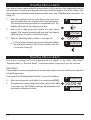
This option allows you to change your own passcode. The master users can also add and
delete user passcodes, see “Setup Users” on page 21.
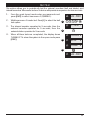
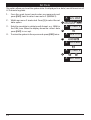
1.
From the unset (open) mode enter your passcode and
press [ENT] to select user menu 1 (U/MENU 1).
2.
Whilst user menu 1 is selected. Press [4] to select the
change passcode option.
3.
4.
Enter your new passcode then press the [ENT] key. A
rising tone indicates acceptance and the system returns
to User menu 1. A low tone indicate an error and you will
be prompted to re-enter your new code.
To return the system to the open mode press [ESC].
SYS OPEN
1
? ? ? ?
+
U / MENU 1
2
4
NEW ----
3
NEW 1 2 1 2
U / MENU 1
4
SYS OPEN
Enable Chime
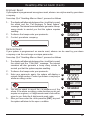
Detection circuits that have been programmed as “Chime”
will generate a two-tone sound when triggered. This option
allows you to enable or disable the chime option.
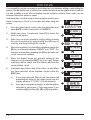
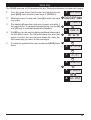
1.
From the unset (open) mode enter your passcode and
press [ENT] to select user menu 1 (U/MENU 1).
2.
Whilst user menu 1 is selected. Press [5] to select the
enable chime option.
SYS OPEN
1
? ? ? ?
+
U / MENU 1
2
5
ENABLED
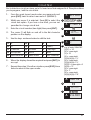
3.
Select the chime option by pressing the pressing [B] to
alternate between enabled and disabled.
3
4.
When the display show the required setting press the
[ENT] key to accept. A rising multi-tone will be heard and
the system is returned to user menu 1.
4
5.
To return the system to the open mode press [ESC].
B
DISABLED
U / MENU 1
5
SYS OPEN
15