1
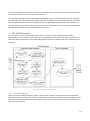
At the current time, with the ASM extension, it is only possible to generate skeleton C# code with added
Code Contracts. The Code Contracts contain postconditions, invariants and constraints for the code.
4.2 Future Work
Future work could be to add hard constraints to the transition property fields. The constraints add an
additional feature to the extension, making the property field’s dependant on each other. The fields Event,
Condition and Action generates the Label in the form of Event(possible argument) [Condition] / Action.
Furthermore the user can fill in the label, and the other three properties will be filled out based on the
label. The constraint on the actual label is that it has to be filled out in the form described above.
Prompting the user in case of an infinite loop in the ASM, could be a valid addition to features in the
extension. The prompt should be information about an infinite loop in the ASM, where the user can
acknowledge with pressing “OK” or “Cancel”.
Another possible feature could be to implement ASM generation from C# code, where the user can add an
existing .cs file to the ASM project, right click on it, select “Generate ASM”, and a .asm file will be created.
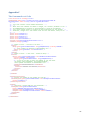
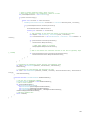
The DSL can show files in different formats, e.g. the .asm file can be shown as an ASM diagram but also as a
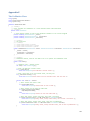
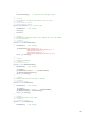
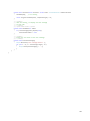
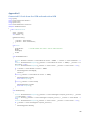
XML file, so the generated code would be in the form of XML language. The XML code for the GSM
authentication ASM diagram can be seen in appendix A. With this feature the user can see if the ASM is still
the same after they modified the generated code.
Another item which could be implemented is XML code generation for UPPAAL, a model-checking tool. The
UPPAAL tool can, among other things, check invariants and reachability properties of an ASM. The generate
button would be placed in the same group as the “Validate and Generate”–button is placed, when the user
right clicks on an empty space in the ASM diagram.
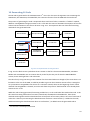
5 Extension Walkthrough
Installing the extension is done by ‘double clicking’ on the file AsgerJensen.ASM.DslPackage in the
ASM\DslPackage\bin\Debug directory and accepting to install it, when the installation window shows. To
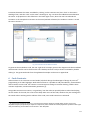
use the extension the user needs to open up their VS2010 and create a standard project, seen in Fig. 5-1.
11