1
OM11 - EPI2 DeviceNet interface
Installation & Maintenance Instructions
4.3 Bus/hardwired mode selection
The DeviceNet interface manages the bus/hardwired mode selection by means of the input
terminal indicated with HW MODE. The physical input accepts from 24 to 125 V DC or AC, polarity
insensitive. When the input is left unconnected or no voltage is applied, the actuator is under bus
control from which is possible to send commands and read status.
When an appropriate voltage is applied to the HW MODE input, the actuator turns under
Hardwired control. In this condition the bus can only read actuator status while the actuator follows
the hardwired open and close controls connected to the terminal board. For further details see the
relevant wiring diagram and the user’s manual: EPI2 Quarter-turn Electric Actuator IOM.
5. Brief DeviceNet description
DeviceNet is a low-level network that provides connection between industrial field devices
(sensors and actuators) and higher-level devices (controllers). DeviceNet uses CAN (Controller Area
Network) for its datalink layer, and CIP (Common Industrial Protocol) for the upper layers of the
network. The major physical and media characteristics of the DeviceNet are:
• Trunk-line / drop-line topology of the network;
Trunk
TR
TR
Drop
• Support for up to 64 devices in a network (i.e. 1 master and 63 EPI2 actuators);
• Node removal without altering the network behavior;
• Support of both network-powered and self-powered devices on the same network;
• Wiring error protection;
• Selectable data rate of 125 k baud, 250 k baud and 500 k baud.
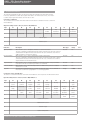
Drop length
Data rate
Trunk distance
Maximum
Cumulative
125 k baud
250 k baud
500 k baud
500 meters
250 meters
100 meters
6 meters
6 meters
6 meters
156 meters
78 meters
39 meters
• Adjustable power configuration to meet individual application needs;
• High current capability (up to 8 A at 24 V DC);
• Operation with off-the-shelf power supplies;
• Available power taps that allow the connection of several power suppliers;
• Build-in overload protection;
• Controller Area Network (CAN) technology for Media Access Control and Physical Signalling.
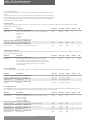
PLC
DeviceNet scanner
PowerTap
Term.
Tap
DeviceNet
Power supply
CAN V+
CAN H
Shield
CAN L
CAN V-
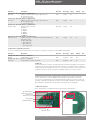
5.1 Network cable
To obtain the expected performances from the communication network the suitable cable must
be utilized. DeviceNet requires a specific cable composed of a Power pair, a Data Pair and a shield
with drain wire. DeviceNet defines different
cables to be used in the different parts of
the network:
• in the trunk line is normally used the
thick cable.
E.g. BELDEN 3082A:
1 pair 15 AWG 19x28 Tinned Copper –
Term.
Tap
Tap
Power pair
1 pair 18 AWG 19x30 Tinned Copper –
Data pair inner shield 100% coverage
• in the drop line is normally used the
thick cable. e.g. BELDEN 3084A
E.g. BELDEN 3084A:
1 pair 22 AWG 19x34 Tinned Copper –
Power pair
1 pair 24 AWG 19x36 Tinned Copper –
Data pair inner shield 100% coverage
5.2 Terminator
The DeviceNet network must be terminated to each end of the main trunk line with a 120 ohm
resistor across CAN_H and CAN_L data line.
Pentair reserves the right to change the contents without notice
page 3