1
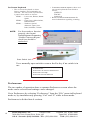
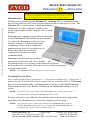
Keyboard Mode
Phrase Button
File & Edit
Menus
Instant Speak
Button
Clears the
Text Box
Sticky Keys
Indicator
Battery Indicator
Volume Control
Selection Mode
Indicator
Number Mode
On/Off
______________
Word Prediction/
Word Completion List
_________________
Stop Speaking Button
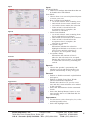
File Menu
• Open and Save user documents.
• Print user documents.
• Change settings (Preferences).
• Help and Exit Persona.
Edit Menu
• Undo last action.
• Cut, Copy and Paste text.
• Select or edit Abbreviations and
Pronunciations.
Speak Button
• Select the button to speak the text (also
can use the Esc key).
• Note: See Preferences/Speech for
options that enable text to be spoken
automatically as it is typed.
Stop Button
• Select the button to stop speaking.
Phrase Button
• Select or edit ready-made sentences.
ISpk Button
• Auxiliary text box for speaking when
the Main text box is being used to
create a document
Volume Control
• Adjusts the loudness ot the spoken
output. Set to 0 to turn off the voice.
2
___________
Speak Button
___________
Main Text Box
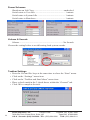
Battery Indicator
• Shows the remaining amount of battery life.
• Approximate run time on batteries is
4–6 hours.
• Charge time is about 2.5 hours.
• CAUTION: The Polyana-JT can get
very hot while charging.
Stick Keys Indicator
• Shows the state of the Shift, Ctrl and
Caps Lock. There are 3 possible lock
states:
• Light Grey ..... unlocked
• Dark Grey ...... temporarily locked
• Black .............. locked.
Selection Mode Indicator
• Use Selection mode to select portions of
text to speak or edit.
• Enable or disable the feature by
simultaniously pressing…
Ctrl L .............. select Letters
Ctrl W ............ select Words
Ctrl S .............. select Sentences
Ctrl P .............. select Paragraph
Ctrl A ............. select All
• Use the arrow keys to move from
selection to selection.
ZYGO Industries, Inc.
PO Box 1008
Portland, OR 97207-1008
7409 SW Tech Center Drive, Suite 125
Tigard OR 97223-8082
U.S.A. / Canada: (800) 234-6006 TEL: (503) 684-6006
FAX: (503) 684-6011