1
Input
Speech
General
Input
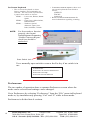
Keyboard Mode:
• There are no settings other than those that can
be found in the Control Panel.
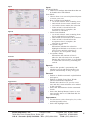
Scan Mode
• Choose from 3 on-screen keyboard layouts
or create your own.
• Row/Column Scan Method:
• 1st switch closure starts scanning rows
• 2nd switch closure starts column scan
• 3rd switch closure makes the selection
• If the switch is closed before the
acceptance time is complete, the
selection is cancelled
• Linear Scan Method
• 1st switch closure starts scanning from
left-to-right and top-to-bottom
• 2nd switch closure makes the selection
• If the switch is closed before the
acceptance time is complete, the
selection is cancelled
• Acceptance Style
Determines whether the selection
highlight will blink several times or will
grow in size until the selection is
accepted. See Acceptance Delay.
• Acceptance Delay
Determines the amount of time it
takes for the selection to be accepted.
During this period of time, it is possible
to cancel the selection by actuating the
switch.
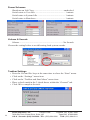
Speech
• Choose the speaker’s personality and
whether or not words and sentences are
spoken automatically as they are typed.
Appearance
General
• Enable or disable automatic capitalization
and spaces.
• Enable or disable Learn New Words
(Word Prediction/Completion).
Disable this check box if you are a new
user and don’t want mistakes to be added
to the word list.
• Select the Edit button to delete unwanted
words.
• Select the Backup/Restore button to save
user specific data to a USB flash disk for
safe keeping.
Appearance
• For text boxes, select font style, size, color,
and background colors.
• Select the highlight color.
ZYGO Industries, Inc.
PO Box 1008
Portland, OR 97207-1008
7409 SW Tech Center Drive, Suite 125
Tigard OR 97223-8082
U.S.A. / Canada: (800) 234-6006 TEL: (503) 684-6006
FAX: (503) 684-6011
5