1
Radoop Documentation, Release 2.1
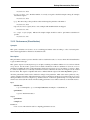
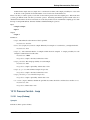
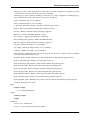
--- Please do not change the first line of the script. The default script does
-- nothing, just delivers the input data set on the output port. You may
-- refer to other input data sets in a similar way to the last line.
-CREATE VIEW ##outputtable## AS
SELECT *
FROM ##inputtable1##
• auto validate (expert): Validate the script automatically using the remote Hive connection. This is required for
appropriate meta data generation during design-time.
– Default value: true
• user defined functions (expert): Add User-Defined Functions (UDFs) that can be used in the script. The temporary functions are defined by their name and the class name that implements it. Please note that the class must
exist both in Hadoop’s classpath and Hive’s classpath.
13.17.2 Pig Script
Synopsis
Runs an arbitrary Pig script.
Description
This operator is for advanced users who want to write their Pig scripts to manipulate their data directly in the process
data flow. This operator also enables Pig experts to integrate their existing Pig Latin code into a Radoop process. To
be able to do this, please note the following instructions about handling input and output data in your Pig script.
As a Pig Latin script may work on multiple inputs and produce multiple outputs, the operator may have arbitrary
number of inputs and outputs. Just connect an input example set to the free input port if you want to use it in you Pig
script. Similarly, you can connect an output port if you want to produce another output with this operator. Your Pig
script should specify the data on these output ports.
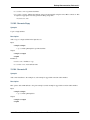
The first input data set should be referred in the Pig script using the following keywords: ##inputfile1##, ##inputstorage1##, ##inputcolumns1##. Before running the operator, Radoop will replace these keywords with the appropriate
values to produce a valid Pig script. The ##inputfile1## keyword refers to the directory that contains the data of the
first input example set. The ##inputstorage1## keyword will be replaced by the appropriate Pig storage handler class
(with their arguments like the field separator) that the software determines automatically for this input data set. The
##inputcolumns1## keyword refers to the list of column name and column type pairs of the input example table. The
conversion of RapidMiner (and Hive) column types to Pig data types is done automatically. The default Pig script of
the operator shows a simple line that loads an input example set using these keywords. The relation name here can be
any arbitrary name.
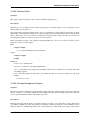
operator_input1 = LOAD ‘##inputfile1##’ USING ##inputstorage1## AS (##inputcolumns1##);
You can load all input example sets the same way, just use the next integer number in the keywords instead of 1. Only
in very rare cases should you consider changing this template for loading your input data.
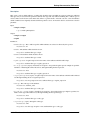
You can later insert a column list of the your first input example set into the script with the keyword ##inputcolumnaliases1##. E.g. this may be used in a FOREACH expression, like in the following default script code line.
operator_output1 = FOREACH operator_input1 GENERATE ##inputcolumnaliases1##;
Otherwise, you may refer to the columns of an example set by their RapidMiner attribute name (this is true if you load
your data with the default template (##inputcolumns1##)).
13.17. Transformation - Custom Script
97

















































![[U7.00.01] Opérateur EXEC_LOGICIEL](http://vs1.manualzilla.com/store/data/006358421_1-4c52b89a0a71b084c3a2df1a9b9adfcc-150x150.png)