1
Radoop Documentation, Release 2.1
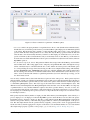
precise). The columns of the table are attributes in this ExampleSet. The wizard will automatically guess the attribute
types based on the values it finds in the beginning of the file. The allowed data types are: real, integer and nominal.
Real and integer attributes will be stored in Hive as DOUBLE and BIGINT columns, while nominal attributes are
stored as STRING columns. Radoop does not explicitly support other types, however, you can load, for example, date
values into a nominal attribute without any problem. You can later process them with Radoop operators like Generate
Attributes, and also use any of Hive’s numerous date functions on them.
You can also assign roles to the attributes, defining what they can be used for by individual operators. You can set
these roles for the attributes later in the process using the Set Role operator. If you are unfamiliar with any concept
mentioned in this step and want to know more before continuing, please read about them in sections RapidMiner Data
Flow and Radoop Basics.
Step 4 of 4. As a last step, you choose a name for the destination Hive table, and optionally change the storage format.
If you opened the wizard from the Parameters view of a Read CSV operator, you can also select whether you want to
store the data in a temporary or a permanent table. The first option is a good choice for you, if you want to immediately
process the data using other Radoop operators, and do not need the original data in this format later (nonetheless you
can store the processed data with Store in Hive operator).
You can optionally change the default storage format (the default is defined by Hive, usually it is textfile). You can
use partitioning and have several options for the file format. Partitioning may enhance the performance of queries
that filter for the partioning column. Special storage formats may decrease the required space and increase the performance. Please note that choosing a special format may increase the import running time as the conversion may require
additional jobs to run. Please refer to the Hive Documentation for the details of the storage types.
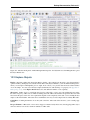
After you have imported your data to the cluster, you can easily access, query, visualize it using the Hive Management
Perspective. Read more about the interface for managing your data on Hive in Appendix B - Hive Management
Perspective. You can access the imported data in a process using the Retrieve from Hive operator. Right click on the
object in this perspective and click on Create Process: Retrieve to instantly create a new Radoop process that uses this
data as an input.
If you opened the wizard for defining the parameters of a Read CSV operator on the Design Perspective, then you can
immediately explore the meta data that appear on the output port of the Read CSV operator, just as with the Retrieve
from Hive operator after selecting the input table you created.
7.1.2 Read Database
Radoop can also stream data to the cluster from a database. The client reads from the defined database connection,
and pushes the data instantly to the cluster. The source can be a database object, but also the result of a query that you
define in a parameter. The operator supports connections to MySQL, PostgreSQL, Sybase, Oracle, HISQLDB, Ingres,
Microsoft SQL Server or any other database using an ODBC Bridge.
Please note that the software may miss the closed source JDBC driver for certain database systems. This only means
that you have to download the driver file yourself and configure it by following the instructions on the Rapid-I-Wiki.
7.1.3 Load From the Memory
You can also load data from the client machine’s operative memory in a process by connecting a RapidMiner operator
that delivers an ExampleSet object on its output to a Radoop Nest operator input. The data set on the wire will be
pushed to the cluster. The processing continues within the Nest. These concepts are explained in greater detail in the
section Radoop Basics.
7.1. Import Scenarios
30