1
Radoop Documentation, Release 2.1
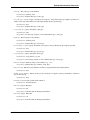
– Default value: false
– Depends on: attribute filter type = regular_expression
• except regular expression (expert): A regular expression for the names of the attributes which should be filtered
out although matching the above regular expression.
– Depends on: use except expression = true, attribute filter type = regular_expression
• value type: The value type of the attributes.
– Default value: nominal
– Depends on: attribute filter type = value_type
• use value type exception (expert): If enabled, an exception to the specified value type might be specified. Attributes of this type will be filtered out, although matching the first specified type.
– Default value: false
– Depends on: attribute filter type = value_type
• except value type (expert): Except this value type.
– Default value: file_path
– Depends on: use value type exception = true, attribute filter type = value_type
• block type: The block type of the attributes.
– Default value: single_value
– Depends on: attribute filter type = block_type
• use block type exception (expert): If enabled, an exception to the specified block type might be specified.
– Default value: false
– Depends on: attribute filter type = block_type
• except block type (expert): Except this block type.
– Default value: single_value
– Depends on: use block type exception = true, attribute filter type = block_type
• numeric condition: Parameter string for the condition, e.g. ‘>= 5’
– Depends on: attribute filter type = numeric_value_filter
• invert selection: Indicates if only attributes should be accepted which would normally filtered.
– Default value: false
• include special attributes: Indicate if this operator should also be applied on the special attributes. Otherwise
they are always kept.
– Default value: false
• replace what: A regular expression specifying what should be replaced.
• replace by: The replacement for the region matched by the regular expression. Possibly including capturing
groups.
13.26. Transformation - Value Modification
115