1
Radoop Documentation, Release 2.1
For Linux or Mac
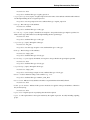
Run the following commands from the terminal:
ssh -N -L 127.0.0.1:1234:127.0.0.1:9999 -L 127.0.0.1:1235:127.0.0.1:10000 user@masterhost
If you are using a private key for authentication, then you also need to add -i /path/to/private.key. You need to keep
this tunnel running as long as you wish to use Radoop with the remote cluster.
9.1.3 STEP 3/3. Setting up Radoop configuration
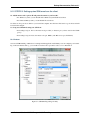
You need to apply special settings when configuring the Radoop connection. The following details need to be provided
on the Advanced panel of the Connection Settings dialog.
• Select Multiple Master configuration
– Namenode address and Jobtracker address: the private hostname/IP address of the master node
– Hive server address: localhost
• Select Change default ports
– Namenode and Jobtracker port: leave the appropriate values according to your Hadoop version
– Hive server port: 1235 (or whatever you have provided above)
• Add two entries to Advanced Hadoop parameters
– Key: hadoop.rpc.socket.factory.class.default , Value: org.apache.hadoop.net.SocksSocketFactory , Enabled: yes
– Key: hadoop.socks.server , Value: localhost:1234 , Enabled: yes
You need to press OK, save this connection, and test the connection with the Test button on the connection dialog. If
the test runs fine then you have properly set up a secure connection to your Hadoop cluster.
The socket settings are only needed on the Radoop clients, so you need to avoid these settings to overwrite the Hadoop configuration on the cluster nodes. The core-site.xml configuration file should include
hadoop.rpc.socket.factory.class.default set to org.apache.hadoop.net.StandardSocketFactory and marked as final on
all your cluster nodes.
9.2 Alternative Solutions: Virtual Private Network (VPN) and Manual
Firewall Settings
An alternative method for bringing your client node into a private network is to define a Virtual Private Network
(VPN). Please refer to OpenVPN documentation or consult with your network administrator for further details. After
defining the VPN and connecting your client computer to the VPN, you should be able to access all the necessary
Hadoop ports from the client, so there is no need for further configuration.
If you have Hadoop nodes that are accessible from everywhere and they are not isolated from the internet, then you
need to protect your data with proper firewall settings. All Hadoop nodes need to be able to access all other nodes at
many different ports to operate properly, so a common practice is to open all ports among Hadoop nodes. Furthermore,
you need to open the above ports for all Radoop clients. These settings might become complicated and hard to maintain
as you add more nodes to your cluster, so it is preferable to organize all Hadoop nodes into a private network. In the
previous sections, we have described several ways to add access to the private network for your Radoop clients.
9.2. Alternative Solutions: Virtual Private Network (VPN) and Manual Firewall Settings
40