1
4. OVERVIEW
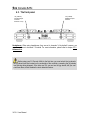
Your DJ Console 4-Mx features a variety of controls allowing you to interact with DJ software.
You can control up to 4 independent decks in DJ software. Descriptions of the default function of
each control are provided below.
2
3
4
5 6 7 8 9 10 11 12 13 14 15 16 17 18 19 20 21 22 23 24
33
32
31
30 29
28
27
26 25
1.
2.
3.
4.
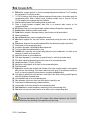
Microphone input (1/4" jack / 6.35mm)
Microphone level control knob
Microphone on/off button
Deck Switch button: depending on the deck mode you select in the control panel, pressing
this button will either: toggle between decks A and C, or B and D (in 4-deck mode, by default);
give you access to a second set of buttons for the deck in question (in 2-deck extended
mode); or have no effect (in 2-deck basic mode). Please see section 5.3.1. Advanced tab for
more information.
5. Pitch Scale buttons: adjust the pitch scale in DJ software up or down (for example, change
the pitch scale range from 6% to 12% in the VirtualDJ software)
Tip: press Pitch Scale - and Pitch Scale + at the same time to reset the pitch: the virtual
pitch fader returns to the central position (while the hardware fader doesn't move).
User Manual – 11/30
ESPAÑOL
34
ITALIANO
NEDERLANDS
DEUTSCH
FRANÇAIS
1
ENGLISH
4.1. The top panel