1
Response NETWORK
CONTROLLER
Version 3.0
User manual
Response NETWORK CONTROLLER
1
Limited warranty
Electronic Theatre Controls (ETC) warrants to the original owner or retail customer that
for a period of one year from date of delivery of a portable system or energization of a
permanently installed system (up to a maximum of 18 months from delivery) its products
will be free from defects in materials and workmanship under normal use and service.
Warranty is limited to 90 days for rental equipment.
Warranty does not cover any product or part of a product subject to accident, negligence,
alteration, abuse or misuse or any accessories or parts not supplied by ETC. Warranty
does not cover “consumable” parts such as fuses, lamps, color media or components
warranted directly to the owner by the original manufacturer. ETC’s warranty does not
extend to items not manufactured by us. Freight terms on warranty repairs are FOB ETC
factory or designated repair facility. Collect shipments or freight allowances will not be
accepted.
ETC’s sole responsibility under this warranty shall be to repair or replace
at ETC’s option such parts as shall be determined to be defective on ETC’s inspection.
ETC will not assume any responsibility for any labor expended or materials used to repair
any equipment without ETC’s prior written authorization. ETC shall not be responsible for
any incidental, general or consequential damages, damages to property, damages for
loss of use, time, profits or income, or any other damages.
The owner’s obligations during the warranty period under this warranty are to notify ETC
at ETC’s address within one week of any suspected defect, and to return the goods
prepaid to ETC at their factory or authorized service center.
THIS WARRANTY IS CONTINGENT ON THE CUSTOMER’S FULL AND TIMELY COMPLIANCE WITH THE TERMS OF PAYMENT SET FORTH IN THE “TERMS AND CONDITIONS”. THIS WARRANTY IS EXPRESSLY IN LIEU OF ANY AND ALL OTHER WARRANTIES EXPRESSED OR IMPLIED INCLUDING THE WARRANTIES OF MERCHANTABILITY AND FITNESS FOR A PARTICULAR PURPOSE AND OF OTHER OBLIGATIONS
AND LIABILITIES ON OUR PART. THE OWNER ACKNOWLEDGES THAT NO OTHER
REPRESENTATIONS WERE MADE TO HIM OR RELIED UPON HIM WITH RESPECT TO
THE QUALITY AND FUNCTION OF THE GOODS SOLD.
This written warranty is intended as a complete and exclusive statement of the terms
thereof. Prior dealings or trade usage shall not be relevant to modify, explain or vary this
warranty. Acceptance of, or acquiescing in, a course of performance under this warranty
shall not modify the meaning of this agreement even though either party has knowledge
of the performance and a chance to object.
Table of contents
Chapter 1
Introduction ................................................................................................................
7
Response NETWORK CONTROLLER features .............................................................................. 8
Using this manual ........................................................................................................................... 9
Text conventions .......................................................................................................................... 11
Pile-on convention ........................................................................................................................ 11
Getting help
............................................................................................................................ 11
Customer service ......................................................................................................................... 12
Chapter 2
Installation
.................................................................................................................. 13
Front panel illustration .................................................................................................................. 14
Back panel illustration ................................................................................................................... 16
Configuring Wyse WY-55/es terminal setup parameters for use with the Response NETWORK
CONTROLLER ............................................................................................................................ 18
Installing the Response NETWORK CONTROLLER ..................................................................... 19
Attaching inputs and outputs ........................................................................................................ 21
Installing Snapshot ....................................................................................................................... 22
Installing printer ............................................................................................................................ 22
Chapter 3
Configuring and using the Response
NETWORK CONTROLLER ......................................................................... 23
Optimizing system performance .................................................................................................. 24
Creating and modifying setup tables ............................................................................................ 25
The Setup display ............................................................................................................ 26
Configuring input parameters .......................................................................................... 27
Configuring output parameters ........................................................................................ 28
Selecting a setup table .................................................................................................... 30
Enabling a setup table from Setup display ....................................................................... 30
Enabling a setup table without a terminal ........................................................................ 30
4
Response NETWORK CONTROLLER
Using Editor to assign inputs to outputs ....................................................................................... 31
The Editor display ............................................................................................................ 32
Assigning inputs to outputs ............................................................................................. 33
Assigning inputs with forced levels to outputs ................................................................ 35
Assigning Forced levels ................................................................................................... 35
Deleting all Forced levels from source column ................................................................ 36
Using Editor’s tools .......................................................................................................... 37
Moving the cursor with [Home] and [Page] ........................................................ 37
Moving the cursor with tab settings ................................................................... 37
Default input to output assignment ................................................................................. 38
Removing existing input to output assignments.............................................................. 39
Copy [/] ............................................................................................................................ 39
Copy Plus One [.] ............................................................................................................. 40
Clear Patch and Move Down [,] ....................................................................................... 40
Displaying the outputs to which an input is patched ....................................................... 41
Saving setup and patch information ............................................................................................. 42
Using EEROM .................................................................................................................. 43
Saving to EEROM ............................................................................................... 43
Loading from EEROM ......................................................................................... 43
Memory enable/disable switch ........................................................................................ 44
Using disk ........................................................................................................................ 45
Naming your shows ............................................................................................ 45
Formatting a disk ................................................................................................ 46
Saving to disk ...................................................................................................... 46
Loading from disk ............................................................................................... 47
Displaying disk directory ..................................................................................... 47
Removing a show from disk ............................................................................... 48
Chapter 4
Using optional accessories ................................................................... 49
Using Snapshot................................................................................................................ 49
Enabling Snapshot .............................................................................................. 50
Using Backup ...................................................................................................... 51
Recording a Backup look ..................................................................................... 51
Playing back a look in Backup ............................................................................. 51
Using Panic to bring up a look ............................................................................. 52
Using Snapshot as an analog console ................................................................. 53
Using the serial printer ..................................................................................................... 54
Printing Setup tables ........................................................................................... 54
Printing patch ...................................................................................................... 54
Response NETWORK CONTROLLER
5
Chapter 5
Using the Response NETWORK
CONTROLLER without a monitor .................................................. 55
Working with jumpers ..................................................................................................... 55
Autoload .......................................................................................................................... 56
Selecting a setup table in hardware mode ....................................................................... 57
Using jumpers to enable/disable controller features ........................................................ 58
Chapter 6
Diagnostic tests ................................................................................................... 59
Displaying levels on screen.............................................................................................. 60
Test display ...................................................................................................................... 61
Setting dimmer levels in Test ............................................................................. 62
Creating a chase in Test ...................................................................................... 63
Fading groups of dimmers in Test ...................................................................... 65
Using Fill [F13] .................................................................................................... 66
Chapter 7
Reference
..................................................................................................................... 67
Appendix A Status line
.............................................................................. 77
Appendix B Status LEDs ........................................................................... 78
Appendix C Hardware jumper settings ................................ 79
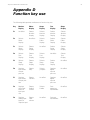
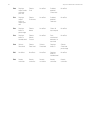
Appendix D Function key use
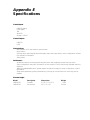
Appendix E Specifications
........................................................... 80
.................................................................... 82
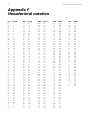
Appendix F Hexadecimal notation
.............................................. 83
Appendix G Input connector adapters
................................. 84
Appendix H Configuring alternate terminals
.............. 85
Index .................................................................................................................................... 89
6
Response NETWORK CONTROLLER
Response NETWORK CONTROLLER
7
Chapter 1
Introduction
The Response NETWORK CONTROLLER™ is the centerpiece of
the Response™ family of interface products from Electronic Theatre
Controls. It allows you to connect control consoles and dimmer
racks from different manufacturers, operate one set of dimmers
with more than one control console, expand the number of dimmers
a console can control, provide on-line backup, and perform a variety
of diagnostic tests.
This chapter includes information to orient you to the controller, the
manual and the optional Wyse™ terminal. It includes the following
sections:
• Response NETWORK CONTROLLER features
• Using this manual
• Text conventions
• Getting help
• Customer support
8
Response NETWORK CONTROLLER
Response NETWORK
CONTROLLER features
Response NETWORK CONTROLLER provides the following features:
•
Input ports supporting DMX512, AMX192, D192, and K96
protocols.
•
Output ports supporting DMX512 and D192 protocols.
•
A wide range of input/output configurations.
•
Diagnostic and test functions that enable you to monitor the
status of your system.
•
Two forms of emergency backup in the event of console failure.
•
Optional Wyse video display terminal for user interface.
•
A 3.5-inch disk drive to save system configuration and patch
information. (Disk drive is standard on rack-mount version; it is
not available on portable model.)
•
Printer support for serial printers.
•
Analog inputs support up to 16 inputs from analog control
consoles.
Response NETWORK CONTROLLER
9
Using this manual
This manual provides instructions for the Response NETWORK
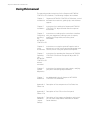
CONTROLLER’s features. The following chapters are included:
Chapter 1
Response NETWORK CONTROLLER features, control
Introduction and manual conventions, getting help, and customer
support.
Chapter 2
Installation
Instructions for installing the Response NETWORK
CONTROLLER, Wyse terminal and other optional
accessories.
Chapter 3
Instructions on setting up the controller to interface
Configuring with your equipment, patching inputs to outputs,
and using
enabling the Sleep mode, and saving show
the
information.
NETWORK
CONTROLLER
Chapter 4
Instructions on using the optional Snapshot unit to
Using
backup your control console and provide analog input
Accessories controls, and on using the optional serial printer.
Chapter 5
Instructions for operating the Response NETWORK
Operating
CONTROLLER without the optional Wyse WY-50
the
terminal.
NETWORK
CONTROLLER
without
a terminal
Chapter 6
System
diagnostics
Instructions for testing inputs and outputs, verifying
your patch and testing output dimmers.
Chapter 7
Reference
An alphabetical listing of Response NETWORK
CONTROLLER commands.
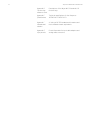
Appendix A
Status line
Description of the components of the Status line
Appendix B Description of the LEDs on the front panel.
Status LEDs
Appendix C
Hardware
jumper
settings
Description of the jumper configurations with which
you can select setup tables and enable or disable
certain features.
10
Response NETWORK CONTROLLER
Appendix D
Function key
reference chart
Descriptions of the Wyse WY-50 terminal’s 16
function keys.
Appendix E
Specifications
Technical specifications for the Response
NETWORK CONTROLLER.
Appendix F
Hexadecimal
notation
A listing of all 256 hexadecimal characters and
their standard numeric equivalents.
Appendix G
Input pinouts
Pinout information for input cable adaptors and
analog cable connectors.
Response NETWORK CONTROLLER
11
Text conventions
In this manual, references to terminal keys are enclosed in square
brackets, such as [Return], [F4] and [1]. Messages displayed on the
terminal display screen are printed in bold face type, such as Select
type of data using the up/down arrows. References to other
sections of the manual are printed in italics, such as Chapter 1,
Introduction.
Pile-on convention
The Response NETWORK CONTROLLER uses a pile-on convention
to determine output levels. It reads all input levels for an output and
sets it at the highest of the levels. For example, if a set of dimmers
receives input from a memory console in the lighting booth and from
a stage manager’s manual console on stage, the Response
NETWORK CONTROLLER sets the dimmers at the greater of the
output settings.
Getting help
When using the optional Wyse WY-50 terminal, help screens are
available for some operations. When help is available, Help appears
in the function key display at the right side of the screen. Press the
appropriate function key to access help information.
12
Response NETWORK CONTROLLER
Customer service
If you have problems with your Response NETWORK CONTROLLER, please follow these steps:
1. First refer to the manual for instructions.
2. If you do not find the answer in the manual, call your local
dealer or ETC for customer service. Please have the following information available before you call:
•
•
•
Model and serial number
Communications protocols being used
Control and dimmer hardware being used
3. To reach Electronic Theatre Controls’ customer service
department call 608/831-4116 Monday through Friday, from
9:00 AM to 5:00 PM Central Standard Time. For emergency
service after hours and weekends call 608/831-4773. Your
call will be answered electronically and automatically forwarded to a service representative who will contact you as
soon as possible.
Address all correspondence about the Response NETWORK
CONTROLLER to:
Electronic Theatre Controls
Customer Service Department
3030 Laura Lane
Middleton, Wisconsin 53562
Response NETWORK CONTROLLER
13
Chapter 2
Installation
This chapter includes instructions on installing the Response NETWORK CONTROLLER and optional Wyse WY-50 terminal, Snapshot
and serial printer.
Before you use the Response NETWORK CONTROLLER, you
should follow these installation procedures in this order:
•
•
•
Configure the Wyse WY-50 terminal for use with the Response
NETWORK CONTROLLER.
Install the Response NETWORK CONTROLLER.
Attach all inputs (control consoles) and outputs (dimmer racks or
other receiving hardware).
Once you have completed the above steps, you can go on to
configure your system.
The following installation procedures are included in this chapter:
•
•
•
•
•
•
Front and back panel illustrations
Configuring the Wyse WY-50 terminal
Installing your Response NETWORK CONTROLLER and optional
Wyse WY-50 terminal
Attaching inputs and outputs
Installing Snapshot
Installing serial printer
The Response NETWORK CONTROLLER front and back panels are
illustrated and described on the following pages.
14
Response NETWORK CONTROLLER
Front panel illustration
The front panel of the Response NETWORK CONTROLLER contains nine indicator LEDs, a reset button,
a memory enable/disable toggle switch, and a fuse. The front panels of the portable and rack mounted
models differ slightly; both are illustrated here. The 19-inch rack mount version features a 3.5-inch disk
drive on the front panel.
MEMORY
ENABLE
ENABLE
DISABLE
TM
RESET
FUSE
NETWORK CONTROLLER
+ 5V
A B
C
D
E
F
G
H
➀
AGC-1
➁
➂ ➃
MEMORY
TM
NETWORK CONTROLLER
+ 5V
A
ENABLE
DISABLE
B
E
C
D
F
G
RESET
H
FUSE
AGC-1
➄
Response NETWORK CONTROLLER
15
➀ Indicator LEDs
Nine LEDs on the Response NETWORK CONTROLLER’s front panel
allow you to monitor the status of the controller’s memory, inputs
and outputs. The functions of the LEDs are described in Appendix B.
Note: If you are using the Response NETWORK CONTROLLER with
the optional Wyse WY-50 terminal, press [F5] (Sleep) to display an
explanation of the LEDs functions.
➁ Memory Enable/Disable
The memory enable/disable switch allows you to prevent unauthorized or accidental changes to the Response NETWORK
CONTROLLER’s EEROM (electronically erasable read-only memory.)
When the switch is in the disable position, you can not record from
working memory to EEROM storage. When the switch is in the
enable position, you can overwrite the existing setups and patch in
memory by making changes and saving them. For instructions on
saving changes to setup and patch, see page 42.
➂ Reset
Changes you make to setup configuration will not take effect until
you press either the [Reset] button on the front panel of the controller, or [F16] (Reset) on the Wyse WY-50 terminal.
➃ Fuse
The Response NETWORK CONTROLLER is protected with a type
3AG-1 one amp fuse, mounted in the front panel. Turn the controller
off, and unplug the AC power cable before changing the fuse.
➄ Disk drive
The 19-inch rack mount model offers a standard, 3.5-inch disk drive
that enables you to save 25 shows.
16
Response NETWORK CONTROLLER
Back panel illustration
The back panels of the portable and rack mounted models differ slightly; both are illustrated here.
Both contain four 5-pin DMX512 connectors, two 25-pin connectors and a power switch.
➀
➁ ➂ ➃
PUSH
PUSH
PUSH
PUSH
➄
Response NETWORK CONTROLLER
17
➀ Power switch
The small black rocker switch controls power to the Response
NETWORK CONTROLLER.
➁ AC Power cord
The portable Response NETWORK CONTROLLER has a removable
power cord. The rack mount model is hard wired.
➂ RS232
The 25-pin connector labeled RS232 allows you to connect the
controller to an optional Wyse WY-50 terminal.
➃ Snapshot
The 25-pin connector labeled Snapshot allows you to connect the
controller to the optional Snapshot unit. Snapshot provides console
backup and analog input.
➄ Input/output connectors
The two male connectors labeled Input 1 and Input 2 receive
control data input. Input 1 accepts DMX512, D192, K96 or AMX192
protocols. (A cable adapter may be necessary. See Appendix G for
adapter information.) Input 2 accepts DMX512 or D192. Two female
5-pin connectors output DMX512 or D192 protocols.
18
Response NETWORK CONTROLLER
Configuring Wyse WY–55/es terminal setup
parameters for use with the Response NETWORK
CONTROLLER
The first time you use the Wyse WY–55/es terminal with the Response NETWORK CONTROLLER you need to change the modem
baud rate, terminal receive handshake protocol and modem data/
parity. Do not change the terminal’s other defaults. Follow the steps
below to change the setup parameters.
Note: If you are using a Wyse WY-50 terminal, or an ADDS 4000/
260IF terminal with your Response NETWORK CONTROLLER, see
Appendix H for information on configuring it.
1. Turn the terminal on. (The Response NETWORK CONTROLLER
need not be turned on to set Wyse WY–55/es terminal defaults.)
2. Hold down [Shift], and press [Setup]. Twelve boxes appear
across the bottom of the screen.
3. Press [Enter]. This returns the terminal to its factory default
settings.
4. Press [F4], Comm.
5. Press [Ø] once to select Mdm Rc Hsk = None, the first box in
the second row.
6. Press the space bar once. The text in the box now reads Mdm
Rc Hsk = XON–XOFF/XPC.
7. Press [F5], Ports. The box labeled Mdm Baud Rate = 9600 is
highlighted.
8. Press the space bar twice. The text in the box now reads Mdm
Baud Rate = 38400.
9. Press [Æ] once to select the box labeled Mdm Data/Parity = 8/
None.
10. Press the space bar three times. The text in the box now reads
Mdm Data/Parity = 8/Even.
11. Hold down [Shift], and press [Setup].
12. Press the space bar once to change the highlighted NO under
Save? (SPACE Toggles) to YES.
13. Hold down [Shift] and press [Setup]. The terminal saves the
setup parameter changes.
Note: The WY–55/es must be used with an ASCII keyboard.
Response NETWORK CONTROLLER
19
Installing the Response NETWORK CONTROLLER
The Response NETWORK CONTROLLER is available in rack-mount
and portable versions. External connections to both units are the
same.
Once you have installed the Response NETWORK CONTROLLER
and optional Wyse WY-50 terminal, you must use software to
configure the system to operate with the equipment you are using.
Follow these steps to install the Response NETWORK
CONTROLLER:
1. Turn off power to the Response NETWORK CONTROLLER
using the small rocker switch on the back panel.
2. If you are using the optional Wyse WY-50 terminal, turn off
terminal power using the rocker switch on the front of the
terminal’s base. Remove the top panel of the Response
NETWORK CONTROLLER by removing the screws and gently
sliding the panel back and up. Make sure that the terminal
enable/disable jumper is set to Off. Once you have determined
that the terminal is enabled, replace the top panel. See Appendix
C for more information on setting jumpers.
Note: Although the Wyse WY-50 terminal is purchased as an
optional piece of equipment, you need it to set up and program
the Response NETWORK CONTROLLER. We recommend that
you have a terminal on hand in the event that programming
changes are needed although it is not necessary to have it
attached to the controller at all times.
A computer running PROCOMM Plus terminal emulation
program may be used in place of a Wyse WY-50 terminal.
Contact ETC for more information.
3. Insert the female end of the terminal power cord in the receptacle labeled Modem on the base of the display monitor, then
insert the other end of the cable into the connector labeled
RS232 on the Response NETWORK CONTROLLER back panel.
4. Turn the Response NETWORK CONTROLLER on; then turn the
Wyse WY-50 terminal on.
20
Response NETWORK CONTROLLER
5. Check terminal default settings before starting to use the
terminal. See page 18 for instructions on setting default settings.
Note: If, after 30 seconds, you get only a partial on-screen
display or no display at all, press [F16] (Reset).
Pinout
Connector is a Cinch DB25S or equivalent.
Controller
Pin
1
2
3
4 to 6
7
8 to 25
Terminal
Signal
Shield ground
Data to controller
Data to terminal
Not used
Signal ground
Not used
Pin
1
2
3
4 to 6
7
8 to 25
Response NETWORK CONTROLLER
21
Attaching inputs and outputs
The Response NETWORK CONTROLLER allows you to connect
to a wide variety of control equipment and outputs. You must
configure your inputs and outputs in the Setup display before
using the Network Controller. To attach dimmer inputs and
outputs, follow these steps:
1. Install the Wyse WY-50 terminal and Response NETWORK
CONTROLLER as described on pages 19 and 20.
2. Verify that your input connector pinout is correct, and insert
input cable connectors into 5-pin input connector(s).
Note: Depending on the input protocol(s) you are using, a
cable adapter may be required. See Appendix G, Input
adapters for specific pinout information.
Input 1 accepts DMX512, AMX192, D192, or K96 protocols.
Input 2 accepts DMX512 and D192 protocols.
The Response NETWORK CONTROLLER accepts up to 16
analog control input channels. If you are using analog inputs,
insert the cable connector into the connector labeled Snapshot.
3. Verify that your output connector pinout is correct, and
insert output cable connectors into 5-pin output
connector(s). Both connectors output either DMX512 or
D192 protocols.
Pinout
The pinout information below applies to DMX512 and D192
inputs. If you are using other inputs refer to Appendix G, Input
adaptors for pinout and cable information. Male connectors are
Switchcraft A5M or equivalent.
Female connectors are XLR or equivalent.
1
2
3
4
5
Common
Data Data +
Not connected
Not connected
22
Response NETWORK CONTROLLER
Installing Snapshot
To install the optional Snapshot module, insert its cable into the
Snapshot connector on the Response NETWORK CONTROLLER.
Power to the Snapshot is provided by the Response NETWORK
CONTROLLER through the Snapshot cable. There is no power
switch on the unit itself.
The Snapshot connector is Cinch DB25P or equivalent. Pinout is
straight one-to-one.
Installing printer
The Response NETWORK CONTROLLER supports an optional serial
printer. Follow these instructions to install the printer:
1. Insert the printer cable into the connector labeled Aux. on the
back of the Wyse WY-50 terminal.
2. Press [Shift] [SetUp] to access the Wyse WY-50 terminal setup
parameter fields.
3. Press [F3] (Setup) to access the Setup display.
4. Press the up arrow key three times; then press the right arrow
key four times to highlight the auxiliary output baud rate field
AUX BAUD R = 9600 appears in the field.
5. Enter the baud rate appropriate for your serial printer as described in the printer’s user manual; then press [Shift] [SetUp].
6. Press [Y] to enter the new auxiliary baud rate.
Response NETWORK CONTROLLER
23
Chapter 3
Configuring and using the
Response NETWORK
CONTROLLER
Before you can use the Response NETWORK CONTROLLER you
must configure the input and output ports for the communications
protocols you are using. This chapter includes the following sections:
•
•
•
•
Optimizing system performance
Configuring your system’s inputs and outputs with setup tables
Creating an input to output patch
Saving setup and patch information
Note: You must have the Wyse WY-50 terminal installed to configure setups.
24
Response NETWORK CONTROLLER
Optimizing system performance
To optimize the processing speed of the Response NETWORK
CONTROLLER, always disable options you are not using. You can
disable options when you configure the controller for your system.
To further optimize performance, put the controller into Sleep mode
any time you are not actually using the terminal, and turn off unused
input and output ports. The Sleep mode is described below. For
information on creating setup tables see page 22. For information on
disabling the terminal and disk drive options see page 58.
To ensure optimum performance always press [F5] (Sleep) to put
the Response NETWORK CONTROLLER into Sleep mode when you
are not using the terminal. Sleep mode increases the controller’s
processing speed, and so makes your lights more responsive to
changes made at the control console(s).
When the console is in Sleep mode, the function keys are displayed
in the upper right corner of the display screen. To leave Sleep mode
and enable the terminal, press any function key, except [F5] (Sleep),
listed in the upper right corner of the screen. Pressing [F5] (Sleep)
will have no effect.
Response NETWORK CONTROLLER
25
Creating and modifying
setup tables
The Response NETWORK CONTROLLER allows you to configure
your input and output ports to accommodate input from various
lighting control consoles and provide dimmer output in either
DMX512 or D192 formats. This information is stored as a setup
table. The controller can create and save up to eight setup tables at
a time.
To create a setup table you enter information on the Setup display.
This information tells the Response NETWORK CONTROLLER’s
processor what sort of equipment and communications protocols
you are using.
The three fields labeled Dig 1, Dig 2 and AMX enable you to select
the correct input protocol or shut off ports you are not using.
Note: It is important that you turn off unused ports in order to
enhance processing speed.
The remaining fields enable you to select output protocols, turn off
unused ports and select other options. The two output ports are
represented on the display by two rows of information. The top row
represents output port one (Out 1) the lower line represents output
port two (Out 2).
Note: Input port one can not be configured for both digital input and
AMX at the same time.
26
Response NETWORK CONTROLLER
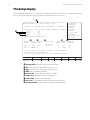
The Setup display
The Setup display enables you to configure the Response NETWORK CONTROLLER’s eight setup tables
with the input and output protocols you need. The Setup display is shown here.
❶
Setup Number 5
Setup tables (0-7)
Input port configuration Hardware 0
❷
❸
❹
Input port
Dig 1
Dig 2
AMX
Data format
off
off
off
Software 0
Mode enabled
Software
Output port configuration
Output ❺Data ❻Dimmers ❼Patch mode
format out
port
Source A
off
512
Source B
Out 1
DMX512 1
Out 2
F1 Monitor
F2 Editor
F3 Setup
F4 Test
F5 Sleep
F6 Help
F7 Set tabs
F8 Enable
F14 Save-Load
F16 Reset
Patch ❽Burst ❾Backup
table rate
enabled
1
1
10
100
off
on
Use the up/down arrows to select a setup number
Setup tables are number 0-7
Use the left/right arrows to move between fields
Dig 1 in
DMX512
Dig 2 in AMX192 Out 1 Out 2
OFF
None
DMX
DMX
Setup Update Memory
ON 0:0 23 Hz Saved
❶ Setup number Displays setup currently enabled.
❷ Dig 1 Input protocol assigned to input port one.
❸ Dig 2 Input protocol assigned to input port two.
❹ AMX AMX enabled or disabled.
❺ Data format Output protocol currently enabled.
❻ Output size Number of outputs transmitted.
❼ Patch mode Input to output data path.
❽ Burst rate Time period between output data transmissions.
❾ Backup enabled Snapshot backup module enabled/disabled.
Response NETWORK CONTROLLER
27
Configuring input parameters
The Response NETWORK CONTROLLER accepts DMX512, D192,
AMX192, K96, or K96C communications protocols. In addition each
port can be disabled individually if only one input is needed. Follow
the steps below to create a setup table:
1. Press [F3] (Setup). The Setup screen is displayed, the Setup
Number field is highlighted, and a new set of function keys
appears in the function key display.
2. Use the up arrow and down arrow keys to select a setup table
number.
3. When you have selected a setup number, press [F8] (Enable).
Note: The left and right arrow keys are disabled until you press
[F8] (Enable).
4. Move the cursor to the Dig 1 field using the left and right arrow
keys, then select the desired protocol for input one using the up
and down arrow keys. Options are DMX512, D192, K96, K96-C,
or Off.
Note: Select Off in the Dig 1 field if you are inputting AMX.
Digital input port one cannot be configured for D192 if digital
output port one is configured for DMX512. If you set the input
port to D192, the controller switches Dig 1 to Off if you later set
the output port to DMX512.
5. Move the cursor to the Dig 2 field using the left and right arrow
keys to select the desired protocol for input two using the up
and down arrow keys. Input options are DMX512, D192 or Off.
Note: Output port two configured for D192 accepts DMX512
input only from input port one. Output port one configured for
D192 accepts DMX512 input only from input port two.
6. Move the cursor to the AMX field using the left and right arrow
keys, and select On or Off to enable or disable AMX input using
the arrow up and down keys.
Note: To use analog inputs, insert the cable connector into the
connector labeled Snapshot. You do not need to configure the
system for analog input.
Note to K96 users
The Response NETWORK CONTROLLER allows you to configure
digital input port one for K96 or K96-C. K96 protocol normally includes patch information from the control console as part of the
dimmer input. If you configure digital input port one for K96, the
Response NETWORK CONTROLLER uses the patch information as
transmitted and ignores the input to output assignment you create in
Editor. If you configure input port one for K96-C, the Response
NETWORK CONTROLLER ignores the patch information included
from the control console and uses the patch you create in Editor.
28
Response NETWORK CONTROLLER
Configuring output parameters
The Response NETWORK CONTROLLER allows you to either use
the patch assignment created with your control console(s), create a
new patch, or use some patched inputs and some unpatched inputs.
This flexibility is the result of the Response NETWORK
CONTROLLER’s two independently configurable output ports. If you
do not need to create an entirely new patch, you can improve
processing speed by internally routing some or all of the input
signals to avoid the patch processor. Follow the procedure outlined
below for each output.
1. Move the cursor to the Data format field using the left and right
arrow keys and select either DMX512 or D192 communications
protocol using the up and down arrow keys.
2. Move the cursor to the Output size field using the left and right
arrow keys, and use the keyboard to enter the number of
dimmer outputs in your system. This number may be no larger
than 512 for each port.
3. Move the cursor to the Patch mode Patch modefield using the
left and right arrow keys and select the desired patch mode
option using the up and down arrow keys.
Patch mode enables you to independently configure the two
output ports. You can configure one output with patch and one
without, both with, or both without.
If you are patching inputs to outputs the options are:
•
•
•
•
•
•
Source A+B+%. Output port accepts the higher of the two
inputs from Source A and Source B and accepts proportional
patch information.
Source A+B. Output port accepts the higher of the two inputs
from Source A and Source B and ignores proportional patch
information.
Source A+%. Output port accepts only Source A inputs and
accepts proportional patch information.
Source B+%. Output port accepts only Source B inputs and
accepts proportional patch information.
Source A. Output port accepts only Source A inputs and ignores
proportional patch information.
Source B. Output port accepts only Source B inputs and ignores
proportional patch information.
Response NETWORK CONTROLLER
29
If are using the Response NETWORK CONTROLLER to convert
data communications protocol without patching, Patch mode
options allow you to specify the desired data path. The options
are:
•
•
•
•
•
•
•
Dig 1 only. Output port accepts data from digital input port
one only.
Dig 2 only. Output port accepts data from digital input port
two only.
Dig 1 + Dig 2. Output port accepts data from both digital
input ports. Processor sends the higher of the two output
levels to output port.
Dig 2 + AMX. Output port receives data from digital input
port two and AMX port. Processor sends the higher of the
two output levels to output port.
AMX192 ONLY. Output port receives AMX192 data from
input port one.
K96 1-512. Output port receives input from K96 dimmer
inputs one through 512, using patch from control console.
K96 513-1024. Output port receives input from K96 dimmer
inputs 513 through 1024, using patch from control console.
Note: The K96 protocol allows you to have as many as 1024
inputs in one input port. These inputs must be split into two
output groups of 512 to be converted into DMX512 or D192.
By specifying K96 1-512 or K96 513-1024 you tell the
processor which output port will handle which half of the
1024 outputs.
Digital input port one must be configured for K96 to use K96
output options.
4. Move the cursor to the Burst rate Burst rate field using the
left and right arrow keys. Burst rate indicates the time
between output data transmissions. The burst rate is
expressed in milliseconds. Modifying the burst rate enables
you to match the processor’s update rate to your control
equipment. The Response NETWORK CONTROLLER’s
default burst rate is 50 milliseconds. It can be reset from 10
to 100 milliseconds in increments of one millisecond.
5. The Patch table Patch tablefield is not used in this version
of the Response NETWORK CONTROLLER.
6. Move the cursor to the Backup enabled field using the left
and right arrow keys. Backup enabled indicates whether
the optional Snapshot backup module is enabled. If you are
not using the Snapshot module, select Off.
7. Press [F16] (Reset) to enter the setup configuration as a
setup table.
30
Response NETWORK CONTROLLER
Selecting a setup table
The Response NETWORK CONTROLLER can create and store up to
eight setup tables. The setup table that appears on the Setup display
does not necessarily control your system; you must select the
desired setup table, then reset the system to enable it. You can
enable a setup from the Setup display. Or, if you are using the
Response NETWORK CONTROLLER without a terminal, you can
use hardware jumpers inside the controller.
Enabling a setup table from Setup display
In most cases you will probably use the Response NETWORK
CONTROLLER in the software mode, using the Wyse WY-50
terminal keyboard to configure your system. Follow these steps to
enable a setup in software mode:
1. Press [F3] (Setup); then press [F6] (Jumpers).
2. Enter the desired setup table number (0 through 7); then press
[Return].
3. Press [E] to enable the desired setup option.
4. Press [F16] (Reset) to reset the controller and enable the
selected setup configuration.
Enabling a setup table without a terminal
When operating the Response NETWORK CONTROLLER without a
terminal, you set hardware jumpers to select setup tables. Follow
the steps in Appendix C to select and enable a setup in hardware
mode.
Response NETWORK CONTROLLER
31
Using Editor to assign
inputs to outputs
The Response NETWORK CONTROLLER’s Editor display allows you
to assign individual inputs to DMX512 and/or D192 outputs. The
Editor display also allows you to edit an existing input to dimmer
assignment, set a dimmer or group of dimmers at a specific level
and quickly determine the outputs to which a given dimmer or
dimmers are assigned.
32
Response NETWORK CONTROLLER
The Editor display
The Editor display allows you to create or modify input to output patch assignment. The Editor display is
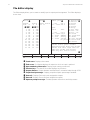
shown here.
Patch
❶
Output
Dim. %%
1 FF
❺2 ❻FF
3 FF
4 FF
5 FF
6 FF
7 FF
8 FF
9 FF
10 FF
11 FF
12 FF
13 FF
14 FF
15 FF
Find:
F1 Monitor
F2 Editor ❹
Source Output Source 1 - 512
Out 1
F3 Setup
A
B Dim. %%
513 - 1024 Out 2
F4 Test
1 513
F5 Sleep
❼2 ❽514
Input
F6 Help
3 515
Source
Port
F7 Set tabs
4 516
F8 Def. col.
5 517
1 - 512
Dig 1
F9 Clr. col.
6 518
513 - 1024 Dig 2
F10 Find
7 519
A1 - A192 AMX192
F11 Find more
8 520
P1 - P16
Analog
F12 Name
9 521
F1 - F100 Forced
F13 Del forced
10 522
0
No patch F14 Save-Load
11 523
F16 Reset
12 524
13 525
Arrows select patch columns
14 526
Page/Shift Page moves the window
15 527
Return will move right and roll
Tabs set column stop points
Home key will move to start
❷
Dimmer port
❸
❾
Dig 1 in
DMX512
❶
❷
❸
❹
❺
❻
❼
❽
❾
Dig 2 in AMX192 Out 1 Out 2
OFF
None
DMX
DMX
Setup Update Memory
ON 0:0 23 Hz Saved
Patch name Displays show name.
Find screen Find feature displays all outputs to which an input is patched.
Input numbering information Displays input naming conventions.
Function keys This area of the screen displays key functions.
Output dimmers Output dimmers are listed here in numerical order through 1024.
Proportional percentage Displays proportional patch percentage if enabled.
Source A Displays Source A inputs assigned to outputs.
Source B Displays Source B inputs assigned to outputs.
Operator prompt messages Provides operator instructions and Help screens.
Response NETWORK CONTROLLER
33
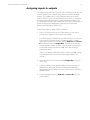
Assigning inputs to outputs
The Response NETWORK CONTROLLER’s Editor display allows you
to patch dimmer control signals from control consoles to dimmer
outputs. This enables you to control dimmers with one or more
control consoles. Inputs can be patched without levels, or assigned
to outputs with inhibited levels to create a proportional patch. You
can modify patches you have created with your control console(s), or
ignore the old patch and create an entirely new one using the
Response NETWORK CONTROLLER.
Follow these steps to assign inputs to outputs.
1. Press [F2] (Editor) to access the Editor display. A new set of
function keys appears in the function key display.
The Editor display is divided into four main sections. You use the
four columns in the left section to create the patch. Dimmer
inputs are entered in the columns labeled Source A and Source
B. The lefthand column, Output Dim., represents the dimmer
output numbers, fifteen at a time. Intensity levels are entered in
the second column from the left, %%, if you are creating a
proportional patch.
Note: If you disable proportional patch in Setup, the %% column
is disabled, and you can not enter percentage values in this
column.
2. Move the cursor to the column labeled Output dim, using the
arrow keys.
3. Type the number of the dimmer output to which you want to
assign inputs, and press [Return]. Desired output dimmer is
displayed and cursor moves to source column next to selected
dimmer output.
4. Enter the desired input(s) in Source A or Source B field; then
press [Return].
34
Response NETWORK CONTROLLER
When control signals enter the processor through the input ports,
the processor assigns them names. The name an input receives is
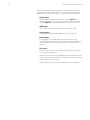
determined by what kind of input it is. Inputs are named as follows:
Digital inputs
Digital inputs that enter the processor through Input 1 are
assigned designations 1 through 512. Digital inputs that enter
through Input 2 are assigned designations 513 through 1024.
AMX inputs
AMX inputs are assigned designations A1 through A192.
Analog inputs
Analog inputs are assigned designations P1 through P16.
Forced inputs
A Forced input is an input assigned to an output at a userspecified level. Inputs set at a forced level are assigned designations F1 through F100, representing levels from one to 100
percent.
Zero patch
Patching a value of zero to an output removes that source field
from the patch assignment.
Note: When two inputs set at different levels are assigned to an
output, the Response NETWORK CONTROLLER sets the output
at the higher of the two levels.
5. Repeat steps two and three until desired patch is configured.
Response NETWORK CONTROLLER
35
Assigning inputs with
forced levels to outputs
In addition to assigning inputs from various kinds of controllers to
outputs, you can also use the Editor display to assign a forced level
to an output. A forced level input is an input that is set at a fixed
level. An output to which a forced input is patched may output at a
higher level, but it will not fall below the forced level. This can be
useful for turning on worklights on stage, or to preheat lamps.
For example, assume DMX512 input number 100 and forced input
F50 are both assigned to output dimmer one. The DMX512 control
console is outputting dimmer 100 at full intensity (100 percent.) The
Response NETWORK CONTROLLER pile-on convention sets the
output dimmer at 100 percent.
If input 100’s intensity is reduced to a level below 50 percent, the
output dimmer continues to output at the forced level of 50 percent.
This section includes information on:
•
•
Assigning Forced levels
Deleting Forced levels
Assigning Forced levels
Assigning Forced levels to outputs assigns a mimimum output level
to a dimmer. Follow these steps to assign Forced levels:
1. Move the cursor to the desired source column using the arrow
keys.
2. Enter the letter F, followed by the percentage value to which
you want to force the output. (For example F50 to set the output
at 50 percent.) When forced levels are in effect, the message
Forced levels present appears at the bottom lefthand corner of
the Editor display.
Note: Forced levels are live outputs. Assigning a forced level to
an output immediately sets dimmer to that level.
36
Response NETWORK CONTROLLER
Deleting all Forced
levels from source column
[F13] (Del. Forced) removes all forced levels from an input
source column. Follow these steps to remove forced levels:
1. Move cursor to source column from which you want to
delete all forced levels.
2. Press [F13] (Del. Forced). The message, Press [Y] to
confirm, or [N] to cancel appears in lower left portion of
display.
3. Press [Y] to remove all forced levels in the selected source
column, or press [N] to cancel.
Response NETWORK CONTROLLER
37
Using Editor’s tools
In assigning inputs to outputs, sometimes the easiest way to
move the cursor is simply to use the up, down, right, and left
arrow keys on the terminal keyboard. When you are creating
large, complex patch assignments though, you may find it easier
to use some or all of the following commands.
Moving the cursor with [Home] and [Page]
Pressing [Home] moves the cursor to dimmer output number
one.
Pressing [Page] displays the next fifteen dimmer outputs and
the inputs patched to them. Press [Shift] [Page] to display the
previous fifteen.
Moving the cursor with tab settings
Using tabs can make creating a large patch much easier. Pressing the [Return] key moves the cursor between columns. You
can determine the columns at which the cursor stops by setting
tabs. When you first use the Response NETWORK
CONTROLLER’s Wyse WY-50 terminal, you should set the tabs
as desired. Follow the steps below to set tabs:
1. Press [F7] (Set tabs). Cursor moves to upper left portion of
Editor display. Active tabs are highlighted.
2. Use the right arrow key to move cursor to desired input
column. Tabs can be set on Output Dim. (output dimmer
number), %% (proportional patch percent), Source A
(Source A inputs), and Source B (Source B inputs).
3. Press up arrow key to turn tab on. Press down arrow key to
turn tab off.
4. Press [Return] when desired tabs have been selected.
38
Response NETWORK CONTROLLER
Default input to output assignment
The Default Column command assigns inputs one through 512
to the Source A column. Inputs one through 512 are assigned to
outputs one through 512, and also to outputs 513 through 1024.
Inputs 513 through 1024 are assigned to the Source B column.
Inputs 513 through 1024 are patched to outputs 1 through 512
and to outputs 513 through 1024.
For example, if both source columns are set with the Default
Column command, both inputs one and 513 are patched to
output number one. Both control the intensity level of the
output. The dimmer outputs at the higher of the two input
levels.
The Default Column command is applied to one source column
at a time. You may set either, or both source columns to the
default. Follow the steps below to use the Default Column
command.
Warning: Using Default Column will remove input to output
assignments you have created.
1. Move the cursor to the desired column, and press [F8] (Def.
Col.).
2. The message Press [Y] to confirm, or [N] to cancel
appears at the lower right corner of the screen.
3. Press [Y] to assign the default column, or [N] to cancel the
operation.
Note: Executing the Default column command when the
cursor is in the percentage column sets all output intensities
at 100 percent. FF will appear next to each output indicating
full output intensity.
Response NETWORK CONTROLLER
39
Removing existing input to output assignments
If you want to create a custom input to output patch assignment, it is often helpful to remove all existing input to output
assignments. This helps prevent old patch information from
being mistakenly included when you create a new one.
The Clear Column command allows you to unpatch all inputs in a
source column. All input numbers in the selected source column
are replaced with zeros indicating that they are not patched to
outputs. Follow these steps to use the Clear Column command:
1. Move the cursor to the desired column, and press [F9] (Clr.
Col.).
2. The message Press [Y] to confirm, or [N] to cancel
appears at the lower left corner of the screen.
3. Press [Y] to unpatch all inputs in the column, or [N] to cancel
the operation.
Copy [/]
If you want to patch the same input to a large, consecutive set
of outputs, you may find it helpful to use the Copy command.
Copy copies the input number at the current cursor location in
the field immediately below it. Follow these steps to use Copy:
1. Move the cursor to the desired source column, and type an
input number.
2. Press [/]. The input number you entered is copied in the field
immediately below the one in which you entered the
number.
3. Press [/] again to copy the input in the next field down.
40
Response NETWORK CONTROLLER
Copy Plus One [.]
If you need to patch consecutively numbered inputs to a set of
consecutively numbered outputs you may find it helpful to use the
Copy Plus One command. Copy Plus One copies the selected input
number, adds one to it, and enters the new input number in the next
field down. Follow these steps to use Copy Plus One:
1. Move the cursor to the desired source column, and type an
input number.
2. Press [.]. The input number you entered increases by one and is
copied to the field immediately below the one in which you
entered the first dimmer input number.
3. Press [.] again to insert the next higher input number in the next
field down.
Clear Patch and Move Down [,]
To unpatch inputs from a consecutive series of outputs, use the
Clear Patch and Move Down command. It inserts a zero in the
cursor location, unpatching the selected output from that input and
then moves to the next input down. Follow these steps to use Clear
Patch and Move Down:
1. Move the cursor to the input field that you want to clear from
the patch using the arrow keys.
2. Press [,] to enter zero in field; cursor moves to the field immediately below.
3. Press [,] to remove the new input from the patch
Note: If you place the cursor on an output and press [,], both
inputs patched to it are removed from the patch.
Response NETWORK CONTROLLER
41
Displaying the outputs to
which an input is patched
The Find command lists all outputs to which a given input is
patched. Up to 15 outputs can be displayed at a time. If the input
is patched to more than 15 outputs, the Find More command
displays subsequent inputs. Follow the steps below to use Find
and Find More.
1. Press [F10] (Find). Cursor moves to the top of the screen and
Find: is highlighted.
2. Enter the number of the desired input, and press [Return].
Note: If entering a digital input, type the number of the input.
If entering an AMX input, the input number must be preceded
by an A. If entering an analog input, the input number must be
preceded by a P. If entering an input set at a forced level, type
F followed by the level at which the input is set.
The outputs to which the input is patched, output percentage
(if inhibited), and other inputs patched to the output (if any) are
displayed in the Find area of the Editor display. If there are
more than fifteen outputs, More appears at the bottom of the
Find screen.
3. Press [F11] (Find more) to display additional outputs.
4. Press [F10] (Find); then [Return] at any time to return to the
first input/output patch.
42
Response NETWORK CONTROLLER
Saving setup and patch
information
When you first create setup tables and patch from the Editor and
Setup displays, they are stored in the Response NETWORK
CONTROLLER’s RAM (random access memory). One patch and
eight setup tables constitute a Response NETWORK CONTROLLER
show. You can create one show at a time in RAM.
Although patch and setup tables stored in RAM and EEROM are not
normally affected by interruptions to the power supply, it is a good
idea to protect them by saving them to EEROM (electronically
erasable read-only memory), or to 3.5-inch disk. Saving your work
not only protects your shows from physical or electrical damage, but
decreases the chance of their being accidentally changed.
This chapter includes the following sections:
•
•
•
Using EEROM
Memory Enable/Disable Switch
Using disk drive
Response NETWORK CONTROLLER
43
Using EEROM
Both rack and portable models allow you to save one complete
show to EEROM at a time. You should save to EEROM frequently to
protect your work from accidental changes and from damage due to
voltage surges or equipment failure.
Note: Show information in RAM is saved, but by saving it to EEROM
it is better protected from voltage surges, equipment failure and
accidental changes.
Saving to EEROM
You can save to EEROM from the Monitor, Editor, Setup and Sleep
displays. To record setup and patch information, follow these steps:
1. Press [F14] (Save-load). A new set of function keys appears in
the function key display.
2. Press [F8] (Load to EEROM). The message Saves setup tables
and patch in active memory to EEROM. Press [Return] to
continue, or [X] to cancel operation. appears on the screen.
3. Press [Return] to save all eight setup tables and the current
patch, or press [X] to cancel the operation.
If Memory has been disabled with the Memory enable/disable
button on the front panel, the controller displays the message
ERROR DETECTED writing to EEROM!! This may be caused
by the write protect switch. Type any key to continue. Flip
the switch to the memory enabled position, and try again.
Warning: When you record a show to EEROM, patch and all
setup tables currently in active memory overwrite the information already saved in EEROM. The old patch and setup tables are
lost.
Loading from EEROM
You can load a show from EEROM to RAM in the Monitor, Editor,
Setup and Sleep displays. Follow the steps below to load setup and
patch information from EEROM.
1. Press [F14] (Save-load). A new set of function keys appears in
the function key display.
2. Press [F9] (Load from EEROM). The message Loads patch and
setup tables from EEROM to active memory. Press [Return]
to continue or [X] to exit.
3. Press [Return] to load patch and setups from EEROM, or [X] to
cancel operation.
44
Response NETWORK CONTROLLER
Memory enable/disable switch
When the memory is set to Memory disable, new information can
not be recorded to EEROM. You can change current setup and patch
information, but you can not record to EEROM. The memory enable/
disable switch has no effect on disk operation.
Note: Memory enable/disable does not affect your ability to read
from EEROM.
Response NETWORK CONTROLLER
45
Using disk
In addition to EEROM storage, the rack mount model has a 3.5-inch
disk drive that enables you save up to 25 shows on each disk. In
addition to saving your patch and setup tables, saving to disk also
saves any looks saved using Snapshot. The disk drive enables you to
save up to 25 shows on a 720K, double-sided, double-density, 3.5inch floppy disk. The Response NETWORK CONTROLLER’s disk
drive formats disks in IBM PC-compatible disk and directory format,
but subdirectories can not be created. Before saving a show to disk
you must:
•
•
Name the show.
Format the disk.
Naming your shows
To save a show on disk, you must give it a name that conforms to
standard MS-DOS file naming conventions. A show name may
consist of up to eight characters, either upper or lowercase. The
following characters may not be used in show names: \ / [ ] : < > = +
; ,. The Response NETWORK CONTROLLER automatically adds the
extension .RNC to the name you give a show.
Follow these steps to name a show:
1. Press [F2] (Editor) to enter Editor display mode.
2. Press [F12] (Name). Cursor moves to the upper left corner of the
screen.
3. Type the show name, and press [Return].
46
Response NETWORK CONTROLLER
Formatting a disk
You must format disks before they can be used to record show
information. You can format disks for the Response NETWORK
CONTROLLER on either an IBM-compatible personal computer, or in
the controller’s disk drive. If you are formatting on the Response
NETWORK CONTROLLER, you can format a disk from the Monitor,
Editor, Setup, Test, or Sleep displays. Follow these steps to format a
disk:
1. Press [F14] (Save-load).
2. Press [F12] (Format disk).
3. Message Place disk in drive and press [Return] to continue,
or [X] to exit. WARNING: FORMATTING ERASES DISK; ALL
INFORMATION WILL BE LOST. Press [Return] to continue or
[X] to exit. appears on screen.
4. Insert disk in drive, then press [Return] to format disk, or press
[X] to cancel. Message Formatting in progress appears.
5. When formatting is complete, message Operation complete
appears on screen.
Saving to disk
The Response NETWORK CONTROLLER allows you to save up to
25 shows on a disk. Each show consists of a patch, eight setup
tables and any backup levels set with Snapshot ;(see page 47 for
more information on using Snapshot.) You can save a show to disk
from the Monitor, Editor, Setup, Test, or Sleep displays. Follow
these steps to save a show to disk:
1. Press [F14] (Save-load). A new set of function keys appears in
the function key display.
2. Press [F6] (Save to disk). Controller displays the message Saves
setup tables, patch and Snapshot looks currently in active
memory to disk. Enter name at cursor and press [Return], or to
use previous name, press [X].
3. Enter a file name, and press [Return]; or just press [Return] to
use the name that appears at the prompt.
4. If the show name you select already exists on the disk, the
message Saving to disk. Error Duplicate File. Press [Return]
to continue or [X] to exit. appears. Press [Return] to overwrite
the existing show, or [X] to cancel the operation.
Response NETWORK CONTROLLER
47
Loading from disk
Shows stored on disk can be loaded directly from disk to the Response NETWORK CONTROLLER’s RAM, but it isn’t loaded into the
EEROM. You can load a show from disk to RAM from the Monitor,
Editor, Setup, Test, or Sleep displays. Follow these steps to load a
show from disk:
1. Press [F14] (Save-load). A new set of function keys appears in
the function key display.
2. Press [F7] (Load from disk). The message, Loads setup tables,
patch and Snapshot looks on disk to active memory. Enter
name at cursor and press [Return], or to use previous name,
press [Return]. appears on the screen, followed by a blank
space or the name of the last show you loaded.
3. Type the new show name, and press [Return], or just press
[Return] if you want to reload the last show you loaded. The
message Press [Return] to continue or [X] to exit. appears on
the screen.
4. When the show has been loaded, the message Operation
complete appears on the screen.
Displaying disk directory
Disk directory allows you to list the shows recorded on the disk with
which you are working. You can display a disk directory from the
Monitor, Editor, Setup, Test, or Sleep displays. Follow these steps to
list the shows recorded on a disk.
1. Press [F14] (Save-load). A new set of function keys appears in
the function key display.
2. Press [F10] (Disk directory). The shows recorded on the disk are
listed and message Directory listing finished. Type any key to
continue. appears on screen.
48
Response NETWORK CONTROLLER
Removing a show from disk
Once you have recorded a show on disk, you may remove it. You
can remove a show from disk from the Monitor, Editor, Setup, Test,
or Sleep displays. Follow these steps to remove a show from a disk:
1. Press [F14] (Save-load). A new set of function keys appears in
the function key display.
2. Press [F11] (Delete show). The message Enter name of show
to be deleted and press [Return], or to delete previous
show, press [X]. appears on the screen.
3. Type the name of the show you want to delete, and press
[Return], or just press [Return] if the show name currently
displayed is the show you want to delete.
4. Press [Page] to display additional inputs or outputs. Press
[Home] to return to input/output number one.
Response NETWORK CONTROLLER
49
Chapter 4
Using optional accessories
This chapter includes instructions for using the optional Snapshot
unit and an optional serial printer.
Using Snapshot
The optional Snapshot unit is a small, analog control console with
features that enable you to use it to backup your control consoles. It
can also be used as a supplemental analog control console.
The Snapshot allows you to back up your control consoles two
different ways, using Snapshot’s Backup or Panic modes. Backup
allows you to record a different look in each of the Snapshot’s 12
pots. Panic automatically assigns groups of output dimmers to each
of the Snapshot’s pots. In both Backup and Panic mode all inputs to
the Response NETWORK CONTROLLER are interrupted and the
Snapshot takes control of all output dimmers.
In addition to using the Snapshot to provide control console backup,
it can be used as an analog control console. The sections included in
this chapter are:
•
•
•
Enabling Snapshot
Using Backup to record and bring up looks
Using Panic to bring up a look
•
Using Snapshot as an analog control console
50
Response NETWORK CONTROLLER
Enabling Snapshot
To use the Snapshot unit for backup you must first enable the
backup feature from the Setup display. To enable backup for both
output ports you must enable backup for each output port separately. Follow these steps to enable Snapshot:
1. Confirm that the Snapshot unit is correctly installed. See page
22.
2. Press [F3] (Setup) to display Setup display.
3. Select the desired setup table using the up or down arrow keys.
Press [F8] (Enable) to make changes to the selected setup table.
4. Move the cursor to the Backup enabled field(s) for the output
port(s) you want to backup, using the left or right arrow keys.
5. Set Backup enabled On using the up or down arrow key.
6. If you want to backup both output ports, move the cursor to the
other Backup enabled field using the right or left arrow key and
repeat step five.
Note: Do not to back up all 1024 output dimmers unless you
need them all. Backing up dimmers slows processing time.
7. Press [F16] (Reset) to enter setup table changes.
Response NETWORK CONTROLLER
51
Using Backup
Backup enables you to use the Snapshot unit to record up to 12
different looks, then bring them up on stage, using Snapshot’s 12
control potentiometers.
Recording a Backup look
Before you can use the Snapshot’s Backup mode, you must save
backup look(s) in the Snapshot potentiometers. You can record up to
12 looks, one in each pot. Follow these steps to record a Snapshot
look:
1. Create a look on stage using control console(s).
2. Move the potentiometer in which you want to store the look to
10. Set all other Snapshot pots to 0.
3. Press the [Program] button on the Snapshot unit and hold it for a
moment. LED flashes indicating that the look has been recorded.
Note: If the Snapshot is not properly recorded the Error LED on
the Snapshot console will light. Frequently this is because you
have neglected to bring up a pot prior to recording a look.
4. Move the potentiometer where the look is stored back to 0.
5. Repeat this procedure for each look you want to save.
Playing back a look in Backup
Once you have recorded a look in a Snapshot pot, you can use the
pot to bring that look up on stage. Follow these steps to play back a
look using Snapshot.
1. Press the [Back] button on the Snapshot unit. All input to digital
input ports one and two are interrupted, and the message
WARNING BACKUP IS ON appears on the display screen.
Note: This message may take a moment to appear or disappear.
2. Move the potentiometer(s) in which the desired look is stored to
bring up the look.
52
Response NETWORK CONTROLLER
Using Panic to bring up a look
If your console fails and you have not recorded backup looks in the
Snapshot console’s twelve pots, you can use the console’s Panic
mode to control dimmers. Backup must be enabled in Setup to use
Snapshot’s Panic feature. See page 29 for instructions on enabling
Backup.
When you press [Panic] the Snapshot console divides the total
number of output dimmers by 12 and assigns each one of the 12
groups to a specific potentiometer on the Snapshot console. If you
have a number of dimmers not evenly divisible by 12, Snapshot
assigns any extra dimmers to pot number 12.
Example
In a 144 dimmer system, Snapshots 1 through 12 are each assigned
12 dimmers. Dimmers one through 12 are assigned to pot 1; dimmers 13 through 24 to pot 2; dimmers 25 through 36 to pot 3 and so
on. Follow these steps to use Panic:
1. Press [Panic] button on the Snapshot unit.
2. Move Snapshot pots up to bring output dimmers to desired
levels.
Note: When you press [Panic], all inputs are interrupted. The
pots on the Snapshot unit take control of all dimmers.
Response NETWORK CONTROLLER
53
Using Snapshot as an
analog control console
In addition to using Snapshot to backup your control console(s), you
may also use it as a twelve channel, analog lighting control console.
When you use the Snapshot as an analog console, it provides you
with 12 analog dimmer inputs. The inputs can be assigned to digital
outputs in the Editor display along with inputs from input ports one
and two. As with digital inputs, analog inputs are assigned to output
dimmers according to a pile-on convention. When you create the
patch, you assign the 12 analog inputs to outputs using the designations P1 through P12. Follow these steps to include analog inputs in
your input to output patch assignment:
1. Press [F2] (Editor) to access the Editor display.
The Editor display is divided into four main sections. The
leftmost section consists of four columns. The left column,
labeled Output Dim. represents the outputs. The second
column from the left, %%, displays output intensity percentage
(if it is inhibited). The two right columns, Source A and Source
B, represent dimmer inputs.
2. Move the cursor to either source field to the right of the output
to which you want to assign an analog input.
3. Type the designation of the desired analog input in the source
field (P1 through P12); then press [Return].
54
Response NETWORK CONTROLLER
Using the serial printer
The Response NETWORK CONTROLLER allows you to print your
setup tables and patch on a standard serial printer.
Printing Setup tables
The Response NETWORK CONTROLLER allows you to use a
standard serial printer to print all eight setup tables currently in RAM.
Follow these instructions to print setup tables:
1. Make sure the serial printer is properly connected. See instructions on page 22.
2. Press [F3] (Setup) to access Setup display.
3. Press [F7] (Printer) to start printing. Message Printing setups,
type [X] to exit appears above prompt messages. All eight
setup tables will print unless you exit.
Printing patch
The Response NETWORK CONTROLLER allows you to use a
standard serial printer to print the patch currently in RAM. Follow
these instructions to print your patch:
1. Make sure the serial printer is properly connected (see instructions on page 22).
2. Press [F2] (Editor) to access the Editor mode.
3. Press [Shift] [Print] to start printing. Message Printing patches,
type [X] to exit appears in lower left corner of Setup display.
Response NETWORK CONTROLLER
55
Chapter 5
Using the Response NETWORK
CONTROLLER without a monitor
Once you have used the terminal to configure your setup tables and
patch, you can disconnect it from the controller and operate the
Response NETWORK CONTROLLER alone. Operating the Response
NETWORK CONTROLLER without the Wyse WY-50 terminal is
called operating in hardware mode. Once you have entered the
hardware mode you can not make changes to patch or setup tables,
but you can select the eight setup tables you have configured using
hardware jumpers.
The following sections are included in this chapter:
•
•
•
Using jumpers to select setup tables
Using jumpers to enable/disable controller features
Autoload
Working with jumpers
When you are using the Response NETWORK CONTROLLER in
hardware mode you select setup tables and certain system features
by manipulating jumpers on the circuit board. The jumpers you will
need to work with are located in a component labeled J3 on the
board. The jumpers consist of two parallel rows of eight small pins
and removable connectors. Each opposing set of pins represents a
circuit. Connecting two pins with a jumper closes a circuit (turns it
on), removing a jumper opens the circuit (turns it off).
56
Response NETWORK CONTROLLER
Autoload
When Autoload is enabled and you press the Reset button on the
front panel, the Response NETWORK CONTROLLER reads the
patch and setup tables stored in EEROM and loads them to the
controller’s active memory. Autoload also loads the show from
EEROM when the controller is turned on. Pressing [F16] (Reset) on
the Wyse WY-50 terminal does not load a new show from EEROM.
If Autoload is enabled and you have not saved your current show to
EEROM, pressing the reset button overwrites the show in active
memory with the show in EEROM. The show in active memory is
lost.
Response NETWORK CONTROLLER
57
Selecting a setup table
in hardware mode
In hardware mode, you can select any one of the controller’s eight
setup tables by removing the unit’s top panel and setting three
jumpers on the circuit board. Follow these steps to select a setup
table in hardware mode.
1. Unplug the controller, and turn power off.
2. Remove the screws that secure the top panel, and remove it by
sliding it back and lifting.
3. Rotate the controller so that the front panel is to your right, and
locate the component labeled J3 on the circuit board.
4. Set jumpers one, two and three as indicated below to select the
desired setup option.
Setup Jumper
table
1
0
1
2
3
4
5
6
7
Off
Off
Off
Off
On
On
On
On
Jumper
2
Off
Off
On
On
Off
Off
On
On
Jumper
3
Off
On
Off
On
Off
On
Off
On
5. Replace the top panel, and turn power on. The setup table
selected by the jumper configuration will be enabled. If Autoload
is enabled, the processor will load the patch and setup tables
into RAM. The selected setup table will be enabled. See the
preceding page for more information on Autoload.
58
Response NETWORK CONTROLLER
Using jumpers to enable/disable
controller features
In addition to using jumpers to select setup tables, you can use
them to enable or disable the Wyse WY-50 terminal, the 3.5-inch
disk drive and the Autoload feature. Disabling unused options
enhances the Response NETWORK CONTROLLER’s processing
speed. Follow the steps below to enable/disable features with
hardware jumpers:
1. Turn power off and unplug the controller.
2. Remove the screws that secure the top panel, and remove it by
sliding it back and lifting.
3. Rotate the controller so that the front panel is to your right, and
locate the component labeled J3 on the circuit board.
4. Set jumpers as described in table below to enable or disable
desired controller features.
Disk drive
Autoload
Wyse WY-50
teminal
Jumper
Enable
Disable
4
5
6
On
On
Off
Off
Off
On
5. Replace top panel, and turn power on.
Note: Leave jumpers seven and eight off at all times.
Response NETWORK CONTROLLER
59
Chapter 6
Diagnostic tests
This chapter describes the Monitor and Test displays. The Response
NETWORK CONTROLLER features enable you to confirm your input
to output patch assignment and to test output dimmers.
The Monitor screen displays the following information:
•
•
•
•
•
•
Input levels at input port one
Input levels at input port two
AMX input levels at input port one
Analog input levels
Output levels at output port one
Output levels at output port two
The Test screen allows you to perform the following tests on your
dimmers:
•
•
•
Set dimmers at a specific level
Run a chase with a selected group of dimmers
Run a fade with a selected group of dimmers from zero to full
and back to zero
60
Response NETWORK CONTROLLER
Displaying input and output
levels on screen
The Monitor screen allows you to display current input and output
levels. Use function keys to select the specific input or output you
want to display and also to select whether output levels are expressed as percentages or in hexadecimal notation. Follow the steps
below to use the Monitor screen:
1. Press [F1] (Monitor) to display the Monitor screen. A new set of
function keys appears in the function key display.
2. Press one of the function keys listed below to select the input or
output you wish to view.
[F6]
[F7]
[F8]
[F9]
[F10]
[F11]
Input port one (digital inputs 1 through 512)
Input port two levels (digital inputs 513 through 1024)
AMX input levels (AMX inputs A1 through A192)
Analog input levels (analog inputs P1 through P16)
Output port one levels (digital output dimmers 1 through
512)
Output port two levels (digital output dimmers 512
through 1024)
Note: Although digital inputs at input port two and output dimmers
from output port two are numbered 513 through 1024 in the Editor
display, they are numbered one through 512 in Test.
3. Press [F12] (Percent) to display levels as percentages, or [F13]
(Hex) to display levels in hexadecimal notation. (For hexadecimal
conversion table see Appendix F.)
Response NETWORK CONTROLLER
61
Test display
The Test display allows you to test your output dimmers independent of any data from control consoles. You can test dimmers one at
a time or in groups. The following subjects are discussed in this
section:
•
•
•
Setting dimmer levels
Creating a chase
Creating a fade
Warning: When the Response NETWORK CONTROLLER enters
Test, all control console data is interrupted.
62
Response NETWORK CONTROLLER
Setting dimmer levels in Test
Test display allows you to directly control dimmers, bypassing all
input from console(s). This can help you identify possible problems
with your patch. To set dimmer levels from Test, follow these steps:
1. Press [F4] (Test) to access the Test display. When you enter
Test, all other processing stops.
2. Press [C] to continue, or [A] if you do not want to enter Test. If
you cancel the operation, the display defaults to Sleep. For a
description of Sleep see page 20.
3. Press [F6] (Out 1) or [F7] (Out 2) to select the output port for the
dimmers you want to test.
Note: Although Output 2 dimmers are numbered 513 through
1024 in the Editor display, they are numbered one through 512
in Test.
4. Move the cursor to the desired dimmer, and enter an output
level.
Note: There are several ways to move the cursor in Test. You
may use the arrow keys to move the cursor in any direction, one
space at a time. You may also use [Home] to move the cursor to
the first dimmer, and [Page] to move to the next screen, or
[Shift] [Page] to move to the previous screen. Each screen
displays 200 dimmers.
5. If you want to test more than one dimmer, press [-] once for
each consecutive dimmer you want to include in the group. The
output level you entered for the first dimmer will be copied in
each subsequent dimmer.
6. Type an output level at the desired cursor location to set the
dimmer at that level.
7. Repeat steps four and five for any additional dimmers you want
to set at a level.
8. Press [F12] (Clear) to remove all test output levels.
Response NETWORK CONTROLLER
63
Creating a chase in Test
Chase tests enable you to select a group of dimmers, then sequentially bring each selected dimmer to full intensity and fade it out.
Follow these steps to run a Chase test:
1. Press [F4] (Test) to display the Test screen. When you enter
Test display, all processing stops.
2. Press [C] to continue, or [A] if you do not want to enter Test. If
you cancel the operation, the display defaults to Sleep. For a
description of Sleep see page 24.
3. Press [F6] (Dig 1 out), or [F7] (Dig 2 out) to select the output port
for the dimmers you want to include in the chase.
4. Use the arrow keys to move the cursor to the first dimmer in the
chase.
Note: There are several ways to move the cursor in Test. You
may use the arrow keys to move the cursor in any direction, one
space at a time. You may also use [Home] to move the cursor to
the first dimmer, [Page] to move to the next screen, or
[Shift][Page] to move to the previous screen. Each screen
displays 200 dimmers.
5. Press [F8] (Set beg.) to select the dimmer as the first dimmer in
the chase.
6. Move the cursor to the last dimmer in the chase.
7. Press [F9] (Set end) to select the dimmer as the last dimmer in
the chase.
8. Press [F10] (Chase) to start chase sequence.
64
Response NETWORK CONTROLLER
9. Press [Shift][>] to increase the rate of the chase, or [Shift][<] to
decrease it.
Note: Current rate is shown in the information displayed just
above the status line. For example if current rate is 10 milliseconds, display reads Speed <> 10 ms.
10. Press [F10] (Chase) again to stop the chase.
11. Press [F12] (Clear) to cancel all test output levels.
Response NETWORK CONTROLLER
65
Fading groups of dimmers in Test
Fade tests enable you to select a group of dimmers, then simultaneously bring all the selected dimmers to full intensity and fade
them out. Follow these steps to run a Fade test:
1. Press [F4] (Test) to access the Test display. When you enter
Test display, all processing stops.
2. Press [C] to continue, or [A] if you do not want to enter Test. If
you cancel the operation, the display defaults to Sleep. For a
description of Sleep see page 73.
3. Press [F6] (Dig 1 out), or [F7] (Dig 2 out) to select the output port
for the dimmers you want to chase.
4. Move the cursor to the first dimmer in the group.
Note: There are several ways to move the cursor in Test. You
may use the arrow keys to move the cursor in any direction, one
space at a time. You may also use [Home] to move the cursor to
the first dimmer, [Page] to move to the next screen, or
[Shift][Page] to move to the previous screen. Each screen
displays 200 dimmers.
5. Press [F8] (Set beg.) to select the dimmer as the first dimmer in
the group.
6. Move the cursor to the last dimmer you want to include in the
group.
7. Press [F9] (Set end) to select the dimmer as the last dimmer in
the group.
8. Press [F11] (Fade) to start the fade. Selected dimmers fade to
full intensity and then back to zero.
9. Press [Shift][>] to increase the speed of the Fade test, or press
[Shift][<] to decrease the speed.
10. Press [F11] (Fade) again to stop the fade.
11. Press [F12] (Clear) to stop the Fade test and remove any remaining test output levels.
66
Response NETWORK CONTROLLER
Using Fill [F13]
Fill [F13] allows you to set the output of a large group of dimmers at
a particular level. Follow these steps to use Fill.
1. Move the cursor to an output dimmer, and enter an output level
of 0 through 99, or F for 100 percent.
2. Press [F13] (Fill) and all other dimmers are set at the same level
as the dimmer(s) you selected initially.
3. To remove levels set with Fill (F13), press [F12] (Clear).
Response NETWORK CONTROLLER
67
Chapter 7
Reference
This chapter lists all the Response NETWORK CONTROLLER’s
controls and functions in alphabetical order.
[<][>]
When running a fade or chase test in Test display, press [Shift][<] to
decrease the speed of the test; press [Shift][>] to increase the
speed of the test. Range of speeds is from 2 to 250 milliseconds.
AMX in
In Monitor display, press [F8] (AMX in) to display intensity levels of
AMX dimmer inputs.
Analog
In Monitor display, press [F9] (Analog) to display intensity levels of
16 analog dimmer inputs.
Arrow keys
Press the up, down, right, and left arrow keys to move the cursor in
Editor and Test.
In Setup display, the left and right arrow keys move the cursor
between input fields; the up and down arrow keys select options.
Autoload
Autoload automatically loads the setup and patch information you
have saved to EEROM into the Response NETWORK
CONTROLLER’s active memory. Autoload is activated when you
press the reset switch on the front panel or when you turn the
power on.
To enable Autoload remove the unit’s top panel, and set jumper
number five on. When Autoload is enabled, the letter A appears in
the Jumpers field of the Status line. When Autoload is disabled, the
letter A is replaced by the letter N.
68
Response NETWORK CONTROLLER
Backup enabled
In Setup display, Backup enabled allows you to enable the optional
Snapshot unit.
You must enable backup for each of the output ports independently.
This can be helpful if you do not need to back up the full 1024
dimmer outputs, since the processing time is increased in proportion
to the number of outputs you are backing up.
Burst rate
In Setup, the Burst rate field allows you to select the time period
between output data transmissions. The burst rate is expressed in
milliseconds. Modifying the burst rate enables you to match the
processor’s update rate to your control equipment. The Response
NETWORK CONTROLLER’s default burst rate is 50 milliseconds. It
can be reset from 10 to 100 milliseconds in increments of one
millisecond.
Chase
In Test display, chase test brings each one of a group of dimmers to
full, then repeats the process with each subsequent selected
dimmer. The chase continues to run until you disable it.
Clear
In Test display, Press [F12] (Clear) to remove set levels on all
dimmers to which an output level has been assigned in Test display.
Clr. col. (Clear Column)
Clear Column command sets all inputs to zero in the source column
where the cursor is located.
Data format
In Setup, the Data format fields select DMX512 or D192 output
protocol for digital outputs one and two. You may also use these
fields to turn either or both of the output ports off.
If an output port is configured for DMX512, the corresponding input
port cannot be configured for D192. If you need to patch D192
inputs to DMX512 output dimmers, configure input port one for
D192 and output port two for DMX512 and use Editor to patch
inputs to outputs as you like.
Response NETWORK CONTROLLER
69
Def. Col. (Default Column)
Default Column command assigns default inputs to output dimmers.
Source A defaults are one through 512; Source B defaults are 513
through 1024. Each source column consists of 1024 input fields.
When you execute the Default Column command for source column
A, inputs one through 512 are assigned to outputs one through 512,
and also to 513 through 1024. When you execute the Default
Column command for source column B, inputs 513 through 1024 are
assigned to outputs one through 512, and also to 513 through 1024.
Editor display
The Editor display allows you to create a patch that assigns dimmer
inputs from different control devices to dimmers. In Editor you can
create a patch, edit an existing patch, set dimmers at forced levels,
and quickly determine the outputs to which a specified input is
assigned.
EEROM
An EEROM (Electronically erasable read-only memory) is a storage
component that enables you to store eight setup tables and one
patch. When you use the Memory enable/disable switch to disable
memory, the information in EEROM cannot be overwritten or
erased.
Enable
In Setup display, press [F8] (Enable) to make changes in the setup
table you have selected.
Fade
In Test display, Fade [F10] brings the selected dimmers to full output
intensity then fades them to zero. The fade test continues to run
until you disable it by pressing [F11] again.
Fill
In Test display, Fill [F13] sets all unselected dimmers to the output
level at which the selected dimmer is outputting at the moment you
press [F13]. Press [F12] (Clear) to remove all test output levels.
70
Response NETWORK CONTROLLER
Find/Find more
In Editor display, Find [F10] allows you to identify the outputs to
which a specified input is patched. Fifteen outputs can be displayed
at a time. If the input is patched to more than fifteen outputs, More
appears at the end of the listing of outputs. Press [F11] (Find more)
to see additional outputs.
Forced levels
In Editor display, Forced levels are inputs that the user sets. If two
inputs are patched to the output, and one is forced, the output will
still output at whichever input is set at the higher level.
To set an input at a forced level, move the cursor to the source
column next to the output to which you want to patch the forced
input. Then, enter the letter F followed by an output level of 1
through 100.
Function keys
The function keys are the 16 keys that run along the top of the Wyse
WY-50 terminal keyboard. Function keys are labeled F1 through F16
and enable you to perform a variety of functions. See Appendix E for
a complete listing of the various function keys.
Help
In the Editor display, the Help screen provides on-screen operator
information about Copy, Copy Plus One and Clear Patch and Move
Down commands. Press [F6] to access Help screen.
Hexadecimal
Hexadecimal is a notation used to express output percentages. The
range from zero to full output intensity is represented in hexadecimal notation by 256 increments. You can select hexadecimal or
percentage in the Monitor and Test displays. For a complete listing
of the 256 hexadecimal alphanumeric characters see Appendix F.
Indicator LEDs
Nine LEDs on the Response NETWORK CONTROLLER’s front panel
allow you to monitor the status of the controller’s memory, inputs
and outputs. For a more detailed explanation of the indicator LEDs
see Appendix A.
Response NETWORK CONTROLLER
71
Jumpers
Jumpers are connectors that bridge a gap between two pins on the
Response NETWORK CONTROLLER circuit board. Jumpers allow
you to select a setup table without using the optional Wyse WY-50
terminal, and enable/disable the Wyse WY-50 terminal, disk drive
and Autoload. For more information on using jumpers, see page 55.
Memory Enable/Disable switch
The Memory Enable/Disable switch is a toggle switch on the front of
the Response NETWORK CONTROLLER . When the switch is set to
Memory Enable you can save the eight setup tables and patch from
active memory to EEROM. When the switch is set to Memory
Disable you can not save to EEROM. This can prevent accidentally
overwriting show information you have previously saved to EEROM.
When memory is disabled you can still read from EEROM. Operation
of the 3.5-inch disk drive is not affected by the Memory enable/
disable switch. When memory is disabled, you can still record to and
read from disk.
Monitor
The Monitor display enables you to display current input and output
levels. Press [F1] (Monitor) to access the Monitor display. Function
keys select desired input/output information. Output levels can be
expressed as percentages or in hexadecimal notation. Monitor
displays and their corresponding function keys are listed in
Appendix D.
Name
To save a show on a disk using the Response NETWORK
CONTROLLER’s 3.5-inch disk drive, you must give the show a name
from the Editor display. Press [F12] (Name) to move the cursor to
the Name field, then type in the name according to MS-DOS naming
conventions. For more information about naming shows see page
44.
Output size
In Setup, the Output size field allows you to specify the number of
output dimmers in your system.
72
Response NETWORK CONTROLLER
Page
Press [Page] to view the next screen in a given display. Press [Shift]
[Page] to view the previous screen.
Panic
If your console fails and Backup is enabled, but you have not recorded specific backup looks in the Snapshot console’s twelve pots,
you can use the console’s Panic mode to control dimmers. Press
[Panic] to divide the total number of dimmers by 12 and assign each
one of the 12 groups to a specific Snapshot pot. For example, if your
system has 144 dimmers, pot number one controls dimmers one
through 12, pot number two controls dimmers 13 through 24, and
pot number 12 controls dimmers 132 through 144.
Percent
In Editor display, the column labeled %% (percent) allows you to
create a proportional patch assignment. The output intensity is
determined by mulitplying the intensity determined by the inputs
times the percentage in the %% column.
Power
Power to the Response NETWORK CONTROLLER is controlled by a
rocker switch on the back panel.
Reset
Pressing [Reset] on the front panel, or [F16] (Reset) on the Wyse
keyboard, causes the Response NETWORK CONTROLLER to reread
all current configuration information. If you have made changes in
Setup, these changes will take effect only when you reset the
controller.
If Autoload is enabled, the processor loads the patch and setup
tables from EEROM to active memory. This feature allows you to
use the controller without the optional Wyse WY-50 terminal.
RS232
The female 25-pin connector labeled RS232 on the Response
NETWORK CONTROLLER back panel is the Wyse WY-50 terminal
connector. The connector is a Cinch DB25S or equivalent.
Response NETWORK CONTROLLER
73
Save-load
Save-load enables you to save patch information and setup tables to
EEROM or to disk, and to load patch information and setup tables to
active memory from EEROM or disk. You can access Save-load
[F14] from the Monitor, Editor, Setup, or Sleep displays.
Set beg/Set end
In Test mode Set beg. [F8] and Set end [F9] enable you to select a
group of output dimmers. The selected dimmers can then be used
to run Chase and Fade tests.
Move the cursor to the first output dimmer in the desired sequence,
and press [F8] to select the beginning output dimmer. Then move
the cursor to the last output dimmer in the desired sequence, and
press [F9] to select it as the last dimmer in the sequence.
Setup
Setup enables you select and enable the setup table, determine your
input and output communications protocols, enter the number of
output dimmers your system uses, turn off unused input and output
ports, and to enable/disable the optional Snapshot unit. Press [F3]
(Setup) to access the Setup display.
Sleep
Putting the Response NETWORK CONTROLLER into Sleep mode
enhances the processing speed of the controller by partially disabling the communications link between the optional Wyse WY-50
terminal and the controller. Once you have configured setup tables
and patch, and selected and enabled a setup table, the Wyse WY-50
terminal is no longer needed to run your system. Because the
terminal-to-controller communications link slows Response
NETWORK CONTROLLER processing time, always put the controller into Sleep mode when you are not using the terminal. Press [F5]
(Sleep) to access the Sleep mode.
74
Response NETWORK CONTROLLER
Snapshot
The Snapshot is a small, analog console that enables you to save onstage looks in 12 independently controlled potentiometers. If the
main control console or consoles fail, Snapshot provides a backup
lighting console. The Snapshot console can also be used as an
analog control console in conjunction with any other control consoles you may be using. See page 49 for more information on using
Snapshot.
Snapshot is enabled by selecting On in the Backup enabled field in
the Setup display. Backup enabled should be set to On if you are
using the Snapshot console to backup your control console(s).
Snapshot is connected via the 25-pin male connector labeled Snapshot on the back panel. The connector is a Cinch DB25P or equivalent.
Tabs
Setting tabs in Editor simplifies the task of assigning inputs to
outputs by minimizing the number of keystrokes required to move
the cursor from one field to another. Normally, pressing [Return]
moves the cursor to the next column to the right or, if it is already in
Source B column, to the first field in the next line. By setting tabs
you can cause the cursor to skip fields you are not using. See page
37 for instructions on setting tabs.
Test
The Test display enables you to test your output dimmers independently of the control consoles and the Response NETWORK
CONTROLLER’s input to output patch assignment. All input information is interrupted, and the test takes control of all outputs. Press
[F4] to display Test screen. For more information on Test see Chaper
6 Diagnostic Tests.
Warning: When you enter Test mode, all dimmer input is interrupted. Once in Test, all dimmers are controlled only by the test
commands you enter on the Test screen.
Response NETWORK CONTROLLER
75
Appendix A
Status line
The status line consists of two lines at the bottom of the Monitor, Editor, Setup, Test, Sleep, and Saveload screens. Its eight fields contain information about the current setup of the Response NETWORK
CONTROLLER. Each of the eight fields is described below.
Dig 1 in
DMX512 OFF
Dig 2 in
D192
AMX192
None
Out 1
DMX
Out 2 Setup Update
DMX 0N0:0
43Hz
Memory
Saved
Dig in 1 (Digital input 1)
Displays the protocol configuration for digital input one and indicates whether the input port is currently
receiving data from a control console. For example, the message DMX512 OFF indicates that input port
one is configured for DMX512 but the port is not connected to a control console.
Dig in 2 (Digital input 2)
Displays the protocol configured for digital input two, and indicates whether the input port is currently
receiving data from a control console. For example, the message D192 indicates that input port two is
configured for D192 protocol and is connected to a control console.
AMX192
Indicates that the protocol configured for input port one is AMX192. Message will either be On, indicating that input one is configured for, and receiving, AMX192; OFF, indicating that input one is configured
for AMX, but is not connected to a control console: or None, indicating that the input is not configured
for AMX.
Out 1 (Output 1)
Indicates whether the output port is currently configured for DMX512, D192 or is disabled. None indicates that the output port is disabled.
Out 2 (Output 2)
Indicates whether the output port is currently configured for DMX512, D192 or is disabled. None indicates that the output port is disabled.
Setup
Displays the setup table that is currently selected and whether it was selected in hardware mode or
software mode. The left number indicates the setup table selected in hardware mode. The middle
number indicates the setup table selected in software mode. The number to the right of the colon
indicates the table currently enabled. The letter A indicates that Autoload is enabled; N indicates that
autoload is disabled. For more information on Autoload, see page 56.
Update
Indicates the rate, in hertz (Hz), at which output data is being updated. Rate is determined by the communications protocol.
Memory
Indicates whether the patch and setups have been changed since the last time you saved them.
76
Response NETWORK CONTROLLER
Appendix B
Status LEDs
The front panel of the Response NETWORK CONTROLLER has a row of nine LEDs labeled +5, and A
through H. The LEDs indicate whether power is on or off, and the status of the controller’s inputs,
outputs and active memory.
Power
LED +5
On
Off
Power On?
Yes
No
Memory status
LED A
LED B
On
Off
Off
On
Problem with
memory
Yes
No
AMX Input status
LED C
LED D
Port enabled
for AMX
Valid input
present
Off
On
Off
Off
Off
On
No
Yes
Yes
No
No
Yes
Digital Port 1 status
LED G
LED H
Input
enabled
for DMX
Valid
input
present
Output
enabled
for DMX
Off
On
Off
On
Off
Off
Off
On
Flash
Flash
No
Yes
Yes
Yes
Yes
No
No
Yes
No
Yes
No
No
No
Yes
Yes
Response NETWORK CONTROLLER
77
Digital Port 2 status
LED E
LED F
Input
enabled
for DMX
Valid
input
present
Output
enabled
for DMX
Off
On
Off
On
Off
Off
Off
On
Flash
Flash
No
Yes
Yes
Yes
Yes
No
No
Yes
No
Yes
No
No
No
Yes
Yes
78
Response NETWORK CONTROLLER
Appendix C
Hardware jumper settings
If you are operating the Response NETWORK CONTROLLER without the Wyse WY-50 terminal, you can
select select setup tables using hardware jumpers. Jumper configurations are shown below.
Setup
table
Jumper
1
Jumper
2
Jumper
3
0
1
2
3
4
5
6
7
Off
Off
Off
Off
On
On
On
On
Off
Off
On
On
Off
Off
On
On
Off
On
Off
On
Off
On
Off
On
If you are operating the Response NETWORK CONTROLLER without the Wyse WY-50 terminal, you can
enable or disable features using hardware jumpers. Jumper configurations are shown below.
Jumper
Enable
Disable
Disk drive
4
On
Off
Autoload
5
On
Off
Wyse terminal
6
Off
On
Response NETWORK CONTROLLER
79
Appendix D
Function key use
The following table provides a reference to function key use.
Key
Monitor
Display
Editor
Display
Setup
Display
Test
Display
Sleep
Display
F1
No effect
Selects
Monitor
Display
Selects
Monitor
Display
Selects
Monitor
Display
Selects
Monitor
Display
F2
Selects
Editor
Display
No effect
Selects
Editor
Display
Selects
Editor
Display
Selects
Editor
Display
F3
Selects
Setup
Display
Selects
Setup
Display
No effect
Selects
Setup
Display
Selects
Setup
Display
F4
Selects
Test
Display
Selects
Test
Display
Selects
Test
Display
No effect
Selects
Test
Display
F5
Selects
Sleep
Display
Selects
Sleep
Display
Selects
Sleep
Display
Selects
Sleep
Display
No effect
F6
Displays
input levels
at input
port one
Selects
Help
Selects
Jumpers
Displays
digital
input at
port one
No effect
F7
Displays
input levels
at input port
two
Selects
Set tabs
No effect
Displays
digital
input at
port two
No effect
F8
Displays
AMX input
levels at
input port
one
Selects
Default
column
Selects
Enable
Sets
beginning
test dimmer
No effect
F9
Displays
Selects
analog input
Clear
levels at
column
Snapshot port
No effect
Sets end
test dimmer
No effect
80
Response NETWORK CONTROLLER
F10
Displays
output levels
at output
port one
Selects
Find
No effect
Enables/
disables
Chase test
No effect
F11
Displays
output
levels at
output port
two
Selects
Find more
No effect
Enables/
disables
Fade test
No effect
F12
Displays
levels in
percentage
Selects
Name
No effect
Clears all
test outputs
No effect
F13
Displays
levels in
hexadecimal
Selects
Delete
Forced
No effect
Sets
unselected
dimmers at
test level
No effect
F14
Selects
Save-load
Selects
Save-load
Selects
Save-load
Displays
levels in
Selects
Save-load
percentage
F15
No effect
No effect
No effect
Displays
levels in
hexadecimal
No effect
F16
Resets
controller
Resets
controller
Resets
controller
Resets
controller
Resets
controller
Response NETWORK CONTROLLER
81
Appendix E
Specifications
Control Inputs
•
•
•
•
•
DMX512 digital
D192 digital
K96
AMX192
Analog 0 -10VDC
Control Outputs
•
•
DMX512
D192
User Interfaces
•
Nine indicator LEDs that monitor system status
•
Reset switch
•
Optional Wyse video display terminal displays input and output levels, setup configuration informa
tion and patch information.
•
Serial printer
Performance
•
All dimmer outputs can be proportionally patched to limit maximum output intensity levels.
•
Setup configuration and patch information can be stored in EEROM (electrically erasable read only
memory).
•
Memory enable/disable switch guards against accidental changes to setup configuration or patch
information.
•
Sleep mode optimizes system performance by turning off unused functions when they are not
needed.
Size and weight
Model
1086A1201
1086A1205
Description
Portable
Rack mount
Dimensions
9.125 x 2.1 x 16.75
19 x 1.75 x 15
Weight
7.5 lbs
14.5 lbs
82
Response NETWORK CONTROLLER
Appendix F
Hexadecimal notation
HEX
01
02
03
04
05
06
07
08
09
0A
0B
0C
0D
0E
0F
10
11
12
13
14
15
16
17
18
19
1A
1B
1C
1D
1E
1F
20
21
22
23
24
25
26
27
28
29
2A
2B
2C
2D
2E
2F
30
31
32
33
34
VALUE
1
2
3
4
5
6
7
8
9
10
11
12
13
14
15
16
17
18
19
20
21
22
23
24
25
26
27
28
29
30
31
32
33
34
35
36
37
38
39
40
41
42
43
44
45
46
47
48
49
50
51
52
HEX
35
36
37
38
39
3A
3B
3C
3D
3E
3F
40
41
42
43
44
45
46
47
48
49
4A
4B
4C
4D
4E
4F
50
51
52
53
54
55
56
57
58
59
5A
5B
5C
5D
5E
5F
60
61
62
63
64
65
66
67
68
VALUE
53
54
55
56
57
58
59
60
61
62
63
64
65
66
67
68
69
70
71
72
73
74
75
76
77
78
79
80
81
82
83
84
85
86
87
88
89
90
91
92
93
94
95
96
97
98
99
100
101
102
103
104
HEX
69
6A
6B
6C
6D
6E
6F
70
72
74
75
76
77
78
79
7A
7B
7C
7D
7E
7F
80
81
82
83
84
85
86
87
88
89
8A
8B
8C
8D
8E
8F
90
91
92
93
94
95
96
97
98
99
9A
9B
9C
9D
9E
VALUE
105
106
107
108
109
110
111
112
114
116
117
118
119
120
121
122
123
124
125
126
127
128
129
130
131
132
133
134
135
136
137
138
139
140
141
142
143
144
145
146
147
148
149
150
151
152
153
154
155
156
157
158
HEX
9F
A0
A1
A2
A3
A4
A5
A6
A7
A8
A9
AC
AF
B0
B1
B2
B3
B4
B5
B6
B7
B8
B9
BA
BB
BC
BD
BE
BF
C0
C1
C2
C3
C4
C5
C6
C7
C8
C9
CA
CB
CC
CD
CE
CF
D0
D1
D2
D3
D4
D5
D6
VALUE
159
160
161
162
163
164
165
166
167
168
169
172
175
176
177
178
179
180
181
182
183
184
185
186
187
188
189
190
191
192
193
194
195
196
197
198
199
200
201
202
203
204
205
206
207
208
209
210
211
212
213
214
HEX
D7
D8
D9
DA
DB
DC
DD
DE
DF
E0
E1
E2
E3
E4
E6
E7
E9
EA
EB
EC
ED
EE
EF
F0
F1
F2
F3
F4
F5
F6
F7
F8
F9
FA
FB
FC
FD
FE
FF
VALUE
215
216
217
218
219
220
221
222
223
224
225
226
227
228
230
231
233
234
235
236
237
238
239
240
241
242
243
244
245
246
247
248
249
250
251
252
253
254
255
Appendix G
Input connector adapters
If you are using AMX192 or K96 inputs, you will need a cable adapter to connect to the Response
NETWORK CONTROLLER’s input connectors. DMX512 and D192 inputs do not require a cable adaptor.
NETWORK
CONTROLLER
Pin
Signal
1
2
3
4
5
Common
Clock (+)
Clock (-)
Analog MUX
n/c
AMX192
pin
K96
(9-pin)
K96
(7-pin)
1
2
4
3
1
4
3
1
7
6
If you are using analog inputs, input connector is a Cinch DB25P or equivalent. Pins one through eight are
not used. Pins nine through 24 are used for inputs P1 through P16 respectively. Pin 25 supplies +12 VDC
power to the optional Snapshot unit.
Appendix H: Configuring alternate terminals
ADDS 4000/260IF setup parameters
The first time you use the ADDS 4000/260IF terminal with the Response
Network Controller you need to change some settings to work with the
Response Network Controller.
The setting changes will vary depending on whether your ADDS terminal
software version is higher or lower than version 2.30.
Checking your ADDS software version
1. Press [control] and [¬] simultaneously.
2. Press [F5]. Software version is displayed after CODE ROM.
3. After noting the version, press [Escape] to exit the version display.
Changes for ADDS 4000/260IF terminals with software versions below 2.30
To configure pre-2.30 version ADDS terminals, you must change the modem
baud rate, emulation type, modem data/format, null suppress, and turn off the
enhanced mode. Do not change the terminal’s other defaults.
Follow the steps below to change the defaults.
1. Turn the ADDS terminal power On.
2. Turn the Response Network Controller power Off.
3. Hold down [Control], and press [Scroll Lock]. Thirteen boxes appear across
the top of the screen.
4. Press [Prt Sc] on the keyboard to bring up the Parameters screen.
5. Press [®] twice to select Default Terminal.
6. Press [Enter]. This returns the terminal to its factory default settings.
7. Press [F1], Emulation= Wyse–60 is highlighted.
8. Press the space bar once. The text reads Emulation=Wyse 50+.
9. Press [®] once to select EIA Baud Rate=9600.
10. Press the space bar twice. The text reads EIA Baud Rate=38400.
11. Press [®] once to move to the box labeled EIA Data Format= 8/1/N.
12. Press the space bar twice. The text reads EIA Data Format= 8/1/E.
13. Press [Pause].
14. Press [Y] to save changes.
15. Turn the ADDS terminal off, then back on.
16. Apply power to your Response Network Controller to begin using your
terminal.
85
Response NETWORK CONTROLLER
Changes for ADDS 4000/260IF terminals with software at 2.30 or above
ADDS 4000/260IF terminals running software version 2.30 or higher require
changes to; modem baud rate, emulation type, modem data/format, null
suppress, enhanced mode enable and f-key speed.
Follow the steps to change the terminal defaults. Do not change other ADDS
defaults.
1. Turn the ADDS terminal power On.
2. Turn the Response Network Controller power Off.
3. Hold down [Control], and press [Scroll Lock]. Thirteen boxes appear across
the top of the screen.
4. Press [Prt Sc] on the keyboard to bring up the PRTSC EXEC. screen. Press
[®] twice to move to DEFAULT TERMINAL and press [enter] to return to
the factory default settings.
5. Press [F1], to enter quick menu setup parameters.
6. The box EMULATION = WISE 60 will be highlighted.
7. Press [space bar] to scroll through the options until the text in the box
reads EMULATION= WISE 50+
8. Press [®] once. The box EIA BAUD RATE is highlighted.
9. Press [space bar] to scroll though the options until the text in the box reads
EIA BAUD RATE + 38400.
10. Press [®] once. The box EIA DATA/FORMAT is highlighted.
11. Press the [space bar] to scroll through the options until the text in the box
reads EIA DATA/FORMAT = 8/1/E.
12. Press [¯] twice. Press the [¬] key twice. The box ENHANCED is
highlighted.
13. Press [space bar] once to change the text in the box to read
ENHANCED = OFF
14. Press [F7] to bring up HOST settings.
15. Press [®] once, followed by pressing [down arrow] twice. The box
NULL SUPPRESS is highlighted.
16. Press the [space bar] once to select NULL SUPPRESS = OFF.
17. Press [F9], to change EMULATION settings.
18. Press the [down arrow] three times. The box F-KEY SPEED is highlighted.
19. Press the space bar once to select F-KEY SPEED = FAST
20. Press the [pause] key.
21. Press [Y] when asked if you want to save changes.
22. Reset the ADDS Terminal.
23. Apply power to your Response Network Controller to begin using your
terminal.
86
Response NETWORK CONTROLLER
Installing a printer for the ADDS 4000/260IF terminal
The Response Network Controller supports an optional parallel printer when
you use the ADDS terminal. Follow these instructions to install the printer:
1. Insert the printer cable into the connector labeled Parallel on the back of
the ADDS 4000/260IF terminal.
2. Turn the terminal on.
3. Hold down [Control], and press [Scroll Lock]. Thirteen boxes appear across
the top of the screen.
4. Press [Prt Sc] on the keyboard to bring up the Parameters screen.
5. Press [¯] twice to select Enhanced= On.
6. Press the space bar once. The text reads Enhanced= Off.
7. Press [Pause].
8. Press [Y] to save changes.
Key substitutions for the ADDS 4000/260IF terminal
Because the Response Network Controller uses function keys F13 through
F16 which the ADDS terminal does not possess, it is necessary to substitute
key combinations which emulate these keys. In addition several other key
substitutions involving [page] and [print] are used. These key substitutions are
explained below:
▼
To simulate [F13], press [control] [T] simultaneously.
▼
To simulate [F14], press [control] [U] simultaneously.
▼
To simulate [F15], press [control] [V] simultaneously.
▼
To simulate [F16], press [control] [W] simultaneously.
▼
To simulate [page], press [Pg Up].
▼
To simulate [shift page], press [Pg Dn].
▼
To simulate [Print], press [shift] [Prt Scr] simultaneously.
87
Response NETWORK CONTROLLER
Configuring a Wyse WY-50 terminal
The first time you use the Wyse WY-50 terminal with the Response Network
Controller you need to change two of the terminal’s default setup parameters,
modem baud rate and handshake protocol.
Do not change the terminal’s other defaults. Follow the steps below to change
the defaults.
1. Turn the Response Network Controller Off.
2. Turn the Wyse WY-50 terminal On.
3. Hold down [Shift], and press [Setup]. Five boxes appear across the bottom
of the screen, one of which will be highlighted.
4. Press [Esc] to make sure that all setup parameters are at default settings.
5. Press right or left arrow keys until the box containing the message
HANDSHAKE = NONE is highlighted.
6. Press the space bar to scroll through the options until the text in the box
reads HANDSHAKE = XONXOFF.
7. Press [¯] once to access the next set of boxes.
8. Press [¬] or [®] to highlight the boxed message PARITY BIT = NONE.
9. Press the space bar to scroll through the options until the text in the box
reads PARITY BIT = EVEN.
10. Press [¬] or [®] to highlight the boxed message MODEM PORT BAUD
RATE = 9600.
11. Press the space bar to scroll through the options until the message reads
MODEM PORT BAUD RATE = 38400.
12. Hold down [Shift], and press [Setup]. Save changes for power-on?
flashes in the upper left corner of the screen. Press [Y] to enter the new
defaults.
Note: Press [N] to cancel the operation.
13. Turn terminal power Off then On, then press [reset].
14. Turn the Response Network Controller On to begin using your terminal.
Index
A
AMX 27, 67, 75
inputs 34
Analog inputs 67
using Snapshot as 53
analog inputs 34
Arrow keys 67
Assigning forced levels to outputs 35
Assigning inputs to outputs 31, 33, 35, 38, 39, 41
Autoload 56, 67
B
Back panel illustration 16
Backing up with Snapshot 51, 52
Backup 51
enabling 29, 68
Burst rate 29, 68
C
Chase 63, 68
Clear 68
Clear Column 39, 68
Clear Patch and Move Down 40
Configuring inputs 27
Configuring outputs 28
Connectors 83
RS232 17
Snapshot 17
Copy command 39
Copy Plus One 40
Creating setup tables 25
inputs 27
outputs 28
Cursor movement 37
Customer service 12
D
Data format 28, 68
Default Column 38, 69
Default input to output assignment 38
Deleting forced levels 36
Dig in 2 75
Digital inputs 27, 34, 75
Dimmers
setting levels in Test 62
testing 61
with Chase 63
with Fade 65
with Fill 66
Disabling unused features 24
Disk directory 47
Disk drive 15
Disk format 45, 46
Displaying inputs and outputs 41, 60
E
Editor 31, 37
Editor display 32,
EEROM 43, 69
Enable 69
Enabling a setup
using hardware
using software
Enabling Snapshot
J
Jumpers 55, 71
using to enable/disable controller
features 58
using to select setup tables 57
K
69
K96
27, 29
L
30
30
50
F
Fade 65, 69
Features 8
Fill 66, 69
Find 41, 70
Find More 41
Forced levels 34, 35, 36, 70
Formatting a disk 46
Front panel illustration 14
Function keys 70
Fuse 15
H
Hardware mode 55
Help 11, 70
Hexadecimal 70
I
Indicator LEDs 70
Inputs
assigning to outputs 33, 35
attaching 21
configuring 25, 27
Installation 13
attaching inputs 21
attaching output dimmers 21
control console(s) 21
printer 22
Response NETWORK CONTROLLER 19
Snapshot 22
terminal to controller pinout 19
Wyse terminal 18
Wyse terminal to Response
NETWORK CONTROLLER 19
Introduction 7
LEDs 15
Listing shows on a disk 47
Loading from disk 47
Loading from EEROM 43
M
Memory 75
Memory Enable/Disable switch 71
Memory enable/disable switch 15, 44
Monitor 59, 71
Monitor display 60
More 70
Moving the cursor 37
in Editor display 37
with [Home] and [Page] 37
MS-DOS file naming conventions 45
N
Naming shows
45, 71
O
Operating without a terminal 55
Optimizing performance 24
Output size 28, 71
Outputs 33, 75
assigning inputs to 33
attaching 21
configuring 25, 28
P
Page 72
Panic 52, 72
Patch mode 28, 29
Patch table 29
Percent column 72
Pile-on convention 11
90
Pinouts 83
adapters 83
analog connectors 83
inputs 21
outputs 21
Snapshot 22
terminal to controller 19
Playing back a look in Backup 51
Power cord 17
Power switch 17, 72
Printing 54
patch 54
setup tables 54
R
Recording a Backup look 51
Removing a show from disk 48
Removing input to output assignments 39
Reset 15, 56, 72
RS232 17, 72
S
Save-load 73
Saving
to disk 45, 46
to EEROM 43
Saving setup and patch information 42
Selecting a setup table 30
Serial printer 54
Set beginning 73
Set end 73
Setting dimmer levels from Test
screen 62
Setup 25, 26, 73, 75
Setup tables
creating 25
defined 25
enabling 30
selecting 30
Setup display 26
Sleep mode 73
enabling 24
Snapshot 46, 49, 53, 74
Backup 51
connections and setup 22
connector 17
enabling 50
Panic 52
playing back a look with Backup 51
recording a look with Backup 51
Source A 33
Source B 33
T
Tabs 74
Test 59, 61, 74
Testing output dimmers 61
Text conventions 11
Response NETWORK CONTROLLER
U
Update 75
Using disk 45, 46, 47, 48
shows per disk 45
Using EEROM 43
W
Wyse terminal
Z
Zero patch 34
18, 19
Electronic Theatre Controls
North America 3030 Laura Lane • Middleton, Wisconsin 53562, USA • Tel: (+1) 608 831 4116 • Fax: (+1) 608 836 1736
Europe 5 Victoria Industrial Estate, Victoria Road • London, W3 6UU, England • Tel: (+44) 181 896 1000 • Fax: (+44) 181 896 2000
Asia Room 605-606, Tower III, Enterprise Square, 9 Sheung Yuet Road • Kowloon Bay, Hong Kong • Tel: (+852) 2799 1220 • Fax: (+852) 2799 9325
Web www.etcconnect.com • Email [email protected] • Copyright 1990-99 • Specifications subject to change • 1086M1005 • Revised 8/99.