1
ControLab – Quality Control Software for Cork Products - User Manual
•
Association of Clients/Suppliers to AQLs and Sampling Tables
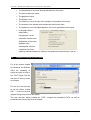
It is through this table that the ControLab
user can configure for each combination
“Client Group \ Product” if ControLab
must use AQLs by defect or admissible
percents out of tolerances. In this table, it
is also possible to associate to each
combination the AQLs and limit percents
that must be considered by default and
the sampling table to use by default by
test.
There may be configurations for each of the possible combinations (“Generic Groups”) and also a
configuration by default (“Group by Default”).
While creating a report, the ControLab behavior will be as follows:
o
1st Step: Try to find the configurations for the “Client\Supplier” and the “Product”
of the report created to generate the tests;
o
2nd Step: If the first step has failed (there are no configurations for the
“Client\Supplier” and the “Product” of the generated report), use the configurations
by default to generate the tests.
•
ControLab General Parameters Setup window
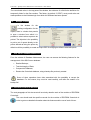
The configuration window for the general parameters of ControLab permits the user to define
parameters that will incidence in various aspects of the Software. It is very important for the
correct use of the program that the user knows the data that can be defined in this window and
the respective consequences in the use of ControLab. Some of the characteristics that can be
configured in this window are:
•
Automatic codification for the name of new reports;
•
Various parameters relative to the reports printing;
•
Configuration of the name for some fields present in the page of identification of reports;
•
Automatic attribution of the responsible for the creation of the report;
•
Specific configurations regarding tests, as for example the visual test, SPME\GC-MS and
etc.
•
Eventual use of the Software in “Terminal Service” (the reader should consult the specific
paragraph from this document).
EGITRON
Page 18