1
GETTING STARTED WITH FundRaiser Basic
38
Thank You Letters
Why send a Thank You? Thanking your donors is an essential part of the
fundraising process. It lets them know that you have received their check. It
gives you an opportunity to make them feel good about having given. It
gives you an opportunity to remind them of the good work that you do (with
their help). And it gives you an opportunity to make it easy for them to give
again (include a pre-addressed envelope).
Most important is that it helps to build a relationship with your donors, which
is essential to any long-term fundraising strategy. Even if all you do is print a
label that you slap on a post card, it is important that you acknowledge
each and every gift. The only exception is when the donor specifically asks
that you not send acknowledgement letters. One fundraising consultant says
repeatedly, “Thank before you bank.” Which means that before you take
your deposits to the bank, you should take your thank you cards and letters
to the post office.
If you feel that you can’t afford to send a letter in response to every donation,
then send a post card, or email for smaller donations and letters for larger
ones. Whatever you do, it is absolutely critical that you acknowledge each
and every contribution.
How do you print Thank You letters?
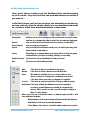
When you add a new contribution, enter a check mark on “Send a Thank
You letter or receipt?”. Once all your contributions have been entered, click
on the Print Menu, then on Letters (or labels or envelopes), and then on
“Marked Gifts (for thank you’s)”. In that same window, choose the letter that
you have created in FundRaiser’s word processor to be printed.
FundRaiser will then print your letter once for each contribution that has the
“Send a Thank You...” checked. After you have printed everything (letters,
labels, envelopes) for those contributions, you need to remove the check
mark from the printed contributions. Do this by clicking on the Print Menu,
then on “Mark Thank You’s Done.” If you fail to do this (FundRaiser will remind
you if you forget), then the next time you print Thank You’s, these same
contributions will be included in the printing - again.
www.FundRaiserSoftware.com
[email protected]