1
5. Controls
4
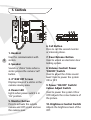
1. Handset
Used for communication with
visitors.
2. Speaker
Sounds a ‘chime’ tome when a
visitor presses the camera ‘call’
button.
3. 4” B/W CRT Screen
Displays image of a visitor or the
camera viewing area.
4. Power LED
Lights when power switch is in
‘On’ position.
5. Monitor Button
Press to activate the outside
camera and CRT screen and see
the camera view.
6. Call Button
Press to call the second monitor
or intercom phone.
7. Door Release Button
Used to unlock an electronic door
locking system.
8. Volume Control/ Power
‘ON/OFF’ Switch
Used to adjust the chime sound
level/ Used to power the system
ON or OFF.
9. Power ‘ON/OFF’ Switch/
Colour Adjust Switch
Used to power the system ON or
OFF/ Adjusts the colour balance of
the picture.
10. Brightness Control Switch
Adjusts the brightness level of the
CRT.