1
IJS delovno poročilo
DP-11153
December 2012
Marko Bohanec
DEXi: Program for Multi-Attribute Decision Making
User's Manual
Version 3.04
Institut ”Jožef Stefan”, Ljubljana, Slovenija
Contents
Contents .................................................................................................................................................. 2
1
Introduction ..................................................................................................................................... 5
1.1 Availability............................................................................................................................................................... 5
1.2 Functionality ........................................................................................................................................................... 5
1.3 Applications ............................................................................................................................................................ 6
1.4 Development and history ................................................................................................................................... 7
1.5 Versions................................................................................................................................................................... 7
1.6 Credits...................................................................................................................................................................... 8
1.7 Acknowledgments ................................................................................................................................................ 9
2
Basic concepts.............................................................................................................................. 10
2.1 Decision Analysis ............................................................................................................................................... 10
2.2 Decision Problem ............................................................................................................................................... 10
2.3 Decision Process................................................................................................................................................ 10
Participants of the Decision Process..................................................................................................................... 11
Decision Problem Identification............................................................................................................................... 11
2.3.1
2.3.2
2.4
2.5
2.6
2.7
2.8
Decision Model.................................................................................................................................................... 12
Multi-Attribute Model ......................................................................................................................................... 12
Qualitative Multi-Attribute Model ................................................................................................................... 12
Attribute ................................................................................................................................................................. 13
Tree of Attributes ................................................................................................................................................ 13
Interpretation ................................................................................................................................................................. 13
Linked Attributes .......................................................................................................................................................... 14
Recommendations....................................................................................................................................................... 14
2.8.1
2.8.2
2.8.3
2.9
Scale....................................................................................................................................................................... 14
Example scales ............................................................................................................................................................ 15
Recommendations....................................................................................................................................................... 15
2.9.1
2.9.2
Utility Function................................................................................................................................................ 15
2.10
2.10.1
2.10.2
2.10.3
2.10.4
Intervals........................................................................................................................................................................... 16
Complex Rules ............................................................................................................................................................. 16
Weights ........................................................................................................................................................................... 17
Combinatorial Explosion............................................................................................................................................ 18
2.11
Options ............................................................................................................................................................. 20
2.12
Evaluation of Options................................................................................................................................... 20
2.13
Analysis ............................................................................................................................................................ 20
3
DEXi components and commands ............................................................................................... 22
3.1 DEXi Model .......................................................................................................................................................... 22
3.2 DEXi File ............................................................................................................................................................... 23
3.3 Main Toolbar ........................................................................................................................................................ 23
3.4 File Menu .............................................................................................................................................................. 23
Option Data File ........................................................................................................................................................... 24
Function Data File........................................................................................................................................................ 25
3.4.1
3.4.2
3.5
3.6
3.7
3.8
3.9
Edit Menu.............................................................................................................................................................. 26
Window Menu...................................................................................................................................................... 26
Help Menu ............................................................................................................................................................ 26
Model Window..................................................................................................................................................... 26
Model Page .......................................................................................................................................................... 27
Workspace ..................................................................................................................................................................... 27
Commands..................................................................................................................................................................... 27
Remarks.......................................................................................................................................................................... 29
Tree View ....................................................................................................................................................................... 29
3.9.1
3.9.2
3.9.3
3.9.4
3.10
Scale Editor..................................................................................................................................................... 30
3.10.1
3.10.2
3.10.3
3.11
Workspace ..................................................................................................................................................................... 30
Commands..................................................................................................................................................................... 30
Remarks.......................................................................................................................................................................... 31
Function Editor............................................................................................................................................... 31
3.11.1
3.11.2
3.11.3
3.11.4
Table ................................................................................................................................................................................ 32
Toolbars .......................................................................................................................................................................... 32
Pop-up Menu................................................................................................................................................................. 33
Status bar ....................................................................................................................................................................... 33
2
3.11.5
3.11.6
3.11.7
3.11.8
Options Page.................................................................................................................................................. 37
3.12
3.12.1
3.12.2
3.12.3
Workspace ..................................................................................................................................................................... 37
Commands..................................................................................................................................................................... 38
Remarks.......................................................................................................................................................................... 38
Evaluation Page ............................................................................................................................................ 38
3.13
3.13.1
3.13.2
Workspace ..................................................................................................................................................................... 39
Commands..................................................................................................................................................................... 39
Analysis Menu................................................................................................................................................ 40
3.14
3.14.1
Option analyses............................................................................................................................................................ 40
Charts Page .................................................................................................................................................... 40
3.15
3.15.1
3.15.2
Workspace ..................................................................................................................................................................... 41
Commands..................................................................................................................................................................... 41
Report ............................................................................................................................................................... 42
3.16
3.16.1
Report elements ........................................................................................................................................................... 42
Preview............................................................................................................................................................. 43
Internal browser............................................................................................................................................. 43
Settings............................................................................................................................................................. 44
3.17
3.18
3.19
3.19.1
3.19.2
3.19.3
4
Utility Function Status................................................................................................................................................. 33
Weight Editor................................................................................................................................................................. 34
Handling Non-Entered Function Values............................................................................................................... 35
Function Editing............................................................................................................................................................ 36
Report Page................................................................................................................................................................... 44
Import/Export Page ..................................................................................................................................................... 45
Advanced Page ............................................................................................................................................................ 45
Example: Car Evaluation Model ................................................................................................... 46
4.1 Tree of Attributes for Car Evaluation............................................................................................................ 46
4.1.1
4.1.2
4.1.3
4.2
4.3
Scales for Car Evaluation ................................................................................................................................ 47
Utility Functions for Car Evaluation .............................................................................................................. 47
4.3.1
4.3.2
4.3.3
4.4
Interpretation ................................................................................................................................................................. 50
Some Car Option Analyses............................................................................................................................. 50
4.5.1
4.5.2
4.5.3
4.6
Interpretation ................................................................................................................................................................. 48
Elementary decision rules......................................................................................................................................... 48
Complex rules and weights ...................................................................................................................................... 48
Description and Evaluation of Cars .............................................................................................................. 49
4.4.1
4.5
Interpretation ................................................................................................................................................................. 46
Attribute Types.............................................................................................................................................................. 46
Attribute Descriptions ................................................................................................................................................. 47
Plus-minus-1 analysis ................................................................................................................................................ 50
Selective explanation.................................................................................................................................................. 51
Compare options.......................................................................................................................................................... 51
Some Car Evaluation Charts .......................................................................................................................... 52
4.6.1
4.6.2
4.6.3
Bar Chart ........................................................................................................................................................................ 52
Scatter Chart ................................................................................................................................................................. 52
Radar Chart ................................................................................................................................................................... 53
5
Further reading ............................................................................................................................. 54
5.1 Documentation in Slovene .............................................................................................................................. 54
5.2 Selected Publications........................................................................................................................................ 54
DEXi Versions ....................................................................................................................................... 57
5.3 Version 2.0 ........................................................................................................................................................... 57
5.3.1
5.3.2
5.3.3
5.3.4
5.4
Version 3.0 ........................................................................................................................................................... 57
5.4.1
5.4.2
5.4.3
5.4.4
5.5
New program features................................................................................................................................................ 57
Changed program features....................................................................................................................................... 58
Changed documentation ........................................................................................................................................... 58
Bug fixes ......................................................................................................................................................................... 58
Version 3.01 ......................................................................................................................................................... 58
5.5.1
5.5.2
5.6
New components ......................................................................................................................................................... 57
New program features................................................................................................................................................ 57
Changed program features....................................................................................................................................... 57
Bug fixes ......................................................................................................................................................................... 57
New program features................................................................................................................................................ 58
Bug fixes ......................................................................................................................................................................... 58
Version 3.02 ......................................................................................................................................................... 58
5.6.1
5.6.2
New program features................................................................................................................................................ 58
Bug fixes ......................................................................................................................................................................... 58
3
5.7
Version 3.03 ......................................................................................................................................................... 59
5.7.1
5.7.2
5.8
New program features................................................................................................................................................ 59
Bug fixes ......................................................................................................................................................................... 59
Version 3.04 ......................................................................................................................................................... 59
5.8.1
5.8.2
New program features................................................................................................................................................ 59
Bug fixes ......................................................................................................................................................................... 59
INDEX.................................................................................................................................................... 60
4
1 Introduction
DEXi is a computer program for multi-attribute decision making. It is aimed at interactive development
of qualitative multi-attribute decision models and the evaluation of options. This is useful for supporting
complex decision-making tasks, where there is a need to select a particular option from a set of
possible ones so as to satisfy the goals of the decision maker. A multi-attribute model is a hierarchical
structure that represents the decomposition of the decision problem into sub-problems, which are
smaller, less complex and possibly easier to solve than the complete problem.
1.1
Availability
DEXi is implemented in Borland Delphi and runs on Microsoft Windows platforms. The latest version
can be downloaded from:
http://kt.ijs.si/MarkoBohanec/dexi.html
DEXi can be used free of charge for non-commercial applications. For information on commercial
applications and for any other questions, please contact Marko Bohanec ([email protected]). Any
feedback on your experience with DEXi will be greatly appreciated.
1.2
Functionality
DEXi supports two basic tasks:
1. development of qualitative multi-attribute models;
2. application of these models for the evaluation and analysis of decision options.
The models are developed by defining:
•
•
•
•
attributes: qualitative variables that represent decision sub-problems,
scales: ordered or unordered sets of symbolic values that can be assigned to attributes,
tree of attributes: a hierarchical structure representing the decomposition of the decision
problem,
utility functions: rules that define the aggregation of attributes from bottom to the top of the
tree of attributes.
In the evaluation and analysis stage, DEXi facilitates:
•
•
description of options: defining the values of basic attributes (terminal nodes of the tree),
evaluation of options: a bottom up aggregation of option values based on utility functions,
5
•
•
analysis: what-if analysis, "plus-minus-1" analysis, selective explanation and comparison of
options,
reporting: graphical and textual presentation of models, options and evaluation results.
DEXi differs from most conventional multi-attribute decision modeling tools in that it uses qualitative
(symbolic) attributes instead of quantitative (numeric) ones. Also, aggregation (utility) functions in
DEXi are defined by if-then decision rules rather numerically by weights or some other kind of formula.
(However, DEXi does support weights indirectly.)
In comparison with its predecessor DEX, DEXi has a more modern and more convenient user
interface. Also, it has better graphical and reporting capabilities, and facilitates the use of weights to
represent and assess qualitative utility functions. On the other hand, DEXi is somewhat less powerful
than DEX in dealing with incomplete option descriptions: DEX employs probabilistic and fuzzy
distribution of values, while DEXi facilitates only the use of crisp or unknown option values.
1.3
Applications
DEXi is particularly suitable for solving complex decision problems, which typically involve:
•
•
•
•
•
many (say, 15 or more) attributes,
many options (10 or more),
judgment, which prevalently requires qualitative reasoning rather than numerical evaluation,
inaccurate and/or missing data,
group decision making, which requires communication and explanation.
For successful application, DEXi requires sufficient resources, in particular expertise and time for
developing a DEXi model.
Some typical application areas and decision problems, in which DEX and DEXi have been used so far,
are the following:
1. Information technology
o evaluation of computers
o evaluation of software
o evaluation of Web portals
2. Projects
o evaluation of projects
o evaluation of proposals and investments
o product portfolio evaluation
3. Companies
o business partner selection
o performance evaluation of companies
4. Personnel Management
o personnel evaluation
o selection and composition of expert groups
o evaluation of personal applications for jobs
5. Medicine and Health-Care
o risk assessment
o diagnosis and prognosis
6. Other Areas
o granting personal/corporate loans
o assessment of technologies
o assessments in ecology and environment
o assessments in agronomy
6
1.4
Development and history
DEXi has been developed in collaboration of the:
•
•
Department of Knowledge Technologies, Jožef Stefan Institute, Ljubljana, Slovenia, and
University of Maribor, Faculty of Organizational Sciences, Kranj, Slovenia.
The initial development was financially supported by the Ministry of Education, Science and Sport of
the Republic of Slovenia within the Ro (Computer Literacy) Programme (1999–2000).
The development of DEXi started in 1999. The motivation was twofold. First, it was conceived as a
successor to DEX, a successful program for multi-attribute modeling. Until 1999, DEX had been used
in several tens of real-life decision situations (see publications on the DEX web page). However, as a
MS-DOS program, DEX was becoming outdated and less convenient for its users. Second, in that
time in Slovenia, the DEX methodology was taught in several university courses, and there were ideas
to introduce it into secondary schools as well. Thus, there was a strong need for a simple computer
program to be used in decision-modeling courses in secondary schools and universities.
Consequently, DEXi’s design is a trade-off between these two requirements. It has a convenient MS
Windows user interface, which has been kept as simple as possible. Some advanced DEX features
have been deliberately dropped, such as: probability and fuzzy distributions of values, chain attributes,
advanced transformations of utility functions, some settings and reports. In order to deal with missing,
incomplete or uncertain data, DEXi employs value sets instead of more complex value distributions of
DEX. On the other hand, more emphasis has been put on graphical and reporting capabilities in DEXi.
Also, DEXi adds a new functionality to the treatment of attribute weights.
The first version of DEXi was developed in 2000 as part of the project called Expert Systems in
Education. The project’s acronym was ESi, where the letter “i” indicated “education” in Slovenian
(“izobraževanje”). The name DEXi (pronounced “DEXy”) was coined using the same pattern to mean
“DEX for Education”.
In subsequent years, DEXi was increasingly used not only in education, but also in more and more
advanced decision-support projects. Some extremely complex decision models were developed in
international projects, proving – somewhat surprisingly – that DEXi was suitable not only for education,
but also for supporting difficult real-life decision problems. Inevitably, in order to address these
requirements, DEXi was being gradually upgraded with new advanced features, such as new methods
for option analysis, import/export features and undo/redo functionality.
1.5
Versions
DEXi version 1.00 was released in 2000, with a Slovenian user interface only.
DEXi versions 1.01 through 1.04 were gradually released in the period 2001-2006. They addressed
only bug fixes and the addition of Slovenian help. There were no major functional additions or
improvements.
DEXi version 1.02 with English user interface was released in 2001.
DEXi version 2.00 was released in 2007, introducing a number of additions and improvements:
•
•
•
•
•
•
•
Slovenian and English user interface for the same functionality,
editing options,
editing utility functions,
importing/exporting options,
exporting utility functions,
report and report settings,
improved DEXi file format,
7
•
•
•
•
English help,
installation package,
improved DEXi web page,
bug fixes.
DEXi version 3.00 was released in 2008:
•
•
•
•
•
undo/redo functionality,
option analysis functionality,
improved option data entry,
updated English help and DEXi web page,
bug fixes.
DEXi version 3.01 was released in May 2009:
•
•
added exporting of attribute tree (two formats: tab-delimited and GML),
bug fixes.
DEXi version 3.02 was released in October 2009:
•
•
•
•
•
added model description editor,
added a new operation to join attributes,
added searching functionality,
improved status displays,
bug fixes.
DEXi version 3.03 was released in March 2011:
•
•
•
•
•
•
added descriptions, summary displays and rounding control of utility functions,
added import and copy/paste functionality for utility functions,
new report: Function summary,
exporting reports to tab-delimited files,
extended searching functionality,
bug fixes.
DEXi version 3.04 was released in December 2012:
•
•
•
added html reports,
improved Function Editor: added attribute information display and inconsistency warning,
bug fixes.
Section 5 provides a more detailed description of different versions of DEXi.
1.6
Credits
Marko Bohanec: Design and programming, English help, Web pages
Vladislav Rajkovič: Initial design and management, educational aspects
Eva Jereb: Slovenian help
Uroš Rajkovič: English translation of version 1.02
Zarja Vintar: DEXi logo
8
1.7
Acknowledgments
David Berneda, http://en.wikipedia.org/wiki/Teechart, TeeChart Pro V4
Anders Melander, http://melander.dk/delphi/gifimage, TGIFImage for Delphi
Jordan Russell, http://www.jrsoftware.org/, Inno Setup 5.1.11
9
2 Basic concepts
2.1
Decision Analysis
Decision Analysis is a discipline popularly known as "Applied Decision Theory". It provides a
framework for analyzing decision problems by:
•
•
•
structuring and breaking them down into more manageable parts,
explicitly considering the possible options (alternatives), available information, involved
uncertainties, and relevant preferences of the decision maker(s),
combining these in order to arrive at optimal or at least 'sufficiently good' decisions.
Decision Analysis, and the DEXi program as well, are aimed at supporting people in making decisions
rather than making decisions themselves. For this purpose, they provide methods and tools for
developing decision models and using them for the evaluation and analysis of options.
2.2
Decision Problem
In Decision Analysis, a decision problem is understood primarily as a problem of choice, which is
defined as follows:
•
•
•
Given a set of options (also called alternatives), which typically represent some object or
actions, either
choose an option that best satisfies the goals (objectives) of the decision maker, or
rank the options according to these goals.
Making a choice usually occurs as part of a decision process.
Decision Analysis and DEXi are particularly interested in complex decision problems, that is problems
which are for some reason considered difficult by the decision maker and require careful elaboration
and analysis. Complex decision problems are usually characterized by:
•
•
•
•
•
•
•
2.3
Novelty: the decision maker is confronted with the problem for the first time and has
insufficient knowledge or skills to address the problem;
Unclearness: unclear understanding of the problem and its goals, unknown or incompletely
defined options;
Uncertainty: existence of possible events that cannot be controlled by the decision maker, but
can affect the decision or its consequences (for example: competition response, weather);
Multiple and possibly conflicting goals;
Group decision-making: involvement of different decision-makers or groups that have different
and possibly conflicting goals;
Important consequences of the decision (such as possible big financial losses or
environmental impacts);
Limited resources to conduct the decision process (most often: available time and expertise).
Decision Process
The ultimate goal of a decision process is to solve a decision problem, that is, to make a decision. In
Decision Analysis, the decision process is understood as a process of careful and in-depth analysis of
the decision problem. It involves a systematic acquisition and organization of knowledge about the
decision problem, which is done by participants of the decision process and typically includes:
•
•
•
assessing the problem,
collecting and verifying information,
identifying options (alternatives),
10
•
•
•
•
anticipating consequences of decisions,
making the choice using sound and logical judgment based on available information,
justification and informing others of the decision and its rationale,
evaluating decisions and their consequences.
In general, such a process should:
•
•
•
•
provide all the information needed for a 'sufficiently good' decision,
reduce the chance of overlooking important information and making other errors,
improve the effectiveness and efficiency of the decision-making, and
improve the quality of the decision itself.
Usually, the decision process involves at least the following steps:
1.
2.
3.
4.
5.
Problem identification
Modeling: developing a decision model
Evaluation and analysis of options
Choice: making the decision
Implementation of the decision
The decision-support tool DEXi is primarily used in the steps 2 and 3.
2.3.1
Participants of the Decision Process
In general, a typical decision process involves up to four types of participants, either individuals or
groups:
1. Stakeholders (also called decision problem owners): individuals or organizations that have a
legitimate interest in the decision-making problem. Usually, these are the ones that need to
make the final decision, and are also responsible for that decision.
2. Experts: People knowledgeable in the field so that they can provide information and advice
relevant for the decision. They may contribute to the overall decision problem identification, to
the definition of options, goals and criteria, and to the decision model development.
3. Decision analyst(s) : Methodologists with experience in Decision Analysis, that is, the
underlying methodology and tools. Often, they take the role of moderators or mediators of the
decision-making team.
4. Users: People affected by the decision.
2.3.2
Decision Problem Identification
The identification of decision problem occurs at the beginning of a decision process. At this stage, the
objective is to understand the decision problem and its components. Some typical questions asked in
this stage are:
•
•
•
•
•
•
•
•
What is the decision problem about? Is it difficult and important? Why?
Who is the stakeholder (decision owner)? Who is responsible, and who will be affected by the
decision? Who are other possible participants in the decision process?
What in general are the options (alternatives) in this case? Can we define some specific
ones?
Which goals (objectives) should be achieved by the decision? Which are the criteria to be met
by the decision?
What are the uncertainties involved?
What are the goals of the decision process? Should we select a single option, or evaluate or
rank more of them?
What are the expected consequences of this decision process?
Do we need to justify the decision? To whom and how?
11
To be suitable for multi-attribute modeling, a decision problem must have some specific properties.
Primarily, it should deal with options, which need to be evaluated, analyzed and compared with each
other. It is important that the decision problem can be decomposed into smaller, less complex subproblems, and that the options can be described by their basic features that correspond to the problem
decomposition. Thus, we should also ask questions such as:
•
•
2.4
Can we think of decomposing the problem into sub-problems? Can we define the relationship
between factors that affect the decision?
Can we think about representing options with their basic features? Which are these features?
Decision Model
The Decision Analysis approach is characterized by the use of decision models. In general, a decision
model encodes knowledge and information that is relevant for solving the decision problem at hand.
Decision models are usually developed by participants of the decision process using tools such as
DEXi. Typical models used in Decision Analysis are:
•
•
•
decision trees,
influence diagrams,
multi-attribute models.
Among these, DEXi employs qualitative multi-attribute models.
Once developed, the decision model is used to:
•
•
evaluate options and
perform various analyses, such as what-if or sensitivity analysis.
The obtained evaluation and analysis results provide the basis for decision maker's assessment of
options and possible choice of the best one.
2.5
Multi-Attribute Model
Multi-attribute models (also called multi-criteria models) represent a class of models used in Decision
Analysis that evaluate options according to several, possibly conflicting, goals or objectives. In
principle, a multi-attribute model represents a decomposition of a decision problem into smaller and
less complex sub-problems. A model consists of:
•
•
attributes and
utility functions.
Attributes are organized hierarchically into a tree of attributes.
Each attribute takes values from the corresponding scale.
Multi-attribute models are used for option evaluation and analysis.
Multi-attribute models used in DEXi are qualitative.
2.6
Qualitative Multi-Attribute Model
DEXi's multi-attribute models are called qualitative. They are characterized by:
•
using qualitative (symbolic) attributes, whose scales are discrete and typically consist of words
rather than numbers,
12
•
employing utility functions that are represented by (tables of) decision rules rather that
numerical formulae.
Here, the word "qualitative" is used for contrast with more traditional "quantitative" decision models,
which are characterized by:
•
•
2.7
using continuous numerical attributes, which typically represent the decision-maker's
preferences, and
using numerical utility functions, such as the weighted sum.
Attribute
Attributes are variables that occur in multi-attribute models. They are organized into a hierarchical
structure called tree of attributes. According to their position in the tree, the attributes are either:
•
•
basic attributes: terminal nodes ("leaves") of the tree, or
aggregate attributes: internal nodes in the tree.
Basic attributes represent inputs of the multi-attribute model. Options are described by the values of
basic attributes.
Aggregate attributes represent option evaluations. They include are the one or more roots of the tree,
which represent the overall evaluation of options.
In DEXi, each attribute is defined by its:
•
•
•
Name: main identification of the attribute, which is typically a short string used in printouts,
table headings, etc.;
Description: usually a longer string providing further documentation about the attribute;
Scale.
Aggregate attributes also have a utility function.
2.8
Tree of Attributes
In a multi-attribute model, attributes are organized hierarchically into a tree of attributes. A model can
have one or more root attributes. Each attribute can be 'decomposed' into one or more descendant
attributes that appear one level below that attribute in the tree. 'Decomposed' attributes are called
aggregate attributes. Attributes that do not have descendants and appear as leaves of the tree, are
called basic attributes.
2.8.1
Interpretation
A tree of attributes can be interpreted in three ways:
1. Decomposition: It represents a decomposition of a decision problem into sub-problems. To
solve 'a problem', which is represented by a a higher-level attribute, one has to solve subproblems represented by its lower-level descendants.
2. Dependency: A higher-level attribute depends on its immediate descendants in the tree. This
dependency is modeled by a utility function that corresponds to the higher-level attribute.
3. Aggregation: Tree structure defines the bottom-up aggregation of option values. The value of
a higher-level attribute is calculated as an aggregation of the values of its immediate
descendants in the tree. Again, this aggregation is defined by the corresponding utility
function.
The interpretation of attribute types is as follows:
13
•
•
•
2.8.2
basic attributes represent inputs of the model,
root attributes represent its main outputs, and
other aggregate attributes represent intermediate results of option evaluation.
Linked Attributes
In principle, DEXi's multi-attribute models have a strict tree structure: attributes are structured so that
there is exactly one path from each aggregate attribute to the root of the tree. This means that each
attribute (other than the root) influences exactly one parent in the tree. Sometimes, this is not enough
and we wish to introduce attributes that influence more than one parent. In other words, we wish to
create attribute hierarchies (directed acyclic graphs) rather than simple trees.
For this purpose, DEXi version 2.0 introduced the concept of linked attributes. The idea is that
whenever there are two attributes in the tree that have equal names and equal scales, and at least
one of them is basic, they are declared 'linked' and they 'logically' represent a single attribute. Attribute
linking is done automatically by DEXi, but only when explicitly enabled in Settings/Advanced. By
default, linking is disabled and equally named attributes are considered different.
This concept allows that DEXi's trees still retain their basic tree structure. In tree displays, linked
attributes appear separately, so the tree structure is preserved - it is only that linked attributes are
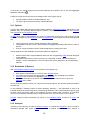
in Tree Views and with italic letters in reports. On the Options
represented by special symbols:
Page, however, any 'chain' of linked attributes appears only once, so there is no need for duplicate
data entry. Linked attributes are also properly handled during the evaluation and on the Evaluation
Page.
2.8.3
Recommendations
1. Before editing a tree in DEXi, sketch it on paper.
2. Before making a real tree, create an unstructured list of attributes. Brainstorm! At this stage,
try not to overlook important attributes, but do not bother about their structure or redundancy.
3. When making a structure of attributes, create meaningful subtrees that contain related
attributes. Try structuring your unstructured list in two directions:
o Bottom-up: Group similar attributes together into a single higher-level attribute. It is
usually a good indication if you can find a meaningful name for it.
o Top-down: Decompose complex attributes into simpler ones.
4. Avoid meaningless, redundant, duplicate, inessential and unoperational attributes. In other
words, check each basic attribute that:
o it has a well defined meaning,
o it does not duplicate or overlap with some other attributes,
o it does affect the decision (and you know how, at least approximately),
o it can be measured or assessed with sufficient accuracy.
5. Avoid aggregate attributes that have more than three descendants. Too many descendants
cause a combinatorial explosion on the size of corresponding utility functions, making them
extremely difficult to handle. In this case, try to restructure the tree below that attribute.
Attribute linking works only when enabled in Settings. In that case, it is done automatically while you
edit your model on the Model Page. As this may appear confusing, you may temporarily disable
linking. When enabled again, your links will be restored automatically.
2.9
Scale
Scale represents a set of values that can be assigned to an attribute.
In DEXi, scales are qualitative and discrete. They consist of a set of words, such as: 'excellent',
'acceptable', 'inappropriate', etc.
14
Scales can be ordered or unordered, and ordered scales can be either increasing or decreasing. An
unordered scale is just a collection of values, whose relation with each other is unknown or undefined.
In contrast, the values of an ordered scale are ordered preferentially, that is, according to their
contribution to the quality of options. The values of increasing scales are ordered from 'bad' to 'good'
values, and the value of a decreasing scales are ordered from 'good' to 'bad' values. In both cases,
'bad' represents a value that is disadvantageous for the option and is least preferred by the decision
maker. Analogously, 'good' represents an advantageous and most preferred value. The ordering of
scales plays an important role in the definition of utility functions, where it simplifies the definition of
decision rules and facilitates checking of their consistency.
With ordered scales, the lowest value is considered 'bad' and the highest 'good' by default. This can
be changed in Scale Editor, where you can individually declare the status of each value. In this way,
not only a single value, but a whole subsequence of values can be declared as 'bad' or 'good'.
For emphasis and better visualization, extreme values of ordered scales are printed in different fonts
and colors. By default, 'bad' values appear in bold-red and 'good' values appear in italic-green. These
can be changed in Settings/Report.
2.9.1
Example scales
no, yes
low, medium, high (e.g., for "Quality")
high, medium, low (e.g., for "Price")
unacceptable, acceptable, good, excellent
2.9.2
Recommendations
On scale size (number of values):
•
•
For basic attributes: Use the least number of values that is still sufficient to distinguish
between importantly different characteristics of options. Usually, this means two to four values.
For aggregate attributes: The number of values should gradually increase from basic
attributes towards the root of tree of attributes. For example, three four-valued attributes might
be aggregated into a five-valued attribute. Five-valued root attributes usually work quite well.
On scale ordering:
•
•
Use increasing scales whenever possible, they really help in the definition of utility functions.
Avoid decreasing scales. They are much less comprehensible than increasing scales.
Increasing and decreasing scales do not work when mixed together in a single utility function.
2.10 Utility Function
Utility functions are the components of multi-attribute models that define the aggregation aspect of
option evaluation. For each aggregate attribute Y, whose descendants in the tree of attributes are X1,
X2,..., Xn, the corresponding utility function f defines the mapping:
f: X1 × X2 × ... × Xn → Y
15
In DEXi, a utility function maps all the combinations of the lower-level attribute values into the values
of Y. The mapping is represented in a table, where each row gives the value of f for one combination
of the lower-level attribute values. Rows are also called decision rules, because each row can be
interpreted as an if-then rule of the form:
if X1 = value1 and X2 = value2 and ... and Xn = valuen then Y = value (or value interval)
In the context of representation, such rules are also called elementary rules. This name is used for
contrast with complex rules.
2.10.1 Intervals
An interval is a subset of consecutive scale values. DEXi often uses intervals in connection with utility
functions, particularly when they are edited or represented by complex rules.
An interval of values is denoted in one of the following ways:
•
•
•
•
'*': the asterisk denotes any value of the corresponding attribute;
'>=value': stands for 'better than or equal to' value (alternative interpretation: 'at least as good
as' value);
'<=value': 'worse than or equal to' value;
'value1:value2': denotes the interval between and including the two values.
2.10.2 Complex Rules
DEXi uses complex rules in order to represent its utility functions in a more compact and possibly
more comprehensible way than with elementary rules (table rows). Complex rules are obtained by
joining several elementary rules which have the same function value. In other words, a complex rule
represents one or more elementary rules. In tables, complex rules are characterized by the use of
intervals.
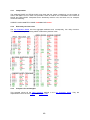
Example: This is the CAR utility function from the Car Evaluation Model, represented with elementary
rules:
This is the same function represented with complex rules:
16
Notice the decreased number of rows from 12 to 7 and the use of symbols '*' and '>='. For example,
the complex rule 1 says that if PRICE is 'high', and regardless on the value of TECH.CHAR., the value
of CAR is 'unacc'. This complex rule is a compact representation of the first four elementary rules.
2.10.3 Weights
Weights are commonly used in Decision Analysis to model the importance of attributes. Weights are
numbers, usually normalized to the sum or maximum of 100, which define the contribution of the
corresponding attribute to the final evaluation. In Decision Analysis, utility functions are commonly
defined using some form of the weighted sum, for example:
f(X1, X2,..., Xn) = w1×X1 + w2×X2 + ... + wn×Xn
Here, wi denote weights and Xi denote attributes.
In qualitative multi-attribute models, there is natively no room for weights: attributes are symbolic and
utility functions are defined by decision rules. However, to bridge the gap between qualitative and
quantitative models, it is possible to introduce weights - in a very approximate and imprecise way also into the qualitative models.
2.10.3.1 Principle
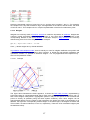
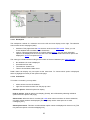
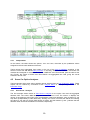
The figure above illustrates the basic approach. It shows the CAR utility function, represented by
points (blue dots) in a three-dimensional space. Each point represents one defined decision rule. To
find out the weights, DEXi places a (hyper)plane (shown in red) into this space so that it matches the
points as closely as possible (using the least squares measure). Once done, weights can be
approximated directly from the slopes of the hyperplane: the higher the slope in the direction of an
attribute, the higher the corresponding relative weight. In the above figure, the weights of PRICE and
TECH.CHAR. are almost identical, 53 and 47, respectively. These are local normalized weights (see
the definition below).
17
DEXi uses weights for two purposes:
•
•
as an approximate representation of utility functions, used primarily for verification and
overview (see examples from the Car Evaluation model), and
for defining utility functions or their parts (see the weight-based strategy of handling nonentered function values.
2.10.3.2 Weight Types
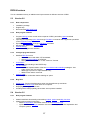
Actually, DEXi uses four types of weights, as illustrated with the following weights from the Car
Evaluation model:
The difference between local and global is due to the tree of attributes. Local weights always refer to a
single aggregate attribute and a single corresponding utility function, so that the sum of weights of the
attribute's immediate descendants (function arguments) is 100%. Global weights, on the other hand,
take into account the structure of the tree and relative importance of its sub-trees. A global weight of
an attribute is calculated as a product of the local weight and the global weight of the attribute that lies
one level above. A global weight of the root attribute is 100%. For example: the global normalized
weight of BUY.PRICE is 50% (its local normalized weight) × 53% (global normalized weight of
PRICE), which gives 26%.
Weights can also be normalized or not. This is because some scales can have more values than the
others. Geometrically, larger scales appear longer, they have lower slopes and, consequently, smaller
weights. Normalization refers to the procedure in which all scales are adjusted to the same length (unit
interval) before determining the weights. Usually, this is the better method of weight assessment and
comparison of attributes.
2.10.4 Combinatorial Explosion
Consider a utility function f that maps the values of the attributes X1, X2,..., Xn into the value of the
aggregate attribute Y.
In DEXi, a utility function maps all the combinations of the lower-level attribute values into the values
of Y. Suppose that each Xi has a scale consisting of si values. Then, the number of combinations and
thus the size of f is equal to
S = s1 × s2 × ... × sn
18
In other words, when defining f, you should define S decision rules.
2.10.4.1 Example
Let all the n lower-level attributes have s-valued scales. In this case, the size of f equals to
S =sn
The following table shows how fast S grows with the increasing n and s.
2.10.4.2 Recommendations
Experience shows that utility functions of size up to 25 are small and usually quite easy to define. The
difficulty grows towards the size of about 100, which is already quite difficult. Everything above 100 is
very difficult, and everything above 500 is extremely hard if not impossible to define.
Also, it is not only the size that matters. The more the attributes, the more difficult the function to
define, even if the size of the functions is comparable. Combining four attributes together usually
appears quite a hard task for human brain.
For these reasons, the DEXi method strongly advises to limit the number of aggregate attributes'
descendants to three, and to restructure the tree of attributes whenever this condition has not been
met.
To prevent the combinatorial explosion, the DEXi program issues a warning before creating a function
of size 200 or more, and disallows the creation of functions larger than 1000.
2.10.4.3 Restructure Tree of Attributes
In order to avoid combinatorial explosion in DEXi models, it is strongly advised to structure the tree of
attributes so that each aggregate attribute has only two or three immediate descendants. Whenever
you encounter an aggregate attribute with four descendants, you may want to consider restructuring
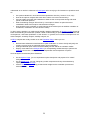
the tree below that attribute. Usually, there are several ways to do this:
19
In all cases, you should regroup the lower-level attributes and introduce one or two new aggregate
attributes, denoted by .
Usually, the 'right' structure is the one that appears the most 'logical' so that:
•
•
it groups together similar or related attributes, and
it is easy to give names to the newly created attributes.
2.11 Options
Options (also called alternatives) are basic entities studied in a decision problem. Depending on the
problem, they can represent different objects, solutions, courses of action, etc., which are evaluated
and analyzed by a multi-attribute model.
In DEXi, each option is represented by its name (not necessarily unique) and a set of values, so that
one value is assigned to each attribute in the tree of attributes. These values are further distinguished
into:
•
•
•
option description: vector of values assigned to basic attributes;
intermediate evaluation results: values assigned to aggregate attributes other than the roots of
the tree;
final (or overall) evaluation results: values assigned to the root(s) of the tree.
Values assigned to basic attributes can be either defined or undefined:
•
•
Defined means that a single qualitative value from the corresponding scale has been assigned
to that attribute.
Undefined means that the value is unknown or unspecified. In DEXi, this is denoted by an
asterisk '*' and is interpreted as a set of all values that can be assigned to the corresponding
attribute.
2.12 Evaluation of Options
With multi-attribute models, options are evaluated in the following way:
1. Each option is represented by a vector of basic attribute values.
2. The values of each option are aggregated in a bottom-up way according to the defined
structure of the model and corresponding utility functions.
3. The overall evaluation of an option is finally obtained as the value of one or more root
attributes of the model.
On this basis, the decision maker can compare and rank the options, and possibly identify and select
the best one.
In the evaluation, undefined values of basic attributes, denoted '*', are interpreted as sets of all
possible values that can be assigned to corresponding attributes. There, DEXi evaluates options trying
all these values and keeps track of the evaluation results in these cases. Therefore, an evaluation
result is not necessarily represented by a single attribute value, but can also be a set of values.
In DEXi, results of option evaluation are shown on its Evaluation Page, as well as in charts and
reports.
2.13 Analysis
Analysis is one of the key concepts in Decision Analysis. In contrast with evaluation, which is merely a
calculation directed from inputs (option descriptions) to outputs (evaluation results), analysis is
20
understood as an active involvement of participants who are trying to find answers to questions such
as:
•
•
•
•
•
Are option evaluations in accordance with expectations? Are they 'correct'? If not, why?
How do the options compare with each other? Which one is the best and why?
Can we explain and justify the evaluations? What are the most important strong and weak
points of individual options?
What if something changes: What if we try a new option? What if an option becomes
unavailable? What if some option characteristics change?
How sensitive is the evaluation to small changes of the model (such as addition or deletion of
an attribute, modification of some decision rules)?
In other words, analysis is a creative and possibly repetitive application of decision models aimed at
better understanding of the decision problem, better understanding of options, their characteristics and
consequences, and better justification of the decision. In general, this involves techniques such as:
what-if analysis, sensitivity analysis, stability analysis, etc.
In DEXi, analyses are mostly carried out on the Evaluation Page, where you can:
•
•
•
Review intermediate and overall results of option evaluation. In order to clarify and justify the
results, you may focus on particularly bad or good evaluations.
Change individual option values and immediately see the effects on evaluation results.
Employ commands on the Analysis Menu (or corresponding toolbar buttons) to perform the
analyses: Plus-minus-1 analysis, Selective explanation and Comparison of options.
Some analyses can also take place elsewhere:
•
•
•
On the Options Page, you can duplicate an option description and prepare it for 'what-if'
analysis.
On the Model Page, you can change any model component and retry the evaluation by
opening the Evaluation Page.
Various charts and reports may provide further insight into the evaluation process and
achieved results.
21
3 DEXi components and commands
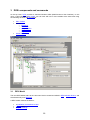
At the top level, DEXi provides a standard Windows MDI (Multi-Document User Interface). In this
case, a 'document' is a DEXi model. You can work with one or more models at the same time using
the following windows and commands:
•
•
•
3.1
Main Toolbar
Menus:
o File Menu
o Edit Menu
o Analysis Menu
o Window Menu
o Help Menu
Model Window
DEXi Model
The term DEXi Model refers to the 'document' that is created and edited in DEXi's Model Window, and
stored externally on a DEXi File.
A DEXi model contains the data on:
•
•
•
a qualitative multi-attribute model,
options, and
program settings.
22
3.2
DEXi File
Each DEXi model, which is created and/or edited in DEXi, can be stored on a DEXi File. You can load
and save files using the File menu commands. DEXi supports three file formats:
.dxi This is the native DEXi file format, which stores a single model, the corresponding option data and
program settings.
.dax File format used by the older program DEX.
.xml File format used by yet another old program, jDEX.
Normally, you should only use the default .dxi file format. The formats .dax and .xml are obsolete and
do not support all DEXi's features. They are implemented only for compatibility with DEX and jDEX.
The .dxi files are composed as XML documents, so you may use other XML tools to process them.
In order to conform to the XML standard and fully support UTF-8 strings, the format of .dxi files has
changed from DEXi 1.04 to 2.0. DEXi versions prior to 2.0 cannot process the new files and refuse to
load them. DEXi 2.0 and above support both formats as follows:
•
•
Loading: File format is recognized automatically.
Saving: By default, files are saved using the new format. For the old format, select "DEXi
version 1" in the Save file dialogue.
For versions 2.0 and above, DEXi files are in principle backward compatible for reading, but not for
writing. This means that any previous version of DEXi can read a file that was created by a more
recent version, however attempting to save this file by the previous version may result in data loss.
Regular updating of DEXi to new versions is therefore strongly advised.
3.3
Main Toolbar
The main toolbar of DEXi provides four buttons for fast activation of top-level DEXi model commands.
New: Create a new DEXi model and show it in a new window.
Open: Load an existing DEXi model from a DEXi file and show it in a new window.
Save: Save the current DEXi model on a DEXi file. File name is requested only when the model is
saved for the first time.
Report: Create and preview a report.
3.4
File Menu
The DEXi File Menu is available at all times for working with the currently active DEXi model window.
Mainly, it provides commands for creating, loading and saving DEXi files, but there are also
commands for importing and exporting other data, making reports, changing program settings and
exiting DEXi.
New: Create a new DEXi model and open a corresponding window. Initially, the model is almost
empty, containing only one root attribute and no options.
Open: Open and load an existing DEXi file through a standard Open a file dialogue.
23
Close: Close the currently active DEXi model window. Before closing, DEXi checks whether the
model has been saved on a DEXi file, and if not, asks you whether to: save the model (Yes),
discard the model (No), or to Cancel closing the window.
Save: Save the currently edited model on a DEXi file. This is a 'quick' save that normally rewrites
the output file without confirmation. However, it does ask you to provide a file name for a newly
created and yet unsaved model.
Save as: Save the currently edited model on a DEXi file. In this case, a Save file dialogue appears
before saving and always lets you to define or redefine the name (and possibly format) of the file.
Import.../Import function: Open a function file and load its decision rules into the currently
selected utility function. The function is created if necessary. Imported are only those rules whose
argument values in the file are matched with the ones in DEXi. Even though DEXi tries to
recognize the data format used in the function file, it is strongly recommended that function data is
exported and imported using the same Import-Export Settings.
Import.../Import options: Open an option file and load its data into the current model. Existing
options that have same names as imported options are overwritten by imported data. Otherwise,
imported options are inserted into the model.
Export.../Export tree: Export the current tree of attributes to an external file. Two data formats are
supported:
•
•
Tab-delimited: textual format with columns containing attribute names, scales and descriptions;
GML (Portable Graph File Format): for creating tree graphs by programs such as yEd Graph
Editor.
Export.../Export function: Save the utility function that is currently selected in the current window.
Data is written to a function file. Before saving, you are asked to define the name and format of this
file.
Export.../Export options: Extract option data from the current model and save it on an option file.
Only options that are selected ('checked') on the Options sub-page of the Charts Page are actually
exported. Before saving, you are asked to specify the name and format of the file.
Model description...: View and edit a description of the current model. The entered text is used
only for documentation and can be displayed in a report.
Report: Create and preview a report.
Settings: View and edit DEXi program settings.
Exit: Close all windows and terminate the execution of DEXi.
3.4.1
Option Data File
Option data files contain option data, which is imported and exported through File Menu commands. In
DEXi, the contents and format of option files are controlled at three points:
•
•
•
On Charts Page/Options Sub-page, where you can select options to be actually exported (all
options are selected by default).
In 'Import options' and 'Export options' dialogues that are used to specify file names and basic
file format, which is either 'Tab-delimited' or 'Comma-separated (CSV)'.
In Settings/Import-Export, where you can specify further details of 'Option data format'.
24
3.4.1.1
Examples
1. Tab-delimited option data file containing both options from the Car Evaluation model and exported
using the default Settings: using 'base 1' values, displaying all attributes using indentation, normal
orientation. The TAB character is denoted '¬'.
¬Car1¬Car2
CAR¬4¬3
. PRICE¬3¬2
. . BUY.PRICE¬2¬2
. . MAINT.PRICE¬3¬2
. TECH.CHAR.¬4¬3
. . COMFORT¬3¬3
. . . #PERS¬3¬3
. . . #DOORS¬3¬3
. . . LUGGAGE¬3¬3
. . SAFETY¬3¬2
2. The same data as above but using comma-separated format, 'base 0' values and including only
non-indented basic attributes in normal orientation.
"","Car1","Car2"
"BUY.PRICE","1","1"
"MAINT.PRICE","2","1"
"#PERS","2","2"
"#DOORS","2","2"
"LUGGAGE","2","2"
"SAFETY","2","1"
3. The same as above, but with text values and transposed orientation.
"","BUY.PRICE","MAINT.PRICE","#PERS","#DOORS","LUGGAGE","SAFETY"
"Car1","medium","low","more","4","big","high"
"Car2","medium","medium","more","4","big","medium"
3.4.2
Function Data File
Function data files are tab-delimited text files for storing utility functions, which are exported and
imported through 'Export function' and ‘Import function’ File Menu commands, respectively. One file
contains one utility function, whose format can be specified with Settings/Import-Export.
3.4.2.1
Examples
1. TECH.CHAR. function from the Car Evaluation model, exported in tab-delimited format, using 'base
1' values and exporting all rules. The character '+' represents an entered rule. The TAB character
is denoted '¬'.
¬COMFORT¬SAFETY¬TECH.CHAR.
1¬1¬1¬1¬+
2¬2¬1¬1¬+
3¬3¬1¬1¬+
4¬1¬1¬1¬+
5¬2¬2¬2¬+
6¬3¬3¬3¬+
7¬1¬1¬1¬+
8¬2¬3¬3¬+
9¬3¬4¬4¬+
2. The same function exported using text values and exporting only entered rules (in this case there is
no need to display the '+' or '-' entered status).
¬COMFORT¬SAFETY¬TECH.CHAR.
1¬bad¬bad¬bad
2¬acc¬bad¬bad
3¬good¬bad¬bad
25
4¬bad¬bad¬bad
5¬acc¬acc¬acc
6¬good¬good¬good
7¬bad¬bad¬bad
8¬acc¬good¬good
9¬good¬exc¬exc
3.5
Edit Menu
The DEXi Edit Menu provides commands for editing the DEXi model that is shown in the currently
active model window. The available editing commands depend on the currently edited model
component, that is, on the page that is currently open in the model window:
Model,
Options,
Evaluation.
There is no Edit Menu associated with the
3.6
Charts page.
Window Menu
The DEXi Window Menu is available at all times and provides commands for working with DEXi model
windows. These commands are particularly useful when there are multiple model windows loaded
simultaneously and shown in the main window of DEXi.
Cascade: Stack currently open windows so that each window title bar is visible. This facilitates an
easy selection of each window.
Tile Horizontally: Resize and move all currently open windows so that they are shown above each
other, occupying the full width of the main window.
Tile Vertically: Resize and move all currently open windows so that they are shown behind each
other, occupying the full height of the main window.
Minimize All: Minimize all currently open windows so that they are shown only as small bars
('icons') in the main window.
Arrange icons: Neatly arrange all currently minimized window 'icons'.
3.7
Help Menu
The Help Menu commands provide help on DEXi.
Help: Show this help.
About: Show DEXi version and copyright information.
For further information and latest news, see the DEXi Web Page.
3.8
Model Window
A DEXi Model Window provides workspace for editing and using one DEXi model. It consists of four
pages ('tabs'):
Model: Edit the current DEXi model: its structure and components.
Options: Edit option descriptions.
26
Evaluation: Evaluate and analyze options.
Charts: Compose and view charts.
3.9
Model Page
The Model Page of DEXi model window provides workspace and commands for editing a DEXi model:
its structure, attributes, scales and utility functions, but excluding options and program settings.
3.9.1
Workspace
The workspace consists of four main areas that correspond to the following model components:
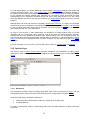
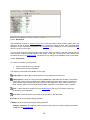
1. Tree of attributes: On the left, there is an "Explorer-like" Tree View that displays the structure
of the edited model. It has an associated vertical toolbar. All toolbar buttons and most of the
corresponding Edit Menu commands refer to the currently selected attribute in the tree.
2. Attribute: There are two entry fields in which you can name (or rename) the currently selected
attribute and optionally provide its description.
3. Scale of the currently selected attribute: You can either select an existing scale from a pulldown list, or press
to open the Scale Editor. Whenever the attribute's scale has been
already defined, the list of scales contains only 'compatible' scales - the ones having the same
number of values.
4. Utility function of the currently selected aggregate attribute. There are three parts: a read-only
field showing the current status of the function, the button to invoke the Function Editor, and
a field for entering an optional description of the function. The utility function area is not
available for basic attributes.
3.9.2
Commands
To invoke a command, you may either:
•
•
•
press a button shown in the window,
select an item from the Edit Menu, or
select an item from the pop-up menu that appears after right-clicking the mouse button.
The Model Page provides the following commands:
27
Add attribute: This command creates a new attribute and inserts it into the tree as a descendant
('child') of the currently selected attribute. The new attribute is automatically called "New", so you
should consider giving it a more meaningful name.
Delete subtree or item: This command depends on the type of the currently selected attribute:
•
•
For an aggregate attribute: it discards all its descendants and its utility function, effectively
converting it into a basic attribute.
For a basic attribute: it deletes that attribute
Thus, to completely delete a sub-tree of attributes, you should "delete it twice".
Cut: Equivalent to Copy followed by Delete subtree or item.
Copy: Copies the currently selected sub-tree into the clipboard for further use.
Paste: Inserts previously Cut or Copied sub-tree into the model, positioning it as a descendant
('child') of the currently selected attribute.
Duplicate: Makes a copy of the currently selected sub-tree and inserts it as a new top-level tree in
the model, so that it can be easily moved around.
Find...: Opens a window in which you can define a text to be searched for in the model. You can
also select components in which to search: attribute names, attribute descriptions, and/or scales.
The search can be case sensitive or not.
Find next: Continues searching from the current position in the model.
Move up: Moves the currently selected attribute one place up according to what is shown in the
tree view.
Move down: Moves the currently selected attribute one place down according to what is shown in
the tree view.
Shrink tree: Shrinks the display of the tree by one level.
Expand tree: Extends the display of the tree by expanding the inner-most collapsed sub-trees.
Undo: Undo the last tree-editing operation.
Redo: Redo the last undone tree-editing operation.
Scale: Invokes the Scale Editor to create or edit the scale of the currently selected attribute.
Delete scale: Deletes the scale of the currently selected attribute.
Utility function: Invokes the Function Editor to create or edit the utility function of the currently
selected aggregate attribute.
Delete function: Deletes the utility function of the currently selected aggregate attribute.
28
3.9.3
Remarks
Changing the structure and scales of attributes can severely affect previously defined utility functions.
In some cases, for example when adding or deleting an attribute value, DEXi tries to adapt the
affected function so that its 'meaning' is preserved as much as possible. Unfortunately, such
adaptation is impossible with more extensive changes, particularly when adding or deleting function
arguments. In these cases, the function must be deleted and defined anew. Before deleting a function,
DEXi issues a warning and asks for your confirmation.
Consequently, you might want to develop your tree structure as completely as possible before
attempting to define utility functions.
3.9.4
Tree View
Tree View is an important part of the DEXi model window and its Model Page. It shows the structure of
the currently edited DEXi model.
In Tree View, you can:
•
•
•
•
3.9.4.1
Select a single attribute by clicking it or using keyboard arrows.
Invoke Model Page commands. Most of these commands refer to the currently selected
attribute.
Move attributes and subtrees shown in the Tree View using standard drag-and-drop mouse
commands.
Expand and collapse the display of sub-trees by clicking the symbols and , respectively.
Status
While editing the model, the status of its attributes is shown in Tree View using the following symbols:
Incomplete basic attribute: an attribute having an undefined scale.
Completely defined basic attribute.
Aggregate attribute whose utility function cannot be constructed due to undefined scales of its own
and/or its descendants.
Aggregate attribute with an undefined utility function (but everything is ready for its construction).
Aggregate attribute with a partially or incompletely defined utility function.
Aggregate attribute with a fully defined (100% determined) utility function.
29
Linked attribute.
3.9.4.2
Remark
Usually, the goal is to completely define all DEXi model components. In Tree View, this is indicated by
"all green" status symbols. Occasionally and only with a good reason, it is acceptable to leave a
and/or to have a linked attribute .
partially defined utility function
3.10 Scale Editor
Scale Editor is a window in which you can create and edit one attribute scale. Basically, a scale is just
an ordered or unordered list of values; you can add and delete these values, give them names and
optional descriptions, change their order and define their bad or good class.
3.10.1 Workspace
Scale Editor consists of:
•
•
•
•
Value list: each value has a name (usually a short string) and an optional description (used
only for documentation).
Scale order entry field at the top: here you can define scale ordering: unordered, increasing
(recommended) and decreasing.
Toolbar at the right: provides command buttons.
The field Default scale for new attributes: when checked, this scale will be automatically
assigned to all attributes created hereafter in the Model Page.
3.10.2 Commands
To invoke a command, you may either:
•
•
press a button shown in the toolbar, or
select an item from the pop-up menu that appears after right-clicking the mouse button.
Scale Editor provides the following commands:
Add value: Inserts a new value into the list. The default name of this value is 'new value', and you
may change this name immediately after insertion.
Delete value: Deletes the value that is currently selected in the value list.
30
F2 (keyboard): Rename value: Opens a small in-line field in which you can quickly rename the
currently selected value.
Edit value: Opens a dialogue in which you can edit both the name and description of the currently
selected value.
Set bad: Set the class of the currently selected value to bad.
Set neutral: Set the class of the currently selected value to 'neutral' (nor bad nor good).
Set good: Set the class of the currently selected value to good.
Move up: Moves the currently selected value one place up in the list.
Move down: Moves the currently selected value one place down along the list.
3.10.3 Remarks
Editing a scale (especially adding and deleting values) may affect already defined utility functions.
DEXi tries to adapt the affected functions so that their 'meaning' is preserved as much as possible, but
you should be careful and verify all affected functions after making such changes.
Increasing scales are strongly recommended: they improve the comprehensibility of models and
simplify the definition of utility functions.
The concept of value 'class' (bad, neutral, good) is meaningful only with ordered scales. Thus, the
commands
do not work with unordered scales. For ordered scales, classes must be ordered,
too. Therefore, classes can be assigned only so that zero or more bad values are followed by zero or
more neutral values, which are then followed by zero or more good values.
3.11 Function Editor
Function Editor is a window in which you can create and edit one utility function. Its workspace
consists of a table, two toolbars, pop-up menu, and status bar.
31
3.11.1 Table
The central part displays a table of decision rules. Table rows contain all the possible combinations of
values of function's arguments (lower-level attributes in the tree). The rightmost column (such as
PRICE above) represents the output function value. This is the only editable column in the table. It
contains cells into each of which you can assign:
•
•
a single value taken from the corresponding scale (for example: 'high'), or
an unknown value, denoted '*' (this is the initial value set to all rows of a newly created table).
The values entered by you appear in bold. Other values are called non-entered and are shown in
normal typeface. By default, non-entered values are handled by DEXi and recalculated each time the
table has changed. In general, non-entered values are intervals.
You can enter a cell value in one of the following ways:
•
•
•
selecting an item from the Rule values field, which appears above the table;
right-clicking and selecting an item from the pop-up menu; or
pressing one of the keys 1, 2, ..., on the keyboard, which represent consecutive scale values,
or the key *, which represents an unknown value.
To delete the currently selected cell value, press the Delete key or the
status to non-entered.
button. Deleting changes cell
Clicking on a table heading shows the description and scale values of the corresponding attribute:
3.11.2 Toolbars
The horizontal toolbar, which is shown above the table, consists of:
Rule values field: used to select a value and assign it to the current cell.
Delete value: Deletes the contents of the currently selected cell.
Complex rules: Makes and previews complex rules of the current function.
% Weights: Open Weight Editor to define attribute weights.
Use scale orders and Use weights are two check boxes that define how to handle non-entered
values.
The horizontal toolbar below the table contains:
Undo: Undo the last function-editing operation.
32
Redo: Repeat the last undone function-editing operation.
Copy: Copies the current utility function into the clipboard for further use. The copied data format is
the same as used in a function file.
Paste: Imports previously Copied function into the current function. After the operation, it reports
the number of imported rules (rules whose values matched between the clipboard and the current
functions) and the number of rules whose values actually changed.
The buttons
Undo and
Redo appear only if activated in Settings.
It is strongly recommended not to change Import-Export Settings between copying and pasting a
function.
3.11.3 Pop-up Menu
This menu appears after right-clicking your mouse. It has two parts: the first one lists values that can
be assigned to the current cell, and the second part contains two items:
Automatic value setup: Controls table recalculation after each change. When checked, DEXi
does recalculate all non-entered function values. Otherwise, there is no recalculation and the two
toolbar checkboxes are disabled.
Enter values: Changes the status of table cells from non-entered to entered. Entered cells are
never recalculated by DEXi and can be only changed by you. After issuing this command, you can
specify whether to change the status of all non-entered cells, or only those having a single (noninterval) value.
3.11.4 Status bar
Status bar displays the status of the edited function.
3.11.5 Utility Function Status
When a utility function is created in DEXi, it is completely undefined at first: all cells in Function Editor
contain the undefined value '*'. When you edit the function, you usually assign values to more and
more cells and the function becomes more and more defined. Usually, the goal is to completely define
the function, that is, to precisely specify all cell values.
DEXi uses two measures of function definition, which are both displayed as status/progress indicators
on Model Page and in Function Editor.
The first measure is called entered rules ratio. This is a ratio between the number of entered rules
(that is, cell values defined by you) and the total number of rules (function size).
The second measure, determination, is somewhat more complex, but better. It takes into the account
that, in general, cell values are intervals rather than single values. A cell is 100% determined if it is
assigned a single value, and is 0% determined if it is completely undefined, that is, it contains the
complete interval of values (denoted '*'). For smaller intervals, intermediate values are calculated
proportionally.
A function is fully determined when all its cells - both entered and non-entered - are 100% determined.
This is in general achievable with less than 100% entered rules due to DEXi's handling of non-entered
values. Therefore, when editing a function, the primary aim is to make it 100% determined, regardless
on the ratio of entered rules.
33
The display of utility function status also includes a frequency distribution of function values, shown in
square brackets. For instance, ‘[high:5,medium:1,low:3]’ denotes that five decision rules map to the
value ‘high’, one rule to ‘medium’ and three to ‘low’. For functions that contain intervals, the sum of
frequencies is greater than the total number of rules.
3.11.6 Weight Editor
In Weight Editor you can view and define weights of the utility function that is currently edited in
Function Editor. Primarily, these weights are intended for weight-based calculation of non-entered
function values.
In this editor, you can set your required weights by moving the sliders of the corresponding attributes.
The numerical values of these settings are shown under 'Required'. In addition, you can normalize
these weights using the buttons:
Sum 100: The weights are proportionally scaled, so that their sum is 100.
Max 100: The weights are proportionally scaled, so that the maximal weight is equal to 100.
The blue bars and blue numbers show the actual 'Current' weights. These are determined from the
utility function currently edited in Function Editor.
‘Rounding’ specifies how to calculate the values of non-entered rules that fall just between two ordinal
values. For example, let ordinal numbers of ‘acc’ and ‘good’ be 2 and 3, respectively. For some nonentered rule, the linear approximation formula using weights can calculate the value 2.5. In this case,
‘Rounding’ specifies whether this value is rounded ‘down’ to 2 (meaning ‘acc’) or ‘up’ (‘good’). The
default setting of ‘no’ does not favor any specific direction and leaves the rounding to the underlying
arithmetic software.
3.11.6.1 Remarks
Absolute values of weights are not really important in DEXi; only their relative proportions with each
other do matter. Both normalizations preserve this property.
It is important to understand that 'Current' weights represent the closest possible match with your
'Required' weights and the rules already entered in the table. In general, thus, 'Current' weights differ
from the 'Required' weights, and there are two main reasons for this:
•
•
Utility function space in DEXi is discrete, not continuous. The functions are discrete, too. In
general, it is impossible to exactly match continuous 'Required' weights to a discrete 'Current'
utility function.
A hyperplane constructed from 'Required' weights depends on already entered function
values. The more the entered values, the less the freedom for the hyperplane, and the lower
the chance to match the 'Required' weights.
34
For example, there is no freedom left with a fully defined utility function. In this case, 'Required'
weights have no effect.
The default setting of ‘Rounding’ is ’no’ for compatibility with DEXi versions prior to 3.03. However, it is
recommended to explicitly set ‘Rounding’ to ‘down’ or ‘up’ for better stability of numerical calculations.
3.11.7 Handling Non-Entered Function Values
In Function Editor, utility function values are either entered by the user or non-entered. Entered values
are shown in bold and are never changed by DEXi during the editing session. This is, however, not
the case with non-entered values, which are handled by DEXi with the purpose to aid and simplify the
function editing process, and maintain the consistency of function definitions. Non-entered values are
shown in normal typeface and, by default, they are recalculated whenever the table changes. The
calculation is based on already entered values and other available information (particularly weights).
DEXi uses two strategies for calculating non-entered values, which can be individually activated or
deactivated using the two corresponding checkboxes on the Function Editor toolbar: Use scale
orders and Use weights. These strategies are available only for functions whose attributes have
increasingly ordered scales. For other functions, Function Editor does not show the corresponding
checkboxes.
3.11.7.1 Scale orders
This strategy takes into account the ordering of scales. Consider the function y=f(x), where both y and
x have increasingly ordered scales. Then, whenever x increases, it is clear that f(x) should also
increase or remain constant. This function property is known as monotonicity.
It is easy to see that, in general, monotonicity narrows the intervals of values that can be assigned to
non-entered cells. For example, the rule 5 above assigns acc to the combination COMFORT=medium
and SAFETY=medium. From this, it immediately follows that for any rules having COMFORT or
SAFETY better than medium, the TECH.CHAR. value should be acc or better - this is exactly what is
shown with rules 6 and 8 above. Similarly, the entered bad value of rule 7 implies that the value of
non-entered rules 4 and 1 is bad, too.
This strategy fails whenever the user enters values that violate monotonicity. When the user attempts
to enter a violating (“inconsistent”) value into a monotone rule set, DEXi issues a warning and
requests confirmation. In the case that the user confirms such entry, DEXi deactivates the scale order
strategy and disables the Use scale orders checkbox. The checkbox remains disabled as long as the
entered rules violate monotonicity. If monotonicity is reestablished later, the checkbox is enabled
35
again, but it remains unchecked; the user must explicitly check it to reestablish the scale order
strategy.
Hint: Observe the status of Use scale orders checkbox. When it is disabled (grayed-out), your
function is non-monotone. When it is enabled, the function is monotone. However, the scale order
strategy is in effect only when the checkbox is enabled and actually checked.
3.11.7.2 Weights
This strategy calculates the values of non-entered rules using a hyperplane (linear function), which is
constructed using weights, as defined in the Weight Editor, and other already entered rules. The
hyperplane is constructed so that its slopes correspond to weights required by the user, and that its
surface lies as close as possible (in the least squares sense) to the already entered values.
Above, the requested weights were 50% for COMFORT and 50% for SAFETY. Using these weights
and the already defined rules 3, 5, 7 and 9, DEXi constructed a hyperplane and used it to determine
the values of non-entered rules 1, 2, 4, 6 and 8.
At least a few rules have to be entered by the user before this method could construct a hyperplane.
The exact number of needed rules depends on function dimensions and geometric positions of
entered rules, but until this condition has not been met, DEXi deactivates this strategy and disables
the Use weights checkbox.
3.11.8 Function Editing
Editing utility functions requires quite some skills and experience, particularly when the corresponding
tables are large. You may want to try some of the following function editing approaches.
For small tables, which consist of about up to 10 or 20 rules, it is probably most effective just
proceeding sequentially through the table and entering all the values in one turn. For fast data entry,
use the keyboard keys 1, 2, etc., and Delete.
For tables of intermediate size, up to 50 or maybe 100, a useful approach is to combine your data
entry with DEXi's 'Use scale orders' strategy. In this case you 'jump' across the table and enter values
only for some 'important' rules, such as rules having extreme values of attributes or extreme function
values. [Indeed, it takes some practice to learn which rules are 'important'.] At the same time, you let
DEXi calculate values of non-entered rules. In this way, you may quickly get a highly determined
function. You may follow this stage by several iterations of finding 'weak' (unsatisfactorily defined)
points of your definition and entering your values there until the function has been completely defined.
36
For even larger tables, you should additionally employ DEXi's 'Use weights' strategy. Start again with
entering 'important' values. Then, open Weight Editor and define your required attribute weights. If
successful, this will fill all the non-entered cells with single values corresponding as closely as possible
to your weights and already entered rules. Afterward, do not forget to check what DEXi has done
automatically for you. Review the assigned values and verify if they make sense to you. Also check
the actual weights achieved in this way (for example, run Weight Editor again and see the 'Current'
weights).
Although DEXi can work with less-than-completely defined utility functions, it is highly recommended
to define the functions completely. Incompletely defined functions may cause options to be evaluated
by sets of values rather than single values. Therefore, you should check the status of your functions
and ensure that they are '100% determined'.
As long as your function is '100% determined', the proportion of actually entered rules is not that
important and can be less than 100%. However, even in this case you should be aware that nonentered rules are more volatile than entered ones. Entered values are never changed by DEXi, but
non-entered values may be unintentionally changed later, for example, by changing weights in Weight
Editor. To protect your completed function from such changes, you may want to run the Enter values
command.
For final verification of your function, you may also want to review its complex rules and weights.
3.12 Options Page
The Options Page of DEXi model window provides workspace and commands for editing option
descriptions: option names and option values assigned to basic attributes of the currently edited DEXi
model.
3.12.1 Workspace
The workspace provides a table for editing option data. Each column represents an option. The first
row displays options' names and each of the remaining rows corresponds to one basic attribute.
Above the table, there is a toolbar consisting of:
•
•
a data-entry field, used to edit the value of a single cell in the table, and
command buttons.
To enter an option name, select a corresponding name cell in the table and edit it contents in the dataentry field.
37
To enter a cell value other than name, you can:
•
•
•
select an item from the data-entry field,
right-click and select an item from the pop-up menu; or
press one of the keys 1, 2, ..., on the keyboard, which represent consecutive scale values, or
press the key *, which denotes an undefined value.
3.12.2 Commands
To invoke a command, you may either:
•
•
press a button shown in the toolbar,
select an item from the Edit Menu.
All commands refer to the option (column) whose cell is currently selected in the table.
Add option: Inserts a new column to the right of the currently selected option. The new option is
named 'New' and all its value cells are set to '*' ('undefined').
Delete option: Deletes the currently selected option.
Move left: Moves the currently selected column one place to the left.
Move right: Moves the currently selected column one place to the right.
Cut: Equivalent to Copy followed by Delete option.
Copy: Copies the currently selected option (column of cells) into the clipboard for further use.
Paste: Inserts previously Cut or Copied column into the table, positioning it to the right of the
currently selected column.
Duplicate: Duplicates the currently selected column.
Undo: Undo the last option-editing operation.
Redo: Repeat the last undone options-editing operation.
3.12.3 Remarks
Duplicating columns is very useful for 'what-if' analysis: duplicate an option, then leave the original
intact and modify only its copy. In this way, you can easily compare the effects of changes on
evaluation results.
3.13 Evaluation Page
The Evaluation Page of DEXi model window displays evaluation results. Each option created
previously in the Options Page, is evaluated by the model created in the Model Page. You can change
option descriptions (values of basic attributes) and see the effects of changes, and copy and paste all
option data. In addition, the Analysis Menu and corresponding toolbar buttons provide commands for
option analyses: Plus-minus-1 analysis, Selective explanation and Compare options.
38
3.13.1 Workspace
The workspace is similar to Options Page's one in that it provides a table showing option data. The
difference is that all option data is shown here, including the values of both basic and aggregate
attributes. Rows of the table correspond to all attributes and are displayed so as to indicate the tree
structure of the current model.
You can move along the cells and select each of them. When you select a cell that corresponds to a
basic attribute, a data-entry field appears in the toolbar, so that you can change the value of that cell in
the same way as on the Options Page. The effects of any change are immediately shown in the table.
3.13.2 Commands
To invoke a command, you may either:
•
•
press a button shown in the toolbar,
select an item from the Edit Menu.
The following commands are available on this page:
Copy options: Copies data of all the options into the clipboard for further use.
Paste options: Copies or inserts previously Copied option data back into the table. The position
where each option's data is pasted into the table is determined from option names. Suppose an
option named "Opt" has been previously copied into the clipboard. If "Opt" exists in the current
table, then the paste command replaces all its data. Otherwise, a new option "Opt" is created.
Find...: Opens the same window as on the Model Page in which you can define a text to be
searched for in the data table.
Find next: Continues searching from the current position in the data table.
Undo: Undo the last option-editing operation.
Redo: Redo the last undone option-editing operation.
Analysis of options: The following three buttons provide shortcuts to option analysis commands
available in the Analysis Menu:
39
Plus-minus-1 analysis: Investigating the effects of changing basic option values by one step
up and down.
Selective explanation: Identifying particular advantages and disadvantages of an option.
Compare options...: Comparing an option with some other options.
3.14 Analysis Menu
The DEXi Analysis Menu is available only from the Evaluation Page. This menu provides commands
for the analysis of options. Each command creates and previews an option analysis report.
3.14.1 Option analyses
Plus-minus-1 analysis: This analysis investigates the effects of changing each basic attribute by
one value down and up (if possible), independently of other attributes. The analysis is carried out
for the currently selected option and displays the effects of changes on the currently selected
aggregate attribute.
Selective explanation: Displays particularly strong and weak values of the currently selected
option. This method finds and displays all connected subtrees of attributes whose values are either
all good (for strong points) or bad (for weaknesses).
Compare options...: This command creates a report that is similar to the common Evaluation
results report, but highlights differences between options. First, DEXi opens a dialogue in which
you can choose a primary option and a list of secondary options:
After selection, DEXi makes a report in which it compares the primary option with each secondary
one. The primary option values are displayed in full, whereas the secondary options' values are
displayed only when they differ from the primary option.
When selecting options on the Compare options dialogue, you can right-click on the list of options,
which gives you two additional commands:
Select all options: Select all options other than the primary one.
Unselect all options: Exclude all options from comparison.
3.15 Charts Page
The Charts Page of DEXi model window provides workspace and commands to create graphical
displays of evaluation results.
40
3.15.1 Workspace
The workspace consists of a selection area on the left and chart display on the right. The selection
area consists of two sub-pages ('tabs'):
•
•
Attributes: This page shows the tree structure of the current DEXi model. There, you can
check attributes that constitute chart's dimensions.
Options: This page shows the list of currently defined options. You can check individual
options to be displayed in the current chart. This selection also determines which options are
displayed in reports or exported to files.
The chart type is determined according to the number of checked attributes (see chart examples):
•
•
•
•
No attributes: No chart is displayed
One attribute: Bar chart
Two attribute: Scatter chart
Three to six attributes: Radar chart
Radar charts can display only one option at the same time. To choose which option is displayed,
select it ('highlight' its name) on the Options sub-page.
3.15.2 Commands
To invoke a command, you may either:
•
•
select an item from the Chart Menu,
right-click and select an item from the pop-up menu.
Show all options: Select all options for display.
Hide all options: Hide all options from display. [Usually, this is followed by selecting individual
options from the Options sub-page.]
Show values: When this item is checked, full scale value names are shown in charts. Otherwise,
only their ordinal numbers are displayed. [This is typically used to save space or to avoid
overlapping text.]
Show option names: This item controls whether option names are displayed in charts or not. [This
may also save space or avoid overlapping text.]
41
Four options: This item is available only for radar charts. When it is checked, four radar charts
and thus four options are shown simultaneously. Otherwise, there is only one large chart that
displays one option.
Copy chart: Copies the current chart into the clipboard so that it can be pasted into other
documents. Available formats for pasting are 'Windows Metafile' and 'Enhanced Metafile'.
3.16 Report
Report provides a formatted and mostly textual presentation of key components of your current DEXi
model. After invoking this command, a small window appears in which you can select elements to be
included in the report:
In addition to element selection, you can press one of the buttons:
Font: Specify font to be used in the report (the default is Arial, 10pt).
Settings: Open Settings/Report in order to specify the format of report and its elements.
Report: Create a report consisting of selected elements and preview it on the screen.
Cancel: Close this window without creating a report.
Also, you can right-click on the list and select one of the menu items:
Select all reports: Select all report elements
Unselect all reports all current selections
3.16.1 Report elements
Model description: Textual description of the current model, which is optional and used only for
documentation.
Attribute tree: Displays attribute names and descriptions. Tree structure is indicated by indenting
and connecting attribute names. [See an example.]
Scales: Similar to 'Attribute tree', but displays scales. [See an example).]
Scale descriptions: A long printout of scales. For each scale in your model, it prints out the scale
name, corresponding attribute description, and all scale values together with their own
descriptions, if any. [This report element is rarely needed.]
42
Function summary: Displays the tree structure along with the status of utility functions.
Rule tables: Prints out all utility functions defined in your model. Display format is determined in
Settings/Report. [See some examples].
Weights: Similar to 'Attribute tree', but displays attribute weights. You can explicitly select
displayed weight types in Settings/Report. [See an example].
Evaluation results: Similar to 'Attribute tree', but displays evaluation results. Only options that are
selected on the Charts Page are included into this report element. Again, its format can be
determined through Settings/Report.
Chart: Prints out the chart that is currently displayed on the Charts Page.
3.17 Preview
Preview displays reports created by DEXi. You can view these reports and optionally print them, save
on files or copy individual pages for transfer to other applications (such as Microsoft Word).
The toolbar, which is displayed at the top of Preview, provides the following buttons and controls:
Page status: Displays the current page number and total number of pages.
and PgUp: Shows the previous page.
and PgDn: Shows the next page.
Zoom: Controls the magnification of display.
Print: Prints the report.
Page setup: Opens a dialog to define page size, orientation, and margins.
Save: Saves the current report on a file. The available formats are: 'Text File (*.txt)', ‘Tab-delimited
File (*.tab)', ‘Html File’ (*.html), 'Enhanced Metafile (*.emf)', and 'Bitmap (*.bmp)'. The former three
save the entire report, while the latter two save only the current page.
Copy: Copies the current page to clipboard for its transfer to other applications. The page is saved
in two formats, 'Windows Metafile' and 'Enhanced Metafile'.
View report in browser: Converts the report to html and opens it in a browser. The browser can
be either internal or external, depending on Settings/Report.
Close: Closes the current preview and returns to DEXi.
3.18 Internal browser
Internal browser provides an alternative way to viewing DEXi reports when they are represented in the
html format. The internal browser is invoked only if Use default system browser is not selected in
Settings/Report (otherwise, the default system browser is invoked externally from DEXi). The internal
browser can be activated from (1) the preview already showing some report or (2) instead of preview
when Reports in html is selected in Settings/Report.
Once open, the internal browser shows the current report and provides the following buttons:
43
-0+
Zoom controls: Control the magnification of display.
Print preview...: Prepares the report for printing and displays it on the screen.
Save: Saves the current report on a html file.
Copy: Copies the current html text to clipboard for its transfer to other applications.
Close: Closes the internal browser and returns to DEXi.
3.19 Settings
Settings is a dialogue in which you can specify how DEXi handles reports, external files and other
advanced features. For this purpose, it provides three pages: Report, Import/Export and Advanced.
The selected settings apply to the current DEXi model and are saved on the corresponding DEXi File.
3.19.1 Report Page
Use this page to specify various aspects of report formatting.
Each section on new page: When checked, each report element is strictly started on a new page.
Otherwise, multiple elements may appear on a single page.
Bad values and Good values: Use these controls to specify the appearance of 'bad' and 'good'
scale values.
Functions: These controls specify the display of utility functions:
•
•
•
•
weights: specifies whether weights are displayed or not;
rule numbers: include or exclude row numbers;
complex rules: when checked, represent the function with complex rules, otherwise use
elementary rules;
entered rules only: when checked, display only rules entered by the user, otherwise also show
non-entered rules.
Weights: These controls specify the display of weights. Use these controls to specify the number
of decimal places and to select individual weight types.
Evaluation: These controls specify the display of evaluation results:
•
•
Number of columns refers to the number of options shown together on the right hand side of
the 'Evaluation results' report element.
Trim characters specifies the maximum number of characters that can be used to display
option values in this report element [the shorter the strings, the more options can be displayed
together].
Reports in html: When checked, all reports are prepared in html and shown in a browser, without
activating the standard preview.
Use default system browser: When checked, html reports are shown using the default system
browser, that is, externally from DEXi. In this case, DEXi writes html files to the temporary system
folder. Otherwise, a browser (based on Internet Explorer) is invoked internally, without writing files
to disk.
44
3.19.2 Import/Export Page
This Settings page specifies the format of external data files. which are imported and exported through
File Menu commands.
Option data format: These controls specify the format and contents of imported and exported
option data files.
•
•
•
•
Option values: specifies the format of values, which can be either text strings or ordinal
numbers starting at 0 (base 0) or 1 (base 1).
Attributes: import/export the values of all or only basic attributes.
Orientation specifies whether data file rows correspond to attributes (normal) or options
(transposed).
Indent specifies whether attribute names are indented or not. Indentation adds whitespace to
outline the tree structure of attributes.
Function data format: These controls specify the format and contents of exported function data
files.
•
•
•
Attribute values: specifies the format of attribute values, which can be either text strings or
ordinal numbers starting at 0 (base 0) or 1 (base 1).
Rules: export all or only entered decision rules.
Interval format specifies the format of function values, which are in general intervals. Possible
formats are:
o from:to,
o from and to separated by the TAB character, or
o using interval symbols '*', '>=', '<=' and ':'.
3.19.3 Advanced Page
This page contains two controls:
Link equal attributes: specifies whether DEXi performs automatic linking of attributes or not.
Undo/Redo: to activate or deactivate the Undo/Redo functionality when editing models, options
and utility functions.
45
4 Example: Car Evaluation Model
This is an example of a DEXi multi-attribute model for the evaluation of cars. This is a very small and
simple model used to illustrate main concepts of multi-attribute modeling and DEXi, and is not meant
to address the problem of car evaluation at any realistic level. This model has been traditionally
handed out together with all previous versions of the programs DEX and DEXi. For this reason, it is
shown here without change, in spite of its age.
4.1
Tree of Attributes for Car Evaluation
The Car Evaluation Model has the following tree structure of attributes:
4.1.1
Interpretation
This structure can be interpreted as follows:
1. Decomposition: In order to evaluate a CAR, we consider its PRICE and TECHnical
CHARacteristics. PRICE is further decomposed into BUYing PRICE and MAINTenance
PRICE. Similarly, TECH.CHAR. are decomposed into COMFORT and SAFETY, and
COMFORT is further decomposed into the number of PERSons (passengers), number of
DOORS and size of the LUGGAGE boot.
2. Dependency: The attribute CAR depends on PRICE and TECH.CHAR. Similarly, COMFORT
depends of #PERS, #DOORS and LUGGAGE. Etc.
3. Aggregation: The values of #PERS, #DOORS and LUGGAGE are aggregated into a value uf
COMFORT. Then, in the following order, BUY.PRICE and MAINT.PRICE are aggregated into
PRICE, COMFORT and SAFETY are aggregated into TECH.CHAR., and PRICE and
TECH.CHAR. are aggregated into CAR.
4.1.2
Attribute Types
The attributes in this tree are of the following types:
•
•
•
Basic attributes are: BUY.PRICE, MAINT.PRICE, #PERS, #DOORS, LUGGAGE and SAFETY
Aggregate attributes are: CAR, PRICE, TECH.CHAR. and COMFORT.
The root attribute is CAR.
46
4.1.3
Attribute Descriptions
In DEXi's reports, this tree is printed together with attributes' descriptions and appears as follows:
4.2
Scales for Car Evaluation
The scales of attributes in the Car Evaluation Model are defined as follows:
4.3
Utility Functions for Car Evaluation
Consider the root attribute of the Car Evaluation Model. According to the tree of attributes, the root
attribute CAR depends on two lower-level attributes: PRICE and TECH.CHAR. Thus, the utility
function that corresponds to CAR maps all the combinations of values of PRICE and TECH.CHAR.
into the values of CAR (see the scales of these attributes). The function is defined by the table shown
below.
47
4.3.1
Interpretation
The attributes PRICE and TECH.CHAR. have three and four values, respectively, so the number of
rows in the table is 3×4=12. Each row provides a value of CAR for one combination of the values of
PRICE and TECH.CHAR. Interpreted as an elementary decision rule, the fourth row, for example,
means the following:
if PRICE=medium and TECH.CHAR.=bad then CAR=unacc.
4.3.2
Elementary decision rules
The Car Evaluation Model has four aggregate attributes and, consequently, four utility functions.
These are defined by the following tables of elementary decision rules:
4.3.3
Complex rules and weights
This example shows all the utility functions, defined in the Car Evaluation Model. They are
represented in terms of local weights and complex rules.
48
4.4
Description and Evaluation of Cars
Options evaluated by the Car Evaluation models are, obviously, cars. This example illustrates two
basic concepts: description of options and evaluation of options.
49
4.4.1
Interpretation
At the bottom, the table shows two options, Car1 and Car2, described by the qualitative values
assigned to the six basic attributes of the tree.
These values then aggregated from bottom to the top of the tree of attributes according to the
structure of the tree and defined utility functions. In this way, intermediate evaluation results are first
obtained and assigned to the attributes PRICE, COMFORT and TECH.CHAR. (see the table at the
top). Finally, the values of PRICE and TECH.CHAR. are aggregated into CAR, giving the overall
evaluation of both cars.
4.5
Some Car Option Analyses
These examples show some option analysis reports obtained from the Car Evaluation Model. These
reports can be created by commands of the Analysis Menu or corresponding buttons on the
Evaluation Page.
4.5.1
Plus-minus-1 analysis
The first example shows results of Plus-minus-1 analysis for the option Car2 and the aggregate
attribute CAR. The column Car2 displays the current values of Car2. The column –1 displays the
values of the attribute CAR when each corresponding lower-level attribute's value changes by one
step down (independently of other attributes). Similarly, the column +1 shows the effects of increasing
the value by one step up. Empty fields denote no effect, and the brackets '[' and ']' indicate that the
attribute value cannot be decreased or increased, respectively.
50
The above display shows, for example, that BUY. PRICE considerably affects the evaluation of Car2.
When BUY. PRICE decreases by one step (from 'medium' to 'high'; the latter value is not shown), the
overal value of CAR becomes 'unacc'. In the other direction (from 'medium' to 'low'), the overall
evaluation improves to 'exc'.
The two brackets ']' indicate that the values of corresponding attributes, #PERS and LUGGAGE,
cannot be increased any more, preventing the +1 part of the analysis.
4.5.2
Selective explanation
Selective explanation highlights particular advantages and disadvantages of an option. The method
finds and displays only those connected sub-trees of attributes for which the option has been
evaluated as particularly good or bad.
This example shows that Car2 has three particularly strong parts (two sub-trees and one single
attribute):
1. overall evaluation, which is strongly influenced by low MAINT. PRICE,
2. COMFORT due to very good #PERS and LUGGAGE, and
3. high SAFETY.
4.5.3
Compare options
This analysis compares one (primary) option with some other selected (secondary) options,
displaying all values of the primary option and only those values of the secondary options that differ
from the primary's ones.
51
This example compares Car1 (primary option) with Car2 (secondary option). Car2 differs from Car1 in
the values of basic attributes MAINT. PRICE and SAFETY, which cause different evaluations of
TECH. CHAR, PRICE and CAR.
4.6
Some Car Evaluation Charts
The following examples show some charts that can be obtained in DEXi from the evaluation of cars
using the Car Evaluation Model. The charts differ in the number of evaluation dimensions (actually
attributes) selected for presentation in DEXi's Chart Page.
4.6.1
Bar Chart
This chart displays evaluation results according to one evaluation dimension. In this case, this is the
root attribute CAR, so the chart shows the overall evaluation of two cars.
4.6.2
Scatter Chart
A scatter chart displays evaluation results according to two selected evaluation dimensions. In this
case, the selected dimensions are PRICE and TECH.CHAR., that is, the two attributes that occur just
below the root attribute CAR (see the tree structure).
52
4.6.3
Radar Chart
Radar chart displays evaluation results according to three or more dimensions (the maximum is six).
The next chart shows the evaluation of cars using the three attributes PRICE, COMFORT and
SAFETY.
53
5 Further reading
5.1
Documentation in Slovene
The DEXi User's Manual is available as:
Jereb, E., Bohanec, M., Rajkovič, V.: DEXi: Računalniški program za večparametrsko odločanje,
Moderna organizacija, Kranj, 2003.
Further information on decision analysis, multi-attribute modeling, fundamental DEXi concepts
and underlying methods is available in:
Bohanec, M.: Odločanje in modeli. DMFA - založništvo, 2006.
5.2
Selected Publications
Bohanec, M., Rajkovič, V.: Večparametrski odločitveni modeli. Organizacija 28(7), 427–438,
1995. [http://kt.ijs.si/MarkoBohanec/org95/index.html]
Bohanec, M., Rajkovič, V.: Multi-attribute decision modeling: Industrial applications of DEX.
Informatica 23, 487–491, 1999.
Bohanec, M., Zupan, B., Rajkovič, V.: Applications of qualitative multi-attribute decision models in
health care, International Journal of Medical Informatics 58-59, 191–205, 2000.
Cestnik, B., Bohanec, M.: Decision support in housing loan allocation: A case study, IDDM-2001:
ECML/PKDD-2001 Workshop Integrating Aspects of Data Mining, Decision Support and MetaLearning: Positions, Developments and Future Directions (eds. Giraud-Carrier, C., Lavrač, N.,
Moyle, S., Kavšek, B.), Freiburg, 21–30, 2001.
Leben, A., Bohanec, M.: Evaluation of life-event portals: Multi-attribute model and case study,
Knowledge management in electronic government (ed. Wimmer, M.A.), 4th IFIP International
Working Conference KMGov 2003, Rhodes, Greece, 25–36, 2003.
Mladenić, D., Lavrač, N., Bohanec, M., Moyle, S. (eds.): Data mining and decision support:
Integration and collaboration. Kluwer Academic Publishers, 2003. Chapters:
•
•
•
Bohanec, M.: Decision support. 23–35.
Bohanec, M., Rajkovič, V., Cestnik, B.: Five decision support applications. 177–189.
Moyle, S., Bohanec, M., Ostrowski, E.: Large and tall buildings: A case study in the
application of decision support and data mining. 191–202.
Moyle, S., Ostrowski, E., Bohanec, M.: Knowledge development using data mining: A specific
application in the construction industry. Leveraging corporate knowledge (ed. Truch, E.), Gower,
pp. 181-197, 2004.
Vintar, M., Grad, J. (ur.): E-uprava: Izbrane razvojne perspektive, Univerza v Ljubljani, Fakulteta
za upravo, 2004.:
•
•
Leben, A., Bohanec, M.: Vrednotenje portalov življenjskih situacij, 123–140.
Bohanec, M.: Odločanje in večparametrsko modeliranje, 205–219.
54
Bohanec, M., Messéan, A., Angevin, F., Žnidaršič, M.: SMAC Advisor: A decision-support tool on
coexistence of genetically-modified and conventional maize. Proc. Information Society IS 2006,
Ljubljana, 9–12, 2006.
Verdev. M., Bohanec, M., Džeroski, S.: Decision support for a waste electrical and electronic
equipment treatment system. Proc. Information Society IS 2006, Ljubljana, 89–92, 2006.
Bohanec, M., Cortet, J., Griffiths, B., Žnidaršič, M., Debeljak, M., Caul, S., Thompson, J., Krogh,
P.H.: A qualitative multi-attribute model for assessing the impact of cropping systems on soil
quality. Pedobiologia 51(3), 239–250, 2007.
Taškova, K., Stojanova, D., Bohanec, M., Džeroski, S.: A qualitative decision-support model for
evaluating researchers. Informatica 31(4), 479–486, 2007.
Žnidaršič, M., Bohanec, M., Zupan, B.: Modelling impacts of cropping systems: Demands and
solutions for DEX methodology. European Journal of Operational Research 189, 594–608, 2008.
Bohanec, M., Messéan, A., Scatasta, S., Angevin, F., Griffiths, B., Krogh, P.H., Žnidaršič, M.,
Džeroski, S.: A qualitative multi-attribute model for economic and ecological assessment of
genetically modified crops. Ecological Modelling 215, 247–261, 2008.
Rozman, Č., Potočnik, M., Pažek, K., Borec, A., Majkovič, D., Bohanec, M.: A multi-criteria
assessment of tourist farm service quality. Tourism Management 30, 629–637, 2009.
Žnidaršič, M., Bohanec, M., Lavrač, N., Cestnik, B.: Project self-evaluation methodology: The
Healthreats project case study. Proc. Information Society IS 2009, Ljubljana, 85-88, 2009.
Bohanec, M., Žnidaršič, M.: Izkušnje z večparametrskimi odločitvenimi modeli pri podpori
odločanja o gensko spremenjenih organizmih. DAES 2010: Sodobni izzivi menedžmenta v
agroživilstvu (ur. Č. Rozman, S. Kavčič), Pivola, 18.–19.3.2010, 29–37, 2010.
Stubelj Ars, M., Bohanec, M.: Towards the ecotourism: A decision support model for the
assessment of sustainability of mountain huts in the Alps. Journal of Environmental Management
91(12), 2554–2564, 2010.
Žnidaršič, M., Bohanec, M.: Handling uncertainty in DEX methodology. URPDM 2010:
Uncertainty and robustness in planning and decision making (eds. C.H. Antunes, D.R. Insua, L.C.
Dias), Proceedings of the 25th Mini-EURO Conference, University of Coimbra - Portugal, 15–17
April 2010.
Pavlovič, M., Čerenak, A., Pavlovič, V., Rozman, Č., Pažek, K., Bohanec, M.: Development of
DEX-HOP multi-attribute decision model for preliminary hop hybrids assessment. Computers and
Electronics in Agriculture 75, 181–189, 2011.
Žnidaršič, M., Bohanec, M., Trdin, N.: Qualitative assessment of data-mining workflows. Fusing
decision support systems into the fabric of the context (eds. A. Respício, F. Burstein). 16th IFIP
WG8.3 International Conference on Decision Support Systems, 28–30.6.2012, Anávissos,
Greece. Amsterdam: IOS Press, 75–88, 2012.
Bohanec, M., Rajkovič, V., Bratko, I., Zupan, B., Žnidaršič, M.: DEX methodology: Thirty three
years of qualitative multi-attribute modelling. Proceedings of the 15th International Conference
Information Society IS 2012, 8.–12.10.2012, Ljubljana, 31–34, 2012.
55
Marinič, S., Bohanec, M.: Večparametrsko vrednotenje variant v odvisnosti od konteksta: Model
za vrednotenje strešnih kritin. Proceedings of the 15th International Conference Information
Society IS 2012, 8.–12.10.2012, Ljubljana, 76–79, 2012.
Bohanec, M., Bertheau, Y., Brera, C., Gruden, K., Holst-Jensen, A., Kok, E.J., Lécroart, B.,
Messéan, A., Miraglia, M., Onori, R., Prins, T.W., Soler, L.-G., Žnidaršič, M.: The Co-Extra
decision support system: A model-based integration of project results. Genetically modified and
non-genetically modified food supply chains: Co-existence and traceability (ed. Bertheau, Y.),
461–489, Wiley-Blackwell, 2013.
56
DEXi Versions
This is a detailed summary of additions and improvements in different versions of DEXi.
5.3
Version 2.0
5.3.1
•
•
•
5.3.2
•
•
•
•
•
•
5.3.3
•
•
•
•
5.3.4
•
•
•
•
5.4
New components
Installation package
English help
Reconstructed DEXi Web Page
New program features
Program settings, which control various aspects of DEXi, particularly reports and data
import/export.
Importing and exporting option data through File Menu commands and Copy/Paste operations
on the Evaluation Page.
Exporting utility functions through a File Menu command.
Moving option data on the Options Page.
Attribute linking.
Slovene and English user interface.
Changed program features
Modified DEXi file format:
o full conformance with XML UTF-8 standard;
o saving program settings in DEXi files;
o saving DEXi files in "version 1" and "version 2" formats.
Scale Editor:
o improved handling of the ENTER key.
Function Editor:
o consistent implementation of the two non-entered value-handling strategies: 'Use
scale orders' and 'Use weights';
o added pop-up menu for improved data entry;
o added 'Enter values' command.
Options Page:
o required confirmation before deleting an option.
Bug fixes
Model Page: Function transformations when moving attributes up and down.
Display of Evaluation Page when there are no options.
Displaying button glyphs and icons.
Avoiding initial crash (hopefully) when there are no printers installed.
Version 3.0
5.4.1
•
•
New program features
Added Undo/Redo functionality when editing models, options and utility functions.
Added option analysis functionality:
o added Analysis Menu and toolbar buttons on the Evaluation Page,
o implemented three analysis methods: Plus-minus-1 analysis, Selective explanation and
Compare options.
57
•
•
5.4.2
•
•
5.4.3
•
•
•
5.4.4
•
•
5.5
Improved option data entry: right-click menus are now available also on the Options and
Evaluation Pages.
Added Shrink/Expand commands to alter the display of attribute trees on the Model Page.
Changed program features
Added Undo/Redo selection to Settings/Advanced.
Added file name on report headings.
Changed documentation
Updated English help.
Updated DEXi Web Page.
New URL of the DEXi Web page: http://kt.ijs.si/MarkoBohanec/dexi.html
Bug fixes
Function Editor: The right-click menu now correctly enters function values.
Corrected calculation of weights of underspecified utility functions.
Version 3.01
5.5.1
•
•
5.5.2
•
•
5.6
New program features
Slightly changed File Menu: added "Import..." and "Export..." submenus.
Added "File/Export.../Export tree..." menu item, for exporting trees of attributes, using two data
formats:
o Tab-delimited: textual format with columns containing attribute names, scales and
descriptions;
o GML (Portable Graph File Format): for creating tree graphs by programs such as yEd
Graph Editor.
Bug fixes
Generation of decision rules of incompletely specified utility functions, correctly interpreting the
setting "entered rules only".
Treatment of linked attributes in "Plus-minus-1 Analysis".
Version 3.02
5.6.1
•
•
•
•
5.6.2
•
•
New program features
Added Model Description functionality:
o Added “File/Model Description...” File Menu item,
o Added “Model description” report item.
Added functionality to search attribute names, descriptions, and scales, for text strings:
o Added Edit Menu items “Edit/Find...” and “Edit/Find next”.
Added a drag-and-drop operation to join two father/son attributes into a single attribute
(provided they have compatible scales).
Improved information displayed in status bars.
Bug fixes
Activation of “Export function”.
Proper counting of attributes of different types in status messages.
58
5.7
Version 3.03
5.7.1
•
•
•
5.7.2
•
•
•
5.8
New program features
Improved handling and display of utility functions:
o Added ability to describe individual functions (Model Page: Description),
o Extended display of function characteristics: added distributions of class values
(Model Page, Function Editor and Function summary report),
o Added value rounding control for functions defined by weights (Weight Editor:
Rounding),
o Added menu item "File/Import.../Import function..." for importing utility function from
tab-delimited files,
o Added copying and pasting of utility functions (Function Editor: Copy and Paste
buttons).
Reports:
o Added new report type: "Function summary",
o Added ability to save reports on tab-delimited files (as additional means of exporting
data).
Search functionality extended to the Evaluation Page:
o Added menu items "Edit/Find..." and "Edit/Find next".
Bug fixes
Report preview does not require an installed printer any more.
Model Page: Timely refreshing of Tree View.
Proper positioning of windows on systems with multiple monitors.
Version 3.04
5.8.1
•
•
5.8.2
•
•
•
New program features
Reports:
o Added html reports
o Html report browsing using an internal or external (default system) browser
Function Editor:
o Adding the display of attribute information
o Issuing a warning when entering inconsistent values and turning off "Use scale
orders"
Bug fixes
Linking of attributes:
o Detecting unstable cases with two aggregate attributes having the same name
o Avoiding an infinite loop by disallowing links to ancestor attributes
Model editing:
o DeleteFunctionValue bug (resulted in 'List out of bounds' error after deleting a scale
value)
o Redesign of utility function modification methods for a better control over the values of
non-entered function values (thanks to Gabriele Fortino for pointing out this problem)
Reports: Proper selection of the chart element
59
INDEX
A
aggregate attribute, 13
aggregation, 13, 15
alternative. See option
analysis
Car Evaluation Model, 50
compare options, 40, 51
of options, 20, 40
Plus-minus-1, 40, 50
selective explanation, 40,
51
what-if, 38
Analysis Menu, 40
applications, 6
attribute, 13
aggregate, 13
basic, 13
description, 13, 47
edit, 27
importance, 17
linked, 14
name, 13
root, 13
scale, 14, 47
status, 29
tree, 13
types, 46
weights, 48
B
bar chart, 41, 52
basic attribute, 13
C
Car Evaluation Model, 46
analyses, 50
charts, 52
evaluation, 49
functions, 47
options, 49
scales, 47
tree of attributes, 46
cell, 32
edit, 32
value, 32, 38, 39
chart, 41
bar, 41, 52
Car Evaluation Model, 52
radar, 41, 53
scatter, 41, 52
type, 41
Chart Menu, 41
Charts Page, 40
combinations, 16, 18
combinatorial explosion, 18
Compare options, 40, 51
complex decision problem,
10
complex rule, 16
current weights, 34
D
data file
function, 25
option, 24
Decision Analysis, 10
decision analysts, 11
decision model, 12
qualitative, 12
quantitative, 13
decision problem, 10
complex, 10
identification, 11
owners, 11
decision process, 10
participants, 11
steps, 11
decision rule, 16
inconsistency, 35
interval, 16
decision rules, 32
decision support, 10
decision-making, 10
decomposition, 13
decreasing scale, 15
defined value, 20
dependency, 13
determined (measure), 33
DEX, 6, 7
DEXi, 5
applications, 6
development, 7
document, 22
documentation, 54
download, 5
file, 23
functionality, 5
history, 7
model, 22
create, 23
edit, 27
open, 23
save, 24
name origin, 7
publications, 54
user interface, 22
versions, 7, 57
E
Edit Menu, 26
editor
Function, 31
60
Scale, 30
Weight, 34
elementary rule, 16
entered rules ratio, 33
entered value, 32
evaluation
Car Evaluation Model, 49
of options, 20
results
final, 20
intermediate, 14, 20, 50
overall, 20, 50
Evaluation Page, 38
examples
Car Evaluation Model, 46
experts, 11
export
function, 24
options, 24
F
file format
comma-separated, 24
CSV, 24
dax, 23
dxi, 23
tab-delimited, 24, 25, 43
xml, 23
File Menu, 23
function, 15
Car Evaluation Model, 47
combinations, 16, 18
complex rule, 16, 48
data file, 25
decision rule, 16
complex, 16
elementary, 16
definition measure, 33
determination, 33
edit, 27, 31
editing, 36
elementary rule, 16, 48
entered rules ratio, 33
export, 24
if-then rule, 16
import, 24
mapping, 15
monotonicity, 35
rounding, 34
size, 18, 36
status, 33
table, 16, 32
cells, 32
undefined, 33
use scale orders, 35
use weights, 36
value, 32
weights, 17
Function Editor, 31
pop-up menu, 33
status bar, 33
toolbar, 30, 32
G
global weights, 18
H
Help Menu, 26
hierarchy, 14
hyperplane, 17, 36
I
if-then rule, 16
import function, 24
import options, 24
increasing scale, 15
Internal browser, 43
interval, 16
L
linked attribute, 14
local weights, 18
M
Main Toolbar, 23
menu
Analysis, 40
Chart, 41
Edit, 26
File, 23
Help, 26
pop-up
Charts Page, 41
Function Editor, 33
Window, 26
model
decision, 12
description, 24
inputs, 14
multi-attribute, 5, 12
multi-criteria, 12
outputs, 14
Model Page, 27
Model Window, 26
monotonicity, 35
multi-attribute model, 5, 12
multi-critera model, 12
N
non-entered value, 32
handling, 35
normalization, 18, 34
normalized weights, 18
'bad', 15
'good', 15
O
option, 20
analysis, 20, 40
Car Evaluation Model, 49
data file, 24
description, 20, 38, 49
edit, 37
evaluation, 20, 39, 49
evaluation results, 20
value, 38, 39
options
compare, 40, 51
export, 24
import, 24
Options Page, 37
ordered scale, 15
P
page
Attributes, 41
Charts, 40
Evaluation, 38
Model, 27
Options, 37, 41
Settings
Advanced, 45
Import/Export, 45
Report, 44
participants
decision analysts, 11
experts, 11
in decision process, 11
stakeholders, 11
users, 11
Plus-minus-1 analysis, 40, 50
Preview, 43
toolbar, 43
Q
qualitative decision model,
12
quantitative decision model,
13
decreasing, 15
edit, 27, 30
increasing, 15
order, 35
ordered, 15
ordering, 15
size, 15
value, 15
Scale Editor, 30
scatter chart, 41, 52
Selective explanation, 40, 51
set of values, 20
Settings, 44
Advanced, 45
Import/Export, 45
Report, 44
stakeholders, 11
strategy
scale orders, 35
weights, 36
T
tab
Attributes, 41
Charts, 40
Evaluation, 38
Model, 27
Options, 37, 41
table
size, 36
toolbar
Evaluation Page, 39
Function Editor, 32
Main, 23
Model Page, 27
Options Page, 37
Preview, 43
Scale Editor, 30
tree
aggregation, 13
decomposition, 13
dependency, 13
of attributes, 13
Car Evaluation Model, 46
edit, 27
R
radar chart, 41, 53
redo, 28, 33, 38, 39, 45
Report, 42
elements, 42
required weights, 34
root attribute, 13
rounding, 34
S
scale, 14
Car Evaluation Model, 47
class
61
restructure, 19
root, 13
Tree View, 29
U
undefined value, 20
undo, 28, 32, 38, 39, 45
unordered scale, 15
use scale orders, 35
use weights, 36
users, 11
utility function. See function
V
value
defined, 20
entered, 32
function, 32
interval, 16
non-entered, 32, 35
set, 20
undefined, 20
W
Weight Editor, 34
weights, 17, 36
approximation, 17
current, 34
edit, 34
global, 18
hyperplane, 17
local, 18
62
normalization, 17, 18, 34
normalized, 18
required, 34
types, 18
window
Model, 26
Window Menu, 26
X
XML, 23