1
Rosen Aviation
4.2. Customize Setup
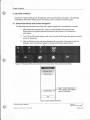
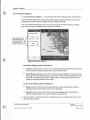
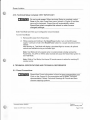
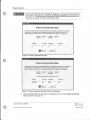
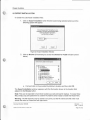
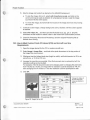
1. Select Customize Setup ... and the Customize Setup menu appears as shown below.
Customi~_~e_tup
Map Options ...
Right Path Options...
Pan-Zoom Options...
I
Slat.us View Options ...
Splash Options...
Colar Optiona...
Custom Configuration
Done
Figure 6 Customize Setup Menu
4.3. Map Options
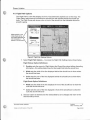
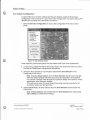
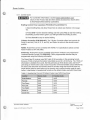
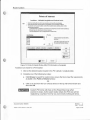
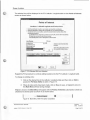
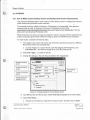
1. Select Map Options ... to access the Map Settings menu shown below.
To allow visual comparisons between options, the map displayed on the right-hand
side will change as new options are selected.
Map
Se~n_l,ls
Oelaull Map Type
• Tettaiin
O Ro.d/Temlory
OPolltical
Globe Projection
e Or1hognpl-.ic
What appears on the
initial screen will be
the Default Settings
(not necessarily as appears
in this document)
0 Cylindricel
Font SUe
e Lwge.t
O lwg•
O Medi<.m
O Smoll..,.
O Smoll•I
Display Units is a
shortcut to the Display
Units menu detailed in
Section 4.1
Diaplooy Units
Figure 7 Map Settings Options
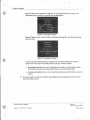
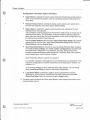
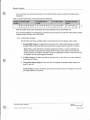
2. Set each option as desired and then select Done to save changes and return to the
technical setup menus.
Document Number: 9002602
Template 4.2
~M.
R8VISIOO A:, 16 May, 2005
Revision:
G
Date: 16 January, 2006
Page 8 of20