1
Norwegian University of Science and Technology
Department of Computer and Information Science
IT2901 - Final semester project - group 11
Fall detection
Authors:
Silje Vikås
Henrik Linde
Simen Kjellgren
Ada Jordal
Trond Klungervik
Eivind Lysne
Customer:
Babak Farshchian
sintef ict
Supervisors:
Njaal Gjerde
Prof. Monica Divitini
May 24, 2012
Abstract
This report presents the research into; development process for; and solution architecture
of; a networked system that distributes alarm-notifications through modern social media
technology. Fall among elderly is a large cost to society, and having realtime, automated
warnings is an important step in reducing these costs. The developed system solves the
problem of realtime message distribution, and is based on XMPP, a protocol that supports
realtime messaging and precence monitoring. The automated detection is a different piece
of the puzzle, and is being researched in a multi-national project. The report and project
is part of the course IT2901 - Informatics Project II.
Acknowledgements
We would like to thank SINTEF ICT for providing us with this project.
NTNU for facilitating the course.
And Babak Farshchian particularly for the help and support during the development process
and for his active role as our customer.
Trondheim, May 24, 2012
Henrik Linde
Eivind Lysne
Trond Klungervik
Ada Jordal
Silje Vikås
Simen Kjellgren
Preface
Falls among the elderly are more common and more damaging than what most of us can
imagine. As we get older, our vision and hearing get impaired, our bones get weaker, we
take more medication, and as a result we become prone to physical falls. Physical falls cost
enormously, both physically, emotionally, and economically. Once a fall occurs, chances for
prolonged hospitalization and further falls increase. Falls also result in the deterioration of the
social lives of those who are affected.
One of the major problems we face is early detection of falls. A person who has fallen is
often in severe pain and probably in shock. To know early that someone has fallen and to
dispatch help is crucial for the involved parties, both the injured person but also his/her family.
Group 11 in IT2901 has taken a courageous journey through the task of creating a fall detection solution that works. The idea of using one’s social network in early fall detection and
help dispatching came from Arild Faxvaag of NSEP (Norsk Senter for Elektronisk Pasientjournal). It was obvious from the beginning that this was a challenging task, both technically and
organizationally. Group 11 used the persona method to do a stakeholder analysis and worked
on requirements, architecture and design of the system based on this early analysis.
Group 11 was asked to use some cutting edge technologies (e.g. Shindig, XMPP) to implement the solution. In this perspective this task was as much a research project as it was a
development project. The group has coped well with the complexity, and decided in a timely
manner to abandon some of these technologies and focus on the most suitable ones. It is important to acknowledge that a lot of time is invested in testing various technologies, time which
might not be visible when looking into the end result alone.
As a customer I am very satisfied with the way the group has worked. The group did a
thorough problem analysis and worked on a sound architecture, taking into account the needs
of all the stakeholders. The developed prototype will be the basis for a trial of fall detection
services in Trondheim in the context of the European project FARSEEING. I wish Group 11
good luck with future challenges.
Babak Farshchian
SINTEF ICT
Contents
1 Introduction
1.1 The course . . . . . .
1.2 Problem Description
1.3 SINTEF . . . . . . .
1.4 Supervisor . . . . . .
1.5 Contact information
1.6 The Team . . . . . .
1.7 Current Situation . .
1.8 Target Situation . .
.
.
.
.
.
.
.
.
15
15
15
16
16
17
17
19
21
.
.
.
.
.
.
.
.
.
23
23
25
27
27
28
28
30
32
34
3 Prestudy
3.1 Research . . . . . . . . . . . . . . . . . . . . . . . . . . . . . . . . . . . . . . . .
3.2 Personas . . . . . . . . . . . . . . . . . . . . . . . . . . . . . . . . . . . . . . . .
37
37
37
4 Requirements
4.1 High level description of requirements
4.2 Functional requirements . . . . . . . .
4.3 Non-Functional requirements . . . . .
4.4 Requirements summary . . . . . . . .
.
.
.
.
43
43
44
47
48
5 Implementation
5.1 Architecture Overview . . . . . . . . . . . . . . . . . . . . . . . . . . . . . . . .
5.2 Description . . . . . . . . . . . . . . . . . . . . . . . . . . . . . . . . . . . . . .
5.3 Employed software/technologies . . . . . . . . . . . . . . . . . . . . . . . . . . .
51
51
52
55
.
.
.
.
.
.
.
.
.
.
.
.
.
.
.
.
.
.
.
.
.
.
.
.
.
.
.
.
.
.
.
.
.
.
.
.
.
.
.
.
.
.
.
.
.
.
.
.
.
.
.
.
.
.
.
.
.
.
.
.
.
.
.
.
2 Project Management
2.1 Process Models . . . . . . . . . . .
2.2 The chosen process model . . . . .
2.3 Prototype . . . . . . . . . . . . . .
2.4 Development Environment . . . . .
2.5 Planned work . . . . . . . . . . . .
2.6 Work Breakdown Structure . . . .
2.7 Gantt diagram . . . . . . . . . . .
2.8 Changes made during development
2.9 Risk analysis . . . . . . . . . . . .
.
.
.
.
.
.
.
.
.
.
.
.
.
.
.
.
.
.
.
.
.
.
.
.
.
.
.
.
.
.
.
.
.
.
.
.
.
.
.
.
.
.
.
.
.
.
.
.
.
.
.
.
.
.
.
.
.
.
.
.
.
.
.
.
.
.
.
.
.
.
.
.
.
.
.
.
.
.
.
.
.
.
.
.
.
.
.
.
.
.
.
.
.
.
.
.
.
.
.
.
.
.
.
.
.
.
.
.
.
.
.
.
.
.
.
.
.
.
.
.
.
.
.
.
.
.
.
.
.
.
.
.
.
.
.
.
.
.
.
.
.
.
.
.
.
.
.
.
.
.
.
.
.
.
.
.
.
.
.
.
.
.
.
.
.
.
.
.
.
.
.
.
.
.
.
.
.
.
.
.
.
.
.
.
.
.
.
.
.
.
.
.
.
.
.
.
.
.
.
.
.
.
.
.
.
.
.
.
.
.
.
.
.
.
.
.
.
.
.
.
.
.
.
.
.
.
.
.
.
.
.
.
.
.
.
.
.
.
.
.
.
.
.
.
.
.
.
.
.
.
.
.
.
.
.
.
.
.
.
.
.
.
.
.
.
.
.
.
.
.
.
.
.
.
.
.
.
.
.
.
.
.
.
.
.
.
.
.
.
.
.
.
.
.
.
.
.
.
.
.
.
.
.
.
.
.
.
.
.
.
.
.
.
.
.
.
.
.
.
.
.
.
.
.
.
.
.
.
.
.
.
.
.
.
.
.
.
.
.
.
.
.
.
.
.
.
.
.
.
.
.
.
.
.
.
.
.
.
.
.
.
.
.
.
.
.
.
.
.
.
.
.
.
.
.
.
.
.
.
.
.
.
.
.
.
.
.
.
.
.
.
.
.
.
.
.
.
.
.
.
.
.
.
.
.
.
.
.
.
.
.
.
.
.
.
.
.
.
.
.
.
.
.
.
.
.
.
.
.
.
.
.
.
.
.
.
.
.
.
.
.
.
.
.
.
.
.
.
.
.
.
.
.
.
.
.
.
.
.
.
.
.
.
.
.
.
.
.
.
.
.
.
.
.
.
.
.
.
.
.
.
.
.
.
.
.
.
.
.
.
.
.
.
.
.
.
5.4
Design . . . . . . . . . . . . . . . . . . . . . . . . . . . . . . . . . . . . . . . . .
6 Iterations
6.1 Iteration
6.2 Iteration
6.3 Iteration
6.4 Iteration
6.5 Iteration
6.6 Iteration
56
.
.
.
.
.
.
63
63
64
66
67
69
70
7 Testing
7.1 Testing overview . . . . . . . . . . . . . . . . . . . . . . . . . . . . . . . . . . .
7.2 Testing strategy . . . . . . . . . . . . . . . . . . . . . . . . . . . . . . . . . . . .
73
73
74
8 Further development
8.1 Detailed technical ideas . . . . . . . . . . . . . . . . . . . . . . . . . . . . . . .
8.2 Features for further development . . . . . . . . . . . . . . . . . . . . . . . . . .
79
79
82
9 System evaluation
9.1 Evaluation of the functional requirements . . . . . . . . . . . . . . . . . . . . .
9.2 Evaluation of the non-functional requirements . . . . . . . . . . . . . . . . . . .
9.3 Summary . . . . . . . . . . . . . . . . . . . . . . . . . . . . . . . . . . . . . . .
83
83
84
84
Appendices
87
A Installation
89
B User Manual
97
1
2
3
4
5
6
.
.
.
.
.
.
.
.
.
.
.
.
.
.
.
.
.
.
.
.
.
.
.
.
.
.
.
.
.
.
.
.
.
.
.
.
.
.
.
.
.
.
.
.
.
.
.
.
.
.
.
.
.
.
.
.
.
.
.
.
.
.
.
.
.
.
.
.
.
.
.
.
.
.
.
.
.
.
.
.
.
.
.
.
.
.
.
.
.
.
.
.
.
.
.
.
.
.
.
.
.
.
.
.
.
.
.
.
.
.
.
.
.
.
.
.
.
.
.
.
.
.
.
.
.
.
.
.
.
.
.
.
.
.
.
.
.
.
.
.
.
.
.
.
.
.
.
.
.
.
.
.
.
.
.
.
.
.
.
.
.
.
.
.
.
.
.
.
.
.
.
.
.
.
.
.
.
.
.
.
.
.
.
.
.
.
.
.
.
.
.
.
.
.
.
.
.
.
.
.
.
.
.
.
.
.
.
.
.
.
.
.
.
.
.
.
.
.
.
.
.
.
.
.
.
.
.
.
C Backlog
105
D Minutes from meetings with customer
113
E Minutes from meetings with supervisor
121
F Minutes from group meetings
125
G Questionnaire
129
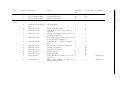
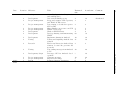
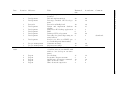
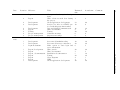
List of Figures
1.1
1.2
1.3
The auto dialler [5] . . . . . . . . . . . . . . . . . . . . . . . . . . . . . . . . . .
The fall detector and receiver of the Cognita Fallofon [6] . . . . . . . . . . . . .
The MDT-122 sender from Gewa [8] . . . . . . . . . . . . . . . . . . . . . . . .
19
20
20
2.1
2.2
2.3
2.4
2.5
2.6
The waterfall process model . . . . . . . . . . .
A figure of an iteration in the Scrum process . .
The 12 core practices of Extreme Programming
Henrik and Eivind pair programming . . . . . .
The Work breakdown structure of this project .
Gantt diagram . . . . . . . . . . . . . . . . . .
.
.
.
.
.
.
.
.
.
.
.
.
.
.
.
.
.
.
.
.
.
.
.
.
.
.
.
.
.
.
.
.
.
.
.
.
.
.
.
.
.
.
.
.
.
.
.
.
.
.
.
.
.
.
.
.
.
.
.
.
.
.
.
.
.
.
.
.
.
.
.
.
.
.
.
.
.
.
.
.
.
.
.
.
23
24
25
26
29
31
3.1
3.2
3.3
3.4
3.5
3.6
Arne Image: photostock/ FreeDigitalPhotos.net[18] . . .
Irene Image: Ambro/ FreeDigitalPhotos.net[19] . . . . .
Maria Image: graur codrin/ FreeDigitalPhotos.net[20] .
Gunnar Image: healingdream/ FreeDigitalPhotos.net[21]
Svein Image: photostock/ FreeDigitalPhotos.net[22] . . .
Lise Image: imagerymajestic/ FreeDigitalPhotos.net[23]
.
.
.
.
.
.
.
.
.
.
.
.
.
.
.
.
.
.
.
.
.
.
.
.
.
.
.
.
.
.
.
.
.
.
.
.
.
.
.
.
.
.
.
.
.
.
.
.
.
.
.
.
.
.
.
.
.
.
.
.
.
.
.
.
.
.
.
.
.
.
.
.
.
.
.
.
.
.
39
39
40
40
41
41
4.1
4.2
Use Case for the Fall detection device. . . . . . . . . . . . . . . . . . . . . . . .
Storyboard for the Fall detection device. . . . . . . . . . . . . . . . . . . . . . .
47
49
5.1
A figure displaying the top level architecture. The green labels represents the
communication protocols used between components. . . . . . . . . . . . . . . .
Class diagram of the models package (getters and setters omitted for readability)
Class diagram of the database layer. Some private methods and members omitted
ER diagram of the database . . . . . . . . . . . . . . . . . . . . . . . . . . . . .
Login Screen for Android . . . . . . . . . . . . . . . . . . . . . . . . . . . . . .
Android: group members . . . . . . . . . . . . . . . . . . . . . . . . . . . . . . .
Android: chat . . . . . . . . . . . . . . . . . . . . . . . . . . . . . . . . . . . . .
Android: alarm triggered . . . . . . . . . . . . . . . . . . . . . . . . . . . . . . .
Android: false alarm . . . . . . . . . . . . . . . . . . . . . . . . . . . . . . . . .
Desktop: profile / home . . . . . . . . . . . . . . . . . . . . . . . . . . . . . . .
Desktop: chat . . . . . . . . . . . . . . . . . . . . . . . . . . . . . . . . . . . . .
Desktop: statistics . . . . . . . . . . . . . . . . . . . . . . . . . . . . . . . . . .
Desktop: admin statistics . . . . . . . . . . . . . . . . . . . . . . . . . . . . . .
Desktop: admin profile / home . . . . . . . . . . . . . . . . . . . . . . . . . . .
52
53
54
54
56
57
57
58
58
59
59
60
61
61
5.2
5.3
5.4
5.5
5.6
5.7
5.8
5.9
5.10
5.11
5.12
5.13
5.14
.
.
.
.
.
.
.
.
.
.
.
.
.
.
.
.
.
.
.
.
.
.
.
.
6.1
6.2
6.3
6.4
6.5
6.6
Gantt
Gantt
Gantt
Gantt
Gantt
Gantt
.
.
.
.
.
.
63
65
66
68
69
71
7.1
The average rank of the sytem from the focus group during the presentation of
iteration 6 . . . . . . . . . . . . . . . . . . . . . . . . . . . . . . . . . . . . . . .
76
B.1
B.2
B.3
B.4
B.5
B.6
B.7
B.8
B.9
B.10
B.11
diagram
diagram
diagram
diagram
diagram
diagram
for
for
for
for
for
for
iteration
iteration
iteration
iteration
iteration
iteration
1
2
3
4
5
6
Login screen . . . . . . . . .
Profile window . . . . . . .
Group selection . . . . . . .
Group members . . . . . . .
Add group / add user . . .
Edit user . . . . . . . . . .
Alarm central window . . .
Alarm central - fall detected
Alarm central - false alarm .
Log window . . . . . . . . .
New entry . . . . . . . . . .
.
.
.
.
.
.
.
.
.
.
.
.
.
.
.
.
.
.
.
.
.
.
.
.
.
.
.
.
.
.
.
.
.
.
.
.
.
.
.
.
.
.
.
.
.
.
.
.
.
.
.
.
.
.
.
.
.
.
.
.
.
.
.
.
.
.
.
.
.
.
.
.
.
.
.
.
.
.
.
.
.
.
.
.
.
.
.
.
.
.
.
.
.
.
.
.
.
.
.
.
.
.
.
.
.
.
.
.
.
.
.
.
.
.
.
.
.
.
.
.
.
.
.
.
.
.
.
.
.
.
.
.
.
.
.
.
.
.
.
.
.
.
.
.
.
.
.
.
.
.
.
.
.
.
.
.
.
.
.
.
.
.
.
.
.
.
.
.
.
.
.
.
.
.
.
.
.
.
.
.
.
.
.
.
.
.
.
.
.
.
.
.
.
.
.
.
.
.
.
.
.
.
.
.
.
.
.
.
.
.
.
.
.
.
.
.
.
.
.
.
.
.
.
.
.
.
.
.
.
.
.
.
.
.
.
.
.
.
.
.
.
.
.
.
.
.
.
.
.
.
.
.
.
.
.
.
.
.
.
.
.
.
.
.
.
.
.
.
.
.
.
.
.
.
.
.
.
.
.
.
.
.
.
.
.
.
.
.
.
.
.
.
.
.
.
.
.
.
.
.
.
.
.
.
.
.
.
.
.
.
.
.
.
.
.
.
.
.
.
.
.
.
.
.
.
.
.
.
.
.
.
.
.
.
.
.
.
.
.
.
.
.
.
.
.
.
.
.
.
.
.
.
.
.
.
.
.
.
.
.
.
.
.
.
.
.
.
.
.
.
.
.
.
.
.
.
.
.
.
.
.
.
.
.
.
.
.
.
.
.
.
.
.
.
.
.
.
.
.
.
.
.
.
.
.
.
.
.
.
.
.
.
.
.
.
.
.
.
.
.
.
.
.
.
.
.
.
.
.
.
.
.
.
.
.
.
.
.
.
.
.
.
.
.
.
.
.
.
.
.
.
.
.
.
.
.
.
.
.
.
.
.
.
.
.
.
.
.
.
.
.
.
.
.
.
.
.
.
.
.
.
97
98
98
98
99
99
100
101
101
102
102
List of Tables
2.1
Risk analysis . . . . . . . . . . . . . . . . . . . . . . . . . . . . . . . . . . . . .
34
4.1
Summary of requirements . . . . . . . . . . . . . . . . . . . . . . . . . . . . . .
48
7.1
7.2
7.3
7.4
7.5
7.6
Testcase
Testcase
Testcase
Testcase
Testcase
Testcase
.
.
.
.
.
.
76
76
77
77
77
78
C.1 Backlog . . . . . . . . . . . . . . . . . . . . . . . . . . . . . . . . . . . . . . . .
106
1:
2:
3:
4:
5:
6:
Real time support . . . . . . .
Information provided . . . . .
User and group administration
Android client fall simulation .
File transfer . . . . . . . . . .
Logging of messages . . . . . .
.
.
.
.
.
.
.
.
.
.
.
.
.
.
.
.
.
.
.
.
.
.
.
.
.
.
.
.
.
.
.
.
.
.
.
.
.
.
.
.
.
.
.
.
.
.
.
.
.
.
.
.
.
.
.
.
.
.
.
.
.
.
.
.
.
.
.
.
.
.
.
.
.
.
.
.
.
.
.
.
.
.
.
.
.
.
.
.
.
.
.
.
.
.
.
.
.
.
.
.
.
.
.
.
.
.
.
.
.
.
.
.
.
.
.
.
.
.
.
.
15
Chapter 1
Introduction
1.1
The course
This project is part of the course IT2901 Informatikk Prosjektarbeid II. It is a mandatory
course/exercise in the third year of the bachelor’s degree in Informatics at NTNU. The main
goal for this course is:
Gaining practical experience in GROUP-ORIENTED software engineering for a
customer, covering the whole life- cycle of a software project [1].
During the course, students work together in groups to carry out a customer driven software
project. The teams are required to attend common activities and supervision meetings, and
then deliver a report at the end of the course. In addition they are also required to deliver an
end product to their customer. This product is developed according to the task description and
customer requirements.
1.2
Problem Description
Approximately 28-35% of people at the age of 65 years or older fall each year, increasing to 3242% for those over 70. [2]. A fall may cause severe injuries that leads to long term hospitalization
and expensive medical care. Epidemiological (population) studies show that hip fractures are
the most serious fall-related injuries for elderly people, with approximately 15% of the patients
dying at the hospital, and a third not living beyond one year after their injury [3]. One of the
leading challenges to be met is the period of time it takes from a fall occurs, till it is discovered
by family members or a health care professional. This research project is aiming to reduce this
time period.
Focus has been on finding a solution that could be built on existing technology, and therefore
a lot of research have been conducted on possible platforms. This eventually led to a solution
prototype built on the XMPP protocol (see section 5.3.2 for more on XMPP). The product is a
prototype that allows friends and family of an elderly person to be notified when a fall happens.
The elderly person is equipped with a sensor on their body capable of detecting if a fall occurs.
In the event of such a fall, a notification of the incident is sent to all his or her registered
16
CHAPTER 1. INTRODUCTION
contacts unless they confirm the incident as a false positive by pressing an abort button within
a fixed time limit.
The network will include family and friends that may be able to help the patient. It will also
include a social worker that is on duty. They can choose between different ways to be notified,
see section 8.1.6, for example on their smartphone. After receiving a notification, and if other
measures are not initiated, the contact can provide the patient with the help needed.
1.3
SINTEF
The customer for this development project is SINTEF ICT. SINTEF is Scandinavia’s largest
independent research organization, and aims at creating value through knowledge, research and
innovation, and develop solutions and technology for practical use. SINTEF is a broad, multidisciplinary research group with international expertise in technology, science, medicine and
social sciences. They are among the four largest contract research institutes in Europe, and
SINTEF ICT provides research-based expertise, services and products in the areas of microtechnology, information systems, computational software, security and safety, communication and
software technology [4].
1.3.1
Customer involvement
The contact at SINTEF ICT was Babak Farshchian and the relationship with him has been
good. There have been weekly meetings where the status of the development process has been
presented and the group has gotten feedback from Mr. Farshchian. Meeting minutes are found
in appendix D. When problems occured during the development process, we could ask for Mr.
Farshchians assistance.
1.3.2
Outside involvement
This project is a part of a bigger project that involves SINTEF ICT, NTNU, the Physiotherapeutic Department at St. Olavs Hospital, the municipality of Trondheim, and the University
of Bologna. Due to the scope of our project we only needed to interact with SINTEF ICT and
St. Olavs Hospital.
1.4
Supervisor
The supervisor for this project has been Njaal Gjerde.
1.4.1
Supervisor interaction
The group has met with the supervisor, Njaal, almost every other week except for during the
Easter holiday. The focus of these meetings have been on the following topics:
• Feedback on the project report
• Discussing the status of the development process, what had been done since the last
meeting, and what would be done during the next two weeks
CHAPTER 1. INTRODUCTION
17
• Reflections on the customer relationship
The supervisor has received drafts of the report for evaluation periodically, according to the
course requirements. Njaal was also of great assistance to the group during the early phases
of the project. The suggested requirements from the groups customer was quite comprehensive
and advice on how to make a more realistic outline in cooperation with the customer was
needed. In between meetings the group communicated with Njaal by email, and any questions
that occurred or help that was needed was addressed fairly quickly by him.
See appendix E for supervisor meeting minutes.
1.5
Contact information
Here are the contact information that was available to the group during this project.
1.5.1
Project supervisor and guidance
• Njaal Gjerde - [email protected]
• Prof. Monica Divitini - [email protected]
1.5.2
Contact person at SINTEF ICT
• Babak Farshchian - [email protected]
1.5.3
Project participants:
• Ada Jordal - [email protected]
• Henrik Linde - [email protected]
• Eivind Lysne - [email protected]
• Silje Vikås - [email protected]
• Trond Klungervik - [email protected]
• Simen Kjellgren - [email protected]
1.6
1.6.1
The Team
General
The team consisted of six students from NTNU. We were all in our final year of the bachelor’s
degree program in information technology, with a slight difference in the selection of courses
to complete the program. The group had a varying familiarity with each other. The groups
competence level also varied a bit, with each team members strengths and weaknesses. We all
were familiar with the Java programming language. Most of us knew how to use LaTex, project
management techniques such as Scrum, and other tools we decided to use for our project. None
18
CHAPTER 1. INTRODUCTION
of us had previously used TRAC, or knew anything about Shindig or XMPP before this. Few
of the group members had ever worked on a customer-related project before, so we were all very
motivated to put what we had learned so far to use. The team consisted of Simen Kjellgren,
Ada Jordal, Eivind Lysne, Henrik Linde, Trond Klungervik and Silje Grimstad Vikås.
1.6.2
Team organization
Team roles
• Group leader: Ada Jordal
Ada has been in charge of convening group meetings, as well as meetings with the customer. She was also responsible for making sure all deadlines were met.
• Customer contact: Ada Jordal
Ada was in charge of communicating with the customer and leading the customer meetings
each friday.
• Supervisor contact: Henrik Linde
In charge of communicating with the supervisor, and leading the supervisor meetings.
• Meeting reporter: Henrik Linde
Meeting reporter for both customer meetings and supervisor meetings were Henrik Linde.
Team roles comment
We did not define the roles within our project any further, because of the way the work was
organized. We were all new to this, and we wanted to make sure all group members could be
involved in all the main tasks of the development process, to add to our learning experience.
Naturally, some group members was working more on some tasks than others, but not to such
an extent that it created any clear division of roles within the team. This worked out well for
us. We were all mutually in charge of process development overview and meeting deadlines,
which eased the pressure on our group leader.
Time and place of worksessions
Our group has met to work on the project regularly on mondays, wednesdays and fridays at
08:00 am, on campus. We have ended the workday flexibly, considering what has needed to be
done, and whether people would go off and work on their own.
Issues met
The only real issue we have faced is group members coming in late, as mentioned in the risk
report, see table 2.1. This has been handled with good communication within the team, so that
the hours lost have been made up for. The possibility of someone not addressing their issues
is always present, but the group has been open to managing conflicts if they occur. We have
been told, and expected there to be at least a couple more group related conflicts. Our group
dynamic has been good, and the team worked very well together.
CHAPTER 1. INTRODUCTION
1.7
19
Current Situation
• Automatic Fall Alarm With Telephone Auto Dialler[5]
The standard fall alarm system (FAS-1) consists of a fall detector, worn like a pager by
the user and a telephone auto dialer (see figure 1.1). The fall detector has a belt clip
for attachment to a belt or clothing and is equipped with a simple on-off switch. When
the detector is switched on, any sudden movement or tilt from a vertical to a horizontal
position will result in a pre-alarm tone that will sound for 30 seconds prior to transmitting
the emergency control signal to activate the telephone dialer. This provides sufficient time
for the user to cancel the alarm to avoid false dialing to the recipients on the call list.
The telephone dialer can store up to six of your own emergency contact telephone numbers.
When the dialer receives a signal from the fall alarm, the automatic dialing sequence
begins. The first number will be called. If the call is answered, the dialer will announce
emergency then speak your home telephone number. If the first call recipient can attend
to the emergency, they can use their telephone keypad to cancel all further calls on the
call list. If they are unable to deal with the incident, they can simply hang up leaving
the dialer to call the next number on the call list and so on until calls are cancelled
by disarming the dialer using the keypad or by a call recipient telephone. If the call is
answered by a mobile telephone voicemail, or a land line answer machine, the message
will be left. The dialer will then go on to dial the remaining numbers on your call list.
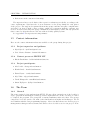
Figure 1.1: The auto dialler [5]
• COGNITA FALLOFON[6]
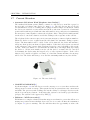
As shown in figure 1.2, this fall detector sends a message to a receiver that can show the
fallen person’s location on a map. This system also has an optional two-way conversation
and SMS. The person at risk of falling also has the ability to self-trigger an alert at the
touch of an emergency button. In Norway, this system is used with people that have
epilepsy. The system is also approved by NAV [7].
• Fallalarm - MDT-122 sender[8]
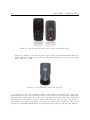
Fall Alarm is a complete alarm system that triggers an alarm if a person has fallen or is
staying in a position of more than 60 degrees for over 15 seconds. At first, the transmitter
(see figure 1.3) gives a warning. The user will then have the opportunity to silence the
20
CHAPTER 1. INTRODUCTION
Figure 1.2: The fall detector and receiver of the Cognita Fallofon [6]
alarm. For example, if one deliberately has settled on the couch without taking off his/her
alarm. If then, the alarm is not silenced, it will send a notification to a receiver over radio
with a range up to 500m.
Figure 1.3: The MDT-122 sender from Gewa [8]
As listed above, there are excisting solutions on the market today with some of the same
functionality that were required for the prototype we have developed, but hey all have limitations
that make them eligible only for specific cases. The first product, the “Automatic Fall Alarm
with Telephone Auto Dialer”, is quite similar to ours, but since this detector is dependent on
the telephone auto dialer, it can only be used inside the elderly person’s own house. The second
product, the “COGNITA FALLOFON”, is basically the same product as ours, the only difference
CHAPTER 1. INTRODUCTION
21
is that this fall detector can only alert the one person that has the receiver. The third product,
the “Fallalarm - MDT-122 sender”, suffers the problem of only being able to send an alert with
a range of maximum 500 meters and over a radio. This means that it can only be used indoors
to have any effect. This product is best used in a hospital or a home for elderly people.
1.8
Target Situation
The target situation of this project specifically is a prototype that will prove useful in the larger
ongoing research project on fall detection-/prevention technology. The envisioned product will
help elderly people with their fear of falling, and also make it easier for their family and friends
to come to their assistance should they need it.
It will consist of a device with a fall detection sensor, and network of contacts that will be
notified if a fall is detected.
22
CHAPTER 1. INTRODUCTION
23
Chapter 2
Project Management
2.1
Process Models
Process models provide stability, control and organization to the development process, and
the process in itself can easily come out of hand if it’s not controlled and kept within certain
boundaries. The process model should define a set of activities, actions, tasks, milestones, and
work products that needs to be in place for the software to be of high quality. A description
of the alternative models the group considered to use for this project, and the one that was
eventually chosen, follows below.
2.1.1
The Waterfall model
The waterfall model is a plan-driven process
model. This means that all planning and
scheduling must be done before you start working on a project. The principal stages of the
waterfall model is:
1. Requirements analysis and definition
2. System and software design
3. Implementation and unit testing
4. Integration and system testing
5. Operation and maintenance
As seen in figure 2.1, the next phase should not
start until the previous phase is finished, and all
Figure 2.1: The waterfall process model
the documents that was the result of the previous phase are approved [9].
The major drawback with the waterfall model is that since all requirements must be defined
in the beginning of the project, before development is started, the product that is produced
in the end might not be what the customer wanted. It is also very expensive producing and
24
CHAPTER 2. PROJECT MANAGEMENT
approving documents, iterations can can be costly and involve a lot of rework [9].
2.1.2
Test Driven Development (TDD)
Test-driven development is a software development process where the solution is developed with
many small steps. First the developer writes a failing test, then produces the code to pass that
test. After that a new test is written, and then code to pass the new test, and so on. The tests
are automated, so it is easy to run the tests over to see if everything that has been made thus
far still works. Some advantages with this development method include:
• Full test coverage.
• There are always a set of automated tests to run to check that the whole solution works.
• The code is highly testable, which can mean a better design, and code that is easy to read
and maintain.
2.1.3
Scrum
Scrum Project Management is an incremental and agile process model, in which all
work is done in discrete steps. According to
Pressman[10], Scrum consists of small working teams, organized to; maximize communication, minimize overhead, and maximize sharing of both informal and formal knowledge.
The Scrum process consists of frequent software increments, and the work is partitioned
into packets. It uses short iterations called
"sprints" with meetings held in between for review and planning, as illustrated in figure 2.2.
Short daily meetings are also held to set daily Figure 2.2: A figure of an iteration in the
goals and identify obstacles. As the product is Scrum process
built, the product is regularly tested and the
work documented.
2.1.4
Extreme Programming (XP)
Extreme Programming, also called XP, is an agile software development method. XP stresses
customer satisfaction. Instead of delivering everything at one time, you deliver preliminary
versions of the software to the customer during the development process [11]. Using XP, requires
open communication with the customer as well as among developers. This helps the developers
respond to changing customer requirements. XP has a set of simple rules that include rules for
planning, managing, designing, coding and testing (See figure 2.3 for the 12 core practices of
Extreme Programming). Some of these rules say that “All production code is pair programmed.”
and that “All code must have unit tests.” XP also uses small teams, with no more than 12
developers working in pairs. Using pair programming helps developers spend less time being
CHAPTER 2. PROJECT MANAGEMENT
25
stuck on a task, and less time finding and fixing bugs, since two pairs of eyes has already looked
over the code.
In XP the development process uses iterations, the same way as in the Scrum process
model, and it is specified that iteration planning starts each iteration. Using XP, you have to
create user stories and perform upfront functional testing together with the customer before
the programming starts [12]. But critics have noted several potential drawbacks, including
problems with unstable requirements, undocumented compromises of user conflicts, and a lack
of an overall design specification or document.
1. Customers define application features
with user stories.
continually seeing and discussing each
other’s code.
2. XP teams put small code releases into
production early.
8. All programmers have collective ownership of the code and the ability to change
it.
3. XP teams use a common system of names
and descriptions.
4. Teams emphasize simply-written, objectoriented code that meets requirements.
5. Designers write automated unit tests
upfront and run them throughout the
project.
6. XP teams frequently revise and edit
the overall code design, a process called
refactoring.
7. Programmers work side by side in pairs,
9. XP teams integrate code and release it
to a repository every few hours and in no
case hold on to it longer than a day.
10. Programmers work only 40 hours per
week; there’s no overtime.
11. A customer representative remains onsite throughout the development project.
12. Programmers must follow a common
coding standard so all the code in the system looks as if it was written by a single
individual.
Figure 2.3: The 12 core practices of Extreme Programming
2.2
The chosen process model
Choosing a good process model is critical in regards to the final product delivered being high
quality. Faced with illness or absence, tasks are easily delegated to the other team members,
and upcoming deadlines are met.
The group chose not to use The Waterfall Model for managing the project, mainly because
of the major drawback of having to define all the requirements in the beginning of the project.
Test driven development was also discarded due to the fact that the group was inexperienced
with it and therefore deemed it to time consuming to use consistently. In addition, we were not
able to easily define what should be tested in the initial phase of the process, which is required
using TDD. From our perspective this method is better suited for when you are building a
26
CHAPTER 2. PROJECT MANAGEMENT
product from scratch, rather than largely building on existing technology.
The team settled on a model loosely based on a combination of the more agile models Scrum
and Extreme Programming. The customer scheduled weekly meetings with the group, something that fits well with agile development models which calls for frequent customer meetings
and a high degree of customer involvement. The custom model focused on maximizing communication between members. This way everyone knew what the others were working on, which
in turn allowed individual team members to work efficiently on their own. Scrum provided a
good framework so that the process was well monitored and evaluated, and flexible enough to
allow important and necessary changes during the process, which in turn highly reduced the
risk associated with changing requirements (see risk analysis chart 2.1). The custom model
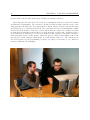
also relied heavily on pair programming (see figure 2.4) and peer reviewing of code, which are
features of Extreme Programming.
Figure 2.4: Henrik and Eivind pair programming
CHAPTER 2. PROJECT MANAGEMENT
2.3
27
Prototype
A prototype is a preliminary version of a product, that is made prior to the product release.
The purpose of a prototype is to demonstrate and test functionality and product design. A
mockup of a product is a way of showing software or user interfaces on paper. To the user, it
will look like the real thing, but will not be useful for work other than what the user sees. If
the mockup provides part of the functionality of the system, and enables testing of a design,
it is a prototype[10]. Product requirements often change as development proceeds, making a
straight-line path to an end product unrealistic.
The product developed by the team is part of a bigger project managed by SINTEF ICT.
The task was to make a prototype that SINTEF later will be testing on a selected group of test
subjects, and is a good starting point for further research and development. This will take place
when our involvement in the project is over. As such we define our end product as a prototype,
but still refer to it using the terms “product” and “solution”.
2.4
2.4.1
Development Environment
LATEX
LATEX is a markup language for document formatting and typesetting. It was used for typesetting the report as it is convenient and easy, and its syntax familiar to most of the team
members.
2.4.2
Subversion and Trac
Subversion was used for versioning control since a repository was provided by the institute,
along with a Trac-wiki for project management and collaboration. Trac is able to interface with
a subversion repository and provide a timeline view of commits and revisions. The customer
had access to the wiki so that he could view project plans and milestones.
2.4.3
Eclipse
Eclipse has been used by all team members the main development environment since everyone
have previous experience with it. Eclipse is an IDE1 for mainly Java development with lots
of available plugins for tool integration and development in other languages. Along with the
standard IDE, plugins for subversion integration, Android development and LATEX was used.
2.4.4
Diagram Editors
Diagrams have been made using either Microsoft Visio or Gnome DIA, depending on the authoring team member’s choice of operating system. In some cases Microsoft Paint was used for
later editing of the image files.
1
Integrated development environment
28
CHAPTER 2. PROJECT MANAGEMENT
2.4.5
Additional
For non-essential files the team utilized a shared Dropbox folder. Additional group communication was done through Facebook. GUI sketches was done with a web application called
Mockups [14].
2.5
Planned work
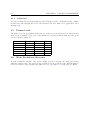
The plan is to spend approximately 20 hours per week per person on the project. This plan was
made at the beginning of the project and might not correspond entirely with the time spent
described in the backlog (C).
Iteration
1th iteration
2nd iteration
3rd iteration
4th iteration
5th iteration
6th iteration
2.6
Date
16.01-06.02
06.02-08.03
08.03-04.04
04.04-16.04
16.04-11.05
11.05-25.05
Duaration
16 days
24 days
18 days
9 days
20 days
11 days
Hours
270
410
320
100
340
190
Work Breakdown Structure
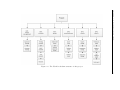
A work breakdown structure, also called a WBS, is used to separate the main project into
different, smaller parts. The reason to use a WBS is get an overview of the different parts of
the project and to easily organize and define its scope. See figure 2.5 for the project’s WBS.
CHAPTER 2. PROJECT MANAGEMENT
Figure 2.5: The Work breakdown structure of this project
29
30
2.7
CHAPTER 2. PROJECT MANAGEMENT
Gantt diagram
Below is a gantt diagram that was created to help schedule the project 2.6. It visualises the
iterations, milestones and other project activities at the highest level of project planning.
Gantt charts are a commonly used visual tool for displaying time relationships of
project tasks and for monitoring the progress toward project completion. Gantt
charts list project tasks. For each task, a bar indicates the relative amount of time
expected to complete the task. Milestones are noted with diamonds. At the start of
a project, Gantt charts are useful for planning purposes. As the project progresses,
the chart is modified to reflect the extent to which each task is completed at the
time the project is monitored. [15]
Task Name
Start
Finish
15.1
1
Scrum Iteration 1
16.01.2012
06.02.2012
16d
2
Scrum Iteration 2
06.02.2012
08.03.2012
24d
3
Scrum Iteration 3
12.03.2012
04.04.2012
18d
4
Scrum Iteration 4
04.04.2012
16.04.2012
9d
5
Scrum Iteration 5
16.04.2012
01.05.2012
12d
6
Scrum Iteration 6
01.05.2012
25.05.2012
19d
7
Report
16.01.2012
25.05.2012
95d
8
Project management:
- Customer meetings
- Supervisor meetings
16.01.2012
25.05.2012
95d
9
Pre-study:
- Research
16.01.2012
26.03.2012
51d
16.01.2012
06.02.2012
16d
06.02.2012
13.02.2012
6d
16.01.2012
01.05.2012
77d
10
Make requirements and
spesification
11
12
Make personas
Development
13
Set up XMPP
23.01.2012
26.03.2012
46d
14
Set up database
21.03.2012
04.04.2012
11d
15
Make Android GUI
13.02.2012
01.05.2012
57d
16
Make desktop GUI
05.03.2012
01.05.2012
42d
05.03.2012
01.05.2012
42d
17
Testing
feb 2012
mar 2012
apr 2012
mai 2012
Duration
18
integration testing
05.03.2012
16.04.2012
31d
19
system testing
05.03.2012
01.05.2012
42d
20
Acceptance testing
16.04.2012
01.05.2012
12d
22.1
29.1
5.2
12.2
19.2
26.2
4.3
11.3
18.3
25.3
1.4
8.4
15.4
22.4
29.4
6.5
13.5
20.5
CHAPTER 2. PROJECT MANAGEMENT
jan 2012
ID
Figure 2.6: Gantt diagram
31
32
CHAPTER 2. PROJECT MANAGEMENT
2.8
2.8.1
Changes made during development
Apache Shindig
The customer initially wanted the application as an Open Social container using Apache Shindig,
which is the reference implementation of the Open Social standard. It was decided by the end
of the second iteration, together with the customer, to drop this idea and go for a purely
XMPP-based solution.
Reason for change
It turned out that Shindig was very poorly documented, especially for the latest stable version2 ,
and a substantial amount of trial and error was needed to make it work with a real SQL database
rather than just sample data. When another full week was spent trying to make it work with
a custom database-schema without results, we took a good hard look on what we were gaining
from using Shindig versus time spent bending it to our will.
In addition we never looked upon what we were making as a kind of social network, and
therefore it felt kind of weird to be using a standard for social networks as a starting platform.
Lessons learned
The main thing we as a group learned from this is that when such a large piece of software is
undocumented, it usually requires huge amount of time to understand it and make it work the
way you want it to. It may be that it is not worth the effort.
2.8.2
Web interface
Our original plan was to provide a web interface for administrators and possibly also other users.
During the early phase of iteration 3 we dropped this idea in favor of a desktop application
written in Java.
Reason for change
In addition to most of us not having any measure of experience with web development, finding a
Javascript library meeting our needs proved next to impossible, most were either too low-level,
unmaintained, or didn’t support publish-subscribe which is vital part of our application. Having
learned from our previous experience with Apache Shindig, we refocused our time and efforts
on writing a desktop client in Java instead.
Lessons learned
Even though web applications with lots of Javascript are all the rage at the moment and learning
new languages and technologies can be fun and exciting, the project timeframe doesn’t always
permit spending the needed time in unfamiliar territory. Sticking to what you already know is
often the best solution.
2
2.0.0 at time of writing
CHAPTER 2. PROJECT MANAGEMENT
33
34
2.9
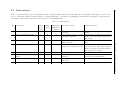
Risk analysis
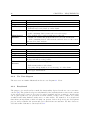
Table 2.1 shows the the projects risk analysis chart. All the identified risks are shown with values for likelihood and impact, graded on a
scale of 1 through 9 with 9 being the highest. A risks importance is calculated by multiplying its likelihood and impact. Suggestions for
preventative and remedial actions are also given for each individual risk.
Table 2.1: Risk analysis
ID
Description
Likelihood
(1-9)
4
Impact
(1-9)
8
Importance
(Likelihood
* Impact)
32
Missing equipment for testing
2
Diseases within the group
5
6
30
3
Not be able to meet deadlines
4
7
28
4
People not showing up on time
7
4
28
5
6
3
5
9
5
27
25
7
SVN server breakdown
Customer changes the requirements
Disagreement, group conflict
5
5
25
8
Computer crash
3
8
24
Remedial action
Good communication with
customer
Cooperation, have a good
communication flow
Customer meeting, wait for equipment
Redesigning of tasks, the sick stay
home so as not to infect the rest of
the group
Talk to customer, ask for new deadline
The person that came late has to
catch up later with their missed
hours. Delegate the tasks that has
not been done to others.
Use backups
Clarify whether we may be able to
meet the new requirements
Group meeting with supervisor
Schedule ahead, make lists
with clear task
Underline how important it is
for people to show up on time.
Backups
Good communication with
customer
Good communication within
the group
Backups
Restore computer, use backups
CHAPTER 2. PROJECT MANAGEMENT
1
Preventive action
Likelihood
(1-9)
4
Impact
(1-9)
6
Importance
(Likelihood
* Impact)
24
Side tracking because of
__(group thinking) about a
solution within the project.
Long time absence( illness, injuries, etc.)
3
8
24
4
5
20
12
13
Customer conflict
Network down
2
2
7
7
14
14
14
Group member incompetence
3
6
18
9
10
11
Description
Project complexity
Preventive action
Remedial action
Ensure the we are realistic
about what we can do
Be objective, ask about external input
Ask help from customer and/or supervisor. Revaluate what we can do
Meeting with customer and/or supervisor
Cooperation, good communication flow, predict long absence
Weekly meetings
Have local copies
Maintain contact through the absence
All must be updated, good
communication
internally,
prepare for the task at hand
Talk to supervisor, resolve conflict
Do other tasks while network is
down
Ask other members for help
CHAPTER 2. PROJECT MANAGEMENT
ID
35
36
CHAPTER 2. PROJECT MANAGEMENT
37
Chapter 3
Prestudy
3.1
3.1.1
Research
Platforms and technologies
Most of the early phase of the project was spent in researching possible platforms and technologies on which to base the solution. The customer had highlighted Apache Shindig[16] as a
possible starting point, and it remained the main point of focus until the third iteration when
it was dropped as a platform for the project (see 2.8.1).
Another early research subject was the XMPP protocol 5.3.2 which had also been noted as
interesting for its real time, publish- subscribe capabilities. It was revisited after Shindig was
scrapped and became the underlying technology of the solution (see chapter 5).
3.1.2
Additional research
There was also done research on different process models, how to make personas, and other
topics relevant to writing the report.
3.2
3.2.1
Personas
The personas method
Developing and using personas is a well known method for defining and getting to know the
target users of a system[17]. This method can be used in relation to requirement specification,
development, testing or marketing decisions related to the product. The method is not meant
to replace working with real customers, just as an addition. The personas are not real users
but fictional portraits of users. Some things that are common to include in the analysis is;
• Name
• A photograph
• Work
• Education
38
CHAPTER 3. PRESTUDY
• Social status
• Personality
• Interests
• Personal history
• Work description
• Moral and ethical issues
There are many ways to do this, but what we have done is to brainstorm what we know
about the potential users of the system with focus on what is relevant for the specific product,
and tried to systemize this information into personas form. The result is shown below.
CHAPTER 3. PRESTUDY
3.2.2
Arne
Name:
Age:
Marital status:
Family:
Arne
95 years old
Widower for ten years
Two children (Kari and Petter) and four
grandchildren
Arne has one good friend (Torleif, 75) that lives nearby. They
meet at the bingo every Sunday. He lives alone in a two storey
house, which means he needs to use the stairs. This worries
his children. Arne is not entirely impressed with all this new
technology and prefers to stick to what he knows. His family has
given him a cell phone and, with some persuasion, he has agreed
to take it with him, to make it easier to stay in touch when he
is out of the house. Arne is generally in good shape, but tends
to get dizzy from time to time because he uses blood thinning
medications. Sometimes he forgets things when he leaves the
house, like his cell phone. Arne is always in a good mood.
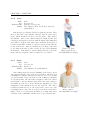
3.2.3
39
Figure 3.1: Arne
Image: photostock/
FreeDigitalPhotos.net[18]
Irene
Name:
Age:
Marital status:
Family:
Irene
75 years old
Divorced
One daughter, no grandchildren
Irene suffers from osteoporosis (thinning of the bones), and a
fall could potentially cause severe bone fractures. She lives in a
community for seniors, and therefore has good access to health
care professionals. Irene is positive to new technology and finds
it very interesting. She has taken computer courses for seniors
and learned to use the Internet and email. She sends emails to
her family at least once a week. When her daughter got a new
smartphone, Irene inherited the one she replaced. She carries
it with her whenever she is out of the house, but so far, only
for making phone calls. She is open to learn more about these
things. Irene is a social person and likes to socialize with other
residents of the community, and has a lot of good friends there.
Figure 3.2: Irene
Image: Ambro/
FreeDigitalPhotos.net[19]
40
3.2.4
CHAPTER 3. PRESTUDY
Maria
Name:
Age:
Marital status:
Family:
Maria
30 years old
Engaged
Grand-daughter of Arne
Maria is a HR-advisor in a marketing firm, and works mainly
from 8 am to 4 pm, however she sometimes has to work overtime.
Figure 3.3: Maria
Maria is an ambitious, young lady with good technical skills, and
Image: graur codrin/
always eager to try the newest technology. She has a smartphone,
FreeDigitalPhotos.net[20]
which she can use to read her mail at any time. Since she mostly
spends her days at work in front of her computer, she has a tab with Facebook open in her
browser most of the day. Since she works in a private firm, all installations of new software
on her computer must be approved by the firm’s IT department, because of possible security
threats that new software might entail. Maria has a good relationship with her grandfather,
Arne, and tries to visit him every weekend. They live in the same city, but it still takes about
20 minutes to drive from her house to Arne’s.
3.2.5
Gunnar
Name:
Age:
Marital status:
Gunnar
27 years old
Single
Gunnar works as a nurse, in a home for elderly people. He is
a shift worker and can sometimes be tired at work, as a result of
rotating between night- and day-shifts. Gunnar is a nice person,
Figure 3.4: Gunnar
and all the seniors are very fond of him. In his spare time, Gunnar
Image: healingdream/
spends a lot of time on his computer and is always interested in
FreeDigitalPhotos.net[21]
trying new technology. Because of his work he does not check his
email very often, only when he is at home. He does, however, always carry his cell phone with
him, an old Nokia 3310. The reasons for using an old Nokia 3310 is his job as a nurse, which
means that he does not earn that much, and his active lifestyle calls for a robust phone.
CHAPTER 3. PRESTUDY
3.2.6
Svein
Name:
Age:
Marital status:
Svein
53 years old
Married, two children
Svein is a doctor, and he spends a lot of time on fall detection
and prevention research. His work is well regarded and his expertise highly demanded. He is considered nationally to be the
“go to guy” in research projects that deal with fall prevention
and fall detection, and is currently involved in several projects.
Svein only checks his email when he at the office. Some days
he spends much time away from his office, but he still tries to
come by to check his mail at least 3 times a day. He is not very
active when it comes to new technology, but because the hospital
has chosen to introduce Tablet PCs, he has started using one of
these and learned to use it. He is comfortable with, and uses the
technology his work requires of him.
3.2.7
41
Figure 3.5: Svein
Image: photostock/
FreeDigitalPhotos.net[22]
Lise
Name:
Age:
Marital status:
Lise
35 years old
Partner
Lise works as an IT professional at the municipality of Trondheim, and is responsible for server management and communication with their working partners. She normally works from 8
am to 4 pm, but sometimes has to be on standby at night, in
case any of the server systems break down, or other problems
arise. Due to her IT operations education, Lisa has experience
with many different technologies, and enjoys a challenge when it
comes to testing new systems. She spends most of the days in
front of her PC, and checks her mail regularly. Social media, like
Facebook, are not allowed during working hours at the municipality of Trondheim. She has been given a smart phone from
Figure 3.6: Lise
her employer, which means that she is always available by email
Image: imagerymajestic/
and SMS. For different reasons they have strict guidelines when
FreeDigitalPhotos.net[23]
it comes to introducing new software on work-computers and cell
phones, which makes it difficult for Lise to install new apps and programs that are not part of
the municipality’s information technology policy.
42
CHAPTER 3. PRESTUDY
43
Chapter 4
Requirements
Functional requirements are meant to describe the intended behaviour of the system along with
technical specifications, system design parameters, data manipulation, and other attributes that
are crucial for development. The systems functional requirements are listed below 4.2 along with
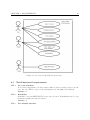
the related use cases, both textual 4.2.1 and in diagram form 4.1.
Use cases describe a sequence of interactions between external actors and the system. Arne
and Gunnar described in the personas section 3.2, are typical actors in this system. The
interactions are viewed from an outside perspective from when the actor needs a service from
the system, until this service is accomplished. It also provides possible variants of this sequence,
other alternatives for reaching the intended goal.
A non-functional requirement specifies, in contrast to a functional requirement, criteria that
can be used to judge the operation of a system, rather than specific behaviors of the system.
4.1
High level description of requirements
When a fall is detected, an alarm should sound locally, giving the user a chance to cancel if it
was a false detection. If the user does not cancel the alarm, a message is sent over the Internet
to the user’s clients. The system will keep a list of available contacts in real time, and whoever
reacts to the alarm can mark the task as handled. By using a real time system, the friends
do not need to actively check the system for new messages. All messages are sent to them
instantly by the system. The real time system also makes it possible to detect when a friend is
unavailable.
The message should contain the user’s position. The position may be given by GPS, or if
the user is at home, sensors can be installed that detects where the user is. If such sensors are
installed the system should allow them to be easily integrated.
A web-interface should allow the friends-list to be set up. An Android application for the
user should monitor sensors to detect falls. The application must be able to connect to different
(new) sensors.
Friends should be able to connect to the system through existing software.
44
4.2
CHAPTER 4. REQUIREMENTS
Functional requirements
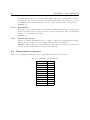
The requirements for the finished product is described below. The priorities goes from 1 (low)
to 5 (high). They are also sorted with the requirements with the highest priority on top.
FR-1. Real time support
The system needs to provide notifications in real time i.e. notifications must be pushed
out to clients rather than clients having to pull them from the server.
Priority: 5
This requirement is given the highest possible priority as it is essential that the case of
a fall that it is discovered as soon as possible, and without the users having to push a
button.
FR-2. Information provided
The Android client should send information that will be needed to help the fallen person.
This information contains GPS-coordinates and the time of the fall.
Priority: 5
Additional information like location can prove life saving in case the fall did not happen
at home. This requirement is therefore also given max priority.
FR-3. User and group administration
An admin should be able to perform administrative tasks via the admin client. Typical
tasks include the adding, deleting and editing of users and groups.
Priority: 5
Being able to do fundemental admininistrative tasks should be possible in any system
and as such is given max priority.
FR-4. Android client fall simulation
The Android client should be able to simulate a fall and publish an notification (see
section 5) to the fallen persons contact group and the administrator client, for demonstrational purposes.
Priority: 4
An actual fall detection algorithm is not part of this solution and the ability to trigger
a simulated fall is important for demonstrating and testing the overall system.
FR-5. File transfer
The android client should be able to send a file to the administrative interface containing
all sensor data related to a fall, which in turn will be stored on the server.
Priority: 3
This data has statistical value, and should therefore be stored on the server. However,
this was given a lower priority as the fall is simulated and the sensor data only exists
in theory.
FR-6. Logging of messages
All messages sent from the fall detection device should be logged.
Priority: 2
This was given a low priority as all messages allready get stored in the database by the
XMPP server by default.
CHAPTER 4. REQUIREMENTS
4.2.1
45
Textual Use Cases
Use Case no. 1
Actor
Trigger
Pre-conditions
Post-conditions
Main Success
Scenario
Extensions
Log in.
Admin / Health care worker.
A user wants to log in to the system.
User is registred with a username and password.
User is successfully logged in to the system.
1. User enters username and password.
2. User successfully logged in.
1a. Wrong username or password.
1. return to point 1.
Use Case no. 2
Actor
Trigger
Preconditions
Post-conditions
Create group.
Admin / Health care worker.
A new group needs to be created.
1. A family wants to use the system for an elderly family member.
1. A new group is created, with a health professional assigned as admin
to the group.
1. Admin creates the group.
Main Success
Scenario
2. Admin creates the necessary user profiles and adds them to the newly
created group.
Extensions
Use Case no. 3
Actor
Trigger
Pre-conditions
Post-conditions
Main Success
Scenario
Extensions
Add new member.
Admin / Health care worker.
A new member needs to be added to an existing group.
1. The group exists.
2. The new member to be added is a family member or associated with
the groups elderly person.
1. The new member created with a profile and added to the group.
1. The user profile is created by the admin.
2. The user is added to the group.
The functionality of use case nr. 2 must be working first.
46
CHAPTER 4. REQUIREMENTS
Use Case no. 4
Actor
Trigger
Pre-conditions
Post-conditions
Main Success
Scenario
Extensions
Use Case no. 5
Actor
Trigger
Preconditions
Post-conditions
Main Success
Scenario
Extensions
4.2.2
Send/receive notification.
Fall victim, health care worker, group members.
A fall is detected.
1. A group exists with the fall victim and his/her contacts in the system.
2. Fall has not been declared as a false alarm.
1. Group members and admin has received a notification of the fall.
2. A file containing data is sent to the server for storage.
1. The android device sends a notification of the fall.
2. Health care worker and group members receives the notification.
3. A file containing data is sent from the android device to the server
and stored for later analysis.
The functionality of use case nr. 3 must be working first.
Confirm/toggle false alarm.
Fall victim.
The fall victim toggles the false alarm button.
A fall has been detected and a notification has been sent.
1. Alerted members of the group has received the notification declearing
the detected fall as a false positive.
1. Falldetection alarm is triggered.
2. Fall victim notifies a false alarm.
3. Necessary Group members receive message of a false alarm.
2a. Fall victim notified false alarm by mistake.
1. Re-toggle alarm button.
Use Case diagram
The uses cases are further illustrated in the use case diagram 4.1 below.
4.2.3
Storyboard
The purpose of a storyboard is to make the functionality depicted in the use cases even more
concrete [24]. The system developer is only limited by his creativity when it comes to the content
of the storyboard, because it does not yet exist a standard way for creating it. Storyboards
can be put together by one person in electronic format, or they can be crafted by a team
on whiteboards using markers, sticky notes, or other media. We wanted to do a storyboard
that shows an important scenario in using our system, both to help us in our development
process, and to visualize the system and get feedback from our customer. We have chosen to
add cartoon-like elements to our storyboard 4.2.
CHAPTER 4. REQUIREMENTS
47
Figure 4.1: Use Case for the Fall detection device.
4.3
Non-Functional requirements
NFR-1. Use code standards
To be able to support the code later, and to make it easier for other people to use the
code, the code shall be easy to read and structured to aid further development.
Priority: 5
NFR-2. Reusability
It should be easy for SINTEF ICT to reuse our code later. It should therefore be easy
for them to further develop the system.
Priority: 4
NFR-3. User friendly interface
48
CHAPTER 4. REQUIREMENTS
The user interface has to be user friendly, simple and easy to understand, so that a
person at the age of 90 does not have a problem with using it. It should also be easy
to administrate the desktop interface for the contact persons of the elderly person.
Priority: 4
NFR-4. Extendibility
It should be easy to add features later and the system must therefore be developed in
such a way that it will be easy to scale it to a bigger system later. The system should
therefore be as modular as possible.
Priority: 3
NFR-5. Security and privacy
Privacy of contact information has to be high, so that users will trust the program
and so that the product does not conflict with any laws or regulations.
Priority: 2 Since what we are now making is a prototype in a pilot test, we have not
focused on this and has therefore given it a low priority.
4.4
Requirements summary
Table 4.1 is a summary, listing all of the requirements and their given priorities.
Table 4.1: Summary of requirements
Requirement
FR1
FR2
FR3
FR4
FR5
FR6
NFR1
NFR2
NFR3
NFR4
NFR5
Priority
5
5
5
4
3
2
5
4
4
3
2
CHAPTER 4. REQUIREMENTS
Figure 4.2: Storyboard for the Fall detection device.
49
50
CHAPTER 4. REQUIREMENTS
51
Chapter 5
Implementation
5.1
Architecture Overview
The solution consists of the following components 5.1:
• An Android client
• A desktop client.
• Openfire XMPP1 server.
• Java backend daemon.
• MySQL database.
The normal data flow for a fall scenario is as follows:
1. A fall is detected by the android device owned by a user, and a notification is published
to the XMPP server.
2. The XMPP server notifies the subscribers in the persons group of the accident.
3. The subscribers, which can be health care workers logged on to the desktop client or family/friends subscribing via some third party XMPP client, receives a real time notification
of the event.
4. Sensor data and other fall related data are then transmitted from the Android device and
stored in the MySQL database for later analysis.
1
The Extensible Messaging and Presence Protocol
52
CHAPTER 5. IMPLEMENTATION
Figure 5.1: A figure displaying the top level architecture. The green labels represents the
communication protocols used between components.
5.2
Description
Our solution is built on two technologies, the XMPP protocol[25, 26, 27] with the publishsubscribe extension[28] and Java RMI[29]. We use XMPP to notify health care professionals,
family and friends in real time when a fall is detected, which is one of the main requirements
for our solution. RMI is used in remote administration of the system, mainly group and profile
management. Using RMI makes it easier to ensure model consistency across the system, which
in theory can support multiple client administration programs.
CHAPTER 5. IMPLEMENTATION
5.2.1
53
Data models and RMI
Figure 5.2: Class diagram of the models package (getters and setters omitted for readability)
As shown in the above class diagram 5.2 the data models are all based on the same abstract
class, making it possible to use the abstraction to keep the RMI interface simple by keeping it
ignorant of the different subclasses. The AbstractModel class also hides the complicated code
for ensuring the thread-safety of the models, which is necessary to provide asynchronous access.
This is important in supporting the real time 1 requirement as synchronous method calls over a
network can delay the displaying of an important message. Lastly, having an abstract superclass
also makes the application more modular in terms of adding more data models later, though
in addition to inherit from AbstractModel, new Model Classes must also be defined with a
unique type constant in the abstract class itself. The reason for this is that model id’s are not
necessarily unique in that models belonging to different subclasses of AbstractModel may have
the same id.
54
CHAPTER 5. IMPLEMENTATION
5.2.2
Database and transaction layer
Figure 5.3: Class diagram of the database layer. Some private methods and members omitted
This part of the application is responsible for the asynchronous storage and retrieval of models
in the database. The DatabaseWorker 5.3 thread keeps a FIFO2 queue of all the pending
transactions and executes them in order. Each transaction is wrapped in a ReturnableStatement
5.3 which contains callbacks for when the transaction either completes or fails.
Figure 5.4: ER diagram of the database
The database schema itself is little more than a relational representation of the data models.
It is worth mentioning that although the raw_data table 5.4 is supposed (and able) to store the
actual sensor data, it instead only stores the path of the data file in the server’s filesystem. This
2
first in first out
CHAPTER 5. IMPLEMENTATION
55
is bacause the format of the data-files is unknown, and a file-parser that could have converted
the files into a format suitable for the database has not be implemented.
5.3
Employed software/technologies
5.3.1
Servers
Openfire
R
Openfire is an open source XMPP server written in Java by Jive Software
MySQL
R
MySQL is an open source relational database management system developed by Oracle
.
5.3.2
Protocols
XMPP
XMPP is an xml-based protocol standard that is widely used in real-time communication software. It is an open standard with many extensions defining additional functionality, for example
publish-subscribe support, which we use in our solution.
Java RMI
Java RMI3 is a technology for using objects in distributed programming, by allowing objects to
be referenced across multiple hosts. An object’s methods can therefore be invoked by objects
running on other hosts than itself. It is part of the Java Standard Edition Class Library.[30]
Locks API
The java.util.concurrent.locks package is part of the Java Standard Edition Class Library, and
provides extended object-locking functionality. Systems implementating the locks API can
acquire object-locks in any order and easily rollback if any one lock was unavailable.
5.3.3
Third party libraries
SMACK
R
SMACK is an open source Java XMPP client library developed by Jive Software
.[31]
MigLayout
MigLayout is an open source Java Layout Manager for Swing developed by MiG InfoCom
AB.[32]
3
Remote Method Invocation
56
5.4
CHAPTER 5. IMPLEMENTATION
Design
The initial userface design was illustrated using GUI sketches. Already from the beginning of
the project, we gave this a lot of thought. The sketches was drawn for the customer and the
team to get an idea of what the finished GUI could look like. The sketches below show the
basic functions of the system. The layout of the interface depends on the user, whether it is the
admin of the group, a regular group member, or the person carrying the fall detection device.
It also depends whether the user is on a computer or an Android phone. We would also like to
stress the fact that we under this section have described both design elements that we have in
fact developed, and elements for further development.
Figure 5.5: Login Screen for Android
CHAPTER 5. IMPLEMENTATION
Figure 5.6: Android: group members
57
Figure 5.7: Android: chat
The first three sketches, 5.5, 5.6 and 5.7 show the user interface for a regular group member
using an Android phone. Shown above is the login screen, a list of group members, and a chat
window, respectively. When a user is logged in, he/she will be able to see all the other members
of the group who is currently online. The user can then start a chat with a single user by
clicking that user’s name. It should also be possible for a user to initiate a group chat, with all
or some of the users online. 8.2
58
CHAPTER 5. IMPLEMENTATION
Figure 5.8: Android: alarm triggered
Figure 5.9: Android: false alarm
The next two sketches show the simple user interface for the elderly person. Once a fall is
detected, an alarm will be triggered and a notification will be sent to all users in the group.
There is a big button for the victim to press in case of a false alarm. The interface for these
two events should look something like figures 5.8 and 5.9, respectively.
The following sketches show the user interface for a group member using a computer. Our
thought here is that when a user is logged in on the desktop version of the system, the profile
page shown in figure B.2 should be the start screen. Here the user will be able to see his
or her profile, as well as the other members of the group along with their availability status,
wether they are online or offline. Figure 5.11 shows the chat page. This sketch should be self
explanatory, and has the same chat functions as described for 5.6 and 5.7.
CHAPTER 5. IMPLEMENTATION
Figure 5.10: Desktop: profile / home
Figure 5.11: Desktop: chat
59
60
CHAPTER 5. IMPLEMENTATION
Figure 5.12: Desktop: statistics
The statistics page, 5.12, should be viewable for everyone and contains a log of all messages
sendt from a spesific users device. From the admin’s view, the interface looks slightly different,
and has some more functions. Only the admin should be able to add entries in the statistics
view, as shown in figure 5.13. The last sketch we have included here is the profile / home page
for the admin, 5.14. Again, it shows some more functionality such as adding or deleting users
to or from the group.
CHAPTER 5. IMPLEMENTATION
Figure 5.13: Desktop: admin statistics
Figure 5.14: Desktop: admin profile / home
To view the final prototype desktop GUI, see appendix B.1.
61
62
CHAPTER 5. IMPLEMENTATION
63
Chapter 6
Iterations
6.1
Iteration 1
The first iteration was used for prestudy, and writing the preliminary report that was to be
delivered at the end. The team decided to use trac for project management and distribution
of tasks within the project group, but this was not properly adopted until the second iteration.
The provided SVN-repository (see section 2.4.2) was not yet available, so a private server was
used as a temporary solution. For a visual representation of time relationship of project tasks,
see the gantt diagram for iteration 1 below (figure 6.1).
Figure 6.1: Gantt diagram for iteration 1
6.1.1
Requirement and risk analysis evaluation
Requirements evaluation:
Not yet defined
64
CHAPTER 6. ITERATIONS
Risk analysis evaluation:
In this iteration the risk analysis were outlined.
6.1.2
Design
Use cases
During this iteration there was made a graphical use case, and textual use cases describing the
tasks that the system will support (see sections 4.2.1 and 4.2.2 for theis use cases).
Graphical user interface
The user interface was discussed with the customer, and possible solutions outlined. Interface
development started in the next iteration, and in this one the focus was on research and prestudy.
6.1.3
Code
There was little production of code in this iteration since our focus was on research, except
setting up a server for SVN to use for the report.
6.1.4
Testing
No code was produced. Testing started in iteration number 2 and continued throughout iteration
2 to 5.
6.2
Iteration 2
Once again a lot of effort was dedicated to writing the report, and the continuation of prestudy
from iteration 1. Trac was put into full use, and we started experimenting with different XMPP
libraries.
6.2.1
Requirement and risk analysis evaluation
Requirements evaluation:
Not yet defined.
Risk analysis evaluation:
No changes made.
6.2.2
Design
The main focus in design in this iteration was sketching ideas for the different GUI designs. See
section 5.4 for more on the design of the finished product.
CHAPTER 6. ITERATIONS
65
Figure 6.2: Gantt diagram for iteration 2
6.2.3
Code
Shindig: We experimented with building simple OpenSocial javascript gadgets to familiarize ourselves with the api. A lot of work went into trying to make Shindig use our own
database schema.
XMPP: Started implementing basic clients with the Smack library and documentation.
Android: Started the implementation of the android client, using the Asmack library.
Very basic during this iteration, writing code for running the android application and for
testing how XMPP works.
6.2.4
Testing
This was the first iteration in which testing took place. For information on how testing was
done see the chapter 7 on Testing.
Shindig was built multiple times from source with different configurations, and tested
against an external MySQL database.
XMPP: All our sample code was run multiple times with small changes or additions to
get a better understanding of the XMPP protocol and the Smack library implementation
in particular.
Android: Tested sending basic chat-messages through XMPP
66
CHAPTER 6. ITERATIONS
6.3
Iteration 3
The development took a new turn at the beginning of the iteration, since Apache Shindig was
dropped as a starting platform (see section 2.8.1 for more on why this choise was made). The
main focus of this iteration was on GUI development, and an XMPP pubsub demo application.
Figure 6.3: Gantt diagram for iteration 3
6.3.1
Requirement and risk analysis evaluation
Requirements evaluation:
Requirements defined.
Due to extensive prestudy, we were not ready to establish the reqirements until this point
in the development process.
Risk analysis evaluation:
Risk nr 4 was added to the requirements analysis, due to experience gained during the
previous iterations.
The impact for risk nr 10 was increased from a 6 to a 8, because we used a lot of time on
Shindig before we descided to go with another solution.
The likelihood for risk nr 12 was decreased from a 3 to a 2, because we felt we had a very
good relationship with our customer at this point.
CHAPTER 6. ITERATIONS
6.3.2
67
Design
In this iteration the GUI development on the different platforms was started. The main focus
was the Android GUI, but a first version of the desktop GUI was also made. The design
was made to look like the GUI sketches made in the previous iteration, but the desktop GUI
changed somewhat from the original sketches because of functionality problems and solutions
found during the development.
6.3.3
Code
Database: Began ER-modeling a first draft of the database. It was later during the
iteration and we wrote the complete SQL script to be run on our virtual machine.
XMPP/pubsub: Started implementing publish-subscribe with the android and desktopclients.
Android: Modified the GUI making it more easy and understandable, although it is still
a GUI of a basic simple prototype. Started implementation of publish-subscribe. Had
trouble making it work for our system.
6.3.4
Testing
Database: The SQL script ran successfully.
XMPP/pubsub: This was tested extensively during this iteration on both desktop and
Android, as part of the prototype development. Publishing from Android would not work
half the time, and we had to reinstall our XMPP-server when we discovered that our
pubsub-nodes were not responding.
Android: Tested the modified GUI, along with its functions. Tested pubsub as we programmed and tried to make it work. Also fixed small bugs and errors we found along the
way.
6.4
Iteration 4
This iteration ended with the delivery of the final draft of the report to our supervisor, and
therefore this naturally took most of our focus. Some efforts also went into testing and database
development.
6.4.1
Requirement and risk analysis evaluation
Requirements evaluation:
The reqirement to make statistic were removed, due to the limitied timeframe of the
project.
Risk analysis evaluation:
68
CHAPTER 6. ITERATIONS
Figure 6.4: Gantt diagram for iteration 4
The likelihood for risk nr 9 was increased from a 3 to a 4, because we discovered elements that needed to be implemented to be able to continue developing using our chosen
architecture.
The likelihood for risk nr 6 was decreased from a 7 to a 5, not just because the requirements
are well defined by this point, but also because of a mutual understanding of what is
reasonably achievable in the remaining time frame of the project.
6.4.2
Design
There was not much further development on the GUI in this iteration. It was sidelined as the
group had to produce a final draft of the report.
6.4.3
Code
XMPP/pubsub: Since XMPP/pubsub was going to be the technology on which the application would be built, the focus was now on building a reliable client for subscribing
and receiving messages from an Android device.
Database/models: Our relational model was completed, and object representations were
implemented in Java. We also started working on the code to integrate the database
into the server, and the RMI code to allow communication between the server and client.
Utilities to load properties and log output was created.
Android: Implemented the function of sending files from android to desktop client through
XMPP.
CHAPTER 6. ITERATIONS
6.4.4
69
Testing
XMPP/pubsub: As the group experienced a lot of trouble getting this to work reliably,
code was heavily scrutinized and run multiple times. The undesirable behaviour was due
to a tiny issue in the configuration of the pubsub nodes, which was discovered after a lot
of trial and error.
Database/models: A set of mockup models were hard coded into the server, to enable
testing of the RMI-communication, the models themselfs, and the client-side, while the
database-support was still not ready.
Android: A test client was made to test the sending and receiving of files.
6.5
Iteration 5
At the beginning of this iteration a lot of work still remained, both in the individual components
and in sewing these parts together into a working application.
Figure 6.5: Gantt diagram for iteration 5
6.5.1
Requirement and risk analysis evaluation
Requirements evaluation:
No changes made.
Risk analysis evaluation:
No changes made.
70
CHAPTER 6. ITERATIONS
6.5.2
Design
At this point the Graphical user interface was completely redone as it now needed to work with
the data models and manage RMI and XMPP connections in the background. Layout code
was cleaned up, and custom models and renderers were added to many of the components to
present the data in the desired manner.
6.5.3
Code
XMPP/pubsub: The pubsub client was integrated with the rest of the client application,
and deemed polished enough for it to be set aside as other parts of the application was
nowhere near as complete.
Server-side: The database code was completed and all the modules of the server were
stitched together into one running instance.
Android: Implemented an option to enter login and server information.
6.5.4
Testing
XMPP/pubsub: Integrating the pubsub client into the overall client application required
testing the component responsible for viewing the incoming data. Initially it did not
handle incoming messages for multiple users correctly, but the problem was traced and
fixed.
Server-side: One by one the modules were added, and the server was run at each step.
Once all the modules were running, the client was connected, and different scenarios of
usage were tested. The server was finally packaged into a runnable jar and deployed on
a remote server. The system was tested on the remote server, with the rmi client, and
messages and files were sent from the android app to the server.
Android: Ran the android application with the new implemented methods, and checked
if the application could log in to the server, and if it functioned as wanted.
6.6
Iteration 6
Now that the product development face of the project is over, this iteration is used to focus on
finishing the report and presenting the developt product to SINTEF ICT.
6.6.1
Requirement and risk analysis evaluation
Requirements evaluation:
No changes made.
Risk analysis evaluation:
No changes made.
CHAPTER 6. ITERATIONS
71
Figure 6.6: Gantt diagram for iteration 6
6.6.2
Design
GUI design is discontinued.
6.6.3
Code
Development of the prototype is discontinued.
6.6.4
Testing
Testing of the prototype is discontinued
6.6.5
Other
Prototype presentation at SINTEF ICT
To showcase the results of our work we held a presentation of the prototype system at SINTEF
ICT monday May 21th. The presentation lasted about 20 minutes, and consisted mainly of
these parts:
• Group introduction, handing out and presenting the questionnaires.
72
CHAPTER 6. ITERATIONS
• Giving the audience 5 minutes to read through the questionnaires, while the team prepared.
• Presenting some facts about elderly, falls among them, and consequences of falling.
• Brief problem description. Description of what we have been working on and the things
that we are proud of accomplishing.
• Presenting the GUI prototype functionality (high level).
• In depth presentation of architectural design, and implementation.
• Finish up presentation and answer questions from the viewers.
73
Chapter 7
Testing
7.1
Testing overview
The process model that was adapted for this project (see 2.2) uses iterations and therefore calls
for continuous testing throughout the iterations. Most of this testing will be done as needed,
without a plan in advance, and as such are documented in chapter 6 on iterations.
In the project’s later phases we will perform acceptance testing, integration testing and
system testing of the final product. We chose not to perform unit testing as we wanted to focus
more on the different parts of the system working together correctly, rather than testing all
“edge-cases” for unexpected behaviour.
7.1.1
Integration testing
High level integration testing is mainly testing of interaction between subsystems, testing of
modules on different platforms or in several processes to find interface errors. The main focus
of integration testing is testing of cooperation between the relevant programs. The risk is that
in the end the programs don’t understand each other. This communication happens in mainly
four ways.
• direct call / online communication between two functions
• communication through a shared database
• communication through files
• communication by standard methods, e.g gateways, ftp, etc.
Integration testing should be done in a step by step manner.
7.1.2
Acceptance testing
Acceptance testing is a test prepared by us, but performed by the customer to see if the system
satisfies the contractual requirements and expectations. Is the system good enough when it
comes to the practical use. The reason for the combination of developers and customer / users
to perform this type of testing is to combine the expertise of the developers on testing, and the
need for a independent view from a third party.
74
CHAPTER 7. TESTING
7.1.3
System testing
A system test is a test that is performed on a complete system with all internal and external
interfaces to evaluate whether the system meets all specified requirements i.e. a test against
the requirements as described in chapter 4 of this document.
The goal is to test:
• that the system’s functionality and properties, including system integration, is consistent
with functional and technical design- and requirements specifications
• the interaction between the system and described procedures
• the interaction between the system and converted data
• the interaction between the system and its surroundings
7.2
7.2.1
Testing strategy
Acceptance test
Acceptance testing is normally done together with the customer. In our case this was done
as a presentation (6.6.5) of the prototype at SINTEF ICT headquarters for a focus group of
people, including Mr. Farshchian himself and a researcher from St. Olav hospital. To get the
necessary feedback, we had designed a survey which were handed out and collected at the end
of the presentation. The questionnaire can be found in appendix G.
Survey result
The feedback we received from the survey are presented below. The viewers was asked to rate
the user interface on a scale from 1 to 5. The results are graphically displayed in figure 7.1.
Android client:
• The patient should be informed that help is on its way. This information should include
who is coming and where they are.
• The big button to press on the android gui is a good design choice.
• The GUI is easy and straightforward.
• It would be nice to have more information about the relations between the patient and
the group members connected to this patient.
• Implement multiple protocols.
• Implement a map function.
CHAPTER 7. TESTING
75
Desktop client:
• There should be a grade on the fall message, to let the patient tell whether he/she consider
the fall to be severe. But the incident should still be followed up.
• The GUI is easy and understandable, good colors.
• A little uncertain what type of user is created. Is Arne Pettersen a "user" or a "patient"?
• The first window called user is a bit misleading. Is the user the group member or the
elder?
• The GUI could include which type of relation (family/friend/neighbor) a group member
has to a patient.
• The creation of user profile is cumbersome.
• A dialog box should appear asking if the admin user is sure he/she wants to delete a user
in the system.
• A false alarm could be marked with yellow instead of green in the alarm panel. This can
change when the admin user manually has checked that it was a false alarm, or that the
fall did not require attendance.
• It should be possible for a group member to inform whether or not they are available to
help the elder who have fallen.
General:
• There should be a feature in the system that automatically disconnects the client application when it moves outside a given geographical area.
• The system is easy to use and straightforward.
• The system needs a feedback mechanism so that the member of the group that takes
action, can inform the other group members, and the patient receives necessary help
within an acceptable timeframe.
• The GUIs shown are basically intuitive and easy-to-use.
• The system is a good starting point
• The admin panel is straightforward.
• There is too much information visible at all time. It could be an idea to use Skype, or
another application where you have accumulated a list of contacts, as a template for the
GUI.
76
CHAPTER 7. TESTING
Figure 7.1: The average rank of the sytem from the focus group during the presentation of
iteration 6
7.2.2
Integration test
Integration testing has been performed as the different parts of the system have been integrated,
which has been mainly during iteration 5.
7.2.3
System test
System testing has been performed against the following test cases:
Table 7.1: Testcase 1: Real time support
Test Category:
Testing requirement
Description:
Expected result:
Actual results:
Comments:
System testing
FR1
Publish a message from the Android client.
The desktop client and two Android smartphones using
generic XMPP clients receives the notification in real time.
Same as expected.
Table 7.2: Testcase 2: Information provided
CHAPTER 7. TESTING
Test Category:
Testing requirement
Description:
Expected result:
Actual results:
Comments:
77
System testing
FR2
Publish a message from the Android client with GPScoordinates and timestamp in the message payload.
The notification contains GPS-coordinates and time of the
fall.
Same as expected.
Table 7.3: Testcase 3: User and group administration
Test Category:
Testing requirement
Description:
Expected result:
Actual results:
System testing
FR3
Done in three steps:
1. Group creation.
2. Person creation.
3. Add member to group.
4. Person deletion.
1. Group created.
2. Person created.
3. Member added to group.
4. Person deleted.
1. Same as expected.
2. Same as expected.
3. Same as expected.
4. Person was deleted but database transaction not comitted.
Comments:
Table 7.4: Testcase 4: Android client fall simulation
Test Category:
Testing requirement
Description:
Expected result:
Actual results:
Comments:
System testing
FR4
A fall is triggered and toggled on and of.
A notification gets published to the XMPP server.
Same as expected.
Table 7.5: Testcase 5: File transfer
78
Test Category:
Testing requirement
Description:
Expected result:
Actual results:
Comments:
CHAPTER 7. TESTING
System testing
FR5
A fall is triggered and as a result, file transfer started.
An empty file is created and sent to the server where it is
stored.
Same as expected.
Table 7.6: Testcase 6: Logging of messages
Test Category:
Testing requirement
Description:
Expected result:
Actual results:
Comments:
System testing
FR6
A fall is simulated and the false alarm button toggled on and
of to send several messages.
Messages are saved in the database.
Same as expected.
The messages are saved only by the XMPP server, and not
in the FallEvent data model.
79
Chapter 8
Further development
8.1
8.1.1
Detailed technical ideas
Thread organization
By convention we should have used one or more ThreadGroups and include all threads started
by the server software, and then use Thread.join() on shutdown to stop the threads in a proper
order. For instance the ShutdownHook that closes the log file should wait for all other threads
to finish before closing the file. Using a ThreadGroup could have odd effects since the Smack
library starts many of it’s own threads in the main-ThreadGroup. The best way might be to
create a custom class that has a field for every thread and shutdown-hook. That way every
thread can selectively wait for other specific threads to finish. Below is a list of known threads
at runtime.
• DatabaseWorker.createDBWorker() - Anonymous inner type. Created from the constructor of DatabaseWorker, and started from DatabaseWorker.setModelManagerAndStart. This
thread asynchronously executes all queries to the database.
• InterruptThreadOnShutdownHook(dbWorker) - Created immidiatly after the DatabaseWorker thread is started. Started by the JVM when it is shutting down. This thread
sends an interrupt message to the database thread, letting it shut down nicely.
• FileTransferReceiver.createMonitorThread - Anonymous inner type. Created and started
in the constructor of FileTransferReceiver. This thread monitors all incoming file transfers, and creates FallEvent and FallData objects for them. When implemented this thread
should perform the parsing of data from the transferred files. Once a parser is implemented, codelines in this thread can be uncommented to use it.
• InterruptThreadOnShutdownHook(monitorThread) - Created in the constructor of FileTransferReceiver. Started by the JVM when it is shutting down. This thread sends an
interrupt message to the file transfer monitor thread, letting it shut down nicely.
• CloseLogPrintStreamHook - Created in FalldetectLog when the PrintStream is initialized.
Started by the JVM when it is shutting down. This thread flushes the PrintStream, re-
80
CHAPTER 8. FURTHER DEVELOPMENT
leases the file resources to the operating system and redirects all printing to the System.err
PrintStream.
• RemoteModelAccessImpl.addShutdownHook - Created after the RMI service has been successfully registered. Started by the JVM when it is shutting down. This thread unregisters
the remote object and stops it from receiving further calls, letting it shut down nicely.
• CloseXMPPConnectionHook - Created after a new XMPPConnection has been established
(currently for the FileTransferReceiver and the PubsubRelay). Started by the JVM when
it is shutting down. This thread closes the connection, letting it shut down nicely.
8.1.2
Two way RMI setup
The server currently has no way of notifying the client system(s) of changes on the server side.
This is most important when the server has created a new entry in the database, and changed
the temporary ID of the model into the permanent ID generated in the database.
8.1.3
XMPP PubSub to Chat proxy
A class, xmpp.PubsubRelay, has been implemented to allow XMPP-chat-clients, that do not
support the Pubsub-extension, to receive notifications from a pubsub-node.
• The class PubsubRelay should format the incoming pubsub message to a more readable
format, before passing it on to the listener. The current implementation only passes on
the XML-string.
• When creating a chat the username can be appended with a resource, to avoid users
getting pubsub-messages sent to their desktop-clients. This resource will have to be set
up on any clients that are supposed to receive these messages. Most publicly available
client programs, by default, sets the resource to the program name, but still supports
setting custom resources.
8.1.4
Load or dispose data
At startup, the program only loads the path of the sensor data, in the local file system, not the
actual data stored in the database. The intention from the start was that this software was not
going to be used for scientific analysis of sensordata, and thus there was no use for the data
in the runtime of the server software. However, such analysis software may be developed and
designed to get data through the server, and not directly from the database. This decision has
not been made.
When decided, developers should either; add the ability to load data from the Database, or;
dispose data, at runtime, after successfully storing it to the database.
8.1.5
User management
The Administrator GUI developed in this project was mostly developed for demonstration
and proof-of-concept purposes. It has the most basic functions; user management and alarm
CHAPTER 8. FURTHER DEVELOPMENT
81
notifications, but as mentioned earlier it lacks some functionality for getting changes on server
sent to the client.
The admin gui is also the only way users can be created or altered. This is done through
the Openfire User Service API[34]. The ability for anonymous connections to register new users
is deactivated on the server to strengthen privacy. Because of this, users cannot change their
login details. The User Service Plugin cannot be implemented directly in a custom client either,
because it is designed to give full access to the server.
It might be possible to create a module on the server that can receive user modification
requests, validate the requesting user, and then commit the changes through the User Service
Plugin. This approach would require a custom client. Perhaps a web-client could be used for
this.
Even with the module described, it’s not possible to set a user’s friends. The groups of of
the user can be set, but new groups cannot be created. This must be done through the openfire
admin console.
Active Directory
A completely different approach would be to utilize Openfire’s Active Directory (LDAP) integration[35]. In this setup Openfire connects to an Active Directory in read-only mode. This
means nothing can be changed through Openfire/XMPP, but a java-ldap library[36] can be used
to develop a module for the server-software that has more possibilities.
8.1.6
User interfaces for different users
Non-administrative users can use any publicly available xmpp client to receive notifications (see
section 8.1.3), but only an administrator may alter users (8.1.5).
System-administrators can access the openfire management panel through port 9090 (default) on the server, and the database through <server>/phpmyadmin.
Health workers can manage their users and groups, and receive alarms, through the Administrator GUI.
The Android app for the observed persons is designed for demonstrating the system, and
has a simple button instead of the actual fall-detecting sensors. When the system for detecting
falls is in place, the Android app should be altered to receive the data as a startup-argument,
and trigger the alarm immediately.
The scientists researching fall detection algorithms will need a separate program that can
access the data, either through the server or directly from the database (see 8.1.4).
8.1.7
Changing the group-objects to allow multiple admins.
The group model can at the moment only have one administrator. In a real world application
this means that all healthworkers, working in shifts in one district, needs to log in with the
same account. Although the current system is adequate for a test-system on the experimental
stage, it might not be suitable for a large scale deployment.
82
CHAPTER 8. FURTHER DEVELOPMENT
8.1.8
Merging different runtime instances of the same model
The overwrite method declared in AbstractModel, needs to be analysed.
Because of the usage of an integer id to identify and separate objects it may happen (i.e.
with deserialized objects from rmi) that two different objects at runtime exist, and have the
same id. To work around this the overwrite method was added late in the development process,
and there is no time now to fix it properly. An example of a problem that occurs: When taking
the groups from a temporary Person model, every person referenced in each group gets that
group added to their list of groups, unless that runtime instance of the group is already there. In
other words the merging process does not propagate the way it should to merge the referenced
objects as well.
The methods takeGroups, takeFallEvents and takeMembers were created to be used in the
constructor that clones an existing model, which in turn is used when the database has added
a new model and generated an id for it. They therefore assume that all lists are empty and do
not check if a merging is necessary. The contents of these methods should be copied into new
methods where they are altered for usage in merging.
See also in the source: manager.ModelManager.mergeInto(. . . ).
8.2
Features for further development
These are some ideas for additional features that the team and the customer discussed as
interesting possibilities for further development, but was not included in the requirements.
• Chat/Video chat
This feature could prove useful in the coordination between group members and the health
care worker when a fall happens. Communication between the fall victim and the group
could also establish persons condition and the seriousness of the incident.
• Making and displaying statistical data
This feature will most likely be implemented in a possible production version, as it is
highly valuably from a reasearchers point of view.
83
Chapter 9
System evaluation
In this chapter we compare the requirements in chapter 4 with the test results in chapter 7 to
evaluate the overall quality of the system.
9.1
Evaluation of the functional requirements
All the functional requirements has been tested using system testing (7.1.3) and the results of
these tests are shown in test case 1 through 6 (7.2.3).
Functional requirement FR-1 Real Time support has been implemented in the prototype
and has been tested on several occasions and is working properly. The result of this test
is shown in test case 1.
Functional requirement FR-2 Information provided was implemented in during interation
5. The result of this test is shown in test case 2. This requirement is working properly in
the prototype.
Functional requirement FR-3 User and group administration has been implemented during
several iterations and the results from the test of this requirement in shown in test case
3. This works, except for the deletion of users, though on a very basic level.
Functional requirement FR-4 Android device fall simulation was developed quite early to
be used in testing of other parts of the prototype. This requirement was tested in test
case 4 and works.
Functional requirement FR-5 File transfer was developed and tested in iteration 4. It was
tested using integration testing (7.1.1) and later in test case 5. The requirement works,
but sends an empty file as the sensor data does not exist in the prototype.
Functional requirement FR-6 Logging of messages. This requirement can be described
as working, but was never implemented to its full extent. It was tested in test case 6.
Messages are saved in the database, but in the finished prototype messages received at
an earlier date can neither be retrieved nor viewed from the Desktop client. We therefore
consider this requirement “not fulfilled”.
84
9.2
CHAPTER 9. SYSTEM EVALUATION
Evaluation of the non-functional requirements
Of all the non-functional requirements, only NFR-3 was formally tested. As a result the others
are evaluated by the team itself as objectively as possible.
Non-Functional requirement NFR-1 Use Code Standards. The code follows Java code
conventions as closely as possible, and a high emphasis has been placed on readability.
The code is not fully documented however.
Non-Functional requirement NFR-5 Security and Privacy. This requirement was early
subject to deprioritization and the final product is neither very secure nor private.
Non-Functional requirement NFR-2 Reusability This requirement is also hurt by the code
not being fully documented. This only affects some of the most self-explanatory parts of
the code however, and also parts which are not ususally documented like the graphical
user interface.
Non-Functional requirement NFR-4 Extendibility In addition to being affected by lacking
documentation in the same manner as the requirement directly above, code modularity
plays a huge role in the meeting of this requirement. Some parts of the final prototype is
quite modular, like the data models, while others can prove quite hard to extend, like the
database layer.
Non-Functional requirement NFR-3 User friendly interface. This requirement was tested
using acceptance testing (see 7.2.1), and the feedback was mostly positive regarding user
friendliness.
9.3
Summary
Since this has been a research project and most of the time has been spent researching possible
solutions that could be used, not a lot of time was left for actual development. Because of this not
all the requirements have been implemented in the finished prototype. Some of the requirement
features that has not been implemented are described in chapter 8 Further Development.
85
Bibliography
[1] IT2901 - Informatics Project II. Mar. 31, 2012. url: http://www.ntnu.edu/studies/
courses/IT2901.
[2]
World Health Orgenization. “WHO Global Report on Falls Prevention in Older Age”. In:
WHO Library (2007).
[3]
McClure RJ et al. “Population-based interventions for the prevention of fall related injuries
in older people (Review)”. In: The Cochrane Collaboration (2008).
[4]
[email protected]. Om SINTEF. Feb. 25, 2012. url: http://www.sintef.no/Om-oss/.
[5]
[email protected]. Automatic Fall Alarm With Telephone Auto Dialler. Feb. 27, 2012.
url: http://www.easylinkuk.co.uk/page7.html.
[6]
[email protected]. Cognita fallofon. Feb. 27, 2012. url: http://www.cognita.no/produkt/
20.
[7]
Imaker as. GPS FALLALARM GODKJENNES AV NAV. Feb. 27, 2012. url: http :
//www.epilepsi.no/arkiv/gps-fallal/.
[8]
gewa.no. Fallalarm – MDT-122 sender. Feb. 27, 2012. url: http://www.gewa.no/alarm/
Alarmer_Knop/277.
[9]
Ian Sommerville. Software Engineering, 9th edition. Pearson, 2011.
[10]
Ph.D. Roger S. Pressman. Software Engineering. 1221 Avenue of the Americas, New York.
NY 10020: The McGraw-Hill Companies, 2005.
[11]
Don Wells. Extreme Programming. Mar. 5, 2012. url: http://www.extremeprogramming.
org/.
[12]
Lee Copeland. Extreme Programming, Computerworld. Mar. 5, 2012. url: http://www.
computerworld.com/s/article/66192/Extreme_Programming.
[13]
Eric J. Braude. Software Engineering, an object-oriented perspective. John Wiley & sons,
INC, 2000.
[14] Balsamiq wireframing tool. Feb. 10, 2012. url: http://www.balsamiq.com.
[15]
Keri E. Pearlson and Carol S. Saunders. Strategic Management of Information Systems,
4th edition. John Wiley & sons, INC, 2009.
[16]
The Apache Software Foundation. Welcome To Apache Shindig ! May 21, 2012. url:
http://shindig.apache.org.
86
BIBLIOGRAPHY
[17]
Till Halbach et al. Kognitiv tilgjengelighet av nettsider og nettsteder. Mar. 31, 2012. url:
http://iktforalle.no/veileder-delB.html.
[18]
photostock. Arne. Apr. 18, 2012. url: http://www.freedigitalphotos.net/images/
Mature_Men_g217-Smiling_Senior_Man_p46707.html.
[19]
Ambro. Irene. Apr. 18, 2012. url: http : / / www . freedigitalphotos . net / images /
Mature_Women_g276-Elderly_Woman_p44385.html.
[20]
graur codrin. Maria. Apr. 18, 2012. url: http://www.freedigitalphotos.net/images/
Younger_Women_g57-Beautiful_Woman_p15964.html.
[21]
healingdream. Gunnar. Apr. 16, 2012. url: http : / / www . freedigitalphotos . net /
images/Younger_Men_g118-Business_Man_p21265.html.
[22]
photostock. Svein. Feb. 8, 2012. url: http://www.freedigitalphotos.net/images/
Healthcare_g355-Portrait_Of_Senior_Doctor_Writing_Reports_p33446.html.
[23]
imagerymajestic. Lise. Apr. 13, 2012. url: http : / / www . freedigitalphotos . net /
images/Business_People_g201-Idle_Manager_Sitting_In_Office_p74881.html.
[24]
Johen Krebs. Form feeds function: The role of storyboards in requirements elicitation.
Mar. 31, 2012. url: http://www.ibm.com/developerworks/rational/library/dec05/
krebs/index.html.
[25]
Peter Saint-Andre. Internet Engineering Task Force (IETF). XMPP: Core. Apr. 4, 2012.
url: http://xmpp.org/rfcs/rfc6120.html.
[26]
Peter Saint-Andre. Internet Engineering Task Force (IETF). XMPP: Instant Messaging
and Presence. Apr. 4, 2012. url: http://xmpp.org/rfcs/rfc6121.html.
[27]
Peter Saint-Andre. Internet Engineering Task Force (IETF). XMPP: Address Format.
Apr. 4, 2012. url: http://xmpp.org/rfcs/rfc6122.html.
[28]
Ralph Meijer Peter Millard Peter Saint-Andre. XEP-0060: Publish-Subscribe. July 12,
2010. url: http://xmpp.org/extensions/xep-0060.html.
[29] Java Remote Method Invocation (Java RMI). Apr. 3, 2012. url: http://docs.oracle.
com/javase/6/docs/technotes/guides/rmi/index.html.
[30] JavaTM Platform, Standard Edition 6 API Specification. Apr. 4, 2012. url: http://docs.
oracle.com/javase/6/docs/api/.
[31] SMACK API. Apr. 4, 2012. url: http://www.igniterealtime.org/projects/smack/.
[32] MiGLayout - Java Layout Manager for Swing, SWT and JavaFX 2. Apr. 4, 2012. url:
http://www.miglayout.com/.
[33]
Janne Tuomikosk. Testing in Scrum. Mar. 5, 2012. url: http://www.tol.oulu.fi/
users/ilkka.tervonen/Ote_vierailu_09.pdf.
[34]
Jive Software. User Service Plugin Readme. Mar. 28, 2012. url: http://www.igniterealtime.
org/projects/openfire/plugins/userservice/readme.html.
[35] LDAP Guide. May 23, 2012. url: http://www.igniterealtime.org/builds/openfire/
docs/latest/documentation/ldap-guide.html.
BIBLIOGRAPHY
87
[36] The java way of Active Directory. May 23, 2012. url: http://www.javaactivedirectory.
com/.
[37]
Canonical. Ubuntu Server Download site. Feb. 25, 2012. url: http://www.ubuntu.com/
download/server/download.
[38]
Heise Media UK Ltd. Oracle retires licence for distributing its Java with Linux. Mar. 28,
2012. url: http://www.h- online.com/open/news/item/Oracle- retires- licencefor-distributing-its-Java-with-Linux-1332835.html.
[39]
Jive Software. Ignite Realtime: Downloads. Mar. 28, 2012. url: http://www.igniterealtime.
org/downloads/index.jsp#openfire.
88
BIBLIOGRAPHY
89
Appendix A
Installation
This setup is based on Ubuntu Server 10.04 64-bit (at time of writing 10.04 is the current
LTS-version1 .). Except for the terminal commands, most of the configuration can be applied
to windows systems as well.
Make sure to note all usernames and passwords created during installment, as they will be
needed when the system is setup.
Some commands need to be run in the terminal/command line of the server.
They will look like this
A.1
Ubuntu-server 64-bit
The current LTS-version of Ubuntu Server 64-bit can be downloaded from ubuntu.com [37].
Installation instructions can also be found there.
A.2
MySQL-server
sudo apt-get install mysql-server phpmyadmin
Currently the last command will give the user 4 prompts during the installation process.
Two passwords must be created, write these down in a secure place for later reference.
1. create root-user pw for server.
2. give the root pw to the phpmyadmin-setup-script, so it may configure the db.
3. create a pw for the phpmyadmin-user.
4. select that apache should be configured for phpmyadmin (press space. It should look like:
[*]apache.)
1
Long Term Support
90
APPENDIX A. INSTALLATION
A.2.1
Setup
The database for the falldetect-system
• Log in to the phpMyAdmin interface using username root, and the first password created
earlier http://localhost/phpmyadmin.
• Go to the “Privileges”-tab. Click the link below the table that says “Add a new User”.
• Enter a new username and password that the falldetect-server will use to access the DB.
• The button “Generate” can create a long relativly secure password, just remember to write
it down with the username.
• In the next box, under “Database for user”, check “Create database with same name and
grant all privileges”.
• Scroll to the bottom and press “Go”
• Log out of phpMyAdmin (green button in top left corner.)
The database for use by Openfire
Openfire can setup and use an embedded database, if this is desirable, this step can be dropped.
(Jump to A.3. Oracle java runtime environment.)
• Log in to the phpMyAdmin interface using username root, and the first password created
earlier http://localhost/phpmyadmin.
• Go to the “Privileges”-tab. Click the link below the table that says “Add a new User”.
• Enter a new username and password that openfire will use to access the DB.
• The button “Generate” can create a long relativly secure password, just remember to write
it down with the username.
• In the next box, under “Database for user”, check “Create database with same name and
grant all privileges”.
• Scroll to the bottom and press “Go”
• Log out of phpMyAdmin (green button in top left corner.)
A.3
Oracle java runtime environment
In August 2011, Oracle withdrew the licence that enabled Linux distributions like Debian,
Ubuntu and Linux Mint to package and distribute the Java Runtime Environment[38]. Openfire
is hardwired to depend on Oracle’s java binaries (not OpenJDK). To get these and keep them
automatically updated a third party distributor is needed.
• sudo apt-get install python-software-properties
APPENDIX A. INSTALLATION
91
• sudo add-apt-repository ppa:ferramroberto/java
• sudo apt-get update
• sudo apt-get install sun-java6-jre
when prompted about licence press ok and yes.
A.4
A.4.1
Openfire
Installation
Download the latest openfire version:
• Go to igniterealtime.org[39]
• select Linux (under Openfire).
• select openfire_XXX_all.deb (where XXX is the version number).
In the commandline open the folder where the file was downloaded, and run .
• sudo dpkg -i openfire_3.7.1_all.deb
• sudo service openfire start
A.4.2
Configuration
Open http://localhost:9090 (This is the admin-webpage for the Openfire-server). A wizard
will help set up openfire for the first time.
• On the first page, select language (for the admin UI) and continue.
• The server’s domain name must be set in the Domain field on the next page. All users
on the server will get an xmppID in the format: [username]@[server.domain.name]. Press
continue.
• To use a custom database (must be configured as described in A.2.1) select Standard
Database Connection and continue. Otherwise ensure “embedded database” is selected,
continue and jump past the following subpoints.
– select MySQL from the presets dropdown-menu.
– The MySQL driver is bundled with openfire and will be set automatically in the
Driver field.
– An example URL will be shown in the connection field. It must be altered by setting
the host to localhost, and database name to the username for openfire, selected in
phpMyAdmin earlier. The finished url should not contain any square brackets.
– Assuming the username is openfireDB, the connection url should be:
“jdbc:mysql://localhost:3306/openfireDB”
92
APPENDIX A. INSTALLATION
– enter the username and password for openfire in the database, into their respective
fields, and continue.
• On profile settings ensure default is selected and continue.
• Set a password for the openfire admin account and continue.
A.4.3
setup
Open http://localhost:9090 again. Log in as admin, with the password set in the last step
of the Openfire-setup.
• Go to Server –>Server Settings –>Registration & Login
• Disable Inband Account Registration and Anonymous Login
• Save Settings
• Go to Users/Groups –>Create New User
• One by one, add the following users, and note their username and password.
– filestorageworker - This bot-user will recieve all sensordata, from the sensor devices.
– relayworker - This bot-user recieves alarm notifications via pubsub from the sensor
devices, and relays them via xmpp-chat to the people in the elderly person’s group.
– healthworker - the admin who will create and manage groups, and monitor them.
• Go to Plugins –>Available Plugins
• Find “User Service” in the list, and click the green cross at the end of the line.
• Go to Server –>Server Settings –>User Service
• Make sure the service is enabled, and note the Secret Key.
• In the field “Allowed IP adresses”, the IP address of the machine that will be running
the server-software can be added to prevent connections from other hosts (for the local
machine: 127.0.0.1).
A.5
The falldetect server software
When java, MySQL and Openfire is in place, the falldetect-software can be set up.
APPENDIX A. INSTALLATION
A.5.1
93
Database setup
The tables needed by the system can be created in the database by executing the file createDatabase.sql (found together with the server source code in the database package), and the first
admin user must be added directly through phpMyAdmin.
• Log in to the phpMyAdmin interface using username, and password, created for the
falldetect-system earlier.
• Go to the tab “Import” and click “Choose File”.
• locate the file “createDatabase.sql” that came with the server source code and click “Go”
in the bottom right corner.
• Go to the person table and the tab “insert”.
• Enter firstname, lastname and the xmpp username (j_ID) (must include “@<server domain>”) of the healthworker-user created in A.4.3.
• click “Go” immidiatly below the j_ID field.
• Log out of phpMyAdmin (green button in top left corner.)
A.5.2
Properties setup
In the home-folder2 of the computer-user that will be running the server-software, a folder called
“.falldetect” must be created. In that folder a file called “falldetect.properties” is needed. This
file will contain all the configurations for the server.
The configurations must be given in <key>=<value>pairs (one pr. line). The file can be
edited in any text-editor.
The minimum requirements for the properties file are given below:
• db.user=<username>(The database user created in A.2.1)
• db.db=<database name>(In A.2.1 this was set to the same as username)
• db.domain=localhost (unless the system will run on another host than the MySQLsoftware)
• db.password=<password created for db.user>
• rmi.domain=<externally accessible IP or domain>(this is the callback-address that connecting clients are given to communicate with the server on. Necessary on linux server,
unless the admin-rmi-client will run on the same machine.)
• xmpp.adminSecret=<secret key>(The Secret key from the User service A.4.3)
• xmpp.workerID=<filetransferworker>(The username given to the bot that will receive
sensordata, in A.4.3)
2
Windows 7 default: “C:\Users\<username>\”; Ubuntu default: “/home/<username>/”
94
APPENDIX A. INSTALLATION
• xmpp.workerPW=<password created for xmpp.workerID>
• xmpp.proxyID=<relayworker>(The username given to the bot that will relay messages
from pubsub to chat, inA.4.3)
• xmpp.proxyPW=<password created for xmpp.relayID>
• xmpp.domain=localhost (unless the system will run on another host than the Openfiresoftware)
The list below shows the optional properties and their default values:
• db.port=3306
• db.protocol=jdbc:mysql://
• xmpp.port=5222
• xmpp.tempFileStorageLocation=<a folder named falldetectSensorData next to the properties file>
• rmi.port=1099
• rmi.resource=falldetect
A.5.3
Starting the server
If the runnable jar is located in the working directory, and java is in the system’d path, the
server can be started from the commandline with the command
java -jar falldetect.jar
And while in the terminal the server can be shut down gracefully by pressing the keycombination Ctrl+C in the keyboard.
A.5.4
Service on Ubuntu
In ubuntu, the server can be started at boot as a service by deploying the script given in the
“startup-script” folder in the server source code. To deploy this follow instructions given in the
README file in the same folder.
A.6
The falldetect client software prototype
After the server software is up and running without problem. The client can be started.
A.6.1
Properties setup
The client needs a properties file in the same location as the server(see A.5.2). If they are
running on the same machine, with the same user, the extra properties can be added to the
same file.
The minimum requirements for the properties file on the client are given below:
APPENDIX A. INSTALLATION
• rmi.domain=<IP-address or domain of the server running the falldetect-software>
• xmpp.domain=<IP-address or domain of the server running the Openfire-software>
• xmpp.usermankey=<secret key>(The Secret key from the User service A.4.3)
• support.phone=<phone number for IT-support >
• support.email=<e-mail-address for IT-support >
The list below shows the optional properties and their default values:
• xmpp.usermanurl=/plugins/userService/userservice
• xmpp.usermanport=9090
• xmpp.port=5222
• rmi.port=1099
• rmi.resource=falldetect
95
96
APPENDIX A. INSTALLATION
97
Appendix B
User Manual
B.1
User Manual
This is the user manual for the Fall Detection Desktop Client. The functionality will be described step by step below. Once the program is started, you will see a login screen, as of figure
B.1. Entering a valid username and password will result in a successful login and will take you
to the next window.
Figure B.1: Login screen
98
APPENDIX B. USER MANUAL
Figure B.2: Profile window
B.1.1
Profile window
The first view that you will see after logging in is the profile panel, as shown above in figure
B.2. This is where you manage your groups.
• Drop-down menu of groups
This is a list of the groups that you are responsible for. A group, when created, will have
the same name as the person it is made for. When you select a group from the dropdown
list (figure B.3), you will see all the persons that belong to this group in the group member
list (figure B.4).
Figure B.3: Group selection
Figure B.4: Group members
• Add Group
This button will allow you to add a new group to the system. When clicking it, you will
see a dialog box as shown in figure B.5. This is where you type in the name of the person
APPENDIX B. USER MANUAL
99
that the group will be connected to, which will also be the name of your new group. JID
(Jabber identifier) is a mail address in the format <First name>@falldetect.dyndns.org.
Finally, you choose the sex and date of birth of the person. Note that all the fields must
be filled out with the correct values to confirm the new group (e.g with the correct JID
format as stated above).
Figure B.5: Add group / add user
• Add user
This button allows you to add persons to the group that is selected in B.3. Note that the
dialog box is similar to the dialog box as in Add Group (see figure B.5).
• Edit user
This feature lets you edit a person from a chosen group. First you must select the person
you would like to edit from the (figure B.4), and then click the Edit user button. The
dialog box displayed in figure B.6 will then appear with the values already assigned to
that person. Modify the desired fields, then click confirm to save the new information for
this person to the database.
Figure B.6: Edit user
• Delete user
This last button on the profile page lets you remove a user from a specific group. This is
done in a similar way as for editing a user - select the person you would like to remove
from the group by clicking the name of this person from the (figure B.4), and then click
the Delete user button. Note that this function will remove the selected person from this
specified group only.
100
B.1.2
APPENDIX B. USER MANUAL
Alarm central window
Figure B.7: Alarm central window
The second tab available to you is called the Alarm central, and is shown in figure B.7. This
is where an event of a fall will appear. This page has two panels. The left panel, with the title
"Observed individuals", is a list of all your groups, with the same name format as before - the
name of the group is also the name of the person that the group is made for. The right panel,
with the title "Messages related to" is where you will see the actual alarms. Once an alarm has
been triggered, the group will be automatically selected from the list on the left panel, in which
the alarm applies to. As you can see in figure B.8 below, a fall has been detected for Arne.
Arne is selected from the observed individuals list, and a big red entry is visible under the right
side pane of the window. If your cursor is held over this red field, you will be able to see some
additional information about the fall event; when and where it happened, as B.8 displays. If
this proved to be a false alarm, however, the right side pane will show what is displayed in
figure B.9.
APPENDIX B. USER MANUAL
Figure B.8: Alarm central - fall detected
Figure B.9: Alarm central - false alarm
101
102
APPENDIX B. USER MANUAL
B.1.3
Log window
Figure B.10: Log window
The third tab is the Log window as shown above in figure B.10. It is quite similar to the Alarm
central window, in the sense that there are two panels. The left panel is again a list displaying
all your groups. You are able to select any group from the list by clicking it. If you select one,
the right panel will show you all the fall events of that group. The information stored about
each entry in this log is the time and location of the incident, along with a short description.
Underneath this log, you will find three buttons.
• New Entry
These three buttons work in the same way as with adding a new user to a group. This
first button allows you to add a new entry in the log. Figure B.11 displays the dialog box
that will appear when you click the New Entry button.
Figure B.11: New entry
APPENDIX B. USER MANUAL
103
• Edit Entry
The edit entry dialog box is the same as in figure B.11. Select an entry from the log in
which you want to edit, then click the edit entry button. You will see the dialog box with
the values already assigned to that entry in the corresponding fields.
• Delete Entry
To delete an entry from the log, simply select the desired entry and then click the delete
button.
104
APPENDIX B. USER MANUAL
105
Appendix C
Backlog
To manage and visualise our work assignments the team has been logging the tasks at hand in
a sprint backlog. The backlog is a list of the tasks the development team are planning to adress
the next iteration.
106
Table C.1: Backlog
Date
Iteration
Task
16.0106.02
1
Preliminary report
Problem description
1
1
Preliminary report
Preliminary report
1
1
1
1
Preliminary
Preliminary
Preliminary
Preliminary
1
1
1
1
1
1
1
1
1
1
1
Preliminary report
Preliminary report
Preliminary report
Preliminary report
Preliminary report
Preliminary report
Preliminary report
Preliminary report
Prestudy
Prestudy
Prestudy
Project management
Target situation description
Current situation product description
Customer description
SCRUM description
Prototype description
Developement environment description
TEAM description
Requirements description
use cases modeling
Storyboard modeling
Alternative solutions description
Timeplan outline
Solution architecture description
Risk analysis and description
Shindig research
XMPP research
Latex research
SVN setup
report
report
report
report
Estimated
time
3
Actual time
3
3
3
3
3
2
2
2
2
2
2
2
2
2
10
4
4
1
6
4
6
30
30
4
1
2
10
4
4
2
6
6
6
40
10
5
2
Comment
APPENDIX C. BACKLOG
Milestone
06.0208.03
Iteration
Milestone
Task
LaTeX setup
Customer meeting
Supervisor meeting
Personas modeling
Estimated
time
1
12
12
8
1
1
1
2
Project management
Project management
Project management
Midterm report
2
2
2
Midterm report and design
Midterm report
Midterm report
2
Midterm report
2
Midterm report
2
Midterm report
2
2
2
2
2
2
Midterm report
Midterm report
Midterm report
Midterm report
Midterm report
Development
2
Development
Actual time
Comment
1
12
0
10
GUI sketching
2
4
Storyboard modeling
Waterfall process developement description
Xtreme Programming process developement description
Test Driven Developemeent process
developement description
Restructuring of chapter organization
Architecture description continued
Testing description
Testcases description
Planned work
Gantt diagram
Make webinterface with open social
gadgets
Shiro and OAuth research for
Shindig authorization
2
2
4
2
2
2
2
2
1
2
4
5
5
2
2
0
4
10
10
1
4
0
Abandoned
4
2
Abandoned
APPENDIX C. BACKLOG
Date
107
Milestone
Task
2
Development
2
2
Development
Project management
2
Project management
2
2
2
2
Project management
Project management
Development
Development
2
2
Development
Testing
2
Research
2
Testing
2
Development/design
2
2
3
Project management
Project management
Report
Make JSgadget for handling friends
and statusupdates
Java version Shindig set-up
Setup and organize SVN repository
and TRAC at IDI-servers
Port existing code and the report to
SVN at IDI.
Share Shindig server source on SVN
XMPP server setup
Work on XMPP library
Develop chatting environment using
XMPP
Implement chatting in Android
Testing and bugfixing Android chat
solution
Find a new library for Android chat
solution, because the previous did
not work
Test sending messages from Android
to PC
Prototype GUI for Android developement
Customer meetings
Supervisor meetings
Iteration chapters description
Estimated
time
8
Actual time
Comment
8
Abandoned
4
1
16
1
Abandoned
2
2
2
4
4
60
2
4
6
50
10
25
30
30
2
2
20
20
5
10
10
3
6
20
7
6
APPENDIX C. BACKLOG
08.0304.04
Iteration
108
Date
04.0416.04
Iteration
Milestone
Task
3
Report
3
3
Develpoment
Develpoment
3
3
Research
Development
3
3
3
3
Development
Development
Development
Development
3
Development
3
3
4
Project management
Project management
Report
4
4
4
4
4
Report
Report
Report
Report
Report
Changing reqirements after second
iteration
Pub-sub implementation
Prototype Android GUI developement
Research on Buddycloud
Design and implement database
schema
Make Rest API desktop application
RMI
Desktop GUI developement
Detecting the phone flips using internal sensors
Send/receive files over XMPP protocol with fileproxy functionality
Customer meetings
Supervisor meetings
Description of further developement
of system (after we are finished with
what we can develop in our timeframe)
Proofreading
Reorganize chapter structure
Architecture description continued
Write about the course
Write about the supervisor
Estimated
time
4
Actual time
20
10
60
10
10
26
10
25
8
6
60
2
8
4
60
2
8
8
12
12
3
10
14,5
3
15
3
10
1
1
12
4
10
2
2
Comment
2
APPENDIX C. BACKLOG
Date
abandoned
109
16.0411.05
Iteration
Task
4
Report
4
Report
4
4
Development
Development
4
4
4
4
4
5
Development
Report
Testing
Project management
Project management
Report
Changes made during the development
Write about research done during
the project
Client application development
Send/receive files over XMPP protocol with fileproxy functionality
Java and MySQL communication
Write user-manual
Testing
Customer meetings
Supervisor meetings
Div
5
5
5
Development
Development
Login mechanism
5
5
5
5
5
5
5
Report/development
Report
Report /documentation
Report
Report
Report
Development
Server-model-multithreading
Server-model-storage-consistency
Make option to enter login and
server information
Write javadoc
Write user manual
Installation documentation
Testing
Class diagrams
WBS
Client application development
Estimated
time
2
Actual time
1
2
50
10
60
9
16
8
20
6
0
10
16
8
30
6
0
17
10
20
6
10
20
7
20
7
5
20
4
1
40
20
7
10
20
5
2
40
Comment
3
APPENDIX C. BACKLOG
Milestone
110
Date
Iteration
11.0525.05
21.05.2012
Sum
Milestone
Task
5
5
6
Testing
Project management
Report completion
Testing
Customer meetings
Proofreading
6
6
6
6
6
6
6
6
6
6
6
6
Report completion
Report completion
Report completion
Report completion
Report completion
Report completion
Report completion
Report completion
Report completion
Report completion
Report completion
Presentation
6
Presentation
6
6
Project management
Report
Abstract
Check refrences
Iteration chapter
Testing chapter
Results from questionair description
User manual
Finish backlog
Further development
Problem description
Planned work
Gantt diagram
Make presentation to hold for SINTEF and St. Olavs
Presentation of product for SINTEF
and St. Olavs
Customer meetings
Report completion div
Estimated
time
20
11
50
Actual time
20
11
50
1
10
10
20
10
10
20
3
2
1
1
6
5
17
12
17
6
15
12
2
2
2
1
6
2
4
6
15
1026
6
38
1172.5
Comment
APPENDIX C. BACKLOG
Date
111
112
APPENDIX C. BACKLOG
113
Appendix D
Minutes from meetings with customer
Meeting with customer - 27.01.12
D.0.4
Participants
Babak Farshchian, Henrik Linde, Eivind Lysne, Ada Jordal, Silje Vikås, Simen Kjellgren, Trond
Klungervik
D.0.5
The Task
It is part of a SINTEF-project about ambient assisted automation at home for old / children
/ disabled, and monitoring with connection to hospital, doctor, or family, and sensors either
connected to the body, or ambient sensors.
The task is given by SINTEF-Trondheim, working with geriatric dep at NTNU DMF.
• Create modular serverside applic. that can accept different client-apps.
• Client-app that can use internal sensors, or external via i.e. Bluetooth.
1. milestone; Create an early simple system, i.e. a chat.
Shindig, open-source, standard connected to JS. Web interface for family.
xmpp, messaging protocol, real time, possibility of ”topics”, has extension for web interface
Customer has e-books on xmpp, can share via e-mail or dropbox. (send reminder)
For next week:
1. Find ideas.
2. Make use case.
3. GUI mockups/home-mockups (sketch)
4. Look into platform.
5. Use TRAC.
6. Share documents over SVN or dropbox.
114
APPENDIX D. MINUTES FROM MEETINGS WITH CUSTOMER
Ubi-collab. Ubiquos computing, gui-less-development.
big button gui after detection, with sound-alarm.
maybe meet with the county and ntnu-med-fac.
D.0.6
Q&A
Old people usually don’t have smart-phones. Possibility to use external sensors.
D.1
D.1.1
Meeting with customer - 03.02.12
platforms
Apache shindig: poorly documented, originally written in javascript.
xmpp: extensions to the protocol can be used, but lack java-libs. what would we use it for?
could it be enough?
A shindig server could be set up as a xmpp-client, and a standard xmpp-server is only used
for connecting to Shindig. some synchronisation is needed.
buddycloud; alternative.
D.1.2
use cases
An admin organizes the “friends”. A fall could first notify the admin, and how in turn could
(ref use cases)
Should the elderly be able to administer their “friends”? or just review them?
We should use Persona. Make “call-cards” with the different users. patient, family, healthpersonnel, IT-tech-personnel
sketch tui (tangible user interface)
a prototype could be triggered by shaking to demonstrate. a scientist interface, that can
collect raw sensory data.
(optional) a user can call her contacts.
contact Jorunn at St.Olav
should assume that all parties always are logged in, a heartbeat system generates an alarm
when a user goes offline.
D.1.3
requirements
realtime privacy & security simplistic user interface
Long term: logging, of event. scalability.
D.2
Meeting with customer - 10.02.12
The meeting with Jorun at St.Olav is postponed, as she is currently unavailable.
APPENDIX D. MINUTES FROM MEETINGS WITH CUSTOMER
D.2.1
115
Personas
The personas were presented to the customer. Jorun could have some valuable input on the
personas. Add knowledge about computers (and other relevant data).
D.2.2
Servers
Xmpp and shindig (php)-servers have been set up. The java-version of shindig is preferred.
Data storage: can shindig be used to store sensor-data from fall-detectors.
D.2.3
Next week
Suggestions for next time. Get a simple “facebook” up and running, with perhaps a statuspossibility, create users from personas. Let xmpp rest for now, experiment with shindig.
D.3
Meeting with customer - 17.02.12
Not here; Ada. The customer was oriented about the problems we had with this week’s goals.
The problem with getting a DB to host data, instead of sample containers. This has been
achieved now, but we did not finish the entire task in time.
Specializing the DB to this project was not recommended, as it might be incompatiable
with the Open Social API.
D.4
D.4.1
Meeting with customer and Jorunn from St.Olav - 17.02.12
Jorunn L Helbostad
Physical therapist, Faculty of Medicine, NTNU. Researching fall prevention, using sensors such
as accelerometer and gyroscope. about. 10’000 elderly fall and break their hip or femoral neck
a year. This costs the community 300’000 - 1’200’000 NOK / pers.
D.4.2
What we have done, so far
The customer presented Jorunn with our progress so far. How our system should support the
communication of fall detection.
The personas-characters were presented.
D.4.3
General discussion of the system
Current system in use has button-activated gadgets with radio signals in house, and landlines(phone) from the house to sentral.
This system should use autom. detect. and cellular phone signals.
We should focus at this point at people that are mentally healthy.
Positioning, indoor, special sensors? outdoor, GPS. battery-problems
The elderly’s phone number should be reg. to allow integration with existing system.
A personas for report functionality, monthly? statistical data.
116
APPENDIX D. MINUTES FROM MEETINGS WITH CUSTOMER
What happens when the alarm sounds? Who responds? How should it be decided?
Fall data should be stored in DB to be retrieved by another app.
Jorunn will request some raw data from a fall. to use as example.
D.5
D.5.1
Meeting with customer - 24.02.12
xmpp-chat:
Discussed smack, smackx, asmack. Customer suggested asmack-service. A book about xmpp
has a client implemented in JS. Could possibly be used as a browser-client in the shindig system.
D.5.2
What has been done since last time
REST-api development halted until the server is ready. The server db-scheme is hard to work
with. A custom scheme is recommended. This will require documentation.
Suggestion. Used by the arduino-group. http://code.google.com/p/opensocial-java-client/
and Jenkins, for hard nightly builds.
Server-code svn. svn has built in support for porting to new svn-system.
look into pubsub in xmpp.
an xmpp-client updates shindig via REST.
buddy-cloud - android xmpp pubsub - github.
until next time: android xmpp-client server db opensocial java client Get a milestone with
a simple message just being sent from a node to all parties
D.6
D.6.1
Meeting with customer - 02.03.12
xmpp-chat:
demonstration: A message was sent from an android emulator via xmpp to an android phone
and a desktop client.
It may be possible to build the system on a chatting-technology, without pubsub. i.e. group
chat. buddycloud, has pubsub. uses asmack-service-lib.
D.6.2
shindig backend
Work on creating models for database-storage is slow.
D.6.3
for next time.
Store a message in shindig. fork a working version of shindig.
APPENDIX D. MINUTES FROM MEETINGS WITH CUSTOMER
D.7
D.7.1
117
Meeting with customer - 09.03.12
Shindig and buddycloud
We wish to discontinue development on shindig, and try to develop the project with buddycloud. Shindig has turned out to be too unfinished to be be built upon. Buddycloud is not an
OpenSocial-system, but has a lot of the same functionality using XMPP with publish-subscribe.
This was ok.
A pure xmpp server-client solution with a pub-sub-plugin could work just as well without
buddycloud.
The customer will be sending some raw sample data from the research-project on the actual
detection of a fall. This is the data that we need to upload and store for each fall.
D.8
Meeting with customer - 16.03.12
xmpp buddycloud, file transfer (jingle)sensor data
få android node pubsub til å fungere utan bugs. vurdere android i stedet for webUI for
familie/venner flere som publisher til samme node. bugs in library with multiple subscriptions
and unsubscribing. use existing open source jabber/xmpp clients for desktop. USE TICKETS/TRAC!!
D.8.1
for next time
flip phone. Publish alarm to node. receive alarm on subscribers. send raw data by chat to a
storageWorker.
D.9
D.9.1
Meeting with customer - 23.03.12
filetransfer
we can transfer the xls-data-file with xmpp file transfer extension. It takes about 10 sec. We
will look into compacting the data before sending.
D.9.2
healthworker gui
the gui-prototype we have so far was shown to the user. It should have more visualization of
new posts.
D.9.3
pubsub
android version has some bugs with class-casts etc. Should not use to much time on it. Could
use a bot to retransmit a chat-message to pubsub.
118
D.10
APPENDIX D. MINUTES FROM MEETINGS WITH CUSTOMER
Meeting with customer - 30.03.12
Licence agreements for 5 of 6 group members were handed in to the customer.
we had some setbacks on pubsub this week, but this has been fixed.
Make a plan on what we want to present for SINTEF/MF, precisely. Work up against this
plan.
The data-model-design for the programs should be created.
Next week (easter) we are going to work 5 days in a row.
D.11
Meeting with customer - 13.04.12
A competition about mobile-applications has been announced. The criterion was discussed.
The announcement came through SINTEF’s mailing-lists. The customer believes we have a
good chance of winning. If we use a day to write an application and perhaps make a prototype
video, we could stand a good chance.
D.11.1
What has been done over easter
Models for admin program, and server has been made. Implementation of database-persistence
has been started. The client and server will communicate with RMI. We plan on being finished
with the coding by May 1.
D.11.2
Presentation
SINTEF ICT has an informal meeting every monday at lunch time. A presentation of the
project could be held there. The presentation of the project could also be held at NTNU DMF.
D.11.3
Misc.
Next week the customer will be abroad, and might not be back in time for the weekly friday
meeting. We will be notified.
D.12
Meeting with customer - 27.04.12
Two alternative dates were set for the presentation at SINTEF; 16.05.12 and 21.05.12.
We are in the process of implementing our system, but currently the the different parts of
the system has not been interconnected and thus we have nothing new to show to the customer.
It was enquired what package-domain our system should use. This can easily be refactored
later, and thus no definite answer was given. It will probably be something along the lines of
org.ubicollab.’*’.
APPENDIX D. MINUTES FROM MEETINGS WITH CUSTOMER
D.13
119
Meeting with customer - 11.05.12
We have got a running working program, that was finally sutured together this week. The
program was demonstrated.
One feature that could be added is to color-code the list of names in the alarm center,
according to the last alarm message that is recorded on that person.
For the presentation we should find an existing client (for the family and neighbor) that can
recieve warnings in addition to the health-worker.
Installation instructions for Windows is needed. Further development needs to be well
documented.
Present what we are proud of/have achieved first. XMPP (mostly) working. In depth study
in user groups with pubsub, taking all into consideration. Was a research project. that we
have a well defined problem definition, and description of the concept of what problems we are
solving.
What would we do if this was to be a throw-away prototype and we were going to start
from scratch? Securing the system better on the server. Using a webUI instead of a desktop
application.
We will hold a presentation for SINTEF the 21.05.12.
120
APPENDIX D. MINUTES FROM MEETINGS WITH CUSTOMER
121
Appendix E
Minutes from meetings with supervisor
E.1
E.1.1
Meeting with supervisor - 01.02.12
What has been started
The assistant has been oriented on what work-methods we have chosen, how far the report has
come, and what our task consists of. Thoughts about the work ahead was shared.
E.2
E.2.1
Meeting with supervisor - 13.02.12
feedback on the preliminary report
The structure; to many chapters. A intro-chap. with proj.desc and SINTEF. Njaal has a
suggestion for structure. Add a scrum log what was done and what happened during each
scrum.
Add short desc. about scrum alt. fossefall and Xp.
requirements mark as FR1, FR2 etc instead of bulletins.
resolution on the use case image.
storyboard was good, but seems a bit unserious.
bibtex urls, books etc.
E.3
Meeting with supervisor - 27.02.12
Progress since last meeting was presented;
• We have moved all the code and report sharing to the svn-server provided by IDI. Everybody has working accounts at IDI now, and we have more knowledge and confidence with
using an svn-server.
• A lot of research and exploring has been done with using a REST-interface with Shindig,
and making a client for xmpp.
122
E.4
E.4.1
APPENDIX E. MINUTES FROM MEETINGS WITH SUPERVISOR
Meeting with supervisor - 12.03.12
What has happened since last time
We have had to leave Shindig, and (almost) start from scratch. We have concentrated our focus
on xmpp server with pub sub and storage of data.
E.4.2
What will our product actually be? what will it contain?
Prioritized list:
1. A server that can:
(a) receive and distribute a fall alarm.
(b) store raw sensor data from the falldetection device in a database.
2. An android app that can send an alarm after shaking the device.
3. A desktop client that can manage users and groups (admin console)
4. An android client that will receive notifications when an alarm is triggered.
E.5
E.5.1
Meeting with supervisor - 23.03.12
Evaluation of the report
Pictures, should have legal sources, and be referred to. All figures should be referred to. Use
cross references to other sections in the rapport (to be reader friendly). Language, make sure
everything is in english, some parts are in norwegian. “planned work” belongs in “project
management”
Requirements - FR-1,2,3,8 are NFR. (anything that ends in -ility is usually NF)
gr. nr on frontpage is missing.
needs sprint-chapters.
E.5.2
Minor problems with the report
needs better desc of course, customer and general introduction.
sort risk table by importance.
a more elaborate section about relations with customer.
Possibility for further development. elaborate on NFR extendability.
section on working methods. subsection on when we work. and a subsection on when and
how often we meet the customer.
pair-programming. time used on researching. sharing and delegating tasks. elaborate in
work-model on how we are always together when working and continually discuss what we are
doing.
problems, sickness. refer to the risk table.
scrum iteration plan (2.7) (should perhaps be in appendix???) refers to XMPP which is
introduced in chapter 4.
APPENDIX E. MINUTES FROM MEETINGS WITH SUPERVISOR
E.6
E.6.1
123
Meeting with supervisor - 25.04.12
Evaluation of the report
• The report has improved much, the biggest problems include language use, and grammar.
The supervisor had a more detailed list, with specific points.
• If possible include more graphics. WBS, burndown, older products that will be replaced
by this.
• The contents-list is a bit long, reduce to two levels.
• Before the contents-list the following can be included.
– Abstract
– Preface (foreword) (av Babak)
– Acknowledgements (i.e. thank SINTEF for the assignment here instead of the frontpage).
124
APPENDIX E. MINUTES FROM MEETINGS WITH SUPERVISOR
125
Appendix F
Minutes from group meetings
F.1
F.1.1
Group meeting - 27.01.12
Scrum-board
Jira, or skinnyboard both have 30-day trial period.
F.1.2
Preliminary report
checked the templates
F.1.3
TODO
Set up TRAC - Henrik Look up Shindig and xmpp - Eivind Use case - Trond and Simen
Preliminary report - Silje and Ada
F.2
F.2.1
Group meeting - 22.01.12
Participants
Henrik Linde, Eivind Lysne, Ada Jordal, Silje Vikaas, Simen Kjellgren
F.2.2
decisions
The report will be written in LATEX, in English. The group’s different schedules showed fridays
and mondays are best for long work sessions. A Meeting room will be applied for on fridays from
08:00 to 16:00 Ada Jordal was elected as leader Henrik Linde was elected as writer/reporter.
All members present agree that weekends may be used to work when necessary.
F.2.3
Discussions and Tasks
Several members of the group know that they will be gone/unavailable for shorter periods during
the semester. So long as this is known in advance, the member in question should finish all
126
APPENDIX F. MINUTES FROM GROUP MEETINGS
started tasks and present the group with their work before departure, enabling the group to
function without him/her.
The Customer was contacted by email. A meeting room was applied for. Cloud communication was set up (dropbox, Google-docs-collection, facebook-group)
F.3
Group meeting - 30.03.12
In addition to a MySQL-server and an Openfire-server, a java-application should run on on a
server, with which the desktop-client can communicate. This application will supply an RMI
interface for adminDesktopGui, receive, handle and store raw-data files, and possibly monitor
all pubsub-nodes.
AdminDesktopGui <—RMI—>java-server-appl.
Falldevice —PubSub—>Openfire —PubSub—>AdminDesktopGui and AndroidFollowerGui
F.3.1
Workplan for Easter
TODOS:
1. Data Models
2. Java server
(a) RMI
(b) DB
(c) FileTransfer
(d) Pubsub
3. Make/plan a presentation for SINTEF. What do we want to show them?
4. Rapport
• Fill in testing in Iteration chapters.
• Fill in backlogs in iteration chapters.
• Correct errors pointed out in midterm-report-feedback
• Describe how we have been doing pre-studies up until after the midterm delivery,
and because of this, do not have detailed sprints/backlogs for this period.
5. Desktop GUI - admin
6. Android GUI - publisher
7. Testing
8. Have all components communicate with each other.
9. Android GUI - subscriber
A table of specific tasks was created.
APPENDIX F. MINUTES FROM GROUP MEETINGS
F.3.2
misc
support_group table should store node_ID from xmpp.
127
128
APPENDIX F. MINUTES FROM GROUP MEETINGS
129
Appendix G
Questionnaire
The questionaire handed out to the audience, at the presentation at SINTEF ICT on May 21.,
is given on the pages following. The audience consisted of both employees from SINTEF, as
well as a delegation from the Faculty of Medicine.
Fall detection - questionaire
Vi er veldig interessert i å høre din mening om prototypen vi har utviklet.
We appreciate your feedback.
På forhånd takk!
Thank you.
Delsystem: Android applikasjon for pasient
Subsystem: Android application for patient
Her referer vi til den håndholdte enheten pasienten bruker for å registrere at det var en
falsk alarm.
This section refers to the handheld unit the patient will use to register a false alarm.
Spørsmål 1: Hvordan tror du appen kommer til å fungere for en pasient?
Question 1: How do you think this application will work for a patient?
Spørsmål 2: Var det noe ved denne delen av systemet du synes var enkelt og forståelig?
Question 2: Was there anything in this part of the system you thought was easy and
understandable?
Spørsmål 3: Var det noe ved denne delen av systemet du synes var vanskelig og lite
forståelig?
Question 3: Was there anything in this part of the system you thought was difficult?
Spørsmål 4: Hvilken funksjonalitet synes du burde vært tilgjengelig for å gjøre systemet
bedre?
Question 4: What functionality do you think should have been avaliable to make the system
better?
Delsystem: Funksjonalitet for helsepersonell
Subsystem: Healthcare personnel functionality
Her refererer vi til desktop klienten helsepersonellet kommer til å bruke.
Her ber vi deg kommentere de funksjonene som er beskrevet under. Var det noe ved
denne delen av systemet du synes var enkelt og forståelig? Var det noe du synes var
vanskelig? Hvilken funksjonalitet synes du burde vært tilgjengelig for å gjøre systemet
bedre?
This section refers to the desktop client for health care personnel. We ask you to comment
the functionality listed below. Was there anything in this part of the system you thought
was easy and understandable? Was there anything in this part of the system you thought
was difficult? What functionality do you think should have been avaliable to make the
system better?
1: Opprette brukerprofil
1: Create user profile
2: Oppdatere/endre brukerprofil
2: User profile update
3: Lese informasjon om en bruker/pasient
3: Read information on user/patient
4: Opprette gruppe/legge til gruppemedlemmer
4: Create group/add group members
5: Motta/godkjenne alarm
5: Receive/ accept alarm
7: Motta beskjed om at det var en falsk alarm, motta/godkjenne meldinger
7: Receive message that says it is a false alarm, receive/accept message
8: Legge inn kommentar til en hendelse
8: Add comment to an event
Annet:
Other:
Generelt, hvor oversiktelig og intuitivt synes du systemet virker?
In general, how straightforward and intuitive do you think the system works?
Generelt forts:
In general continues:
Ranger brukervennligheten på følgende delsystemer
Lav
1
2
1. Android applikasjon for pasient:
3
4
Høy
5
3
4
High
5
2. Desktopklienten for helsepersonen
Profilpanelet:
Alarmsentralen:
Loggpanelet
Rate the usability in the following subsystems:
Low
1
1. Android application for patient:
2. Desktop client for health care
personnel
Profile panel:
Alarm central:
Log panel:
2