1
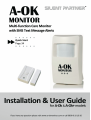
Products covered in the guide:
•
A-Ok - kit includes main sensor unit, wall mounting bracket & screws, UK plug-in power
supply with 5m power lead, PC Configuration application and USB cable, UK Pay-as-you go
SIM card (unregistered)
•
A-Ok+ - as above but including wireless peripherals i.e. wireless door sensor
Safety
Please read and follow these safety guidelines in order to maintain safety of the installers and users:
•
A-Ok (later referred to as the A-Ok, the device or the system) has a radio transceiver operating in GSM850, GSM900, GSM1800 and GSM1900 bands and 868.1-869.5MHz for wireless
peripherals.
•
Don’t use the system where its GSM engine may interfere with other devices and cause
potential danger.
•
Don’t use the system in the vicinity of medical devices.
•
Don’t use the system in hazardous environments.
•
Don’t expose the system to high humidity, chemical environment or mechanical impacts.
•
Don’t attempt to personally repair the system. Any system repairs must be done only by
qualified, safety aware personnel.
The system must be powered by power supply source which should not exceed 15VA
power supply and must be approved by LTS EN6095901 standard
External power supply is for internal use only i.e. inside a building and must be plugged
into a standard UK 3-pin socket. The main circuit should be protected by short circuit or
over-current protection.
Mains power must be disconnected during installation.
The system must be used only with approved back-up battery to avoid fire or explosion
hazards. Special care must be taken connecting positive and negative battery terminals.
Electrical socket from which the system is powered must be in an easily accessible place.
The device contains a back-up battery and therefore if you need to switch the system off
completely, you can do so by opening the cover and disconnecting the battery terminal.
Device is protected by a Fuse F1 type – C1S 2.5A. Blown fuse should not be replaced by
the user and should be returned to the supplier for attention.
WARNING: In order to avoid fire or explosion hazards, the system must be used only with
approved back-up battery. Special care must be taken when connecting positive and
negative battery terminals.
2
Silent Partner Ltd – A-Ok User Guide V1.1
The WEEE (Waste Electrical and Electronic Equipment) marking on this product (see left)
or its documentation indicates that the product must not be disposed of together with
household waste. To prevent possible harm to human health and/or the environment, the
product must be disposed on in an approved and environmentally safe recycling process.
For further information on how to dispose of this product correctly, contact the system
supplier, or the local authority responsible for waste disposal in your area.
Limited Liability
•
The buyer must agree that whilst the system will help with detection of falls, illness, temperature issues, power fail, wander and burglary, it does not guarantee detection. Buyer
should also understand that it is an aid to ‘care’ and not a substitute for regular care visits.
•
“Silent Partner Ltd” will not take any responsibility regarding personal or property or revenue loss while using the system.
•
“Silent Partner Ltd” liability according to local laws does not exceed value of the purchased
system.
•
“Silent Partner Ltd” is not affiliated with any of the cellular providers therefore
not responsible for the quality of cellular service.
is
Manufacturer Warranty
•
The system carries a 12-month warranty by the manufacturer.
•
Warranty period starts from the day the system has been purchased by the end user. The
warranty is valid only if the system has been used as intended, following all guidelines listed
in the manual and within specified operating conditions. Receipt must be kept as a proof of
purchase date.
•
The warranty is voided if the system has been exposed to mechanical impact, chemicals,
high humidity, fluids, corrosive and hazardous environment or other force majeure factors.
•
The warranty is a return to base warranty.
Package Content
1. A-Ok..................................................................................................................... qty. 1
2. Power Supply................................................................................................... qty. 1
3. A-Ok User Manual ......................................................................................... qty. 1
4. MicroUSB - USB cable ................................................................................... qty. 1
5. Configuration Software CD ........................................................................ qty. 1
6. Wireless Accessories depending on model purchased.................... qty. 1
Silent Partner Ltd – A-Ok User Guide V1.1
3
About User Manual
•
This document describes Care Monitoring Device A-Ok’s installation, configuration and
operation.
•
It is very important to read User Manual before using the system.
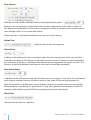
Where you see this symbol you can remotely change the setting by sending a SMS text message to an installed A-Ok device. Please see the Remote
SMS section at the end of this user guide.
Contents
1. General Usage Guide.............................................................................................................. 5
1.1Operation ........................................................................................................................................................5
1.2 Technical specifications...............................................................................................................................5
1.3 Main Functions...............................................................................................................................................6
2. Set-up, Configuration and Installation.................................................................................. 9
2.1
2.2
2.3
2.4
2.5
2.6
2.7
2.8
2.9
SIM Cards – registering and inserting....................................................................................................9
Installing & launching software............................................................................................................. 10
Connecting software to the A-Ok for configuration...................................................................... 10
Settings page............................................................................................................................................... 11
Parameters page......................................................................................................................................... 18
Wireless devices.......................................................................................................................................... 23
Mounting the A-Ok.................................................................................................................................... 27
Testing the A-Ok.......................................................................................................................................... 28
Typical alert messages.............................................................................................................................. 29
3. Security Mode....................................................................................................................... 31
4. Remote SMS Configuration.................................................................................................. 32
4
Silent Partner Ltd – A-Ok User Guide V1.1
1. General Usage Guide
1.1 Operation
A-Ok is designed to be used indoors to check for regular movement patterns, monitor room temperature, power cuts, night wandering and be used as a security system. The A-Ok+ model adds
wireless sensors to monitor door opening (wandering alert). All these features are optional and can
be selected or de-selected at any time using the configuration software.
A-Ok units connect directly to the GSM mobile network and alerts are sent directly to carers by SMS
text message if any of the above situations go outside of your pre-set parameters.
1.2 Technical Specification
Supply Voltage – via power supply
11-15V 500 mA max
Back-up Battery voltage, capacity
8.4V; 150-250mAh
Back-up Battery type
Ni-Mh
GSM modem frequency
900/1800/1900Mhz
Dimensions
104x60x33mm
Operating temperature range
-10 to 40oC
Back-up battery operating time
3 hours (max)
Movement Sensor Detection angle
90°
Maximum motion detection range
10 metres
A-Ok+ Radio transmitter-receiver frequency
866.1 MHz - 869.5 MHz
A-Ok+ Radio communication range
30m indoors (max)
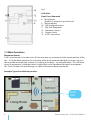
Fig 1
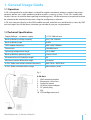
A-Ok Unit:
1. Wall mounting bracket
2. Movement sensor lens
3. Socket for power
4. UK Main power adapter
5. DC power plug
7. N/A
10. USB configuration port
Silent Partner Ltd – A-Ok User Guide V1.1
5
Fig 2
A-Ok Unit:
Front Cover Removed
6. Reset Button
(hold for 5 seconds to reset the unit)
9. Backup battery
10. USB configuration port
11. SIM Card Receptacle
12. Movement Sensor
13. Tamper switch
14. A-Ok+ Transceiver
1.3 Main Functions
Movement Sensor
A-Ok’s main function is to alert carers if it has not seen any movement within certain periods of the
day. A-Ok should be positioned in a location where the monitored individual has to pass by in order to go about normal daily routines (i.e. hallway or landing) – see example below. This will mean
when ‘no movement’ is detected, there is highly likely to be a problem that needs investigation.
NB - The A-Ok does not record images or video of the person being monitored.
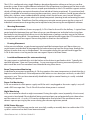
Example: Typical installation position:
A-Ok
Unit
6
Silent Partner Ltd – A-Ok User Guide V1.1
The A-Ok is configured using simple Windows based configuration software so that you can fine
tune the system to best match different individual’s lifestyle patterns and hence get the best results
from the alerting system. Please see our sample questionnaire on the A-Ok website support section
which will help gather accurate information from individuals being monitored. If a monitored individual is incapable of correctly answering these questions, carers or relatives should be consulted or
failing this, we have some standard default settings which should cover most ‘normal’ lifestyles.
To customise the system, you can select up to three time periods (morning, lunch and evening) to monitor movement within. Should users find the settings are not quite correct upon using the system or if
individual’s circumstances change, they can be adjusted at any time using the configuration software.
•
Morning Movement:
In the example installation (shown on page 6), A-Ok is fixed to the wall in the hallway. A typical time
period might be between 6am and 10am when you would expect an individual to be rising from
bed and passing through the hallway to visit the bathroom or perhaps on their way to the kitchen
to prepare a morning drink. No movement during this period would trigger the A-Ok to alert carers
via a ring and/or text message at 10am asking them to check on the individual.
•
Evening Movement:
In the same installation, a typical evening period could be between 8pm and 10pm when you
would expect an individual to be preparing for bed and passing from the living room through the
hallway to make their way to the bedroom. No movement during this period would trigger the
A-Ok to alert carers via a ring and/or text message at 10pm to let them know.
•
Lunchtime Movement (for extra monitoring)
You may expect an individual to visit the kitchen at lunchtime to get food or drink. Typically this
could be between 12pm and 2pm perhaps. As per morning and evening movement periods, an
alert would be sent if no movement was detected during these times.
Room Temperature Monitoring
In addition to movement monitoring, A-Ok also monitors the room temperature to check that the is
kept at a comfortable level. If the temperature falls below or rises above pre-set levels, an alert SMS
message is sent. This can be automatically disabled at night as central heating is usually switched
off during this period.
Power Cut Monitoring
A-Ok can monitor its main power supply and if the unit is unplugged or the main supply is cut, will
send a SMS message alert. The A-Ok will also alert when power is restored.
Night Wandering
A-Ok can monitor or check on night movement. During the night a carer (especially a live-in carer)
may want to be alerted if the individual being monitored gets up and potentially puts themselves
and the carer at risk. As such, A-Ok can be configured to send an alert if the movement sensor
detects a person passing by the sensor during your chosen night-time period.
All OK Status Message
A regular status SMS message can be sent on a daily, weekly or monthly basis to confirm the A-Ok
system is active and no alerts have been activated.
Silent Partner Ltd – A-Ok User Guide V1.1
7
Security Mode
When not being used as a care monitor A-Ok can be switched into security mode. This is ideal when
the home is left unoccupied for a period of time. To switch the A-Ok unit into security mode one of
the alert message recipients just needs to call the number of the SIM card in the A-Ok – after a few
rings A-Ok will terminate the call and activate security mode. If the voicemail answering service
picks up the call then you should end the call manually. This will be confirmed by a SMS message.
Calling the A-Ok a second time will disable security mode and revert the A-Ok back to care mode.
Make sure all door sensors are in the closed position before you set security mode.
The A-Ok+ (Plus) model offers the following additional features:
Wandering via main doors
Wireless door sensors can be added to the A-Ok unit to detect when doors have opened. To inform
the carer speedily and prevent their charge wandering too far away from the home, the A-Ok+ can
be configured to “ring” a mobile or home number and send an alert SMS message to inform them of
the wander alert.
Bogus Caller Alert
Wireless door sensors have a built-in pushbutton which individuals can press to trigger a SMS alert
message to inform of unwelcome callers to the home.
8
Silent Partner Ltd – A-Ok User Guide V1.1
2. Set-up, Configuration and Installation
The Following section will guide you through this sequence:
•
Registering and activating your PAYG or Pre-Pay SIM Card (not relevant for Contract SIMs)
•
Insert SIM Card in A-Ok Unit
•
Install Configuration Software onto PC or Laptop
•
Plug in power cable to A-Ok and plug in USB cable for programming
•
Connecting to A-Ok and configuration using software.
•
Installation/Mounting of A-Ok
•
Testing of A-Ok
2.1 SIM Cards
Register and add credit to your chosen SIM Card. Instruction booklets that are provided with SIM
Cards on how to do this. Please refer to A-Ok website support section for latest SIM card recommendations and links to Mobile Network provider websites.
NB: It is the responsibility of the user/carers/relatives to ensure the SIM card has credit. The system
will not warn of lack of credit and without credit, the system cannot send alert messages! We would
always recommend the use of monthly contract or automatic top-up pay-as-you-go SIM Cards as
they do not need to be topped up.
Install the registered SIM card into the A-Ok unit if it has not been supplied pre-installed (if so skip
to section 2.2)
! MAKE SURE UNIT IS UNPLUGGED FROM MAINS SUPPLY !
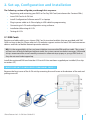
Remove the front cover of the A-Ok unit by removing the small screw at the bottom of the unit and
pulling cover off.
Silent Partner Ltd – A-Ok User Guide V1.1
9
Open the SIM card holder by sliding in direction of open arrow as shown above and hinging the flap
upwards and to the right. Insert SIM card as shown so that gold contacts are face down when SIM
Card cover is flipped back down. Slide the SIM card cover in direction of the Lock arrow as shown
below to lock SIM card in place. Please visit our website www.A-Ok.co.uk for video demo of this
procedure if required. Replace the front cover and screw.
Connect the power lead and plug the unit into the mains – see Fig 1 (page 5), (Power plug (5) connected at socket for power in the top of the A-Ok unit. (3)) . Plug the supplied USB cable between
the mini USB socket on the side of the A-Ok (10) and a free USB port of your PC.
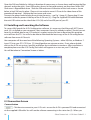
2.2 Installing and Launching the Software
To successfully launch the A-Ok Configuration software, it is necessary that Microsoft .NET Framework 3.5 is installed on your computer. Most computers have this already installed. Should you not
have this installed, please see A-Ok website’s support section for how to download this program
or install from the CD. You will also be able to download the latest copy of the A-Ok configuration
software from www.A-Ok.co.uk.
Your computer will also need one of the following Operating Systems:- either XP, Vista, or Windows 7.
Insert CD into your PC’s CD Drive. CD should perform an autorun routine. If not, please doubleclick on the A-Ok set-up icon (.exe file) and follow the installation instructions. After installation is
complete please run the A-Ok Config Tool which will appear as an icon on your PC desktop.
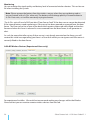
You will be taken to Connection Screen as below:
2.3 Connection Screen
Connect button
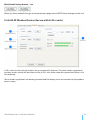
Click here to connect to your A-Ok unit - ensure the A-Ok is powered ON and connected
via the supplied USB cable. You will see the software connecting in the status bar (5). When you
10
Silent Partner Ltd – A-Ok User Guide V1.1
have successfully connected you will be presented with the Settings page.
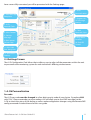
2. Alert Message
Recipients
3. A-Ok
Internal Clock
4. Alert Control
5. Startup
Message
6. Main power
fail message
1. A-Ok
Personalisation
7. Regular “All
OK” Message
Settings
8. Clock
(Network) Sync
9. Ring Alerts
Duration
10. Red LED
Control
11. PAYG SIM
Anti-deregister
12. Write/Read
Settings
2.4 Settings Screen
The A-Ok Configuration Tool allows the installer or user to adjust all the parameters within the unit
to personalise the monitoring system for each individual’s differing circumstances.
1. A-Ok Personalisation
Passcode:
The A-Ok passcode must be changed to a four digit security code of your choice. Eg replace 0000
with 1234. Please remember your passcode as this will allow you to send SMS messages to the
A-Ok to check the status of the device as well as make configuration changes using the Remote SMS
config commands listed at the end of this user guide.
Silent Partner Ltd – A-Ok User Guide V1.1
11
*You will not be able to enter alert message recipient numbers if you do not change the
passcode*
Person/Home:
This is where the name of the person being cared for is stored - You can put up to 24 characters in
this field. e.g. Mum, Dad, Mrs Jones, Brenda etc...
Location/Postcode:
This field is for entering the location of the A-Ok unit such as the postcode - You have 24 characters
so can replace the postcode with the house name or even the home telephone number of the
person being monitored. E.g. Home, 23 West St, Paris etc
2. Alert Message Recipients
Message Recipients (i.e. carers or responders)
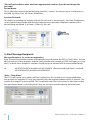
Enter the name and mobile number of the people who will receive the SMS or "Ring" alerts. You can
add a maximum of five recipients and can select whether they receive just SMS messages, just "ring"
alerts* or both. Note: Recipient’s numbers should always be entered with the international prefix.
i.e. UK 078912345678 should be 4478912345678 (Note the leading 0 (Zero) is omitted)
UK 01628638557 should be 441628638557
*Note - "Ring Alerts"
The A-Ok unit can be set to make a call to a number for a few seconds as an instant notification
that an alert has triggered. A "ring" alert typically calls the recipients phone within 10 seconds. This
enables the recipient to react quickly. This is especially useful for live-in carers to alert when a door
has opened and there is risk of the person they are caring for wandering away from the home.
12
Silent Partner Ltd – A-Ok User Guide V1.1
Usage example:
In this example Jane & Helen will receive SMS alerts for all alert conditions than have been enabled in the
Parameters section. The home phone will just "ring" for a few seconds to alert the home owner that an alert
has triggered. This is useful for Night Wandering or Door Wandering where the carer lives with their charge.
** Important: You must enter the alert message recipients number with the international prefix
as shown in the example above.
3. Internal Clock
You can set the internal clock of the A-Ok unit to match the time of your PC clock by clicking on the
‘Get PC Time’ and then by clicking Set Clock, this will write this time to the A-Ok Unit. Please check
your PC is set at the correct time first.
4. Alert Control
SMS Alert Control allows you to select how you would like the text messages sent:
Send Alerts to all
All recipients that have checked the SMS alert box will receive the alert SMS messages.
Cascade Alerts
The alert SMS messages will be sent to the recipients in turn from recipients 1 through to 5 until
A-Ok receives an automatic SMS delivery report back from the recipient’s phone to confirm the
message has arrived. If no delivery receipt is received within a short time the A-Ok will try recipient
number 2 and so on until the message is delivered. When a delivery receipt is received by A-Ok, no
further messages will be sent to remaining recipients. Lack of delivery receipts can mean that the
Silent Partner Ltd – A-Ok User Guide V1.1
13
recipient’s phone is switched off or not on the mobile network.
NB. Not all mobile networks support the ‘cascade feature’, in these circumstances; A-Ok will
default to sending alerts to all users concurrently.
5. Startup Message
A-Ok will send recipients a SMS Message to inform them that the device is active and on the
network.
The message format is a follows:
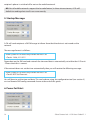
Alarm system A-Ok successfully started. MD V6.01.05
-Clock is 14:38, 31.1.2011
Dependent on the SIM card and network the time and date is automatically set within the A-Ok unit
- Please check this is correct.
If the network does not set the time automatically then you will receive the following message:
Alarm system A-Ok successfully started. MD V6.01.05
-Clock is NOT Set-Please set.
You will have to set the time and date. This can be done using the configuration tool (see section 3)
or via a Remote SMS config command shown at the end of this guide.
6. Power Fail Alert
14
Silent Partner Ltd – A-Ok User Guide V1.1
The A-Ok until has a backup battery which is recharged when the unit is connected to its power
supply. If the power supply is cut or has been unplugged, the A-Ok will send the following message
to the recipients:
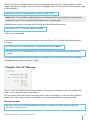
Mrs Smith SL6 1ED: A-Ok Main Power Cut Alert - Please Check
Note: The A-Ok unit delays sending the power fail alert until the main power has been disconnected for 5 mins. This is to allow for brief power cuts or power dips.
When the main power is restored the A-Ok will send the following message:
Mrs Smith SL6 1ED: A-Ok Main Power is restored.
A-Ok is now active again.
If the main power remains disconnected for a period of time A-Ok will send the following alert
messages:
Mrs Smith SL6 1ED: A-Ok Battery Low - Please reconnect to main power.
Mrs Smith SL6 1SD: A-Ok Battery too low - A-Ok will switch off - Please check time and date when
restored.
We would recommend you do not disable this feature as you will not know if the unit has been
unplugged or the mains supply has failed.
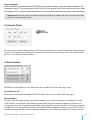
7. Regular "All’s OK" Message
The A-Ok unit will send a status text message to all recipients at regular intervals to confirm the
A-Ok is active and the status of any alarms:
You can specify the time that the message will be sent and whether it is sent each day (default),
weekly (at set time each Sunday) or Monthly (at set time on the 28th day on each month).
Message example:
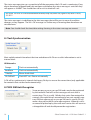
Mr Smith SL6 3EU: A-Ok Active:Movement OK,Door1 OK,Door2 OK,Temp OK,Power OK,Signal
OK,Clock is:18:00, 4.2.2011
Silent Partner Ltd – A-Ok User Guide V1.1
15
The status message gives you a snapshot of all the parameters the A-Ok unit is monitoring. If any
alarms have been triggered and have not been reset before the status message is sent then they
will appear as ALARM - You should then call or visit to check all is ok.
Mr Smith SL6 3EU: A-Ok Active:Movement ALARM,Temp OK,Power OK,Signal LOW,Clock is:18:00,
5.2.2011
The status message is in addition to the alert messages that will be sent to warn of condition
changes as they happen. The ‘ALLs OK’ message is a further way of knowing there have been no
missed alarms.
Note: You should check the time/date setting showing in the status message are correct.
8. Clock Synchronisation
Most mobile networks broadcast the time and date and A-Ok can use this information to set its
internal clock.
UK Networks:
Orange
Clock set automatically
Vodafone
Clock set automatically
T-Mobile
Please check clock
O2/GiffGaff
Clock NOT set - Please set manually
A-Ok will re-synchronise its internal clock every 28 days to ensure the correct time (only applicable
for newtorks that set the clock automatically).
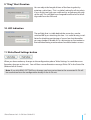
8. PAYG SIM Anti-Deregister
Some pre-pay or pay as you go SIM cards may be de-registered
by the network if no calls or text messages are sent after a
certain time. This is usually 180 days but varies from network to
network. We would always recommend a low cost monthly contract SIM but where a pay-as-you-go SIM card is used A-Ok will
make a long call to the first message recipient - When this call is
answered or picked up by the voice mail service this will count as
a chargeable call and should prevent de-registration.
16
Silent Partner Ltd – A-Ok User Guide V1.1
9. "Ring" Alert Duration
You can adjust the length of time of the free ring alert by
entering a value here - This is a global setting for all ring alerts.
If you set this too high your voice mail or ansaphone may pick
up the call. This will then be a chargeable call and will use calling credit from the SIM card.
10. LED Indication
The red light that is visible behind the sensor lens can be
switched off by un-checking this box. It is useful during installation for checking positioning of sensor lens but thereafter
you may decide to disable if it is a distraction or fascination to
the individual being monitored and would be better unseen.
11. Write/Read Settings button
When you have made any changes to the configuration please ‘Write Settings’ to send these configuration changes to the unit. You will then see confirmation message ‘Write OK’ in the Status Bar
(bottom left of screen).
Note: If you click READ SETTINGS any changes you have not written to the connected A-Ok will
be overwritten from the configuration already in the A-Ok unit.
Silent Partner Ltd – A-Ok User Guide V1.1
17
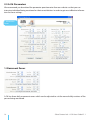
2.5 A-Ok Parameters
We recommend you download the parameter questionnaire from our website so that you can
interview individual being monitored or their carer/relatives in order to get most effective information for these settings.
1. Movement
Zones
1. Movement Zones
A-Ok has three daily movement zones which can be adjusted to suit the normal daily routines of the
person being monitored.
18
Silent Partner Ltd – A-Ok User Guide V1.1
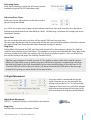
Activating Zones:
Each Zone (Morning, Lunchtime & Evening) can be
enabled using the ON/OFF drop down box:
Adjusting Zone Times:
Each zone can be adjusted to suit the times of the
person being monitored:
e.g.: If Mrs Jones gets up and goes to the bathroom between 7am and 9am then you should set
the Morning Movement Zone from 06:00 to 10:00. NB Morning, Lunchtime & Evening time zones
should not overlap.
Alarm Text:
You can customize the alert text that will be sent by SMS text message here.
The message should describe the event and will be sent to all selected recipients after the end time
has expired and if no movement has been detected during this period.
Ring Alert:
A Ring Alert will precede the SMS text Alert with a brief call to the recipients’ phone. This can be
useful to draw attention to critical alerts. The recipient must also have checked the "Ring" box in the
message recipient list within the settings tab. The duration of the ring alert is also set in call duration on the settings tab page. See Settings Section Note 9.
Tip: Message receipients should save the A-Ok’s mobile number within their mobile’s phonebook and, if possible, assign a specific ring tone. When the ring alert is triggered you will then
be able to distinguish this call immediately by the name on the display as an alert from A-Ok.
The alert SMS text will also be sent (unless you have unchecked the SMS box in the message
recipient list) giving you more details of the type of alert.
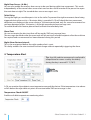
2. Night Movement
It can be useful to be alerted during the
night if the person you are caring for has
got up and may be at risk. This is especially
important if the carer lives with their charge.
Night Movement mode will activate if it detects movement during the period defined.
Night Mode Movement:
ON/OFF – Enable/Disable or switch off this alert feature.
Ring Alert:
See Ring Alert section in Movement Zones.
Silent Partner Ltd – A-Ok User Guide V1.1
19
Night Door Sensor: (A-Ok+)
You can also enable the wireless door sensor to be used during night time movement - This works
independently of the normal door sensor alerts and can be used to monitor if the person has open
the main door at night. The standard door sensor message is sent.
Toilet Delay:
During the night you would expect visits to the toilet. To prevent the night movement alarm being
triggered during these visits a 10 minute delay is provided. A-Ok will check that two movement
detections are made past the sensor during a 10 minute period and, only if a second movement has
not been detected within 10 minutes, is the night movement alarm message sent.
To enable/disable this feature please check/uncheck the toilet delay box.
Alarm Text:
You can customize the alert text that will be sent by SMS text message here.
The message should describe the event and will be sent to all selected recipients after the end time
has expired and no movement has been detected during this period.
Night Alarm Restore Interval:
This is the reset period before the night wander alert is reset.
This delay enables the carer to attend to their charge without repeatedly triggering the alarm.
4. Temperature Alert
Tip:- Age UK website recommends comfortable
temperature for rooms used by the elderly
during the day is around 21°C (70°F).
A-Ok can monitor the ambient room temperature around the device. If the temperature rises above
or falls below the adjustable set points the customizable SMS text message is sent.
Temperature Check ON/OFF
Enable or disable temperature monitoring alerts
20
Silent Partner Ltd – A-Ok User Guide V1.1
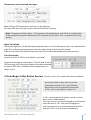
Temperature alert level and messages:
Both HIGH & LOW temperature settings can be adjusted.
The alert SMS text message can be customised for both settings.
Note: Temperature Alerts delay - A-Ok monitors the temperature and will only send the alert
if the temperature remains below the LOW set point for one hour. This is to prevent false triggering.
Night Time Mode:
During the night you can disable the temperature alerts as most heating systems are switched off at
night. This will prevent temperature alert messages being sent during this period.
Enter the start and end time for the period you wish to have the temperature alerts inactive.
Frost Protection:
(used only when A-Ok Security Mode is activated):
To prevent damage to water pipes A-Ok will send an alert
SMS message to all message recipients that have selected
to receive SMS alerts when the room temperature is at
3degC or less.
4. Door/Bogus Caller Button Sensors
(Only for use on A-Ok+ models with wireless peripherals)
Up to two wireless door sensors can be
connected to each A-Ok+ units. Wireless
door sensors must be ‘paired’ to the main
A-Ok+ unit as described in section 2.6
A-Ok+ can monitor local wireless sensors such as
door sensors and pendants.
The door sensors can be positioned up to 30 meters
from the main A-Ok+ unit and will trigger an
alert message when a monitored external door is
opened. This is used to warn of wandering.
Silent Partner Ltd – A-Ok User Guide V1.1
21
Door Sensors:
Door Sensor enable ON/OFF:
Each door sensor can be switched on/off by selecting/deselecting here.
Each door sensor has built-in pushbutton which can be configured to send an alert as shown in
the "Button Text" field below. As the sensor is attached to a door this button can be used to alert to
warn of bogus callers or as a panic alert button.
Please select this in the Button checkbox if you wish to use this feature.
Button Text:
Add your chosen alert message here.
Alarm Delay:
A delay can be added to this alert so the ‘door open’ alert text message will not be sent until the
time delay has elapsed. This feature is used when you wish to know if a door has been opened but
not shut again. If the door is shut before the time period has elapsed the message is not sent. This
feature is useful for individuals who forget to close their external doors properly!
Door Sensor Ring:
In addition to the SMS text message alert the door sensor can trigger a "ring" alert. This will immediately ring any recipient who has selected to receive "ring" alerts in the message recipient list.
Note: This feature is to enable carers whose charges are prone to wandering to react very quickly
before the person wandering has gone too far. A "ring" alert typically alerts recipient 1 within 10
seconds and the following alert SMS text message gives the carer more details.
Alarm Text:
Add your chosen alert message here.
22
Silent Partner Ltd – A-Ok User Guide V1.1
Write/Read Settings button – see
When you have made all changes to the parameters page, please WRITE these changes to the unit.
2.6 A-Ok RF Wireless Devices (for use with A-Ok+ units)
A-Ok+ units can link to local wireless sensor to expand its features. The main wireless peripherals
are door sensors which will alert back via the A-Ok+ unit when a door has opened and there is risk
of wandering.
These wireless peripherals are battery powered and the battery must be inserted into the product
prior to setup.
Silent Partner Ltd – A-Ok User Guide V1.1
23
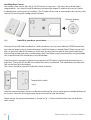
Installing Door Sensor:
The wireless door sensor (Part No: A-Ok-AD) comes in two parts – the main sensor block and a
magnet block – You should install the battery and note the unique ID code for the sensor (shown
inside the door sensor) prior to installing. The ID code will be used to connect/pair the sensor to the
main A-Ok unit using the configuration software.
Observe polarity
here
Fig 1
Note ID of your door sensor here:- …………………………………..
Prise top of case off with thumbnail or small screwdriver. You can now slide the CR2032 button battery into the battery slot or remove the plastic tab if the battery is already fitted. Please ensure that
the +ve (positive) side of the battery is at the top. You may have to remove the circuit board from
the housing to help give access to the battery slot. They battery can be removed by using the blade
of a screwdriver to push the battery out of the holder.
Snap the plastic cover back in place ensuring the small LED light is aligned with the clear lens on
the cover. The small LED will flash to confirm the sensor is powered. See video demo on website if
still unsure how to fit the battery.
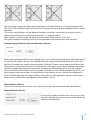
The sensor should be screwed to the door frame as below:
Tamper/fault switch
Fig 2
Note the mounting plates/covers can be removed from the sensor and magnet to enable fitting and
an arrow is shown on the magnet part (cover removed) to help with fixing.
Please ensure the correct orientation as shown in Fig 1. Picture overleaf show how not to fit the
door switch!
24
Silent Partner Ltd – A-Ok User Guide V1.1
The rear tamper switch should be positioned against the door frame so it is in the closed position.
The sensor LED will flash briefly when the door is opened or closed and periodically flash to confirm
operation.
If you are using the bogus call pushbutton located on the door sensor then ensure the sensor is
placed in a position than it can be easily pressed – i.e. at body height.
Note: Wireless sensors can be mounted up to 30 meters from the main A-Ok unit.
The signal strength and battery level can be monitored in the configuration tool software.
Configuring your Wireless Device within the software
Each wireless peripheral (Door sensor, pendant etc...) has a unique 8 character code which distinguishes it from other wireless devices. Each peripheral needs to be connected (paired) to the A-Ok+ unit.
Add the ID number (you made a note of overleaf) in Device ID box as shown above and click on Add.
(If the device is not discovered within 30 seconds you may need to press the small black reset button
which is located in the top right corner above the battery inside the door sensor. See Fig 1 above).
Once the wireless device (door sensor) has battery inserted, the LED will flash periodically. A-Ok+ will
then connect to the sensor and it is now defined as door/button sensor 1 and can be configured in
the A-Ok Parameter tab as described earlier in this guide. You can repeat this step for a second door/
button sensor, which will be configured as door/button sensor 2.
Delete Wireless Device
If you wish to disconnect a wireless sensor then select the appropriate code and click ‘Remove’
Replace Wireless Device
If you wish to replace a device with a new sensor then
you can enter the new device code and the old device
code and click ‘Replace’
Silent Partner Ltd – A-Ok User Guide V1.1
25
Monitoring
You can monitor the signal quality and battery level of connected wireless devices. This can be useful when installing the system.
Note: Please remove the battery from the wireless sensors when they are not being used or
are not “paired” with a A-Ok+ main unit. The battery will discharge quickly if it cannot detect a
A-Ok+ host units, as it will be constantly trying to connect.
The A-Ok+ unit will send a SMS text alert “Door Sensor Fault” if the door sensor cannot be detected,
if the internal battery needs replacing or if the sensor has been opened or removed from the door
frame. The Door sensor has a lever at the back which remains depressed whilst fitted on the door
frame and when this lever is released i.e. once removed from the door frame, it will generate an
alert.
As such, be aware that after set-up, if door sensor is not already mounted on the frame, you will
receive this initial message telling you there is a Door fault which you can ignore until the sensor is
correctly fitted to the door frame.
A-Ok RF Wireless Devices (Experienced Users only)
For experienced installers. We would not recommend making any changes within the Wireless
Zones tab but you can monitor remote wireless devices from this tab.
26
Silent Partner Ltd – A-Ok User Guide V1.1
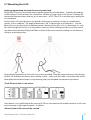
2.7 Mounting the A-Ok
Unplug programming lead and disconnect power lead.
Mount the A-Ok unit is a position where regular movement will take place – typically the landing
or the hallway. Do not position it in a bedroom, kitchen or living room as the sensor is looking for
movement between rooms and not just in one room. NOTE: The A-Ok is monitoring or looking for
‘no’ movement.
Position the A-Ok unit high up on a wall and not facing any windows or door or variable heat
sources such as radiators. The angle of detection is 90˚ (a right angle) in all directions. The red
light will assist you during the installation process because when this is lit, it is detecting. As such,
you should angle the sensor so it only detects a person whilst walking past the sensor but would
not detect the individual if they had fallen in front of the sensor and was perhaps on the floor in a
sitting or crawling position.
Secure the fixing bracket to the wall using screws provided. Plug the power connector into the top
of the A-Ok and the transformer into a nearby socket – make sure the cable is secured to the wall or
channelled around door frames using retaining clips (not included) to prevent a trip hazard.
The A-Ok main unit is now active.
Once power is re-established to the unit and A-Ok has connected to the mobile network, it will send
a text message to Message Recipient 1 as follows:
‘Alarm System A-Ok successfully started’
Silent Partner Ltd – A-Ok User Guide V1.1
27
2.8 Testing the A-Ok
Once you have installed the A-Ok unit you can test it by requesting a status messages by sending
the following text message to the A-Ok SIM card number:
PASSCODE INFO
(note the SPACE between PASSCODE & INFO)
PASSCODE is the 4 digit number that you set using the configuration software.
Example: 1234 INFO
A-Ok will reply with one of the following SMS messages i.e.:
Mrs Jones SL6 3EU: A-Ok Active:Movement OK,Door1 OK,Door2 OK,Temp OK,Power OK,Signal
OK,Clock is:09:59, 11.2.2011
or
Mrs Jones SL6 3EU: A-Ok Active:Movement OK,Door1 OK,Door2 OK,Temp OK,Power OK,Signal OK,Clock is NOT Set-Please set.
If you receive the second message you should set the clock either by using the Configuration software or by sending the following message: PASSCODE YYYY.MM.DD HH:mm
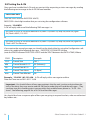
(note the SPACE between PASSCODE & DATE and the SPACE between the DATE & TIME) Where:
CODE
Description
Example
YYYY
Current Year
2011
MM
Current Month 01-12
02 (February)
DD
Current Date 01-31
11
HH
Current Time Hours
18 (6pm)
mm
Current Time Minutes
50
Example: 1234 2011.02.12 18:50. A-Ok will reply with a message to confirm:
Date and Time are set 2011.02.11 18:50
Important:- You should inform all message recipients that the unit is active and give them details of the alerts they may receive and the SIM card number that will send the messages – They
can then store this number against a name within their mobile/home phone i.e.: “A-Ok – Mrs
Jones”. See following page for list of A-Ok Care Alert Messages.
You should also have a response plan of how you are going to respond to alerts, who are authorised
key holders etc...
28
Silent Partner Ltd – A-Ok User Guide V1.1
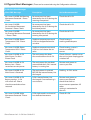
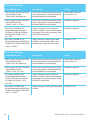
2.9 Typical Alert Messages: (These can be customised using the Configuration software)
A-Ok Care Alert Messages
Alert SMS Message
Description
Action Recommended
Mrs Jones SL6 5BB: No Morning
Movement Detected – Please
Check.
No movement has been
detected by the A-Ok during the
morning time period
Check that all is OK
Mrs Jones SL6 5BB:
No Lunchtime Movement
Detected - Please Check.
No movement has been
detected by the A-Ok during the
lunchtime period
Check that all is OK
Mrs Jones SL6 5BB:
No Evening Movement Detected
– Please Check.
No movement has been
detected by the A-Ok during the
evening time period
Check that all is OK
Mrs Jones SL6 5BB: Room
Temperature LOW - Please
Check.
Ambient temperature around
A-Ok has dropped below the
set value
Check heating is
working and adequate.
Mrs Jones SL6 5BB: Room
Temperature HIGH - Please
Check.
Ambient temperature around
A-Ok has risen above the set
value
Check heating system is
correct or cooling is
correct.
Mrs Jones SL6 5BB: A-Ok
Main Power Cut Alert Please Check
The main power has been
disconnected from the A-Ok
Check if there is a power cut or
the unit has been unplugged or
switched off
Mrs Jones SL6 5BB: A-Ok
Battery Low - Please
reconnect to main power.
The main power has not been
restored and the A-Ok’s internal
battery is running low
Restore main power as
soon as possible
Mrs Jones SL6 5BB: A-Ok
Main Power is Restored.
The main power is restored
BEFORE the internal battery has
discharged
Nothing - A-Ok is active.
Mrs Jones SL6 5BB: A-Ok
Battery too low - A-Ok
will switch off - Please
check time and date when
restored.
A-Ok’s internal battery has
discharged. Care monitoring is
now inactive.
Restore main power as
soon as possible and
check/reset clock to
ensure correct operation. All
other
setting is maintained in
the unit.
Mrs Jones SL6 5BB: Night
Movement Detected - Please
Check.
A-Ok night mode is active and
has detected movement
Check all is OK
Silent Partner Ltd – A-Ok User Guide V1.1
29
A-Ok Status Messages
Alert SMS Message
Description
Action
Alarm system A-Ok successfully
started. MD V6.01.05
-Clock is NOT Set-Please set.
Initial start-up message sent on power
up or when power is restored after the
internal battery has discharged.
Clock needs to be set
(see section 2.8)
Alarm system A-Ok successfully
started. MD V6.01.05
-Clock is 14:38, 31.1.2011
Initial start-up message sent on power
up or when power is restored after the
internal battery has discharged.
No action required
Mrs Jones SL6 5BB: A-Ok
Active:Movement OK,Door1
OK,Door2 OK,Temp OK,Power
OK,Signal OK,Clock is:19:13,
26.1.2011
Status message sent at set time to
confirm system is active and time/date
are correct. Also sent by request using
XXXX INFO command
No action required
Mrs Jones SL6 5BB: A-Ok
Active:Movement ALARM,Temp
OK,Power OK,Signal LOW,Clock
is:09:11, 5.2.2011
Status messages showing activated
ALARM – No movement alarm was
detected during the last time zone
Check all is OK
Alert SMS Message
Description
Action
Alarm system A-Ok successfully
started. MD V6.01.05
-Clock is NOT Set-Please set.
Initial start-up message sent on power
up or when power is restored after the
internal battery has discharged.
Clock needs to be set
(see section 2.8)
Alarm system A-Ok successfully
started. MD V6.01.05
-Clock is 14:38, 31.1.2011
Initial start-up message sent on power
up or when power is restored after the
internal battery has discharged.
No action required
Mrs Jones SL6 5BB: A-Ok
Active:Movement OK,Door1
OK,Door2 OK,Temp OK,Power
OK,Signal OK,Clock is:19:13,
26.1.2011
Status message sent at set time to
confirm system is active and time/date
are correct. Also sent by request using
XXXX INFO command
No action required
Mrs Jones SL6 5BB: A-Ok
Active:Movement ALARM,Temp
OK,Power OK,Signal LOW,Clock
is:09:11, 5.2.2011
Status messages showing last activated
ALARM
Check all is OK
A-Ok+ Care Messages
30
Silent Partner Ltd – A-Ok User Guide V1.1
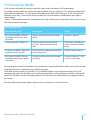
3.0 Security Mode
A-Ok can be switched into security mode for times when the home is left unoccupied.
To enable security mode any of the message recipients can just call the A-Ok’s mobile number from
their authorised phones – i.e. the phones that receive the alert SMS messages. A-Ok will reject this
call after a few rings* and set the security mode ON. You will receive a confirmation message as
shown below:
* Note – If the mobile network’s voicemail answers the call then just hang up the call as soon as you
hear the voicemail message.
A-Ok security mode
Alert SMS Message
Description
Action
Mrs Jones SL6 5BB: A-Ok Security Mode is now active - Ring
to disable.
Security mode has been activated by
calling
No action required
System disarmed. Tamper: 3,4
Security mode cannot be set due
to A-Ok+ door sensor position of
fault
Check door is closed and
sensor is fixed to the door
frame.
A-Ok Security Mode - Alarm Triggered: Mrs Jones SL6 3EU
A-Ok security has detected movement
in the secure zone
Check or seek assistance
Mrs Jones SL6 5BB: A-Ok Security Mode Deactivated - Now in
Care Mode.
Security mode has been de-activated
by calling
No action required – A-Ok
is now in Care mode.
During security mode if A-Ok detects any movement a warning SMS alert will be sent to all message
recipients that have selected to receive SMS messages.
To disable security mode just call the A-Ok’s mobile number a second time and again A-Ok will
automatically reject the call after one ring (If voicemail picks up the call then manually end the call)
and A-Ok will return to care monitoring mode. You will receive a confirmation message to confirm
this action.
For more information and updates please visit our website as www.A-Ok.co.uk
Silent Partner Ltd – A-Ok User Guide V1.1
31
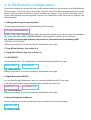
4. A-Ok Remote Configuration:
There are a number of settings that can be changed remotely just by sending one of the following
SMS messages. These messages can only be sent from one of the alert message recipient’s mobile
phones and must be sent exactly as shown including any spaces. If you receive a message “wrong
syntax” please check your message and try again. You should also make a note of any changes you
make remotely.
1. Adding/removing message recipients:
To add a message recipient send the following SMS message:
XXXX NR2:44NNNNNNNNNN
where: XXXX is the 4 digit passcode , NR2 is the second recipient (you can have up to five recipients
NR1, NR2, NR3, NR4 & NR5) 44NNNNNNNNNN is the telephone number of the recipient.
e.g. To add a new message recipient into position 3 you would send the following SMS
1234 NR3:447871234567
When sent correctly A-Ok will send back a confirmation message.
2. Time & Date Setting: See section 2.8
3. Status/All’s OK message: See section 2.8
4. A-Ok ON/OFF:
You can disable the A-Ok completely by sending the following SMS message:
XXXX A-Ok:ON or XXXX A-Ok:OFF
e.g. 1234 A-Ok:OFF
When sent correctly A-Ok will send back a confirmation message.
5. Night Movement ON/OFF:
You can disable Night Movement alerts by sending the following SMS message:
A-Ok will use the night movement parameters already set in the unit.
XXXX NIGHT:ON or
XXXX NIGHT:OFF
e.g. 1234 NIGHT:OFF
When sent correctly A-Ok will send back a confirmation message.
6. Remote Temperature Request:
You can request the current temperature from a remote A-Ok unit by sending:
XXXX GETTEMP
eg 1234 GETTEMP
Silent Partner Ltd – A-Ok User Guide V1.1
33
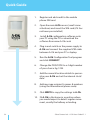
Quick Guide
1. Register and add credit to the mobile
phone SIM card.
2. Open the main A-Ok sensor (small screw
at bottom) and insert the SIM card (if it has
not been pre-installed)
3.
Install A-Ok configuration software onto
your PC using the CD or download the
software from www.A-Ok.co.uk
4. Plug in and switch on the power supply to
A-Ok and connect the supplied USB cable
between A-Ok and your PC or laptop.
5. Run the A-Ok Configuration Tool program
and click CONNECT
6. Change the PASSCODE to a 4 digit number
of your choice. Eg. 1234
7. Add the name & location details to personalise your A-Ok and set the internal clock/
date.
8. Add message recipient’s names & numbers
(using the International phone code)
9. Click WRITE to copy the settings to A-Ok.
10.Fit A-Ok in the home in a position where
you would expect to detect regular movement, usually the hallway or landing.
34
Silent Partner Ltd – A-Ok User Guide V1.1
Please read the full user guide to configure movement times, temperature settings etc and how to install wireless accessories such as the door sensor.
Silent Partner Ltd – A-Ok User Guide V1.1
35
Silent Partner Ltd
Tel: 0800 9 10 10 20
www.a-okmonitor.com