1
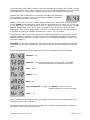
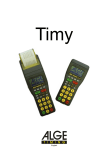
When the TIMY Terminal has finished copying Time Stamps,
"End" is displayed.
At this point, remove the USB-Key. If the Terminal indicates "End" immediately, without
displaying "CoPY", the TIMY Terminal memory was empty and there was nothing to copy.
It is possible download the Time Stamps from several different TIMY Terminals, without
copying the USB-Key contents onto the PC after each copy function. The capacity of a
USB-Key can be considered as unlimited as a 256Mb Key is able to store approximately 8
million Time Stamps!
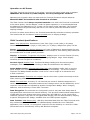
The TIMY Terminal can store 14,000 Time Stamps in its internal
memory before requiring a transfer to a USB-Key. When the internal
memory is full, TIMY displays "FuLL" when an additional employee
"Clocking" is attempted:
If, for an unspecified reason, TIMY does not manage to copy the Time
Stamps to the USB-Key, the Terminal displays an error code (for
example, "Er63"):
The TIMY error codes are grouped into "Er5x" and "Er6x" series. The "Er5x" series
indicates a hardware problem with the USB-Key and the "Er6x" series indicates a problem
related to USB-Key formatting.
The USB-Key shipped with the TIMY Terminal is formatted and tested by the system
manufacturer. If a USB-Key from some other source is used, it may not function with the
Terminal for a variety of reasons, such as excessive power consumption.
When using an original Key and the Terminal indicates a "Er5x" error, the USB-Key is
probably defective and needs replacement. If the Terminal indicates a "Er6x" error, the
causes can be:
- The absence of a file named "BKS_FILE.TXT" on the USB-Key
- Illegal handling of file "BKS_FILE.TXT" (never remove, rename or replace the file by
another)
- Badly formatted USB-Key
- A damaged or defective USB-Key
For more details on the USB-Key formatting process, see "About the USB-Key" on page 8.
Daylight Saving Time
TIMY Terminals are supplied with the automatic changeover for Daylight Saving Time
activated. If this function needs to be de-activated, swipe the Configuration Badge
"SUMMERTIME=OFF". If this function should be re-activated, swipe the Configuration
Badge "SUMMERTIME=ON". Once programmed, the setting is permanent until it is reprogrammed. There is no need to swipe the badge every spring and autumn.
Time Setting
For the temperature range +10°C to +40°C, the internal clock of the TIMY Terminal has
an accuracy of approximately ±15 seconds per month. The further the ambient
temperature moves away from 25°C, the larger the accuracy variation.
TIMY Time Reporting Terminal
Page: 3 of 10