1
Do not leave the Terminal in "Set Time" mode. The display does not switch off in this
mode and the batteries run down quickly. The "SET CLOCK" badge must be swiped to exit
the "Set Time" mode.
Changing Batteries
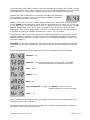
When the batteries are low, the TIMY display indicates "bAtt" when
the red button is pressed, or when a badge is swiped under AC mains
power operation, as seen here.
When "bAtt" is indicated, it is not possible to download Time Stamps to the USB-Key
during battery operation, in case insufficient power is available to complete the download
sequence. Batteries must be replaced for the download to be successful.
At the first appearance of this message, the remaining battery life is still adequate for
several hundred Time Stamps. However, do not delay replacing the batteries. If the
operational limit is exceeded, the Terminal stops functioning, but no data is lost. "Time
Stamps" are stored in flash memory which does not require any electrical source. As soon
as the batteries are replaced by new ones, the Terminal returns to normal operation.
However, the clock needs energy to function and, if too much time is taken to replace the
batteries, the clock may require re-setting after the Terminal re-starts.
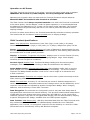
The batteries are located in a drawer that can be
withdrawn from the top of the Terminal without removing
the Terminal from the wall.
Pinch the two retaining clips on either side and pull the
drawer out. The clips are difficult to pinch by hand, to
prevent the drawer from popping out during transport.
A flat-bladed screwdriver may be required to press the
clips in.
Remove the expended batteries and replace them with
NEW alkaline batteries, all of the same brand. Be careful
with the battery polarity when refitting. The Terminal clock
continues to function for at least 3 MINUTES without
batteries. Beyond this time, there may be a need to re-set
the clock after the Terminal restarts. Use only good-quality
"branded" alkaline batteries. Do not use rechargeable-type
batteries!
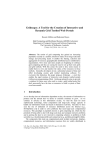
Press the
clips inwards
Remove the
drawer with
the batteries
NOTE: Four NEW alkaline "AA" type batteries have the capacity to perform approximately
20,000 Time Stamps. If the Terminal must operate on AC power, order the AC mains
power plug-in adapter, part number 9100-1084UK, with the UK/Irish compatible plug. Any
Time Stamp data in memory is NOT lost when the batteries are removed.
TIMY Time Reporting Terminal
Page: 5 of 10