1
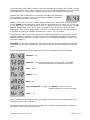
To set the time of the TIMY Terminal, swipe the Configuration Badge "SET CLOCK". At this
moment, the clock stops, TIMY enters the "Set Time" mode and displays the current value
of the MINUTES. For most time settings, the user ONLY has to adjust the minutes.
Because the TIMY display does not indicate extended text messages,
the messages are slightly cryptic. For example, "Πi 43" indicates 43
minutes when the clock is at 15:43:
BRIEFLY press the red button, and the display advances by one minute. If the Terminal
time is ahead of the actual time, either wait for the actual time to "catch up" or cycle up
to "59" after which the setting starts over at “0”. Adjust the minute value so that it is ONE
MINUTE IN ADVANCE of the actual time, and wait for the correct time to occur before
swiping the "SET CLOCK" badge again. The clock is synchronised with the set values at
the instant of swiping the badge; seconds are re-set to "00" by default.
If other time or date values need adjustment, PRESS and HOLD the red button until the
next time category displays. For each category, the adjustment operation is the same:
BRIEFLY press the red button to advance the value and PRESS and HOLD to pass to the
next time category.
CAUTION: for the year adjustment, if the desired value has been passed it is necessary
to advance all the way through year "99" to arrive at "00" and then stop on the correct
year.
For a clock showing 15:43:56 Friday 26/12/2013, the display sequence would be:
Minutes = 43
Seconds = 00 (Seconds are always re-set to "00" to facilitate
synchronisation with a broadcast time clock)
Year = 2013
Month = 12
Date = 26
Day of the Week = Friday (This MUST be set correctly for
daylight saving to function correctly)
Hour = 15
If the red button is pressed and held, the display cycles around to "Minutes" (Πi), then
"Seconds", then "Year" and so on.
To check the accuracy of the clock, compare the Terminal minute changeover with the
time signal of the reference time clock.
TIMY Time Reporting Terminal
Page: 4 of 10