1
CONTROLS & FUNCTIONS
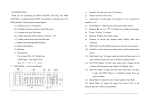
1. SCANNER BUTTONS - Used to Select any or all of 12 fixtures This
is what selects which DMX channels go to
the fixtures.
Scanner 1 controls Channel 1 to 16
Scanner 2 controls Channel 17 to 32
See addressing of fixtures on page 7 for more information
2. SCENE BUTTONS - Used to store Scenes in program mode or
playback your scenes in playback mode
3. LCD DISPLAY - Displays values and settings depending on the
chosen function.
4. BANK BUTTONS ( OR )- Selects which Bank you want to use.
(there are 30 selectable banks total.)
5. CHASE - Used to select chases (1-6).
6. PROGRAM - Used to activate program mode Display blinks when
activated.
7. MIDI / REC - Used to control MIDI operation or to Record each
step for Scene and Chases.
8. AUTO/DEL- Select AUTO speed in chase mode or Deletes
Scenes and or chases .
9. MUSIC / BANK COPY- Used to trigger sound activation in Chase
mode or to copy a bank of scenes from one to
another in Program Mode
10. BLACKOUT - Disables or enables all channel outputs
11. TAP SYNC / DISPLAY - In Auto Chase mode used to change
rate of chase also to change LCD Display in
Manual Chase.
12. FADE TIME SLIDER - Used to adjust the FADE TIME. Fade Time is
the amount of time it takes the DMX Operator
to completely change from one scene to another.
For example; if the fade time slider is set to 0 (zero) a scene change will
be instant. If the slider is set to ‘30s’ it will take the DMX Operator 30 seconds to complete the change from one scene to the next.
13. SPEED SLIDER - Used to adjust the rate of chase speed in Auto
Mode.
14. PAGE SELECT - Used to select faders between PAGE A (1-8) and
PAGE B (9-16) of each Scanner Button
15. FADERS (1-8) - Used to adjust the intensity from 0% to 100% or DMX
output level from 0 to 255 of each channel
ADJ Group - DMX OPERATOR User Manual page 3
REAR CONTROLS
16. MIDI IN- Receives MIDI data.
17. DMX POLARITY SELECT- Changes the polarity setting of the DMX
output.
18. DMX OUT- Used to send DMX signal to fixtures or Packs.
19. DC INPUT- Accepts a DC 9~12V, 300 mA minimum, power
supply.
17
16
MIDI IN
18
DMX POLARITY
SELECT
1:GND
2:DATA 3:DATA +
19
DMX OUT
DC INPUT
-
1:GND
+
2:DATA +
3:DATA -
+9V-+12V 300mA Min.
DMX512 ADDRESSING
WHEN ADDRESSING YOUR FIXTURES FOLLOW THE STARTING
ADDRESS IN THIS BOOK NOT THE ADDRESSING FOUND IN YOUR
FIXTURE MANUAL
DMX 512 is a type of protocol that sends out up to 512 multiplex
channels at once down a common cable. Each channels has a value
from 0 to 255. You set the address for each receiver(fixture) by using
Dip switches or some type of digital readout
Each Dip switch has an ADDRESS based on binary code.
Dip switch
#1 #2 #3 #4 #5 #6 #7 #8 #9
Value
1 2 4 8 16 32 64 128 256
YOU SELECT THE ADDRESS WANTED BY ADDING THE TOTAL OF
DIP SWITCHES ON.
Dip switch #10 is not used with DMX but normally to select some
Function ie: Master / Slave, Sound Activation or to receive DMX
Control.
ADJ Group - DMX OPERATOR User Manual page 4