1
AUTO RUN CHASES:
1. Select your desired chase by pressing any or all of the six
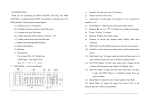
CHASE BUTTONS (FIG.5).
2. Press and release the AUTO/DEL BUTTON (FIG.8).
3. The corresponding LED will flash in the LCD DISPLAY (FIG.3)
indicating Auto mode is engaged.
4. Adjust the SPEED (FIG.13) and FADE (FIG.12) times to your desired
settings.
5. The chase will now run according to your set speed and fade
time.
Note: You can override the speed and by tapping the
TAP SYNC /DISPLAY BUTTON (FIG.11) three times, the chase would then
run according to the time interval of your taps.
Note: when Adjusting fade time never make it slower than the Speed setting or your scenes will not be completed before a new step is sent.
Note: If you want to include all the Chases PRESS AUTO/DEL BUTTON
before selecting Chase.
MUSIC RUN SCENES:
1. Press the MUSIC/BANK-COPY BUTTON (FIG.9) to turn on the
corresponding LED in the LCD DISPLAY (FIG.3).
2. Select the bank that holds the scenes you wish to chase by using
UP or DOWN BUTTONS (FIG.4), you may also use a MIDI controller
to change the scenes (see MIDI operation).
3. Press MUSIC/BANK COPY BUTTON (FIG.9) to exit.
MUSIC RUN CHASES:
1. Select your desired chase by pressing one of the six
CHASE BUTTONS (FIG.5).
2. Press and release the MUSIC/BANK-COPY BUTTON (FIG.9).
3. The corresponding LED will flash in the LCD DISPLAY (FIG.3)
indicating Music mode is engaged.
4. Chase will now run sound.
ADJ Group - DMX OPERATOR User Manual page 15
MIDI OPERATION
To Activate MIDI operation:
1. Press and hold down the MIDI/REC BUTTON (FIG.7) for three
seconds, the last two digits of the LCD DISPLAY (FIG.3) will BLINK to
indicate MIDI setting.
2. Use the UP AND DOWN BUTTONS (FIG.4) to select the MIDI Channel
1 to 16 you would like to be activated from.
3. Press and hold down the MIDI/REC BUTTON (FIG.7) for three
seconds,to exit this function and MIDI operation is now on.
MIDI CHANNEL SETTING
BANK (Octave)
BANK
BANK
BANK
BANK
BANK
BANK
BANK
BANK
BANK
BANK
BANK
BANK
BANK
BANK
BANK
NOTE NUMBER
FUNCTION
1
2
3
4
5
6
7
8
9
10
11
12
13
14
15
00 TO 07
08 TO 15
16 TO 23
24 TO 31
32 TO 39
40 TO 47
48 TO 55
56 TO 63
64 TO 71
72 TO 79
80 TO 87
88 TO 95
96 TO 103
104 TO 111
112 TO 119
1 to 8 of Bank 1
1 to 8 of Bank 1
1 to 8 of Bank 1
1 to 8 of Bank 1
1 to 8 of Bank 1
1 to 8 of Bank 6
1 to 8 of Bank 7
1 to 8 of Bank 8
1 to 8 of Bank 9
1 to 8 of Bank10
1 to 8 of Bank11
1 to 8 of Bank12
1 to 8 of Bank13
1 to 8 of Bank14
1 to 8 of Bank14
CHASES
120 TO 125
1 to 6 Chases
BLACK OUT
126
on or off
on or off
on or off
on or off
on or off
on or off
on or off
on or off
on or off
on or off
on or off
on or off
on or off
on or off
on or off
BLACKOUT
The DMX OPERATOR only receives MIDI notes and you may have to transpose your keyboard to find the proper notes
ADJ Group - DMX OPERATOR User Manual page 16