1
10
Bryce 5: User Manual
RENDERING:
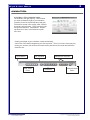
To output your final animation into QuickTime, you must File> Render Animation.
Things to remember:
♦
The window you are viewing is what will be rendered…to render the camera view…you
must select the camera view from work view controller.
♦
There are different compressors to render with…each has a benefit and limitation; you need
to learn them to make sure you are using the correct one based on your desired output.
♦
A high frame per second creates smooth animations and huge file size…balance this
depending on output destination.
♦
Using no compression is best for importing into a video editor.
♦
Use cleaner 5 to shrink file size after editing.
♦
The size of the window is the size of the QuickTime movie…to change to a smaller
size…use the document setup area and set it to 320 x 240…this is best for most animations
because of file size and web destinations.
♦
On a PC it defaults to AVI…change to Quicktime
File name: Bryce5_User.pmd
Last modified: 03/06/02
Copyright Arizona Board of Regents, 2002
The University of Arizona