1
3
Bryce 5: User Manual
SETTING UP YOUR WORKSPACE:
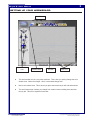
Work Feature
Work window
view
Creation Area
Work
Window
Time Line
♦
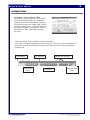
The work window view is a very often-used item. This is how you quickly change the work
window view. Notice the triangle…this is a text based change area.
♦
Next is the creation area. This is where you place the items that you will edit and animate.
♦
The work feature area is where you change from creation items to editing items and also
the sky lab. This will be explained more later.
File name: Bryce5_User.pmd
Last modified: 03/06/02
Copyright Arizona Board of Regents, 2002
The University of Arizona