1
SET
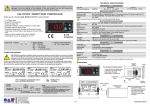
OUT1 LED : Specifies the output OUT1.
OUT1 OUT2 HOUR MIN
START
SET
SET
OUT2 LED : Specifies the output OUT2.
HOUR LED : Selected time unit is HOUR.
STOP
CAL
ETM232
ETM2432
DIGITAL TIMER
MIN LED
: Selected time unit is MINUTE.
Timer value can be set in Running Mode , Parameter values can be set in Programming Mode and newly assigned parameter values can be saved .
SET
After parameter values are changed , new values are saved to memory and Running Mode is returned either by pressing
button or by waiting 10
seconds.
Timer is started by pressing
button for 1 second , when Str.2 is selected (Except,either parameter or time set value changing) .
Menu parameters can be accessed in Programming Mode. Parameter set values can be increased. Timer set value can be increased in Time Config
Mode. Timer set value increases gradually accelerated by pressing continuously.
Timer and audible warning are stopped by pressing button for 1 second. when Str.2 is selected (Except,either parameter or time set value changing) .
Menu parameters can be accessed in Programming mode. Parameter set values can be decreased. Timer set value can be decreased in Time Config
Mode. Timer set value decreases gradually accelerated by pressing continuously.
TIME CONFIG MODE
28 : 00
Timer
set
value
SET
SET
27 :59
28 : 00
28 : 00
SET
SET
Running Mode switches to Time Config Mode by pressing
button. Display indicates configuration mode is opened by flashing. Desired timer set value can be set by pressing
SET
new timer set value is saved to memory and Running Mode is returned either by pressing
button or by waiting 10 seconds.
Programing Menu is opened and Confparameter is seen by pressing
sub-menu parameter is opened when pressing
button.
SET
and
buttons at same time. Switching between menu parameters is done by pressing
SET
SET
buttons. After desired timer value set,
button. While one of menu parameter is seen,
SET
In order to change sub-menu parameters value, press
buttons while holding button down.When
button is released , all changes will be saved to memory and related sub-menu parameter is returned.
Programming Menu is returned from sub-menu parameters by pressing
buttons at same time. In the sub-menu , all changes will be saved to memory and Running Mode is returned from sub-menu
SET
if no key is pressed for 10 seconds. In programming menu , all changes can be saved to memory and Running Mode can be returned from programming menu either by pressing
buttons at same time or
if no key is pressed for 10 seconds.
SET
Programming Menu
Parameter Configuration Diagram
SET
SET
SET
SET
Conf
tIME
5tr.t
0ut.t
5ond
www.west-cs.com
p.5EC
t.5Et
Time unit ;
hour (hour) or
min (minute)
t.lol
If Str.t is Str.1, digital inputs
(start,reset,gate) are enabled.
If Str.t is Str.2,
START/STOP buttons are enabled.
t.upl
Output type ;
9 different output type
can be selected.
(Out.1, Out.2, Out.3, . , Out.9 )
Detailed in page 3/4.
In.dE
time
Time config lower limit ;
can be selected between
0:01 and t.uPL parameter
value.
Time config upper limit ;
can be selected between
t.loL parameter value
and 99:59.
Time config increase/decrease
step;
can be selected between
1 and 30.
Parameter security code ;
Parameter value must be
432.
5.Cod
(dPArmessage is seen and
factory reset is started
if holding
button down for 4
seconds while S.Cod is 0.)
|
SET
min
hour
SET
In order to set related parameter to desired value , hold
button down,
when display is started to flash use
buttons.
Value increases/decreases gradually accelerated by pressing
buttons continuously.
t.SEt security parameter ;
nonE: Programming Menu
invisible.
P.YES: Programming Menu
parameter can be changed.
P.no : Programming Menu
parameter can only be seen.
a. -t.5.
ConF and tSEt security parameter ;
nonE: Programming Menu
invisible.
P.YES: Programming Menu
parameter can be changed.
P.no : Programming Menu
parameter can only be seen.
a. -t.c.
Audible Warning Config ;
8 different sound type
can be selected.
If sd. is 1,
audible warning is enabled.
WEST Control Solutions
The Hyde Business Park
Brighton East Sussex
BN2 4JU United Kingdom
Tel : +44 (0) 1273 606271
Fax : +44 (0) 1273 609990
hour
2/4
ETM2432-E-01-201411