1
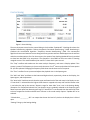
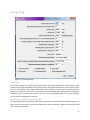
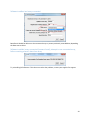
Settings dialog
Figure 6. The Settings dialog.
Decay Time
The acoustic outputs, the columns of the Spectrogram, the Single mic spectrum, and the Display, have
memory that decays exponentially with the Decay time. Setting the Decay time to a short value, such as
0.01 sec., gives displays that change rapidly with transient events, such as echoes of impulsive sounds.
Setting it to a long time, such as 1 sec. gives results that are steadier and produces better averaging for
stationary sources. A compromise choice of 0.2 or 0.3 sec. can give good results for common situations
such as slowly moving people or vehicles.
Microphone for spectrum and sound (1-40)
The selected microphone is used the audio output, the Spectrum, and the sound for MPEG-4 output. If an
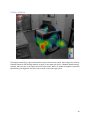
ROI is present on the Display, then focused data for the center of the ROI is used for all of these instead
of the selected microphone.
11