1
Array disconnected and SIG software CcmAccess.jar not installed ........................................................ 23
Software installed and array disconnected ............................................................................................ 23
Software installed and array connected ................................................................................................. 24
Software installed, array connected (camera found), attempt to use connected array, failure receiving
acoustic data from array ......................................................................................................................... 24
Overview
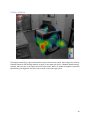
BeamformX is a real time acoustic beamforming program from OptiNav, Inc. See www.optinav.com or
contact Robert Dougherty at [email protected]. It maps acoustic source distributions for noise control
engineering, machinery troubleshooting, bioacoustics, aircraft tracking, architectural acoustics, security,
and other applications. It is based on OptiNav’s beamforming algorithm Robust Asymptotic Functional
Beamforming,1,2 but can also perform conventional Frequency Domain Beamforming. It displays the real
time beamform map, a spectrum, a spectrogram, and a text peak list. The previous 30 seconds or so of
data are stored in the spectrogram buffer. The real time acquisition can be paused and the data in the
spectrogram buffer can be replayed with different processing parameters including the central frequency,
the focus distance, and the temporal decay time. Video with audio can exported to MPEG-4 files. Raw
data can be recorded for post processing using BeamformX other software.
The four main windows are Control, the Spectrogram, the Spectrum, and the Display. Their functions and
controls are described in the following sections after a description of the Startup Dialog.
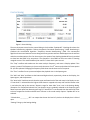
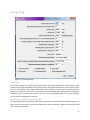
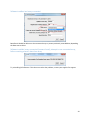
Startup Dialog
Figure 1. Startup dialog.
3