1
7 Operation
7.2
ÄKTAFPLC/ÄKTApurifier/ÄKTAbasic –
UNICORN 3.2 – 3.21
7.2.1
Using the buffer selection function in a run
The buffer valve instruction is designated BufferValveA. In the Run Data
pane, it is designated V5_BufferA for ÄKTAFPLC, and for ÄKTApurifier/
ÄKTAbasic it is V6_BuffA1. To use a valve in a method, proceed as follows:
22
1
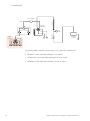
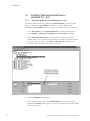
In the Main Menu, select File:New:Method to create a new method.
Select System:, Technique:, Template: and For column: Click OK.
2
Select View:Text instructions to display the text instruction editor.
Double-click on the instruction block where you want to add the general
function valve instruction, e.g. Start_Conditions_zz. Highlight the
instruction below to insert the valve instruction.
3
Click the Flowpath radio button.
4
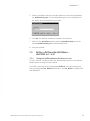
From the Instructions list, select BufferValveA. The valve instruction
parameter Position allows you to change all eight positions of the buffer
valves individually.
Buffer Selection Kit User Manual 71-5029-21 Edition AC