1
Testing the Internal GPS and other Circuitry
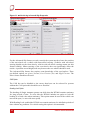
To check that all the internal circuits in the RT3000 are working correctly and that the
navigation computer has booted correctly, use the following procedure:
1.
Connect power to the system, connect the system to a laptop computer and run
the visual display software (ENGINUTIY.EXE).
2.
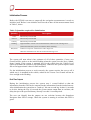
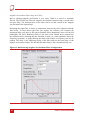
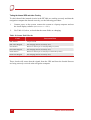
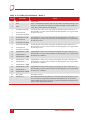
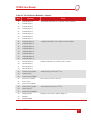
Use Table 19, below, to check that the status fields are changing.
Table 19. Status Field Checks
Field
Increment Rate
IMU Packets
100 per second
IMU Chars Skipped
Not changing (but not necessarily zero)
GPS Packets
Between 2 and 20 per second (depending on system)
GPS Chars Skipped
Not changing (but not necessarily zero)
GPS2 Packets
Between 2 and 20 per second (only for dual-GPS systems)
GPS2 Char Skipped
Not changing (but not necessarily zero)
These checks will ensure that the signals from the GPS and from the Inertial Sensors
are being correctly received at the navigation computer.
62
Oxford Technical Solutions