1
© Nexus Technology P/L, 2010
S:\Manuals\SAM\SAM_Instruction_Manual_01_141010.doc
Extensive self-test diagnostic routines that will allow the user to verify that the
SAM is operating as it should.
The ability to monitor any other cell to determine the threat in that cell. The
primary use of this function is to evaluate the best escape route in an
emergency.
3.2 Installer Mode
Installer mode is accessed from User Mode by pressing the selection knob 4 times
within 1 Second. The display will show the message “Exit Installer Y” if this process
has been performed correctly.
Rotate the control knob ccw and press it to enter Installer Mode.
In Installer and Configuration Modes, a 30 second inactivity timer is running and will
result in operation being returned to User Mode if there is no front panel control
actions within this time. Note that the SAM continues to receive and decode any
DAEW messages whilst in this mode.
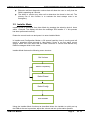
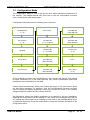
Installer Mode features the following menu structure:
Set Volume
Select Frequency
Select Preset
Select Config
Exit Installer
Using the Installer Mode functions as described allows the installer to quickly set up
the SAM at the user‟s premises; adjust the volume and set up the station presets.
SAM User Manual
Page 9
Of 15