1
DIGITAL PROXIMITY SYSTEM (DPS)
Datasheet
FEATURES AND BENEFITS
Digitally Configurable
Metrix pioneered the patented technology used in the DPS which provides numerous performance and user-convenience benefits.
Developed in 2005 for our vibration transmitters, the technology has proven itself in thousands of installations worldwide. You can
configure the device using the included software in three ways:
- METHOD #1 - By selecting from a discrete list of pre-configured calibration curves to standard 4140 target material and the
following combinations of probe types and cable lengths:
•
•
•
Metrix MX2030 probe system, 5m and 9m lengths
Metrix / BN4 7200 series 5 and 8mm probe systems, 5m and 9m lengths
BN4 3300 / 3300XL 5 and 8mm probe systems, 5m and 9m lengths
- METHOD #2 - By specifying one additional factory-loaded curve1 at time of ordering, from any of the available options for MX2033
drivers and MX2034 transmitters (refer to pages 7 and 8 respectively).
NOTE: This memory will be left empty if not specified at time of ordering. It can be used in the field as per method #3 below.
- METHOD #3 - Generate a custom curve in the field2 by recording the gap voltage at 10 mil increments and entering it into the
software. A custom linearization table is then generated and loaded into the device. This method is particularly convenient when
the shaft target material composition is not known.
These configuration options provide the user with maximum
flexibility and accuracy in adapting a single driver or transmitter
device to the following parameters:
• Target material (including unknown or indeterminate
materials)
• Probe series and tip diameters from various manufacturers
• Extension cable lengths
• Position, thrust, radial vibration or speed measurement3
• Full scale range3
• Upscale/downscale direction3
The driver or transmitter is configurable via a USB port, protected
under the baseplate of the device. The DPS configuration software
is available as a free download at metrixvibration.com.
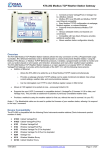
The DPS Configuration Software features a simple, intuitive user interface that
makes it easy to configure the signal conditioner in the field. Users can select
from a discrete list of factory pre-configured curves using drop-down boxes, or
generate a custom linearization curve in the field by entering gap voltages at
10mil increments.
Configured DPS units can easily be identified in the field using the DPS configuration software and our optional Metrix User Label Kit
P/N 100527 (see Accessories on page 11). The kit consists of specially shaped polycarbonate overlay labels and paper labels (Avery 6570).
The customized details are printed on an Avery 6570 label, and this is affixed under a clear rectangular window in the polycarbonate
overlay label, providing a weatherproof seal. Target material, probe type and series, system length, and output sensitivity can be recorded.
We provide user-configurable fields where you can record installation- and device-specific details such as date of last calibration,
instrument loop tag numbers, probe location (machine / bearing / angular orientation), and any other details useful to machinery and
instrumentation personnel.
NOTES:
1. One additional calibration curve can be stored in the device beyond the factory standard curves of method #1. This curve can be supplied by the factory per method #2,
or can be generated by the user in the field per method #3.
2. Custom curves assume standard supported probe types (MX2033/MX2034 option BB) and system lengths (MX2033/MX2034 option CC), and that mismatched systems
will not be used, such a 7200 cable with an MX2030 probe. Certain material types may limit total available linear range and other specifications. These can be quantified
when a material sample is provided to the factory.
3. These settings are applicable to MX2034 transmitters only.
4. Registered trademark(s) of Bently Nevada®.
5. Registered trademark(s) of Metrix®.
www.metrixvibration.com • [email protected] • 281.940.1802
Doc# 1087015 • REV P (October 2015) • Page 2 of 11