1
22
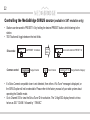
Controlling the MediaBridge SIRIUS source (available in SAT emulation only)
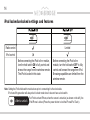
• Stations can be saved to PRESET 1-6 by holding the desired PRESET button, while listening to the
station.
• TEXT button will toggle between the text fields.
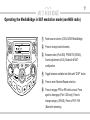
Sirius mode:
PRESET 1-6
Common control:
recall PRESET 1-6 stations
TUNE TRACK
Change Channel
to store
station
SCAN
PRESET 1-6
Scan Channel
store current station to PRESET 1-6
FOLDER/CAT/TYPE
Change Satellite Category
• If a Sirius Connect compatible tuner is not detected, then either a “No Tuner” message is displayed, or
the SIRIUS option will not be selectable. Please refer to the factory manual of your radio system about
operating the Satellite mode.
• Go to Channel 000 to view the Sirius Tuner ID for activation. The 12 digit SID display format is in two
halves as SID “123456-” followed by “-789ABC”.