1
TABLE OF CONTENTS
TABLE OF CONTENTS .......................................................................................................................... 2
IMPORTANT NOTICE............................................................................................................................. 4
GENERAL ............................................................................................................................................... 5
1. TIMEBOX APPLICATION .................................................................................................................. 5
1.1
1.2
2.
Philosophy of the System .................................................................................................................. 5
About ................................................................................................................................................. 5
PRESENTATION OF THE TIMEBOX TERMINALS .................................................................................. 7
2.1
2.2
2.3
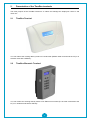
TimeBox Terminal.............................................................................................................................. 7
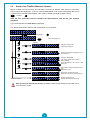
TimeBox Biometric Terminal .............................................................................................................. 7
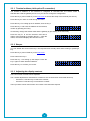
Setup of the TimeBox Biometric terminal........................................................................................... 8
3. OVERALL OPERATION ................................................................................................................... 11
DESCRIPTION OF THE SCREENS ..................................................................................................... 12
1. ACCESS TO THE SOFTWARE .......................................................................................................... 12
1.1
1.2
1.3
1.4
1.5
2.
Accessing the software .................................................................................................................... 13
Customising the password to access the software .......................................................................... 14
Accessing the aid manual ................................................................................................................ 15
Understanding the various entry points ........................................................................................... 16
Understanding and using the filtering of employees ........................................................................ 18
CLOSING THE SOFTWARE ............................................................................................................. 19
2.1
2.2
2.3
3.
Exit the software .............................................................................................................................. 20
Save the data................................................................................................................................... 20
Transfer data from the terminal........................................................................................................ 21
CLOCKING ANOMALY .................................................................................................................... 22
3.1
3.2
3.3
4.
Understand the screen of anomalies ............................................................................................... 23
Access clocking anomalies and correct them .................................................................................. 24
Generating a report of anomalies .................................................................................................... 25
CLOCKINGS AND TOTALS .............................................................................................................. 26
4.1
4.2
4.3
4.4
4.5
4.6
4.7
5.
6.
Understanding the screen of clockings and totals............................................................................ 27
Accessing the clockings and totals of an employee ......................................................................... 29
Accessing the monthly clockings and totals of an employee ........................................................... 30
Modifying, entering or deleting a clocking time manually ................................................................. 31
Setting up the time display in the software ...................................................................................... 32
Modifying totals by Add/Deduct and Adding comments ................................................................... 33
Generating the reports related to attendance and totals .................................................................. 34
CLOCKING RESULTS ..................................................................................................................... 35
GLOBAL ADMINISTRATION OF CLOCKINGS AND TOTALS ................................................................... 37
6.1
6.2
6.3
6.4
6.5
7.
Understanding the screen of the global administration of clockings and totals ................................ 38
Accessing clockings and totals of several employees ..................................................................... 40
Modifying or deleting manually the clocking times of one or more employees ................................ 41
Modifying the totals by Add/Deduct and inserting a comment for one or more employees.............. 42
Generating the reports related to attendance and totals .................................................................. 43
REPORTS .................................................................................................................................... 44
7.1
7.2
7.3
7.4
8.
Understanding the screen for selecting the reports ......................................................................... 45
Setting up a report for one or more employees................................................................................ 46
Understanding the viewing screen of a report ................................................................................. 51
Generate a report ............................................................................................................................ 52
CREATING AND SETTING UP EMPLOYEES........................................................................................ 54
8.1
8.2
8.3
9.
Understanding the screen of managing employees' file................................................................... 55
Creating a new employee’s file ........................................................................................................ 56
Modifying/deleting the parameters of an employee already created ................................................ 57
CREATE AND MANAGE SCHEDULES ................................................................................................ 58
9.1
9.2
9.3
9.4
9.5
10.
10.1
10.2
11.
11.1
11.2
12.
12.1
12.2
12.3
12.4
Understanding the screen for setting up the schedules ................................................................... 59
Understanding the operation of the various windows ...................................................................... 60
Creating, duplicating, modifying or deleting a daily schedule .......................................................... 62
Using the creation wizard of a daily schedule .................................................................................. 64
Create, modify or delete a weekly schedule .................................................................................... 65
SET UP THE BELL RINGING ........................................................................................................ 66
Understand the screen for setting up the bell ringing....................................................................... 67
Select the bell ringing of the TimeBox Biometric terminal ................................................................ 68
SETTING UP THE BELL RINGING CALENDAR ................................................................................. 69
Understanding the screen for setting up the calendar ..................................................................... 70
Setting up a lockout window ............................................................................................................ 71
GLOBAL CONFIGURATION.......................................................................................................... 72
Understanding the software setup screen ....................................................................................... 73
Understanding and setting up the results locking date .................................................................... 74
Understanding the concept of maximum range of the day............................................................... 75
Defining the roundings on clockings ................................................................................................ 77
2